22 Best Blogging Tools for Growth
Written by
Ernest Bogore
CEO
Reviewed by
Ibrahim Litinine
Content Marketing Expert

We’ve noticed a pattern among teams that publish consistently: growth stalls not because of a lack of ideas, but because each stage of blogging depends on tools that don’t work well together. You plan in one place, write in another, optimize somewhere else, and promote across five different dashboards. The system drags even when the content is good.
Here’s how that friction shows up day to day:
Drafts move slowly because feedback and formatting live in scattered documents.
You choose topics without knowing which ones your blog can actually win.
Promotion becomes inconsistent because posts aren’t repurposed or scheduled in time.
To cut through that, we evaluated dozens of tools across research, writing, SEO, visuals, CMS workflows, promotion, and audience growth. We looked past shiny features and focused on what actually drives outcomes: faster publishing cycles, better search performance, clearer collaboration, stronger visuals, and consistent distribution.
Table of Contents
TL;DR
| Tool | Category | Core Strength | How to Use It to Grow Your Blog |
|---|---|---|---|
| AnswerThePublic | Ideation & topic research | Turns seed keywords into real questions | Find question-style topics and FAQs your readers actually search for |
| Notion | Content planning & operations | Central hub for ideas; briefs; and workflows | Organize your content system; track status; and manage every post in one place |
| LowFruits | Keyword research | Finds weak SERPs & easy-to-rank long tails | Target keywords your site can rank for quickly to generate steady organic wins |
| Ahrefs | Deep SEO research | Backlinks; keywords; content gaps | Choose topics with proven demand and detect opportunities competitors miss |
| Semrush | SEO & marketing suite | Multi-channel SEO + competitive data | Run full SEO workflows; analyze competitors; and plan high-value content |
| Google Search Console | Search performance | First-party query & indexing data | Improve posts using real keywords you already rank for and fix indexing issues |
| Google Docs | Drafting & collaboration | Shared cloud-based writing space | Draft; edit; and review posts with your team in one live document |
| Jasper | AI content creation | Branded; scalable AI writing | Produce high-volume content while keeping tone consistent |
| ChatGPT | Flexible AI assistant | Ideas; drafts; rewrites; explanations | Brainstorm; outline; draft; and refine posts quickly across many formats |
| Claude | Long-context AI writing | Handles huge documents safely & coherently | Summarize research; reorganize long drafts; and generate clean structured content |
| Grammarly | Editing & clarity | Real-time grammar & tone improvements | Clean up drafts; ensure clarity; and keep your writing consistent everywhere |
| Canva | Visual creation | Easy templates & AI design tools | Create blog graphics; headers; and social assets fast — no designer needed |
| Unsplash | Free stock images | Free; high-quality photography | Add strong visuals to posts to boost engagement without increasing costs |
| Freepik | Visual assets & AI tools | Huge stock library + templates | Create polished; branded visuals and illustrations for your posts and social media |
| Surfer SEO | On-page optimization | Real-time SERP-based content scoring | Optimize drafts using data from top-ranking pages to improve chances of ranking |
| Yoast SEO | WordPress SEO | In-editor guidance + technical automation | Improve metadata; readability; and indexing without leaving the WordPress editor |
| Rank Math | Advanced WordPress SEO | Multi-keyword; schema; analytics | Manage SEO; redirects; schemas; and tracking inside WordPress |
| WordPress.org | CMS | Full control; customization; SEO flexibility | Build a scalable; SEO-first blog with any structure; theme; or plugin stack |
| Ghost | CMS + newsletters | Speed + built-in audience monetization | Publish fast; send newsletters; and grow paid memberships from one platform |
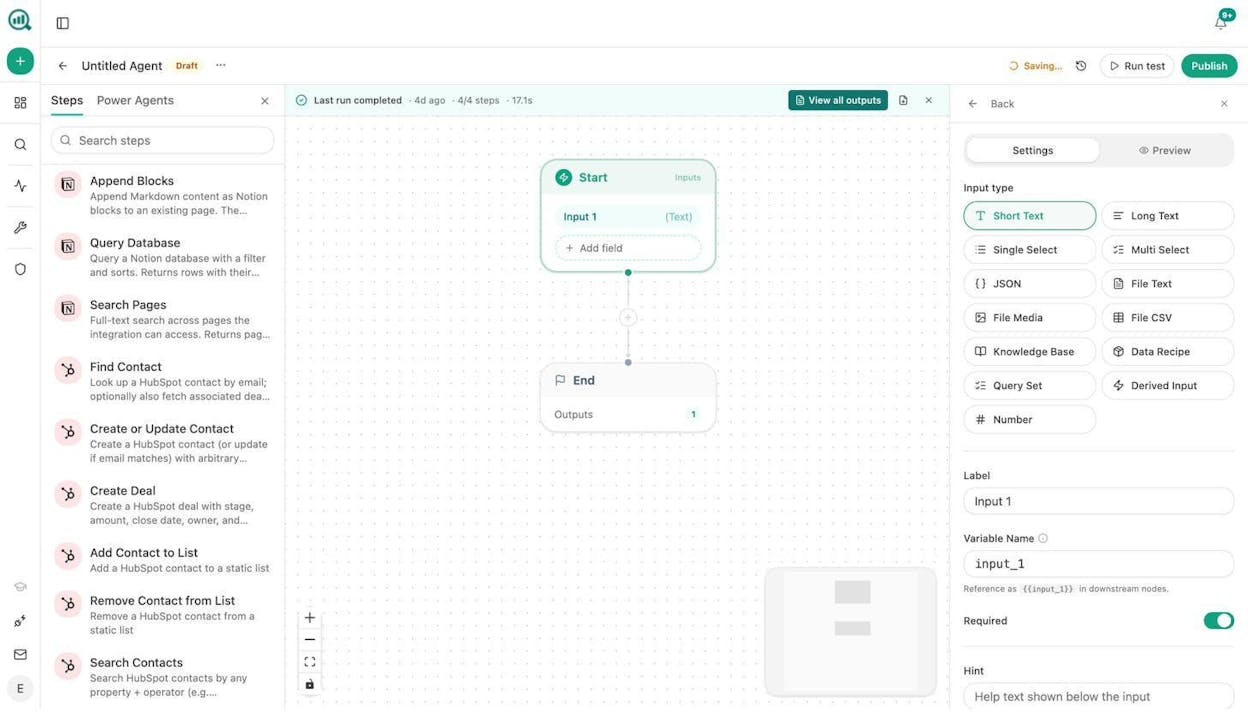
| HubSpot CMS | CMS + CRM | Content connected to CRM & automation | Turn blog traffic into qualified leads with built-in SEO and nurturing tools |
| Buffer | Social promotion | Simple multi-channel scheduling | Keep your blog visible by repurposing and scheduling posts across platforms |
| Kit (ConvertKit) | Email growth | Creator-focused automations & commerce | Capture subscribers; nurture them automatically; and sell digital products |
| Analyze AI | AI search visibility | Maps AI mentions → traffic → conversions | See which LLMs send real traffic and optimize pages that actually generate revenue |
Tools that help you plan and validate your blog ideas
AnswerThePublic: best blogging tool for turning searches into blog ideas

When your keyword tools feel dry, you need help hearing real people.
This is where AnswerThePublic starts to shine, because it shows how people phrase questions, fears, and comparisons in search.
It turns vague topics into clear angles that match how readers actually talk.
Key AnswerThePublic standout features
Shows “question clouds” that group what, why, how, and other question types
Maps preposition searches like “for beginners” or “with examples” into neat clusters
Highlights comparison phrases such as “tool A vs tool B” that make strong posts
Lets you export every idea into CSV files for planning and briefing work
Tracks new questions over time so you can spot fresh topics early
AnswerThePublic helps bloggers move past flat seed keywords and see the real questions behind them. It pulls ideas using the same suggestions people see on Google and other search sites, so your topics match real search behavior. The visual wheels make it easy to spot themes for guides, FAQs, and comparison posts without digging through dense tables. This tool works best when you want to design series like “how to” hubs, FAQ clusters, or support style content that answers one clear search question per post.

That power comes with some limits that matter once you scale. AnswerThePublic does not show deep SEO numbers like search volume or difficulty, so you still need a classic SEO tool to judge demand and competition. The free version only allows a few searches each day, which slows heavy planning cycles or team workflows. Since the data leans on suggestion streams, some lists feel noisy or thin, which means you must prune ideas and pair them with stronger metrics from tools like Ahrefs or Semrush.
| How AnswerThePublic helps blogging growth | Why it matters for your blog |
|---|---|
| Turns one seed keyword into hundreds of real questions | You can fill your content calendar with posts that match reader searches |
| Groups ideas by question and comparison type | You can design clear clusters and internal links around search intent |
| Reveals long-tail phrases that big tools skip | You can win easier rankings with focused; low-competition topics |
| Exports ideas into sheets for briefs and planning | Your team can move from research to outlines without extra copying |
| Tracks new questions as they appear | You can update old posts and ship fresh posts before rivals react |
Takeaway
Notion: best blogging tool for planning and running your content system

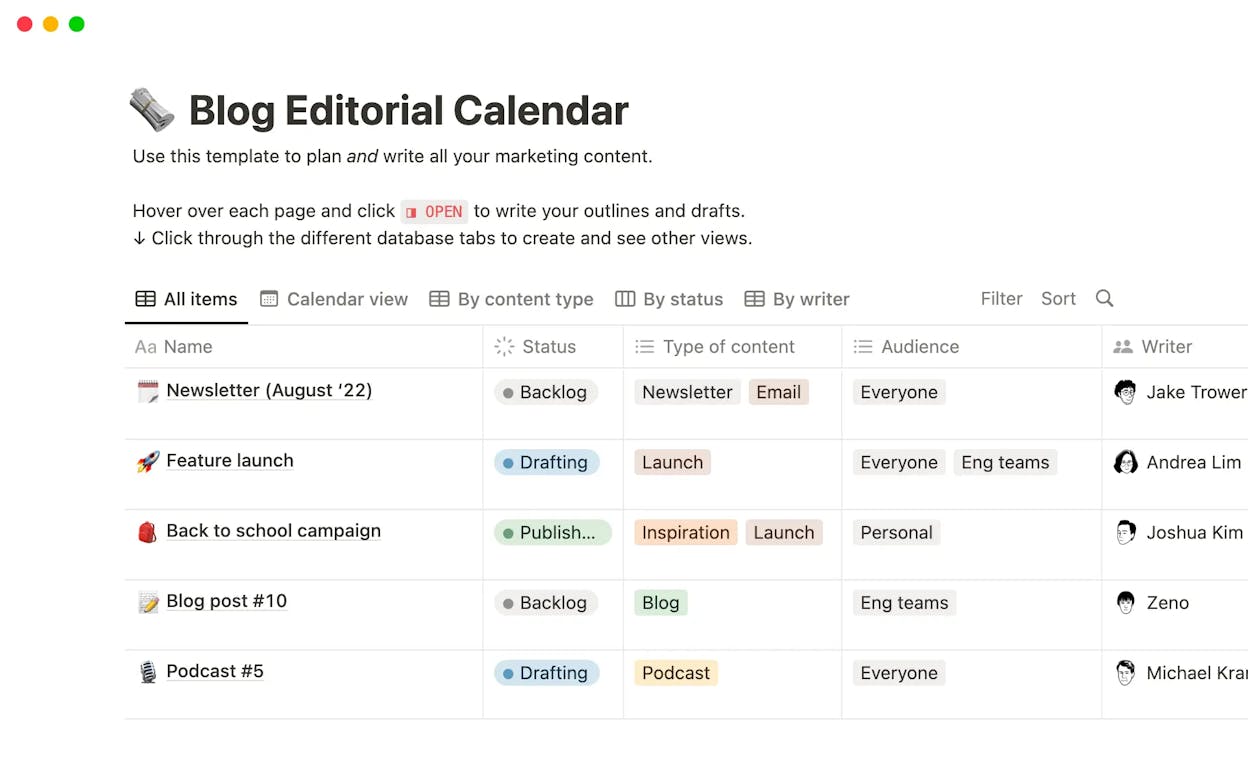
When your blog grows past a few posts, you need a place that can hold ideas, track status, and keep your whole workflow clean. Notion gives you that space by turning messy planning into one simple system that your team can see and update in real time. It blends notes, tasks, databases, and calendars, so you plan, brief, and track every post without jumping across tools.
Key Notion standout features
Custom databases that track topics, stages, deadlines, and owners
Calendar and kanban views that reveal progress and bottlenecks at a glance
Real-time collaboration for briefs, outlines, comments, and updates
AI features for brainstorming ideas, writing summaries, and shaping outlines
Templates for content calendars, pipelines, and repeatable workflows
Notion stands out because it lets bloggers build a planning system that fits how they work rather than forcing them into fixed templates. You can design a full content pipeline with idea capture, brief creation, SEO notes, draft links, and publish dates in one place. The mix of views helps you spot delays early, and the AI tools speed up early ideation or outline steps. This is helpful when you manage many posts at once and need clarity on what moves next.

This freedom comes with a cost because the setup can feel slow when you start from scratch. The tool takes time to learn, and simple workflows can feel heavy when all you need is a basic checklist. Notion also works best online, and exporting or printing pages still feels limited, so you need a steady connection for smooth use.
| How Notion helps blogging growth | Why it matters for your blog |
|---|---|
| Builds one place for ideas; briefs; and drafts | You stop losing work across notes; docs; and emails |
| Shows clear timelines and status in boards or calendars | You publish on time and avoid stalled posts |
| Links outlines; research; SEO notes; and assets together | Your posts stay organized from start to finish |
| Helps teams comment; plan; and update in real time | You reduce back-and-forth and save editing time |
| Supports templates for repeat tasks and workflows | You move faster by reusing proven processes |
Takeaway
LowFruits: best blogging tool for finding easy keywords you can rank for

When your blog needs steady traffic without long waits, you need keywords that match your site’s strength. LowFruits helps you spot these gaps by showing search terms where small sites already rank, which means you have a real chance to win. It scans autocomplete sources, “People Also Ask,” and wildcard searches, then checks the SERP to find weak spots you can target with focused posts.
Key LowFruits standout features
Finds long-tail keywords from Google Autocomplete and PAA
Flags weak SERPs where low-authority sites already rank
Clusters keywords into groups you can turn into topic hubs
Supports bulk analysis for faster research sessions
Lets you scrape competitor keywords to reveal hidden angles
LowFruits works well because it puts ranking odds at the center of your research. Instead of giving you large lists with no context, it highlights where small sites break into page one, which tells you the search is open for new players. The clusters make it easier to build groups of posts, and the weak-spot markers help you choose ideas that fit the size of your site. This helps you create content that moves faster and avoids topics where you would struggle to rank.

Those strengths come with limits that matter for long-term planning. The tool does not match big SEO platforms for deep data or broad keyword coverage, so you may miss wider trends or rich metrics like link counts. Many of the long-tail ideas show low search volume, which means you must publish more posts before traffic grows. The credit system also adds cost when you run large batches or scrape many competitors, so you must plan your searches with care.
| How LowFruits helps blogging growth | Why it matters for your blog |
|---|---|
| Finds low-competition keywords fast | You create posts that rank sooner and bring quicker wins |
| Reveals weak spots in the SERP | You pick ideas where your site has a real chance |
| Clusters related keywords | You build topic hubs that boost internal linking |
| Shows long-tail queries big tools skip | You uncover ideas your rivals miss |
| Bulk analysis speeds up research | You plan calendars without slow manual work |
Takeaway
Tools that help you research what readers actually search for
Ahrefs: best blogging tool for deep SEO research and finding content gaps

Strong blogs grow on clear insight, not guesswork, and Ahrefs gives you the data needed to see what truly drives search results. The platform brings together keyword research, backlink intelligence, site audits, and competitive analysis, so you understand both your strengths and the opportunities your rivals leave open. Every module works toward one goal: helping you make content decisions based on evidence rather than hope.
Key Ahrefs standout features
Site Explorer that uncovers backlinks, anchors, and top-performing pages
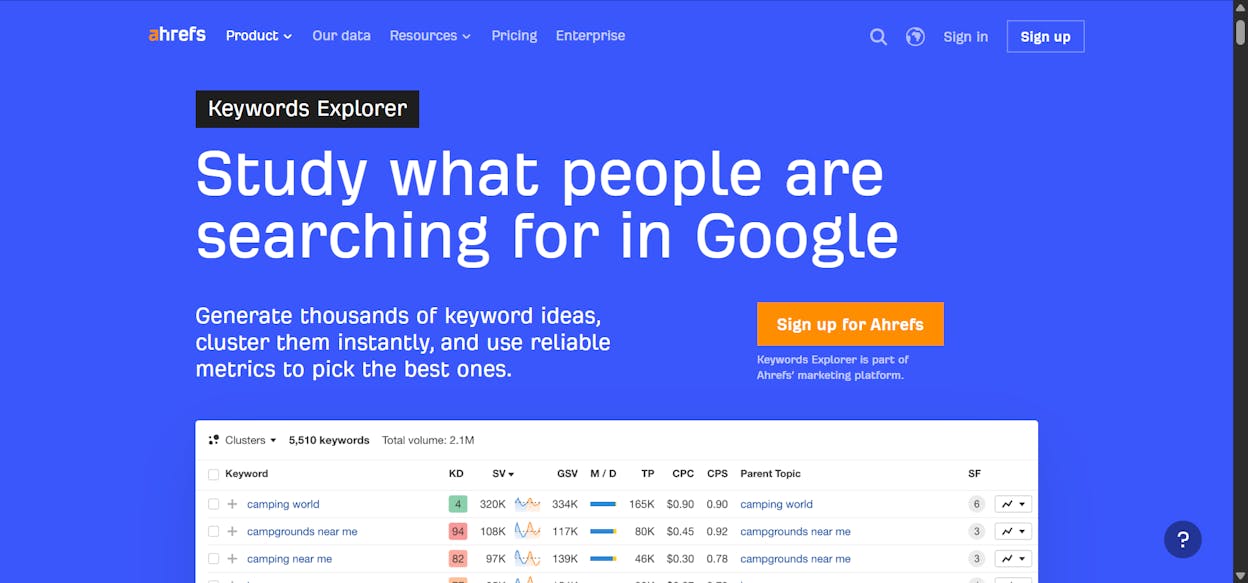
Keywords Explorer with billions of ideas across major search engines
Content Explorer for finding high-engagement articles and trending topics
Rank Tracker to monitor positions and movement in the SERP
Site Audit for identifying technical issues that limit visibility
Ahrefs stands out because it exposes the mechanics behind ranking pages. You can see which keywords send traffic to competitors, how strong their backlinks are, and which topics they cover that you have not touched yet. The platform highlights profitable gaps and surfaces patterns that shape long-term content planning. This gives your blog a clear path for growth, backed by real numbers rather than hunches.

There are limits to consider, especially for smaller teams. Pricing sits on the higher end of the market, which can make it difficult for solo bloggers to justify. The depth of features can feel heavy when you only need simple keyword checks, and navigating advanced dashboards adds time to the learning curve. These issues do not reduce the tool’s power, but they make it better suited for bloggers who want full control over their SEO strategy.
| How Ahrefs helps blogging growth | Why it matters for your blog |
|---|---|
| Reveals competitor keywords and gaps | You choose topics with clear ranking potential |
| Shows backlink strength and weak spots | You understand what helps pages rise or fall |
| Tracks ranking changes over time | You know which posts need updates or fresh links |
| Uncovers high-performing content ideas | You create posts backed by proven demand |
| Audits your site’s technical health | You fix issues before they limit organic traffic |
Takeaway
Semrush: best blogging tool for running full-scale SEO and content research

A strong blog needs more than keyword ideas, and Semrush brings together every part of search and content analysis in one place. It blends keyword tools, competitor insights, technical audits, PPC data, and social analytics so you can see how your content performs across channels. The platform gives you a wide view of your market and helps you find the topics, keywords, and gaps that can lift your organic growth.
Key Semrush standout features
Keyword research across many databases with filters for intent and difficulty
Deep competitor analysis that shows their ranking pages and traffic sources
Rank tracking with daily updates and long-term visibility trends
Site Audit that checks technical issues, broken links, and SEO errors
PPC and social tools that reveal ad data, posts, and cross-channel behavior
Semrush stands out because it gives you a multi-angle view of your content landscape. You can see where competitors win traffic, which keywords bring the most value, and where your blog can break through. The platform highlights gaps your rivals leave open, and this helps you choose topics with strong search demand. Its rank tracker and audit tools keep your blog healthy and show how each update changes performance. With all these data sources in one place, planning becomes faster and more informed.

The wide feature set, however, introduces some hurdles. Semrush sits on the expensive end of SEO tools, which makes it less accessible for freelancers or small blogs. Many users also note that the interface can feel intense when you only need simple keyword checks, because the dashboards offer so many metrics at once. This depth is useful over time, but beginners can feel lost during the first setup and early workflows.
| How Semrush helps blogging growth | Why it matters for your blog |
|---|---|
| Reveals competitor keywords and traffic sources | You find openings your rivals do not cover |
| Tracks ranking trends across many keywords | You see which posts rise and which need fixes |
| Analyzes technical issues through its Site Audit | You improve health and prevent ranking drops |
| Suggests high-value keywords with intent filters | You choose topics that match reader goals |
| Supports SEO; PPC; and social insights in one tool | You understand your full content footprint |
Google Search Console: best blogging tool for seeing how your posts perform in Google search
Takeaway
Google Search Console: best blogging tool for seeing how your posts perform in Google search

Strong content needs feedback, and Google Search Console gives you a direct look at how Google reads, ranks, and serves your pages. It shows which queries lead people to your posts, how often your site appears in results, and where technical issues slow down visibility. With tools for indexing, URL checks, and sitemap submission, it becomes the core system for understanding what happens after you publish.
Key Google Search Console standout features
Performance reports that track impressions, clicks, CTR, and average position
Coverage and indexing reports that highlight crawl errors and blocked pages
Mobile usability checks that show issues on small screens
URL Inspection to confirm indexing status and request re-crawls
Sitemap submission to help Google discover content faster
Google Search Console stands out because it shows real data taken from Google’s own search index. This makes it the most trustworthy source for understanding which queries trigger your posts and how often users choose your content. The reports reveal early ranking signals, slow-moving pages, and posts that need updates. When you use these insights to refine titles, fix indexing issues, or improve internal links, your blog gains traction faster and with more confidence.

The limits appear when you try to dig deeper into strategy. GSC does not show competitor data or advanced keyword models, so you must pair it with other tools for larger research work. The interface takes practice because each report uses terms that new users may not grasp at first. Some query data is also sampled, which means long-tail searches do not always display, and metrics can lag behind real activity. These gaps do not hurt its core purpose, but they shape how you use it in a wider SEO stack.
| How Google Search Console helps blogging growth | Why it matters for your blog |
|---|---|
| Shows real search queries and click data | You learn what people typed before finding your post |
| Highlights coverage and indexing issues | You fix errors that block Google from crawling pages |
| Tracks search position changes over time | You spot posts losing ground and update them early |
| Confirms whether URLs are indexed | You avoid guessing why pages do not appear in results |
| Offers data straight from Google | You trust the numbers more than third-party estimates |
Takeaway
Tools that help you draft, edit, write faster and improve content quality
Google Docs: best blogging tool for drafting and collaborative editing

A smooth writing workflow depends on a place where ideas can grow, get reviewed, and move toward publication without friction. Google Docs provides that space by letting writers, editors, and collaborators work inside one shared document with instant updates. It runs in the cloud, connects with the full Google Workspace ecosystem, and saves every change as it happens, which makes it a dependable home for early drafts and editorial review.
Key Google Docs standout features
Cloud-based writing environment that works in any browser or mobile app
Real-time co-editing with color-coded cursors and live updates
Integrations with Google Drive, Sheets, Slides, Gmail, Keep, and Workspace add-ons
Comments, suggestions, and a full version history for clear review cycles
Basic formatting tools and templates for quick setup of common document types
Google Docs stands out because it makes collaboration simple. Editors can leave comments without touching the main text, suggestions capture revisions cleanly, and version history keeps every step available for review. Its auto-save and cloud storage keep drafts safe, while device-agnostic access lets teams work across time zones with little setup. For bloggers who depend on feedback loops or frequent revisions, these features create a clean and predictable workflow that moves content forward without document chaos.

The limitations appear when you push beyond drafting. Offline mode works, but it is not always stable, and large documents with many comments or images can slow down. Formatting options remain basic, making it harder to handle design-heavy documents or advanced layout needs. The built-in grammar tools offer only light checks, so most writers pair Docs with external editing apps. Heavy add-ons or long revision histories can impact performance, especially on older devices, and Drive storage limits may restrict large content libraries.
| How Google Docs helps blogging growth | Why it matters for your blog |
|---|---|
| Gives writers and editors one shared space | You avoid version conflicts and reduce review time |
| Tracks every change through suggestions and history | You keep drafts organized and protect past work |
| Auto-saves to the cloud instantly | You write without fearing lost progress |
| Works on any device with a browser | You draft and review from anywhere |
| Supports comments and @mentions | You streamline feedback and speed up approvals |
Takeaway
Jasper: best blogging tool for fast content creation and brand-consistent automation

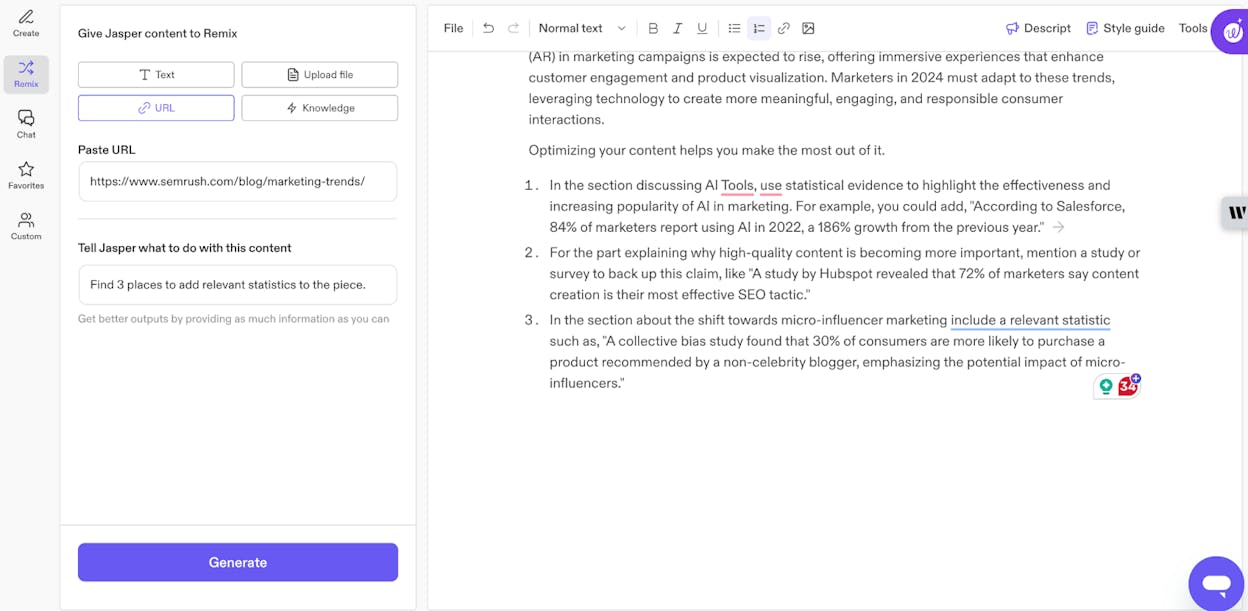
Strong marketing teams need speed, scale, and consistency, and Jasper focuses on giving them all three. It works as an AI content hub built for marketers rather than a simple writing bot. The platform creates long-form posts, ad copy, emails, and social content while keeping tone and style aligned with a brand’s voice. It also includes workflow tools that help teams run larger content systems without juggling multiple apps.
Key Jasper standout features
Brand-voice controls that shape tone, style, and audience through presets and “Brand IQ”
Templates and workflows for blogs, ads, emails, and multi-step content tasks
Automation tools like Jasper Grid, Studio, and Canvas for building repeatable pipelines
Multi-channel support for SEO posts, social captions, product copy, scripts, and more
Integrations that connect Jasper to marketing stacks and help teams scale production
Jasper stands out because it’s built around the needs of teams that publish often. Brand IQ keeps tone steady across posts and channels, while workflows and pipeline tools help move drafts through editing and reuse. These features support campaigns where writers must create many assets quickly without losing voice or quality. Jasper also handles repurposing well, which helps teams turn one idea into blogs, ads, emails, and social posts at speed.

Some limits appear once you push it into more complex or specialized topics. Jasper can repeat ideas, miss nuance, or create content that needs strong editorial review. The platform’s cost also becomes harder to justify for small blogs or low-volume users. Many teams still rely on manual editing and fact-checking because AI outputs can be incorrect or overly broad, which adds time back into the process if the content requires depth or precision.
| How Jasper helps blogging growth | Why it matters for your blog |
|---|---|
| Creates drafts and outlines quickly | You publish more without slowing your team |
| Keeps tone steady with brand-voice tools | You maintain consistent messaging across posts |
| Automates content workflows | You reduce manual steps and save production time |
| Supports many formats and channels | You reuse ideas across the entire marketing funnel |
| Integrates with broader marketing stacks | You build a smoother end-to-end content system |
Takeaway
ChatGPT: best blogging tool for fast ideas, clear drafts, and flexible content support

A reliable creative partner helps you move from blank page to polished draft without slowing down your workflow, and ChatGPT fills that role with conversational speed and range. It responds to prompts, interprets intent, and generates text in many styles, which makes it useful for planning, outlining, writing, rewriting, and exploring ideas. Because it works across text, images, audio, and code, it adapts to many stages of a blogging workflow, from research support to final draft refinement.
Key ChatGPT standout features
Natural language conversations that follow context across many topics
Strong text generation for blogs, scripts, stories, copy, and summaries
Multimodal support in newer models, interpreting images, audio, and other formats
Coding and analysis tools for debugging, data help, and structured tasks
Personalization through memory for users who want ongoing context and continuity
ChatGPT stands out because it accelerates the creative process without forcing you into strict templates. You can use it to brainstorm topics, polish ideas, generate outlines, draft paragraphs, fix grammar, or rewrite sections in a different tone. Its range across domains makes it useful outside writing as well, whether you need quick research explanations, coding help, or structured problem solving. This flexibility turns it into a dependable assistant that fits into many parts of a blogger’s workflow, from idea discovery to ready-to-publish content.

These strengths come with important limits. ChatGPT can produce confident but inaccurate responses, especially in technical or niche topics, so careful human review remains essential. It relies on patterns rather than deep understanding, which can lead to generic phrasing or misinterpretations. Bias in training data can affect outputs, and dependence on the tool may reduce critical evaluation during drafting. Models also lack real-time awareness unless connected to external systems, so they cannot access live events or current data without plugins or browsing tools.
| How ChatGPT helps blogging growth | Why it matters for your blog |
|---|---|
| Generates ideas and drafts quickly | You reduce time spent on early writing steps |
| Supports rewriting and polishing | You improve clarity and tone with less effort |
| Works across many formats | You create posts emails scripts and captions in one place |
| Handles research summaries and explanations | You understand topics faster and plan better |
| Adapts to your voice through memory | You maintain consistency across published content |
Takeaway
Claude: best blogging tool for thoughtful writing, safer outputs, and long-context analysis

Writers who work with complex drafts or large research files often need an AI partner that stays consistent, careful, and steady across long conversations. Claude fits that role with a design philosophy centered on safety and clarity. Built by Anthropic, it blends natural conversation, long-context reasoning, and ethical guardrails to help with drafting, summarizing, coding, and structured analysis. Its approach makes it a dependable assistant for bloggers who value precision and lower-risk outputs.
Key Claude standout features
Human-like conversation that supports drafting, rewriting, analysis, and coding
Constitutional AI design that guides safer and more aligned outputs
Multi-modal capabilities depending on the model version
Long-context processing for reading large documents, long chats, or multi-file research
Coding and workflow tools such as Claude Code for debugging and refactoring
Claude stands out because it handles long or complex inputs with more stability than many models in its class. Its extended context windows help you work with full drafts, multiple sources, or deep research without breaking your train of thought. The safety focus also keeps responses measured and respectful, which supports tasks where tone and reliability matter. Claude is often chosen by writers who want structured outlines, careful summaries, or a partner that avoids risky interpretations when working through sensitive material.

The model’s cautious nature limits some creative tasks, especially when you expect imaginative or experimental writing. Its safety alignment may block harmless prompts, and some versions rely on older training data that can miss recent information. Pricing and availability can vary by region, and Claude’s performance may fall behind top-tier models in certain advanced reasoning benchmarks. These gaps do not reduce its strengths for long-form or analytical work, but they shape which workflows benefit most from it.
| How Claude helps blogging growth | Why it matters for your blog |
|---|---|
| Processes long drafts and documents at once | You organize research without splitting files |
| Produces steady low-risk responses | You reduce tone issues and factual drift |
| Handles summaries and structured outlines well | You speed up early and mid-stage planning |
| Supports coding and workflow tools | You streamline technical tasks for your site |
| Maintains safer and more aligned outputs | You avoid problematic phrasing during drafting |
Takeaway
Grammarly: best blogging tool for clean, clear writing and cross-platform editing support

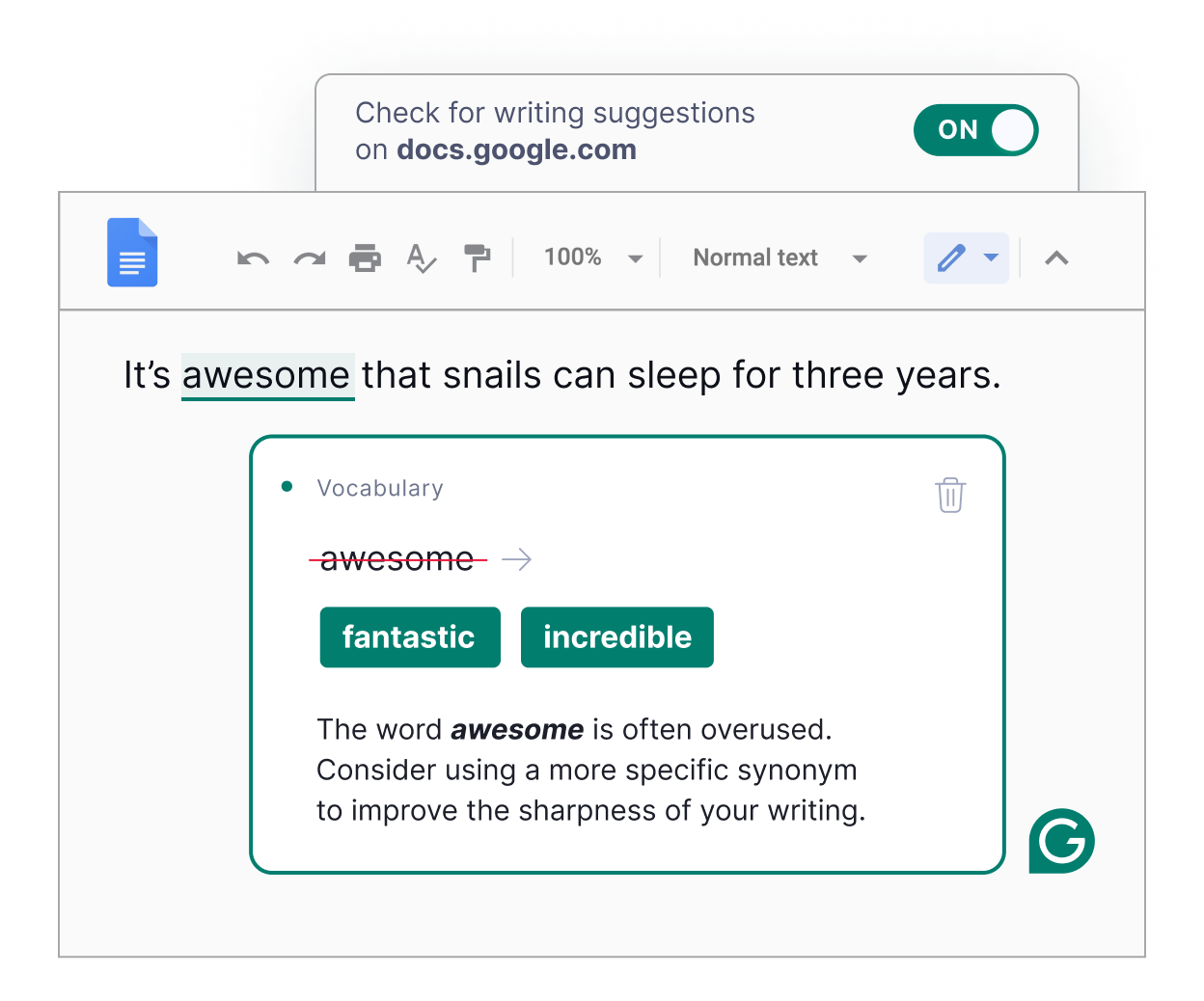
Clarity plays a major role in how readers experience a blog post, and Grammarly helps elevate that clarity by providing real-time suggestions for grammar, tone, and structure across nearly every writing surface. The tool works inside browsers, documents, messaging apps, and email clients, ensuring your drafts stay consistent and polished wherever you write. With Grammarly’s evolution into the broader Superhuman ecosystem, its writing assistance now blends with productivity features that automate routine tasks and provide deeper context across apps.
Key Grammarly standout features
Real-time grammar, spelling, and punctuation correction across apps
Tone and style detection with suggestions ranging from formal to casual
Rewrite tools for sentences and paragraphs, including summarization and generative prompts
Plagiarism detection and citation help for premium users
Integrated AI agents in Superhuman Go that draft replies, summarize threads, and automate tasks
Grammarly stands out because it reduces friction in the editing process. Writers receive immediate clarity improvements, tone adjustments, and surface-level fixes without needing to run separate checks. The rewriting tools help rework confusing sentences, adapt voice for different audiences, or tighten long paragraphs. Its cross-platform presence means you can refine drafts directly in Google Docs, WordPress editors, email threads, or social posts without shifting platforms. With Superhuman Go, the system expands beyond writing, supporting productivity tasks that keep your workflow moving.

The tool’s strengths come with limits that matter for bloggers who value distinct voice. Some suggestions can flatten style or remove personality, and blindly accepting them may result in generic writing. Premium plans add cost, especially when you expand into the broader Superhuman suite, and some users report the interface can feel intrusive during focused writing. Despite its advanced AI, it cannot fully replace human judgment for structure, nuance, or creativity, so manual review remains essential for final drafts.
| How Grammarly helps blogging growth | Why it matters for your blog |
|---|---|
| Provides real-time clarity and correctness fixes | You reduce editing time and improve readability |
| Works across browsers; docs; and email clients | You polish writing wherever you draft content |
| Offers tone and style adjustments | You keep voice consistent across posts |
| Supports rewrites and generative prompts | You overcome sticking points and refine drafts faster |
| Adds productivity tools through Superhuman Go | You streamline tasks beyond writing itself |
Takeaway
Tools that help you design or find out images faster and make blog posts visually appealing
Canva: best blogging tool for fast, polished visuals and brand-consistent graphics

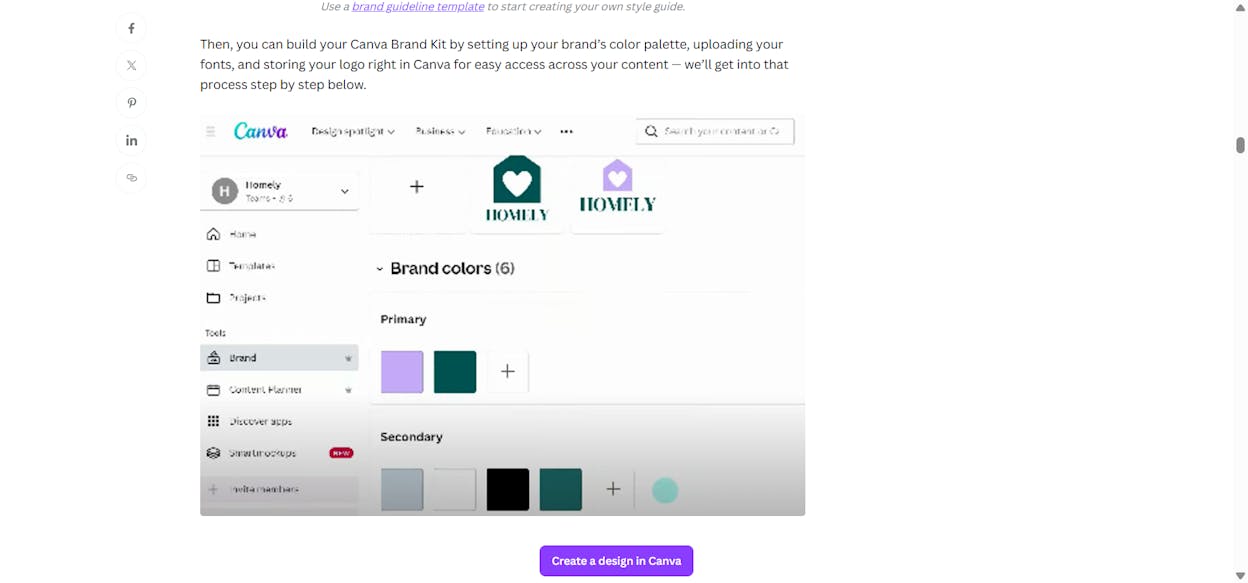
Strong blog posts often need visuals that explain, attract, or reinforce a message, and Canva makes that possible without professional design training. The platform combines a drag-and-drop editor, a large template library, and AI-powered tools that help you generate images, layouts, and branded assets in minutes. Its web-based workspace and collaboration features also make it easy for teams to review, adjust, and publish graphics together.
Key Canva standout features
Large template library covering blog headers, infographics, thumbnails, and social graphics
AI tools like Magic Design and Magic Write to speed up ideas and layout generation
Brand Kits for storing colors, logos, and fonts across all designs
Cloud-based collaboration with shared folders, comments, and team assets
Expanded Visual Suite that supports wider workflows beyond simple graphics
Canva stands out because it compresses what normally requires multiple design tools into a single, approachable workspace. Bloggers can build consistent visuals, produce reusable templates, and generate social variations with little friction. Brand Kits ensure every asset looks aligned, while AI features cut down the time needed to brainstorm layouts or adjust designs. The platform’s simplicity gives teams that lack design skills the ability to publish professional visuals at speed.

The platform still carries limits that matter when you want a unique or advanced style. Heavy use of popular templates can lead to graphics that look generic unless you customize heavily. Export options are narrower compared to pro design tools, which makes advanced editing or cross-platform workflows more difficult. Larger teams may also outgrow Canva’s capabilities or find its pricing less competitive when compared with full Adobe stacks. These constraints do not reduce its strengths for everyday blogging visuals, but they shape its role as a fast, accessible creation tool.
| How Canva helps blogging growth | Why it matters for your blog |
|---|---|
| Provides templates for headers; posts; and infographics | You create visuals that increase engagement without extra tools |
| Uses AI to speed up creation and layout ideas | You move from concept to publish-ready graphics quickly |
| Stores brand styles in one place | You maintain a consistent look across all blog assets |
| Enables team collaboration online | You streamline feedback and reduce design bottlenecks |
| Makes visual production accessible to non-designers | You ship more polished content without expert skills |
Takeaway
Unsplash: best blogging tool for free, high-quality images that upgrade your visuals

Compelling visuals often shape how readers engage with a blog post, and Unsplash makes it easy to find polished photography without licensing hurdles. The platform offers a vast library of free, high-resolution images contributed by photographers from around the world. Its generous license allows you to use and edit photos for commercial or personal projects, which turns Unsplash into a dependable source for blog headers, supporting visuals, and social graphics.
Key Unsplash standout features
Huge library of photos across business, lifestyle, tech, nature, travel, and more
Free commercial and personal use under the Unsplash License
Curated and community-submitted images from global creators
Easy keyword search, category browsing, and integrations with tools like Canva and PowerPoint
High-resolution downloads suitable for web and print
Unsplash stands out because it gives bloggers instant access to professional imagery without cost or complex licensing. When you’re producing articles at scale or need on-brand visuals quickly, having a reliable archive of free photos saves both time and budget. The wide contributor community brings stylistic variety, helping you find images that fit different tones—minimal, bold, natural, editorial, or artistic. This flexibility makes Unsplash a go-to option for blogs that lack custom photography but still need strong visual presentation.

Some of Unsplash’s limits appear when you need originality or legal certainty. Popular images get reused across many sites, which can make blog visuals feel generic unless you customize them. The license does not indemnify users, which means you must be careful when selecting images featuring trademarks, recognisable people, or branded environments. Searching for niche or highly specific concepts can be difficult, and not every category offers the depth you might expect. For businesses or sensitive campaigns, these factors require extra review before publishing.
| How Unsplash helps blogging growth | Why it matters for your blog |
|---|---|
| Provides free; high-quality photos | You elevate visual quality without increasing budget |
| Offers easy search and fast downloads | You add visuals to posts without slowing production |
| Supports commercial use with simple terms | You publish confidently across articles and social media |
| Integrates with design tools | You build graphics quickly inside your existing workflow |
| Delivers variety through global contributors | You find images that match your style and content tone |
Takeaway
Freepik: best blogging tool for versatile visuals, templates, and AI-powered creative assets

Strong visuals help shape a blog’s identity, and Freepik offers a broad creative ecosystem that supports everything from simple icons to full campaign-ready graphics. The platform blends a massive stock library with AI tools, online editors, and ready-made templates, giving bloggers and designers quick ways to build visual assets at scale. Its freemium model also makes it accessible to beginners while offering deeper licensing and premium content for teams that need more flexibility.
Key Freepik standout features
Large collection of photos, vectors, PSD files, illustrations, icons, and mockups
Integrated AI tools for image generation, editing, background removal, and video creation
Online editors and templates for building blog graphics and marketing visuals
Freemium access, where free assets require attribution and premium plans unlock commercial use and broader rights
Easy search tools and organized categories for fast asset discovery
Freepik stands out because it functions as both an asset library and a lightweight design studio. Bloggers can pull high-quality visuals, customize them, and export ready-to-publish graphics without switching tools. The mix of stock content and AI features speeds up creative workflows, especially when you need fresh designs for headers, infographics, thumbnails, or social promotions. With millions of assets and templates, the platform supports many styles and helps maintain brand consistency across posts.

At the same time, licensing rules require attention. Free assets need attribution, and misinterpreting usage rights can create legal issues, especially around commercial content or sensitive themes. Popular visuals can appear across many websites, which makes designs feel repetitive unless you personalize them. Free accounts face daily download limits and occasional upsell prompts, and overall quality varies by creator. Some users also report confusion around credits or limits when using AI tools heavily.
| How Freepik helps blogging growth | Why it matters for your blog |
|---|---|
| Offers millions of ready-to-use visuals | You speed up content creation without hiring designers |
| Provides AI-enhanced editing and generation tools | You create fresh; customized graphics faster |
| Supports templates for many visual formats | You maintain consistent style across your blog and social channels |
| Uses a flexible freemium model | You access quality assets even with limited budget |
| Includes online editors for quick adjustments | You refine visuals in minutes without extra software |
Takeaway
Tools that help you optimize your blog for search and technical performance
Surfer SEO: best blogging tool for data-backed on-page optimization and faster rankings

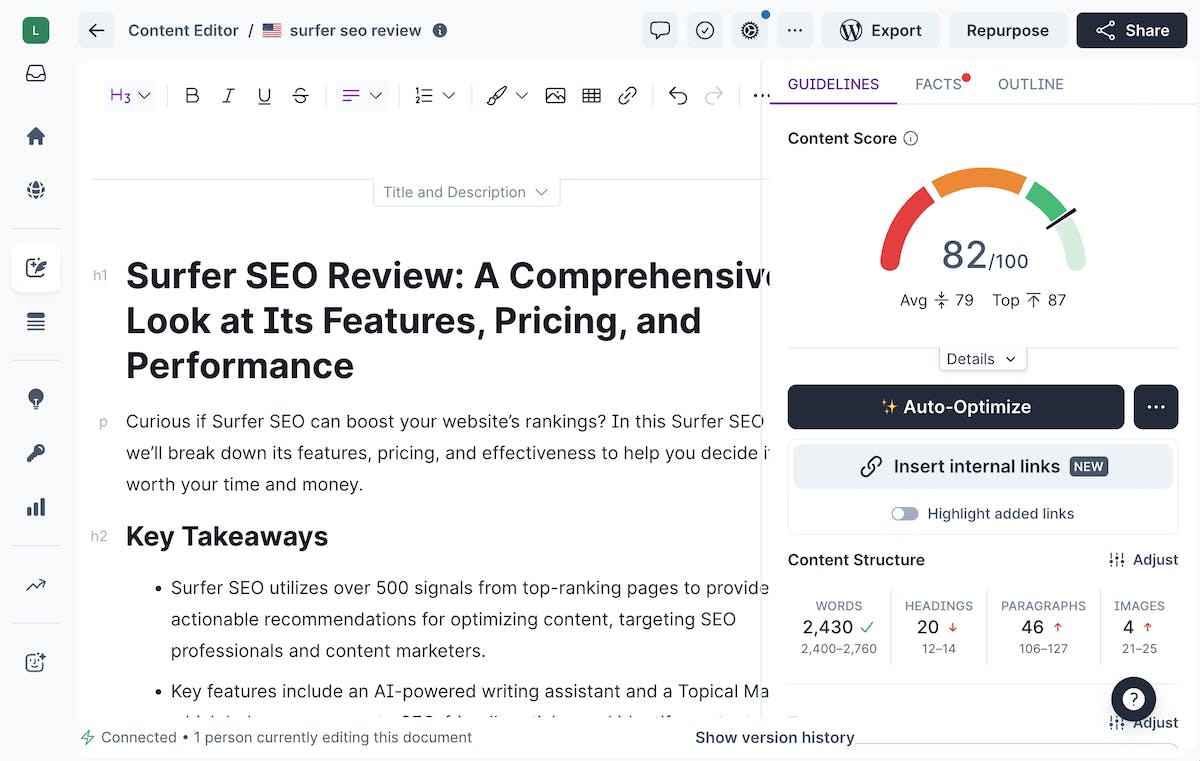
Surfer SEO is built around a simple but powerful idea: the fastest way to improve organic performance is to model what already works on the SERP. Instead of relying on intuition, Surfer analyzes top-ranking pages for your target keyword and transforms those insights into real-time content guidelines. Its Content Editor, SERP Analyzer, outlines, and entity suggestions help creators produce content that aligns with ranking patterns — without guessing what Google “wants” to see.
Key advantages that make Surfer a growth engine
Data-driven Content Editor that grades your draft against SERP competitors
SERP Analyzer that reveals structural insights from winning pages
Outlines, briefs, and SEO-based structures for scaling content teams
Keyword + entity suggestions that reduce guesswork in semantic optimization
Surfer stands out because it brings quantifiable structure to the writing process. As you draft, the editor updates live with suggestions on headings, word count, term usage, and content depth — helping writers and editors align their work with what’s already ranking. This workflow is especially valuable for teams producing content at scale, since it standardizes optimization across dozens or hundreds of articles. Many creators also see quicker ranking improvements because Surfer maps drafts to real competitive signals, not generic “SEO best practices.”

The tool’s focused scope does come with tradeoffs. Surfer is not a full SEO suite, meaning you’ll likely pair it with Ahrefs, Semrush, or Google Search Console for keyword research, backlink analysis, or broader competitive strategy. Its pricing can feel steep for solo creators or small teams, especially if they don’t publish frequently enough to justify the monthly cost. And because the tool mirrors SERP norms, following every suggestion too literally can make content feel formulaic unless balanced with strong writing and unique insights.
| How Surfer SEO supports blogging growth | Why it matters for your blog |
|---|---|
| Uses real SERP data to shape optimization guidelines | You write posts aligned with what already ranks; increasing your chance of visibility |
| Provides real-time scoring and on-page recommendations | You fix issues while drafting instead of during lengthy edits |
| Generates outlines; briefs; and entity suggestions | You produce well-structured posts faster and cover topics more completely |
| Offers consistent optimization standards for teams | Your writers follow the same SEO blueprint; improving quality across all posts |
Takeaway
Yoast SEO: best blogging tool for on-page optimization and in-editor SEO guidance

A strong SEO workflow often begins inside the editor, and Yoast SEO makes that process straightforward by delivering real-time guidance as you write. The plugin integrates directly into WordPress so bloggers can optimize titles, meta descriptions, readability, and structure without switching tools. Yoast also automates many technical SEO tasks behind the scenes, giving creators a cleaner foundation for search indexing and visibility.
Key Yoast SEO standout features
Real-time SEO and readability scoring using its traffic-light system
Title and meta description controls with templates and variables
Automatic XML sitemap generation for better indexing
Social previews and OpenGraph settings for tailored sharing
Built-in checks for readability, sentence structure, and passive voice
Technical SEO helpers such as schema markup, canonical URLs, and robots control
Yoast SEO stands out because it brings both content and technical optimization into a familiar interface. Writers receive direct suggestions on clarity, keyword placement, and structure while still drafting a post. The automatic generation of sitemaps, schema, and canonical tags helps maintain a healthy site architecture without requiring deep SEO knowledge. Yoast also lets you shape how your content appears in search and social feeds, giving more control over click-through appeal and user experience.

Some limitations become clear as your site grows. The plugin can feel heavy on certain WordPress setups, and some valuable features—like internal linking suggestions or redirect management—sit behind the Premium paywall. The scoring system also shapes how some writers approach SEO, sometimes encouraging them to chase “green lights” instead of focusing on user intent or natural writing flow. For teams balancing speed and quality, these trade-offs matter when deciding how heavily to rely on Yoast’s signals.
| How Yoast SEO helps blogging growth | Why it matters for your blog |
|---|---|
| Offers in-editor optimization tips | You improve SEO while drafting; not after publishing |
| Handles technical SEO automatically | You reduce errors and streamline maintenance |
| Controls titles; metadata; and previews | You shape better search and social click-through |
| Improves readability with structured checks | You create clearer content for readers and search |
| Integrates seamlessly into WordPress | You avoid switching tools and save workflow time |
Takeaway
Rank Math: best blogging tool for powerful, all-in-one WordPress SEO optimization

A well-structured SEO workflow benefits from tools that consolidate research, technical setup, and content optimization in one place. Rank Math delivers that by blending real-time SEO analysis, schema controls, analytics integration, and modular features directly into the WordPress dashboard. Its design gives bloggers more flexibility and depth than many plugins, while keeping advanced capabilities accessible through a guided setup and toggle-based feature system.
Key Rank Math standout features
Real-time SEO scoring with suggestions for improvements
Multiple keyword optimization for broader ranking opportunities
Built-in schema markup builder supporting many schema types
Integrated Google Analytics and Google Search Console data inside WordPress
Optional Content AI tools for writing guidance and keyword optimization
Additional utilities such as redirects, XML sitemaps, 404 monitoring, and local SEO modules
Rank Math stands out because it offers an extensive toolkit even at the free tier. Multi-keyword support, analytics dashboards, schema tools, and redirects all come baked in, reducing the need for extra plugins. The modular interface allows you to activate only the features you need, which helps keep WordPress sites lean while still maintaining strong SEO coverage. For bloggers who want more control over technical SEO and broader insight into performance, the plugin provides both flexibility and depth in a single environment.

The rich feature set brings complexity that newcomers may find challenging. Rank Math’s interface can feel dense with options, and users unfamiliar with SEO may need time to understand scoring signals and configuration settings. Some advanced capabilities—including Content AI credits or premium analytics—sit behind paid plans. Support availability varies across tiers, and the volume of features may distract from writing if overused. These trade-offs matter most for bloggers who prefer simpler workflows or minimal configuration.
| How Rank Math helps blogging growth | Why it matters for your blog |
|---|---|
| Offers deep SEO analysis with multi-keyword focus | You optimize posts for broader search visibility |
| Integrates analytics into WordPress | You monitor performance without switching tools |
| Provides schema; redirects; and sitemaps | You strengthen technical SEO with fewer plugins |
| Uses modular features | You tailor the plugin to your site's needs |
| Includes Content AI tools | You refine content and keywords with guided suggestions |
Takeaway
Best CMS for Blogging Growth (SEO, Scale & Content Velocity)
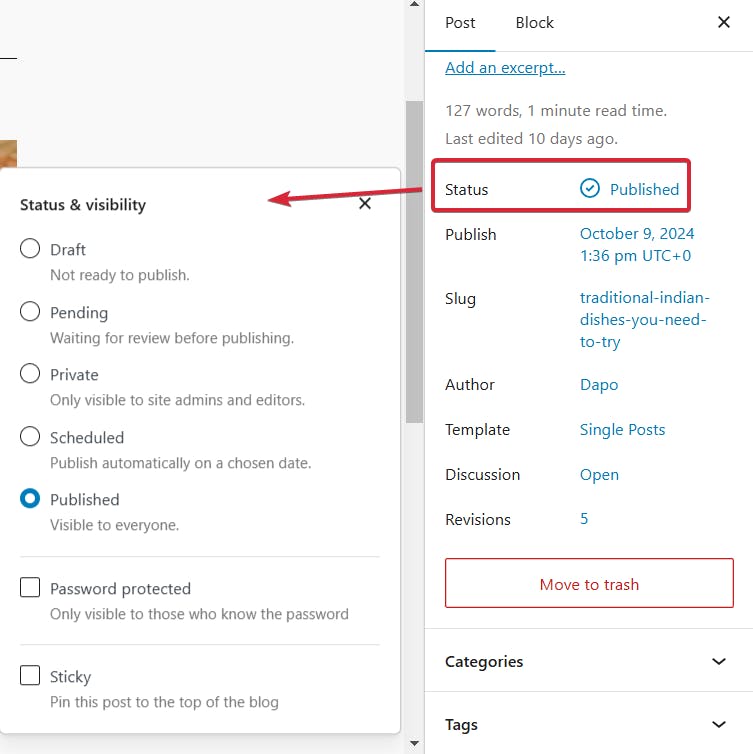
WordPress.org: best blogging platform for long-term growth, customization, and full SEO control

A scalable blog needs flexibility at every stage — from how content is structured to how search engines read and index it. WordPress.org delivers that flexibility with a self-hosted system built for customization, performance, and SEO depth. Because it gives you full control over your site, themes, and plugins, it becomes a platform that grows as your editorial needs expand, whether you publish a handful of posts per month or hundreds across multiple categories.
Key WordPress.org standout strengths
SEO-friendly architecture with clean code, custom URLs, and fast indexing
Full customization of templates, categories, permalinks, and content structures
A massive plugin ecosystem that adds speed tools, analytics, schema, automation, and AI features
The ability to integrate SEO plugins like Yoast, Rank Math, or AIOSEO for deeper metadata and technical optimization
Scalable design suitable for niche blogs, authority sites, and multi-author editorial teams
WordPress.org excels because it grants full ownership of your site’s SEO and content architecture. You can shape URLs, headings, categories, and internal linking structures to match your growth strategy. Plugins expand your capabilities — from caching and schema to analytics dashboards and automation tools — allowing you to optimize posts in the editor while improving speed and technical SEO behind the scenes. This level of freedom helps blogs adapt to new topics, new formats, and new SEO best practices without platform constraints.

The platform requires more setup and maintenance than hosted alternatives, which may challenge beginners who prefer an all-in-one environment. Managing hosting, security, backups, and plugin updates can add complexity. Some themes and plugins introduce performance overhead if not optimized correctly, requiring careful selection and technical awareness. For teams without technical support, these factors shape the learning curve and ongoing workload.
| How WordPress.org supports blogging growth | Why it matters for your blog |
|---|---|
| Offers strong SEO foundations and advanced plugin support | You improve rankings through full control over metadata and structure |
| Allows custom architecture for categories; templates; and permalinks | You scale content across niches without CMS limitations |
| Provides a vast plugin ecosystem | You add features for speed; automation; analytics; and editing as your blog grows |
| Supports complete ownership and flexibility | You avoid platform restrictions and build for the long term |
| Adapts to any editorial workflow | You support single-author blogs and multi-writer publications alike |
Takeaway
Ghost: best blogging platform for speed, built-in growth loops, and a writing-first workflow

A high-performing blog depends on speed, clean structure, and tools that support direct audience growth. Ghost delivers these elements through a modern, lightweight architecture built on Node.js, paired with native publishing and monetization features. Its writing-focused design and built-in newsletters create an efficient environment for publishing content and growing a reader base without relying on dozens of plugins or external platforms.
Key Ghost standout strengths
Extremely fast performance powered by Node.js, improving Core Web Vitals and SEO
Native email newsletters and membership tools for list-building and monetization
Minimalist, distraction-free editor with Markdown support for faster writing
Built-in SEO foundations: sitemaps, canonical tags, structured metadata, and social cards
Reduced reliance on plugins thanks to integrated growth and optimization features
Ghost stands out because it merges publishing, SEO, and audience engagement inside one unified system. Its performance advantage helps posts load quickly, supporting better rankings and reducing user drop-off. The built-in newsletter system allows creators to collect subscribers and send issues directly from the platform, turning blog readers into long-term community members. Ghost’s editor emphasizes clarity and speed, letting writers draft and publish without navigating a cluttered interface. With SEO handled natively, teams spend less time configuring plugins and more time creating.

The simplicity and focus of Ghost mean it has trade-offs for users seeking extensive customization. Themes and integrations are available but less abundant than WordPress, which may limit advanced design or complex workflows. Self-hosting adds technical overhead unless using Ghost(Pro), and some teams may find the ecosystem less flexible for multi-plugin automation or niche SEO add-ons. For creators needing deep extensibility or large-scale custom builds, Ghost’s streamlined approach can feel restrictive.
| How Ghost supports blogging growth | Why it matters for your blog |
|---|---|
| Offers fast performance and clean code | You gain SEO benefits through better Core Web Vitals |
| Includes newsletters and memberships by default | You build an owned audience and recurring revenue |
| Provides a minimalist; writing-first editor | You publish faster with fewer workflow distractions |
| Handles SEO automatically without plugins | You reduce setup time and avoid configuration errors |
| Removes plugin bloat and complexity | You run a lightweight; efficient publishing system |
Takeaway
HubSpot CMS: best blogging platform for converting traffic into leads and scaling inbound growth

A blog does more than publish content — it fuels pipelines, nurtures audiences, and supports full customer journeys. HubSpot CMS is built for that broader purpose. By connecting content creation directly with the HubSpot CRM, automation tools, and analytics, it transforms a blog into a measurable lead-generation and revenue engine. Its integrated SEO tools, personalization features, and workflow automation make it especially effective for businesses that want their content strategy tied directly to marketing and sales outcomes.
Key HubSpot CMS standout strengths
Native integration with HubSpot CRM and marketing automation workflows
Built-in SEO recommendations and topic-cluster planning inside the editor
A/B testing, personalization, and smart content options for improving conversions
Unified ecosystem combining CMS, analytics, marketing tools, email, and automation
Support for lead scoring, segmentation, and lifecycle-based messaging
HubSpot CMS stands out because it closes the gap between traffic and revenue. Every visitor interaction — from blog views to form submissions — is captured in the CRM, enabling segmentation, nurturing sequences, and behavior-driven messaging. SEO insights built into the CMS help teams structure topic clusters, plan content strategically, and optimize posts without external plugins. Smart content, dynamic CTAs, and personalization tools allow businesses to tailor experiences to specific audience segments, improving engagement and conversion rates as the blog scales.

The platform’s strength in integration and automation comes with considerations. Pricing increases as teams adopt advanced personalization or multi-hub features, which may be challenging for smaller blogs or early-stage creators. While the all-in-one design reduces plugin chaos, it also ties you to the HubSpot ecosystem, making migrations or custom development more complex. Users seeking highly flexible design or open-source extensibility may find the system more structured than they prefer. For growing businesses, however, the streamlined workflows and measurable ROI often outweigh these constraints.
| How HubSpot CMS supports blogging growth | Why it matters for your blog |
|---|---|
| Connects content to CRM-powered lead capture | You turn organic traffic into qualified; trackable leads |
| Includes built-in SEO guidance and strategy tools | You plan and optimize posts without relying on plugins |
| Offers smart content and A/B testing | You improve engagement through personalized experiences |
| Integrates with automation and analytics | You nurture leads and measure ROI across the funnel |
| Designed for inbound-focused teams | You scale blogs as part of complete marketing systems |
Takeaway
Tools that help you promote your content and grow your audience
Buffer: best blogging tool for consistent social promotion and multi-channel publishing

A steady distribution workflow keeps blog content visible long after it’s published, and Buffer helps creators build that rhythm without extra complexity. The platform centralizes scheduling, repurposing, and publishing so you can plan posts across several social networks from one clean dashboard. Its AI Assistant supports ideation and rewriting, which makes turning blog posts into platform-specific content much faster. With built-in analytics and cross-channel support, Buffer helps bloggers stay active and organized while maintaining a predictable posting cadence.
Key Buffer standout features
Social scheduling and content planning for LinkedIn, Instagram, X (Twitter), TikTok, Facebook, and more
AI Assistant for rewriting posts, generating ideas, and adapting content to each platform
Engagement analytics, posting insights, and channel performance dashboards
Multi-platform publishing with integrations for Canva, Zapier, WordPress, and other tools
Queue-based workflows that keep content organized and consistent
Buffer stands out because it simplifies day-to-day promotion for bloggers who need a clear, manageable system. Its planner helps maintain visibility across platforms without manual posting, and the AI Assistant reduces the effort required to repurpose articles into social-ready formats. The interface is intentionally simple, which keeps the workflow focused on publishing rather than configuring tools. This structure is especially helpful when you want to turn one blog post into a week’s worth of content without friction.

Buffer’s limitations appear when your needs become more advanced. Its analytics give a basic but useful overview, though they lack deeper insights found in enterprise-level tools. Free and lower-tier plans cap channels and scheduled posts, which can restrict output as your publishing volume grows. Automation is also lighter compared to platforms with bulk scheduling, listening, or complex workflow rules. These trade-offs matter for teams that require more sophisticated social operations.
| How Buffer helps blogging growth | Why it matters for your blog |
|---|---|
| Schedules and automates multi-channel social posts | Your blog content stays visible without daily manual posting |
| Repurposes articles using AI | You turn one blog post into several social updates quickly |
| Maintains a consistent posting rhythm | Consistency increases reach; engagement; and traffic potential |
| Tracks engagement across platforms | You learn which social posts drive interest and refine your strategy |
| Integrates with creative and CMS tools | You keep promotion; design; and publishing in one smooth workflow |
Takeaway
Kit: best blogging tool for creator-focused email growth and automated audience nurturing

Email remains one of the strongest channels for turning readers into loyal followers, and Kit gives creators a streamlined way to grow, segment, and monetize their audience. Built with bloggers and digital creators in mind, it combines email campaigns, visual automations, landing pages, and simple commerce features into one unified system. Its focus on tag-based segmentation and creator-friendly workflows helps transform blog traffic into subscribers and buyers without the complexity of enterprise email tools.
Key Kit standout features
Visual email sequences and automation funnels for targeted subscriber journeys
Landing pages and opt-in forms for capturing readers without extra tools
Monetization features for selling digital products, subscriptions, and accepting tips
Tag-based segmentation and simple analytics for audience management
Clean interface built for creators rather than corporate teams
Kit stands out because it centers its tools around the creator workflow instead of broad marketing use cases. The visual automation builder makes it easy to map how readers move from a blog post to a form, to a welcome sequence, and eventually to a purchase or newsletter loop. Its monetization tools reduce friction by allowing creators to sell digital products directly inside the platform. For bloggers who want a lean system that handles both subscriber growth and audience nurturing, Kit offers a focused set of tools that feel intuitive rather than overwhelming.

Kit’s drawbacks become clearer when needs are simpler or budgets are tight. Pricing scales with subscriber count, which can feel steep for bloggers who only want a basic newsletter. The email editor and design templates are also more minimal than what advanced design platforms offer. Analytics are functional but not deep, which may limit insights for data-driven teams. These trade-offs matter for creators choosing between simplicity and richer feature depth.
| How Kit helps blogging growth | Why it matters for your blog |
|---|---|
| Builds automated welcome and nurture sequences | You onboard new readers without manual work |
| Provides landing pages and forms for email capture | You grow your list directly from blog posts |
| Supports selling digital products and subscriptions | You turn your audience into revenue without extra tools |
| Enables tag-based segmentation for targeted campaigns | You send messages tailored to reader interests |
| Keeps the interface simple and creator-focused | You stay productive without navigating complex software |
Takeaway
Analyze AI: The best and most comprehensive tool to track your blog in LLMs

Blog growth used to be a straight line from keyword research to rankings to clicks. AI answer engines broke that loop. People still discover ideas through blogs, but they often start with a prompt, get an answer, and only click when a page feels like the best next step.
Most “AI visibility” tools stop at the moment your brand appears in a response. That is not enough for a blog team trying to decide what to write next, what to update, and what to retire. You need to know which prompts actually matter for your category, which pages those prompts surface, and whether any of that drives real engagement and revenue.
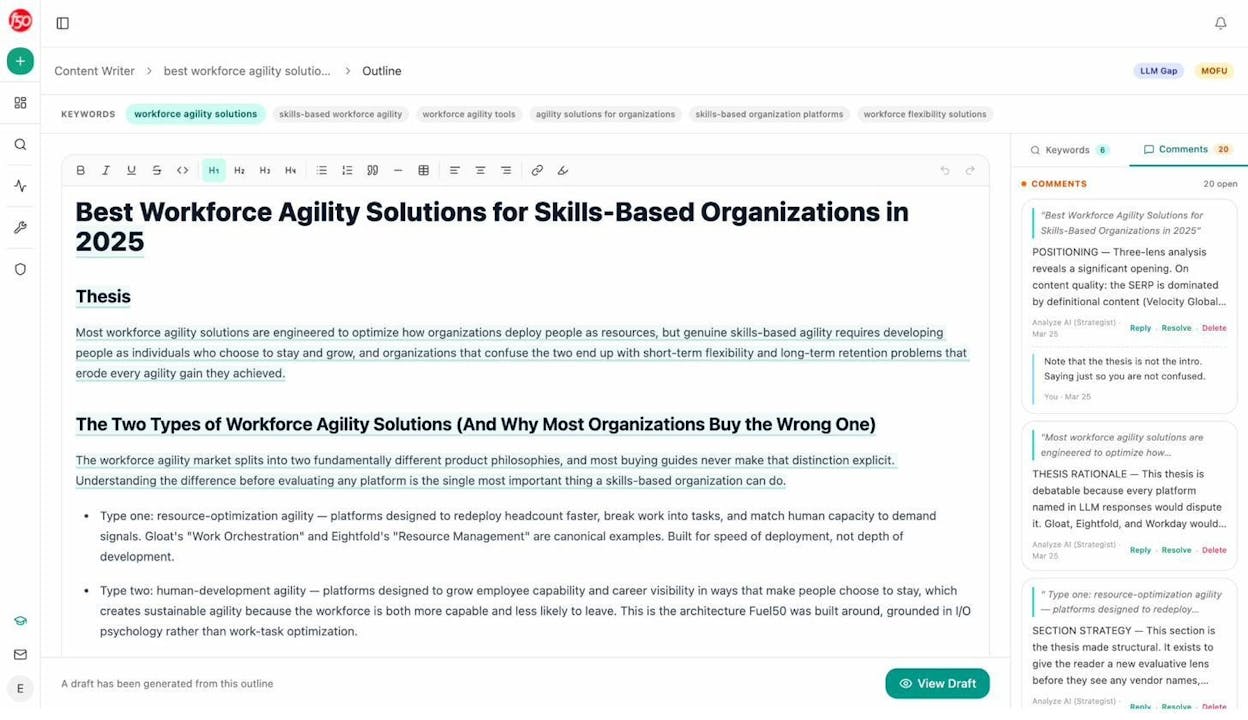
Analyze AI helps you plan and prioritize prompt coverage for your blog, then connects that visibility to attribution. You can identify the prompt themes that drive discovery, map them to existing posts or new content opportunities, and track where you win or lose across ChatGPT, Perplexity, Claude, Copilot, and Gemini. Once AI sends visitors to your site, Analyze shows what happens next through analytics-grade attribution, including landing pages, conversion actions, assisted revenue, and ROI by referrer.
Key Analyze AI features
Plan and prioritize the prompts that shape how your blog gets discovered in AI search
See actual traffic from AI engines, not just mentions or screenshots
Know which blog posts convert AI visitors and optimize where outcomes move
Track prompt-level wins and losses and tie them to specific pages and topics
Audit which sources models trust and close authority gaps that block citations
Surface opportunities and competitive gaps that prioritize actions by potential impact, not vanity metrics.
Here are in more details how Analyze AI works:
See actual traffic from AI engines, not just mentions

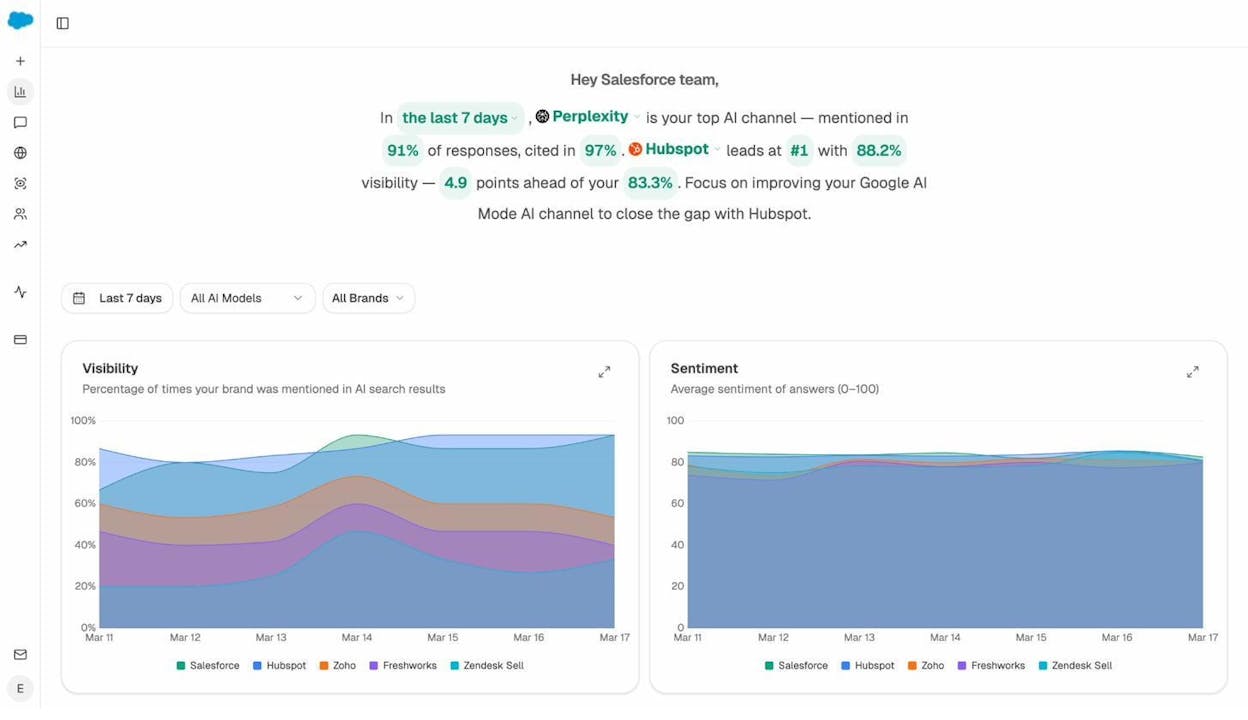
Analyze AI attributes every session from answer engines to its specific source—Perplexity, Claude, ChatGPT, Copilot, or Gemini. You see session volume by engine, trends over six months, and what percentage of your total traffic comes from AI referrers. When ChatGPT sends 248 sessions but Perplexity sends 142, you know exactly where to focus optimization work.

Know which pages convert AI traffic and optimize where revenue moves

Most tools stop at "your brand was mentioned." Analyze AI shows you the complete journey from AI answer to landing page to conversion, so you optimize pages that drive revenue instead of chasing visibility that goes nowhere.
The platform shows which landing pages receive AI referrals, which engine sent each session, and what conversion events those visits trigger.
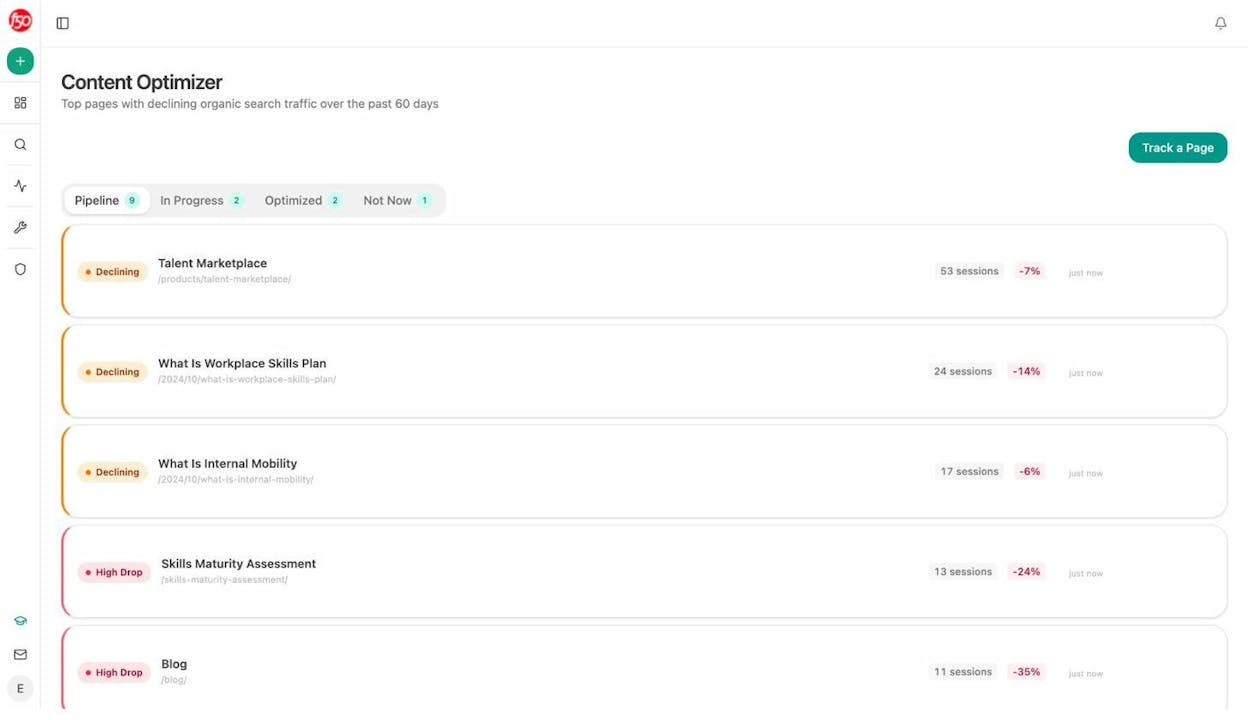
For instance, when your product comparison page gets 50 sessions from Perplexity and converts 12% to trials, while an old blog post gets 40 sessions from ChatGPT with zero conversions, you know exactly what to strengthen and what to deprioritize.
Track the exact prompts buyers use and see where you're winning or losing

Analyze AI monitors specific prompts across all major LLMs—"best Salesforce alternatives for medium businesses," "top customer service software for mid-sized companies in 2026," "marketing automation tools for e-commerce sites."

For each prompt, you see your brand's visibility percentage, position relative to competitors, and sentiment score.
You can also see which competitors appear alongside you, how your position changes daily, and whether sentiment is improving or declining.

Don’t know which prompts to track? No worries. Analyze AI has a prompt suggestion feature that suggests the actual bottom of the funnel prompts you should keep your eyes on.
Audit which sources models trust and build authority where it matters

Analyze AI reveals exactly which domains and URLs models cite when answering questions in your category.
You can see, for instance, that Creatio gets mentioned because Salesforce.com's comparison pages rank consistently, or that IssueTrack appears because three specific review sites cite them repeatedly.

Analyze AI shows usage count per source, which models reference each domain, and when those citations first appeared.

Citation visibility matters because it shows you where to invest. Instead of generic link building, you target the specific sources that shape AI answers in your category. You strengthen relationships with domains that models already trust, create content that fills gaps in their coverage, and track whether your citation frequency increases after each initiative.
Prioritize opportunities and close competitive gaps

Analyze AI surfaces opportunities based on omissions, weak coverage, rising prompts, and unfavorable sentiment, then pairs each with recommended actions that reflect likely impact and required effort.
For instance, you can run a weekly triage that selects a small set of moves—reinforce a page that nearly wins an important prompt, publish a focused explainer to address a negative narrative, or execute a targeted citation plan for a stubborn head term.
Tie AI visibility toqualified demand.
Measure the prompts and engines that drive real traffic, conversions, and revenue.
Similar Content You Might Want To Read
Discover more insights and perspectives on related topics

The 9 Best LLM Monitoring Tools for Brand Visibility in 2026

Use These 10 AI Tools to Scale Your Startup in 2026

The 14 Best Competitive Intelligence Tools for Market Research

10 AI Applications for Small Businesses to Try
11 Best Keyword Tracking Tools for 2026 (Tried & Reviewed)