



Summarize this blog post with:


In this article, you’ll learn how to do SEO yourself, from the first technical check to the point where you’re tracking results week over week. You’ll set up your site so search engines and AI engines can find it, pick keywords and prompts worth winning, write pages that rank and get cited, build links, and measure what’s actually moving the needle.
Table of Contents
What “DIY SEO” actually means in 2026
DIY SEO means doing your own search optimization without hiring an agency or a full-time SEO. The job is the same as it’s always been. Help the right people find your site when they search.
Two things have changed.
First, the search landscape now has two layers. There’s still classic Google search, and there’s a fast-growing layer of AI search across ChatGPT, Perplexity, Gemini, Copilot, and Claude. People ask both. Both can send qualified visitors. SEO is not dead. It’s just not the only organic channel anymore.
Second, the tools you need to do SEO yourself are mostly free. We’ll point to free tools throughout the guide so you can get started without paying for anything.
For background on how SEO and AI search work together, see our breakdowns of GEO vs SEO and the 4 pillars of SEO for AI search.
Let’s start.
1. Get your technical SEO in order
If Google can’t crawl and index your pages, no amount of content or link building will help. The same goes for AI engines. Most rely on Bing or Google’s index, plus their own crawlers (GPTBot, PerplexityBot, ClaudeBot, Google-Extended). If your site blocks them, you’re invisible to AI answers.
So your first job is to make sure both kinds of bots can read your site.
Run a quick technical audit
Sign up for the free Google Search Console and Bing Webmaster Tools. Both surface most of the technical issues you need to fix in the first 90 days.
![[Screenshot of the Google Search Console “Pages” coverage report showing indexed and non-indexed URLs]](https://www.datocms-assets.com/164164/1778277631-blobid1.png?auto=format,compress&w=1248&fit=max)
Look for these red flags first:
-
Pages that return 4xx or 5xx errors.
-
Pages marked “Discovered, not indexed” or “Crawled, not indexed”.
-
Mobile usability issues.
-
Slow Core Web Vitals on key landing pages.
Fix the broken pages and indexing errors before anything else. A broken page can’t rank no matter how good it is. Use our free broken link checker to spot internal and external broken links across your site, then fix or redirect them.
Make sure AI crawlers can read your site
This part most “DIY SEO” guides skip.
Open your robots.txt file (it’s at yourdomain.com/robots.txt) and check whether you’re allowing the major AI bots. If you want AI search visibility, leave them in.
The bots to allow are GPTBot (OpenAI), PerplexityBot, ClaudeBot, Google-Extended (used for AI Overviews and AI Mode), and OAI-SearchBot.
If you see a line like User-agent: GPTBot followed by Disallow: /, you’re blocking it. Remove the disallow if you want to be cited.
For more on the trade-offs here, see our piece on how to rank on ChatGPT.
A fixes-first checklist
Before moving on, make sure each of these is in place:
|
Item |
Why it matters |
|---|---|
|
HTTPS on every page |
Trust signal and ranking factor |
|
Single canonical version (www or non-www, not both) |
Prevents duplicate content |
|
XML sitemap submitted to Search Console |
Helps Google find all pages |
|
robots.txt allows search and AI bots |
Without it, you’re invisible |
|
Mobile-friendly layout |
Most searches are mobile |
|
Page speed under 3 seconds |
Drops in speed correlate with drops in rankings |
2. Do keyword research (and prompt research)
To get traffic, you need to target the words and phrases your potential customers actually search for. The classic version is keyword research. The new version adds prompt research, because the queries people type into ChatGPT and Perplexity are not the same shape as Google queries.
You need both.
How to find keywords (the classic SEO part)
Start with our free keyword generator tool. Enter one or two seed keywords related to your business.
![[Screenshot of the keyword generator tool showing a seed keyword and the list of suggested terms with search volumes]](https://www.datocms-assets.com/164164/1778277638-blobid2.png?auto=format,compress&w=1248&fit=max)
You’ll get a list of related keywords. For each one, you want to know two things:
-
Will it bring real traffic if you rank? Use our free website traffic checker to gauge how much traffic comparable pages get.
-
Can you actually rank for it? Use our free keyword difficulty checker to see how competitive a term is. As a rule of thumb, if your site is new, target keywords with difficulty under 20. If your site has some authority already, you can stretch to 40 or 50.
Then check the SERP for each keyword you’re seriously considering. Use our free SERP checker to see who’s ranking and what kind of pages win. If the top 10 are giant brands you can’t realistically displace, pick a different keyword.
If you want to go deeper on selecting the right terms, our guide to 22 keyword types to know for SEO and AI search breaks down each category so you can match keyword type to business goal.
How to find prompts (the AI search part)
Keyword research tells you what people type into Google. Prompt research tells you what they ask ChatGPT, Perplexity, Gemini, Copilot, and Claude.
This matters because AI prompts are usually longer, more conversational, and closer to the buying decision. Someone might Google “CRM software” and ask ChatGPT, “what’s the best CRM for a 5-person sales team already on HubSpot.” The keyword you optimized for won’t necessarily surface your page in that AI answer.
Open Analyze AI and go to Ad Hoc Prompt Searches. Type a prompt the way a real buyer would say it.
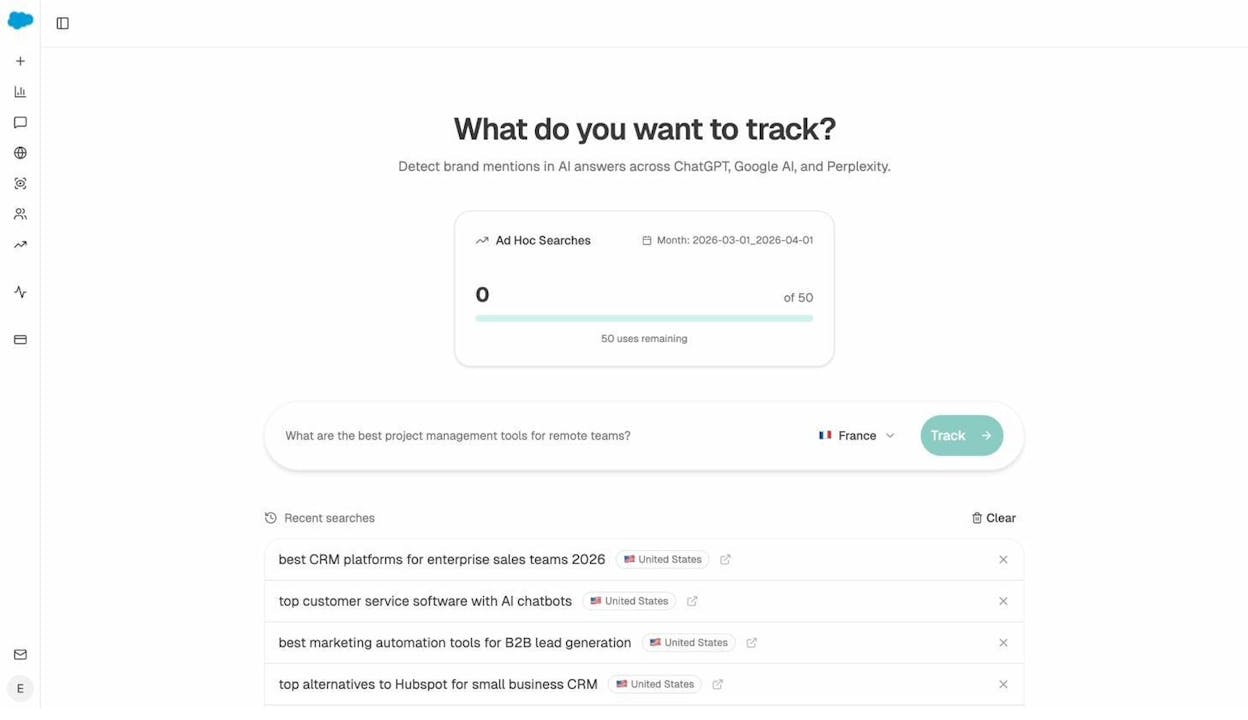
You’ll see who gets cited, which sources the model pulls from, and whether your brand appears at all. Run 10 to 20 prompts a real customer might ask. The ones where your competitors show up and you don’t are your prompt opportunities.
To make this systematic, set up a list of tracked prompts in the Prompts dashboard. Analyze AI runs them automatically against ChatGPT, Perplexity, Gemini, and others, and tells you who’s mentioned, who’s cited, and how that changes week over week.
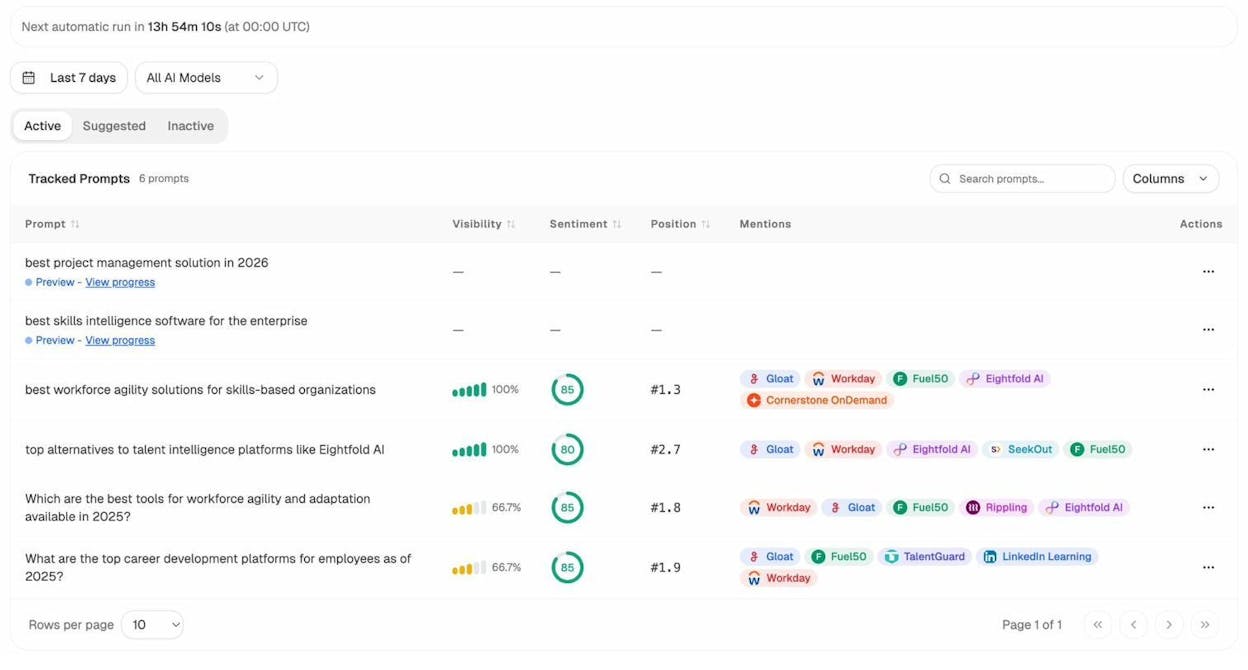
Now you have two lists. Keywords for Google and prompts for AI engines. The next step is creating pages that win on both.
3. Create pages that are optimized for both search and AI
A good page in 2026 has to do two jobs. It has to rank in Google’s results, and it has to be the kind of page an AI engine wants to cite when answering a related question.
The same fundamentals do both.
Match search intent
If you want to rank, your page has to match what searchers actually want.
Google already does the hard work of figuring out intent for you. Look at the top 5 ranking pages and ask three questions:
-
Content type. Are they blog posts, product pages, listicles, videos, calculators?
-
Content format. How-to, list, definition, comparison, opinion?
-
Content angle. Beginner, advanced, year-specific, vertical-specific?
If the top 5 results for “DIY SEO” are all step-by-step beginner guides, don’t write an enterprise SEO essay. Write a step-by-step beginner guide that’s better than theirs.
For more, our 2026 SEO content strategy guide walks through how to choose intent and structure together.
Cover the topic completely
The top result for most queries answers everything a reader could reasonably want to know.
To find the gaps, run your draft (or your existing page) through Analyze AI’s Content Optimizer. It compares your content against the top-ranking pages and the queries AI engines associate with the topic, then shows you what’s missing.
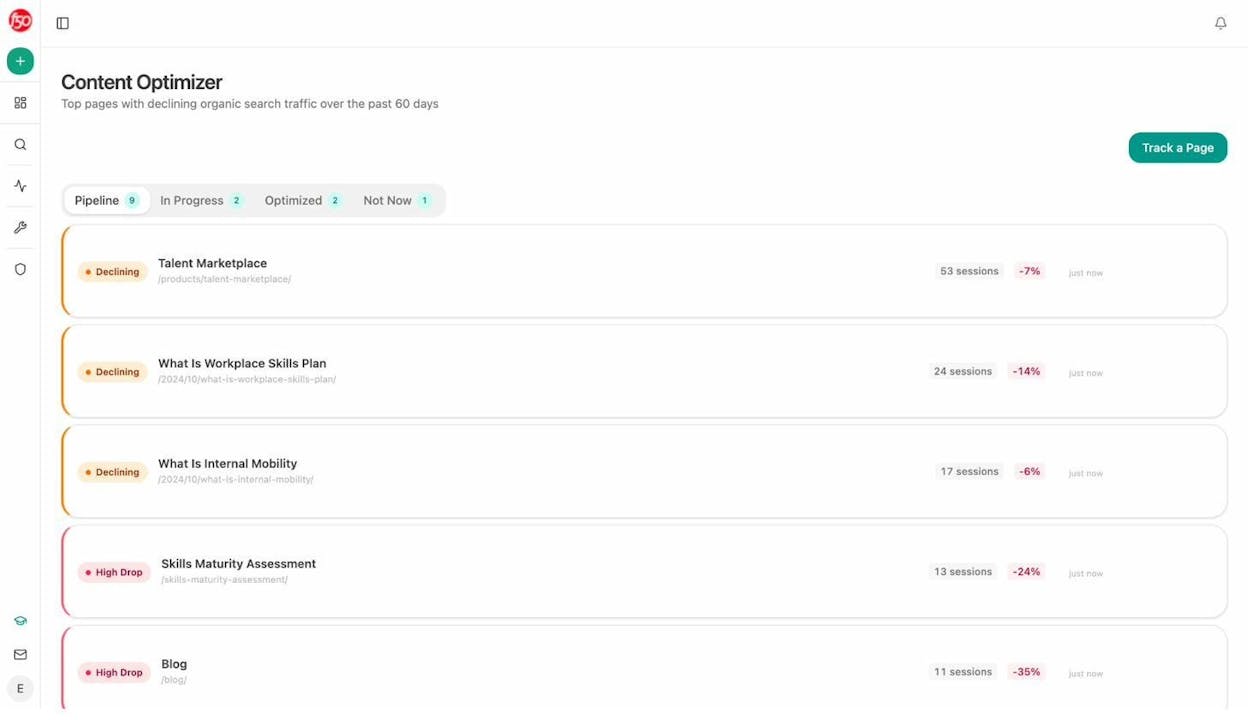
Add the missing subtopics as H2s or H3s. Don’t pad the article with everything. Add only what a reader of this specific intent actually wants.
Make your content original
Cover the topic in full, but don’t paraphrase what’s already ranking. Copycat content can’t outrank the original, and it gives AI engines no reason to cite you over the source.
A few ways to add originality:
-
First-hand experience. Write what you’ve actually done, not what you’ve read.
-
Original data. Run a small survey or analyze your own product data. Even a 50-person poll gives you something no one else has.
-
A clear opinion. Take a side. Hedged content gets ignored by humans and rephrased by AI. A specific, defensible claim gets quoted.
-
Expert input. Interview one person inside your company who lives this topic every day. That conversation alone will produce three details no competitor has.
Write in simple language
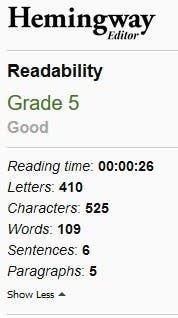
If your reader has to re-read a sentence, you’ve lost them. AI engines also extract more cleanly from clear prose.
A few rules:
-
Use short sentences.
-
Use the simpler word (“use” not “utilize”).
-
Break long paragraphs into short ones.
-
Lead with the answer, then explain.
-
Replace adjectives with specifics. “Fast load time” is weak. “Loads in 1.2 seconds” is strong.
Add the on-page basics
Once the substance is right, add the formatting that makes it easy for both Google and AI engines to understand:
-
Use the target keyword in the H1, the URL slug, and the first 100 words.
-
Write a meta description that reads like the answer to the query.
-
Use descriptive alt text on every image.
-
Use clear H2s and H3s that telegraph what’s inside each section.
-
Add a short summary near the top. AI engines often quote it.
Make the content easy for AI to extract
This is the new piece.
LLMs prefer content that’s easy to chunk and quote. To help them:
-
Lead each section with a one-sentence answer to the implied question.
-
Use definition-style sentences (“DIY SEO is…”) for terms you want to own.
-
Include named entities (people, companies, tools, places) so models can disambiguate.
-
Add small data points and stats with sources.
-
Keep paragraphs under 4 sentences.
For a deeper guide, see how to get mentioned in AI search, built on 65,000 citations of real AI responses.
4. Build links and earn AI citations
Links are still one of the signals Google relies on most to rank pages. Citations and brand mentions are now the equivalent for AI engines. You want both.
Link internally first
Internal links are the simplest links you can build. They pass authority between your pages, they help Google discover new content, and they help AI engines map the structure of your site.
Two simple rules:
-
Every new page should be linked to from at least 2 existing pages.
-
Every new page should link out to at least 3 related pages on your site.
For a deeper walk-through, our 10 internal linking tips for SEO covers specific tactics for a strong internal link structure.
![[Screenshot of a content management system showing related internal links being added to a blog post]](https://www.datocms-assets.com/164164/1778277647-blobid7.png?auto=format,compress&w=1248&fit=max)
Use source platforms (the new HARO)
HARO shut down in 2024. Two replacements have filled the gap. Both work the same way. Journalists post requests for expert sources, you respond with a quote, and if they use it, you usually get a link.
-
Qwoted, free tier available.
-
Featured.com, formerly Help A B2B Writer.
Set up email filters for your topic keywords, scan once a day, and only respond when you have real expertise. One good response a week earns more links than 50 generic pitches.
Replicate your competitors’ backlinks
If a site links to your competitor, it might link to you too. So find those sites.
Pick three competitors and run their domain through any backlink checker. Look for:
-
Resource pages and “best of” lists where they appear.
-
Podcasts that interviewed them.
-
Industry reports that cite them.
-
Newsletters that featured them.
For each one, the path to your own link is obvious. Pitch the same podcast, ask to be added to the resource page, or contribute to the next industry report.
Our 9 best backlink building tools roundup covers free and paid tools you can use for this.
Replicate your competitors’ AI citations
This is the AI search equivalent of the backlink replication tactic above. The mechanic is the same. Find the sources LLMs already trust to talk about your category, then get yourself in those sources.
Open Analyze AI’s Sources dashboard. It shows the websites AI engines pull from when answering prompts in your space.
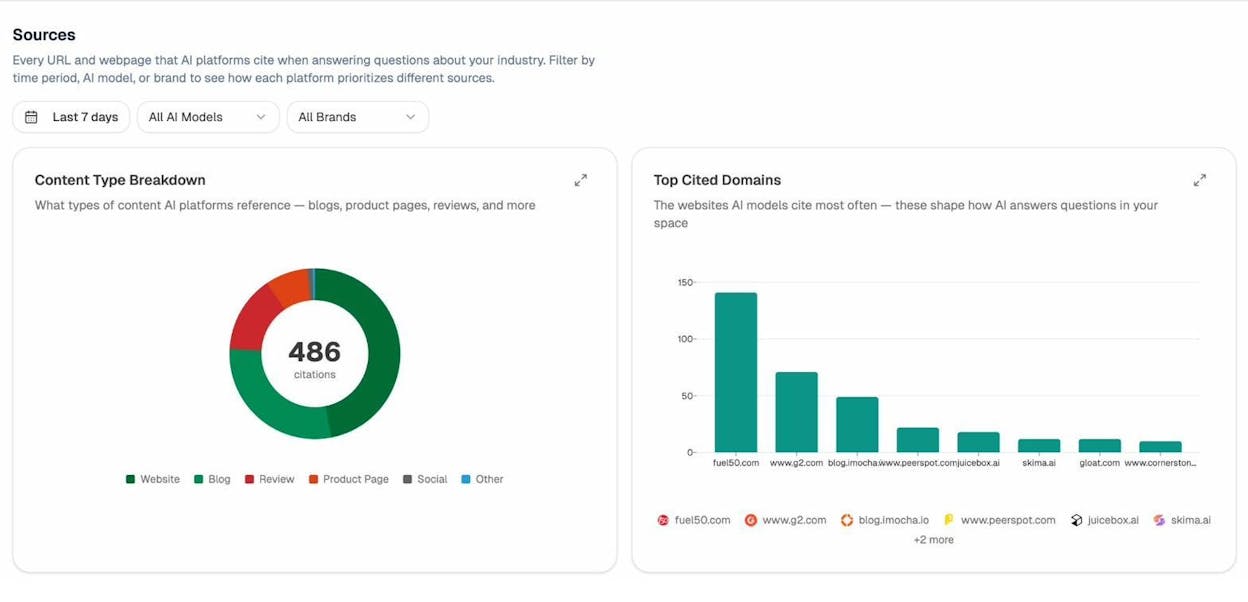
If Reddit, G2, and three industry newsletters keep showing up as sources for prompts in your category, you have a clear list of places to be present in. Get reviewed on G2. Become active on the relevant subreddit. Pitch the newsletters.
You can also use the Competitors dashboard to see which prompts your rivals win and which sources cite them but not you. Those are the gaps to close.
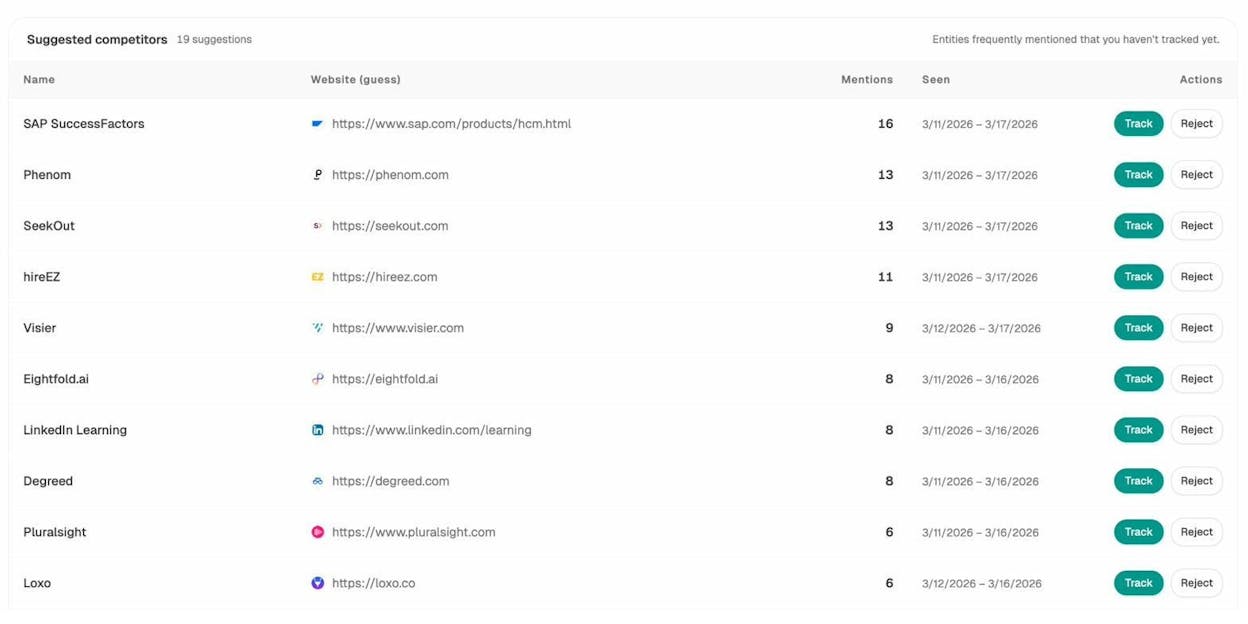
For a full breakdown of this tactic, our guide on how to outrank competitors in AI search is built on the same data.
5. Track and measure your performance across search and AI
If you don’t measure, you don’t know what’s working. Most DIY SEO guides give you a list of metrics and stop there. We’ll give you the metrics, the tools, and a simple weekly routine.
What to track for traditional SEO
|
Metric |
What it tells you |
Free tool |
|---|---|---|
|
Organic traffic |
Whether your overall search visibility is growing |
Google Search Console |
|
Impressions |
How often you appear in results |
Google Search Console |
|
Average position |
Where you rank for tracked keywords |
|
|
Referring domains |
Number of unique sites linking to you |
|
|
Conversions from organic |
Whether traffic turns into business outcomes |
Google Analytics 4 |
Pick 3 to 5 keywords that map to your business and track them weekly with our free keyword rank checker. We also have free keyword tools for Bing, YouTube, and Amazon.
What to track for AI search
This is where most DIY SEO guides leave you on your own. Five metrics matter for AI search.
-
AI visibility (share of voice). How often you’re mentioned across tracked prompts.
-
AI citations. How often your domain is cited as a source.
-
AI traffic. Sessions on your site that came from ChatGPT, Perplexity, Gemini, and others.
-
Sentiment. Whether AI engines describe your brand favourably, neutrally, or negatively.
-
Competitor share. How your visibility compares to your direct rivals.
Open the Analyze AI Overview dashboard. You’ll see all five at a glance.
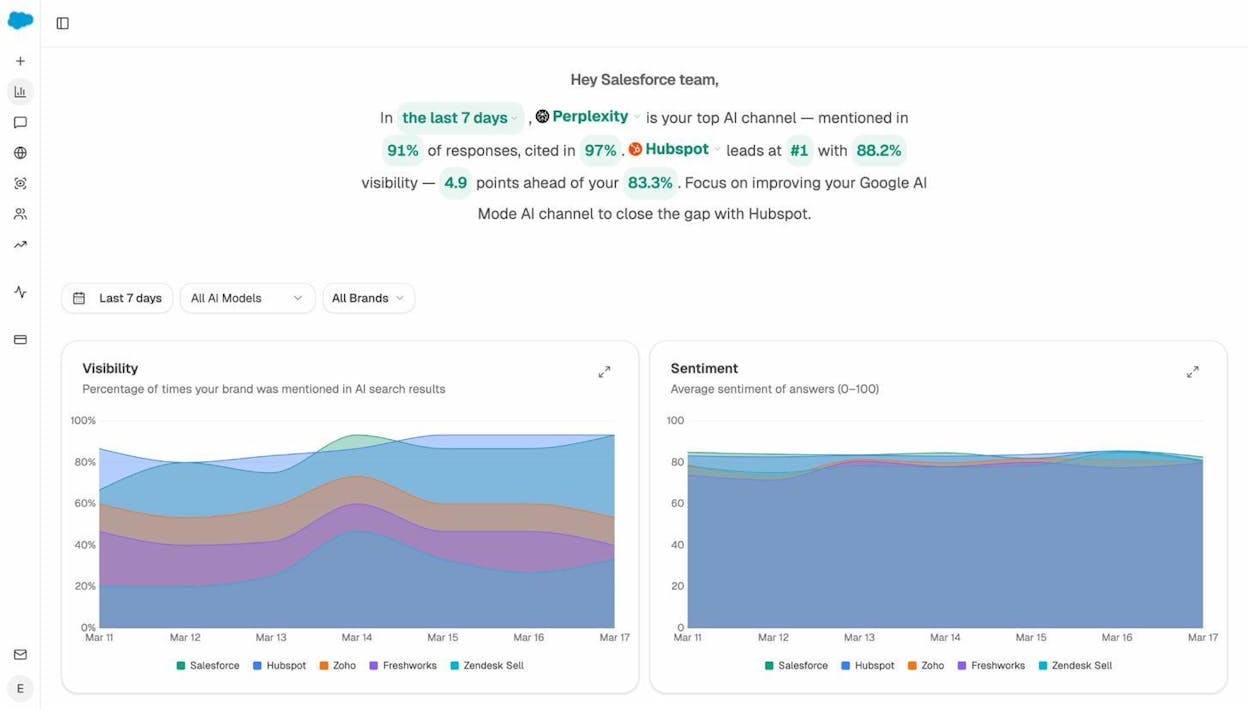
To go deeper on incoming AI traffic, the AI Traffic Analytics view shows which AI engines are sending visitors, which pages they land on, and which prompts triggered the visit.
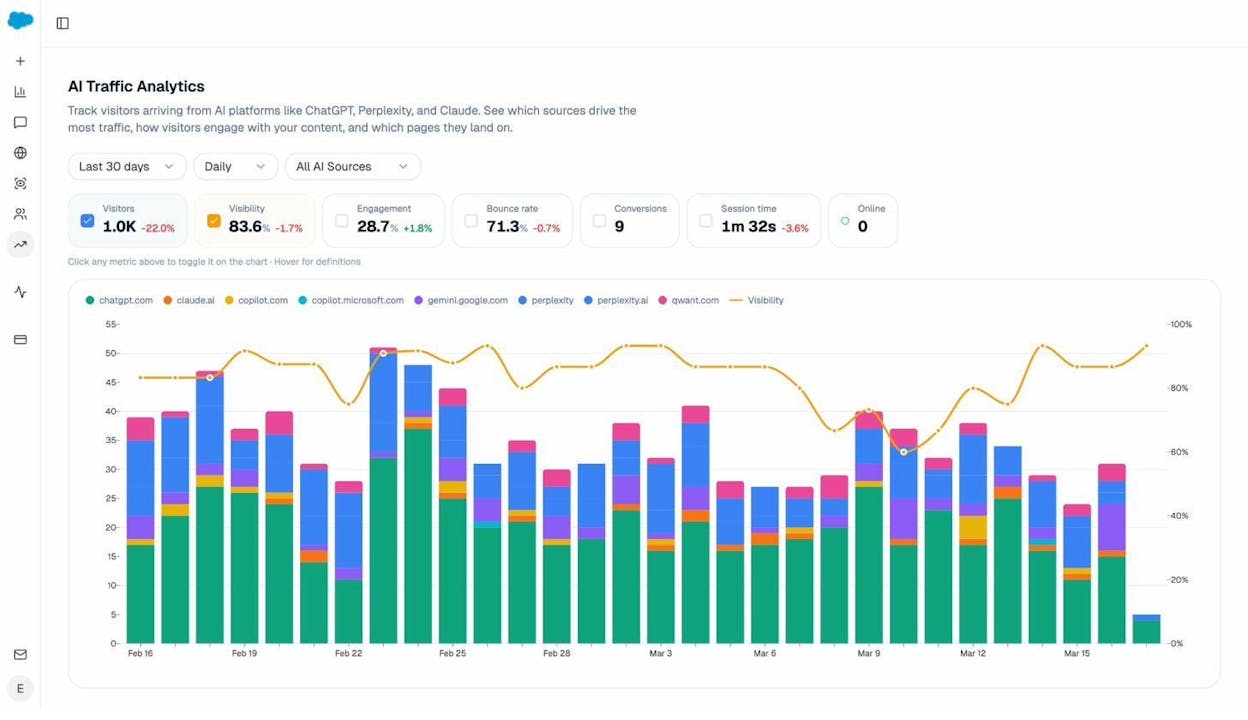
Use this to find pages already attracting AI traffic and double down on what’s working. If a how-to page gets cited often by Perplexity, write three more on adjacent topics.
For sentiment and brand perception, the Perception Map shows how each AI engine describes your brand and your competitors across themes like price, ease of use, support, and reliability.
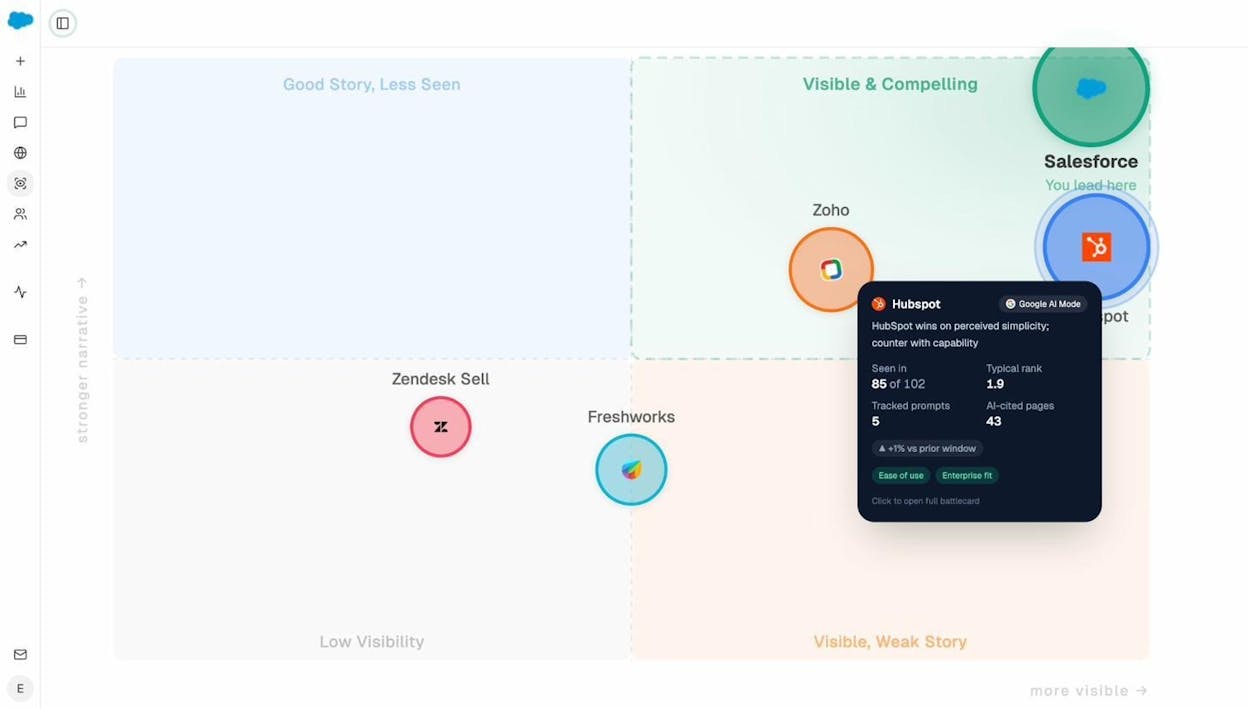
If ChatGPT consistently calls your competitor “easy to set up” and never says that about you, you’ve found a content gap and a positioning problem in the same view.
Build a simple weekly routine
Tracking only works if you actually look at the numbers. Set a 30-minute weekly check-in:
-
Open Search Console. Note any new top-10 keywords and any pages that dropped.
-
Open Analyze AI Overview. Note changes in visibility, citations, and AI traffic.
-
Pick one win to expand on, like a page getting cited more often.
-
Pick one loss to investigate, like a keyword dropping 5+ positions.
-
Add one specific action to next week’s to-do list.
If you don’t want to log in every week, switch on Analyze AI’s Weekly Email Digests. They land in your inbox with the week’s changes summarized and a short list of suggested actions.
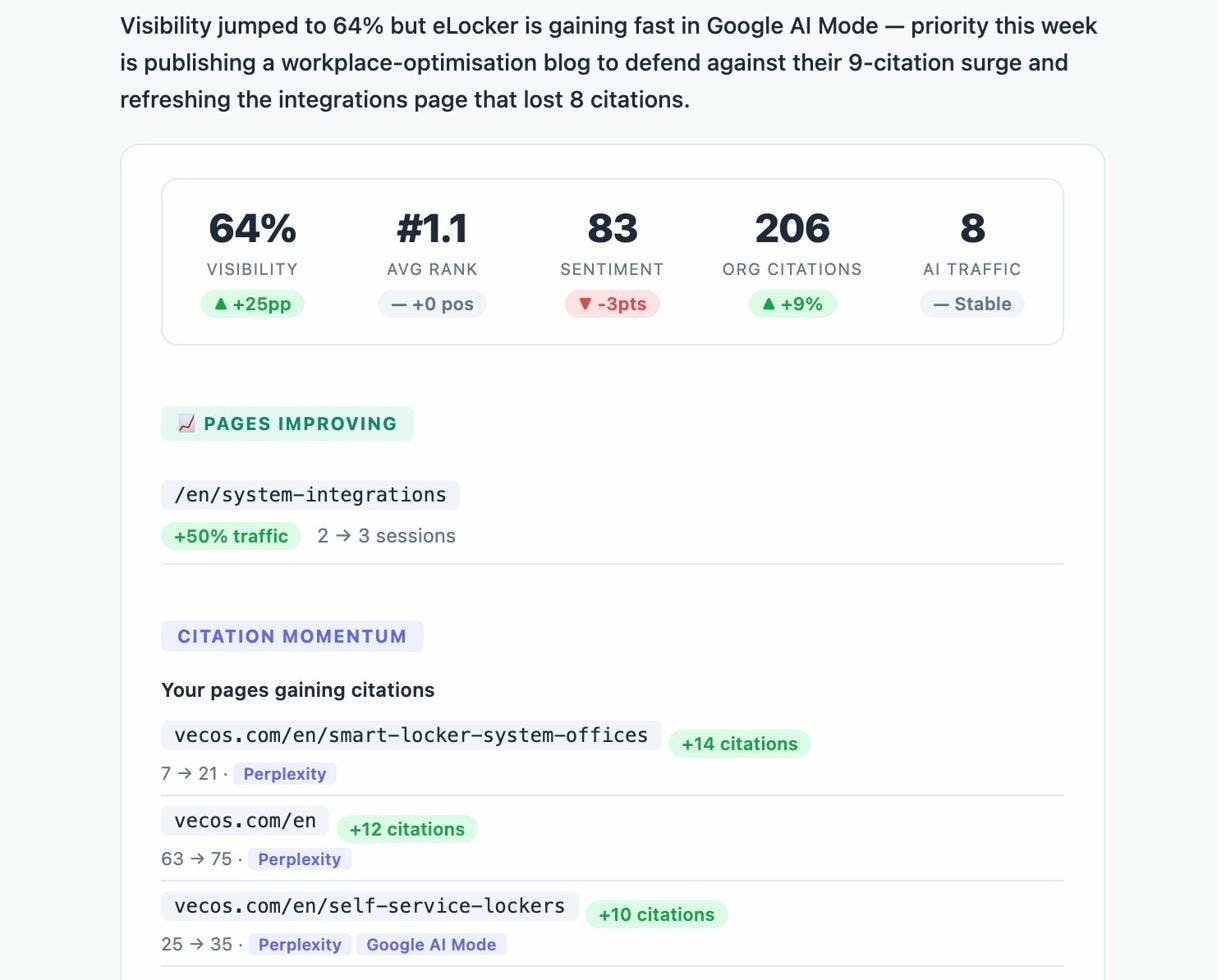
That’s it. Five steps. Done weekly, this is everything most small businesses need from SEO and AI search to start winning.
Final thoughts
DIY SEO works. Plenty of brands have grown to seven and eight figures with a founder or a single marketer doing all of this themselves.
The key isn’t finding one secret tactic. It’s running the loop.
-
Fix your technical foundation.
-
Find keywords and prompts that match your business.
-
Build pages that match intent and earn citations.
-
Earn links and source mentions.
-
Track what works and double down.
Once you’ve done one full cycle, the second is faster. By the third, you’re operating like an in-house SEO team of one.
If you want to go further on AI search, our breakdowns on how to rank on ChatGPT and how to rank on Perplexity are the natural next reads.
Now stop reading and go fix the first thing on your site that’s broken.

Ernest

Ibrahim


