



Summarize this blog post with:


In this article, you’ll learn what local SEO is, why it still matters more than ever, and how to do it step by step. You’ll also learn how AI search engines like ChatGPT, Perplexity, and Google AI Mode are changing local discovery — and what you can do right now to show up in both traditional search results and AI-generated answers.
Table of Contents
What Is Local SEO?
Local SEO is the process of optimizing your online presence so your business appears when people search for products or services near them.
When someone types “pizza near me” or “plumber in Austin” into Google, two things happen. First, Google shows a map pack — a set of three local business listings with a map. Second, it shows the regular organic results below.
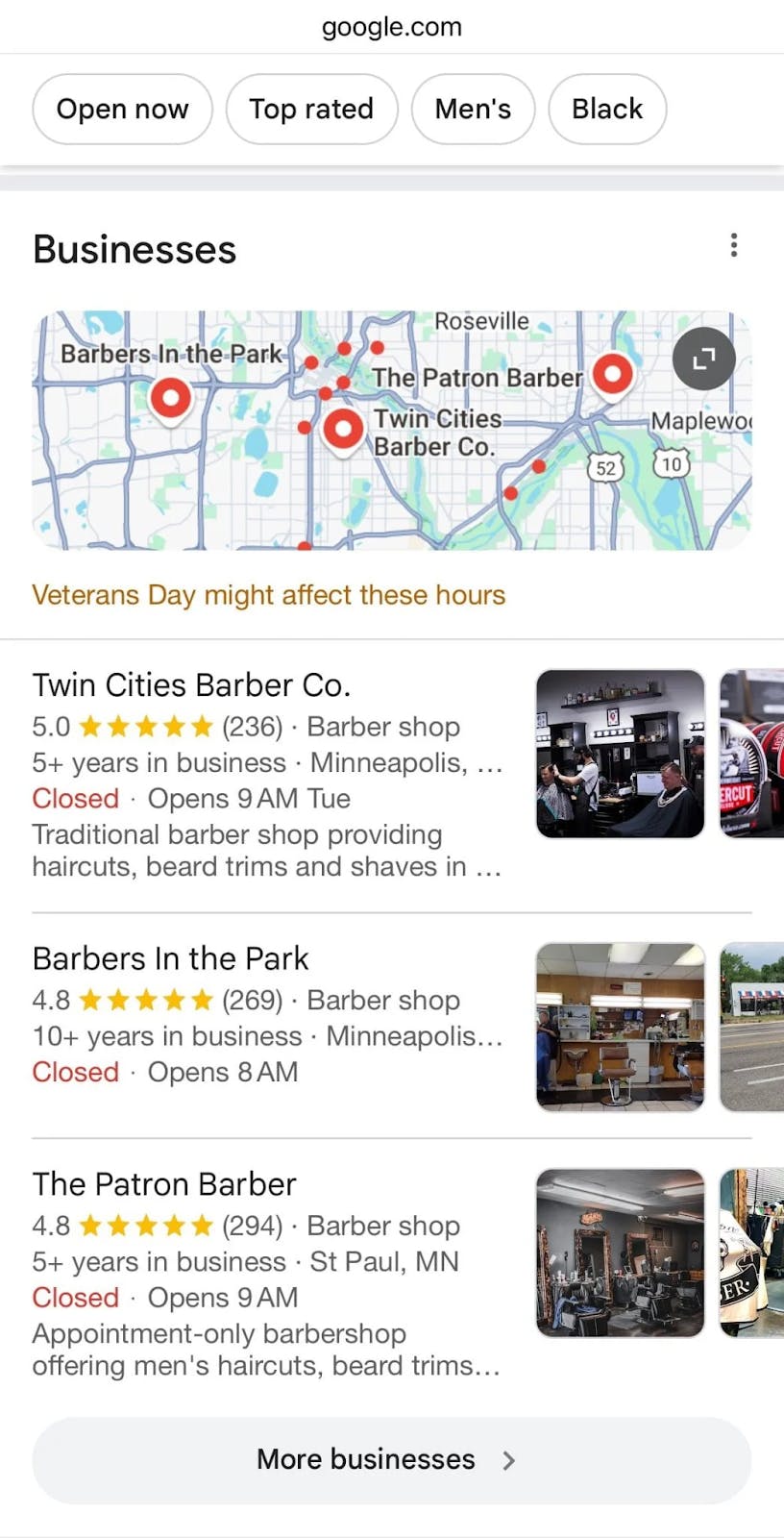
Local SEO is the work you do to rank higher in both of these result types. That work includes optimizing your Google Business Profile, earning reviews, building local citations, doing keyword research for your area, getting backlinks, and making on-page improvements to your site.
If you run a business with a physical location — or if you serve customers in a specific geographic area — local SEO is how those customers find you online instead of your competitors.
Why Local SEO Matters in 2026
People don’t open the Yellow Pages anymore. They search. And they search with intent to act.
According to Google’s own data, 30% of all mobile searches relate to location. 78% of people who search for something nearby on their phone visit a business within a day. And 28% of those searches end in a purchase.
Those numbers alone make local SEO one of the highest-ROI marketing activities a small or medium business can do. But there’s a newer reason local SEO matters: AI search.
AI Search Is Becoming a Local Discovery Channel
People are no longer limited to typing queries into Google. They’re asking ChatGPT, Perplexity, Google AI Mode, and Claude for local recommendations. Prompts like “best family dentist in Denver with evening hours” or “affordable Italian restaurants downtown Portland” are becoming common.
When someone asks an AI model for a local recommendation, that model pulls from the same signals that traditional search relies on — authoritative content, reviews, structured data, and citations across the web. If your business has strong local SEO fundamentals, you’re already better positioned for AI search visibility than competitors who don’t.
This doesn’t mean you need to choose between SEO and AI search. It means local SEO is evolving, and the businesses that win will be the ones visible across both traditional and AI-powered search.
How Does Local SEO Work?
Local SEO is a game of two halves. Google shows two types of results for local searches, and each has different ranking factors.
Map Pack Results
The map pack (also called the local pack) is the cluster of three business listings that appears near the top of Google’s results for local queries. Each listing shows the business name, rating, address, hours, and a map pin.
To appear in the map pack, you need a Google Business Profile. Google determines which businesses to show based on three factors:
|
Factor |
What It Means |
|---|---|
|
Relevance |
How well your Business Profile matches the search query |
|
Distance |
How close your business is to the searcher or the location they specified |
|
Prominence |
How well-known your business is based on reviews, links, citations, and web presence |
Organic “Blue Link” Results
Below the map pack, Google shows the standard organic results. These are the website pages that rank based on more traditional SEO signals — content relevance, backlinks, on-page optimization, and site authority.
Many local businesses focus on the map pack and ignore organic results. That’s a mistake. Both send customers your way, and the tactics that improve one often improve the other.
Where AI Search Fits In
AI search engines don’t show map packs. Instead, they synthesize answers from multiple sources and present them as conversational responses. When someone asks Perplexity “best plumber in North London,” the answer might reference review sites, blog posts, and business directories — the same sources that feed traditional local SEO.
The key difference is that AI models decide which sources to cite. If your business appears consistently across authoritative local sources — directories, review sites, niche blogs, your own well-structured website — AI models are more likely to mention you in their responses.
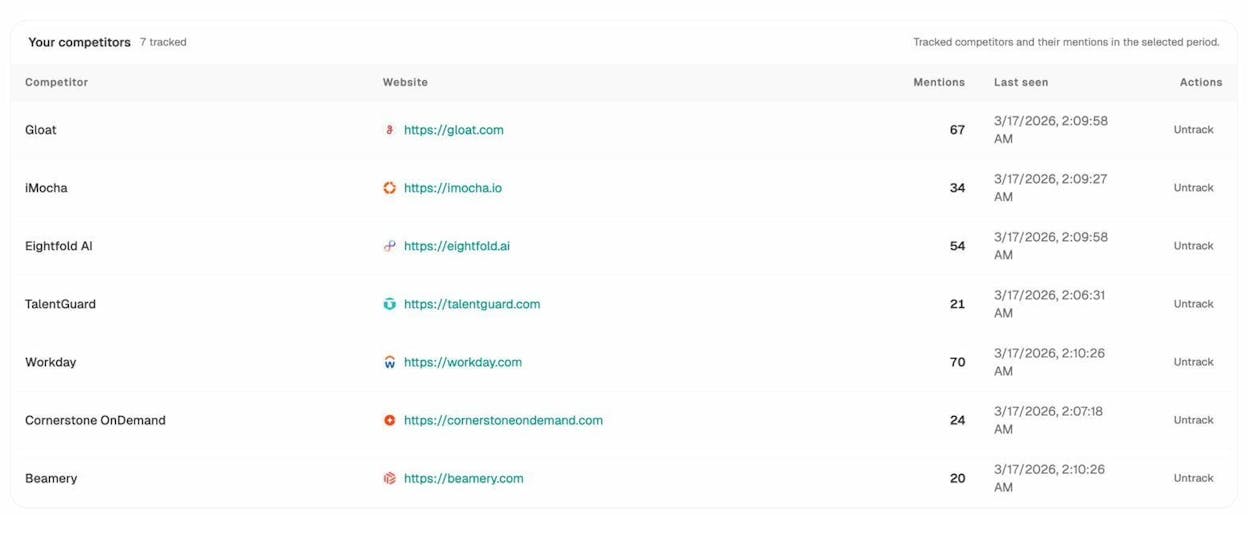
You can track this. Tools like Analyze AI let you monitor whether your business gets cited in AI-generated answers, which competitors show up instead, and what prompts trigger those mentions.
How to Do Local SEO
The rest of this guide walks through each step of local SEO in detail. The structure follows the same ranking factors we just covered — your Google Business Profile, reviews, citations, keywords, backlinks, and on-page signals — plus the technical foundations that tie everything together.
Each section covers the traditional SEO approach first, then explains how to extend that work into AI search visibility.
1. Claim and Optimize Your Google Business Profile
Your Google Business Profile (GBP) is the single most important local SEO asset you have. Without it, you cannot appear in the map pack. With a complete and optimized profile, you dramatically increase your chances of being found — both in Google and in AI-generated responses that pull from Google’s data.
BrightLocal’s annual survey found that 36% of SEOs consider GBP signals the most important factor for map pack rankings. And that percentage has grown year over year.
Google itself reports that customers are 70% more likely to visit businesses with a complete Business Profile and 50% more likely to consider purchasing from them.
Here’s how to set yours up properly:
Step 1: Claim your profile. Go to Google Business Manager and either claim an existing listing or create a new one. You’ll need to verify your business, usually through a postcard, phone call, or email.
![[Screenshot: Google Business Manager sign-up page]](https://www.datocms-assets.com/164164/1774437491-blobid2.png?auto=format,compress&w=1248&fit=max)
Step 2: Choose the right primary category. Your primary category tells Google what your business does. Be as specific as possible. “Italian Restaurant” is better than “Restaurant.” If you’re a plumber who specializes in emergency repairs, “Emergency Plumber” is better than “Plumber.”
![[Screenshot: Google Business Profile category selection dropdown]](https://www.datocms-assets.com/164164/1774437492-blobid3.jpg?auto=format,compress&w=1248&fit=max)
Step 3: Complete every field. Fill out your business hours (including holiday hours), add your physical address if you have a storefront, set your service area if you travel to customers, list your services and products, and upload high-quality photos.
Step 4: Write a compelling business description. Use this space to clearly explain what you do, who you serve, and what makes you different. Include your primary service keywords naturally — not stuffed artificially.
Step 5: Add products and services. Google lets you list individual services with descriptions and prices. Use this. It helps Google match your profile to specific search queries.
Step 6: Upload photos regularly. Businesses with photos receive 42% more requests for directions and 35% more click-throughs to their websites, according to Google. Upload photos of your storefront, interior, team, products, and completed work. Aim to add new photos at least monthly.
How GBP Data Feeds AI Search
When AI models generate answers about local businesses, they often pull from the same structured data that Google Business Profiles contain — business name, category, hours, reviews, and service descriptions.
A complete and accurate GBP improves your chances of being cited in AI-generated answers. But to track whether that’s actually happening, you need visibility into what AI models are saying about your business.
With Analyze AI’s prompt tracking, you can run prompts like “best [your service] in [your city]” across ChatGPT, Perplexity, Claude, and Google AI Mode. The tool runs these prompts on a schedule and records whether your business appears in the response, how it’s described, and which competitors show up instead.
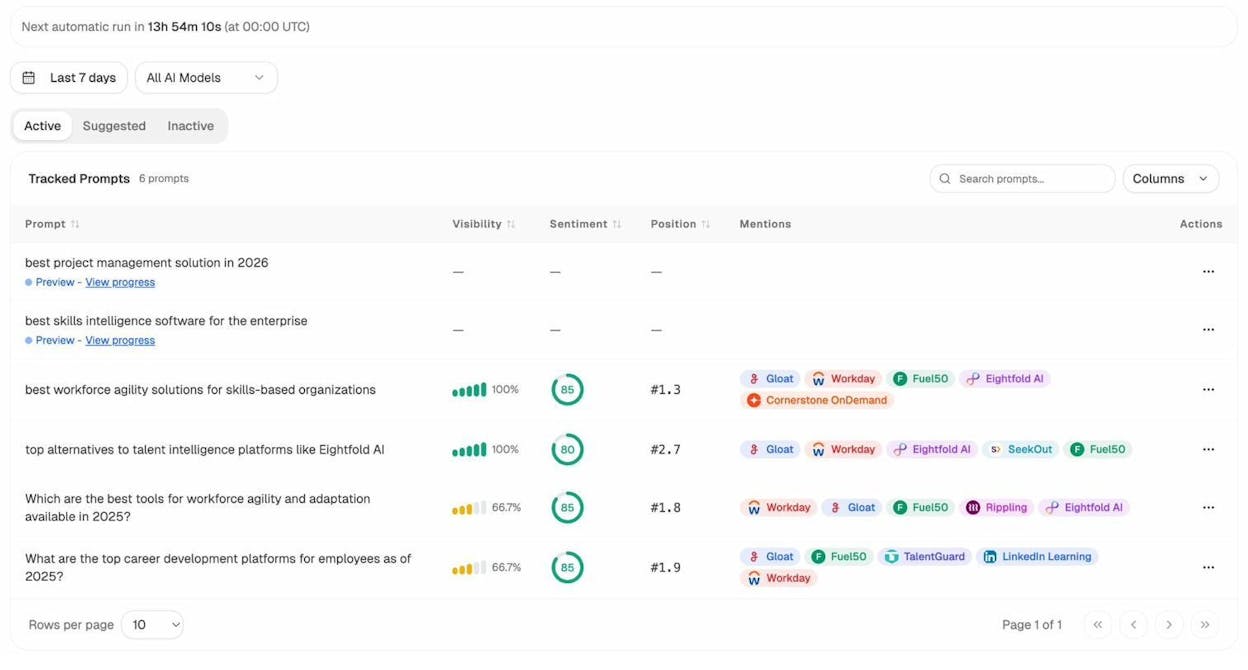
This turns GBP optimization from a “set it and forget it” task into a measurable channel. If you update your GBP description and your AI visibility improves over the following weeks, you’ve got a signal that the change worked.
2. Build a Review Strategy
Reviews influence both map pack rankings and customer trust. BrightLocal’s survey shows that 17% of SEOs consider reviews the most important ranking factor for the map pack, and that number has climbed steadily in recent years.
But the value of reviews goes beyond rankings. Reviews are social proof. They tell potential customers — and AI models — what it’s like to work with you.
Here’s how to build a review system that runs on autopilot:
Create a direct review link. Google Business Manager lets you generate a short URL that takes customers directly to the review form. Share this link after every job, transaction, or visit.
![[Screenshot: Google Business Manager showing how to find the review link under “Ask for reviews”]](https://www.datocms-assets.com/164164/1774437500-blobid5.jpg?auto=format,compress&w=1248&fit=max)
Ask at the right moment. The best time to ask for a review is right after you’ve delivered a positive outcome. For a restaurant, that’s when the customer is paying. For a plumber, it’s after the repair is confirmed working. For a dentist, it’s during the follow-up message.
Automate reminders. Use email or SMS follow-ups with your review link. Many CRM tools let you trigger a review request automatically after a service is completed.
Respond to every review. Google recommends responding to reviews, and doing so signals that you’re an active, engaged business. Respond to positive reviews with a quick thank-you. Respond to negative reviews with empathy and a clear path to resolution.
Don’t buy or incentivize reviews. Google’s terms prohibit offering money, discounts, or gifts in exchange for reviews. Getting caught leads to review removal or profile suspension.
Diversify review platforms. While Google reviews are most important for the map pack, reviews on Yelp, industry-specific directories, and Facebook help too. They build your overall online reputation, which affects both traditional and AI search.
Why Reviews Matter Even More in AI Search
When someone asks ChatGPT “best dentist in Austin for kids,” the model doesn’t just cite one source. It synthesizes information from multiple review platforms, directories, and web pages. Businesses with consistently positive reviews across many platforms are more likely to be recommended.
You can see this in action by tracking AI prompts relevant to your business. In Analyze AI, set up prompts that mirror how real customers would ask AI models about your services. Then monitor the responses over time to see whether your review-building efforts translate into more AI mentions.
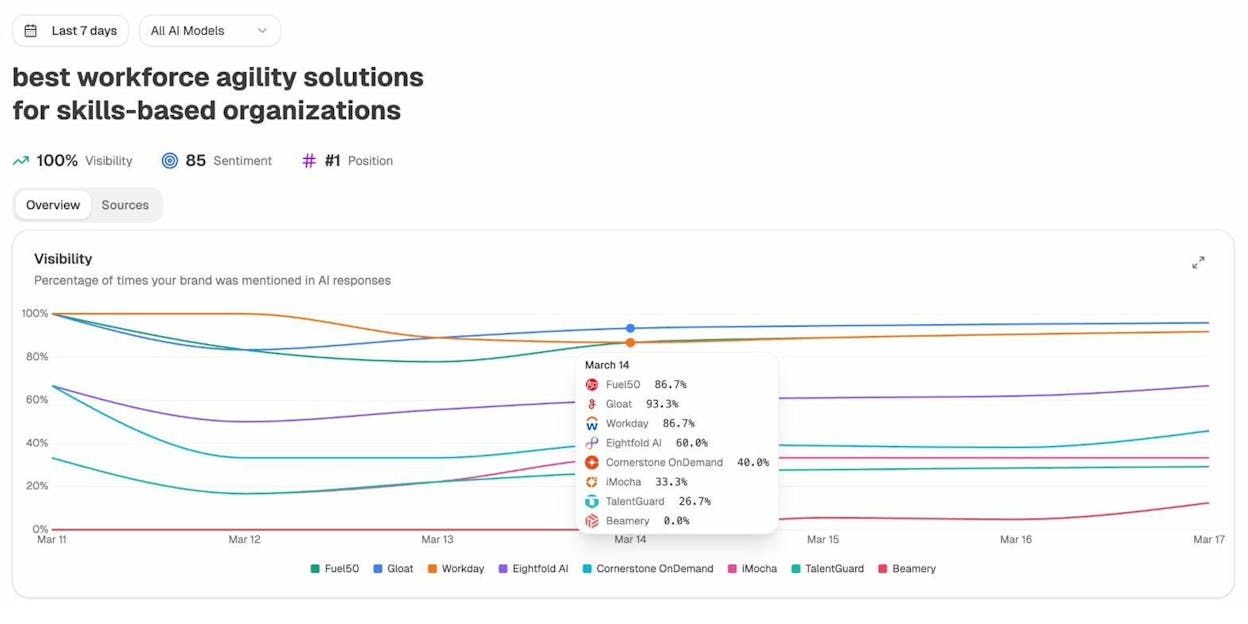
If a competitor consistently appears in AI answers and you don’t, check their review profile. A significant gap in review volume or rating often explains the difference.
3. Build Local Citations
A local citation is any online mention of your business’s name, address, and phone number (NAP). Citations most commonly appear on business directories, social media profiles, and industry-specific listing sites.
BrightLocal’s survey shows that 7% of SEOs consider citations the most important local ranking factor — for both map pack and organic results. That number has declined over the years, meaning citations alone won’t make or break your local SEO. But they remain a foundational signal that validates your business exists and operates where you say it does.
Here’s how to build and maintain citations effectively:
Start with the big data aggregators. In the U.S., submit your business information to Data Axle, Localeze, and Foursquare. These aggregators feed your information to hundreds of smaller directories, so getting listed here has a multiplier effect.
Submit to major platforms. After the aggregators, manually submit to Apple Maps, Yelp, Bing Places, Yellow Pages, and Facebook. Each of these is a high-authority citation that Google trusts.
Find industry and local directories. These vary by business type and location. A restaurant should be listed on TripAdvisor and OpenTable. A lawyer should be listed on Avvo and FindLaw. A plumber should be on HomeAdvisor and Angi.
Here’s how to find directories your competitors use but you don’t:
-
Go to a backlink comparison tool (like Ahrefs’ Link Intersect or a similar competitor link analysis)
-
Enter the homepages of three to five competing local businesses
-
Set the mode to “URL” for all targets
-
Click “Show link opportunities”
![[Screenshot: backlink comparison tool results showing sites linking to competitors — likely directories]](https://www.datocms-assets.com/164164/1774437506-blobid7.png?auto=format,compress&w=1248&fit=max)
Sites that link to multiple competitors but not to you are likely directories where you should also list your business.
Keep NAP consistent everywhere. The most common citation mistake is inconsistency. If your Google Business Profile says “123 Main St” but Yelp says “123 Main Street,” that discrepancy can dilute the trust signal. Use the exact same format for your business name, address, and phone number on every platform.
Audit existing citations. Search for your business name in quotes on Google. Look through the results for incorrect or outdated listings. Update them.
Citations and AI Source Selection
AI models use citations as one of many trust signals when deciding which businesses to mention. A business that appears consistently across authoritative directories, with matching information, looks more credible to an AI model than one with sparse or inconsistent listings.
You can use Analyze AI’s citation analytics to see which URLs AI models cite when answering prompts related to your business category. If directory listings frequently appear as cited sources, that’s a strong signal to invest more in your citation profile.
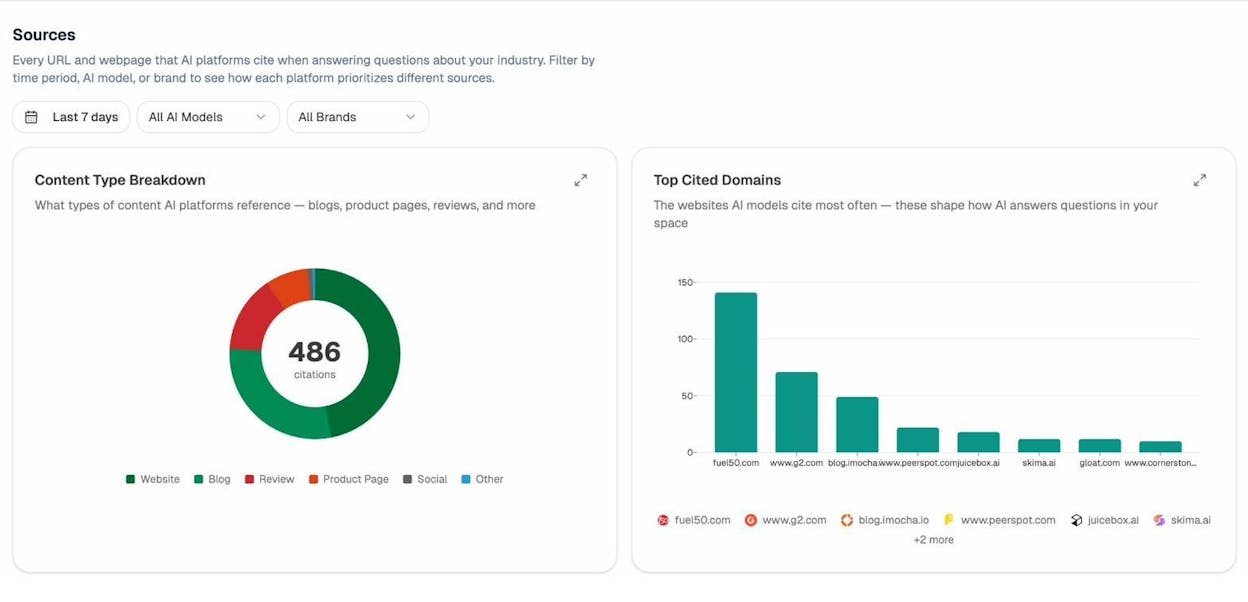
This data also reveals which directories carry the most weight with AI models — so you can prioritize your citation-building efforts accordingly.
4. Do Local Keyword Research
Local keyword research is the process of figuring out exactly what people type (or say) when they search for businesses like yours in your area.
This step matters because you can only optimize for what people actually search for. If you assume everyone searches for “plumber” but ignore that hundreds of people search for “emergency boiler repair” or “drain unblocking near me,” you’re missing potential customers.
Here’s a step-by-step process:
a. Brainstorm Service-Based Keywords
Start by listing every service you offer. Don’t filter or prioritize yet — just get them all written down.
For a plumber, that list might include: drain unblocking, boiler repair, boiler installation, boiler servicing, radiator installation, burst pipe repair, toilet repair, tap replacement, underfloor heating installation.
For a dentist: teeth cleaning, root canal, dental implants, teeth whitening, emergency dentist, kids dentist, Invisalign, dental crowns, wisdom tooth extraction.
![[Screenshot: A simple spreadsheet or notepad showing a brainstormed list of services]](https://www.datocms-assets.com/164164/1774437512-blobid9.png?auto=format,compress&w=1248&fit=max)
b. Expand With a Keyword Research Tool
Your brainstormed list is a starting point. A keyword research tool will reveal services you missed.
Take your seed keywords and plug them into a tool like Google Keyword Planner or a paid tool like Semrush. Check the “Matching terms” or “Related keywords” reports.
If you don’t have a paid tool subscription, Analyze AI’s free Keyword Generator can help you expand your seed list. Enter a service keyword like “boiler repair” and get a list of related terms — including long-tail variations that people actually search for.
![[Screenshot: Analyze AI Keyword Generator tool results for a local service keyword]](https://www.datocms-assets.com/164164/1774437515-blobid10.png?auto=format,compress&w=1248&fit=max)
For example, plugging “boiler repair” and “boiler installation” into a keyword research tool might reveal related terms like “gas boiler installation,” “combi boiler installation,” “electric boiler installation,” and “boiler replacement cost.”
![[Screenshot: Keyword research tool showing matching terms report with local service keywords and their search volumes]](https://www.datocms-assets.com/164164/1774437518-blobid11.png?auto=format,compress&w=1248&fit=max)
Another approach: plug a competitor’s website into a competitive analysis tool and check their top pages. Look for URLs that correspond to specific services — those are keywords your competitor is targeting.
If you want a quick read on how much traffic a competitor gets before diving deeper, Analyze AI’s free Website Traffic Checker gives you an estimate of any site’s monthly visitors. This helps you identify which local competitors are actually winning organic traffic — and which ones just look established but aren’t getting much search volume.
![[Screenshot: Analyze AI Website Traffic Checker showing estimated monthly traffic for a local competitor’s site]](https://www.datocms-assets.com/164164/1774437522-blobid12.png?auto=format,compress&w=1248&fit=max)
c. Check Search Volumes
Most keyword research tools show national search volume. For local volume, use Google Keyword Planner and set the location to your city or state.
Don’t ignore Bing either. Bing still commands a meaningful share of search traffic, and its user base skews toward desktop and older demographics — which overlaps heavily with many local service categories. Analyze AI’s free Bing Keyword Tool shows you keyword data specific to Bing, so you can spot opportunities that Google-only tools miss.
![[Screenshot: Google Keyword Planner with location filter set to a specific city, showing local search volume ranges]](https://www.datocms-assets.com/164164/1774437524-blobid13.png?auto=format,compress&w=1248&fit=max)
Keyword Planner has two limitations: it shows broad ranges (1K–10K instead of exact numbers) and it groups similar keywords together. Because of this, it’s often more useful to compare relative popularity at the national level. If “boiler repair” has 3x the national volume of “boiler servicing,” that ratio likely holds true in your city too.
Use this to prioritize. Higher-volume keywords deserve more attention in your optimization efforts.
You should also consider keyword difficulty — how hard it will be to rank for a given term. A high-volume keyword that every competitor in your city targets may be harder to crack than a lower-volume keyword with less competition. Analyze AI’s free Keyword Difficulty Checker gives you a quick read on how competitive a keyword is, so you can balance volume against realistic ranking opportunity.
![[Screenshot: Analyze AI Keyword Difficulty Checker showing difficulty score for a local service keyword]](https://www.datocms-assets.com/164164/1774437530-blobid14.png?auto=format,compress&w=1248&fit=max)
d. Check for Local Intent
Not every keyword related to your services has local intent. Local intent means the searcher wants a nearby provider.
To check, Google the keyword and look at the results. If you see a map pack and local business websites ranking, the keyword has local intent.
You can speed this up with Analyze AI’s free SERP Checker. Enter your keyword and instantly see the full SERP layout — including whether a map pack appears, which domains rank, and what SERP features are present. This saves you from manually Googling dozens of keywords one by one.
![[Screenshot: Analyze AI SERP Checker results showing SERP features for a local keyword, including map pack presence]](https://www.datocms-assets.com/164164/1774437531-blobid15.png?auto=format,compress&w=1248&fit=max)
![[Screenshot: Google SERP for “boiler installation” showing map pack — confirming local intent]](https://www.datocms-assets.com/164164/1774437541-blobid16.png?auto=format,compress&w=1248&fit=max)
If the results are all informational articles or national brands with no map pack, the keyword probably doesn’t have local intent.
![[Screenshot: Google SERP for a query without local intent — no map pack, only informational content]](https://www.datocms-assets.com/164164/1774437544-blobid17.png?auto=format,compress&w=1248&fit=max)
Keywords without local intent can still be valuable for content marketing, but they’re not local SEO targets.
e. Assign Keywords to Pages
Once you have your keyword list filtered for local intent, map each keyword to a page on your website.
The rule is simple:
-
If two keywords describe different services (like “boiler repair” and “drain unblocking”), they need separate pages.
-
If two keywords describe the same service (like “drain unblocking” and “drain unclogging”), they go on the same page.
Your homepage will target your broadest keyword — usually your business category plus location (e.g., “plumber in Austin”). Each service page will target more specific keywords.
How to Research What People Ask AI Models About Your Services
Traditional keyword research tells you what people type into Google. But people phrase AI prompts differently. Instead of “plumber Austin TX,” someone might ask ChatGPT, “Who’s the most reliable plumber near downtown Austin for emergency weekend repairs?”
These longer, more conversational queries are harder to predict with traditional keyword tools. That’s where Analyze AI’s prompt suggestion feature comes in. It analyzes your business and suggests prompts that real users might ask AI models about your services or your industry.
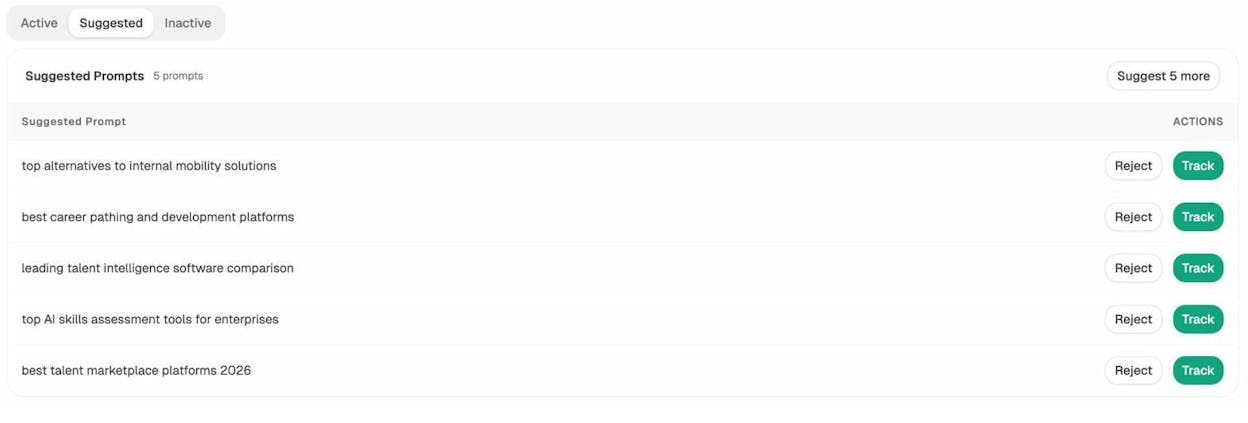
Analyze AI Prompt Suggestions — the platform suggests relevant prompts you should track, with one-click options to Track or Reject each suggestion
You can track these prompts to see if your business appears in the response. If it doesn’t, you know exactly which AI conversations you’re missing from — and can work on the content and citations that would get you mentioned.
This is the AI search equivalent of keyword research. Instead of search volume, you’re tracking prompt visibility. And instead of ranking position, you’re tracking whether you’re cited, mentioned, or absent.
5. Get More Backlinks
Backlinks — links from other websites to yours — are one of the strongest ranking signals for organic local search. BrightLocal’s survey found that 31% of SEOs consider links the most important factor for organic local rankings, and 13% consider them the most important for map pack rankings.
Multiple studies have confirmed a strong positive correlation between the number of referring domains pointing to a website and its organic search traffic.
Here’s how to build local backlinks:
Get listed in local and industry directories. You may have done this for citations already. Many directories include a link to your website, making them both a citation and a backlink.
Get links from local organizations. Chambers of commerce, business associations, local news sites, and community organizations often link to member businesses. Join them.
Sponsor local events or charities. Event pages and nonprofit donor pages often link back to sponsors. This is a natural way to earn local backlinks while supporting your community.
Create locally relevant content. Write guides, resources, or data-driven posts that are useful to your local community. A real estate agent in Denver might publish a neighborhood guide. A restaurant in Portland might publish a local food event calendar. Content that serves a local audience earns local links.
Video works especially well for local businesses. “How to” videos about home repairs, before-and-after project walkthroughs, and local neighborhood tours all attract views and links. If you’re considering video, use Analyze AI’s free YouTube Keyword Tool to find what people in your industry are searching for on YouTube. A plumber might discover that “how to fix a dripping tap” has thousands of monthly searches — and a helpful video that mentions your service area drives both awareness and backlinks.
Reclaim unlinked mentions. Sometimes businesses, blogs, or news sites mention your business without linking to your website. Search for your brand name in quotes on Google and look for mentions without links. Reach out and ask for the link.
Analyze competitor backlinks. Use a competitive backlink analysis tool to see who links to your competitors. If a local blog links to three of your competitors but not to you, that’s an opportunity. Reach out with a reason they should link to you too.
When evaluating potential link sources, authority matters. A link from a high-authority local news site carries more weight than a link from a brand-new blog. Use Analyze AI’s free Website Authority Checker to quickly assess any domain’s authority score before investing time in outreach.
![[Screenshot: Analyze AI Website Authority Checker showing domain authority score for a local directory or news site]](https://www.datocms-assets.com/164164/1774437550-blobid19.png?auto=format,compress&w=1248&fit=max)
Fix broken links on your own site. Broken outbound or internal links create a poor user experience and waste link equity. Run your site through Analyze AI’s free Broken Link Checker to find and fix any dead links. This is especially important if you’ve changed URLs, removed service pages, or had your site redesigned.
![[Screenshot: Analyze AI Broken Link Checker results showing broken links found on a local business website]](https://www.datocms-assets.com/164164/1774437555-blobid20.png?auto=format,compress&w=1248&fit=max)
Local Links and AI Citations: The Overlap
Backlinks and AI citations share an underlying logic. Both signal that other sources trust and reference your business. Pages that earn strong backlinks tend to rank higher in traditional search — and pages that rank higher in traditional search tend to get cited more by AI models.
Our research across 83,670 AI citations shows that AI models heavily favor authoritative, well-linked sources when generating responses. When Perplexity or ChatGPT recommends a local service, it usually cites pages that already rank well in Google — pages that have backlinks from trusted sources.
This means your link-building efforts serve double duty. Every backlink improves your organic ranking, which in turn improves your chances of being cited in AI search.
You can measure this directly in Analyze AI by looking at the top sources that AI models cite for prompts in your industry.
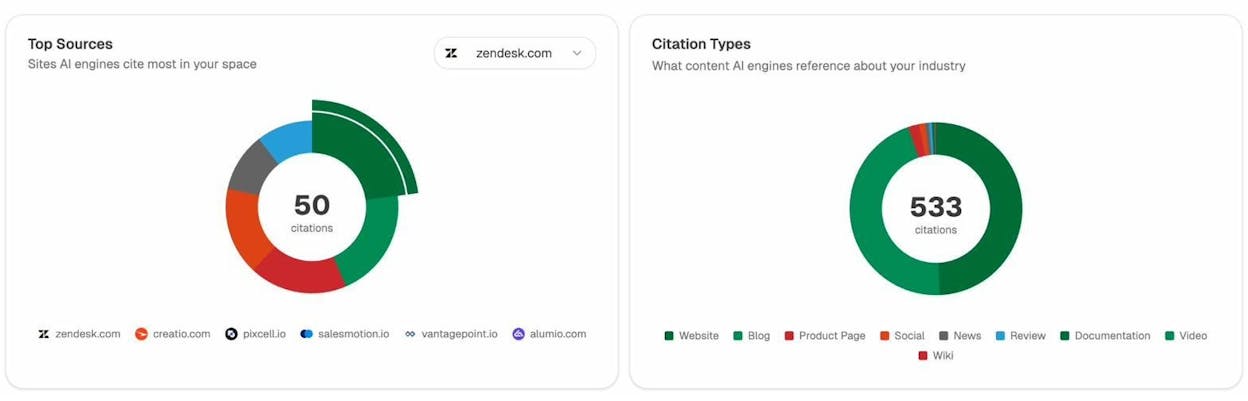
If your website or pages linking to you appear in this list, your link-building strategy is paying off in AI search too.
6. Improve On-Page SEO for Local
On-page SEO is where you optimize the content and HTML of your web pages to rank higher. BrightLocal’s survey shows that 34% of SEOs consider on-page signals the most important factor for organic local rankings — making it the top-ranked factor for organic results.
Here’s what to focus on:
Write title tags that include your service and location. Your title tag is the blue clickable link in search results. For a service page, a good format is: “[Service] in [City] | [Business Name].” For example: “Emergency Plumber in Austin | Quick Fix Plumbing.”
![[Screenshot: Browser tab and Google SERP snippet showing a well-optimized local title tag]](https://www.datocms-assets.com/164164/1774437564-blobid22.png?auto=format,compress&w=1248&fit=max)
Write meta descriptions that encourage clicks. The meta description is the gray text below the title in search results. Include your key service, location, and a reason to click — like “24/7 availability” or “Free estimates.”
Use descriptive, SEO-friendly URLs. Keep URLs short and descriptive. /services/boiler-repair is better than /page?id=47.
Include your NAP on every page. Your business name, address, and phone number should be in your website’s footer and on your contact page. This consistency reinforces your local presence to both search engines and AI crawlers.
Add locally relevant content to service pages. Don’t just list your services — explain what you do in the context of your area. A roofer in Miami should mention hurricane-resistant materials. A landscaper in Phoenix should discuss drought-tolerant plants. This local context helps search engines (and AI models) understand your relevance to local queries.
Optimize images. Use descriptive file names (e.g., boiler-repair-austin.jpg instead of IMG_2847.jpg) and alt text that describes the image content. Include location where natural.
Link internally. Connect related pages on your site with internal links. Your homepage should link to your main service pages. Your service pages should link to related services and to your contact page. This helps search engines understand your site structure and helps visitors navigate.
Use “Also Talk About” Keywords to Match Searcher Expectations
One of the best on-page SEO tactics for local is checking what top-ranking pages in your area mention. This reveals what searchers expect to find.
Here’s how to find these terms using a keyword research tool:
-
Enter your service keyword plus your location (e.g., “boiler repair London”)
-
Go to the “Related terms” or “Also talk about” report
-
Filter for keywords that appear on the top 10 ranking pages
![[Screenshot: Keyword tool Related Terms report showing “also talk about” keywords for a local service query]](https://www.datocms-assets.com/164164/1774437567-blobid23.jpg?auto=format,compress&w=1248&fit=max)
For “boiler repair London,” you might see terms like “gas safe” (customers want a certified engineer), “greater London” (they want to know if you serve their area), “emergency call” (they want to know if you do emergency work), and “gas boiler” (they want to know if you repair their specific type).
Add these details to your service pages. They’re the kind of specific, helpful information that makes your content more useful than competitors’ pages — and more likely to be cited by AI search engines.
7. Add Local Schema Markup
Schema markup is structured data you add to your website’s code that helps search engines understand your content better. For local businesses, the most important schema type is LocalBusiness.
Google uses schema to power rich results, knowledge panels, and featured snippets. AI models also benefit from structured data because it makes your information machine-readable.
Here’s a basic LocalBusiness schema template in JSON-LD format:
{
"@context": "https://schema.org",
"@type": "LocalBusiness",
"name": "Quick Fix Plumbing",
"image": "https://www.quickfixplumbing.com/images/storefront.jpg",
"telephone": "+1-512-555-0123",
"address": {
"@type": "PostalAddress",
"streetAddress": "123 Main Street",
"addressLocality": "Austin",
"addressRegion": "TX",
"postalCode": "78701",
"addressCountry": "US"
},
"geo": {
"@type": "GeoCoordinates",
"latitude": 30.2672,
"longitude": -97.7431
},
"url": "https://www.quickfixplumbing.com",
"openingHoursSpecification": [
{
"@type": "OpeningHoursSpecification",
"dayOfWeek": ["Monday", "Tuesday", "Wednesday", "Thursday", "Friday"],
"opens": "08:00",
"closes": "18:00"
}
],
"priceRange": "$$",
"areaServed": {
"@type": "City",
"name": "Austin"
}
}
Add this to the <head> section of your homepage and location-specific pages. Use the most specific schema subtype available — Dentist, Plumber, Restaurant, RealEstateAgent, etc. — rather than the generic LocalBusiness.
![[Screenshot: Google’s Rich Results Test tool showing valid LocalBusiness schema markup]](https://www.datocms-assets.com/164164/1774437570-blobid24.jpg?auto=format,compress&w=1248&fit=max)
You can validate your schema with Google’s Rich Results Test or Schema.org’s validator.
Why Schema Matters for AI Search
AI models that use retrieval-augmented generation (RAG) pull content from the web in real time. When they encounter well-structured schema markup, it makes it easier for them to extract accurate facts about your business — your name, address, hours, services, and service area.
This doesn’t guarantee a citation. But it removes friction. A page with clean schema markup is easier for an AI model to parse and trust than a page where business details are buried in paragraphs of text.
8. Optimize for Mobile and Page Speed
Over 60% of Google searches now happen on mobile devices, and the percentage is even higher for local searches. If your website is slow or hard to use on a phone, you’ll lose both rankings and customers.
Test your mobile experience. Open your website on your phone. Can you tap the phone number to call? Can you find your address without scrolling? Can you read the text without zooming? If the answer to any of these is no, fix it.
Check your page speed. Use Google’s PageSpeed Insights to test your site. Aim for a performance score above 80 on mobile. Common issues include oversized images, render-blocking JavaScript, and slow server response times.
![[Screenshot: Google PageSpeed Insights results for a local business website on mobile]](https://www.datocms-assets.com/164164/1774437573-blobid25.png?auto=format,compress&w=1248&fit=max)
Make sure your phone number is clickable. On mobile, your phone number should be a tel: link. When someone taps it, their phone should start dialing. This sounds basic, but a surprising number of local business sites don’t do it.
Add your address with a map link. Link your address to Google Maps or Apple Maps. This makes it effortless for mobile users to get directions.
Fast, mobile-friendly websites rank better in both desktop and mobile search. They also create a better experience for AI search visitors — users who click through to your site from an AI-generated citation will judge your business by how quickly and easily your page loads.
9. Track, Measure, and Improve
Local SEO isn’t something you set up once and forget. It’s an ongoing process that requires monitoring and adjustment.
Track Your Traditional Local Rankings
Use a rank tracking tool to monitor where you appear for your target keywords. Google Search Console is free and shows you which queries bring traffic to your site. For more detailed tracking by city or ZIP code, paid rank trackers like those in our roundup are worth considering.
For a quick spot-check without a paid subscription, Analyze AI’s free Keyword Rank Checker lets you see where your site ranks for any keyword right now. This is useful for verifying your position on your most important local terms without committing to a monthly tool.
![[Screenshot: Analyze AI Keyword Rank Checker showing ranking position for a local keyword]](https://www.datocms-assets.com/164164/1774437579-blobid26.png?auto=format,compress&w=1248&fit=max)
![[Screenshot: Google Search Console performance report filtered by a local query]](https://www.datocms-assets.com/164164/1774437579-blobid27.jpg?auto=format,compress&w=1248&fit=max)
Pay attention to trends. If a keyword drops, check whether a competitor published new content, earned new links, or updated their GBP. Then respond accordingly.
Track Your AI Search Visibility
Traditional rank tracking tells you where you stand in Google. But it tells you nothing about whether ChatGPT, Perplexity, or Google AI Mode mention your business when users ask about your services.
This is where Analyze AI fills the gap.
Set up prompts that reflect how potential customers would ask AI models about your services. Then track the results over time. Analyze AI runs these prompts on a schedule and shows you:
-
Whether your brand was mentioned in each response
-
Which competitors were mentioned instead
-
The sentiment of how AI models describe your business
-
Which sources AI models cited in their answers
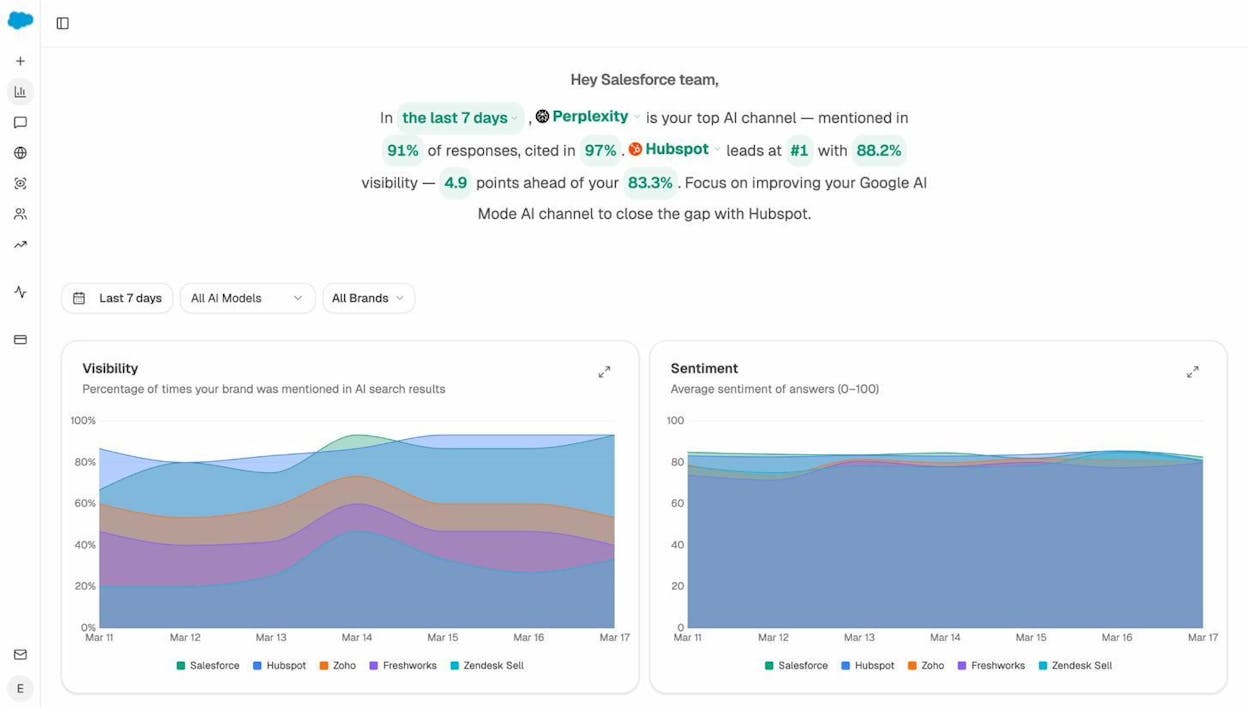
Analyze AI Overview dashboard — see your brand’s visibility percentage and sentiment score over time across all AI models, with competitor comparison charts showing exactly where you stand
You can also connect your Google Analytics (GA4) to Analyze AI to see how much traffic AI search actually sends to your site, which pages AI visitors land on, and whether those visits convert.
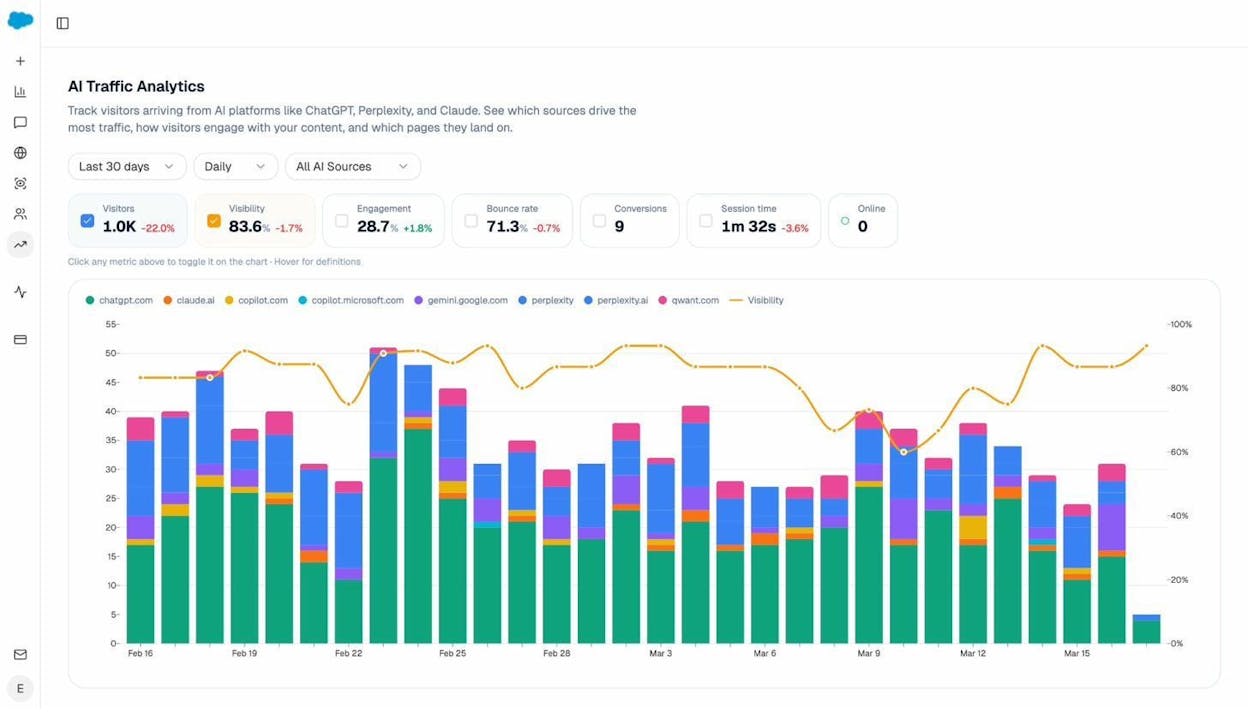
Analyze AI Traffic Analytics — track visitors arriving from AI platforms like ChatGPT, Perplexity, Claude, and Gemini, with daily breakdowns by source, visibility overlay, engagement metrics, and conversion tracking
Drill down further to see exactly which landing pages are receiving AI-referred traffic, which AI engines sent that traffic, and how those visitors behave after they arrive.
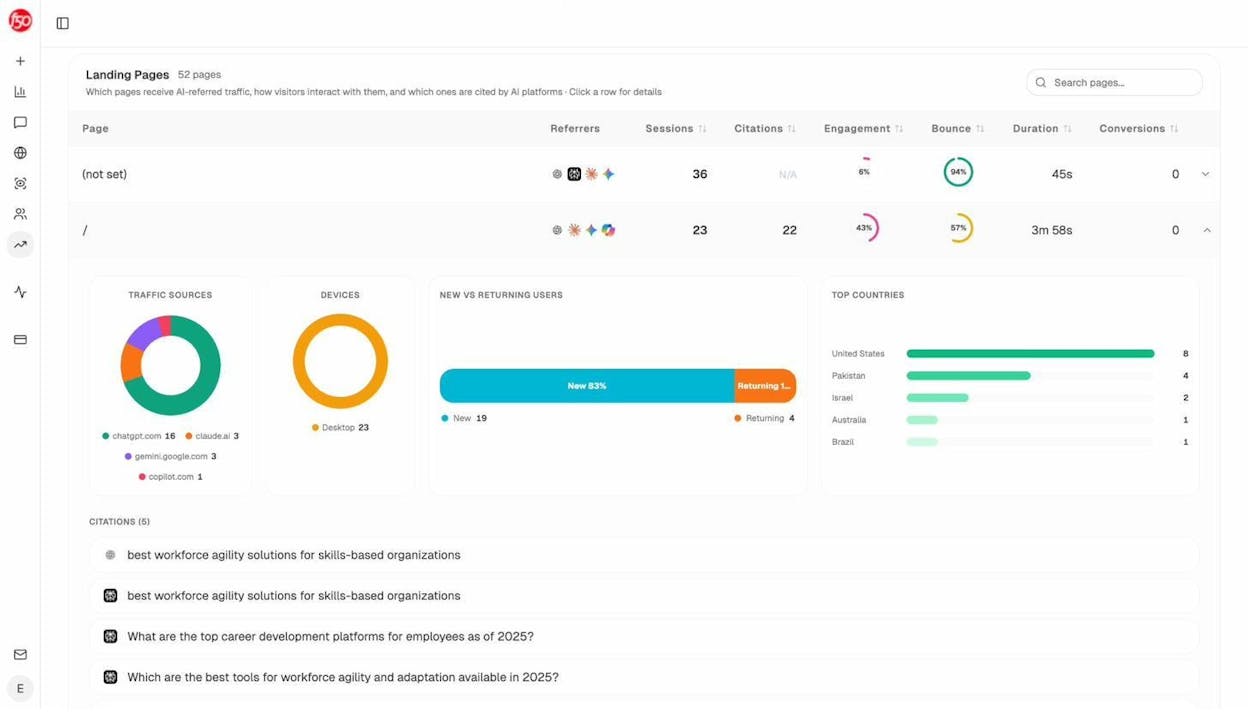
Analyze AI Landing Pages — see which of your pages receive AI-referred traffic, with per-page breakdowns showing referrer sources, sessions, citations, engagement rate, bounce rate, and conversion data
This data closes the loop between your local SEO work and AI search results. If you improve your GBP, earn more reviews, and build better service pages, you can measure whether those changes increase your AI visibility — not just your Google rankings.
Find Opportunities You’re Missing
One of the most actionable views in Analyze AI is the Position Breakdown. It shows exactly which prompts your brand appears in across each AI engine, what position you hold, and which competitors rank alongside you.
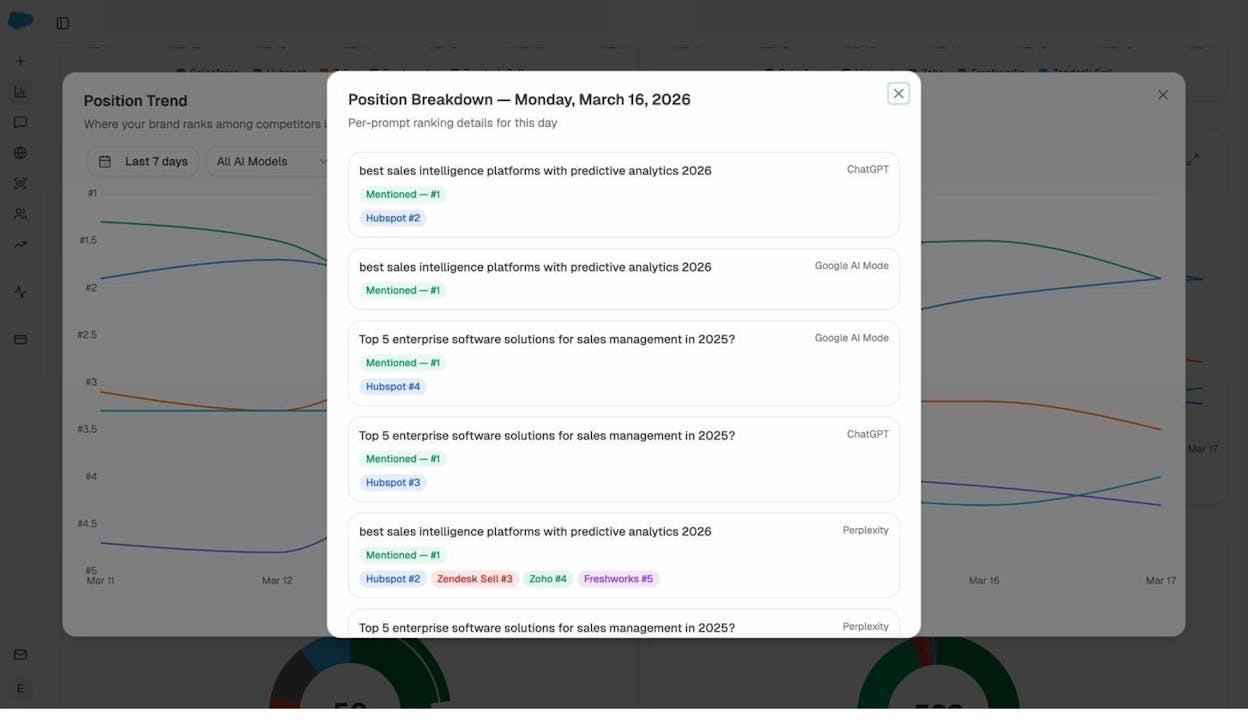
Analyze AI Position Breakdown — per-prompt ranking details by day, showing exactly where your brand is mentioned across ChatGPT, Google AI Mode, and Perplexity, with competitor positions for each prompt
These opportunities are your roadmap. If a competitor gets mentioned for “best emergency plumber in Austin” but you don’t, you know exactly what to work on — your emergency services page, your reviews for emergency work, and the citations that reference your emergency availability.
You can also use the Competitor Suggestions feature to discover which brands are frequently mentioned alongside yours in AI answers — even ones you weren’t aware were competing for the same prompts.
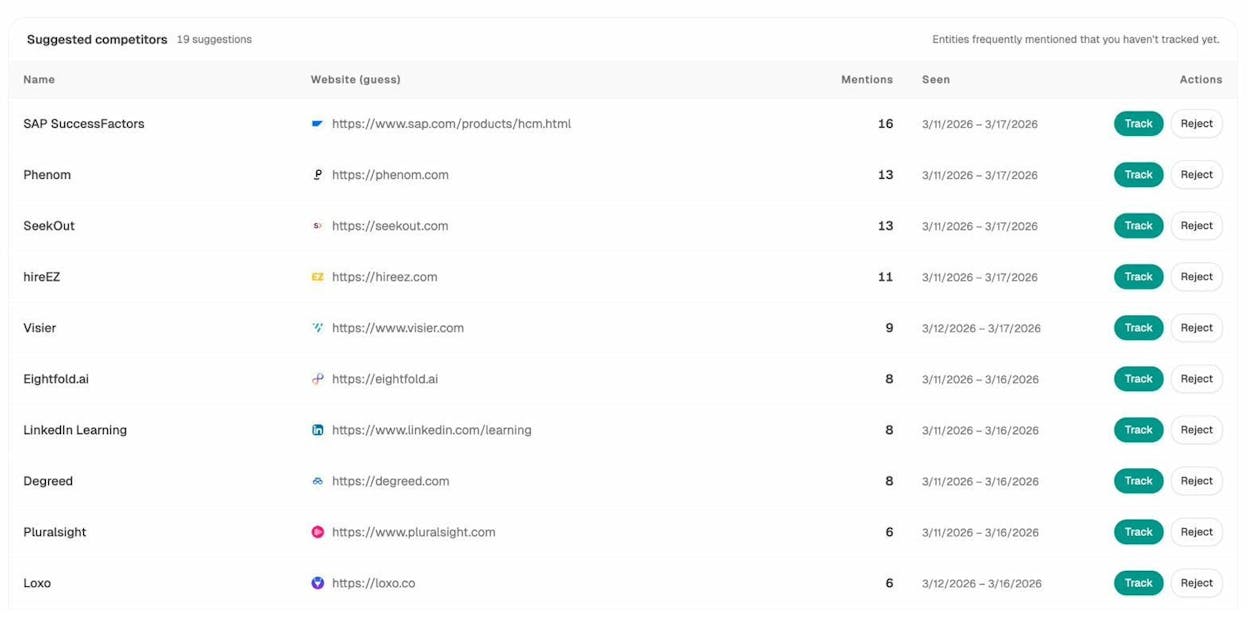
Analyze AI Suggested Competitors — discover entities that frequently appear in AI answers alongside your tracked brands, with mention counts and the option to start tracking them
Understand How AI Models Perceive Your Brand
Beyond visibility and position, it matters how AI models describe your business. Analyze AI’s Perception map plots your brand against competitors on two axes: visibility (how often you appear) and narrative strength (how positively you’re described).
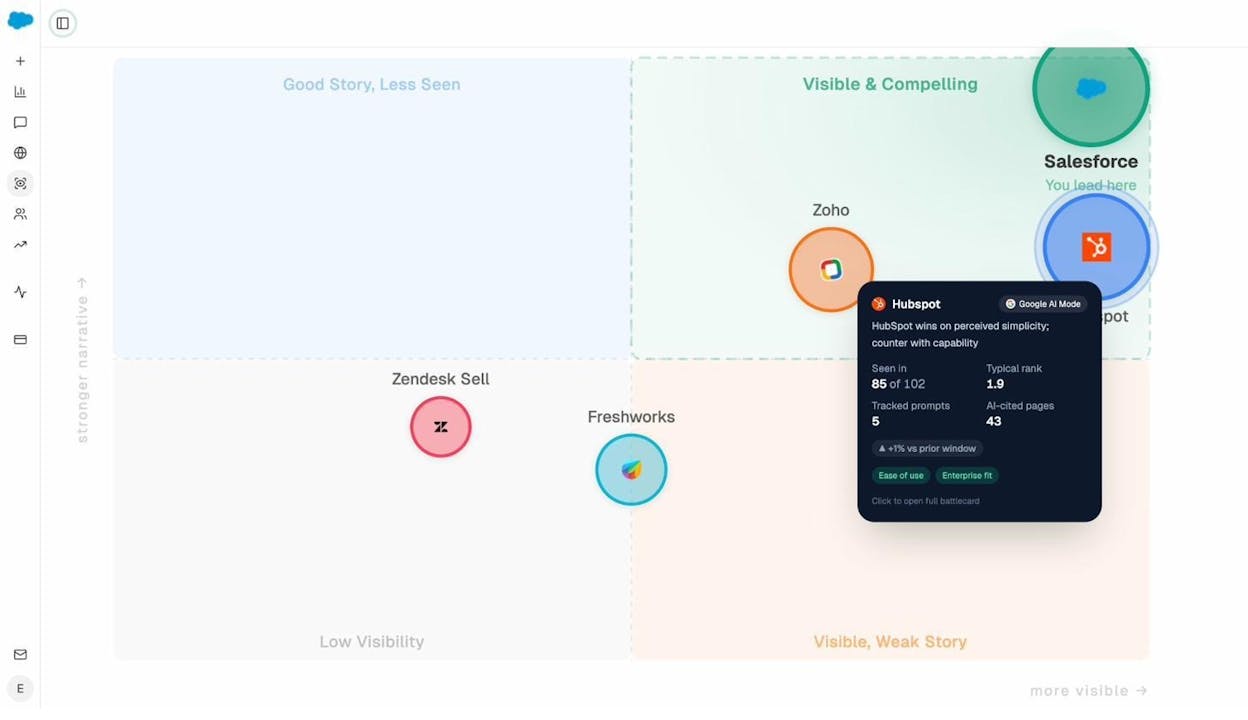
Analyze AI Perception Map — see where your brand and competitors sit on a quadrant chart measuring visibility vs. narrative strength, with detailed battlecards showing per-brand stats like typical rank, tracked prompts, and AI-cited pages
A business in the “Visible & Compelling” quadrant has both strong presence and positive framing in AI answers. If your business sits in “Visible, Weak Story,” you’re showing up but the narrative isn’t flattering — which points to a reputation or content issue you can fix.
Local SEO Tools
Here’s a quick reference of the tools mentioned in this guide, plus a few others that are useful for local SEO.
|
Tool |
What It Does |
Free? |
|---|---|---|
|
Manage your Google Business Profile |
Yes |
|
|
Monitor your site’s search performance |
Yes |
|
|
Find keywords and local search volumes |
Yes |
|
|
Test your site’s loading speed |
Yes |
|
|
Validate your schema markup |
Yes |
|
|
See map pack rankings around your location |
Freemium |
|
|
Manage business listings across multiple directories |
Paid |
|
|
Local SEO auditing, citation building, rank tracking |
Paid |
|
|
Track AI search visibility, citations, competitor mentions, and AI traffic |
Freemium |
|
|
Generate keyword ideas from seed terms |
Yes |
|
|
Check how hard a keyword is to rank for |
Yes |
|
|
See where your site ranks for any keyword |
Yes |
|
|
View full SERP layout and features for any keyword |
Yes |
|
|
Estimate any website’s monthly traffic |
Yes |
|
|
Check domain authority of any website |
Yes |
|
|
Find broken links on your site |
Yes |
|
|
Find keyword data specific to Bing search |
Yes |
|
|
Find what people search for on YouTube |
Yes |
|
|
Find product keyword data on Amazon (useful for local retailers) |
Yes |
The tools you need depend on your budget and business size. At minimum, every local business should use Google Business Manager, Google Search Console, and a basic rank tracking solution.
If you don’t have the budget for paid tools, Analyze AI’s free tool suite covers many of the same core needs — keyword generation, rank checking, SERP analysis, authority checking, and broken link detection — at no cost.
If you want to go further and track how your business appears in AI-generated answers — and see which competitors are winning those mentions — Analyze AI’s full platform adds that layer.
Local SEO Checklist
Use this checklist to make sure you’ve covered the fundamentals:
|
Task |
Status |
|---|---|
|
Claimed and verified Google Business Profile |
☐ |
|
Completed all GBP fields (hours, address, services, photos, description) |
☐ |
|
Selected specific primary business category |
☐ |
|
Set up a system to request reviews after each job/visit |
☐ |
|
Responding to all reviews (positive and negative) |
☐ |
|
Submitted to major data aggregators (Data Axle, Localeze, Foursquare) |
☐ |
|
Listed on Apple Maps, Yelp, Bing Places, Facebook |
☐ |
|
Listed on industry-specific directories |
☐ |
|
NAP consistent across all listings |
☐ |
|
Completed local keyword research |
☐ |
|
Created dedicated service pages for each key service |
☐ |
|
Optimized title tags and meta descriptions with service + location |
☐ |
|
Added LocalBusiness schema markup |
☐ |
|
Website is mobile-friendly and loads in under 3 seconds |
☐ |
|
Phone number is clickable on mobile |
☐ |
|
Earning local backlinks through directories, organizations, and content |
☐ |
|
Tracking keyword rankings with a rank tracking tool |
☐ |
|
Tracking AI search visibility with Analyze AI |
☐ |
Key Takeaways
Local SEO in 2026 is a two-front strategy. The fundamentals haven’t changed — your Google Business Profile, reviews, citations, keywords, backlinks, and on-page optimization still determine whether customers find you in Google.
What has changed is that AI search engines are now part of the discovery journey. People ask ChatGPT, Perplexity, and Google AI Mode for local recommendations, and those models rely on the same signals you’re already building through local SEO.
The businesses that will win are the ones that do both: execute the local SEO fundamentals and then measure and optimize for AI search visibility alongside their traditional rankings.
If you’re starting from scratch, focus on the first five steps in this guide. Claim your GBP, get reviews flowing, build your citations, do your keyword research, and start earning links. These foundations benefit both traditional search and AI search.
Once those are in place, add AI search tracking to your workflow. Monitor the prompts that matter to your business, identify where competitors outpace you, and use that data to guide your next round of improvements.
SEO isn’t dead. It’s expanding. And local businesses that treat AI search as another organic channel — not a replacement for what works — will have a significant advantage.
Further Reading

Ernest

Ibrahim


