



Summarize this blog post with:


In this article, you’ll learn how to optimize your website for users in different countries and languages—and how to extend that visibility into AI search engines like ChatGPT, Perplexity, and Claude. You’ll get 10 proven best practices, a downloadable checklist, step-by-step tutorials for each practice, and a framework for tracking your brand’s international presence across both traditional and AI-powered search.
Table of Contents
International SEO best practices
-
Define your international markets upfront
-
Consider all languages spoken in each global market
-
Choose the right international SEO URL structure
-
Install a Content Delivery Network (CDN)
-
Do keyword research for each of your foreign markets
-
Use one language per page
-
Ensure internal links only go to content in the same language
-
Implement hreflang properly
-
Don’t redirect users based on their IP address or cookies
-
Build your backlink profile in each of your target countries
Bonus: Track your international visibility in AI search
1. Define your international markets upfront
You probably already have a shortlist of countries you’d like to target. Maybe your product ships there. Maybe you have local teams. Maybe your sales data shows inbound interest from specific regions.
That’s a good starting point, but it’s not enough. You also need to validate those markets with search data. Otherwise, you risk investing in a market where search demand is low—or ignoring one where demand is high and competition is weak.
How to validate international markets with search data
Step 1: Check where your competitors get organic traffic.
Open a competitive research tool (Google Analytics benchmarking, SEMrush, or similar) and look at the traffic distribution by country for your top 3–5 competitors.
![[Screenshot: Competitor organic traffic share by country in a competitive research tool]](https://www.datocms-assets.com/164164/1774967617-blobid1.png?auto=format,compress&w=1248&fit=max)
If a competitor gets 25% of its traffic from Brazil, that tells you there’s meaningful search demand in that market. It doesn’t guarantee you’ll succeed there, but it’s a signal worth investigating.
Step 2: Cross-reference with your own analytics.
Check Google Analytics (GA4) > Reports > User attributes > Demographic details. Filter by country. If you’re already getting traffic from a country you haven’t actively targeted, that’s a strong signal of latent demand.
![[Screenshot: GA4 demographic details showing traffic by country]](https://www.datocms-assets.com/164164/1774967626-blobid2.jpg?auto=format,compress&w=1248&fit=max)
Step 3: Estimate keyword opportunity by market.
Pick your top 10 keywords. Use a keyword research tool to check search volume for each keyword in your target countries. This will show you where the demand is.
![[Screenshot: Keyword research tool showing search volume for the same keyword across multiple countries]](https://www.datocms-assets.com/164164/1774967629-blobid3.png?auto=format,compress&w=1248&fit=max)
For example, “home insurance” has 67,000 monthly searches in the UK but significantly fewer in smaller markets. If you’re allocating equal resources to every market, you’re wasting budget.
Step 4: Assess competitive difficulty by market.
High search volume means nothing if the top 10 results are dominated by entrenched local players with thousands of backlinks. Use Analyze AI’s Website Authority Checker to gauge the domain strength of top-ranking competitors in each market. Markets where top-ranking sites have lower authority scores represent easier entry points.
Check your AI visibility by market, too
Traditional keyword research only tells half the story. Users in different countries are also asking AI engines—ChatGPT, Perplexity, Claude, Gemini—questions about your industry in their local language.
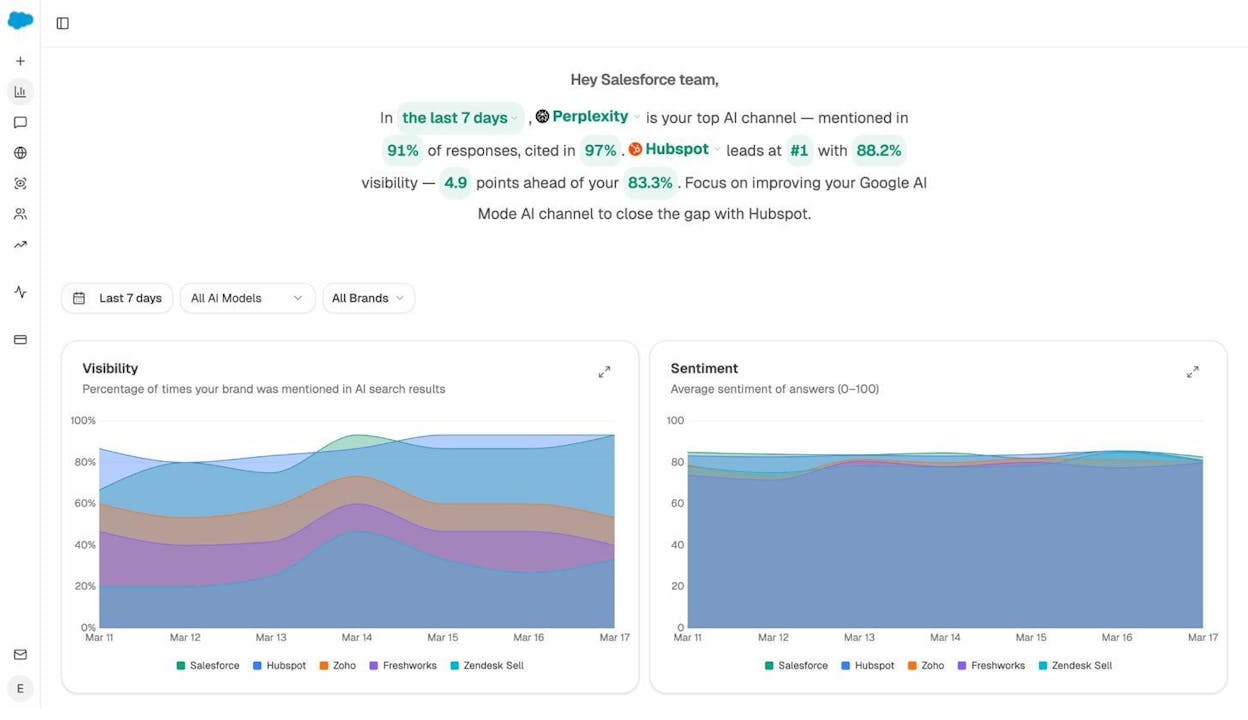
With Analyze AI, you can track which prompts mention your brand (or don’t) across AI engines and filter by market. If competitors are showing up in AI answers in Germany or Japan but you’re not, that’s a gap you can close with localized, AI-citable content.
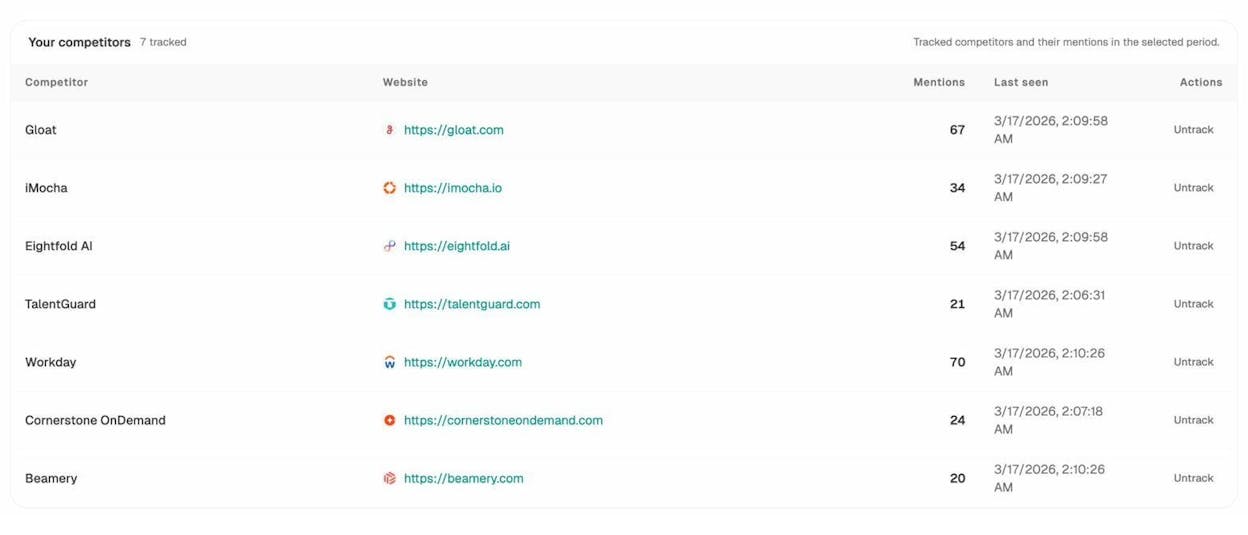
The Competitor Overview in Analyze AI shows you exactly which rivals get mentioned in AI responses—and how often—so you can prioritize the markets where you’re falling behind.
2. Consider all languages spoken in each global market
This step sounds obvious, but it trips up even experienced teams. Countries don’t equal languages. A single country can have multiple official languages, dominant dialects, and immigrant populations that search in entirely different terms.
Canada has two official languages: English and French. Switzerland has four: German, French, Italian, and Romansh. India has 22 scheduled languages, but Hindi and English dominate online search. Belgium operates in Dutch, French, and German.
If you’re targeting Canada, you’ll need both an English-Canadian and a French-Canadian version of your key pages. Miss the French version and you’re invisible to roughly 22% of the Canadian population.
Language-first vs. country-first: which approach to choose
You have two paths:
Language-first approach: Create content in each language without worrying about country-specific versions. For example, one Spanish version for all Spanish-speaking countries. This works well when you’re resource-constrained, your product doesn’t have country-specific pricing, or your content is universal (educational, informational).
Country-first approach: Create separate versions for each country, even if they share a language. For example, separate pages for Spain-Spanish and Mexico-Spanish. This is the more thorough approach because it lets you localize currency, cultural references, terminology, and legal requirements.
Here’s how to decide:
|
Factor |
Language-First |
Country-First |
|---|---|---|
|
Budget |
Lower (fewer pages) |
Higher (more pages to create and maintain) |
|
Product/service |
Same worldwide |
Varies by country (pricing, shipping, legal) |
|
Terminology |
Minimal variation |
Significant variation (e.g., “flat” vs. “apartment” in UK vs. US English) |
|
Currencies |
Not displayed or universal |
Country-specific pricing |
|
Risk of errors |
Lower (fewer pages to manage) |
Higher (more pages = more hreflang complexity) |
|
SEO precision |
Good |
Best |
My recommendation: start language-first if you’re launching internationally for the first time. You’ll cover the largest audience with the least complexity. Graduate to country-first for your highest-value markets once you have the resources.
How this applies to AI search
AI engines like ChatGPT and Perplexity draw from content in the language the user prompts in. If a user in Brazil asks a question in Portuguese, the AI pulls from Portuguese-language sources. If your content only exists in English, you won’t appear in those responses.
This means the same logic applies: you need content in the languages your audience actually uses. But there’s an additional nuance. AI engines also consider the depth and authority of your content. A thin, machine-translated page is unlikely to be cited. A well-written, comprehensive page in the local language is far more likely to be picked up as a source.
3. Choose the right international SEO URL structure
Your URL structure determines where content for each market lives on your website. Get this wrong and you’ll create a maintenance nightmare that confuses both users and search engines. There are three viable options and one to avoid entirely.
Option 1: ccTLDs (country-code top-level domains)
Example: example.de, example.fr, example.co.uk
ccTLDs send the strongest geo-targeting signal to search engines. Users in Germany recognize .de instantly and trust it. Google also understands that .de content is intended for German users.
The downside is cost and complexity. Each ccTLD is a separate domain. That means separate hosting, separate analytics, separate link equity, and separate maintenance. If your main domain has strong backlinks, none of that authority transfers to your ccTLD automatically.
Best for: Large enterprises with dedicated teams per market, brands where local trust signals matter (finance, healthcare, government), and companies already operating separate regional businesses.
Option 2: Subfolders (subdirectories)
Example: example.com/de/, example.com/fr/, example.com/en-gb/
Subfolders keep everything under one domain. All link equity stays consolidated. You only need one analytics property, one CMS, and one hosting setup. Adding a new market is as simple as creating a new subfolder.
The tradeoff is a weaker geo-targeting signal compared to ccTLDs. But hreflang tags (covered in section 8) largely solve this problem.
Best for: Most businesses, especially those launching internationally for the first time, SaaS companies, content-heavy sites, and teams with limited dev resources.
Option 3: Subdomains
Example: de.example.com, fr.example.com
Subdomains sit between the other two options. They allow localized hosting (which can improve load times) and offer flexible naming. But Google initially treats subdomains as somewhat separate entities, which means you’ll need to build authority for each one individually.
Best for: Companies that need localized hosting but want to keep a single brand domain, and organizations with complex infrastructure requirements.
Option 4: URL parameters (avoid this)
Example: example.com?lang=de&country=de
URL parameters for language or country targeting are confusing for crawlers, hard for users to read, and explicitly discouraged by Google. Don’t use them.
URL structure comparison table
|
Feature |
ccTLDs |
Subfolders |
Subdomains |
|---|---|---|---|
|
Geo-targeting signal |
Strong |
Moderate (use hreflang) |
Moderate |
|
Link equity |
Split across domains |
Consolidated |
Partially split |
|
Setup complexity |
High |
Low |
Medium |
|
Maintenance effort |
High (multiple domains) |
Low (one domain) |
Medium |
|
Cost |
Higher (domain purchases) |
Lower |
Lower |
|
Analytics tracking |
Separate per domain |
One property |
Separate per subdomain |
|
Adding new markets |
Requires new domain |
Create a new folder |
Create a new subdomain |
My recommendation: Unless you have a specific reason to choose ccTLDs (like operating separate legal entities per country), go with subfolders. You’ll consolidate authority, simplify maintenance, and reduce the chance of technical errors. This is the path most SEOs recommend for good reason.
4. Install a Content Delivery Network (CDN)
If your website loads slowly for users in distant countries, your rankings in those markets will suffer. Google has confirmed that page speed is a ranking factor, and users simply won’t wait for a slow page to load—especially on mobile.
A CDN (Content Delivery Network) solves this by distributing copies of your content across servers worldwide. When a user in Tokyo requests your page, they load it from a nearby server instead of your origin server in, say, Dallas. The result: faster load times for every market you target.
How to choose and set up a CDN
Step 1: Pick a CDN provider.
The most popular options are Cloudflare (free tier available), AWS CloudFront, Fastly, and Akamai. For most businesses, Cloudflare’s free plan is a strong starting point. It offers global coverage, automatic HTTPS, and basic DDoS protection.
Step 2: Configure your DNS.
Point your domain’s DNS to the CDN provider. With Cloudflare, this means changing your nameservers. With AWS CloudFront, you’ll create a distribution and update your DNS records.
![[Screenshot: DNS configuration pointing to CDN provider]](https://www.datocms-assets.com/164164/1774967636-blobid6.png?auto=format,compress&w=1248&fit=max)
Step 3: Test page load times from multiple countries.
Use Google PageSpeed Insights or WebPageTest.org (which lets you select test locations globally) to verify that load times improved in your target markets.
![[Screenshot: PageSpeed Insights results showing performance score]](https://www.datocms-assets.com/164164/1774967639-blobid7.png?auto=format,compress&w=1248&fit=max)
Step 4: Monitor Core Web Vitals across markets.
Check Google Search Console > Core Web Vitals to make sure your pages pass the performance thresholds for all countries. If certain markets still show poor performance, consider enabling additional CDN caching rules or image optimization for those regions.
Why CDN matters for AI search, too
AI engines crawl and index content just like traditional search engines. If your pages load slowly or throw errors, AI crawlers may skip them entirely. A fast, globally distributed site ensures that AI models can access and cite your content regardless of where their crawl infrastructure is located.
5. Do keyword research for each of your foreign markets
This is where most international SEO strategies either succeed or fail. Many teams assume they can simply translate their existing keyword list into the target language and call it done. That approach misses the most important insight: people in different countries use different words to describe the same thing—even when they speak the same language.
In the US, people search for “cell phone.” In the UK, they search for “mobile phone.” In Australia, “bin chicken” gets 12,000 monthly searches while “ibis bird” barely registers. In Spain, “ordenador” means computer, but in Latin America, “computadora” is the standard term.
Step-by-step: International keyword research
Step 1: Start with your core keyword list.
Take the keywords that drive the most traffic and revenue in your home market. These are your starting point—not your final list.
![[Screenshot: Spreadsheet showing a core keyword list with search volumes and URLs]](https://www.datocms-assets.com/164164/1774967641-blobid8.png?auto=format,compress&w=1248&fit=max)
Step 2: Use a keyword tool that supports country-level data.
Enter your keywords into a tool like Analyze AI’s Keyword Generator or Keyword Difficulty Checker to see search volume and competition data for each target country.
![[Screenshot: Keyword tool showing search volume for the same keyword across different countries]](https://www.datocms-assets.com/164164/1774967644-blobid9.png?auto=format,compress&w=1248&fit=max)
Pay close attention to volume differences. A keyword with 50,000 monthly searches in the US might have 500 in Norway. That doesn’t mean Norway isn’t worth targeting—it means you need to find the terms Norwegians actually use.
Step 3: Research local terminology.
For markets where you don’t speak the language, here are reliable approaches:
-
Use Google Autocomplete in the target country. Go to google.de (or the relevant country Google), set the language, and start typing your seed keywords. The autocomplete suggestions will show you what local users actually search for.
![[Screenshot: Google Autocomplete showing suggestions in German for a seed keyword]](https://www.datocms-assets.com/164164/1774967649-blobid10.png?auto=format,compress&w=1248&fit=max)
-
Check competitor pages in the target market. Find local competitors ranking for your target topics. Look at their title tags, H1s, and on-page copy for the terms they use.
-
Consult native speakers. If you have local team members, customers, or freelancers, ask them to review your keyword list. They’ll catch nuances that no tool can.
-
Use bilingual keyword tools. Some tools let you input a keyword in one language and see related terms in another.
Step 4: Validate search intent per market.
The same keyword can have different search intent in different countries. “Football” in the US means American football. In Brazil, it means soccer. Before creating content, search your target keywords in the local Google to see what type of content ranks. If the top results are product pages and you’re planning a blog post, you have an intent mismatch.
Use Analyze AI’s SERP Checker to quickly see what ranks for any keyword in any country without changing your VPN or browser settings.
Step 5: Map keywords to pages.
Create a spreadsheet that maps each keyword to a specific page for each market. This prevents keyword cannibalization and ensures every page has a clear target.
|
Market |
Keyword |
Search Volume |
Mapped URL |
Content Status |
|---|---|---|---|---|
|
US |
home insurance |
40,000 |
/en-us/home-insurance/ |
Live |
|
UK |
home insurance |
67,000 |
/en-gb/home-insurance/ |
Live |
|
Germany |
Hausratversicherung |
22,000 |
/de/hausratversicherung/ |
Draft |
|
France |
assurance habitation |
18,000 |
/fr/assurance-habitation/ |
Planned |
How to research prompts for AI search in foreign markets
Keyword research shows you what people type into Google. But an increasing share of your international audience is asking questions to AI engines instead. These queries tend to be more conversational and longer than traditional search queries.
With Analyze AI, you can track the specific prompts that mention (or should mention) your brand across ChatGPT, Perplexity, Claude, and Gemini. The platform suggests relevant prompts based on your industry and competitors, and you can filter by language and market.
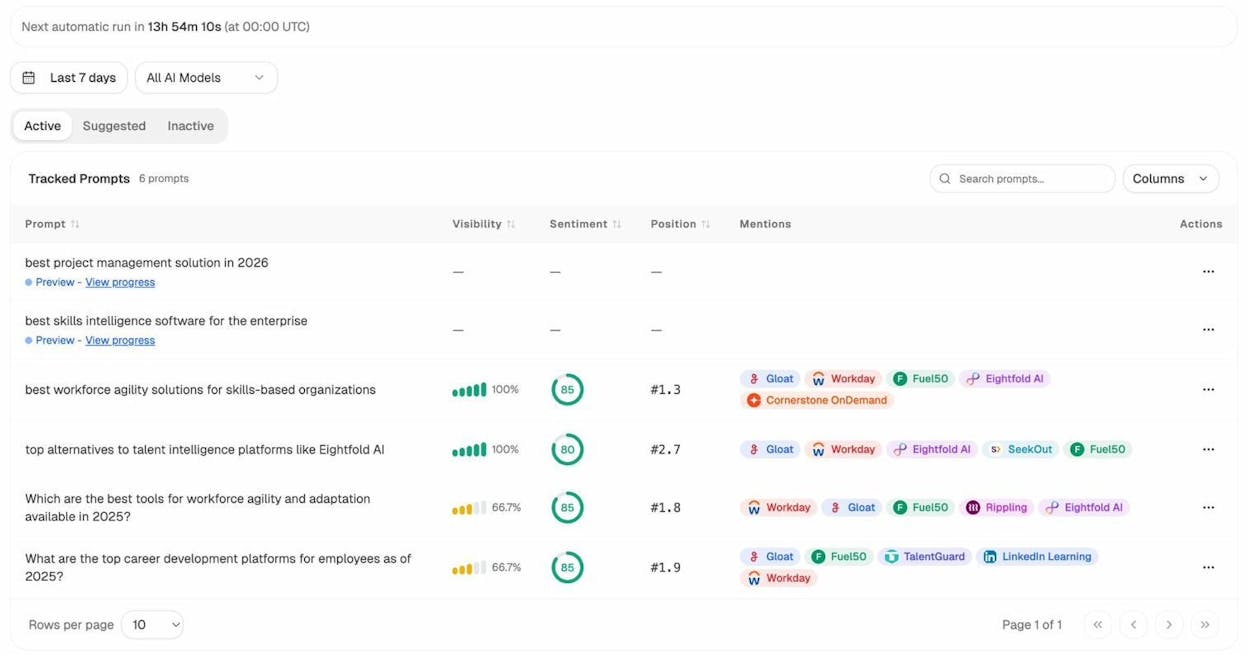
This is the prompt-level view in Analyze AI. Each row shows a tracked prompt, its visibility score (how often your brand appears in AI responses), sentiment, position, and which competitors also show up. Use this to identify gaps: if a competitor appears in AI responses for a key prompt but you don’t, that’s an opportunity to create or improve content for that topic.
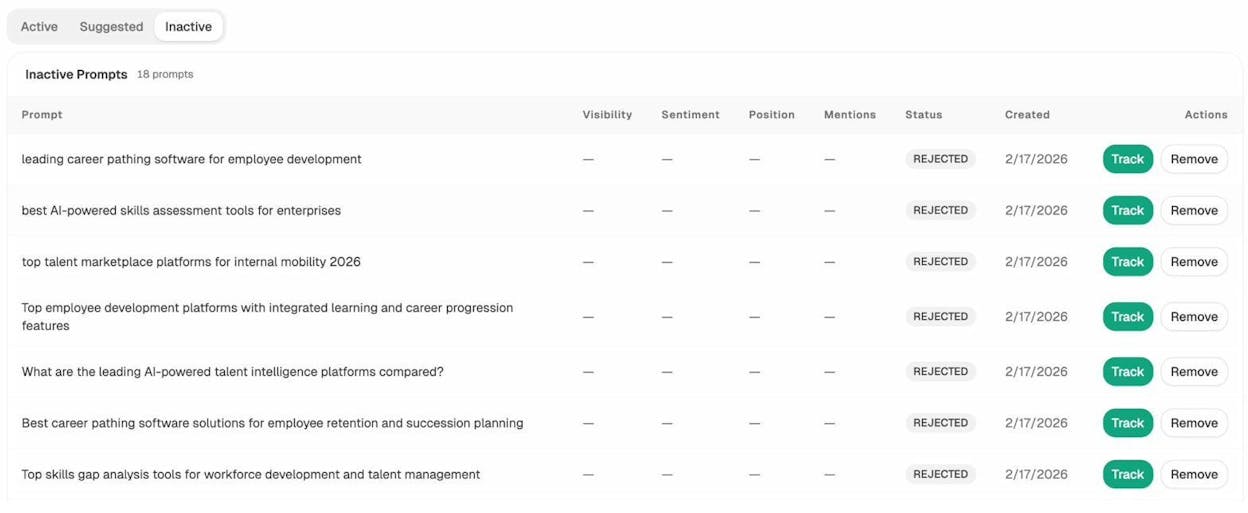
The platform also suggests prompts you may not have thought of. Accept the ones that align with your content strategy and add them to your tracking set.
6. Use one language per page
Every page on your international site should be in one language only. No mixing English and Spanish on the same URL. No dynamically swapping languages based on browser settings. No accordion menus that show content in multiple languages on a single page.
Google explicitly recommends using separate URLs for each language version. This lets crawlers discover, index, and rank each version independently.
What to localize beyond body copy
Language is more than words on a page. To truly localize, you need to address every element that a user from that country would expect to see in their language and format:
-
Meta titles and descriptions. These appear in search results and directly affect click-through rates. A French user seeing an English meta title will scroll past.
-
Image alt text. Translate or rewrite alt text for accessibility and image search in the target language.
-
Images with text. If your screenshots, infographics, or diagrams contain text, create localized versions.
-
Currency and pricing. Show prices in local currency. A UK user expects GBP, not USD.
-
Date and time formats. The US uses MM/DD/YYYY. Most of Europe uses DD/MM/YYYY. Japan uses YYYY/MM/DD.
-
Phone numbers. Include the local country code and format.
-
Office addresses. If you have local offices, list them. If not, consider whether showing a foreign address might reduce trust.
-
Units of measurement. The US uses miles and Fahrenheit. Nearly everyone else uses kilometers and Celsius.
Common mistake: machine translation without human review
Google can detect thin, auto-translated content. More importantly, users can detect it instantly. A badly translated page damages trust far more than having no translated page at all.
If you can’t afford professional translation, use AI translation tools as a starting draft, then have a native speaker review and edit. Pay special attention to idioms, cultural references, and industry-specific terminology that machine translation consistently gets wrong.
7. Ensure internal links only go to content in the same language
This is one of the most common mistakes in international SEO—and one of the easiest to fix.
When you internally link from a French page to an English page, two bad things happen. First, the user lands on a page they can’t read. Second, you send a confusing signal to Google about which language version of the target page is most relevant.
Rules for international internal linking
Rule 1: Every internal link on a French page should point to another French page. If the target page doesn’t exist in French, either create it or don’t link to it.
Rule 2: Navigation links must match the page language. Your header, footer, sidebar, and breadcrumbs should all link to same-language pages. If your German subfolder’s navigation links to English pages in the footer, fix it.
Rule 3: Audit regularly. As your site grows, cross-language links inevitably creep in. Set up a quarterly audit to catch them. Crawl your site with a tool like Screaming Frog and filter for internal links that cross language subfolders.
![[Screenshot: Screaming Frog internal link audit filtered by URL subfolder mismatch]](https://www.datocms-assets.com/164164/1774967659-blobid13.jpg?auto=format,compress&w=1248&fit=max)
Rule 4: Don’t launch a market too early. If you only have five pages in Japanese, launching a Japanese subfolder creates a poor user experience. Users will click around and hit dead ends. Wait until you have enough content to support at least your main navigation categories and key landing pages.
For more on building effective internal link structures, see our detailed guide.
8. Implement hreflang properly
Hreflang is a piece of HTML code that tells Google which language and regional version of a page to serve to which users. It’s the glue that holds your international SEO strategy together—and it’s one of the most error-prone areas of technical SEO.
What hreflang does
Hreflang creates a mapping between equivalent pages in different languages or regions. When Google encounters a page with hreflang tags, it knows:
-
This page is intended for users in [country] who speak [language].
-
Here are the alternative versions for users in other countries or languages.
-
Here’s the default version to serve if no specific match exists (the x-default tag).
How to implement hreflang (step-by-step)
You can implement hreflang in three ways: HTML link tags, HTTP headers, or XML sitemaps. HTML link tags are the most common approach.
Step 1: Add hreflang tags to the <head> of each page.
Every language/region version of a page must reference every other version, including itself. Here’s an example for a page that exists in US English, UK English, French, and German:
<link rel="alternate" hreflang="en-us" href="https://example.com/en-us/page/" />
<link rel="alternate" hreflang="en-gb" href="https://example.com/en-gb/page/" />
<link rel="alternate" hreflang="fr" href="https://example.com/fr/page/" />
<link rel="alternate" hreflang="de" href="https://example.com/de/page/" />
<link rel="alternate" hreflang="x-default" href="https://example.com/en-us/page/" />
Step 2: Ensure reciprocal references.
If Page A references Page B in its hreflang tags, Page B must also reference Page A. Missing reciprocal references are the #1 cause of hreflang errors.
Step 3: Use the x-default tag.
The x-default tag tells Google which page to serve when no hreflang match exists. This is typically your main market’s page or a language-selector page.
Step 4: Validate your implementation.
Use a tool like Screaming Frog, Sitebulb, or a free hreflang validator to check for errors. Common issues include missing self-referencing tags, incorrect language codes, broken URLs in hreflang tags, HTTP/HTTPS mismatches, and missing reciprocal references.
![[Screenshot: Hreflang validation tool showing errors and warnings]](https://www.datocms-assets.com/164164/1774967664-blobid14.png?auto=format,compress&w=1248&fit=max)
Hreflang format reference
|
Format |
Use case |
Example |
|---|---|---|
|
Language only |
Target speakers of a language globally |
hreflang="es" (Spanish, all countries) |
|
Language + region |
Target speakers in a specific country |
hreflang="es-mx" (Spanish, Mexico) |
|
x-default |
Fallback for unmatched users |
hreflang="x-default" |
Important: Language codes follow ISO 639-1 (two-letter). Country codes follow ISO 3166-1 Alpha-2 (two-letter). Don’t invent your own codes.
Hreflang for XML sitemaps
If you have hundreds or thousands of pages, implementing hreflang via XML sitemaps is cleaner than adding tags to every page’s HTML. Here’s the format:
<url>
<loc>https://example.com/en-us/page/</loc>
<xhtml:link rel="alternate" hreflang="en-us" href="https://example.com/en-us/page/" />
<xhtml:link rel="alternate" hreflang="fr" href="https://example.com/fr/page/" />
<xhtml:link rel="alternate" hreflang="de" href="https://example.com/de/page/" />
<xhtml:link rel="alternate" hreflang="x-default" href="https://example.com/en-us/page/" />
</url>
For a more detailed walkthrough, see our guide on hreflang tags.
9. Don’t redirect users based on their IP address or cookies
This is a common temptation: detect a user’s location via IP address and automatically redirect them to the “correct” language version of your site. It feels helpful. It’s actually harmful.
Why IP-based redirects hurt your international SEO
Problem 1: Googlebot typically crawls from US IP addresses. If you redirect non-US IPs to localized versions, Googlebot may never see your French, German, or Japanese content. That means those pages may never get indexed—or they’ll be indexed with the wrong signals.
Problem 2: IP geolocation is unreliable. VPN users, travelers, expats, and users on mobile networks frequently appear to be in the wrong country. Redirecting them to a language they don’t speak creates frustration and bounce.
Problem 3: Google explicitly advises against it. Google’s international targeting documentation says to avoid IP-based redirects and to not attempt varying location to detect site variations.
What to do instead
Option 1: Display a banner suggesting the correct version. Many major brands do this. A non-intrusive banner at the top of the page says something like “It looks like you’re in Germany. Would you like to visit our German site?” The user clicks to switch or dismisses the banner.
![[Screenshot: Example of a language/region suggestion banner on a website]](https://www.datocms-assets.com/164164/1774967665-blobid15.png?auto=format,compress&w=1248&fit=max)
Option 2: Provide a language/region selector in the navigation. A globe icon or dropdown in the header lets users switch at any time. Make sure it’s visible and easy to use.
![[Screenshot: Language selector dropdown in a website header]](https://www.datocms-assets.com/164164/1774967669-blobid16.png?auto=format,compress&w=1248&fit=max)
Option 3: Use hreflang and let Google handle it. If your hreflang implementation is correct, Google will serve the right version to users in each market. The user doesn’t need to do anything—they’ll see the correct version in search results.
10. Build your backlink profile in each of your target countries
Your website might have a strong backlink profile in your home market. That authority doesn’t automatically transfer to new international markets. A page targeting German users needs links from German websites. A page targeting Japanese users needs links from Japanese websites.
This is the step most companies skip—and it’s often the difference between ranking on page one and being invisible in a new market.
How to build international backlinks (step-by-step)
Step 1: Analyze your current backlink distribution.
Use a backlink analysis tool to see where your existing links come from by country. This shows you which markets you already have authority in and which need attention.
Use Analyze AI’s Website Authority Checker to quickly gauge the authority of your domain and any competitor’s domain. Then use the Broken Link Checker to find broken link opportunities on websites in your target markets.
Step 2: Study where competitors get their international links.
Find 3–5 competitors who rank well in your target market. Analyze their backlink profiles to see which local sites link to them. These same sites are potential link targets for you.
![[Screenshot: Backlink analysis showing competitor links grouped by country]](https://www.datocms-assets.com/164164/1774967674-blobid17.png?auto=format,compress&w=1248&fit=max)
Step 3: Build relationships with local publications.
For each target market, identify industry blogs, news sites, directories, and resource pages that cover your topic. Reach out with localized pitches—in the local language—offering value through guest posts, data, expert quotes, or original research.
Step 4: Create locally relevant content.
Content that references local data, local trends, or local case studies naturally attracts links from local publishers. A generic English-language guide won’t earn links from a German industry blog. A data-driven study about the German market will.
Step 5: Monitor your progress.
Check your backlink distribution by country monthly. For a broader view, see our guide on link building tools and our coverage of off-page SEO strategies.
How AI search engines evaluate international authority
AI engines like ChatGPT and Perplexity don’t just look at backlinks. They evaluate the breadth, depth, and topical authority of your content. A site that has comprehensive, well-structured content in German—backed by citations from reputable German sources—is more likely to be cited in German-language AI responses.
With Analyze AI, you can see which sources AI engines cite most frequently in your industry. The Sources dashboard shows the top-cited domains and the types of content (blogs, product pages, reviews) that AI models reference.
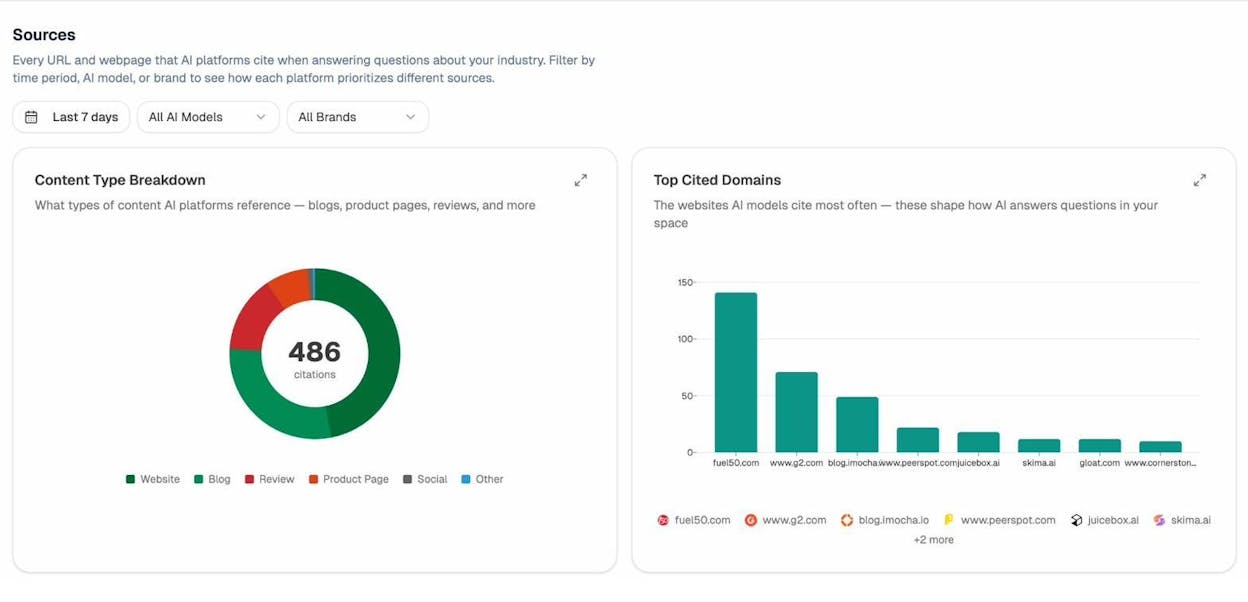
Use this data to understand which content formats and sources dominate AI citations in your target markets, then create content that matches or exceeds that standard.
Bonus: Track your international visibility in AI search
Everything above focuses on traditional international SEO—and that’s still the foundation. But if you stop there, you’re ignoring the fastest-growing search channel worldwide.
AI engines are especially popular in international markets where Google’s dominance is lower. In China, users turn to DeepSeek and Baidu AI. In Russia, Yandex AI. Globally, ChatGPT and Perplexity are gaining share in every language.
How to monitor your brand across AI engines globally
Step 1: Set up prompt tracking for your international markets.
In Analyze AI, create prompt clusters for each market you target. For example, if you sell CRM software, track prompts like “best CRM for small businesses” in English, “meilleur CRM pour PME” in French, and “beste CRM für kleine Unternehmen” in German.
The platform runs these prompts daily across ChatGPT, Perplexity, Claude, Gemini, and more, then records whether your brand is mentioned, in what position, with what sentiment, and which competitors appear alongside you.
Step 2: Track AI referral traffic by market.
Connect your GA4 account to Analyze AI to see which AI engines drive traffic to your site, broken down by landing page. This reveals which international pages are actually converting AI visitors—and which ones need work.
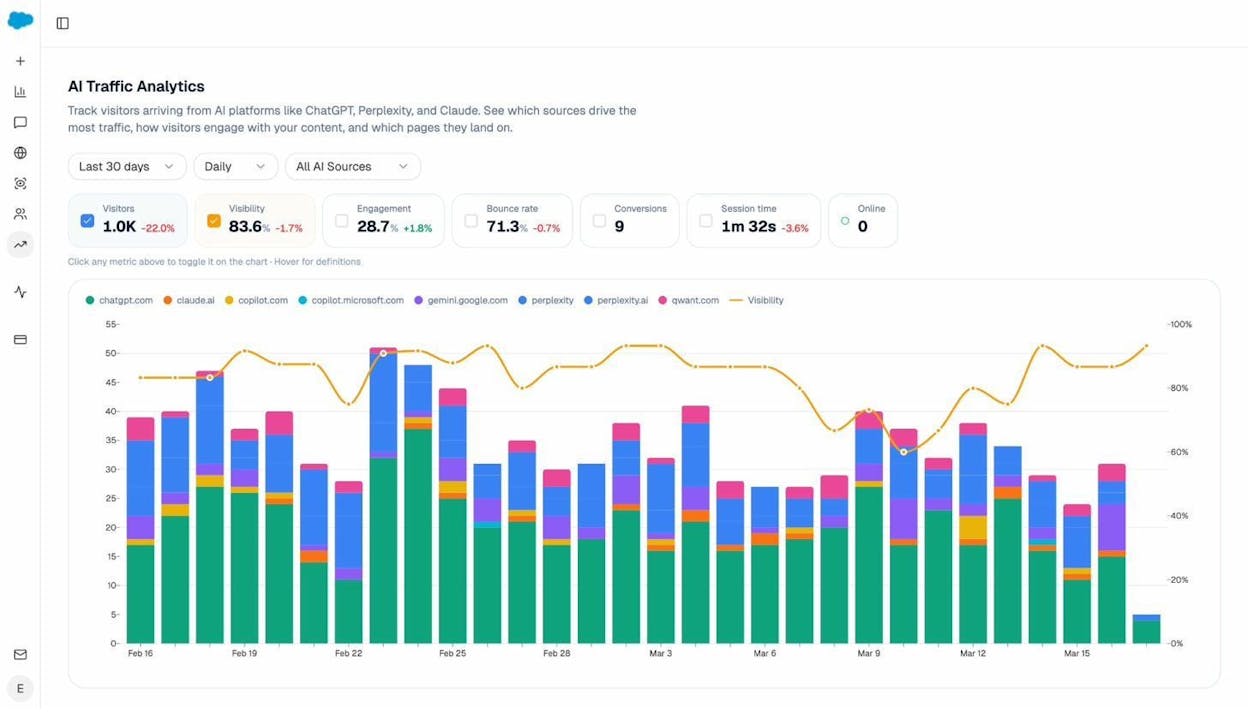
The AI Traffic Analytics view shows daily sessions from each AI engine (ChatGPT, Claude, Copilot, Perplexity, Gemini, and more). Use it to spot trends: is AI traffic growing in your German market? Flat in Japan? This data tells you where to invest more content effort.
Step 3: Identify competitive gaps in AI citations.
Analyze AI’s Competitor Overview shows which rivals appear most frequently in AI responses for your tracked prompts. Filter by market or prompt cluster to see who’s winning in each geography.
If a competitor consistently appears in French-language AI responses but you don’t, that’s a clear signal to improve your French content—both for traditional SEO and AI citability.
Step 4: Double down on pages that AI engines already cite.
The AI Traffic by Page report in Analyze AI shows exactly which of your pages receive traffic from AI engines. If your “/en-gb/product-comparison/” page is already getting ChatGPT referrals, optimize it further. Add structured data, improve its depth, and ensure it’s the most comprehensive resource on that topic.
If certain page formats keep appearing—comparison pages, how-to guides, data-driven research—that’s a pattern. Create more of those formats in your other international markets.
For a deeper dive into answer engine optimization, see our complete guide.
International SEO checklist
Use this checklist to implement the best practices above. Work through it sequentially—each step builds on the previous one.
Market research and planning
-
☐ Identify your target international markets using search data and business priorities
-
☐ Validate search demand by checking keyword volumes per country
-
☐ Assess competitive difficulty per market using domain authority tools
-
☐ Research all languages spoken in each target market
-
☐ Decide on language-first vs. country-first approach
-
☐ Check AI visibility per market using Analyze AI
Technical setup
-
☐ Choose your URL structure (ccTLDs, subfolders, or subdomains)
-
☐ Set up a CDN for global page speed
-
☐ Verify Core Web Vitals pass for all target markets
-
☐ Set up Google Search Console properties for each market/language version
-
☐ Configure geo-targeting in Google Search Console (if using subfolders or subdomains)
Content and keyword strategy
-
☐ Conduct keyword research per market (don’t just translate)
-
☐ Map keywords to specific pages per market
-
☐ Create a localized content plan for each market
-
☐ Use one language per page (no mixing)
-
☐ Localize all on-page elements: meta tags, alt text, images, currencies, dates, phone numbers
-
☐ Have native speakers review all translated/localized content
-
☐ Track prompts in AI engines per market using Analyze AI
Technical SEO implementation
-
☐ Implement hreflang tags on all localized pages
-
☐ Include self-referencing hreflang tags
-
☐ Add x-default hreflang tag
-
☐ Validate hreflang implementation (check for reciprocal references)
-
☐ Ensure all internal links point to same-language content
-
☐ Remove any IP-based or cookie-based redirects
-
☐ Add a language/region selector to navigation
-
☐ Submit localized XML sitemaps to Google Search Console
Link building and authority
-
☐ Audit current backlink distribution by country
-
☐ Identify local link opportunities in each target market
-
☐ Create locally relevant content to attract local links
-
☐ Build relationships with local publications and industry sites
-
☐ Monitor backlink progress per country monthly
Monitoring and optimization
-
☐ Track keyword rankings per country
-
☐ Monitor AI visibility and mentions per market via Analyze AI
-
☐ Track AI referral traffic by engine and landing page
-
☐ Audit cross-language internal links quarterly
-
☐ Review hreflang for errors after any site changes
-
☐ Check that new content is indexed in all target markets
Key takeaways
International SEO is a long-term investment. It requires careful planning, consistent execution, and ongoing maintenance. Here’s what matters most:
Choose the right URL structure and stick with it. Subfolders work best for most businesses. Avoid parameterized URLs entirely.
Localize, don’t just translate. Keyword research, cultural context, currency, and formatting all matter. A translated page is not a localized page.
Get the technical details right. Hreflang errors are the most common cause of international SEO failures. Validate early and audit regularly.
Build authority locally. Your home market’s backlinks won’t help you rank in new markets. Invest in local link building from day one.
Don’t ignore AI search. Users worldwide are increasingly turning to AI engines for answers. Track your brand’s visibility in AI responses across markets, and create content that AI engines will cite. Use tools like Analyze AI to monitor where you appear, where competitors win, and where to invest next.
SEO isn’t dead—it’s evolving. AI search is a new organic channel that complements traditional SEO. The brands that optimize for both will have the strongest international presence.
For more on building a comprehensive SEO competitor analysis strategy, tracking keyword types that matter, or choosing the right SEO audit tools, explore our resource library.

Ernest

Ibrahim


