



Summarize this blog post with:


In this article, you’ll learn how to build a topical map that organizes your website’s content into a clear hierarchy of topics and sub-topics — so search engines (and AI answer engines) recognize you as an authority in your niche. You’ll get a step-by-step process for identifying your core topic, finding sub-topics with real business value, verifying traffic potential, and mapping everything into a structured content plan. You’ll also learn how to extend your topical map to cover AI search visibility — a growing channel that most topical mapping guides ignore entirely.
Table of Contents
What Is an SEO Topical Map?
An SEO topical map is a structured plan that organizes your website’s content around a core topic, supporting topics, and sub-topics. Think of it as the blueprint for your entire content strategy.
Instead of publishing random blog posts and hoping they rank, a topical map forces you to cover a subject comprehensively — and in a logical hierarchy. That hierarchy tells Google (and increasingly, AI models like ChatGPT, Perplexity, and Gemini) that your site has depth and authority on a given subject.
Here’s a simple way to visualize it:
-
Core topic: The broad subject your site is built around (e.g., “project management software”)
-
Supporting topics: Major pillars under that core topic (e.g., “task management,” “team collaboration,” “resource planning”)
-
Sub-topics: Specific articles and pages under each pillar (e.g., “how to create a Gantt chart,” “best task management apps for remote teams”)
![[Screenshot: A visual diagram showing a topical map hierarchy with a core topic at the top branching into 3-4 supporting topics, each with 3-5 sub-topics underneath]](https://www.datocms-assets.com/164164/1774908891-blobid1.png?auto=format,compress&w=1248&fit=max)
The relationship between these levels matters. Each sub-topic supports its parent topic through internal links, creating a web of related content that signals topical depth to both search engines and AI models.
Why Topical Maps Matter for SEO (and AI Search)
A topical map isn’t a nice-to-have. It’s a structural decision that affects your rankings, your content ROI, and your ability to scale.
Here’s why.
They build topical authority faster
Google’s algorithms increasingly reward sites that demonstrate expertise on a topic — not just individual pages that target individual keywords. When you publish a cluster of interconnected content on a subject, each piece reinforces the others. A single blog post about “keyword research” won’t move the needle. But ten interlinked posts covering keyword research from different angles — tools, techniques, long-tail strategies, clustering methods — signal to Google that your site genuinely covers this subject.
They prevent wasted effort
Without a map, teams publish content reactively. Someone has a blog idea, writes it, publishes it, and moves on. Six months later, you realize you have three posts competing for the same keyword (that’s keyword cannibalization) and zero posts covering a high-value topic your competitors own. A topical map eliminates this problem by showing you every topic you need to cover — and every topic you don’t.
They make AI search visibility easier to earn
This is the part most topical mapping guides skip entirely.
AI answer engines like ChatGPT, Perplexity, Claude, and Google’s AI Overviews don’t just pull answers from individual pages. They synthesize information from sources that demonstrate comprehensive coverage of a subject. When your site has a well-structured topical map with deep, interlinked content, AI models are more likely to cite you as a source — because you’ve built the kind of comprehensive resource they rely on.
In other words, the same topical depth that builds your SEO authority also makes your content more citable in AI search. This isn’t about choosing between SEO and AI search optimization — it’s about doing one thing well and benefiting from both channels.
How to Build a Topical Map: Step by Step
Here’s the process. It factors in brand relevance, business potential, and traffic potential — not just keyword volume. That distinction matters, because a topical map built on volume alone will generate traffic that doesn’t convert.
Step 1. Identify your site’s core topic
Before you open any tool or spreadsheet, answer four questions:
-
What is your site’s core focus? Be as specific as possible. “Marketing” is too broad. “B2B SaaS content marketing” is better.
-
What do you want to be known for? This is your expertise claim — the subject where you want to be the go-to resource.
-
What themes tie your content together? Look at your existing content. What thread connects your best-performing pages?
-
What parameters limit your scope? If you sell email marketing software, you probably shouldn’t be publishing content about social media advertising — even if the keyword volume is attractive.
Write your answer in one sentence. This becomes the anchor of your entire topical map.
Example: If you run a CRM platform, your core topic might be “sales pipeline management for B2B teams.” If you run an SEO tool, it might be “search engine optimization for marketers.” If you run an AI search analytics platform like Analyze AI, it might be “AI search visibility and optimization.”
Once you’ve defined your core topic, add it to your topical mapping spreadsheet (more on the template below).
![[Screenshot: A spreadsheet with “Core Topic” labeled in the first cell, showing an example like “B2B SaaS Content Marketing”]](https://www.datocms-assets.com/164164/1774908901-blobid2.png?auto=format,compress&w=1248&fit=max)
Step 2. Brainstorm supporting topics and sub-topics
Now you need to find the supporting topics and sub-topics that sit beneath your core topic. This is where you cast a wide net — and then filter ruthlessly in later steps.
Use multiple data sources so you don’t miss anything:
Google Search
Type your core topic into Google and pay attention to autocomplete suggestions, “People Also Ask” boxes, and related searches at the bottom of the page. These reflect real queries people type. For each suggestion that’s relevant to your business, add it to a running list.
![[Screenshot: Google search bar showing autocomplete suggestions for a topic like “content marketing strategy” with dropdown suggestions visible]](https://www.datocms-assets.com/164164/1774908904-blobid3.png?auto=format,compress&w=1248&fit=max)
![[Screenshot: Google’s “People Also Ask” box showing 4-5 related questions expanding below the search results]](https://www.datocms-assets.com/164164/1774908907-blobid4.png?auto=format,compress&w=1248&fit=max)
![[Screenshot: Google’s “Related Searches” section at the bottom of the SERP showing 8 related query tiles]](https://www.datocms-assets.com/164164/1774908910-blobid5.png?auto=format,compress&w=1248&fit=max)
Wikipedia
Search your core topic on Wikipedia and look at the table of contents. Wikipedia’s structure is essentially a topical map created by thousands of editors over years. The major headings are your supporting topics. The sub-headings are your sub-topics.
![[Screenshot: A Wikipedia article’s table of contents sidebar showing hierarchical heading structure for a broad topic]](https://www.datocms-assets.com/164164/1774908913-blobid6.png?auto=format,compress&w=1248&fit=max)
Keyword research tools
Use a keyword research tool to find related terms with actual search volume. Enter your core topic as a seed keyword and explore the related keyword suggestions. Look for clusters of keywords that point to the same underlying topic.
You can start with free options like Analyze AI’s keyword generator to brainstorm seed keywords, or our keyword difficulty checker to gauge how competitive each term is before adding it to your map.
![[Screenshot: Analyze AI’s keyword generator tool showing results for a seed keyword, with related keywords, search volume, and difficulty scores]](https://www.datocms-assets.com/164164/1774908916-blobid7.png?auto=format,compress&w=1248&fit=max)
ChatGPT and AI assistants
Ask ChatGPT or Claude to generate a topical map for your subject. A simple prompt like: “I’m building a topical map for a website about [your core topic]. List 8 supporting topics, and for each, list 5-10 sub-topics that would form a comprehensive content plan.”
This gives you a solid starting point. AI tools are excellent at identifying obvious sub-topics you might overlook — but they also tend to include topics that have zero business value for your specific company. That’s why the next step matters.
Competitor content
Look at what your top 3-5 organic competitors are publishing. Navigate to their blog or resource section and catalog their content by topic. Pay attention to what they cover that you don’t, and which of their pages generate the most engagement (check their social shares, comment counts, or use a backlink checker to see which pages earned the most links).
Use Analyze AI’s website authority checker to gauge how strong each competitor’s domain is, and our website traffic checker to estimate which competitors get the most organic traffic. This tells you which competitors’ content strategies are actually working.
![[Screenshot: Analyze AI’s website authority checker tool showing domain authority score, backlink count, and referring domains for a competitor URL]](https://www.datocms-assets.com/164164/1774908919-blobid8.png?auto=format,compress&w=1248&fit=max)
As you collect ideas from all these sources, organize them into two levels in your spreadsheet. Supporting topics go in the top row. Sub-topics go underneath each supporting topic, grouped logically.
![[Screenshot: A spreadsheet showing supporting topics in blue-highlighted header cells across the top, with 5-8 sub-topics listed vertically beneath each one]](https://www.datocms-assets.com/164164/1774908924-blobid9.png?auto=format,compress&w=1248&fit=max)
At this stage, don’t filter too aggressively. You want a big list. The filtering happens next.
Step 3. Score each topic for brand relevance and business value
This is the step that separates a useful topical map from a useless one.
Most topical mapping guides tell you to collect keywords, check their volume, and start writing. That approach produces a lot of content that ranks but doesn’t drive business results. The missing piece is evaluating each topic against your brand and your business model.
Brand relevance scoring
For every topic on your list, assign a brand relevance score from 0-3:
|
Score |
Meaning |
Example |
|---|---|---|
|
3 |
Directly tied to your core offering |
“How to track AI search visibility” for an AI analytics platform |
|
2 |
Closely related — your product can help |
“How to do a content audit” for a content analytics tool |
|
1 |
Tangentially related — your brand is relevant but not central |
“What is digital marketing” for an SEO platform |
|
0 |
Not related to your brand at all |
“Best social media scheduling tools” for an SEO platform |
Business potential scoring
Next, score each topic for business potential — how likely is it that someone reading this content would eventually become a customer?
|
Score |
Meaning |
Example |
|---|---|---|
|
3 |
Your product is essential to solving this problem |
“How to track brand mentions in AI search” for Analyze AI |
|
2 |
Your product is one of several solutions |
“Best competitor analysis tools” where your tool is one option |
|
1 |
Weak connection — awareness only |
“What is SEO” — educational, no direct product tie |
|
0 |
No product connection whatsoever |
“History of search engines” — interesting but no business value |
Here’s the key: any topic that scores 0 on both brand relevance and business potential should be removed immediately. It doesn’t matter if it has 50,000 monthly searches. If it can’t drive business results, it doesn’t belong in your topical map.
This is where most teams go wrong. They see a high-volume keyword related to their industry and assume it’s worth targeting. But if you sell CRM software, a guide on “how to write a cold email” might get traffic without ever producing a qualified lead. Be ruthless here.
Step 4. Verify the traffic potential of each sub-topic
After filtering for brand relevance and business value, you need to verify that each remaining topic has enough search demand to justify creating content.
Use a keyword research tool to check two things for each sub-topic:
-
Search volume: How many people search for this term each month? Use Analyze AI’s keyword rank checker or SERP checker to see current rankings and search volumes.
-
Traffic potential: What’s the estimated organic traffic to the current top-ranking page? This matters more than raw volume, because a page can rank for hundreds of related keywords beyond the primary one.
![[Screenshot: A keyword research tool showing search volume, keyword difficulty, and traffic potential metrics for a list of keywords]](https://www.datocms-assets.com/164164/1774908926-blobid10.png?auto=format,compress&w=1248&fit=max)
Checking keywords one by one gives you the most accurate picture. For each sub-topic keyword, look at the top-ranking page’s total organic traffic. That number represents the realistic traffic ceiling for your page if it reaches position one.
Checking keywords in bulk is faster but less precise. Paste your full list of sub-topic keywords into a keyword tool and sort by traffic potential. This is ideal when you have 50+ sub-topics to evaluate and need to prioritize quickly.
Cluster your keywords by parent topic. Many different keywords point to the same underlying topic. For example, “how to do keyword research,” “keyword research process,” “keyword research guide,” and “keyword research tutorial” should all be served by a single page. Keyword clustering groups these together so you don’t accidentally plan multiple pages for the same intent.
![[Screenshot: A keyword clustering view showing groups of related keywords clustered under parent topics, with aggregate search volume for each cluster]](https://www.datocms-assets.com/164164/1774908930-blobid11.png?auto=format,compress&w=1248&fit=max)
Add the volume and traffic potential data to your spreadsheet for each sub-topic. You now have four data points per topic: brand relevance, business potential, search volume, and traffic potential.
Step 5. Validate your topics through AI search visibility
Here’s where most topical mapping processes stop — and where yours should go further.
Traditional topical maps optimize for Google’s organic results. But a growing share of your audience now finds answers through AI search engines: ChatGPT, Perplexity, Google AI Overviews, Claude, and Copilot. If you’re building a topical map in 2026, ignoring AI search is like building an SEO strategy in 2010 and ignoring mobile.
The good news: SEO and AI search aren’t competing channels. They’re complementary. The same topical depth that earns Google rankings makes your content more citable by AI models. But you can gain an edge by specifically checking which of your planned topics are already generating AI search traffic — and which competitors are winning in AI search for topics you plan to target.
Check which topics AI models already cite your competitors for
In Analyze AI, navigate to the Competitors section. Here, you’ll see which competitors get mentioned alongside your brand in AI-generated answers, how often they appear, and which prompts trigger their mentions.
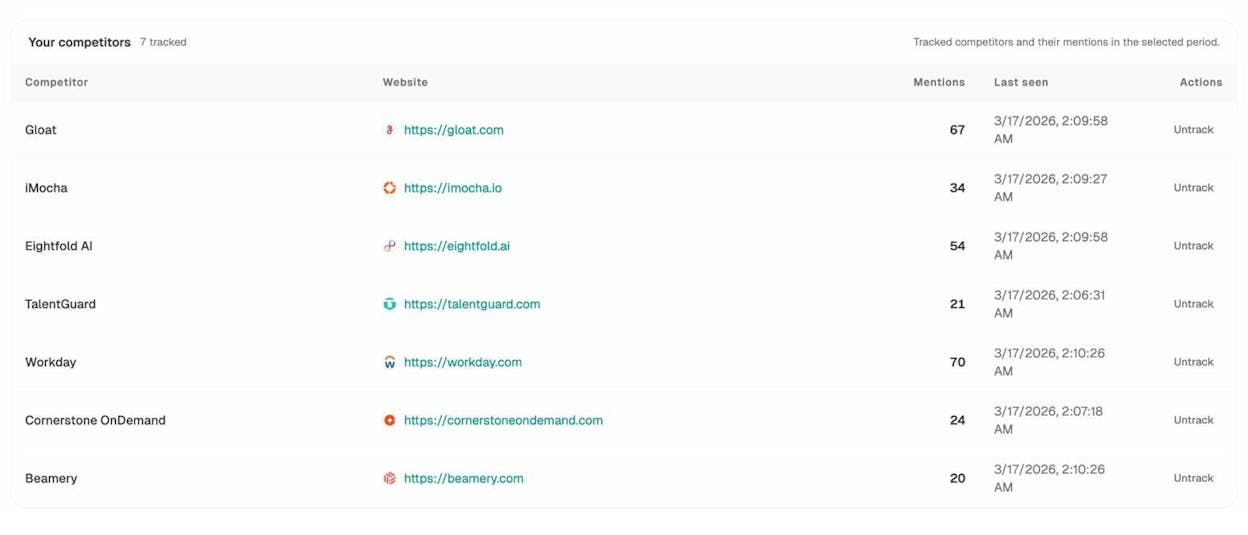
This data reveals two things for your topical map:
-
Topics where competitors dominate AI search — these are high-priority topics to add to your map if they aren’t there already.
-
Topics where no one dominates yet — these are opportunities to establish authority before the space gets crowded.
Check which prompts matter in your space
In Analyze AI’s Prompts section, you can track specific prompts (the questions people ask AI models) and see your visibility, sentiment, and position for each one. The Suggested Prompts tab even recommends new prompts based on your industry cluster, so you can expand your tracking without guessing.
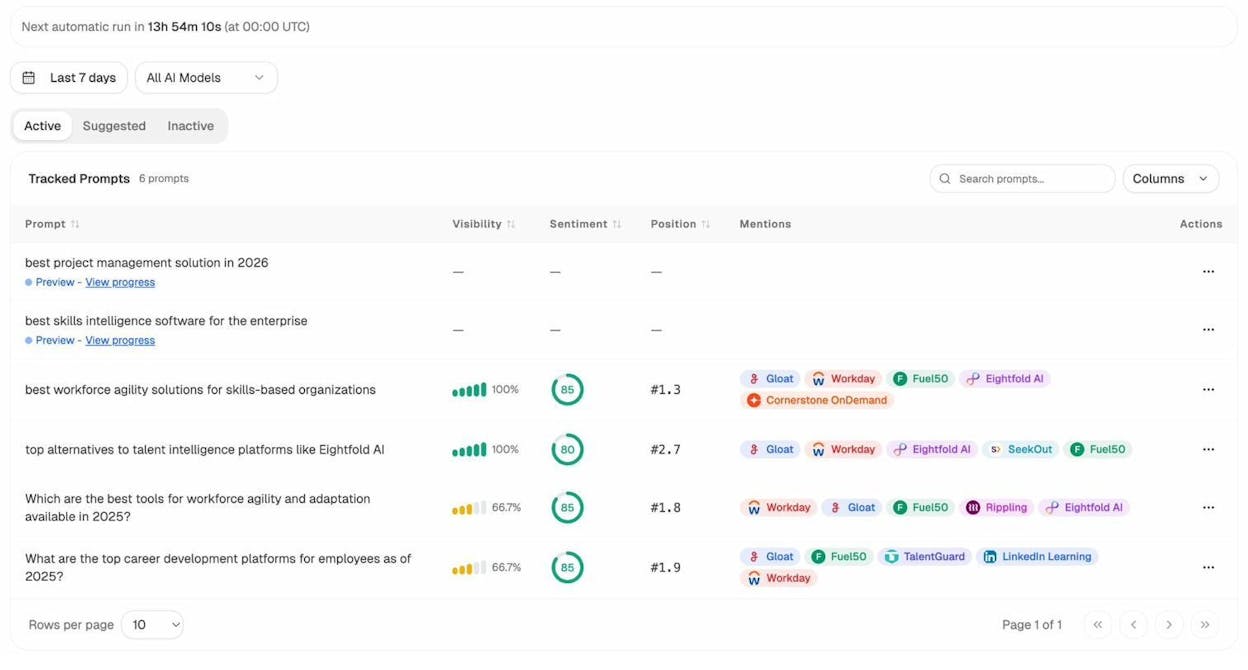
Analyze AI Prompts dashboard showing tracked prompts with visibility percentage, sentiment scores, and position rankings
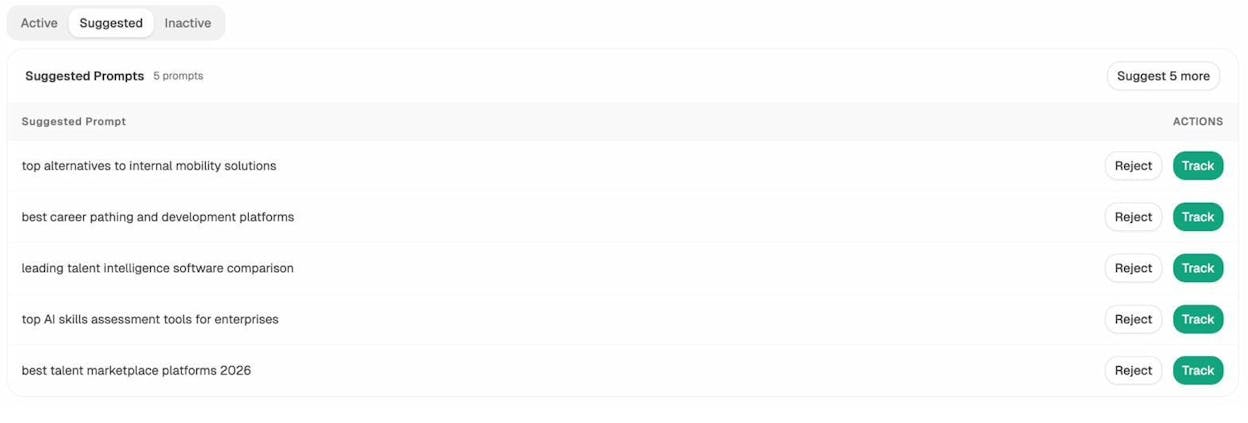
Analyze AI Suggested Prompts showing recommended prompts with Track and Reject buttons
Cross-reference these prompts with your topical map. If there’s a prompt where your brand has zero visibility but your competitor appears 100% of the time, the underlying topic belongs on your map — regardless of its traditional search volume.
Check which sources AI models cite
Navigate to the Sources section in Analyze AI to see which domains and content types AI models reference most in your industry. If review sites, Wikipedia, or competitor blogs dominate the citations, that tells you what kind of content to create for each topic in your map.
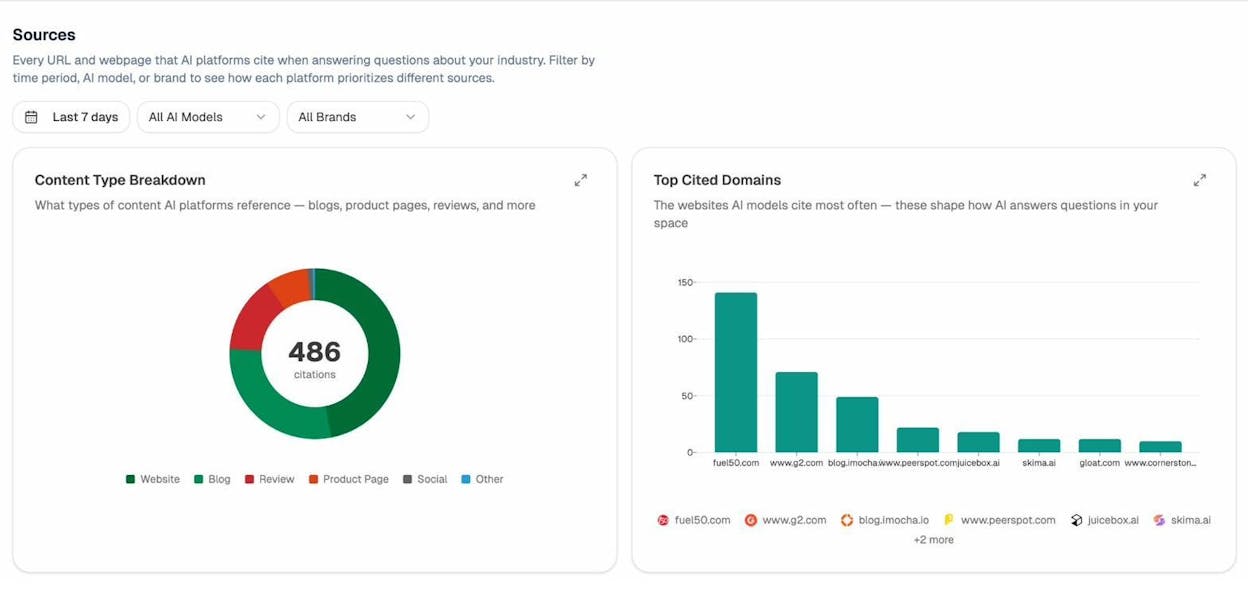
Analyze AI Sources dashboard showing Content Type Breakdown donut chart and Top Cited Domains bar chart
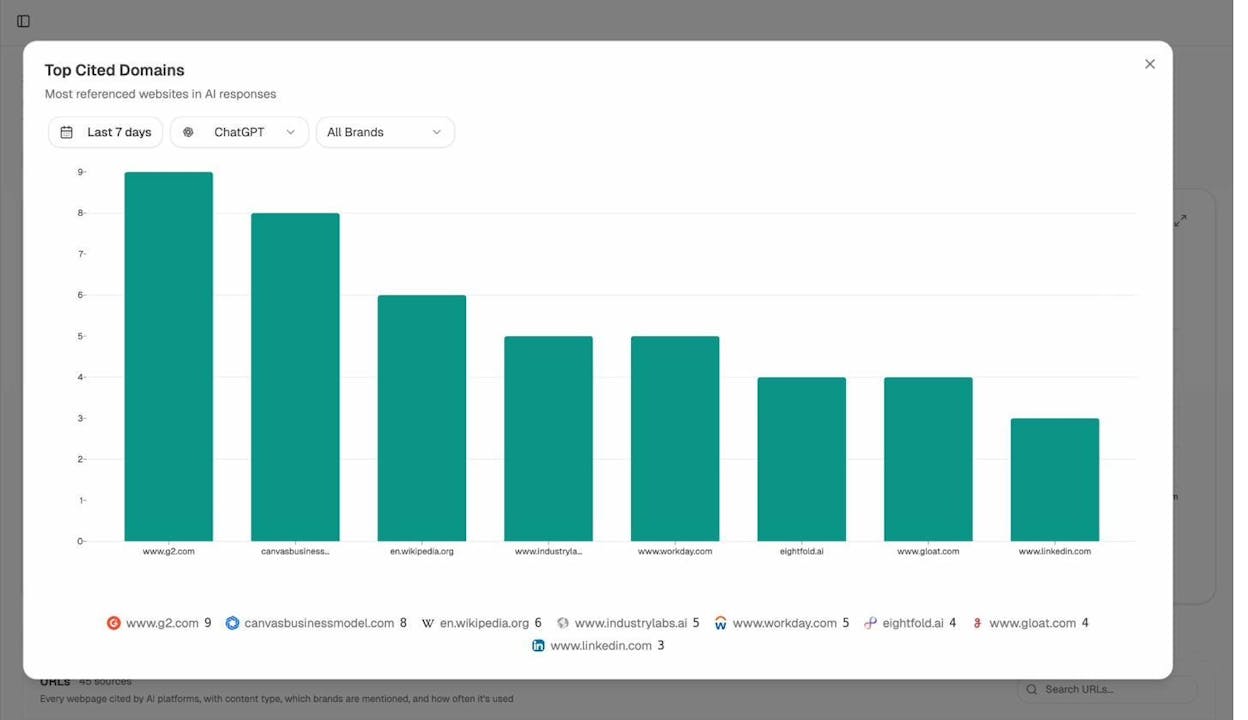
Analyze AI Top Cited Domains expanded view filtered by ChatGPT, showing most referenced websites in AI responses
For example, if AI models predominantly cite “blog” content types in your space, that validates building out detailed blog content in your topical map. If they cite “product pages,” your map should include product-focused landing pages alongside educational content.
This step adds an AI search layer to your topical map without replacing the SEO foundation. You’re building one map that serves both channels.
Step 6. Finalize which topics make the cut
You now have four scores for each topic: brand relevance, business potential, search volume, and traffic potential. Plus, you have qualitative data from your AI search analysis.
Remove or replace any topic that scores low on at least two of the four metrics. Here’s how to think about common scenarios:
|
Brand Relevance |
Business Potential |
Traffic Potential |
Decision |
|---|---|---|---|
|
High |
High |
High |
Highest priority — create this content first |
|
High |
High |
Low |
Still worth creating — it may not drive organic search traffic, but it serves your audience and can generate AI search citations |
|
High |
Low |
High |
Create, but deprioritize — good for awareness, not conversions |
|
Low |
Low |
High |
Remove — high volume but no business value |
|
Low |
Low |
Low |
Remove immediately — no reason to create this |
After this filter, you should have a clean list of topics that are relevant to your brand, have business potential, and have verified demand in either organic search, AI search, or both.
Step 7. Map existing pages and plan new URLs
If you have an existing website, map your current pages to the topics in your plan. This reveals three things:
-
Topics you’ve already covered — mark these as “Existing” and add the URL.
-
Topics you’ve covered poorly — mark these as “Update” with the existing URL plus notes on what needs to change.
-
Topics with no existing page — mark these as “New” and plan a URL slug.
![[Screenshot: A spreadsheet with columns for Topic, Status (Existing/Update/New), URL, Brand Relevance, Business Potential, and Traffic Potential]](https://www.datocms-assets.com/164164/1774908948-blobid17.png?auto=format,compress&w=1248&fit=max)
For new pages, plan your URL slugs to follow a logical hierarchy that mirrors your topical map. For example:
-
Core topic: /blog/content-marketing/
-
Supporting topic: /blog/content-marketing/strategy/
-
Sub-topic: /blog/content-marketing/strategy/content-audit-guide/
This URL structure reinforces the topical hierarchy for search engines. But don’t overthink it — clean, descriptive slugs matter more than perfect nesting.
Step 8. Plan your internal linking structure
A topical map without internal links is just a list. The links between your pages are what transform individual articles into a topical cluster that search engines recognize as authoritative.
Follow these principles:
Every sub-topic page should link to its parent supporting topic page. If you write a blog post about “how to find long-tail keywords,” it should link to your pillar page about “keyword research.”
Every supporting topic page should link to its sub-topic pages. Your keyword research pillar should link out to every related sub-topic: keyword clustering, keyword difficulty, keyword types, long-tail strategies.
Sub-topic pages should link to each other when relevant. Your post on keyword clustering should link to your post on keyword types, because readers interested in one are likely interested in the other.
Don’t force links where they don’t fit. If a link doesn’t serve the reader, don’t add it. Search engines can tell the difference between helpful contextual links and links stuffed in for SEO purposes.
For a deeper look at how to structure your internal links effectively, read our guide on internal linking for SEO.
Step 9. Prioritize your content production
You can’t publish everything at once. You need a priority system.
Create a priority score for each topic by weighting your four metrics. A simple formula:
Priority Score = (Brand Relevance × 3) + (Business Potential × 3) + (Traffic Potential × 2) + (Search Volume × 1)
The weights reflect what matters most: brand alignment and business impact outweigh raw traffic numbers.
Then band your topics into priority tiers:
|
Priority Band |
Score Range |
Action |
|---|---|---|
|
5 (Highest) |
25-27 |
Create these first — they’re high-value, high-opportunity topics |
|
4 |
20-24 |
Create these in your second sprint |
|
3 |
15-19 |
Schedule for Q2 or Q3 |
|
2 |
10-14 |
Backlog — revisit when higher priorities are done |
|
1 (Lowest) |
Below 10 |
Consider removing from the map entirely |
Start with Band 5. Publish those pages first, interlink them, and monitor performance. Then move to Band 4, and so on.
Step 10. Track performance across organic and AI search
Once your content starts going live, you need to track how it performs in both channels.
For organic search: Track keyword rankings, organic traffic, and engagement metrics for each page in your topical map. Use tools like Analyze AI’s SERP checker or keyword rank checker to monitor position changes over time.
For AI search: Track whether your content is being cited by AI models when users ask questions about your topics. This is where Analyze AI gives you a clear advantage.
In the AI Traffic Analytics section, you can see exactly which pages on your site receive AI-referred traffic — from ChatGPT, Perplexity, Claude, Gemini, Copilot, and others. You’ll see sessions, engagement rates, bounce rates, and even conversions from each AI source.
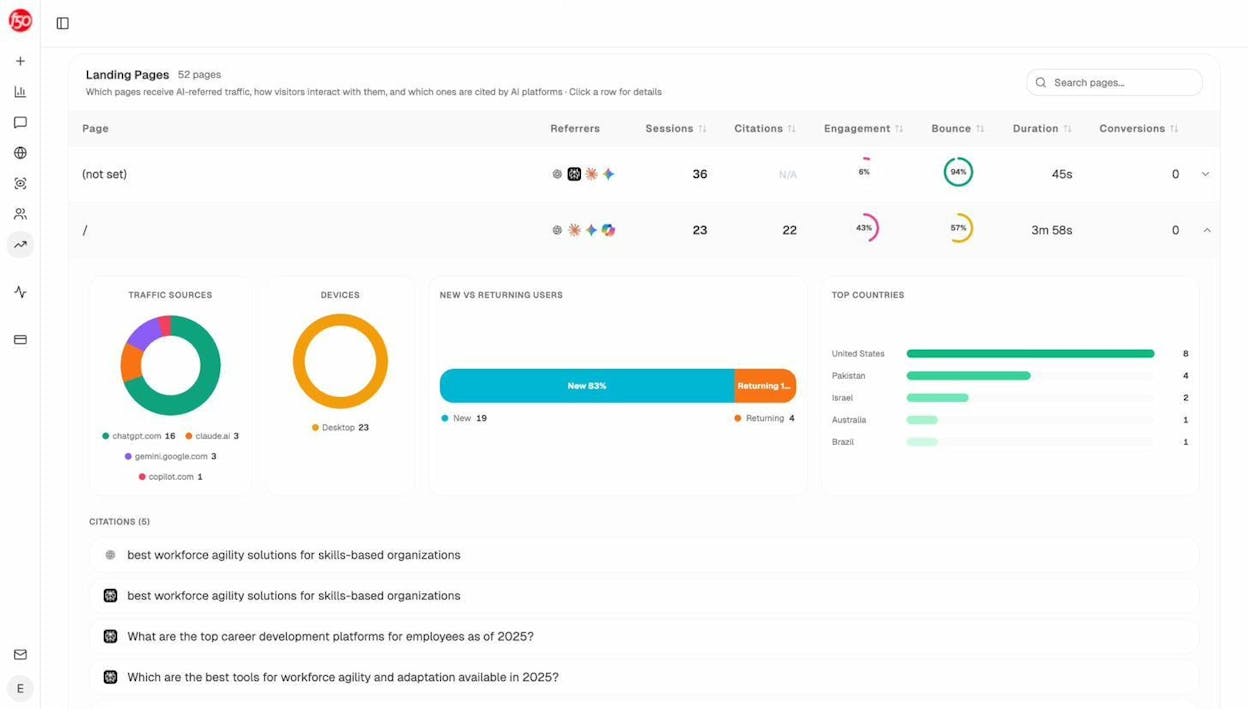
Analyze AI Landing Pages view showing pages receiving AI-referred traffic with sessions, citations, engagement, bounce rate, duration, and conversions for each page
This data closes the loop on your topical map. You can see which topics in your map are generating AI search traffic (and double down on them), and which topics have zero AI visibility (and investigate why).
Over time, look for patterns: are certain content formats getting more AI citations? Are long-form guides outperforming short articles in AI search? Do pages with structured data get cited more often? These insights inform how you create future content for the remaining topics in your map.
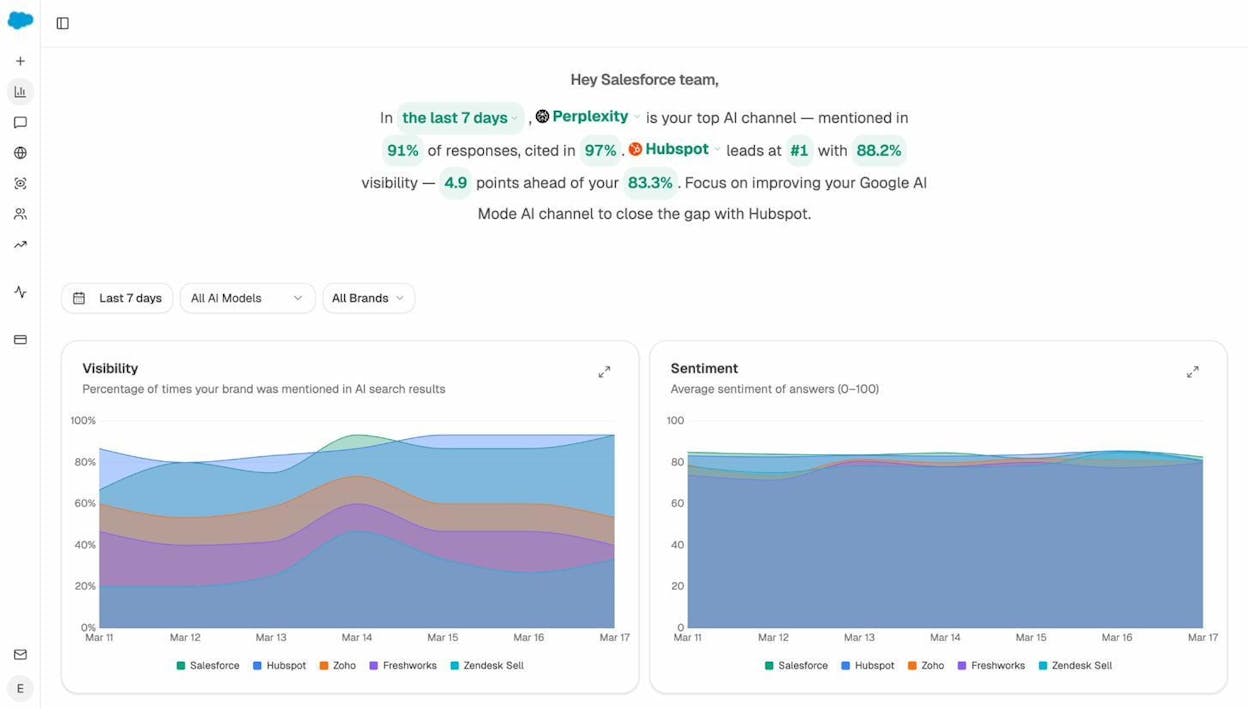
The Overview dashboard in Analyze AI gives you the big picture: your overall visibility across AI models, how it trends over time, and where your competitors stand relative to you.
Common Mistakes to Avoid
Building a topical map is straightforward, but there are a few traps that consistently hurt results.
Mistake 1: Adding every keyword you find. A topical map is not a keyword dump. If a topic doesn’t pass your brand relevance and business potential filters, it doesn’t belong on the map — regardless of search volume. An e-commerce site selling running shoes doesn’t need a post about “history of marathon running” just because it has 10,000 monthly searches.
Mistake 2: Ignoring search intent. Two keywords with similar wording can have completely different intents. “Best CRM software” (comparison intent) and “CRM software pricing” (transactional intent) need different page types. Map each topic to the correct page type — blog post, landing page, comparison page, or product page — based on what Google currently ranks for that term.
Mistake 3: Building the map and never updating it. A topical map is a living document. New topics emerge, search volumes shift, competitors publish new content, and AI search introduces new opportunities. Review and update your map quarterly.
Mistake 4: Not connecting your SEO topics to AI search. Most companies treat organic search and AI search as separate channels with separate strategies. They’re not. The content you build for your SEO strategy is the same content that AI models cite. By tracking AI visibility alongside organic performance — using tools like Analyze AI — you get a complete picture of how your topical map drives traffic from every search surface, not just Google’s ten blue links.
Mistake 5: Building topic clusters without internal links. A topical map is a plan. Internal links are the execution. Without links connecting your sub-topic pages to their parent topics, search engines can’t see the topical relationship you’ve mapped out. Audit your internal links every time you publish a new page.
Topical Mapping Template
To make this process easier, we’ve put together a topical mapping spreadsheet template you can duplicate and customize. It includes tabs for:
-
Core topic definition — your anchor and scope boundaries
-
Topic brainstorming — space for supporting topics and sub-topics from all your data sources
-
Scoring — columns for brand relevance, business potential, search volume, and traffic potential
-
Priority banding — automated priority scores based on your scoring inputs
-
Content plan — mapped URLs, page types, status (Existing/Update/New), and assigned owners
-
AI search layer — columns for AI visibility, top-cited prompts, and competitor AI mentions
You can download the template in Google Sheets or Excel format and follow along with the steps above.
![[Screenshot: Overview of the topical mapping template spreadsheet showing multiple tabs at the bottom and the main content plan view with all scoring columns visible]](https://www.datocms-assets.com/164164/1774908959-blobid20.png?auto=format,compress&w=1248&fit=max)
Extending Your Topical Map for AI Search Visibility
If you’ve followed the steps above, your topical map already serves AI search well. Comprehensive, well-structured content is exactly what AI models draw from when generating answers.
But there are specific ways to make your topical map even more effective for answer engine optimization.
Add a “prompt mapping” layer to your topics. For each sub-topic in your map, identify 2-3 prompts that a user might type into ChatGPT, Perplexity, or Claude to find that information. These prompts often differ from traditional search queries. Where a Google user might type “best keyword research tools,” a ChatGPT user might type “what’s the most accurate keyword research tool for small businesses?” Map these prompts alongside your keywords.
Analyze AI’s prompt suggestion feature can help here. It recommends prompts relevant to your industry cluster, so you can expand your coverage without guessing.
Prioritize topics where AI models already mention your competitors but not you. In Analyze AI’s Competitor Overview, you can see exactly where competitors win in AI search. If a competitor appears in 100% of AI responses for a prompt related to your industry and you appear in 0%, the underlying topic should be high on your priority list.
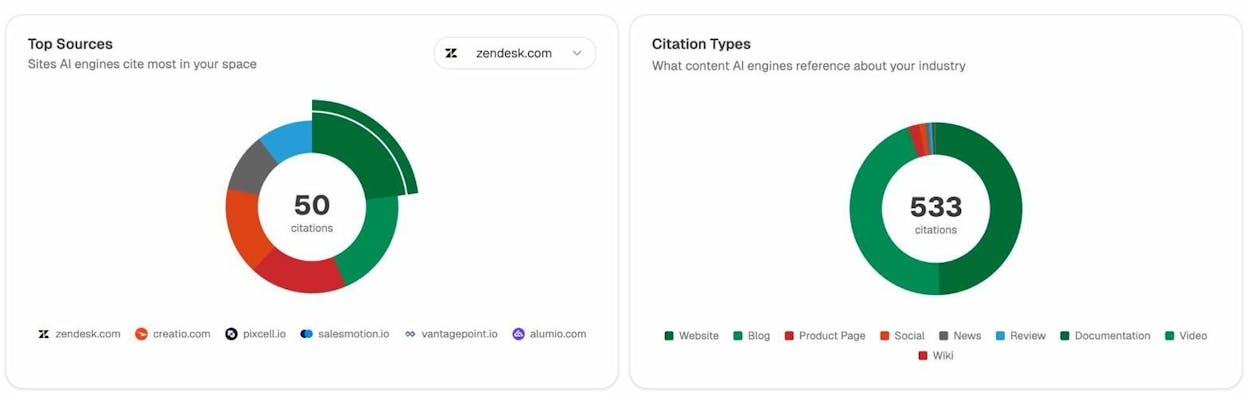
Monitor which of your pages AI models actually cite. After publishing content from your topical map, track it in Analyze AI’s Sources section. You’ll see which URLs AI models reference, how often, and in which engines. If a page gets zero AI citations despite ranking well in Google, it might need structural improvements — better headings, clearer definitions, more concrete data — to become more citable by AI models.
Use AI traffic data to refine your map over time. The AI Traffic Analytics section in Analyze AI shows you which pages receive AI-referred visits, which AI engines drive those visits, and how those visitors engage. Pages with high AI traffic and high engagement are signals that you’ve hit the right topic and format. Use those signals to inform how you create content for similar topics in your map.
Putting It All Together
A topical map gives your content strategy structure. Instead of publishing content based on gut instinct or whatever keyword looks interesting this week, you’re building a systematic plan rooted in brand relevance, business potential, and verified search demand.
The process boils down to this:
-
Define your core topic with precision.
-
Brainstorm supporting topics and sub-topics from multiple sources.
-
Score each topic for brand relevance and business potential.
-
Verify traffic potential with keyword data.
-
Add an AI search visibility layer using tools like Analyze AI.
-
Cut any topic that scores low on two or more metrics.
-
Map existing pages and plan new URLs.
-
Build your internal linking structure.
-
Prioritize production based on a weighted scoring formula.
-
Track performance across both organic and AI search.
The companies that win in 2026 and beyond won’t be the ones who publish the most content. They’ll be the ones who publish the right content — organized in a topical structure that both search engines and AI models recognize as authoritative.
SEO isn’t dead. It’s evolving. And a well-built topical map is how you evolve with it — covering both the traditional search results and the AI search surfaces where a growing share of your audience finds answers.

Ernest

Ibrahim


![How to Build a Keyword Strategy That Actually Drives Results [Free Template]](/_next/image?url=https%3A%2F%2Fwww.datocms-assets.com%2F164164%2F1774864066-blobid0.png&w=3840&q=75)

