



Summarize this blog post with:


In this article, you’ll learn what keyword cannibalization actually is (and what it isn’t), why it matters for both traditional search and AI search visibility, how to find real cannibalization issues on your site using five proven methods, how to fix them without losing traffic, and which popular “fixes” you should avoid entirely.
Table of Contents
What Is Keyword Cannibalization?
Keyword cannibalization happens when multiple pages on your site target the same or very similar keywords and compete against each other in search results. Instead of one strong page ranking well, you end up with two or more weaker pages splitting signals like backlinks, internal links, and click-through rates.
The result is that none of your pages perform as well as a single, consolidated page could.
Here’s a simple example. Say you run a SaaS company and you have two blog posts: “How to Write a Content Brief” and “Content Brief Guide: Everything You Need to Know.” Both target the same primary keyword. Both cover the same intent. Google has to choose between them, and it may not choose the one you want. Worse, both pages may rank lower than they would if you combined their authority into one.
But here’s the part most people get wrong: having multiple pages about a related topic is not automatically cannibalization. It only becomes a problem when the overlap hurts your overall organic performance.
That distinction matters because pages tend to rank for dozens or even hundreds of keyword variations. Two pages might share one keyword while each ranking for completely different long-tail terms. In that case, merging them could cost you more traffic than you gain.
Real cannibalization exists when two conditions are true at the same time:
-
Multiple pages target the same keyword.
-
Those pages fulfill the same or very similar search intent.
If both conditions aren’t met, you probably don’t have a problem worth fixing.
Is Keyword Cannibalization Bad?
Yes — when it’s real. But the keyword here is “real.”
The SEO community has a habit of overdiagnosing cannibalization. People see two URLs ranking for the same keyword and immediately sound the alarm. But that’s not enough evidence on its own.
Consider this scenario. You have two pages that both rank for “project management software.” One sits at position #1 and gets thousands of visits per month. The other ranks for a handful of related long-tail keywords and brings in a few hundred visits on its own. Together, they generate more traffic than either page would alone.
Is that cannibalization? Technically, both pages “target” the same keyword. But your site’s total organic performance is better with both pages than it would be with one. Merging them would likely mean losing the long-tail traffic the second page brings in.
Real cannibalization looks different. It looks like:
-
Two pages that swap rankings every few weeks, with neither holding a strong position.
-
A newer page that accidentally pushes an older, better-performing page out of the top 10.
-
Three blog posts from different years covering the exact same topic, with Google unable to decide which one to rank.
-
Total estimated traffic across all competing pages that is clearly lower than what one consolidated page could achieve.
The test is straightforward: if you could get more organic traffic and better rankings by combining the pages, you have a cannibalization issue. If not, leave it alone.
How Keyword Cannibalization Affects AI Search Visibility
Most guides on keyword cannibalization focus entirely on traditional search. But if you’re also tracking your brand’s visibility in AI search engines like ChatGPT, Perplexity, Claude, or Google’s AI Overviews, cannibalization creates an additional problem.
AI search engines pull citations from web content to support their answers. When your site has multiple pages covering the same topic, AI models face the same confusion Google does — they have to choose which page to cite. Sometimes they pick the weaker page. Sometimes they pick none, because neither page has enough concentrated authority to stand out as the definitive source.
This matters because AI engines tend to cite fewer sources per response than Google shows in its organic results. A traditional SERP might display 10 results, giving you room for two or three pages. An AI-generated answer typically cites three to five sources. If your authority is diluted across multiple pages, you may not make the cut at all.
Here’s what that looks like in practice. In Analyze AI’s Sources dashboard, you can see exactly which URLs and domains AI models cite when answering questions in your space — along with the content types that get referenced most often. If your brand isn’t showing up here, while competitors with consolidated content are dominating the citation landscape, diluted pages are likely part of the problem.
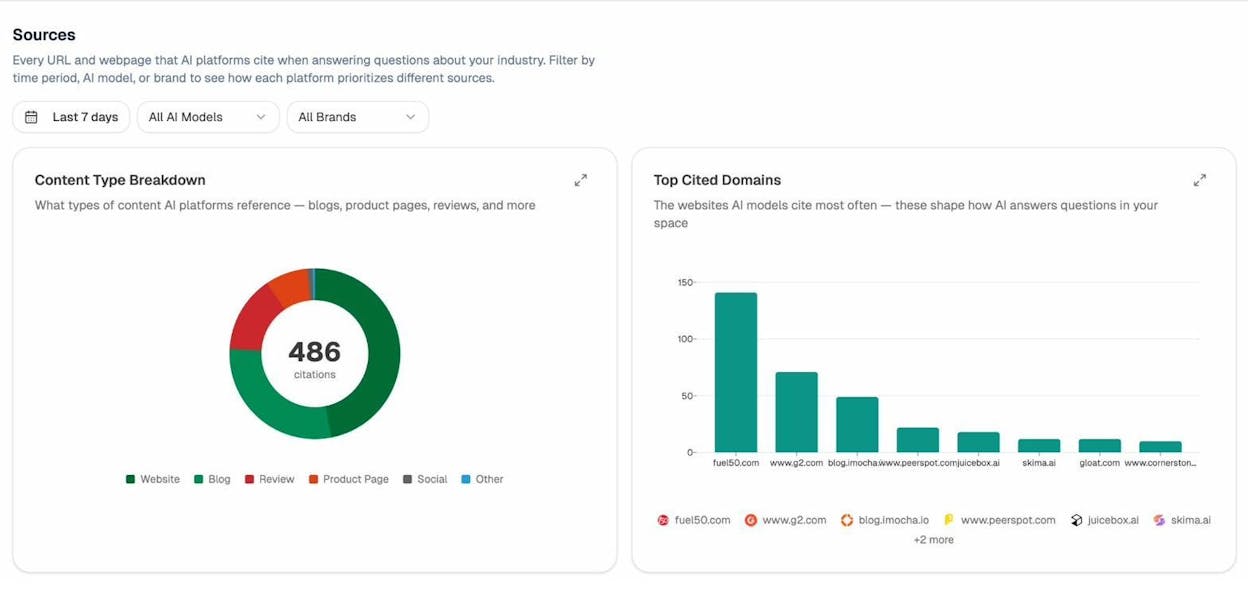
Research from Analyze AI’s study of 83,670 citations across ChatGPT, Claude, and Perplexity confirms this pattern: AI engines strongly favor pages with clear topical authority and consolidated depth. Thin, overlapping pages rarely get cited.
And unlike Google, AI engines don’t cluster results from the same domain. There’s no “host clustering” to manage. If two of your pages compete, the AI model simply picks whichever it considers most relevant — or skips your domain entirely in favor of a competitor that has one definitive page on the topic.
This is an important point that lines up with something we believe strongly at Analyze AI: SEO isn’t dying — it’s evolving. Search is expanding from ten blue links to multi-modal, prompt-shaped answers. Quality still governs visibility. Authority still comes from depth, originality, structure, and usefulness. What changes is where that quality needs to be legible — to crawlers, to AI models, and to the people asking better questions. Fixing keyword cannibalization strengthens your pages’ chances in both channels.
How to Find Keyword Cannibalization Issues
The trick to finding real cannibalization is to look for pages that target the same keywords and fulfill the same or very similar intent. Pages that share a keyword but serve different purposes — like a blog post and a product page — are usually fine.
Here are five methods to find genuine issues, ordered from simplest to most thorough.
Method 1: Run a Content Audit
If your site has fewer than a few hundred pages, a content audit is the most reliable way to find cannibalization. Pull a full list of your published content, group it by topic, and look for overlaps.
Here’s how to do it step by step:
-
Export all indexed URLs from your site. You can pull this from Google Search Console under “Pages” or from a crawler like Screaming Frog.
-
Add each page’s primary target keyword and its top-ranking keywords. Use Analyze AI’s free Keyword Rank Checker to pull this data for any domain — it shows position, volume, estimated traffic, and the specific URL that ranks for each keyword.
-
Sort by topic cluster or primary keyword. Look for groups where two or more pages target the same term.
-
For each overlap, check the intent. Open both pages. Do they answer the same question? Solve the same problem? If yes, you likely have a cannibalization issue.
![[Screenshot: Google Search Console performance report filtered by a specific query showing multiple pages from the same site ranking for it]](https://www.datocms-assets.com/164164/1774440848-blobid1.png?auto=format,compress&w=1248&fit=max)
This method takes time, but it gives you the most complete picture. It also helps you spot related problems like thin content, outdated posts, and content gaps.
Tip: If you’re running this audit for the first time, create a simple spreadsheet with columns for URL, primary keyword, search intent, monthly organic traffic, and a notes column for your recommendation (keep, merge, redirect, or delete).
Method 2: Check Historical Rankings for Specific Keywords
This method works best when you already suspect a specific keyword has a cannibalization problem — maybe you’ve noticed ranking fluctuations or a drop in traffic.
Here’s the process:
-
Open Google Search Console and go to the Performance report.
-
Filter by the specific keyword you want to investigate.
-
Click on the “Pages” tab to see which URLs rank for that keyword.
-
If multiple pages appear, check whether they’ve been swapping positions over time.
![[Screenshot: Google Search Console Performance report showing the Pages tab filtered by a specific query, with multiple URLs visible]](https://www.datocms-assets.com/164164/1774440855-blobid2.png?auto=format,compress&w=1248&fit=max)
If you don’t have access to GSC for a domain (for example, when analyzing a competitor), you can get similar data from Analyze AI’s free Keyword Rank Checker. Enter the domain, filter by the keyword you’re investigating, and the results table shows every ranking keyword alongside its position, search volume, estimated traffic, and the specific URL that ranks. If you see two different URLs from the same domain ranking for the same or very similar keywords, that’s your signal to investigate further.
![[Screenshot: Analyze AI Keyword Rank Checker results showing a domain’s ranking keywords with position, volume, traffic, and URL columns — multiple URLs visible for similar keywords]](https://www.datocms-assets.com/164164/1774440856-blobid3.png?auto=format,compress&w=1248&fit=max)
Ranking instability is a strong signal. If you see two or three URLs trading places in the search results over the past six months — and none of them holding a top-3 position consistently — cannibalization is likely the cause.
You can also use a keyword tracking tool to monitor this over time. Set up tracking for the keyword in question and watch for URL swaps.
Method 3: Run a site: Search in Google
This is the quickest check you can do. Go to Google and search for:
site:yourdomain.com "target keyword"
This shows you every page on your site that mentions that keyword. Scan the results for pages that cover the same topic with the same intent.
![[Screenshot: Google search results for a site: query showing multiple pages from the same domain about the same topic]](https://www.datocms-assets.com/164164/1774440861-blobid4.png?auto=format,compress&w=1248&fit=max)
A few things to keep in mind with this method. Google returns every vaguely matching result, so not everything that appears is a problem. A site might have 50 results for a broad term like “SEO,” but only two or three of those pages actually target it as a primary keyword. For more on using advanced search operators effectively, check out our guide on searching any website for keywords.
Use this as a quick screening tool, not as a definitive diagnosis. If you see multiple pages that look like they’re covering the same ground, investigate further using Method 2 or Method 5.
Method 4: Remove Google’s Host Clustering to See True Rankings
When you search Google normally, it typically shows only one or two results from the same domain. This is called host clustering, and it hides potential cannibalization issues.
To see the real picture, run your search and then add &filter=0 to the end of the Google search URL. This disables host clustering and shows all the pages from your domain that rank for that term, along with their actual positions.
![[Screenshot: Google search results with &filter=0 appended to the URL, showing multiple results from the same domain in the top 20]](https://www.datocms-assets.com/164164/1774440864-blobid5.png?auto=format,compress&w=1248&fit=max)
You can also use Analyze AI’s free SERP Checker to quickly see who ranks in the top 10 organic positions for any keyword in 15+ countries. Enter your target keyword, check the results, and look for whether multiple pages from the same domain appear. The results table shows the title, domain, and full URL for each position, so you can immediately see if your site is competing against itself — and how the intent of the top results lines up with each of your competing pages.
![[Screenshot: Analyze AI SERP Checker results for a target keyword showing ranked domains, titles, and URLs]](https://www.datocms-assets.com/164164/1774440867-blobid6.png?auto=format,compress&w=1248&fit=max)
This is useful because it gives each URL a sense of place in the rankings. You can see which page Google considers most relevant (the one ranking highest) and which pages are dragging behind. This directly informs your consolidation strategy: the highest-ranking URL is usually the one to keep and build on.
Method 5: Look for Multiple Ranking URLs at Scale
The previous methods work well for investigating specific keywords. But if you want to find cannibalization issues across your entire site, you need a broader approach.
In Google Search Console, go to the Performance report, click on “Pages,” then export the full data set. Cross-reference this with your keyword data to find keywords where multiple URLs appear. Any keyword that has two or more pages ranking for it is worth investigating.
For a faster approach, enter your domain in Analyze AI’s free Keyword Rank Checker and export the full list of ranking keywords with their corresponding URLs. Sort the export by keyword, and any keyword where two different URLs appear is a candidate for investigation. The tool also shows position, volume, and traffic for each entry, so you can immediately prioritize by impact.
![[Screenshot: Analyze AI Keyword Rank Checker export sorted by keyword, showing two different URLs ranking for the same keyword with their respective positions and traffic estimates]](https://www.datocms-assets.com/164164/1774440870-blobid7.png?auto=format,compress&w=1248&fit=max)
You can also look for this feature in whatever SEO software you use — filtering for keywords with multiple ranking URLs is a standard report in most platforms.
Important: Not every keyword that shows multiple ranking URLs is a real problem. Always check intent and traffic impact before taking action. A keyword where one page ranks #2 and another ranks #47 is not the same as a keyword where two pages are stuck fighting for positions #6 through #12.
How to Spot Cannibalization Signals in AI Search
Beyond traditional search, you can also check whether your pages are competing for the same AI search citations. Here’s how to do it using Analyze AI.
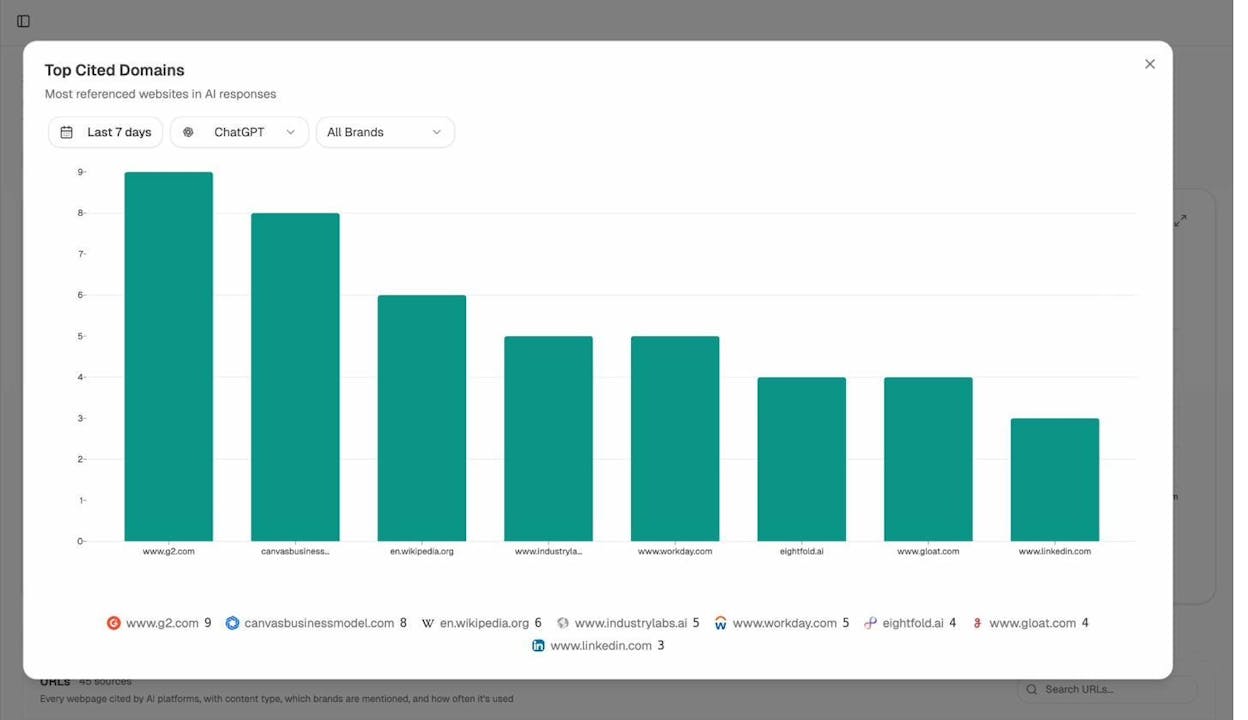
Check your Sources and Citation data. Go to the Sources report in Analyze AI and look at which of your URLs are getting cited. If you see two or more URLs from your domain being cited for similar prompts, that’s a signal worth investigating. The Sources dashboard shows every URL and webpage that AI platforms cite when answering questions about your industry — including which brands get mentioned alongside each source.
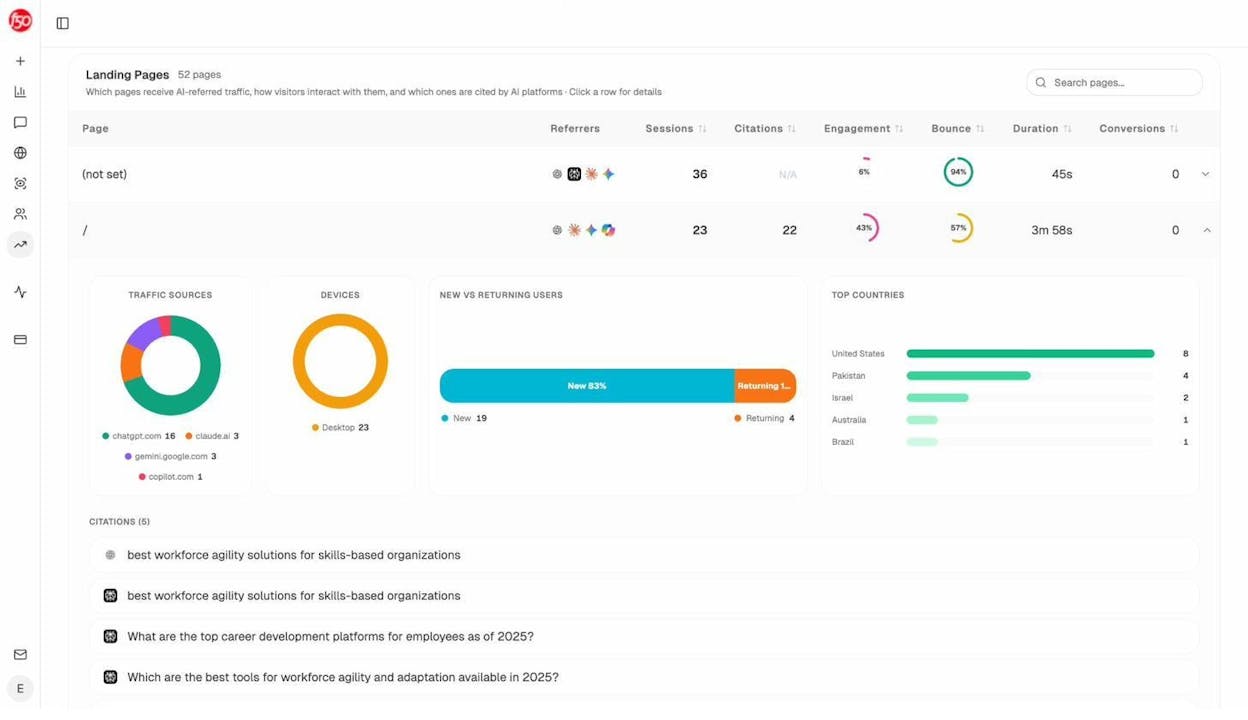
Review your AI Traffic by Landing Page. Connect your GA4 account and check which pages receive traffic from AI search engines. The Landing Pages view in Analyze AI shows each page alongside its referral sources (ChatGPT, Claude, Perplexity, Gemini, Copilot), session count, citation count, engagement, bounce rate, and conversions. If you see two pages on the same topic both receiving small amounts of AI traffic from different engines, consolidating them could concentrate that traffic into one stronger page.
Use the Competitor Suggestions report. The Competitors section in Analyze AI shows suggested competitors — entities frequently mentioned that you haven’t tracked yet. If competitors with one consolidated page on a topic are getting mentioned repeatedly while your brand splits the same topic across two pages, that’s a clear sign your diluted content is costing you visibility.
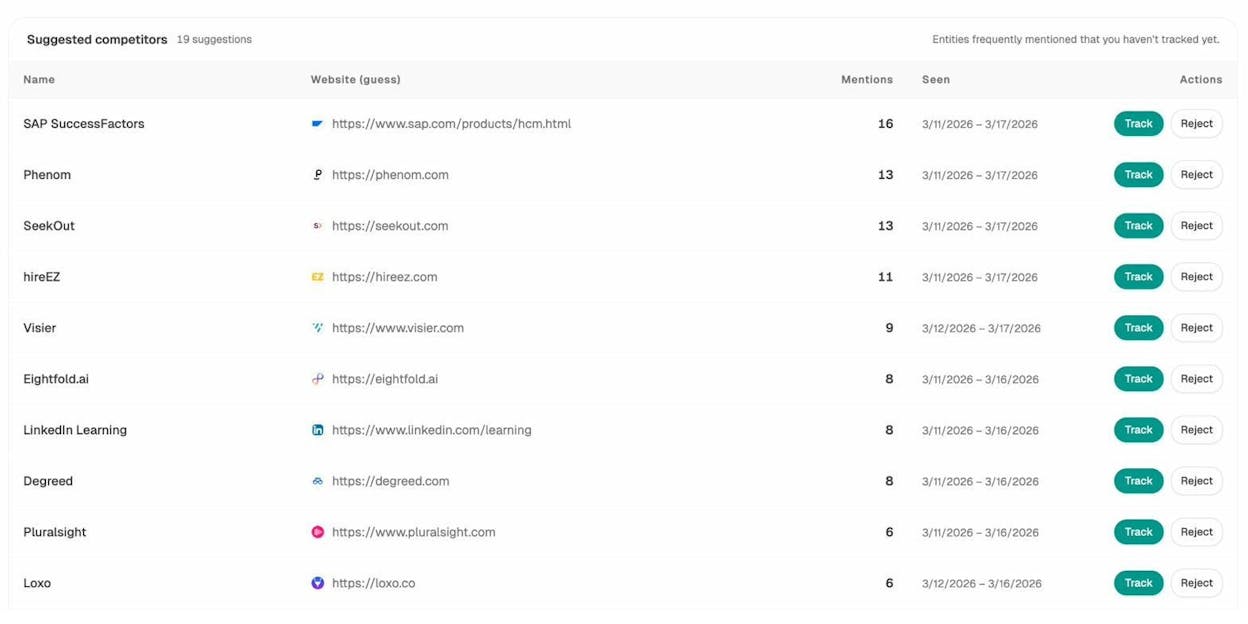
This AI search layer adds a new dimension to cannibalization diagnosis. A page might rank decently in Google but get zero AI citations because a competing page on your own site is muddying the signal. Checking both channels gives you the full picture.
How to Fix Keyword Cannibalization Issues
Once you’ve confirmed that you have a real cannibalization issue, the fix is usually straightforward: consolidate the competing pages into one. The goal is to combine the best content, links, and authority into a single page that performs better than any of the individual pages did.
Here’s a step-by-step process.
Step 1: Decide Which Page to Keep
Look at the competing pages and evaluate each one based on:
|
Factor |
What to Check |
Why It Matters |
|---|---|---|
|
Current organic traffic |
Which page gets the most visits? |
Higher traffic = more existing value to preserve |
|
Backlink profile |
Which page has the most (and best) external links? |
Backlinks are the hardest signal to rebuild |
|
Content quality |
Which page is the most comprehensive and up to date? |
Better content = better foundation for the consolidated page |
|
URL structure |
Which URL is most logical and keyword-friendly? |
Cleaner URLs tend to perform better long-term |
|
Ranking position |
Which page does Google currently favor? |
Google’s preference reflects its assessment of relevance and authority |
In most cases, one page will clearly stand out. That’s the page you keep and build on. If it’s a close call, lean toward the page with the strongest backlink profile, since those links carry the most weight and are the hardest to rebuild.
If you need a quick way to compare competing pages, Analyze AI’s free Website Traffic Checker shows estimated organic traffic, total keywords, and traffic value for any domain — plug in both URLs to see which one carries more organic weight. And the Website Authority Checker gives you the overall authority profile, ranked keywords, and top-10 position count so you can evaluate which page Google considers more authoritative.
![[Screenshot: Analyze AI Website Authority Checker results showing a domain’s organic traffic estimate, total keywords, and ranking distribution]](https://www.datocms-assets.com/164164/1774440887-blobid11.png?auto=format,compress&w=1248&fit=max)
Step 2: Merge the Content
Go through the page(s) you plan to remove and pull out anything valuable: unique insights, examples, data points, sections that the surviving page doesn’t cover. Integrate the best elements into the page you’re keeping.
This isn’t about copying and pasting. It’s about creating one resource that’s better than anything you had before. Think of it as a content upgrade, not just a merge.
Tip: If both pages have sections that rank for different long-tail keywords, make sure the consolidated page covers those subtopics too. You want to preserve (and ideally expand) your keyword footprint.
Step 3: Set Up 301 Redirects
Once the consolidated page is live, set up 301 redirects from the old URL(s) to the surviving page. This tells search engines that the old page has permanently moved, and it passes the majority of the old page’s link equity to the new one.
|
Action |
When to Use |
|---|---|
|
301 redirect to existing page |
The surviving page already covers the topic well; you just need to redirect the weaker page and merge in any missing content. |
|
301 redirect to new page |
Neither existing page is good enough; you create a new, comprehensive page and redirect both old URLs to it. |
|
Delete + redirect |
The old page has almost no traffic, no backlinks, and no unique content worth saving. Redirect to the closest relevant page. |
Step 4: Update Internal Links
After redirecting, go through your site and update any internal links that pointed to the old URL(s). While 301 redirects pass link equity, direct links are always better. Redirect chains slow down crawling and leak a small amount of PageRank.
Use Google Search Console’s “Links” report or a site crawling tool to find pages that still link to the old URL. Update each one to point directly to the new destination.
After you’ve set up redirects, also run Analyze AI’s free Broken Link Checker on your key pages. It audits any webpage for broken links, SEO issues, and page health problems — so you can catch any internal links that broke during the consolidation process or redirects that aren’t resolving properly.
![[Screenshot: Analyze AI showing a page audit with broken links flagged and actionable recommendations]](https://www.datocms-assets.com/164164/1774440889-blobid12.png?auto=format,compress&w=1248&fit=max)
Step 5: Monitor the Results
After consolidation, monitor the surviving page’s performance for at least four to eight weeks. Expect some initial fluctuation as Google reprocesses the changes. But over the following weeks, you should see the consolidated page climb in rankings and gain traffic.
Track these metrics:
|
Metric |
Expected Outcome |
Timeframe |
|---|---|---|
|
Organic traffic to surviving page |
Should increase |
2–4 weeks |
|
Rankings for primary keyword |
Should stabilize and improve |
3–6 weeks |
|
Total organic traffic (old + new URLs combined) |
Net increase |
4–8 weeks |
|
Backlinks to redirected URL |
Should pass through via 301 |
Immediate |
|
AI search citations to the consolidated page |
Should increase as authority concentrates |
4–8 weeks |
If you see a significant drop in traffic that doesn’t recover within six to eight weeks, revisit the consolidated page. You may have accidentally lost important content or subtopics during the merge.
How to Strengthen Your Consolidated Page for AI Search
Once you’ve consolidated your content, take the extra step of optimizing the surviving page for AI search visibility. Here’s how.
Make the page the definitive source on the topic. AI engines cite pages that demonstrate depth and authority. A consolidated page that combines the best of two or three weaker pages is already stronger. But go further: add original data, unique examples, expert quotes, and structured content (tables, step-by-step instructions, FAQ sections) that AI models can easily extract and reference.
Check your AI visibility after consolidation. Use Analyze AI’s prompt tracking to monitor whether the consolidated page starts appearing in AI-generated answers for relevant prompts. The Tracked Prompts dashboard shows visibility percentage, sentiment score, position, and which competitors get mentioned alongside your brand — so you can see exactly whether consolidation is translating to AI search wins.
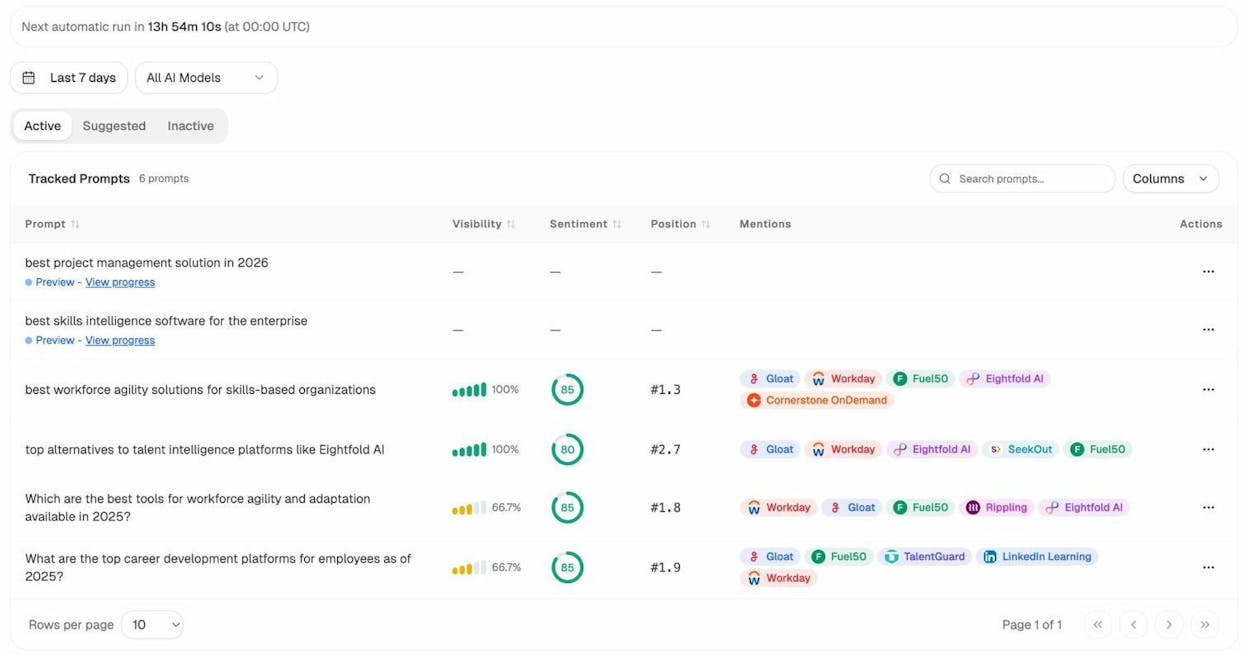
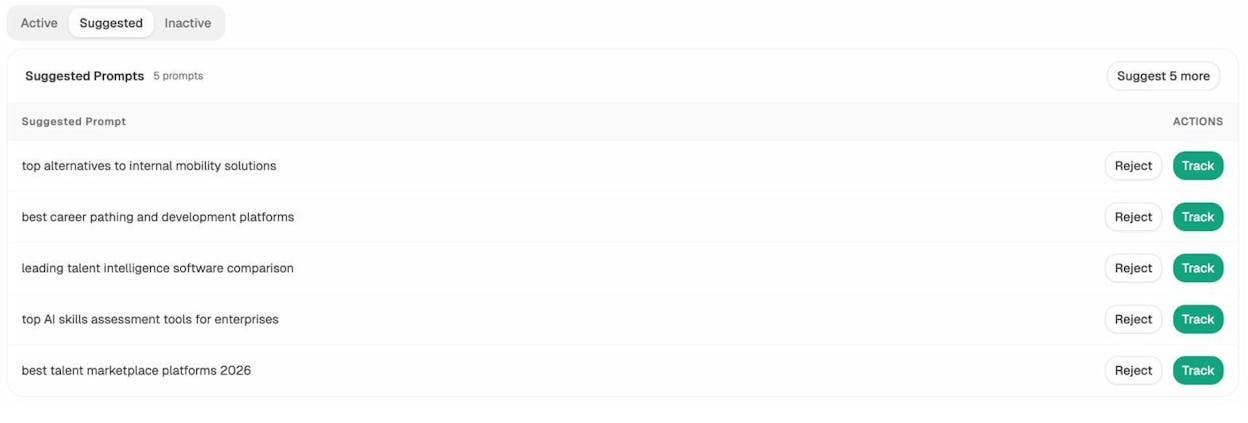
Use prompt suggestions to find new tracking opportunities. Analyze AI’s Prompt Suggestion feature analyzes your site and proposes relevant prompts to track. After consolidation, check whether new prompt suggestions emerge for the consolidated page’s topic. Add the most relevant ones to your tracking list to measure your progress.
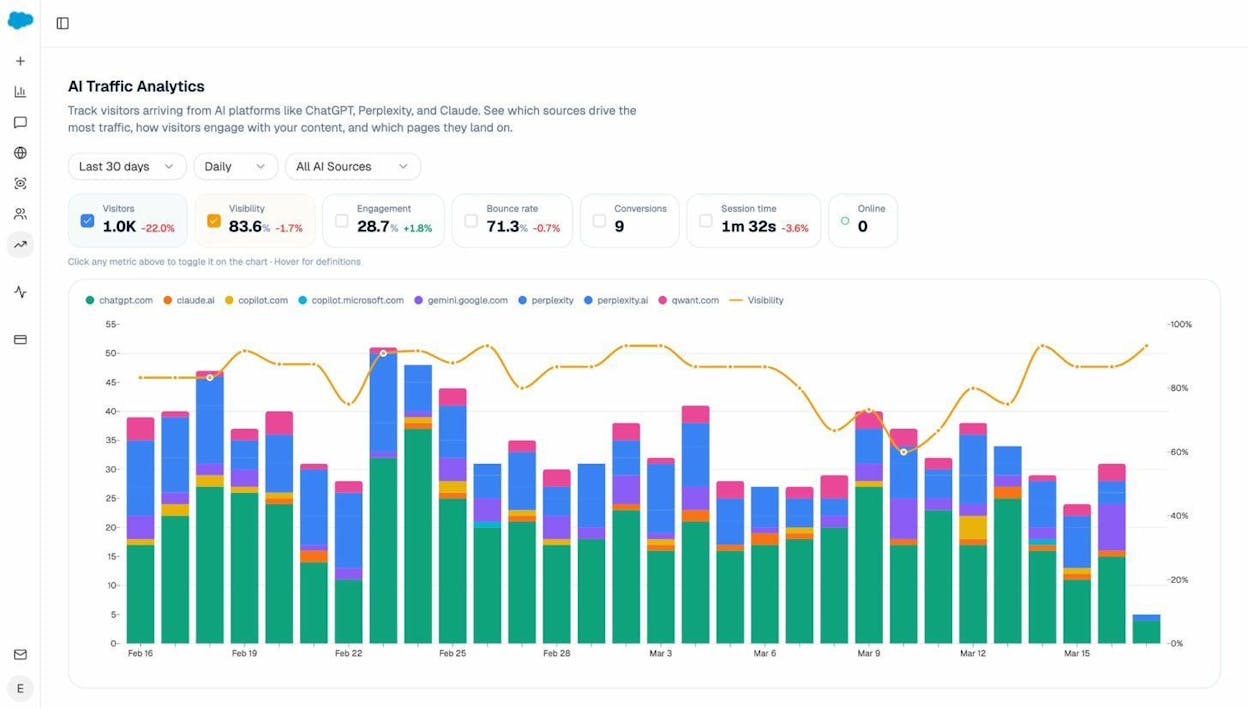
Monitor your overall AI traffic trend. The AI Traffic Analytics dashboard in Analyze AI shows visitors arriving from AI platforms like ChatGPT, Perplexity, and Claude. It breaks down traffic by engine, shows engagement metrics, bounce rate, conversions, and overlays visibility trends. Check this after consolidation to see if your consolidated page starts pulling more AI referral sessions.
Is the Fix Always This Simple?
Most of the time, yes. Consolidate, redirect, and monitor. But there are situations where the answer isn’t so clean-cut.
When One Page Already Ranks #1
If one of your “competing” pages already holds the #1 position for its primary keyword and is pulling in maximum traffic, think carefully before merging it with another page — even if the other page targets a similar keyword.
Here’s an example. Say you have:
-
/blog/submit-website-to-search-engines (ranks #1 for “submit website to search engines,” gets 5,000 visits/month)
-
/blog/submit-website-to-google (ranks #8 for “submit website to google,” gets 300 visits/month)
These pages have overlapping intent. The second page’s traffic is much lower. This looks like a cannibalization issue on paper.
But the first page is already maxed out. It ranks #1 and gets more traffic than any competing page in the SERPs. Merging the second page into it won’t improve its rankings — it’s already at the top. And you’d lose the 300 visits/month the second page generates on its own.
Use the free SERP Checker to verify this. Enter the primary keyword and check whether the #1 page is already outperforming every other result in the SERPs. If so, leave it alone. The cost of merging (lost long-tail traffic) outweighs the benefit (marginal, if any).
When Pages Target the Same Keyword but Different Intents
Sometimes two pages share a keyword but serve different purposes. For example:
-
A blog post titled “Best CRM Software for Small Business” (informational intent)
-
A product page titled “CRM Software — Free Trial” (transactional intent)
Both might rank for “CRM software.” But they serve different stages of the buyer journey. The blog post captures people in research mode. The product page captures people ready to buy or try.
If the keyword has mixed intent — meaning Google shows both informational and transactional results on the first page — this usually isn’t a cannibalization issue. Each page earns its own traffic from its own set of long-tail variations.
The exception is when your analytics clearly show that the informational page has zero business value. If the blog post drives no conversions, no email signups, and no meaningful engagement, and it’s also pulling the product page’s rankings down, then consolidation (or a redirect to the product page) might make sense. But be certain before you act.
When Multiple Pages Compete in AI Search
Here’s a scenario that’s becoming more common. You check your AI search analytics and find that two of your pages are being cited in AI-generated answers — but for different prompts. One page gets cited when users ask “What is [topic]?” and the other gets cited for “How to [topic].”
This isn’t necessarily cannibalization. In AI search, different prompts can trigger different pages, much like different keywords trigger different pages in Google. As long as each page serves a distinct purpose and gets cited for distinct prompts, you’re fine.
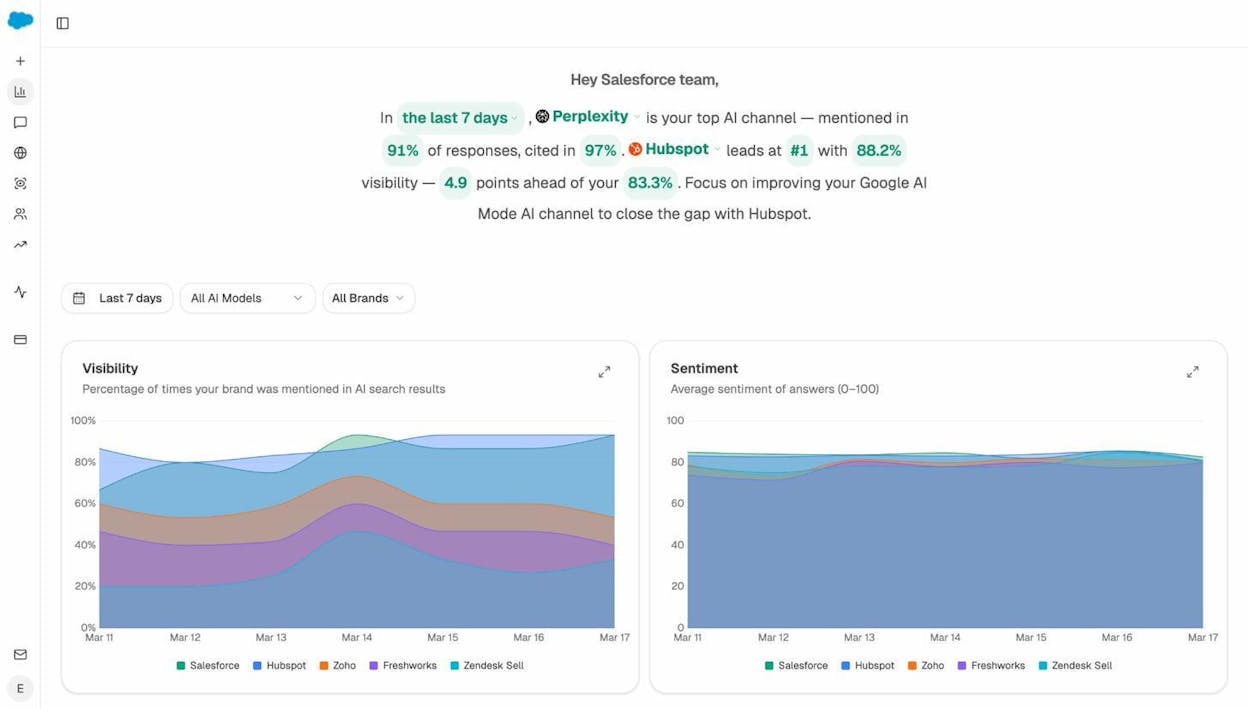
The real problem is when two pages compete for the same prompt and neither wins consistently. You can check this in Analyze AI’s prompt-level analytics. If you see instability — your brand visibility for a specific prompt jumping between 33% and 100% over time, and the sources tab showing different URLs from your domain getting cited on different days — consolidation will almost certainly help.
Keyword Cannibalization Fixes You Should Avoid
Some commonly recommended cannibalization “fixes” sound logical but do more harm than good. Here’s what not to do.
Don’t Just Delete the Page
Unless the page has zero traffic, zero backlinks, and zero business value, deleting it outright is wasteful. You lose whatever long-tail rankings and link equity the page has built up. Always redirect deleted pages to a relevant alternative. Use the free Website Traffic Checker to verify a page’s traffic before deciding to delete it — you might be surprised by how much it’s still contributing.
Don’t Noindex the Page
Adding a noindex tag tells search engines to remove the page from their index entirely. That means it won’t rank for any keyword — not just the one causing the overlap. This is a blunt instrument when you need a scalpel.
Use noindex for pages that genuinely shouldn’t appear in search results (like internal search result pages or thin tag archive pages). Don’t use it to fix cannibalization.
Don’t Canonicalize Unless It’s a True Duplicate
The canonical tag tells search engines which version of a page is the “original” when near-identical copies exist. It’s designed for exact or near-exact duplicates — like when the same product appears under two different URL structures.
It’s not meant for two distinct blog posts that happen to target the same keyword. These are different pages with different content. Canonicalizing one to the other confuses the purpose of the tag and won’t solve your ranking problem.
Don’t Try to “De-optimize” a Page
Some SEOs recommend removing the target keyword from one page to make it stop competing. In theory, this makes sense. In practice, it’s deeply flawed.
You can’t de-optimize a page for one keyword without affecting its rankings for other keywords. Removing internal links with a specific anchor text, deleting keyword mentions, or stripping sections from the page will hurt its overall performance — not just for the cannibalizing keyword but for everything else it ranks for.
If a page is causing cannibalization, the right move is consolidation, not surgery.
How to Prevent Keyword Cannibalization Before It Starts
Fixing cannibalization is important, but preventing it is better. Here are three practices that keep cannibalization from developing in the first place.
Map Keywords to Pages Before You Publish
Before writing any new content, check whether you already have a page targeting the same keyword and intent. Maintain a simple keyword-to-URL map — a spreadsheet that lists every primary keyword you’re targeting and the page that owns it.
When a writer proposes a new blog post, check the map first. If a similar page already exists, decide: should the new content be added to the existing page, or does it serve a genuinely different intent?
If you’re building your keyword map from scratch, start with Analyze AI’s free Keyword Generator to find keyword ideas along with their search volume, difficulty, and CPC data. Then run your top candidates through the Keyword Difficulty Checker to gauge competition before assigning them to pages. This prevents the common mistake of assigning two pages to keywords that are really the same query phrased differently — the difficulty and SERP overlap data makes that clear before you publish.
![[Screenshot: Analyze AI Keyword Generator results showing keyword suggestions with volume, difficulty, and CPC]](https://www.datocms-assets.com/164164/1774440909-blobid17.png?auto=format,compress&w=1248&fit=max)
And don’t limit your keyword research to Google alone. If your content also targets platforms like YouTube, Amazon, or Bing, use the corresponding tools — YouTube Keyword Tool, Amazon Keyword Tool, and Bing Keyword Tool — to check for overlaps across those platforms too. Cannibalization can happen anywhere you have multiple pages competing for the same search intent.
This single step prevents the vast majority of cannibalization issues.
Use Keyword Clustering to Group Related Terms
Related keywords often share the same intent and should be targeted by the same page. Keyword clustering helps you identify these groups before you create content, so you don’t accidentally split related terms across separate pages.
For example, “how to do a content audit,” “content audit checklist,” and “content audit template” all share informational intent. They should be covered by one comprehensive page, not three separate posts.
Audit Regularly, Especially After Scaling Content
Cannibalization tends to creep in over time, especially at companies that publish frequently. A quarterly content audit that specifically checks for keyword overlap keeps the problem from growing.
Add cannibalization checks to your audit process: look for keyword overlaps using the Keyword Rank Checker, review ranking history for instability, and verify that your keyword-to-URL map is still accurate. This is especially important after campaigns where you publish a lot of content in a short period.
And don’t forget the AI search layer. Periodically check your Analyze AI Citation Analytics to see if multiple pages are getting cited for overlapping prompts. Catching this early lets you consolidate before the problem impacts your visibility across both traditional and AI search.
Analyze AI’s Free SEO Tools for Cannibalization Analysis
Throughout this guide, we’ve referenced several free tools that help at different stages of finding and fixing keyword cannibalization. Here’s a quick reference:
|
Tool |
Use Case in Cannibalization Analysis |
|---|---|
|
Find which URLs rank for which keywords — spot overlapping URLs at scale |
|
|
See who ranks in the top 10 for any keyword — check if your site appears twice |
|
|
Compare traffic between two competing pages to decide which to keep |
|
|
Evaluate which page Google considers more authoritative |
|
|
Catch broken links after redirects during consolidation |
|
|
Build a keyword-to-URL map to prevent future cannibalization |
|
|
Gauge competition and spot overlapping queries before publishing |
All of these tools are free to use — no login required. For AI search visibility tracking, prompt analytics, and citation monitoring, Analyze AI’s paid platform picks up where these free tools leave off.
Decision Framework: Fix, Monitor, or Leave It?
Not every keyword overlap needs fixing. Use this framework to decide.
|
Situation |
Action |
Why |
|---|---|---|
|
Two pages target the same keyword and intent; neither ranks well |
Fix (consolidate and redirect) |
Combining authority will likely improve rankings for both traditional and AI search |
|
Two pages target the same keyword, but one ranks #1 with maximum traffic |
Leave it |
The top page is already performing at its ceiling; merging won’t help and may cost you long-tail traffic |
|
Two pages target the same keyword but different intents (informational vs. transactional) |
Monitor |
Usually fine, especially if the keyword has mixed intent in the SERPs; only act if one page has zero value |
|
Rankings swap between two pages frequently |
Fix (consolidate immediately) |
Ranking instability is the clearest sign of harmful cannibalization |
|
One page ranks in Google but gets no AI citations; another page gets cited in AI but doesn’t rank in Google |
Monitor |
Both pages may be serving different channels effectively; check total performance across both |
|
Two pages compete for the same AI search prompt and neither wins consistently |
Fix (consolidate) |
AI engines favor depth and authority; one strong page will outperform two weak ones |
Final Thoughts
Keyword cannibalization is real, but it’s also overdiagnosed. The fact that two pages share a keyword doesn’t automatically mean something is broken. Google doesn’t get “confused” by related pages on your site. It knows what’s on each page and ranks them based on relevance, authority, and intent.
What matters is whether the overlap is actually hurting your performance. If it is — if two pages are fighting for the same position, or if a stronger page could exist by combining two weaker ones — then consolidation is the right move. The process is straightforward: pick the stronger page, merge the best content, redirect, and update internal links.
The new consideration in 2026 is that cannibalization now affects two channels, not one. AI search engines cite from the same web content that Google indexes. When your authority is diluted across multiple pages, you lose visibility in both traditional search and AI-generated answers. This doesn’t mean SEO is dying or that you need to start over — it means the fundamentals that have always worked (depth, originality, structure, usefulness) now need to be legible to AI models too.
Consolidating your content strengthens your position everywhere your audience searches. Whether you’re diagnosing cannibalization through Google Search Console, the free Keyword Rank Checker, or Analyze AI’s AI search analytics, the principle is the same: build one definitive page per topic, make it the best resource available, and let your authority compound rather than compete with itself.

Ernest

Ibrahim


![The Only SEO Checklist You Need in 2026 [With Template]](/_next/image?url=https%3A%2F%2Fwww.datocms-assets.com%2F164164%2F1774288228-image7.png&w=3840&q=75)


