

![How to Build a Keyword Strategy That Actually Drives Results [Free Template]](/_next/image?url=https%3A%2F%2Fwww.datocms-assets.com%2F164164%2F1774864066-blobid0.png&w=3840&q=75)

Summarize this blog post with:


In this article, you’ll learn how to turn a messy list of keyword ideas into a prioritized, actionable keyword strategy—one that accounts for traffic potential, business value, ranking difficulty, and (increasingly) AI search visibility. You’ll walk away with a repeatable framework, a free template to organize your work, and the clarity to know exactly what to publish next and why.
Table of Contents
What Is a Keyword Strategy (and How Is It Different from Keyword Research)?
Keyword research is the process of finding search terms your audience uses. You plug seed terms into a tool, generate hundreds of ideas, and collect data on volume, difficulty, and intent.
Keyword strategy is what you do with that list afterward.
It’s the process of evaluating, scoring, and prioritizing those keywords based on three things:
-
Traffic potential — Will this keyword actually send visitors to your site?
-
Business potential — Does this keyword connect to something you sell or do?
-
Ranking potential — Can you realistically compete for a top position?
Think of keyword research as gathering raw ingredients. Keyword strategy is the recipe—it tells you which ingredients to use, in what order, and what to leave on the shelf.
Without a strategy, you end up with an overwhelming list of terms and no sense of priority. With one, you know exactly what to work on next and why every piece of content exists.
![[Screenshot: A Venn diagram showing the intersection of Traffic Potential, Business Potential, and Ranking Potential — with “Best Keywords to Target” in the center overlap]](https://www.datocms-assets.com/164164/1774864066-blobid1.png?auto=format,compress&w=1248&fit=max)
Before You Start: Define Your Goals
The right keyword strategy looks different depending on what you’re optimizing for. Before you touch a keyword list, get clear on the outcome you want.
If your goal is traffic growth, prioritize keywords with high search volume and low difficulty. These are your quick wins—they build momentum and prove to stakeholders that SEO works.
If your goal is leads or revenue, prioritize keywords with strong purchase intent. These tend to have lower volume but much higher conversion rates. A keyword like “best CRM for small teams” converts far better than “what is a CRM,” even though the latter gets 10x the searches. This is the core idea behind Pain Point SEO—start with bottom-of-funnel keywords that map directly to what you sell, then work your way up the funnel.
If your goal is topical authority, prioritize coverage. You want to own every subtopic within a cluster so Google (and AI models) see your site as the definitive resource. This matters now more than ever as AI search engines like ChatGPT and Perplexity cite sources that demonstrate depth across a topic, not just a single page.
If your goal is AI search visibility, you’ll need to layer in a new type of analysis. More on that in a dedicated section below.
Most strategies blend these goals. The key is knowing which one takes priority at your current stage of growth.
Step 1: Find Keywords with Traffic Potential
There’s no point in targeting keywords nobody searches for. Even a #1 ranking sends zero traffic if the query has no demand. So the first step is building a list of keywords that real people are actually typing into Google.
Here are three methods to do this, from fastest to most thorough.
A. Mine Your Competitors’ Top Pages
Your competitors have already done keyword research for you—they just don’t know it. If a competitor gets a lot of organic traffic to a page, the keyword driving that traffic almost certainly has traffic potential. And because they’re a competitor, that keyword is probably relevant to your business too.
Here’s how to find your competitors’ best keywords:
-
Pick 3–5 direct competitors. These are sites that sell similar products or services and target a similar audience.
-
Enter each competitor’s domain into a tool like Keywords Explorer or use a competitive analysis tool.
-
Go to the Top Pages report (or equivalent) and look at which pages drive the most estimated organic traffic.
-
Note the primary keyword for each page.
![[Screenshot: A competitor’s Top Pages report showing their highest-traffic pages and the keywords driving traffic to each — use any SEO tool’s competitor analysis view]](https://www.datocms-assets.com/164164/1774864078-blobid2.png?auto=format,compress&w=1248&fit=max)
As you scan the list, skip any keywords that aren’t relevant to your business. If you sell project management software, a competitor’s high-traffic page about “free invoice templates” might not be worth targeting—even if it gets 50,000 visits a month. The traffic won’t convert for you.
Pro tip: If the competitor’s list is cluttered with branded keywords (like their company name), filter those out. You want to see the non-branded terms driving traffic.
B. Use a Keyword Research Tool
Keyword research tools let you explore a massive database of search queries, filter by metrics, and find ideas you’d never think of on your own.
Here’s the process:
-
Start with 5–10 seed keywords. These are the broadest terms that describe your product, service, or industry. If you run an email marketing platform, your seeds might be: email marketing, email automation, newsletter, drip campaign, email list.
-
Enter them into a keyword tool like Analyze AI’s free keyword generator, Google Keyword Planner, or a paid tool.
-
Go to the Matching Terms or Related Keywords report.
-
Filter for keywords with meaningful traffic potential.
![[Screenshot: A keyword research tool showing matching terms for a set of seed keywords, filtered by traffic potential, with columns for volume, KD, and TP]](https://www.datocms-assets.com/164164/1774864081-blobid3.png?auto=format,compress&w=1248&fit=max)
A critical nuance here: search volume is not the same as traffic potential. A keyword might show 10,000 monthly searches, but if the top-ranking page for that keyword only gets 200 clicks, the real opportunity is much smaller. This often happens when Google shows an AI Overview, a featured snippet, or a knowledge panel that answers the question directly in the SERP.
Always look at the estimated traffic to the #1 ranking page for a keyword. That number—often called Traffic Potential (TP)—is a far more reliable indicator of how much traffic you’ll actually get.
C. Use Google Search Console to Find Existing Opportunities
If your site already has some organic traffic, Google Search Console is a goldmine for finding keywords you’re almost ranking for. These are terms where you’re on page 2 or the bottom of page 1—close enough that a content update or optimization could push you into a top spot.
Here’s how to find them:
-
Open Google Search Console → Performance → Search results.
-
Set the date range to the last 3 months.
-
Filter by position: show queries where your average position is between 8 and 25.
-
Sort by impressions (descending).
![[Screenshot: Google Search Console performance report filtered for positions 8–25, sorted by impressions descending]](https://www.datocms-assets.com/164164/1774864091-blobid4.png?auto=format,compress&w=1248&fit=max)
These are your low-hanging fruit. You’re already getting impressions for these queries, which means Google sees your page as at least somewhat relevant. A targeted content refresh can often push these from page 2 to page 1. Read more in our guide on finding which keywords your site ranks for.
D. Use AI Chatbots for Keyword Discovery
Here’s a method most guides skip entirely: using AI chatbots as a brainstorming partner.
Open ChatGPT, Claude, or Perplexity and ask a question like:
“What are the most common questions someone would ask when evaluating [your product category]?”
Or:
“If someone was trying to solve [specific pain point], what would they search for on Google?”
AI models are trained on enormous amounts of web data. They’re surprisingly good at surfacing the natural-language queries your audience actually uses—especially long-tail, conversational queries that traditional keyword tools miss.
This is particularly useful for AI keyword research, because the queries people type into ChatGPT and Perplexity are often different from what they type into Google. They’re longer, more specific, and more conversational. Understanding these patterns now will help you build content that performs in both traditional and AI search.
Once you’ve gathered ideas from all four methods, you should have a raw list of at least 100–200 keyword ideas. Now it’s time to evaluate them.
Step 2: Score Business Potential
Every keyword your potential customers search for has some value to your business. But some are worth significantly more than others.
Consider these three keywords for a project management software company:
-
“what is project management” — The searcher is learning. They’re nowhere near buying anything.
-
“best project management software for remote teams” — The searcher is comparing options. They’re actively shopping.
-
“Asana vs Monday vs ClickUp” — The searcher has narrowed their options and is about to make a decision.
The closer a searcher is to a buying decision, the more “business potential” that keyword has. This is why we score business potential separately from traffic potential. A keyword with 500 monthly searches and high purchase intent will often generate more revenue than a keyword with 50,000 searches and zero intent.
Here’s a scoring framework you can use:
|
Score |
What It Means |
Example |
|---|---|---|
|
3 — High |
Your product/service is the direct solution to the searcher’s problem. You can naturally pitch it. |
“best email marketing software for ecommerce” |
|
2 — Medium |
Your product is relevant but not the main focus. You can mention it naturally. |
“how to increase email open rates” |
|
1 — Low |
Your product is tangentially related. Hard to mention without forcing it. |
“what is digital marketing” |
|
0 — None |
Your product has no connection to the query. |
“how to write a resume” |
Go through your keyword list and assign a score of 0–3 to every keyword. Be honest. If you can’t naturally weave your product into the content, the keyword isn’t worth prioritizing—no matter how much traffic it gets.
One common mistake: Teams often over-index on top-of-funnel keywords (score 1) because they have high volume. But as Grow and Convert’s Pain Point SEO framework demonstrates, bottom-of-funnel keywords (score 2–3) tend to produce far more conversions despite lower volume. Build from the bottom of the funnel up, not the top down.
Step 3: Assess Ranking Difficulty
Some keywords are easy to rank for. Others will take months of work and dozens of backlinks. Understanding where each keyword falls on that spectrum is critical to building a realistic strategy.
Here are five factors to evaluate:
A. Keyword Difficulty (KD) Score
Most SEO tools provide a Keyword Difficulty score—a numerical estimate of how hard it is to rank in the top 10 for a given keyword. This score is typically based on the number and quality of backlinks pointing to the current top-ranking pages.
Use Analyze AI’s free keyword difficulty checker to quickly check this for any keyword.
![[Screenshot: A keyword difficulty checker showing KD score, search volume, and a brief explanation of what’s needed to rank]](https://www.datocms-assets.com/164164/1774864101-blobid5.png?auto=format,compress&w=1248&fit=max)
KD scores are a useful starting point, but they’re not the full picture. A keyword with KD 30 might still be hard to rank for if every top result is from a massive brand. And a keyword with KD 60 might be achievable if the content quality of the top results is poor.
Use KD as a filter, not a final answer.
B. Backlink Profile of Top Results
Backlinks remain one of Google’s strongest ranking signals. The more high-quality backlinks the current top-ranking pages have, the harder it’ll be to compete.
To assess this:
-
Search for your target keyword on Google.
-
Take the top 5 results and check how many referring domains each one has using a backlink tool or Analyze AI’s website authority checker.
-
Compare that to your own site’s link profile.
![[Screenshot: SERP overview showing linking domains to each top-ranking page for a target keyword]](https://www.datocms-assets.com/164164/1774864103-blobid6.png?auto=format,compress&w=1248&fit=max)
If every top result has 200+ referring domains and your site has 15, you’re probably looking at a long-term play. That doesn’t mean you shouldn’t target it—just know that it won’t rank next month.
C. Domain Authority of Competitors
While Google has said it doesn’t use a site-level authority metric, there’s a strong correlation between domain strength and ranking ability. Sites with high Domain Rating (DR) tend to rank faster and for more competitive terms.
Check the DR of the sites currently ranking for your keyword. If they’re all DR 70+ and your site is DR 25, you’ll likely need to build up your domain’s backlink profile before you can compete on those terms.
You can check any site’s authority using Analyze AI’s website authority checker.
D. Search Intent Alignment
Even if you have the links and authority to rank, you won’t get anywhere if your content doesn’t match what searchers actually want. This is called search intent, and it’s arguably the most important ranking factor to get right.
To figure out search intent, look at what’s already ranking on page 1. You’re checking for three things:
-
Content type — Are the top results blog posts, product pages, landing pages, or tools? If every result is a free tool and you’re planning to write a blog post, you’ll struggle.
-
Content format — Are they listicles, how-to guides, comparison tables, or definitions? Match the format the SERP rewards.
-
Content angle — Is there a dominant hook across the results? Things like “for beginners,” “in 2026,” “free,” or “step-by-step” reveal what the audience cares about most.
![[Screenshot: Google search results for a keyword, showing the content type and format of each top result]](https://www.datocms-assets.com/164164/1774864112-blobid7.png?auto=format,compress&w=1248&fit=max)
Use Analyze AI’s free SERP checker to quickly scan the top results for any keyword without manually searching.
If you can’t create the type of content the SERP is rewarding, mark the keyword as “rejected” in your strategy template and move on.
E. Content Quality of Current Results
Sometimes the top-ranking pages are genuinely excellent. They have original data, expert interviews, custom graphics, and years of iteration. Competing with them means investing serious time and resources.
Other times, the top results are thin, outdated, or clearly generated by AI without any original insight. These represent opportunities to win by simply creating something significantly better.
Scan the top 3–5 results and ask yourself:
-
Is the content comprehensive, or are there obvious gaps?
-
Is it based on original research or firsthand experience?
-
Is it up to date?
-
Does it actually help the reader, or is it padded with filler?
If you can create something meaningfully better—more detailed, more current, or with a unique angle—the keyword is worth pursuing even if the KD score looks challenging.
Putting It Together: Score Ranking Potential
Based on your assessment of the five factors above, assign each keyword a Ranking Potential (RP) score:
|
Score |
What It Means |
|---|---|
|
3 — High |
Low KD, few backlinks needed, weak content in the top results. You can likely rank within 3–6 months. |
|
2 — Medium |
Moderate KD, some backlinks needed, decent content in the top results. Ranking possible in 6–12 months. |
|
1 — Low |
High KD, many backlinks needed, strong content from authoritative sites. This is a long-term play (12+ months). |
|
0 — Not feasible |
You can’t match the intent (e.g., SERP is dominated by free tools you can’t build). |
Step 4: Cluster Your Keywords
Before you finalize your strategy, group your keywords into clusters. Keyword clustering is the process of grouping keywords that share the same search intent—meaning they can (and should) be targeted by a single page.
Why does this matter? Because if you create separate pages for keywords that Google considers the same topic, those pages will compete against each other. This is called keyword cannibalization, and it can tank your rankings for both terms.
Here’s how to cluster effectively:
-
Take two keywords from your list that seem related—say, “keyword strategy” and “how to build a keyword strategy.”
-
Google both of them.
-
If the top 3–5 results are largely the same pages, those keywords belong in the same cluster. Target them with a single piece of content.
-
If the results are completely different, they need separate pages.
For each cluster, choose one primary keyword (the one with the highest traffic potential) and list the remaining keywords as secondary keywords. Your primary keyword goes in your title, URL, and H1. Your secondary keywords get woven into the body, subheadings, and meta description.
![[Screenshot: A spreadsheet showing keyword clusters — each cluster has a primary keyword, secondary keywords, and a shared intent label]](https://www.datocms-assets.com/164164/1774864117-blobid8.png?auto=format,compress&w=1248&fit=max)
A faster method: Many SEO tools offer automatic clustering features. They group keywords by “parent topic”—the keyword whose top-ranking page also ranks for all the other keywords in the group. This isn’t perfect, so always verify with a manual SERP check, but it saves significant time when working with large keyword lists.
Step 5: Add AI Search to Your Keyword Strategy
Here’s where most keyword strategy guides stop. But if you’re building a strategy in 2026, you’re missing a major channel if you only think about Google.
AI search platforms—ChatGPT, Perplexity, Claude, Gemini, Google AI Mode—now drive real, measurable traffic. And the keywords (or more accurately, the prompts) that matter in AI search are different from traditional SEO keywords.
This doesn’t mean SEO is dead. It means SEO is evolving. AI search is a complementary organic channel, not a replacement. The best keyword strategies now account for both.
Here’s how to layer AI search into the strategy you’ve been building.
A. Understand How AI Search Queries Differ from Google Queries
When someone uses Google, they tend to type short, fragmented queries: “best crm small business.” When they use ChatGPT or Perplexity, they write full sentences: “What’s the best CRM for a 10-person team that needs strong email integration?”
This means the same buyer intent shows up in different language across the two channels. Your keyword strategy should account for both:
-
Traditional SEO keywords (short, high-volume queries typed into Google)
-
AI search prompts (longer, more specific queries typed into ChatGPT, Perplexity, Claude, or Google AI Mode)
The good news: if your content is comprehensive, well-structured, and authoritative, it tends to perform in both channels. AI models draw from the same web content that Google indexes. But understanding the prompt patterns in your space helps you structure content in a way that’s more likely to get cited.
B. Track the Prompts That Mention Your Brand (and Your Competitors)
In traditional SEO, you track which keywords your site ranks for. In AI search, you track which prompts your brand appears in—and which ones it doesn’t.
Analyze AI makes this measurable. In the Prompts dashboard, you can see every prompt you’re tracking, your visibility percentage, sentiment score, position, and which competitors appear alongside you.
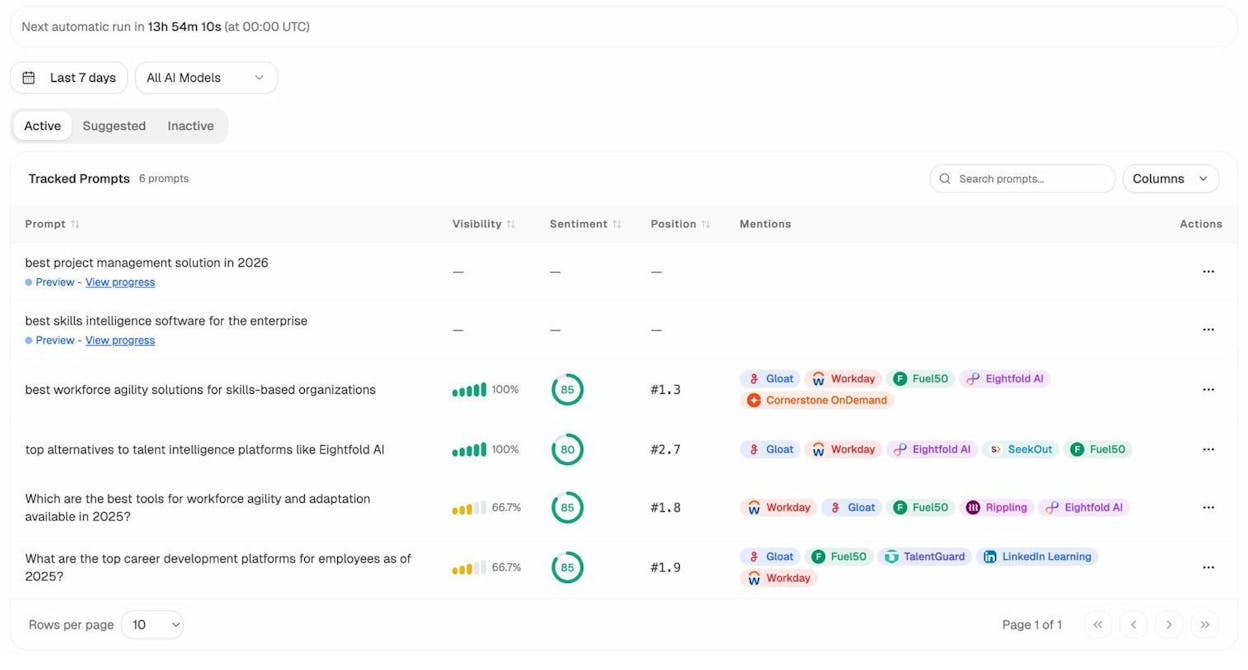
For example, you might discover that your brand shows up in 100% of ChatGPT’s responses for “best workforce agility solutions for skills-based organizations” but is completely absent from “best career pathing and development platforms.” That gap is an opportunity—you now know exactly what content to create or improve.
C. Use Prompt Suggestions to Find AI Search Opportunities
Just like keyword research tools suggest keywords you haven’t thought of, Analyze AI suggests prompts you should be tracking. Go to the Suggested tab in the Prompts section to see AI-generated prompt ideas based on your industry and tracked competitors.
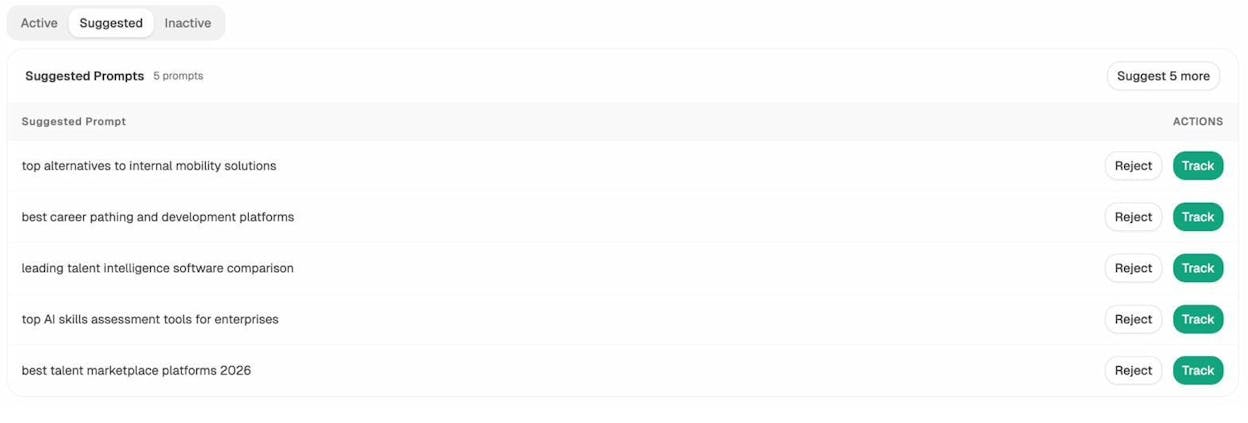
These suggestions act like a keyword research tool for AI search. One click to “Track,” and Analyze AI will start monitoring your visibility for that prompt across all major AI models daily.
D. Find Where Competitors Win and You Don’t
In the Competitors section of Analyze AI, you can see which brands are mentioned most frequently across AI responses in your space. This is the AI search equivalent of a competitor gap analysis.
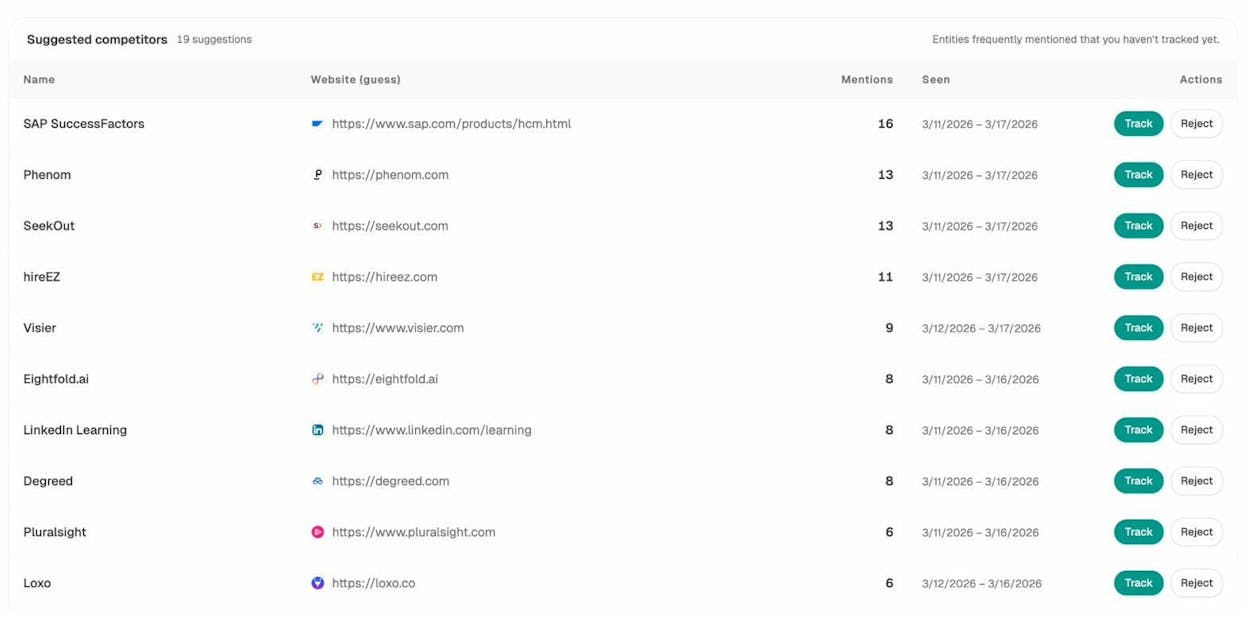
If a competitor is getting mentioned in 16 of the prompts you track and you only show up in 4, you know exactly where to focus your efforts. Click into the competitor to see which specific prompts they win—then create or improve content to close those gaps.
You can also use the Competitor Overview to compare your visibility share against tracked rivals over time:
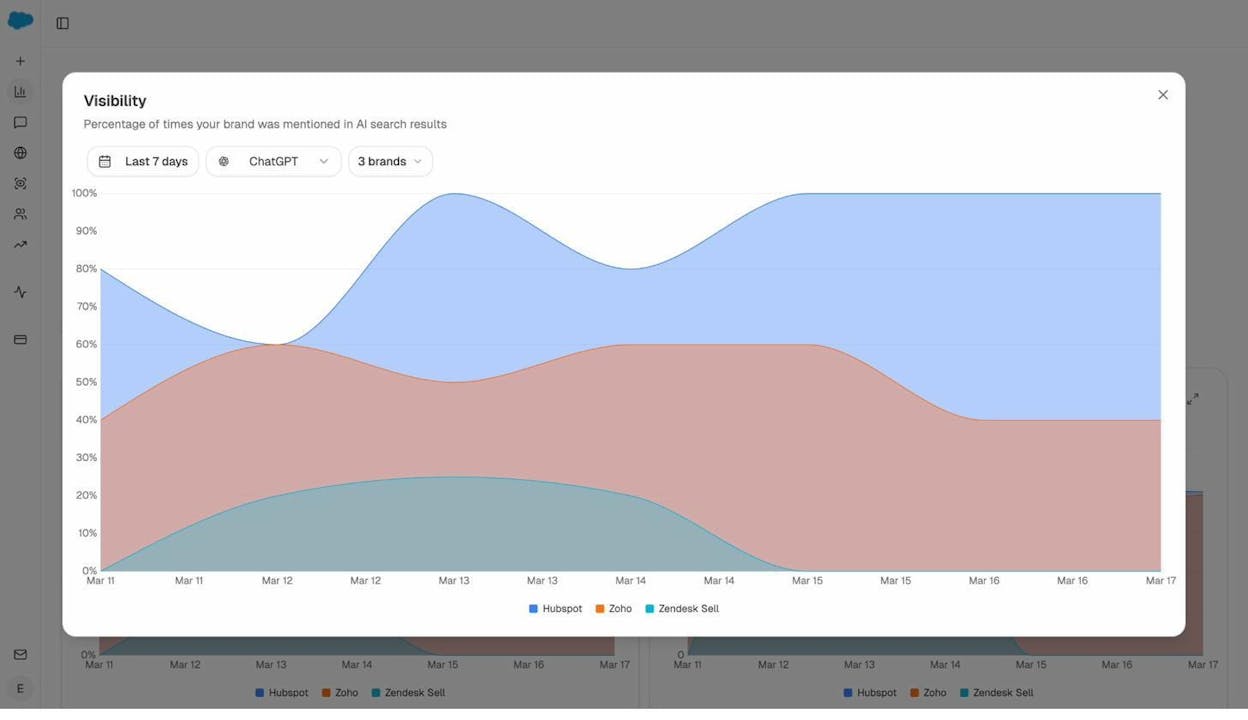
This gives you a rolling scoreboard. If a competitor’s visibility is rising while yours is flat, something in their content strategy is working. Dig into which prompts are driving the shift and respond.
E. Check Which Pages Already Get AI Traffic
Here’s a powerful signal most teams miss: you may already be getting traffic from AI search and not know it.
Analyze AI connects to your GA4 data and isolates traffic from AI referral sources—ChatGPT, Perplexity, Claude, Gemini, Copilot, and others. In the AI Traffic Analytics dashboard, you can see total visitors from AI search, broken down by engine, with engagement metrics and conversions.
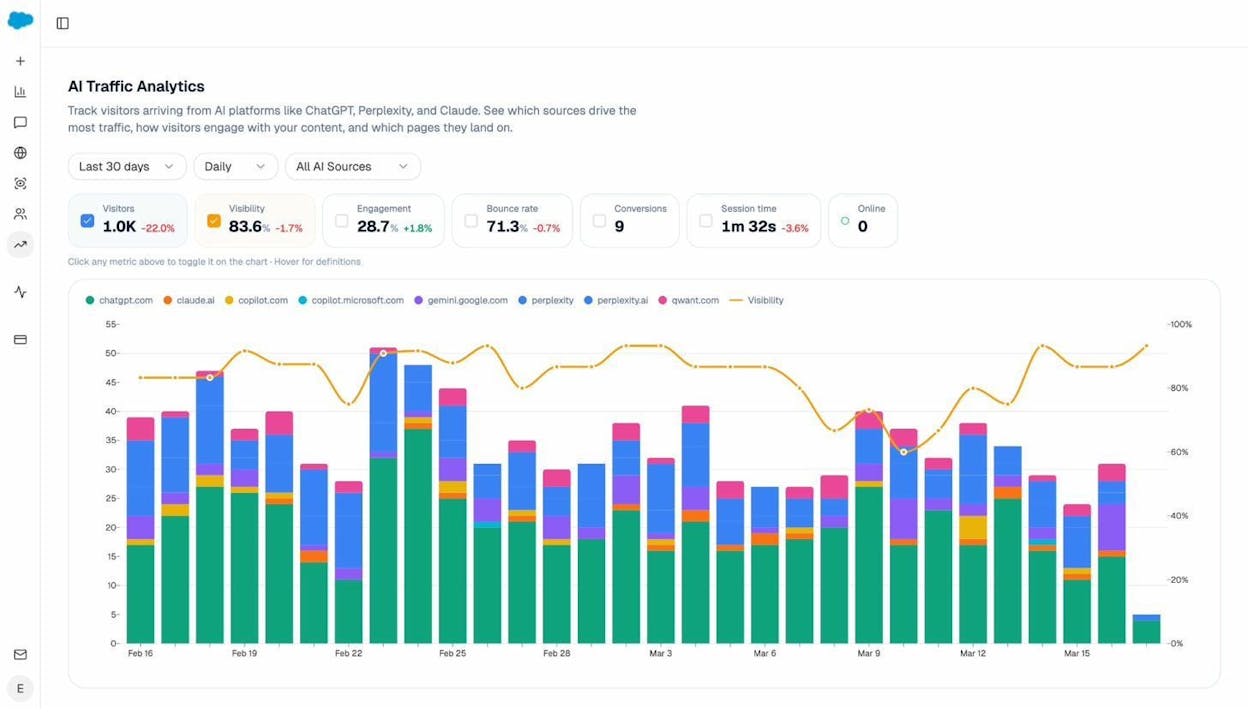
Drill down into the Landing Pages tab to see exactly which pages AI engines are sending traffic to. This reveals which of your existing pages AI models prefer to cite—and which ones convert that traffic.
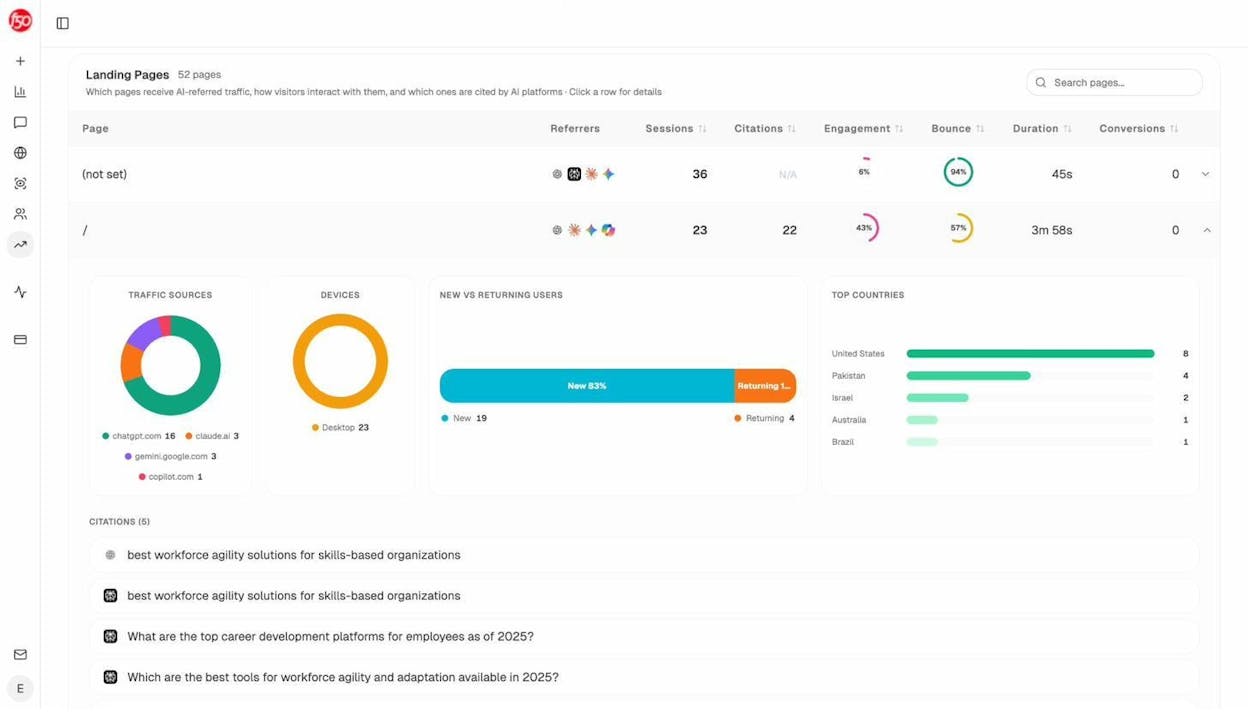
Pages that already receive AI traffic are templates for what works. Study their structure, length, format, and topic coverage. Then apply those patterns to new content.
F. See Which Sources AI Models Cite in Your Space
AI models cite sources when generating responses. If you know which websites and content types get cited most in your industry, you can create content that’s more likely to earn those citations.
In Analyze AI’s Sources dashboard, you can see the top cited domains and the types of content AI platforms reference—website pages, blog posts, reviews, product pages, and more.
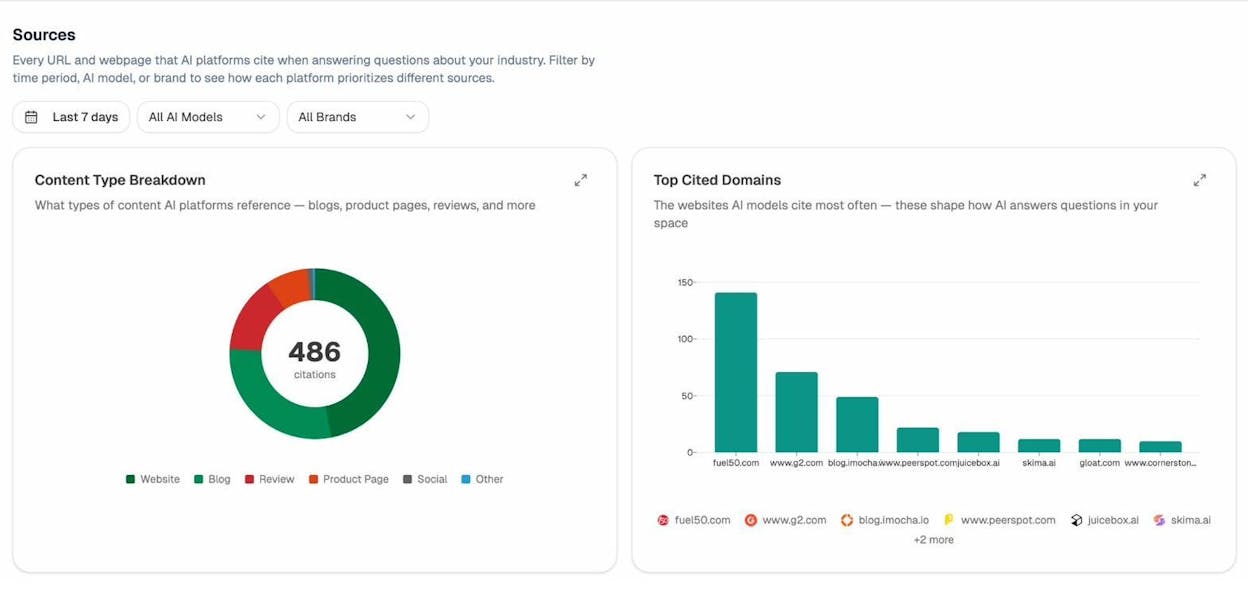
If blog posts and review sites dominate citations in your space, that tells you where to focus your content strategy. If product pages are rarely cited, you know that educational content is what earns AI mentions—not feature specs.
G. Monitor Brand Perception Across AI Models
Beyond visibility, it matters how AI models describe your brand. Are they positioning you accurately? Are they highlighting your strengths or amplifying competitor narratives?
Analyze AI’s Perception map plots your brand and competitors on a 2×2 grid: visibility on the x-axis, narrative strength on the y-axis. The ideal position is “Visible & Compelling” (top right).
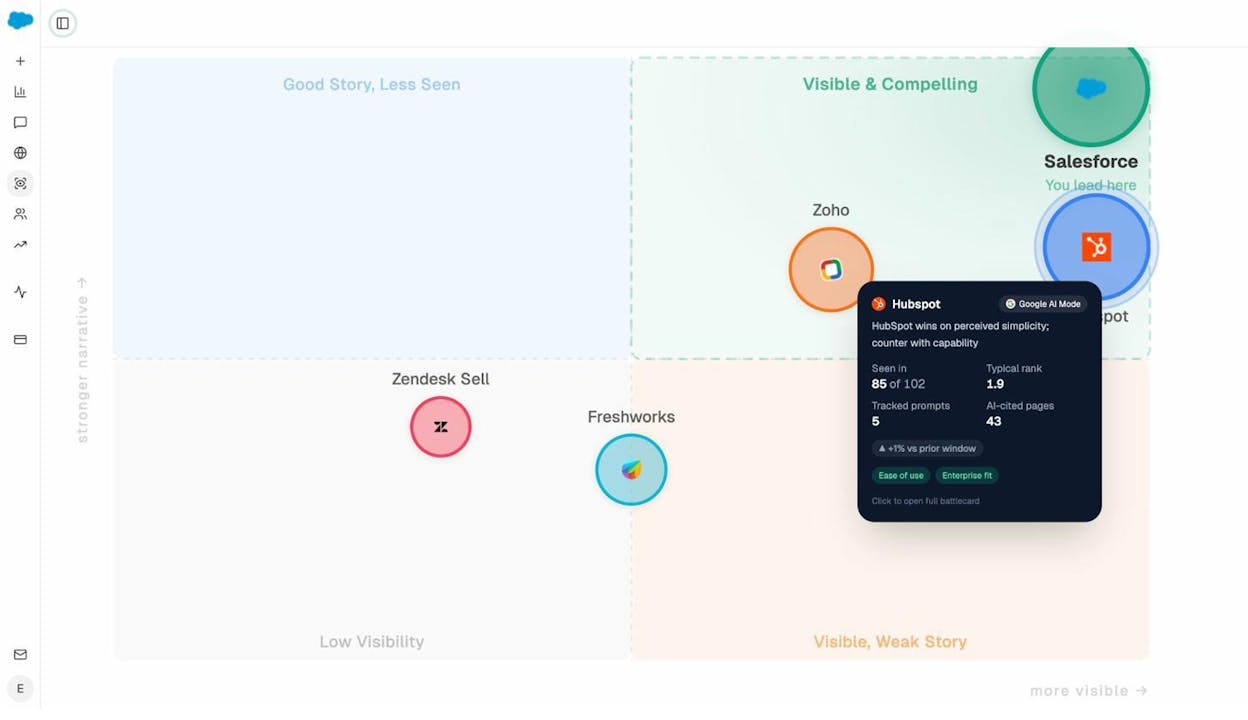
If your brand is visible but AI models tell a weak story about you, the fix isn’t more content—it’s better content that shapes the narrative. Update your key pages to emphasize your differentiators, and those talking points will flow into AI responses over time.
H. Map AI Search Insights Back to Your Keyword Strategy
Here’s how all of this connects back to the keyword strategy spreadsheet you’re building:
-
Add a column for “AI Prompt Equivalent.” For each traditional keyword, note the natural-language prompt someone would type into ChatGPT. For example, if your keyword is “best crm small business,” the AI prompt might be “What’s the best CRM for a small business with less than 20 employees?”
-
Add a column for “AI Visibility.” Check whether your brand currently appears in AI responses for that topic. If yes, note your position. If no, that’s a gap worth closing.
-
Prioritize keywords where you can win in both channels. Keywords where you have strong Google ranking potential AND low AI visibility are especially valuable—you can build content that ranks on Google and starts appearing in AI responses simultaneously.
For deeper reading on how answer engine optimization works and how to rank on ChatGPT or Perplexity, check out our dedicated guides.
Step 6: Bring It All Together in a Strategy Document
Creating a keyword strategy means combining everything you’ve gathered into one document that your team can act on. You can use our free template (a Google Sheets spreadsheet) for this.
Here’s what each column should contain:
|
Column |
What It Captures |
How to Score It |
|---|---|---|
|
Keyword |
The primary keyword for this topic |
From Steps 1A–1D |
|
Secondary Keywords |
Related terms to include in the same content |
From Step 4 |
|
Cluster |
The topic cluster this keyword belongs to |
From Step 4 |
|
Traffic Potential (TP) |
Estimated monthly traffic to the #1 page |
3 = High (1,000+), 2 = Medium (250–999), 1 = Low (<250) |
|
Business Potential (BP) |
How relevant this keyword is to your product |
3 = Direct pitch, 2 = Natural mention, 1 = Tangential, 0 = None |
|
Ranking Potential (RP) |
How realistic it is to rank in the top 5 |
3 = Easy, 2 = Moderate, 1 = Hard, 0 = Not feasible |
|
AI Prompt Equivalent |
The natural-language query for AI search |
From Step 5H |
|
AI Visibility |
Whether your brand currently appears in AI responses |
Yes / No / Partial |
|
Search Intent |
Type of content the SERP rewards |
Blog post, landing page, tool, etc. |
|
Priority |
Overall priority combining all scores |
High / Medium / Low |
|
Status |
Where you are in the process |
Not started / In progress / Published |
![[Screenshot: A completed keyword strategy spreadsheet with all columns filled in, showing 10–15 rows with color-coded priority scores]](https://www.datocms-assets.com/164164/1774864167-blobid17.png?auto=format,compress&w=1248&fit=max)
How to Prioritize
With all three scores filled in, prioritization becomes straightforward:
High priority (publish first): Keywords with high TP, high BP, and high RP. These are your quick wins with strong business impact. If they also have low AI visibility, even better—you’re capturing an underserved channel.
Medium priority (publish next): Keywords with a mix of scores. Maybe they have high business potential but moderate ranking difficulty. Or high traffic potential but only tangential business relevance. These are worth targeting, just not first.
Low priority (backlog): Keywords where most scores are low. Maybe there’s traffic potential but zero business relevance, or the ranking difficulty is too high for your current domain authority. Save these for later.
Rejected: Keywords where you scored a 0 in any category. If there’s no business potential, no point in writing the content. If ranking potential is 0 (you can’t match the intent), don’t waste resources.
Step 7: Turn Your Strategy Into an Action Plan
A strategy without execution is just a spreadsheet. Here’s how to move from prioritized keywords to published content.
Map Keywords to Content Types
For each high-priority keyword, decide what type of content you’ll create based on the search intent analysis from Step 3D:
-
Informational intent → Blog post, guide, or tutorial
-
Comparison intent → Comparison page or “vs” article
-
Transactional intent → Product page, landing page, or pricing page
-
Navigational intent → Usually not worth targeting unless it’s your own brand
Create a Publishing Calendar
Take your high-priority keywords and map them to a realistic publishing schedule. Consider:
-
How many pieces can your team produce per month?
-
Which keywords depend on others? (For example, you should publish a pillar page before its cluster pages.)
-
Are any keywords time-sensitive? (Like “best [tool] for 2026” — these need to go live before the year progresses.)
Assign Ownership
For each piece of content, assign a writer, editor, and a target publish date. Track status in your strategy document (Not started → Outline → Draft → Review → Published).
Build for Both Channels
When you write each piece of content, keep both Google and AI search in mind:
-
Structure content with clear H2s and H3s that answer specific questions. AI models parse headings to understand page structure.
-
Include tables, definitions, and data points that AI models can easily extract and cite.
-
Use schema markup where appropriate. Structured data helps both Google and AI models understand your content.
-
Answer the AI prompt variant within your content. If the AI prompt equivalent is “What’s the best email marketing platform for small businesses?”, make sure your article has a section that directly answers that question.
For more on this, read our guide on how to use keywords in SEO and SEO content strategy.
Step 8: Monitor, Measure, and Iterate
A keyword strategy isn’t a one-time exercise. It’s a living document that evolves as you publish content, earn rankings, and discover new opportunities.
Track Your Google Rankings
Use Analyze AI’s keyword rank checker or a rank tracking tool to monitor where you stand for each target keyword. Check monthly and note trends:
-
Climbing: Your strategy is working. Keep going.
-
Stalling: The content may need updating, more internal links, or backlinks. Read more about internal linking best practices and link building tools.
-
Dropping: Investigate. A competitor may have published better content, or your page may need a refresh.
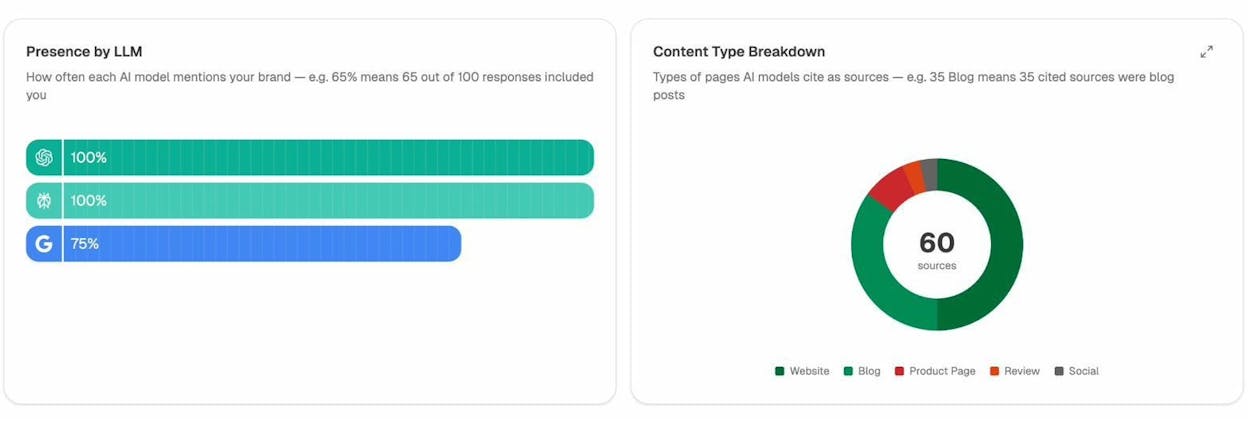
Track Your AI Search Visibility
In Analyze AI, check your prompt-level visibility weekly. Monitor:
-
New prompts where you’ve gained visibility — Your content strategy is working.
-
Prompts where competitors are gaining ground — These need a content response.
-
Which AI engines cite you most — Double down on formats and structures those engines prefer.
Update Your Strategy Quarterly
Every quarter, go back to Step 1 and repeat the process:
-
Look for new keyword opportunities from competitor analysis and Google Search Console.
-
Re-score keywords whose rankings have changed.
-
Add new AI prompts from Analyze AI’s suggestions.
-
Move completed keywords from “In progress” to “Published” and promote backlog items to active.
The teams that treat keyword strategy as an ongoing discipline—not a one-time project—are the ones that compound their organic traffic over time.
Common Keyword Strategy Mistakes to Avoid
Chasing volume over intent. A keyword with 50,000 monthly searches sounds exciting until you realize it has zero conversion potential. Always score business potential before you prioritize by volume.
Ignoring AI search entirely. AI search engines now account for measurable, growing traffic. Ignoring them means leaving a channel on the table—especially for bottom-of-funnel queries where AI responses often include product recommendations.
Targeting too many keywords at once. A focused strategy with 30 well-chosen keywords will outperform a scattered strategy with 300. Quality of targeting beats quantity every time.
Not clustering keywords. If you create separate pages for “keyword strategy” and “how to build a keyword strategy,” those pages will cannibalize each other. Always cluster before you publish. Read more in our keyword clustering guide.
Skipping the SERP analysis. You can’t assess ranking difficulty from a KD score alone. Always look at what’s actually ranking. The SERP tells you what Google rewards—match it, then beat it.
Setting it and forgetting it. A keyword strategy from 6 months ago is already stale. Competitors publish new content, search volumes shift, and AI models update their responses. Build review cycles into your process.
Tools You’ll Need
You don’t need a huge budget to build a strong keyword strategy. Here’s what we recommend:
For keyword research and discovery: - Analyze AI Keyword Generator (free) - Google Keyword Planner (free with Google Ads account) - Analyze AI YouTube Keyword Tool (free, for video keyword research) - Analyze AI Bing Keyword Tool (free, for Bing-specific data) - Analyze AI Amazon Keyword Tool (free, for ecommerce keyword research)
For competitive analysis: - Analyze AI Website Traffic Checker (free) - Analyze AI Website Authority Checker (free) - Your preferred SEO tool’s competitor analysis features
For difficulty and SERP analysis: - Analyze AI Keyword Difficulty Checker (free) - Analyze AI SERP Checker (free) - Analyze AI Keyword Rank Checker (free)
For AI search strategy: - Analyze AI (prompt tracking, competitor analysis, AI traffic attribution, citation analytics)
For link analysis: - Analyze AI Broken Link Checker (free)
Quick-Reference Checklist
Use this as a shortcut when building your next keyword strategy:
Phase 1 — Gather keywords
-
[ ] Pull competitors’ top pages and keywords
-
[ ] Run seed keywords through a keyword research tool
-
[ ] Check Google Search Console for existing opportunities
-
[ ] Brainstorm AI search prompts using chatbots
Phase 2 — Evaluate keywords
-
[ ] Score Traffic Potential (1–3) for each keyword
-
[ ] Score Business Potential (0–3) for each keyword
-
[ ] Score Ranking Potential (0–3) for each keyword
-
[ ] Check search intent alignment for each keyword
Phase 3 — Organize and prioritize
-
[ ] Cluster keywords by shared search intent
-
[ ] Assign primary and secondary keywords to each cluster
-
[ ] Add AI prompt equivalents and check AI visibility
-
[ ] Prioritize: High → Medium → Low → Rejected
Phase 4 — Execute
-
[ ] Map each keyword to a content type
-
[ ] Build a publishing calendar
-
[ ] Write content that serves both Google and AI search
-
[ ] Publish and track rankings + AI visibility
Phase 5 — Iterate
-
[ ] Review rankings and AI visibility monthly
-
[ ] Re-score and re-prioritize quarterly
-
[ ] Add new keywords and prompts as they emerge
Keep Learning
If you want to go deeper on any part of this process, here are our most relevant guides:

Ernest

Ibrahim


![The Only SEO Checklist You Need in 2026 [With Template]](/_next/image?url=https%3A%2F%2Fwww.datocms-assets.com%2F164164%2F1774288228-image7.png&w=3840&q=75)


