



Summarize this blog post with:


In this article, you’ll learn how to design a website architecture that works for both Google and AI search engines like ChatGPT, Perplexity, Gemini, and Copilot. You’ll get a step-by-step process for planning your page hierarchy, doing keyword and prompt research, modeling your structure on competitors who already win, getting the technical layer right, and measuring whether your architecture actually drives the rankings, traffic, and citations you want.
Table of Contents
What website architecture actually is
Website architecture is how the pages on your site are organized, linked, and labeled. A logical architecture lets a visitor get from your homepage to any important page in two or three clicks. It also lets a crawler discover, render, and understand your content without wasting time on dead ends.
Here is what a clean ecommerce architecture looks like at the highest level.
![[Screenshot: simple website hierarchy diagram showing Homepage at the top, branching into top-level Categories, then Subcategories, then individual Product pages, similar to a folder tree]](https://www.datocms-assets.com/164164/1777920433-blobid1.png?auto=format,compress&w=1248&fit=max)
Think of it like a file system on a computer. Folders inside folders inside folders. The deeper you nest something, the harder it is to find. Crawlers and AI engines hit the same wall. A page that takes six clicks to reach gets crawled less often, indexed slower, cited rarely, and ranked lower. A bad architecture buries your money pages. A good one promotes them.
Start with the pages every site needs
Before sketching anything advanced, make sure the foundational pages exist and live in the main navigation.
You need an About page that explains who you are, what you do, where you are based, and who is behind the company. You need a Contact page with your name, address, and phone number. You need a Blog that houses your educational content. And you need a clear statement of what you actually do, ideally inside the navigation labels themselves (Services, Products, Pricing).
![[Screenshot: example of a clean website navigation bar showing labels like “Services,” “Products,” “Pricing,” “Blog,” “About,” and “Contact”]](https://www.datocms-assets.com/164164/1777920438-blobid2.png?auto=format,compress&w=1248&fit=max)
The About and Contact pages do more than satisfy compliance. AI engines lean on them when they need to verify whether a brand is real, what it sells, and who runs it. The same is true for E-E-A-T signals in Google’s quality rater guidelines.
If you sell a specific product or service, name it in the navigation. Do not hide it behind a vague label like “Solutions.” Crawlers and LLMs both parse navigation labels as entity signals, so calling your service “Cat sitting” is more useful than calling it “Pet care services.”
Pick between flat and deep architecture
A flat architecture keeps every page within two or three clicks of the homepage. A deep architecture nests pages further down.
![[Screenshot: side-by-side diagram comparing flat website structure (3 levels) vs deep website structure (6+ levels), with arrows showing fewer clicks in the flat version]](https://www.datocms-assets.com/164164/1777920442-blobid3.png?auto=format,compress&w=1248&fit=max)
For most sites under a few thousand URLs, flat wins. Crawlers spend their crawl budget on pages they can reach quickly, so buried pages get crawled less often or not at all. Internal link equity flows more efficiently across a flat structure. And AI engines tend to cite pages with shorter URL paths and fewer navigation steps.
Deep architecture only makes sense when you genuinely have a hierarchy that adds meaning. An ecommerce site with a path like /shoes/men/running/road-shoes/ has real depth because each level filters the catalog. A SaaS blog does not need that depth, and adding it just buries posts.
A simple rule. If a category in your navigation only contains one or two pages, collapse it. Depth without volume is just friction.
Map your structure with keyword research
Once your skeleton is in place, you need to know what your audience is actually searching for.
Open a tool like Ahrefs Keywords Explorer and type in the topic that defines your business. Open the matching terms report and group results by intent.
![[Screenshot: Ahrefs Keywords Explorer with the “Matching terms” report visible, with three highlighted groups of related keywords showing different intent types]](https://www.datocms-assets.com/164164/1777920446-blobid4.png?auto=format,compress&w=1248&fit=max)
Three buckets matter most.
Top-level category terms become primary navigation items. Broad heads of demand like “cat sitting” or “talent intelligence software.”
Mid-level subcategory terms become hub pages or section landings. Things like “cat sitting rates” or “talent intelligence software for enterprise.”
Long-tail informational terms become individual blog posts or feature pages. Things like “how much does a cat sitter cost in San Diego.”
Plot these on a simple mind map so you can sense-check the hierarchy with your team before any of it goes live.
![[Screenshot: site architecture diagram in MindMeister or similar tool showing Homepage at the center branching into About, Services, Locations, Blog, with sub-pages under each]](https://www.datocms-assets.com/164164/1777920450-blobid5.png?auto=format,compress&w=1248&fit=max)
If you do not have access to a paid tool, our free keyword generator tool and keyword difficulty checker cover the basics. You can also pull ideas from Bing, YouTube, and Amazon to triangulate intent across surfaces. For a deeper walkthrough, see our guide on the 22 keyword types every team should track for SEO and AI search.
Map your structure with prompt research
Keywords tell you what people type into Google. Prompts tell you what people ask ChatGPT, Perplexity, and Gemini. They are not the same.
Prompts are longer, more conversational, and they often pack the buying context into the question itself. Someone might Google “cat sitter San Diego,” but ask ChatGPT “I’m going on vacation for two weeks and need a reliable sitter for two indoor cats in San Diego, what are my options?” The pages you build to win that prompt look different from the pages you build to win the keyword.
Inside Analyze AI, Prompt Discovery surfaces real prompts your industry is fielding right now, and Prompt Tracking watches how your brand performs against them over time.
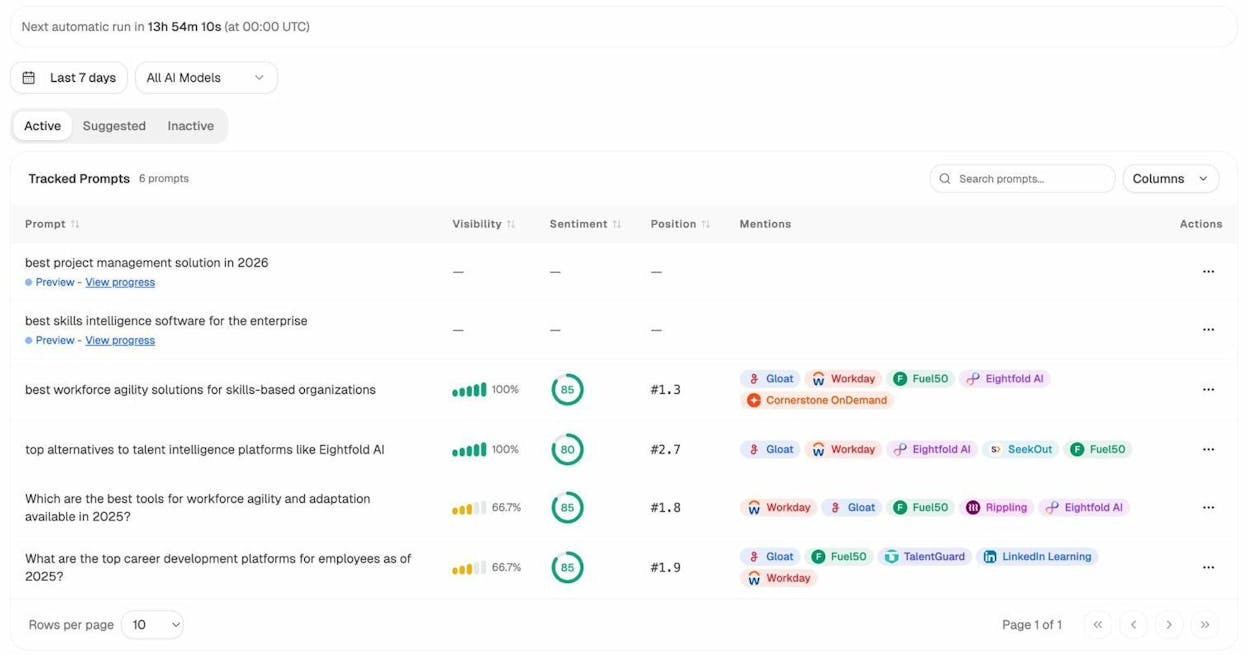
You will see your visibility, sentiment, position, and which competitors get mentioned for each prompt. That signal tells you which sections of your website need to exist, which need to be expanded, and which need to be created from scratch.
The Suggested tab pushes prompt ideas you do not yet track, scraped from real conversations in your space.
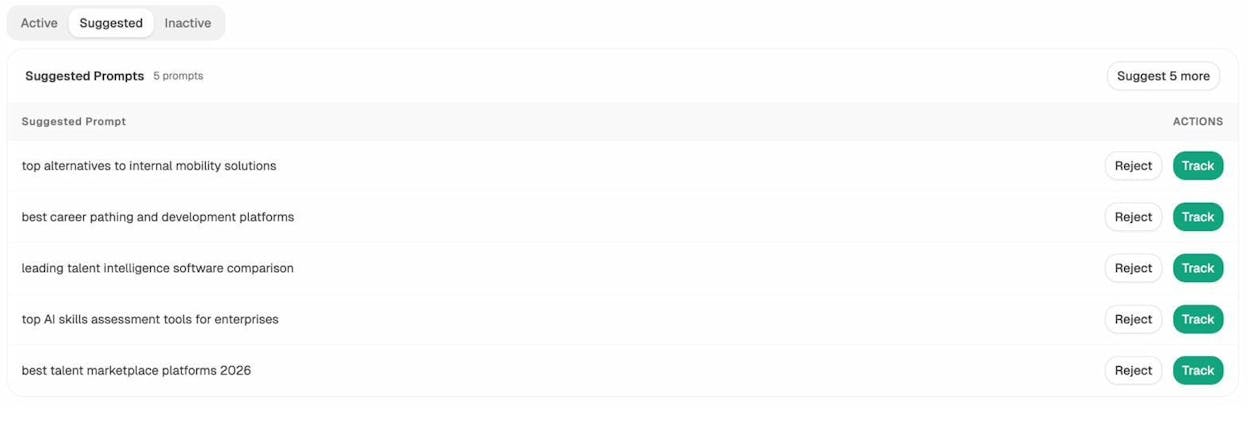
When a suggested prompt does not have a matching page on your site, that is an architecture gap. Add the page. Link it from a logical parent. Repeat until your structure covers the prompts your buyers actually use.
For more on how to discover and use prompts, our guide on AI keyword research with chatbot tools walks through the workflow, and our breakdown of answer engine optimization explains how to write each page so it earns the citation once it exists.
Steal structure from competitors
Once you have your own keyword and prompt list, look at competitors who already win. You do not need to invent the architecture from scratch.
For Google, drop a competitor domain into Ahrefs Site Explorer and open the Site Structure report. You will see how they group their pages, how deep their categories go, and which folders carry the most traffic.
![[Screenshot: Ahrefs Site Explorer Site Structure report showing a competitor’s folder structure with traffic numbers per folder]](https://www.datocms-assets.com/164164/1777920459-blobid8.png?auto=format,compress&w=1248&fit=max)
For a sharper view, find competitors who already rank for a specific keyword you want and study their structure step by step.
-
Open Keywords Explorer and enter your target keyword.
-
Scroll to the SERP overview and click the chevron next to a competitor.
-
Open their domain in Site Explorer.
-
Change “Exact URL” to “Domain” and hit search.
-
Click “Site structure” in the left navigation.
-
Expand the chevron to see the full folder path.
![[Screenshot: Site structure report after clicking through SERP overview, showing the folder path expanded for a ranking competitor]](https://www.datocms-assets.com/164164/1777920460-blobid9.png?auto=format,compress&w=1248&fit=max)
Now do the same for AI search. Inside Competitor Intelligence, you get a list of suggested competitors based on which brands AI engines actually mention alongside yours.
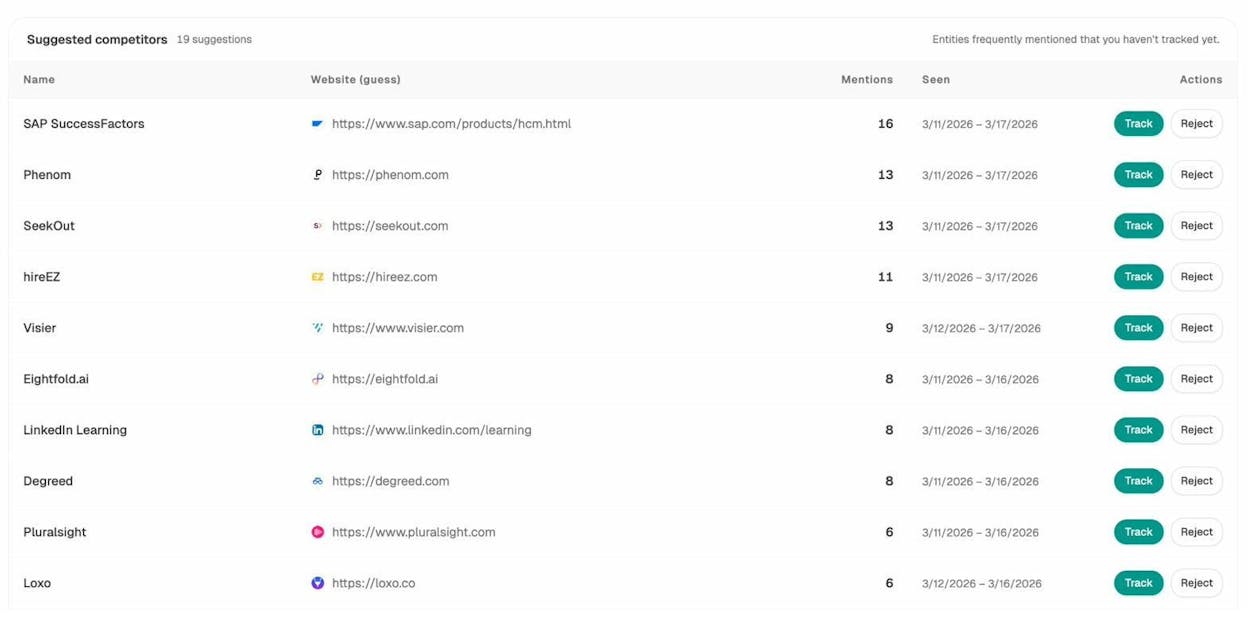
These are not the competitors you assume. They are the brands AI thinks you compete with, based on real prompt responses across ChatGPT, Perplexity, Gemini, and Copilot. Track them, study their site structure, and look at which pages get cited. If three competitors have a /comparison/ folder and you do not, that is a structural gap worth closing.
Our guide on SEO competitor analysis with AI search tracking covers the full workflow.
Use a hub-and-spoke or pillar model for clusters
A flat architecture handles your top-level structure. Topic clusters handle the depth inside each section. Two patterns are worth knowing.
Hub and spoke. A hub page introduces a topic and links to many spoke articles, each covering a subtopic in depth. Spokes link back to the hub and across to each other. This model fits when a topic has many distinct subtopics that each deserve their own URL.
Pillar. A single very long page that covers a topic exhaustively, with anchor links and a table of contents. Pillars work when readers prefer staying on one page rather than clicking through to multiple.
For most blogs, hubs win because each spoke gets its own ranking shot and its own AI citation opportunity. AI engines especially favor cluster structures because they pull citations from multiple URLs in the same answer, so a hub-and-spoke setup gives them a wider citation surface.
Our guide on the 4 pillars of an effective SEO strategy for AI search breaks down how to build clusters that earn citations across both Google and LLMs.
Get the on-page architecture right
Hierarchy alone does not make your site rankable. You also need the on-page elements that signal structure to crawlers and readers.
Use descriptive, keyword-aware URLs
A good URL describes the page in two or three words. /blog/website-architecture works. /blog/post-id=4827 does not. Stay shallow. /services/cat-sitting beats /services/cat-care/in-home/sitting/standard. Shorter paths are easier to index and more likely to be cited by AI engines.
Add breadcrumbs
Breadcrumbs help users understand where they are in your site, and they give Google a structured representation of your hierarchy that can show up in search results. Add them to every page below the homepage and mark them up with BreadcrumbList schema.
Build internal links with intent
Internal linking is the backbone of architecture. The goal is not “link a lot.” The goal is to direct authority and crawl attention to the pages that matter most.
Three principles. Link from your highest-authority pages (homepage, top blog posts) to the pages you want to rank or earn citations for. Use descriptive anchor text that matches the target page’s main keyword or prompt, never “click here.” Build at least three to five contextual internal links to every important page.
Our 10 internal linking tips for SEO covers this in depth.
Title tags, meta descriptions, and heading hierarchy
Every page needs a unique title tag and meta description that include the target keyword and clearly describe what the page delivers. Use one H1 per page. Use H2s and H3s to outline the content in a logical order. AI engines pull headings to understand what a page covers, so a clean heading structure improves both ranking and citation eligibility.
Author bios
Add a real author bio to every blog post with credentials, a photo, and links to social profiles. This is a baseline E-E-A-T signal for Google and a credibility signal for AI engines that increasingly prioritize content from identifiable experts.
Get the technical architecture right
This is the layer most teams skip. It is also the layer that quietly costs you rankings and citations.
HTTPS
Every page on every domain. No exceptions. Google has treated HTTPS as a ranking signal since 2014, and AI engines deprioritize insecure pages.
XML sitemap
Generate a sitemap.xml file at /sitemap.xml and submit it to Google Search Console and Bing Webmaster Tools. The sitemap tells crawlers which URLs you consider canonical.
Robots.txt
Place a robots.txt file at the root of your domain. Use it to block crawl-wasting paths like admin pages, internal search results, and faceted navigation, and to point crawlers to your sitemap.
LLMs.txt
This is the file most architecture articles do not yet mention. LLMs.txt is an emerging standard that gives AI engines a curated, machine-readable summary of your most important pages. Think of it as a sitemap built for ChatGPT, Perplexity, and Claude rather than Google. Generate one in a minute with our free LLMs.txt generator tool, and our roundup of the 7 best LLMs.txt generator tools compares the options.
Crawlable links
Use proper <a href> tags for every internal link. Avoid JavaScript-only navigation, span-based clicks, and onclick handlers. If a crawler cannot follow it, neither can an LLM. Google’s links best practices guide has the full list of acceptable patterns.
Mobile-responsive design
Google indexes the mobile version of your site by default. If your mobile experience is broken, your rankings will be too. Use responsive design and test on real devices.
Canonical tags
Every page needs a canonical tag pointing to the preferred URL. This handles duplicate content, parameter-laden URLs, and syndicated content cleanly.
Structured data
Schema markup makes your content machine-readable. At minimum, implement Article, Organization, BreadcrumbList, and FAQ schema. AI engines use schema as one of the strongest signals for what a page is about and who created it. More schema generally means more citation eligibility.
Page speed and Core Web Vitals
Slow pages get fewer crawls, lower rankings, and fewer citations. Aim for an LCP under 2.5 seconds, an INP under 200 milliseconds, and a CLS under 0.1. Core Web Vitals are a confirmed Google ranking factor, and slow loads correlate with lower AI citation rates because pages that time out during scraping never get indexed.
Audit your technical setup
Run a periodic technical audit using a site auditor like Ahrefs Site Audit, Screaming Frog, or Sitebulb. Check for broken internal links with our free broken link checker, check your domain authority with the website authority checker, and pull traffic estimates with the website traffic checker. For SERP-level diagnostics, our SERP checker and keyword rank checker cover the visibility side.
Here is the quick comparison of where each architectural element matters most.
|
Element |
SEO impact |
AI search impact |
|---|---|---|
|
Flat hierarchy |
High |
High |
|
Internal linking |
High |
Medium |
|
Schema markup |
Medium |
High |
|
LLMs.txt |
None |
High |
|
Page speed |
High |
Medium |
|
Author bios |
Medium (E-E-A-T) |
High (citation trust) |
|
Breadcrumbs |
Medium |
Low |
|
HTTPS |
Required |
Required |
|
Mobile responsive |
Required |
Medium |
Validate your structure with the right metrics
You do not know whether your architecture works until you measure it.
For Google, watch your Search Console reports. Pay attention to indexed pages, average position, click-through rate by URL, and crawl stats. Pages that do not get indexed are pages your hierarchy is hiding.
For AI search, watch which landing pages actually receive AI-referred traffic. Inside AI Traffic Analytics, you get a per-URL view of how much traffic ChatGPT, Perplexity, Gemini, and Copilot are sending to your site.
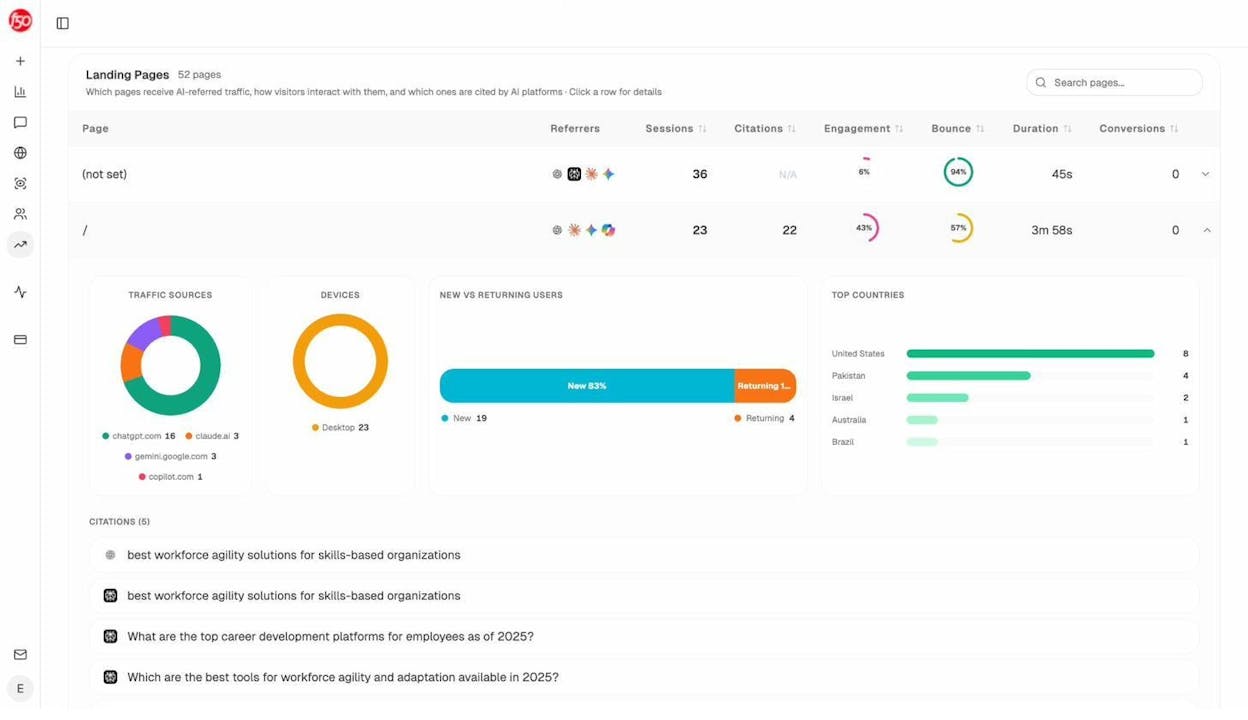
This view changes how you think about architecture. The pages that pull AI traffic are not always the pages that pull Google traffic. When a long-tail blog post sends dozens of sessions a week from Perplexity, that is a signal to build more pages structured the same way and link them tightly together.
Then look at what types of content AI cites in your space. Inside Citation Analytics, you get a content type breakdown showing whether your industry’s AI answers pull from blogs, product pages, reviews, or social.
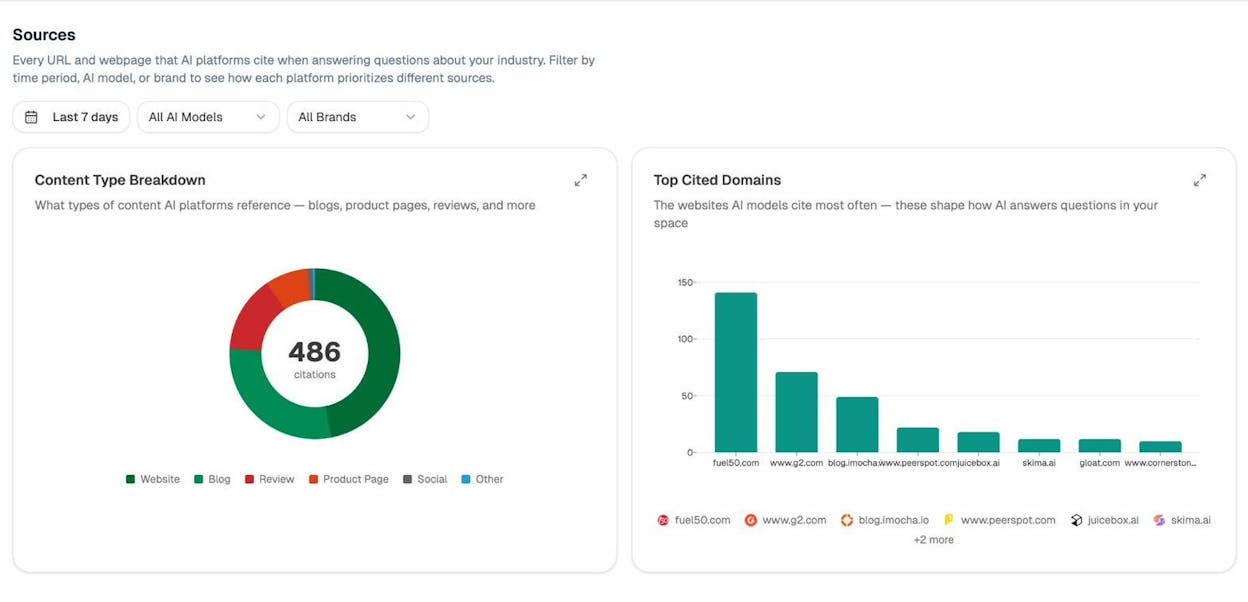
This is one of the more useful pieces of architectural intelligence you can get. If 60% of AI citations in your industry come from blog posts and only 5% from product pages, your blog needs to be the primary architectural pillar of your site. If reviews dominate, your structure should make review content easy to find and link out to.
When a page is underperforming relative to its potential, AI Content Optimizer shows you exactly which gaps to fix to improve both Google rankings and AI citations.
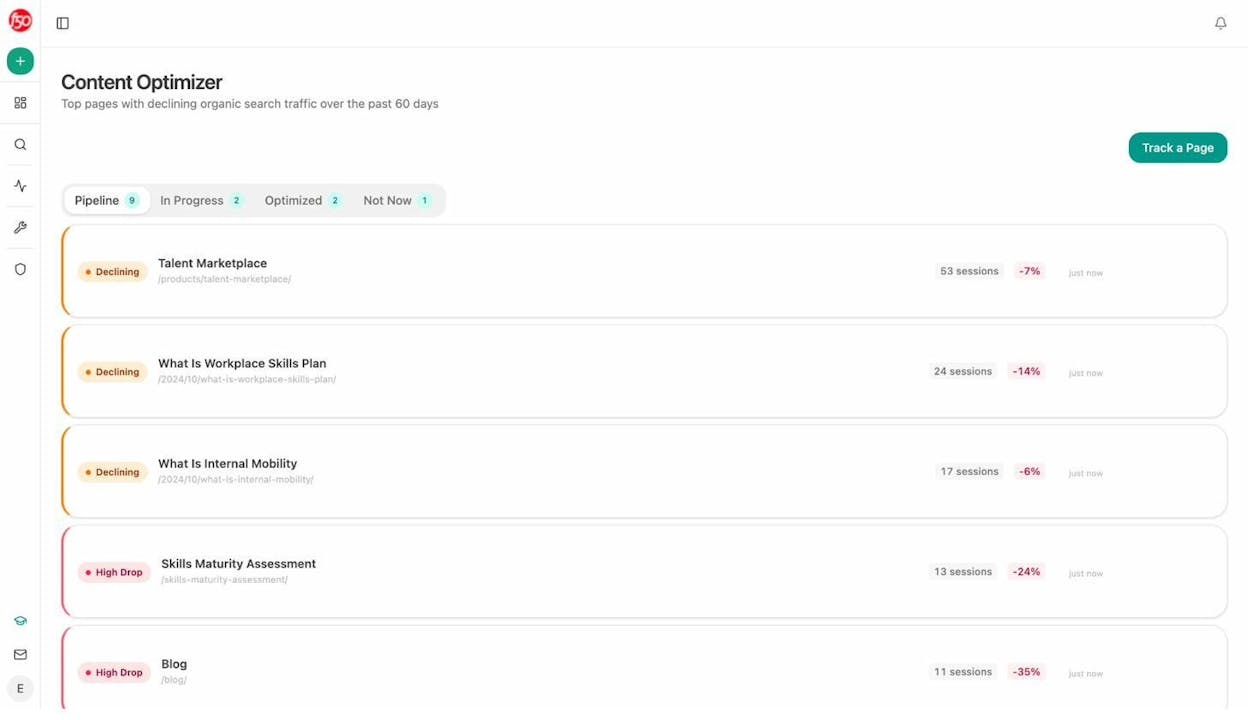
Our guide on how to get mentioned in AI search walks through this measurement loop in detail.
Final thoughts
A great website architecture does three jobs at once. It makes content easy for humans to find. It makes content easy for Googlebot to crawl and rank. It makes content easy for AI engines to parse and cite.
The mistake teams make is treating these as competing goals. They are not. The same flat hierarchy that helps Google rank you helps Perplexity cite you. The same internal links that distribute PageRank guide LLMs to related context. The same clear headings that earn featured snippets earn AI answer placements.
SEO is not dead. It is expanding. AI search is the newest organic channel, and your architecture is the foundation that decides whether you show up there too. Build it once, build it well, and it compounds across every channel for years.

Ernest

Ibrahim


