



Summarize this blog post with:


In this article, you’ll learn what the hreflang attribute is, why it matters for both traditional SEO and AI search visibility, and how to implement it correctly on your website. You’ll also get a step-by-step walkthrough of all three implementation methods (HTML tags, HTTP headers, and XML sitemaps), a semi-automated workflow using a free Google Sheets template, and a full audit checklist covering the nine most common hreflang mistakes — along with how to fix each one. Finally, you’ll see how multilingual content performs in AI search engines and how to track that performance with Analyze AI.
Table of Contents
What Is Hreflang?
Hreflang is an HTML attribute that tells search engines the language and (optionally) the geographic region a page targets. When you have the same page in multiple languages, hreflang tags connect those versions together so search engines can serve the right one to the right user.
For example, Google “apple official website” from the United States and you’ll get apple.com. Do the same search from Spain and you’ll see the Spanish version of the page instead.
![[Screenshot: Google SERP showing Apple’s US result for “apple official website”]](https://www.datocms-assets.com/164164/1774854688-blobid0.png?auto=format,compress&w=1248&fit=max)
![[Screenshot: Google SERP showing Apple’s Spanish result for the same query]](https://www.datocms-assets.com/164164/1774854688-blobid1.png?auto=format,compress&w=1248&fit=max)
Hreflang is what makes this swap possible. Without it, search engines must guess which version to show based on weaker signals like link patterns and on-page content-language metadata.
Google’s John Mueller has called hreflang “one of the most complex aspects of SEO” — not because the concept is hard, but because implementation mistakes compound fast on large sites. When Ahrefs ran a study across 374,756 domains, they found that 67% of hreflang implementations had at least one issue.
That sounds intimidating. But if you understand the rules and use the right tools, you can get it right from the start. The rest of this guide will show you how.
Why Does Hreflang Matter for SEO?
If you’ve invested time and money translating content into multiple languages, you need search engines to show each version to the right audience. Hreflang is the primary mechanism for making that happen.
Both Google and Yandex treat hreflang tags as an important signal for language and regional targeting. Bing considers hreflang a weaker signal — they rely more on the content-language HTML attribute, link patterns, and visitor behavior — but they still recommend using it in their official documentation.
Note: Baidu does not use hreflang at all. They rely on the content-language HTML attribute instead.
There are three specific reasons why hreflang matters for your rankings:
1. Correct version, correct user
When someone in Germany searches for something your site covers, you want Google to show your German page — not the English one. Hreflang makes that match explicit rather than leaving it to guesswork. The result is a better user experience: lower bounce rates, longer time on page, and higher engagement.
To verify this is actually happening, use a free SERP checker to see which version of your page appears for a given query in different countries. If your German page isn’t showing up for German queries, that’s a strong sign your hreflang tags need attention.
2. Shared ranking signals within a cluster
As Google’s Gary Illyes has explained, pages within an hreflang cluster can share ranking signals in certain scenarios. For example, if someone searches for a brand name in Japan, the English page may be the strongest in the cluster and the one that determines the ranking position. But Google will swap the result to show the Japanese version to that user.
This means your strongest page lifts the entire cluster. A well-built German page that earns backlinks from .de domains can boost the ranking potential of your English page for the same topic — and vice versa. You can check the authority of each language version using a website authority checker — if one version is significantly weaker, it may be dragging down the cluster rather than contributing to it.
3. Duplicate content protection
This is the one most people overlook. Say you have two versions of a product page: one for UK readers (prices in GBP, “colour,” “trousers”) and one for US readers (prices in USD, “color,” “pants”). These pages are nearly identical. Without hreflang tags, Google may see them as duplicate content and pick one version to index while ignoring the other.
Hreflang tags signal the relationship between those pages so Google understands they serve different audiences, not the same audience twice. That said, hreflang is a signal, not a directive — it’s still best practice to localize content beyond just changing currency symbols. Adjust spelling conventions, local references, examples, and pricing formats to give each version genuine regional relevance.
Important distinction: Fully translated pages (e.g., English and German) are not treated as duplicates by Google. The duplicate content risk applies specifically to pages in the same language targeting different regions.
How AI Search Engines Handle Multilingual Content
Traditional search engines use hreflang tags, IP location, and browser settings to decide which language version to show. AI search engines like ChatGPT, Perplexity, Claude, and Gemini work differently.
When someone asks a question in French, an AI engine searches the web and pulls from pages it determines are most relevant and authoritative — regardless of what hreflang tags those pages carry. The model’s retrieval-augmented generation (RAG) pipeline prioritizes content quality and topical match over HTML metadata. This means a well-written English page can be cited in a French-language AI response if no strong French alternative exists.
But here’s what’s changing: as AI search engines mature, they are increasingly favoring same-language sources when they exist. Our analysis of 83,670 AI citations across ChatGPT, Claude, and Perplexity found that AI models tend to cite content that matches the prompt’s language when a quality match is available. Pages in the same language as the prompt get cited more often than translated alternatives.
At Analyze AI, we believe GEO isn’t a replacement for SEO — it’s the next transformation of it. Search is expanding from ten blue links to multi-modal, prompt-shaped answers. Quality still governs visibility. Authority still comes from depth, originality, structure, and usefulness. What changes is where that quality must be legible — to crawlers, to models, and to the people asking better questions.
This has two practical implications for multilingual sites:
First, your translated pages are a competitive advantage in AI search. If your competitor only publishes in English and you have strong French, German, and Spanish versions, you’re more likely to be cited when users prompt those AI engines in those languages. This is essentially the same logic behind hreflang in traditional search — right content, right language, right user — but applied to a new channel.
Second, you can track which language versions AI engines actually cite. In Analyze AI, the Landing Pages report shows which specific URLs receive traffic from AI search engines, broken down by source. If you run a multilingual site, you can see whether your /fr/, /de/, or /es/ pages are getting cited — and by which AI engines.
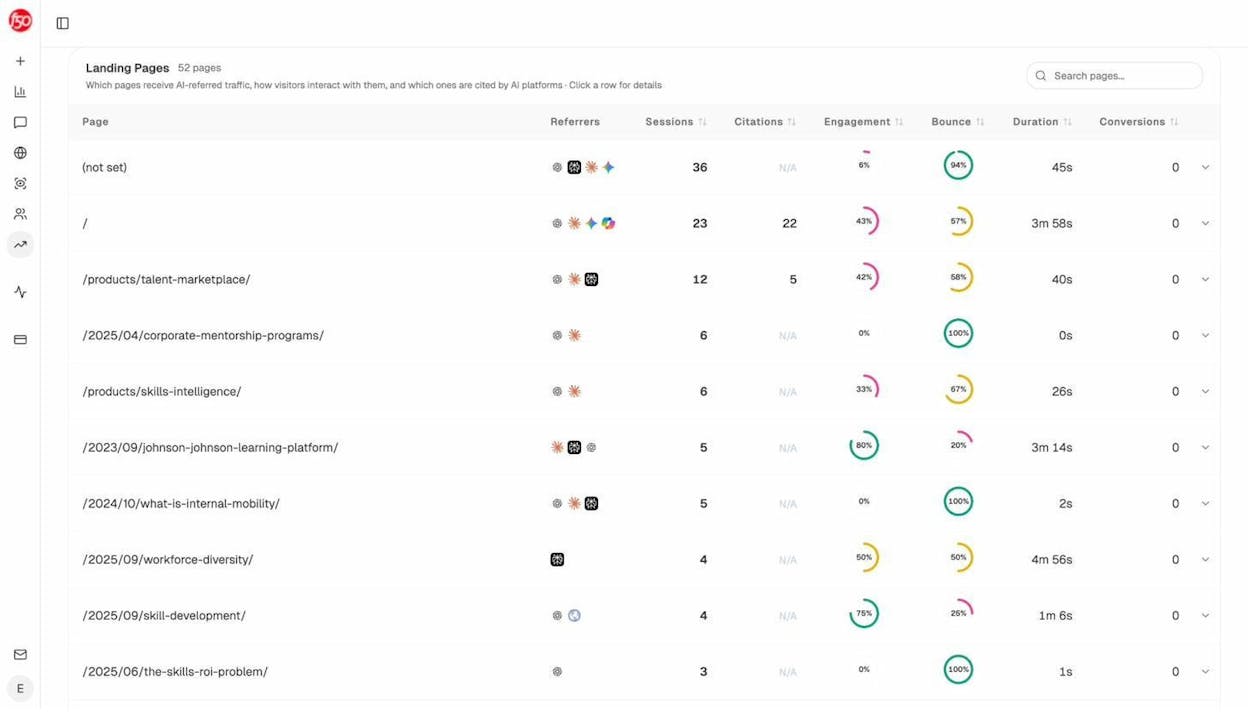
This data lets you prioritize. If your German content pulls strong AI referral traffic but your Spanish content gets almost none, that’s a signal to invest more in your Spanish pages — exactly the same way you’d use Google Search Console data to guide traditional SEO priorities.
The bottom line: hreflang helps search engines serve the right version. But for AI search, what matters is having high-quality localized content that AI models can find, trust, and cite. Hreflang and multilingual content work together. Don’t treat them as separate strategies.
What Does a Hreflang Tag Look Like?
Hreflang tags use simple, consistent syntax:
<link rel="alternate" hreflang="x" href="https://example.com/alternate-page" />
Here’s what each part means:
|
Part |
What it does |
|---|---|
|
link rel="alternate" |
Tells the browser this link points to an alternate version of the current page |
|
hreflang="x" |
Specifies the language (and optionally the region) of that alternate version |
|
href="https://example.com/alternate-page" |
The full URL of the alternate page |
That’s it. The syntax is the same no matter how many language versions you have — you just repeat the tag for each one.
How to Construct a Hreflang Tag
Building a hreflang tag requires two things: the correct language code and the URL of the alternate page. Hreflang uses ISO 639-1 two-letter language codes, the same ones you’ve likely seen in URL subfolder structures like /de/, /fr/, or /es/.
Example: Say you have an English blog post at https://example.com/blog/keyword-research/ and a German translation at https://example.com/blog/de/keyword-recherche/. The hreflang tag on the English page pointing to the German version would be:
<link rel="alternate" hreflang="de" href="https://example.com/blog/de/keyword-recherche/" />
You just fill in the language code (de for German) and the full URL. That’s all.
Targeting a Specific Region (Optional)
Sometimes a language code alone isn’t enough. Hreflang also supports an optional region code using ISO 3166-1 alpha-2 format. You only need this when you’re targeting speakers of the same language in different countries.
English speakers in the UK:
<link rel="alternate" hreflang="en-gb" href="https://example.com/uk/hello" />
English speakers in the US:
<link rel="alternate" hreflang="en-us" href="https://example.com/us/hello" />
The syntax is hreflang="language-country" — always lowercase language code, then a dash, then the country code.
When You Actually Need Language + Region
The most common scenario is ecommerce. Imagine you sell a single product and ship to both the US and the UK. Both audiences speak English, but US customers expect prices in dollars and UK customers expect pounds.
You create two pages: same product, same language, different pricing. These are nearly identical, which means Google may treat one as a duplicate. Hreflang tags with regional targeting (en-us and en-gb) tell search engines that these are intentional variations for different markets.
![[Screenshot: Diagram showing en-us page with USD pricing pointing to en-gb page with GBP pricing, both connected by hreflang tags]](https://www.datocms-assets.com/164164/1774854694-blobid3.png?auto=format,compress&w=1248&fit=max)
If you sell products across multiple regions, multilingual keyword research goes beyond Google. Use an Amazon keyword tool to find how people search for your products on Amazon in different locales — those same terms often map to what they’ll search on Google. And if you produce video content in multiple languages, a YouTube keyword tool will help you find demand for your topics in each target language. The point is: hreflang tags only help if you’re targeting the right keywords in each market. Do the research before you translate.
The same logic applies when one country has multiple official languages. Canada, for example, has both English and French as official languages. A blog post about budget road trips in Canada would benefit from two versions: one in English (en-ca) and one in French (fr-ca).
Deciding Which Languages Are Worth Targeting
Before you create translated versions and set up hreflang tags, make sure there’s actual search demand in each target language. Use a keyword generator tool to find what people search for in your target markets, then run those terms through a keyword difficulty checker to see how competitive they are. You might discover that the German version of your target keyword has high volume and low competition — making it a better investment than a Spanish version where competition is fierce.
This research also helps with localization. Direct translations of keywords rarely match what locals actually search for. For example, the English term “cheap flights” translates differently depending on whether you’re targeting Spain (vuelos baratos) or Mexico (boletos de avion baratos). A keyword generator built for specific markets will surface these nuances.
Quick Reference: Common Language and Region Codes
|
Language/Region |
Code |
Use case |
|---|---|---|
|
English |
en |
General English content |
|
English (US) |
en-us |
US-specific content with USD pricing |
|
English (UK) |
en-gb |
UK-specific content with GBP pricing |
|
German |
de |
General German content |
|
German (Austria) |
de-at |
Austrian-specific German content |
|
Spanish |
es |
General Spanish content |
|
Spanish (Mexico) |
es-mx |
Mexican-specific Spanish content |
|
French |
fr |
General French content |
|
French (Canada) |
fr-ca |
Canadian French content |
|
Portuguese (Brazil) |
pt-br |
Brazilian Portuguese content |
|
Chinese (Simplified) |
zh-hans |
Simplified Chinese content |
The Basics of Hreflang Implementation
Before you implement hreflang using any method, there are three rules you must follow at all times. Break any of these and your hreflang tags will either be ignored or — worse — cause search engines to misunderstand your site structure.
Rule #1: Hreflang Tags Are Bidirectional
Hreflang tags work in pairs. If your English page includes a hreflang tag pointing to the Italian version, the Italian page must include a hreflang tag pointing back to the English page.
![[Screenshot: Diagram showing bidirectional hreflang tags between English and Italian pages, with arrows going both directions]](https://www.datocms-assets.com/164164/1774854699-blobid4.png?auto=format,compress&w=1248&fit=max)
Think of it like a relationship status on social media. You can declare yourself in a relationship with anyone you want, but unless they confirm it on their end, nobody takes it seriously. The same applies to hreflang. Google needs both sides to confirm the relationship before it trusts the tags.
This pair-based system creates what’s called an hreflang cluster — a group of pages that are all connected as language variants of the same content. When these bidirectional tags are broken or incomplete, you may see the wrong page appearing in search results, multiple pages competing for the same query, or incorrect titles displayed for the right URL.
Rule #2: Self-Referential Hreflang Tags Are Best Practice
Google states that “each language version must list itself as well as all other language versions.” In practice, this means every page in a cluster should have a hreflang tag that points back to itself.
So if you’re connecting an English page (https://example.com/hello) and an Italian page (https://example.com/ciao), each page should include both of these tags:
<link rel="alternate" hreflang="en" href="https://example.com/hello" />
<link rel="alternate" hreflang="it" href="https://example.com/ciao" />
The English page gets both tags. The Italian page gets both tags. The second tag on each page is self-referential.
![[Screenshot: Diagram showing both pages carrying identical sets of hreflang tags, with the self-referential tag highlighted]](https://www.datocms-assets.com/164164/1774854699-blobid5.png?auto=format,compress&w=1248&fit=max)
John Mueller has said that the self-referential tag is technically optional. But it remains a recommended best practice, especially when you’re building and managing hreflang at scale.
Rule #3: X-Default Tags Are Recommended
The x-default hreflang tag tells search engines which page to show when no other language version matches the user. You don’t have to use it, but Google recommends that you do.
<link rel="alternate" hreflang="x-default" href="https://example.com/" />
In most cases, the x-default page is the same as your primary language page (e.g., your English version). But it can also be a language-selector page — a page that detects the user’s location or language and redirects them to the right version.
How Google’s matching works: Google uses a best-match approach. For an English-speaking user in Spain, it first looks for an en-es match (English for Spain). If that doesn’t exist, it falls back to en (any English version). If that doesn’t exist either, it falls back to the x-default page.
How to Implement Hreflang Tags
There are three methods for implementing hreflang attributes. Each has trade-offs depending on your site size, CMS, and content types.
|
Method |
Best for |
Limitations |
|---|---|---|
|
HTML tags |
Small sites, simple setups |
Bloats <head>, must edit every page |
|
HTTP headers |
Non-HTML content (PDFs, docs) |
Harder to audit, server config required |
|
XML sitemaps |
Large sites, many languages |
All in one file, but requires sitemap maintenance |
1. Implementing Hreflang Tags Using HTML
This is the simplest method and the best starting point for beginners. You place hreflang tags directly in the <head> section of each page.
Example: Suppose you have three versions of a blog post:
-
English: https://example.com/blog/free-keyword-tools/
-
German: https://example.com/blog/de/kostenlose-keyword-tools/
-
Chinese: https://example.com/blog/zh/free-keyword-tools/
You would add the following tags to the <head> of all three pages:
<link rel="alternate" hreflang="en" href="https://example.com/blog/free-keyword-tools/" />
<link rel="alternate" hreflang="de" href="https://example.com/blog/de/kostenlose-keyword-tools/" />
<link rel="alternate" hreflang="zh" href="https://example.com/blog/zh/free-keyword-tools/" />
<link rel="alternate" hreflang="x-default" href="https://example.com/blog/free-keyword-tools/" />
![[Screenshot: HTML source code of a page showing hreflang tags inside the <head> section]](https://www.datocms-assets.com/164164/1774854705-blobid6.png?auto=format,compress&w=1248&fit=max)
The problem with this method is that it gets messy fast. Every time you add a new language, you have to go back and add another hreflang tag to every existing version of that page. If you have 200 pages and five languages, that’s 1,000 tags you need to maintain manually.
There are no limits to the number of hreflang tags you can add to a page. But from a practical standpoint, too many tags will bloat your <head> and can slow down page load times.
2. Implementing Hreflang Using HTTP Headers
For non-HTML content like PDFs, you can’t place tags inside a <head> section because there is no HTML. In these cases, you use HTTP response headers to specify language relationships. This method also works with regular web pages.
Example: Imagine you convert your blog post into three PDF versions (English, German, Chinese). The HTTP response header for each PDF would look like this:
HTTP/1.1 200 OK
Content-Type: application/pdf
Link: <https://example.com/blog/free-keyword-tools.pdf>; rel="alternate"; hreflang="x-default",
<https://example.com/blog/free-keyword-tools.pdf>; rel="alternate"; hreflang="en",
<https://example.com/blog/de/kostenlose-keyword-tools.pdf>; rel="alternate"; hreflang="de",
<https://example.com/blog/zh/free-keyword-tools.pdf>; rel="alternate"; hreflang="zh"
This method is less common for standard web pages, but it’s the only option for non-HTML file types. If you have a significant number of downloadable resources in multiple languages, you’ll need it.
3. Implementing Hreflang in Your XML Sitemap
For larger sites with many language variants, the XML sitemap method is often the most efficient. You define all hreflang relationships in your sitemap using the xhtml:link attribute, which means everything lives in a single file.
Example: Using the same three-page setup:
<url>
<loc>https://example.com/blog/free-keyword-tools/</loc>
<xhtml:link rel="alternate" hreflang="x-default" href="https://example.com/blog/free-keyword-tools/" />
<xhtml:link rel="alternate" hreflang="en" href="https://example.com/blog/free-keyword-tools/" />
<xhtml:link rel="alternate" hreflang="de" href="https://example.com/blog/de/kostenlose-keyword-tools/" />
<xhtml:link rel="alternate" hreflang="zh" href="https://example.com/blog/zh/free-keyword-tools/" />
</url>
<url>
<loc>https://example.com/blog/de/kostenlose-keyword-tools/</loc>
<xhtml:link rel="alternate" hreflang="x-default" href="https://example.com/blog/free-keyword-tools/" />
<xhtml:link rel="alternate" hreflang="en" href="https://example.com/blog/free-keyword-tools/" />
<xhtml:link rel="alternate" hreflang="de" href="https://example.com/blog/de/kostenlose-keyword-tools/" />
<xhtml:link rel="alternate" hreflang="zh" href="https://example.com/blog/zh/free-keyword-tools/" />
</url>
<url>
<loc>https://example.com/blog/zh/free-keyword-tools/</loc>
<xhtml:link rel="alternate" hreflang="x-default" href="https://example.com/blog/free-keyword-tools/" />
<xhtml:link rel="alternate" hreflang="en" href="https://example.com/blog/free-keyword-tools/" />
<xhtml:link rel="alternate" hreflang="de" href="https://example.com/blog/de/kostenlose-keyword-tools/" />
<xhtml:link rel="alternate" hreflang="zh" href="https://example.com/blog/zh/free-keyword-tools/" />
</url>
This looks verbose, but it has two major advantages over the HTML method. First, everything is in one file. You never need to edit individual pages when you add or remove a language. Second, sitemap-based hreflang doesn’t add code to your page <head>, so there’s zero impact on page load speed — which matters for Core Web Vitals and user experience.
For sites with 10+ languages, the sitemap method is almost always the right choice.
How to Semi-Automate Hreflang Implementation
Manually creating hreflang tags for every page and language combination is tedious and error-prone. For small-to-medium sites, you can automate most of the work with a Google Sheets template.
Here’s how to do it step by step.
Step 1: Set Up Your Languages
Make a copy of this Google Sheets template. Go to the “Setup” tab and select your default language plus up to four additional language variations.
For example, if your default language is English and you also publish in Spanish, German, French, and Portuguese, you’d configure those five options in the setup tab.
![[Screenshot: Google Sheets “Setup” tab showing language dropdown selections — default language set to English, with Spanish, German, French, and Portuguese as alternatives]](https://www.datocms-assets.com/164164/1774854705-blobid7.png?auto=format,compress&w=1248&fit=max)
Step 2: Add Your URLs
Switch to the “URLs” tab. You’ll see columns for each language you configured in Step 1, plus an x-default column. Paste the URLs for each page and its translated counterparts into the matching columns.
![[Screenshot: Google Sheets “URLs” tab showing English URLs in column A, with corresponding German, Spanish, and other language URLs in adjacent columns]](https://www.datocms-assets.com/164164/1774854713-blobid8.png?auto=format,compress&w=1248&fit=max)
Place each page’s translated versions in the same row. If a particular page hasn’t been translated into a specific language, leave that cell blank.
Step 3: Generate and Download the XML Sitemap
Go to the “Results” tab. The sheet auto-generates the complete XML sitemap markup based on the URLs you entered.
![[Screenshot: Google Sheets “Results” tab showing auto-generated XML sitemap code in column A]](https://www.datocms-assets.com/164164/1774854714-blobid9.png?auto=format,compress&w=1248&fit=max)
Copy everything in column A. Paste it into an XML file (e.g., hreflang-sitemap.xml). Upload the file to your website’s root directory, then submit it to Google through Google Search Console.
Step 4: Maintain the Sheet Over Time
Whenever you add or remove a translated page, update the Google Sheet. The sitemap code regenerates automatically. Copy the updated code, replace your existing sitemap file, and resubmit to Search Console.
This workflow won’t fully automate hreflang for enterprise-level sites with thousands of pages. But for blogs, SaaS marketing sites, and small ecommerce stores, it saves hours of manual work and drastically reduces the chance of implementation errors.
How to Audit Your Site for Hreflang Issues
No matter how careful you are, hreflang mistakes will happen. Pages get deleted, URLs change, new languages get added without updating older pages. That’s why regular auditing is essential.
The fastest way to catch these issues is to crawl your site regularly using a site audit tool. Tools like Screaming Frog and Sitebulb can detect hreflang-specific problems automatically.
Here are the nine most common hreflang issues, what causes them, and exactly how to fix each one.
1. Missing Self-Referential Hreflang Tag
What it means: A page has hreflang tags pointing to other language versions but is missing the tag that points to itself.
Why it matters: Google expects each language version to list itself alongside all other versions. A missing self-reference breaks that expectation.
How to fix it: Add a hreflang tag to the affected page that points back to its own URL, using the correct language code.
2. Invalid Language or Locale Code
What it means: A hreflang tag uses a language or region code that doesn’t exist in the ISO standard. Common examples include using en-UK instead of en-gb, or using three-letter language codes instead of two.
Why it matters: Search engines ignore invalid hreflang tags entirely. Your alternate pages won’t be recognized.
How to fix it: Check the affected pages and replace invalid codes with valid ISO 639-1 language codes and ISO 3166-1 alpha-2 country codes.
3. Same URL Referenced for Multiple Languages
What it means: One URL appears in hreflang tags for two or more different languages. For example, example.com/page.html is tagged as both hreflang="en" and hreflang="de".
Why it matters: A single page can’t serve two languages. Contradictory tags confuse search engines and both attributes may be ignored.
How to fix it: Remove the incorrect hreflang reference. Each URL should only be associated with one language (or language-region) code.
4. Missing Return Tag (No Bidirectional Link)
What it means: Page A links to Page B in its hreflang annotations, but Page B doesn’t link back to Page A.
Why it matters: Hreflang tags must be bidirectional. Without the return tag, the relationship is unconfirmed and search engines will likely ignore it.
How to fix it: Add the missing return tag on the second page. You can also check for this issue in Google Search Console’s International Targeting report under the “Language” tab.
![[Screenshot: Google Search Console International Targeting report showing hreflang errors with missing return tags]](https://www.datocms-assets.com/164164/1774854723-blobid10.png?auto=format,compress&w=1248&fit=max)
5. Hreflang Pointing to a Non-Canonical URL
What it means: A hreflang tag references a URL that has a canonical tag pointing somewhere else. The rel="alternate" says “this is a valid version,” but the rel="canonical" says “this isn’t the authoritative version.” Those two signals contradict each other.
Why it matters: Search engines get mixed signals and may ignore the hreflang tag, the canonical tag, or both.
How to fix it: Make sure all hreflang annotations point to canonical URLs only. If a page has a canonical tag pointing elsewhere, either update the canonical or change the hreflang to point to the canonical URL.
Heads up: When you have two nearly identical pages in the same language (e.g., en-us and en-gb), Google may choose one as the canonical and deindex the other. Use the URL Inspection tool in Google Search Console to see how Google treats each URL.
6. Hreflang and HTML Lang Mismatch
What it means: The declared hreflang language attribute doesn’t match the HTML lang attribute on the same page.
Why it matters: Google doesn’t use the HTML lang attribute, but Bing and other search engines do. Inconsistency between the two can cause conflicting signals across search engines.
How to fix it: Align the HTML lang attribute with the declared hreflang for each page. If your hreflang says de, your HTML lang should also say de.
7. Hreflang Pointing to a Broken Page
What it means: A hreflang tag references a URL that returns a 404 or other error code.
Why it matters: Search engines can’t show users a page that doesn’t exist. The hreflang tag is effectively dead.
How to fix it: Either fix the broken URL so it returns a 200 status, or update the hreflang tag to point to the correct, working URL. To catch these issues proactively, run your multilingual subfolders through a free broken link checker — it will flag any dead URLs that your hreflang tags might be pointing to.
8. Multiple Pages for the Same Language in Hreflang
What it means: A single page’s hreflang annotations reference two or more different URLs for the same language code. For example, two different URLs are both tagged as hreflang="de".
Why it matters: Search engines don’t know which German page to use. They’ll often ignore both.
How to fix it: Remove the duplicate reference so only one URL is associated with each language code.
9. Missing X-Default Tag
What it means: The page has hreflang tags but no x-default fallback.
Why it matters: Without x-default, there’s no fallback for users whose language doesn’t match any of your defined versions. Google recommends using x-default as a catch-all.
How to fix it: Add an x-default hreflang tag to all pages in the cluster, pointing to your default language page or a language-selector page.
Verify That the Right Version Ranks
Fixing tag-level errors is only half the audit. You also need to confirm that the correct language version actually appears in search results for its target audience.
Start by checking whether each language version ranks for the keywords it should. Use a keyword rank checker to see where your German page ranks for German keywords, where your Spanish page ranks for Spanish keywords, and so on. If the wrong version is ranking — say, your English page shows up for a German query — that’s a sign your hreflang tags aren’t being processed correctly, or that Google has chosen a different canonical.
You should also check the traffic each language version receives. A website traffic checker lets you compare estimated traffic across your subfolders (e.g., /de/ vs /es/ vs /fr/). If a language version that targets a large market barely gets any traffic, it could mean the page isn’t being indexed, hreflang tags are broken, or the content needs stronger localization.
![[Screenshot: Analyze AI’s website traffic checker showing estimated traffic for a multilingual domain’s language subfolders]](https://www.datocms-assets.com/164164/1774854723-blobid11.png?auto=format,compress&w=1248&fit=max)
Since Bing handles hreflang differently from Google — treating it as a weaker signal and relying more on content-language attributes — it’s worth researching what your target audience searches for on Bing specifically. The Bing keyword tool can help you find keyword opportunities in Bing’s search ecosystem, which is especially relevant for multilingual sites because Bing powers several AI search engines (including ChatGPT’s web search).
Tracking Multilingual Performance in AI Search
Traditional hreflang audits tell you whether your tags are configured correctly. But they don’t tell you how your multilingual pages perform in AI search. And as AI engines like ChatGPT, Perplexity, and Claude send an increasing share of referral traffic, this is a blind spot you can’t afford to ignore.
With Analyze AI, you can connect your GA4 data and see exactly which of your multilingual pages receive traffic from AI search engines. The AI Traffic Analytics dashboard shows total AI referral sessions, which engines are sending that traffic, and how the trend is moving over time.
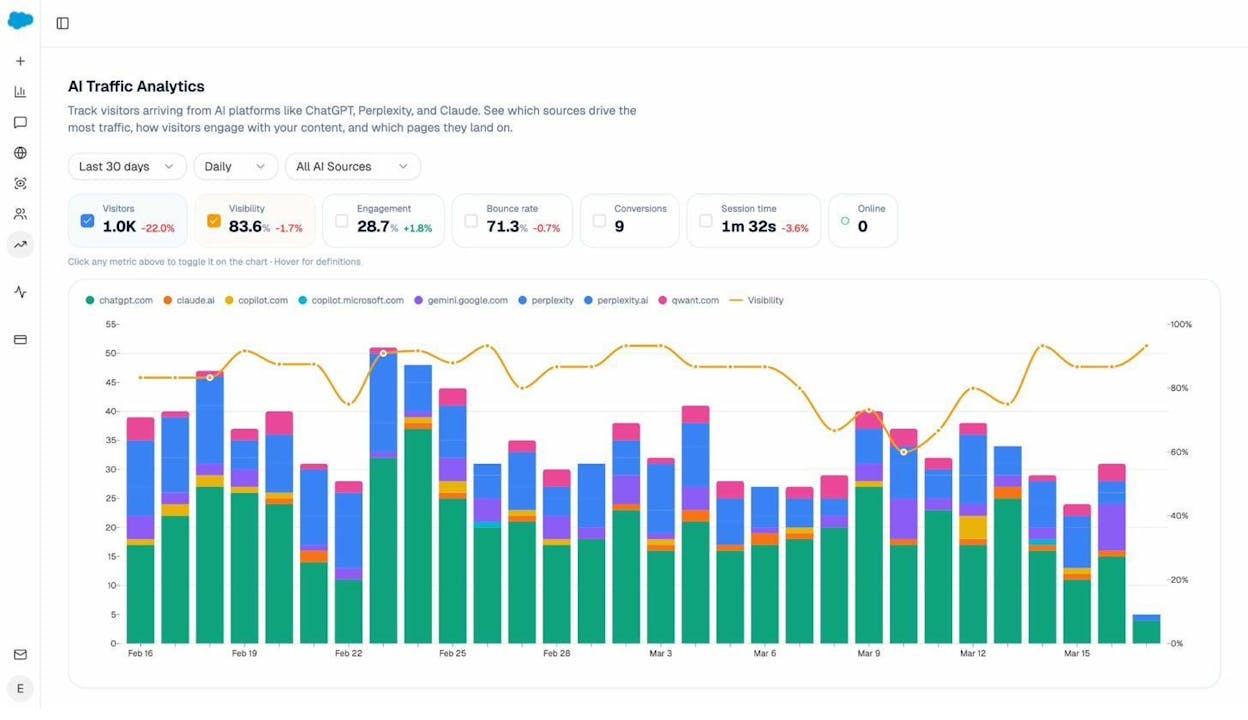
You can also drill into the data by landing page to see whether ChatGPT, Perplexity, Claude, or Copilot drives more sessions to your translated content. The Landing Pages view breaks down each page by referrer, sessions, citations, engagement, and conversions — so you can see exactly which multilingual pages AI engines are sending traffic to.
This matters for multilingual strategy because it tells you which language versions are actually working in AI search. If your French content gets cited by Perplexity but your German content barely shows up, that’s a prioritization signal for your content team.
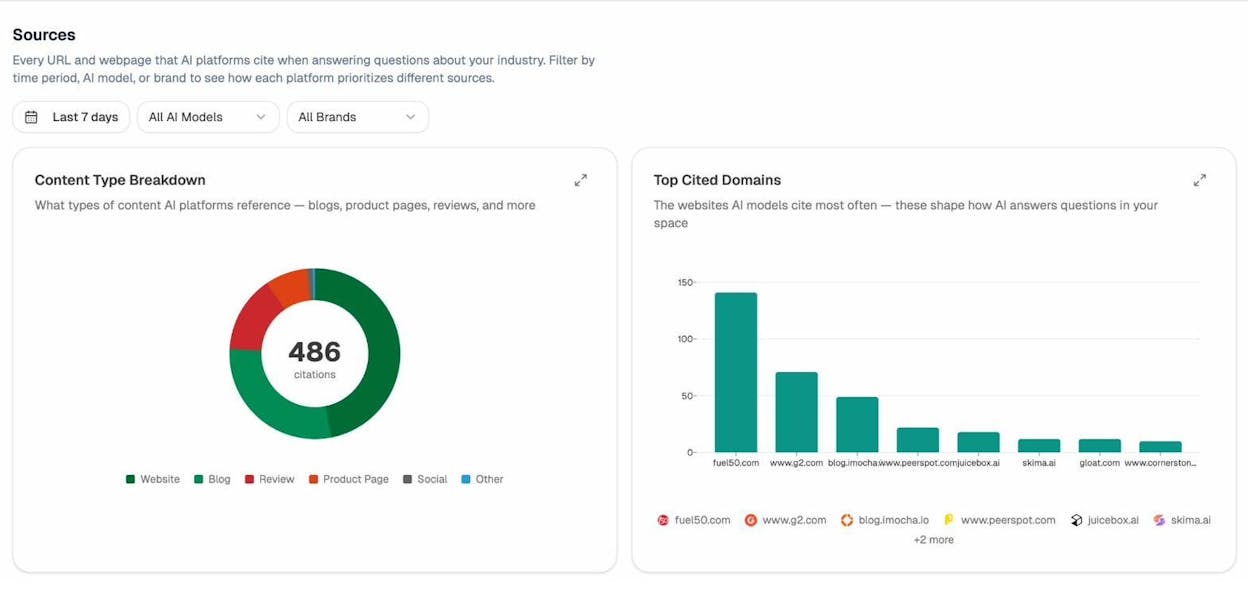
You can also use the Sources report to see which domains AI models cite most often in your space — and whether your multilingual pages are among them. This reveals citation gaps and shows you exactly which sources to outrank or earn links from.
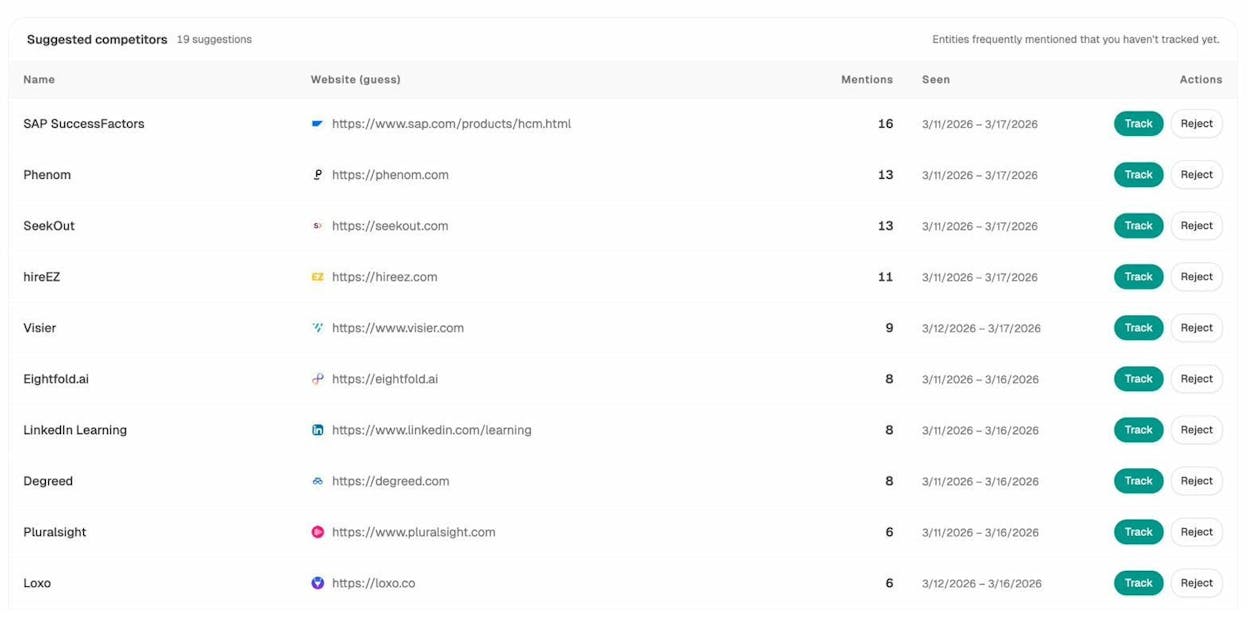
Beyond sources, Analyze AI also surfaces competitors that AI models mention alongside your brand — including ones you may not have been tracking. The Suggested Competitors view shows entities frequently mentioned that you haven’t tracked yet, with mention counts and date ranges, so you can decide whether to add them to your competitive set.
And if you’re tracking specific prompts across AI engines, the Tracked Prompts dashboard shows visibility percentage, sentiment score, average position, and which competitors appear alongside you — for every prompt you’re monitoring.
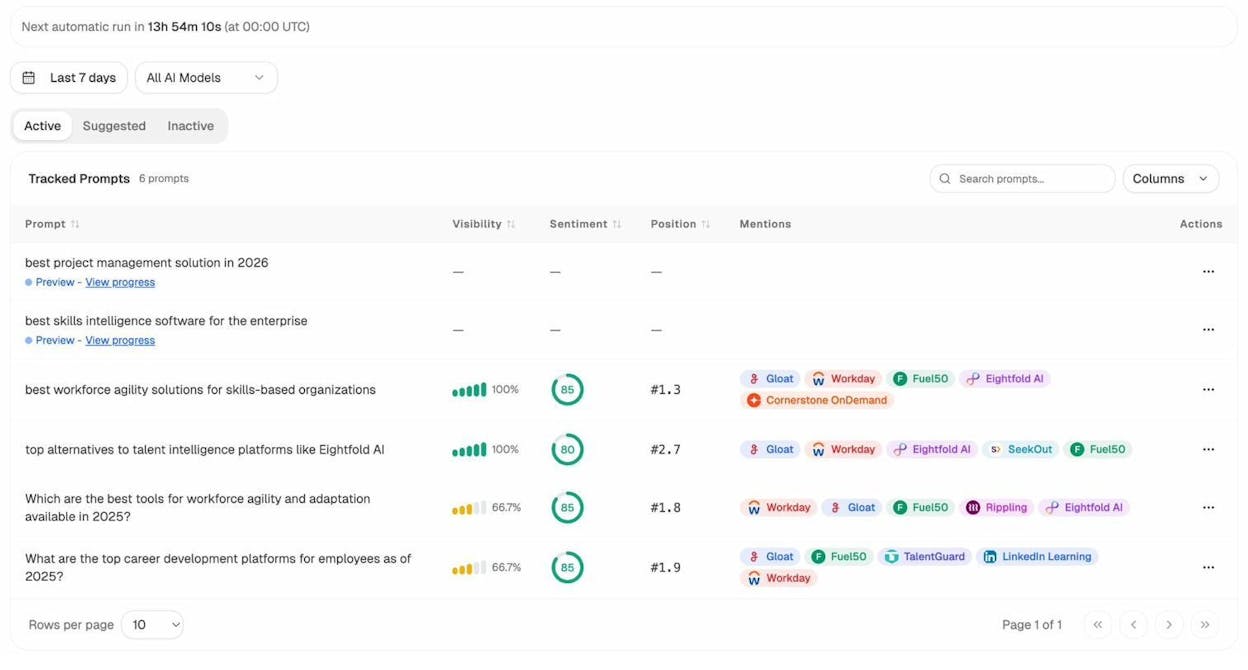
The point is simple: hreflang gets the technical plumbing right. But measuring how your multilingual content performs across both traditional and AI search is what turns that plumbing into a real competitive advantage.
Problems with Hreflang That Google May Ignore
While you should always follow hreflang best practices, there are a few known mistakes that Google’s systems automatically compensate for. These are edge cases where Google’s parsers are forgiving enough to still interpret your intent correctly.
1. Underscore Instead of a Dash
Using en_us instead of en-us. Google’s Gary Illyes has confirmed that Google’s parsers correct for this common typo.
2. en-UK Instead of en-GB
Using en-UK when the correct ISO code is en-GB. John Mueller confirmed on Reddit that because “UK” is a reserved code, Google can fix this automatically.
3. Missing Self-Referential Tag
As mentioned earlier, John Mueller has stated that the self-referential hreflang tag is “optional but good practice.” Google won’t penalize you for omitting it, but it’s still recommended.
4. Relative vs. Absolute URLs
Google can handle both relative and absolute URLs in hreflang tags. However, using absolute URLs is the safer choice because it eliminates ambiguity, especially when your site uses multiple subdomains or subdirectories.
Keep in mind: Just because Google compensates for these mistakes doesn’t mean other search engines do. Yandex and Bing may handle these errors differently. Always aim for correct implementation first.
Be Careful Redirecting Users
Many websites auto-redirect visitors based on IP address, browser language, or cookies. This might seem helpful, but it creates problems for both users and search engines.
Google’s official documentation is clear on this point: don’t use IP-based detection to adapt content. The reason is that Googlebot’s crawls mostly originate from the US, and they don’t vary location to detect site variants. If your site redirects Googlebot based on IP, it might never see your other language versions at all.
Auto-redirecting users is also considered cloaking if you treat search engine bots differently from regular visitors — which is a violation of Google’s Webmaster Guidelines.
What you can do instead: Use detection logic (IP, browser language, cookies) to suggest a different version to the user, not force one. A small banner at the top of the page saying “This page is also available in German” with a link is perfectly fine. Just don’t auto-redirect.
![[Screenshot: Example of a non-intrusive language suggestion banner on a website]](https://www.datocms-assets.com/164164/1774854739-blobid16.png?auto=format,compress&w=1248&fit=max)
Be careful with banner size, too. If the suggestion banner takes up too much screen space, Google may treat it as an interstitial, which can hurt your mobile rankings.
Extra Warnings Most Guides Skip
There are a few technical issues that most hreflang guides don’t mention but that can silently break your implementation.
UTF-8 encoding in URLs. Google handles UTF-8 encoded characters in URLs without issues. But other parts of your tech stack (CDN, CMS, or analytics platform) may not. If you use non-ASCII characters in your URLs, test them across your entire pipeline before relying on them in hreflang tags.
Hreflang tags pushed into the <body>. Hreflang tags belong in the <head>. If your CMS, a JavaScript injection, or an unclosed HTML element pushes them into the <body>, Google won’t see them. This is called “breaking the head” and it can happen subtly — for instance, if an iframe or an unclosed meta tag forces the <head> to close prematurely. Use Chrome DevTools (Right Click > Inspect > Elements panel) to check whether your hreflang tags actually appear inside <head> in the rendered DOM.
![[Screenshot: Chrome DevTools Elements panel showing hreflang tags inside the <head> section]](https://www.datocms-assets.com/164164/1774854740-blobid17.jpg?auto=format,compress&w=1248&fit=max)
Don’t block pages with robots.txt. If Google can’t crawl a page, it can’t see its hreflang tags. Make sure all pages in your hreflang cluster are crawlable.
Don’t noindex pages with hreflang tags. Pages need to be indexed for hreflang tags to have any effect. A page that’s noindexed won’t appear in search results regardless of its hreflang configuration.
Don’t mix implementation methods inconsistently. If you use XML sitemaps for some pages and HTML tags for others, make sure the signals are consistent. Conflicting hreflang declarations across methods will confuse search engines. Pick one primary method and stick with it across your site.
Final Thoughts
Hreflang is not as complicated as its reputation suggests. The concept is simple: tell search engines which page belongs to which audience. The challenge is maintaining consistency as your site grows, languages get added, pages get deleted, and URLs change.
Three things will keep you on track. First, pick one implementation method (XML sitemaps are best for most sites) and use it consistently. Second, automate what you can with templates and CMS plugins so you’re not managing tags by hand. Third, audit regularly using a crawler and fix issues before they compound.
And if your site serves a multilingual audience, don’t stop at traditional search. Track how each language version performs in AI search engines using tools like Analyze AI — because the same logic that makes hreflang valuable in Google applies to the new organic channels that AI search is opening up. The brands that measure both will be the ones that win both.
Analyze AI also offers a suite of free SEO tools to support your multilingual strategy — including a keyword generator, keyword difficulty checker, SERP checker, keyword rank checker, broken link checker, and website authority checker. All free. No account required.

Ernest

Ibrahim


