



Summarize this blog post with:


SEO is full of repetitive, manual work. Checking status codes page by page. Exporting CSVs and vlookup-ing your way through keyword data. Pulling the same Google Search Console report every Monday morning. These tasks don’t require creativity or strategic thinking — they just eat time.
Python fixes that. With a few lines of code, you can audit an entire site for broken links, scrape metadata from hundreds of pages, parse log files for crawl insights, or connect to any API that offers structured SEO data. And you don’t need a computer science degree to start. Thanks to tools like Google Colab, ChatGPT, and browser-based coding environments, the barrier to entry has never been lower.
The best part? The same Python skills that power your SEO workflows also let you tap into AI search data — tracking how models like ChatGPT, Perplexity, and Claude reference your content and send traffic to your site.
In this article, you’ll learn why Python is worth picking up as an SEO professional, which concepts to learn first, how to set up your environment in under five minutes, and how to run practical scripts that automate real SEO tasks — from auditing meta tags across thousands of pages to pulling data from Google Search Console. You’ll also learn how Python can help you track and optimize for AI search, the fastest-growing organic channel alongside traditional SEO.
Table of Contents
Why Learn Python as an SEO?
Every SEO professional hits a ceiling with manual processes. You can only audit so many pages by hand, only export so many spreadsheets, only click through so many tabs in your SEO tools. Python removes that ceiling.
Here’s what Python unlocks for you:
Automate the work that eats your week. Checking HTTP status codes across 5,000 URLs. Validating hreflang tags. Scanning for missing alt text. Flagging thin content pages. These are tasks that follow clear rules — exactly the kind of work Python handles faster and more reliably than any human.
Extract insights from massive datasets. When you’re working with keyword lists of 50,000+ terms, ranking data across multiple markets, or crawl logs with millions of rows, spreadsheets choke. Python’s pandas library processes these datasets in seconds and lets you slice, filter, group, and visualize the data however you need.
Connect to the tools you already use. Google Search Console, Google Analytics, Bing Webmaster Tools — they all offer APIs. Python lets you pull data directly from these platforms into your own reports, dashboards, or analysis scripts. No more manual exports.
Collaborate with developers on equal footing. Whether you’re building programmatic SEO pages, debugging JavaScript rendering issues, or specifying technical requirements for a site migration, understanding Python helps you speak the same language as your engineering team. That alone can be the difference between a recommendation that gets implemented and one that sits in a backlog for six months.
Learn logic that transfers everywhere. The programming fundamentals you pick up from Python — variables, loops, conditionals, functions — apply to Google Apps Scripts, SQL queries, Liquid templates in headless CMSs, and dozens of other tools that SEOs increasingly encounter.
And there’s one more reason that matters in 2026: AI search is now a real channel. Tools like ChatGPT, Perplexity, Claude, and Google’s AI Mode are sending measurable traffic to websites. Understanding Python helps you build scripts that track this traffic, analyze which content AI models prefer, and identify patterns in how your brand shows up across answer engines.
You’re not learning Python alone, either. LLMs like ChatGPT can explain error messages, debug your scripts, and even write first drafts of code for you. Google Colab lets you run notebooks in your browser without installing anything. The learning curve has flattened dramatically.
![[Screenshot: ChatGPT debugging a Python error message for an SEO script]](https://www.datocms-assets.com/164164/1774866252-blobid1.png?auto=format,compress&w=1248&fit=max)
The Core Concepts You Need to Start Using Python
You don’t need to become a developer. You need to learn enough to be dangerous — which, for most SEO tasks, means understanding about five core concepts and knowing which libraries to install.
1. Choose Your Coding Environment
Before you write a single line of Python, you need a place to write and run it. Think of it like choosing between Google Docs and Microsoft Word — the output is the same, but the experience differs.
Here are three options, ranked from simplest to most powerful:
|
Environment |
Best for |
Setup time |
Cost |
|---|---|---|---|
|
Beginners, data analysis, sharing scripts |
0 minutes (runs in browser) |
Free |
|
|
Learning Python, quick experiments |
2 minutes (browser-based) |
Free tier available |
|
|
VS Code + Python |
Serious projects, local file access, version control |
10-15 minutes (local install) |
Free |
If you’ve never written code before, start with Google Colab. You open a notebook, paste a script, click “Run,” and see results. There’s nothing to install, nothing to configure, and you can share notebooks like Google Docs.
If you want a structured learning path, try Replit’s 100 Days of Python course. It teaches Python fundamentals through hands-on projects in a browser-based editor. This is the approach many SEOs who’ve successfully learned Python recommend.
If you want full control, install VS Code with the Python extension. This gives you access to your local file system, Git version control, virtual environments, and the ability to schedule scripts. It requires more setup but pays off when your projects get more complex.
![[Screenshot: Google Colab notebook with a simple SEO script running]](https://www.datocms-assets.com/164164/1774866258-blobid2.png?auto=format,compress&w=1248&fit=max)
Start with Colab or Replit. You can always graduate to VS Code later when you need more power.
2. Learn These Python Fundamentals First
You don’t need to master Python to start using it for SEO. But you do need to understand a handful of foundational concepts that appear in nearly every script you’ll write.
Variables store data. A variable might hold a URL, a list of keywords, or a status code. You’ll use them constantly.
url = "https://example.com"
status_code = 200
page_title = "Home Page"
Lists hold collections of data — like all the URLs on your site, or all the keywords in your target list.
urls = ["https://example.com", "https://example.com/about", "https://example.com/blog"]
Dictionaries store data in key-value pairs. They’re perfect for structured SEO data like URL + title + meta description.
page_data = {
"url": "https://example.com/about",
"title": "About Us",
"meta_description": "Learn more about our company."
}
Loops repeat an action across a collection. This is how you check status codes for 5,000 URLs instead of just one.
for url in urls:
print(f"Checking: {url}")
Conditionals let your script make decisions. For example, flagging pages with a status code other than 200.
if status_code != 200:
print(f"Problem found: {url} returned {status_code}")
Functions bundle actions into reusable blocks. You write the logic once, then call it as many times as you need.
def check_page(url):
r = requests.get(url)
return r.status_code
These six concepts will power the vast majority of your SEO automation. You can learn them through beginner tutorials like Python for Beginners or the W3Schools Python Tutorial. But the fastest way to learn is to start building something — which is why the projects section below exists.
3. Learn These Core SEO-Related Skills
With the fundamentals in place, four specific skills will cover almost every SEO use case you’ll encounter:
Making HTTP requests. The requests library lets Python fetch web pages, check status codes, and interact with APIs. This is the foundation for everything from site audits to data collection.
import requests
r = requests.get("https://example.com")
print(r.status_code) # 200, 404, 301, etc.
Parsing HTML. After fetching a page, you’ll want to extract specific elements — the title tag, meta descriptions, heading structure, image alt text, internal links. The beautifulsoup4 library makes this straightforward.
from bs4 import BeautifulSoup
soup = BeautifulSoup(r.text, 'html.parser')
title = soup.title.string
Working with data in spreadsheets. SEO data lives in CSVs and spreadsheets. The pandas library reads, writes, filters, groups, and analyzes tabular data far more efficiently than Excel.
import pandas as pd
df = pd.read_csv("keywords.csv")
print(df.head())
Connecting to APIs. Google Search Console, Bing Webmaster Tools, and many SEO platforms offer APIs that return data in structured formats like JSON. Python’s requests library handles these connections, and the json module parses the responses.
import requests
import json
response = requests.get("https://api.example.com/data",
headers={"Authorization": "Bearer YOUR_TOKEN"})
data = response.json()
Once you know these four skills, you can build tools that crawl, extract, clean, analyze, and report on SEO data. Let’s look at the libraries that make this possible.
Essential Python Libraries for SEO
Python’s real power comes from its libraries — pre-built packages that handle the heavy lifting so you don’t have to write everything from scratch. Here are the ones you’ll use most often:
|
Library |
What it does |
Install command |
Common SEO use |
|---|---|---|---|
|
requests |
Sends HTTP requests |
pip install requests |
Check status codes, fetch pages, call APIs |
|
beautifulsoup4 |
Parses HTML and XML |
pip install beautifulsoup4 |
Extract titles, meta tags, links, headings |
|
pandas |
Data analysis and manipulation |
pip install pandas |
Process keyword data, merge datasets, build reports |
|
csv |
Read/write CSV files |
Built-in (no install needed) |
Export audit results to spreadsheets |
|
json |
Parse JSON data |
Built-in (no install needed) |
Handle API responses |
|
lxml |
Fast HTML/XML parser |
pip install lxml |
Speed up BeautifulSoup parsing |
|
selenium |
Browser automation |
pip install selenium |
Audit JavaScript-rendered pages |
|
scrapy |
Advanced web scraping |
pip install scrapy |
Large-scale crawling projects |
|
advertools |
SEO-specific utilities |
pip install advertools |
Sitemap parsing, robots.txt analysis, SERP scraping |
|
google-auth |
Google API authentication |
pip install google-auth |
Connect to Search Console and Analytics |
|
openpyxl |
Read/write Excel files |
pip install openpyxl |
Generate formatted Excel reports |
You don’t need all of these on day one. Start with requests, beautifulsoup4, and pandas. Those three cover about 80% of SEO automation tasks.
Pro tip: You can install all three at once in Google Colab or your terminal:
pip install requests beautifulsoup4 pandas
In Google Colab, most of these are already pre-installed, so you can skip the installation step and start coding right away.
Beginner-Friendly Python for SEO Projects (With Code)
These projects are simple, practical, and solve real problems. Each one uses fewer than 30 lines of code and can be copy-pasted into Google Colab to run immediately.
1. Check if Pages Are Using HTTPS
HTTPS is a confirmed ranking signal. If you’re auditing a site or reviewing a list of competitor URLs, this script checks whether each URL uses a secure connection and logs the HTTP status code.
import csv
import requests
with open('urls.csv', 'r') as file:
reader = csv.reader(file)
for row in reader:
url = row[0]
try:
r = requests.get(url, timeout=10)
protocol = "HTTPS" if url.startswith("https") else "HTTP"
print(f"{url}: {r.status_code} ({protocol})")
except requests.exceptions.RequestException as e:
print(f"{url}: Failed to connect - {e}")
How to use this: Create a CSV file called urls.csv with one URL per row. Upload it to Google Colab (or place it in the same directory as your script), then run the code. The output tells you the status code and protocol for each URL.
![[Screenshot: The CSV file with URLs and the terminal output showing status codes]](https://www.datocms-assets.com/164164/1774866261-blobid3.png?auto=format,compress&w=1248&fit=max)
2. Audit Missing Image Alt Attributes
Missing alt text hurts accessibility and costs you image search visibility. This script scans any page and returns every image that’s missing a descriptive alt attribute.
import requests
from bs4 import BeautifulSoup
url = 'https://example.com'
r = requests.get(url)
soup = BeautifulSoup(r.text, 'html.parser')
images = soup.find_all('img')
missing_alt = [img.get('src') for img in images if not img.get('alt')]
print(f"Found {len(images)} images total.")
print(f"{len(missing_alt)} are missing alt text:\n")
for src in missing_alt:
print(f" - {src}")
How to use this: Replace https://example.com with any URL you want to audit. To check multiple pages, wrap this in a loop that iterates over a list of URLs (just like the HTTPS checker above).
3. Scrape Title Tags and Meta Descriptions at Scale
Thin, duplicate, or missing meta tags are among the most common on-page SEO issues. This script fetches the title and meta description from a list of URLs and saves everything to a CSV for review.
import requests
from bs4 import BeautifulSoup
import csv
urls = [
'https://example.com',
'https://example.com/about',
'https://example.com/contact'
]
with open('meta_audit.csv', 'w', newline='', encoding='utf-8') as f:
writer = csv.writer(f)
writer.writerow(['URL', 'Title', 'Title Length',
'Meta Description', 'Description Length'])
for url in urls:
try:
r = requests.get(url, timeout=10)
soup = BeautifulSoup(r.text, 'html.parser')
title = soup.title.string.strip() if soup.title and soup.title.string else 'MISSING'
title_len = len(title) if title != 'MISSING' else 0
desc_tag = soup.find('meta', attrs={'name': 'description'})
desc = desc_tag['content'].strip() if desc_tag and desc_tag.get('content') else 'MISSING'
desc_len = len(desc) if desc != 'MISSING' else 0
writer.writerow([url, title, title_len, desc, desc_len])
print(f"Done: {url}")
except Exception as e:
writer.writerow([url, 'ERROR', 0, str(e), 0])
print(f"Error: {url}: {e}")
print("\nResults saved to meta_audit.csv")
How to use this: Replace the urls list with your own URLs (or read them from a CSV). The output file flags pages with missing tags and includes character counts so you can spot titles or descriptions that are too long or too short for search results.
![[Screenshot: The resulting meta_audit.csv open in Google Sheets showing titles, lengths, and missing tags]](https://www.datocms-assets.com/164164/1774866266-blobid4.png?auto=format,compress&w=1248&fit=max)
4. Find Broken Internal Links
Broken internal links waste crawl budget and create dead ends for users. This script crawls a page, extracts all internal links, and checks each one for errors.
import requests
from bs4 import BeautifulSoup
from urllib.parse import urljoin, urlparse
base_url = 'https://example.com'
r = requests.get(base_url)
soup = BeautifulSoup(r.text, 'html.parser')
links = soup.find_all('a', href=True)
checked = set()
print(f"Checking {len(links)} links on {base_url}\n")
for link in links:
href = urljoin(base_url, link['href'])
# Only check internal links
if urlparse(href).netloc != urlparse(base_url).netloc:
continue
if href in checked:
continue
checked.add(href)
try:
resp = requests.head(href, timeout=10, allow_redirects=True)
if resp.status_code != 200:
print(f"[{resp.status_code}] {href}")
print(f" Anchor text: '{link.get_text(strip=True)}'")
except:
print(f"[FAILED] {href}")
This script only checks internal links (same domain) and uses HEAD requests for speed. For a full-site broken link audit, you can also use the free Analyze AI Broken Link Checker, which scans your entire site without writing any code.
![[Screenshot: Terminal output showing broken internal links with their status codes and anchor text]](https://www.datocms-assets.com/164164/1774866267-blobid5.png?auto=format,compress&w=1248&fit=max)
5. Parse and Audit Your XML Sitemap
Your XML sitemap tells search engines which pages to crawl. This script parses it, checks each URL’s status code, and flags problems.
import requests
from bs4 import BeautifulSoup
import csv
sitemap_url = 'https://example.com/sitemap.xml'
r = requests.get(sitemap_url)
soup = BeautifulSoup(r.text, 'xml')
urls = [loc.text for loc in soup.find_all('loc')]
print(f"Found {len(urls)} URLs in sitemap\n")
results = []
for url in urls:
try:
resp = requests.head(url, timeout=10, allow_redirects=True)
status = resp.status_code
if status != 200:
print(f"[{status}] {url}")
results.append({'url': url, 'status': status})
except:
print(f"[FAILED] {url}")
results.append({'url': url, 'status': 'FAILED'})
# Save results
with open('sitemap_audit.csv', 'w', newline='') as f:
writer = csv.DictWriter(f, fieldnames=['url', 'status'])
writer.writeheader()
writer.writerows(results)
errors = len([r for r in results if r['status'] != 200])
print(f"\n{errors} issues found. Saved to sitemap_audit.csv")
How to use this: Replace the sitemap URL with yours. The script handles standard XML sitemaps. For sitemap indexes (sitemaps that point to other sitemaps), you’ll need to add a loop to parse the child sitemaps first.
6. Extract All Headings from a Page (H1-H6)
Heading structure matters for both on-page SEO and accessibility. This script pulls every heading from a page and displays the hierarchy so you can spot missing H1s, skipped heading levels, or content structure problems.
import requests
from bs4 import BeautifulSoup
url = 'https://example.com'
r = requests.get(url)
soup = BeautifulSoup(r.text, 'html.parser')
for level in range(1, 7):
headings = soup.find_all(f'h{level}')
for h in headings:
indent = " " * (level - 1)
print(f"{indent}H{level}: {h.get_text(strip=True)}")
This is especially useful when combined with a loop across multiple URLs — you can quickly spot pages with multiple H1 tags or headings that skip levels (jumping from H2 to H4, for example).
7. Pull Data from Google Search Console
Google Search Console is one of the most valuable SEO data sources, and its API lets you pull search performance data directly into Python. This script retrieves your top queries and pages for any date range.
from google.oauth2 import service_account
from googleapiclient.discovery import build
import pandas as pd
# Authenticate (you need a service account JSON key file)
SCOPES = ['https://www.googleapis.com/auth/webmasters.readonly']
credentials = service_account.Credentials.from_service_account_file(
'service-account-key.json', scopes=SCOPES)
service = build('searchconsole', 'v1', credentials=credentials)
# Query: top pages by clicks in the last 28 days
request = {
'startDate': '2026-02-25',
'endDate': '2026-03-25',
'dimensions': ['page'],
'rowLimit': 100
}
response = service.searchanalytics().query(
siteUrl='https://example.com',
body=request
).execute()
# Convert to DataFrame
rows = response.get('rows', [])
data = [{
'page': row['keys'][0],
'clicks': row['clicks'],
'impressions': row['impressions'],
'ctr': round(row['ctr'] * 100, 2),
'position': round(row['position'], 1)
} for row in rows]
df = pd.DataFrame(data)
df.to_csv('gsc_top_pages.csv', index=False)
print(df.head(20))
Setup required: You need a Google Cloud project with the Search Console API enabled and a service account with access to your property. Google’s official API quickstart guide walks you through the setup.
![[Screenshot: The resulting DataFrame in Google Colab showing top pages with clicks, impressions, CTR, and position]](https://www.datocms-assets.com/164164/1774866272-blobid6.png?auto=format,compress&w=1248&fit=max)
This is where it gets powerful. Once you have GSC data in Python, you can filter for pages losing traffic, identify keywords with high impressions but low CTR (title tag optimization opportunities), or cross-reference with crawl data to find indexed pages that aren’t in your sitemap.
8. Bulk Check Keyword Rankings
If you want a quick way to check where your pages rank for specific keywords without relying on a paid tool, this script checks Google results and finds your domain’s position. Note that this approach should be used carefully and sparingly — search engines can block automated requests.
import requests
from bs4 import BeautifulSoup
import time
def check_ranking(keyword, target_domain):
headers = {'User-Agent': 'Mozilla/5.0'}
query = keyword.replace(' ', '+')
url = f"https://www.google.com/search?q={query}&num=20"
try:
r = requests.get(url, headers=headers, timeout=10)
soup = BeautifulSoup(r.text, 'html.parser')
results = soup.find_all('div', class_='g')
for i, result in enumerate(results, 1):
link = result.find('a')
if link and target_domain in link.get('href', ''):
return i
return "Not in top 20"
except:
return "Error"
keywords = ["python for seo", "seo automation", "python seo scripts"]
domain = "yourdomain.com"
for kw in keywords:
position = check_ranking(kw, domain)
print(f"'{kw}': Position {position}")
time.sleep(5) # Be respectful: wait between requests
For regular keyword tracking, a dedicated tool is more reliable. You can use the free Analyze AI Keyword Rank Checker to check rankings without writing code, or the SERP Checker to see the full results page for any query.
Python for AI Search: The Next Frontier
Here’s what most Python-for-SEO guides miss entirely: AI search is now a measurable traffic channel, and Python can help you optimize for it.
Platforms like ChatGPT, Perplexity, Claude, Gemini, and Microsoft Copilot are answering millions of queries every day. When they generate responses, they often cite sources — and those citations drive real traffic. This isn’t theoretical. Brands are already seeing thousands of monthly sessions from AI referral traffic, and the numbers are growing.
The question isn’t whether AI search matters. It’s whether you’re measuring it.
Tracking AI Referral Traffic with Python
AI platforms send traffic with identifiable referrer strings. You can use Python with the Google Analytics 4 API to isolate and track this traffic:
# Simplified example: identifying AI referral sources from GA4 data
ai_referrers = [
'chatgpt.com', 'chat.openai.com',
'perplexity.ai', 'perplexity',
'claude.ai',
'copilot.microsoft.com',
'gemini.google.com'
]
# After pulling your GA4 referral data into a DataFrame:
ai_traffic = df[df['source'].str.contains(
'|'.join(ai_referrers), case=False, na=False)]
print(f"Total AI referral sessions: {ai_traffic['sessions'].sum()}")
print(f"\nBreakdown by source:")
print(ai_traffic.groupby('source')['sessions'].sum().sort_values(ascending=False))
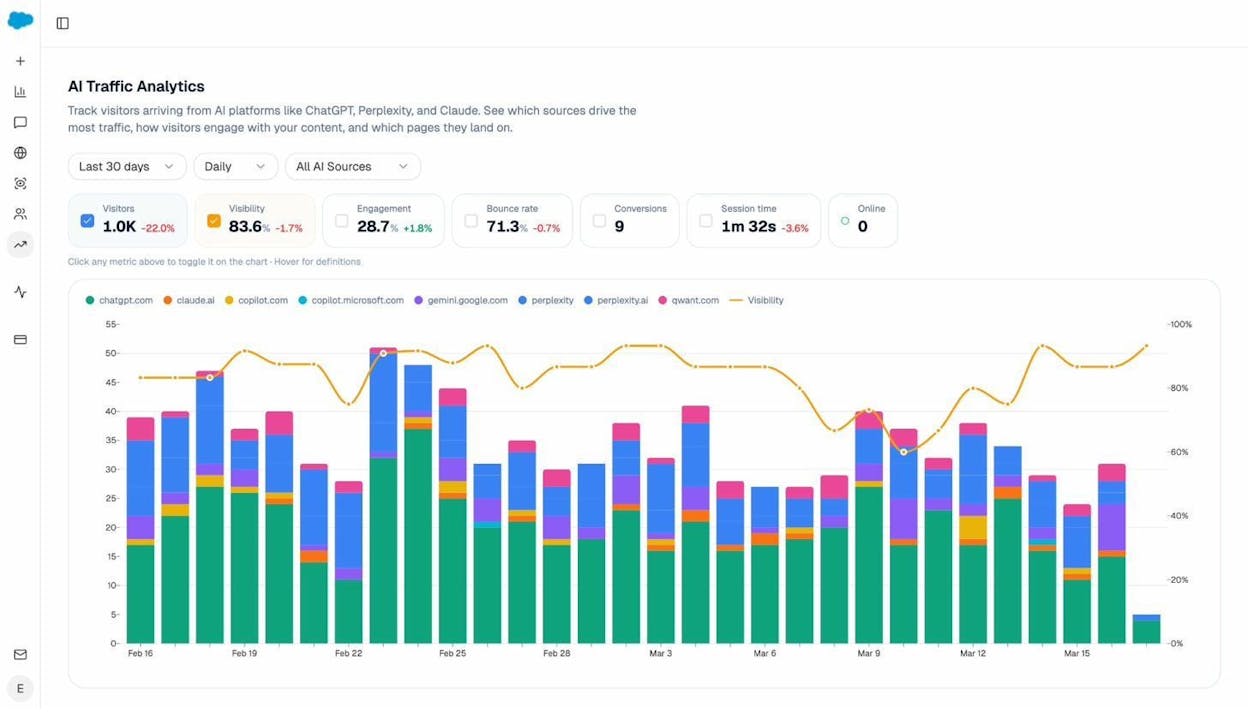
This gives you a basic picture, but manually querying GA4 and maintaining referrer lists gets tedious fast. That’s exactly the problem Analyze AI solves. It connects to your GA4 and automatically attributes AI-driven sessions, breaking them down by engine, landing page, and conversion events — no scripting required.
Understanding Which Pages AI Models Cite
Beyond tracking traffic, you can use Python to analyze patterns in which pages AI models reference. The logic is straightforward: ask an AI model about topics in your space, record which URLs appear in the citations, and look for patterns.
# Conceptual example: logging AI citation patterns
import json
from datetime import datetime
citation_log = []
# After querying multiple AI platforms about your industry topics:
citation_log.append({
"date": datetime.now().isoformat(),
"prompt": "best project management tools 2026",
"model": "ChatGPT",
"cited_urls": [
"https://example.com/blog/pm-tools-guide",
"https://competitor.com/reviews/project-management"
],
"your_brand_mentioned": True,
"position": 2
})
# Analyze over time:
# Which of your pages get cited most?
# Which competitors appear alongside you?
# Which prompts never mention your brand?
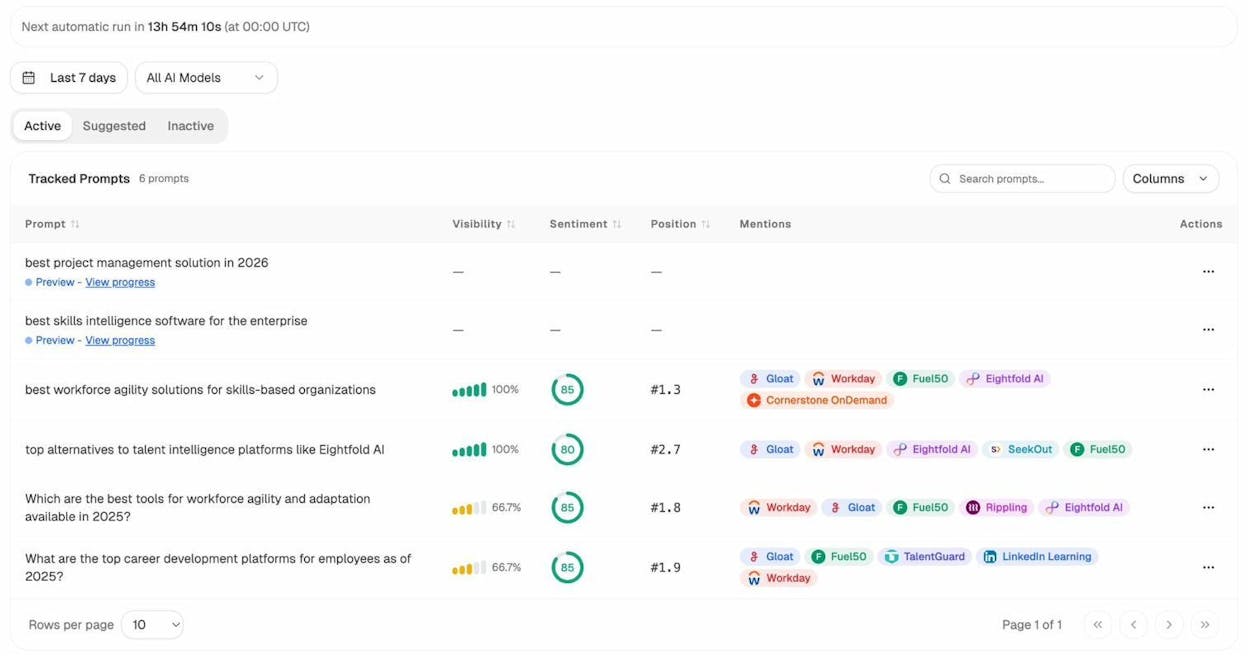
Running this manually is possible but not scalable. This is where a dedicated platform like Analyze AI shines. It tracks prompts across ChatGPT, Perplexity, Claude, Copilot, and Gemini on a daily schedule, showing you exactly where your brand appears (and where it doesn’t), which competitors show up alongside you, and what sentiment AI models express about your brand.
How Python and Analyze AI Work Together
Python and a platform like Analyze AI aren’t competing approaches — they complement each other. Here’s how the workflow fits together:
Use Python for custom technical SEO audits, one-off data analysis, connecting to APIs like Google Search Console, building internal tools, and scripting tasks unique to your site.
Use Analyze AI for tracking AI search visibility, monitoring prompt-level brand presence, attributing AI referral traffic to specific pages, competitive intelligence across AI engines, and identifying content opportunities where competitors win and you don’t.
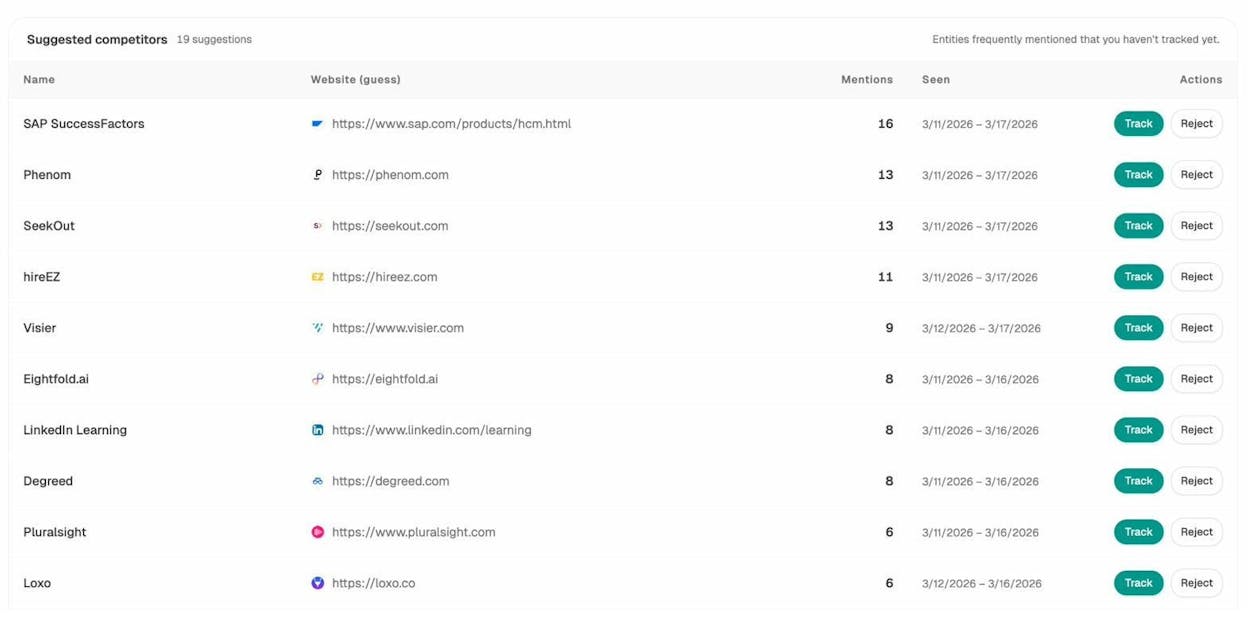
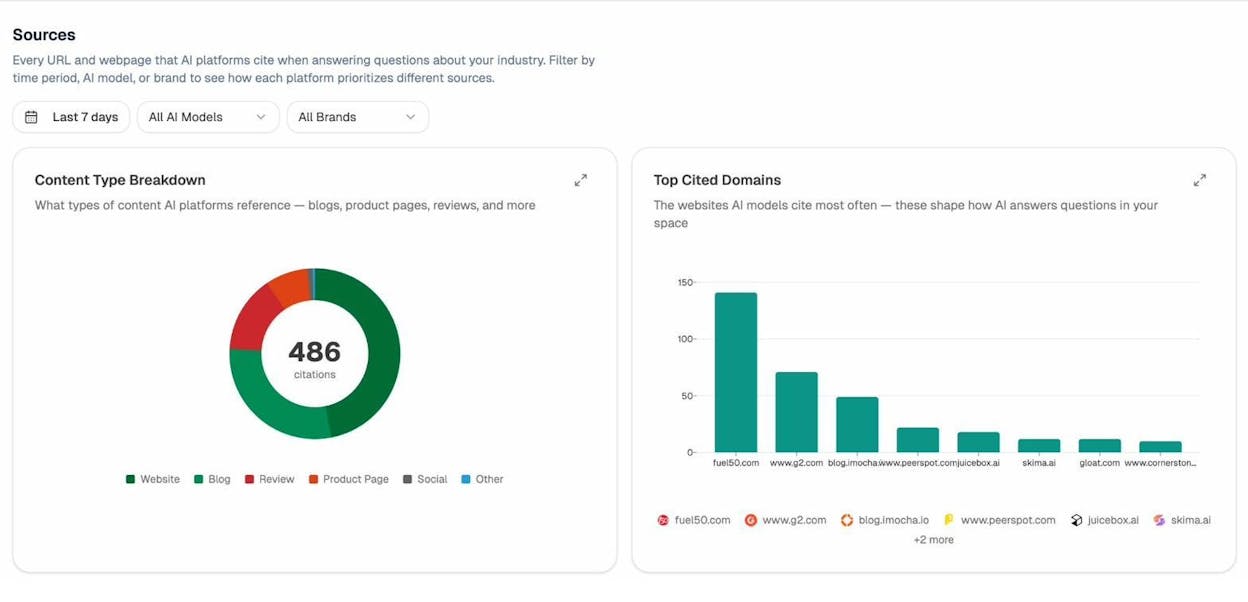
For example, you might use Python to pull your Google Search Console data, identify pages that rank well in traditional search, and then check Analyze AI to see if those same pages are being cited by AI models. Pages that rank well in Google but don’t appear in AI answers represent a specific optimization opportunity. Analyze AI’s Sources dashboard shows which of your URLs AI models cite, how often, and in which engines — giving you a clear picture of the gap.
This dual approach — Python for traditional SEO automation, Analyze AI for AI search intelligence — gives you complete coverage of both organic channels.
Free Python Scripts and Resources for SEOs
You don’t have to build everything from scratch. The SEO community has shared hundreds of free, ready-to-use Python scripts. Here are some of the best starting points:
Patrick Stox’s Google Colab collection. Patrick Stox, a well-known technical SEO, maintains several free Colab notebooks:
-
Redirect matching script — Automates 1:1 redirect mapping by matching old and new URLs via text similarity. Extremely useful during site migrations. Run it here.
-
Page title similarity report — Compares your submitted titles with what Google actually displays in SERPs, using a BERT model. Great for large-scale title audits. Run it here.
-
Traffic forecasting script — Uses historical traffic data to predict future performance. Helpful for setting expectations with stakeholders. Run it here.
![[Screenshot: One of Patrick Stox’s Colab notebooks running a redirect matching script]](https://www.datocms-assets.com/164164/1774866283-blobid11.png?auto=format,compress&w=1248&fit=max)
JC Chouinard’s Python for SEO guide. JC maintains one of the most comprehensive free resources on Python for SEO at jcchouinard.com/python-for-seo. It covers everything from basic setup to advanced topics like natural language processing and machine learning for SEO.
Community script collections. The SEO community maintains a growing list of free Python scripts across a range of use cases. This Looker Studio dashboard catalogs scripts from dozens of contributors — covering crawling, keyword research, content analysis, and more.
Learning platforms. For structured Python courses, RealPython offers hands-on tutorials with practical examples. DataCamp is another strong option, especially for data-focused work like keyword analysis and reporting.
Python vs. No-Code SEO Tools: When to Use Each
Not every SEO task needs Python. Sometimes a dedicated tool is faster, more reliable, and easier to maintain. Here’s how to decide:
|
Situation |
Use Python |
Use a dedicated tool |
|---|---|---|
|
Checking rankings for 5 keywords |
Overkill |
|
|
Auditing 10,000 URLs for broken links |
Good option |
Broken Link Checker is faster for basic checks |
|
Pulling GSC data weekly |
Automate with Python + cron |
Manual export works for occasional checks |
|
Tracking AI search visibility daily |
Complex to build and maintain |
Analyze AI handles this automatically |
|
Finding new keyword ideas |
API scripts require setup |
Keyword Generator for quick research |
|
One-off competitive analysis |
Python for custom deep dives |
Competitor analysis for ongoing monitoring |
|
Merging and cleaning large datasets |
Python (pandas) is unmatched |
Excel works for smaller files |
|
Generating SEO reports for clients |
Python for custom dashboards |
SEO reporting tools for templated reports |
The sweet spot for most SEO professionals is a combination: use tools for routine tasks and monitoring, and use Python for custom analysis, data processing, and automation that no single tool covers.
For keyword research specifically, Analyze AI offers free tools for Bing keywords, YouTube keywords, Amazon keywords, and a general keyword difficulty checker — all free and no Python required. You can also check any site’s traffic and authority using the Website Traffic Checker and Website Authority Checker.
Tips for Learning Python as an SEO
After working with SEO teams who’ve made the transition from spreadsheet-only workflows to Python-assisted ones, a few patterns stand out:
Start with a real problem, not a tutorial. The fastest way to learn Python is to pick an SEO task you do repeatedly — checking status codes, pulling GSC data, auditing meta tags — and automate it. You’ll learn faster because you care about the outcome.
Use ChatGPT as your debugging partner. When you hit an error (and you will), paste the error message into ChatGPT and ask it to explain what went wrong. This approach cuts through the frustration that makes most beginners quit. Don’t be embarrassed by “dumb” error messages — everyone hits them.
Copy first, then customize. Start by copying scripts from this article or the resources linked above. Run them. See the output. Then tweak one thing: change the URL, add a column to the output, filter the results differently. Each small change teaches you something new.
Keep your scripts organized. Create a folder for your Python projects. Name scripts descriptively: meta_tag_audit.py, gsc_weekly_report.py, broken_link_checker.py. Add comments that explain what each section does. Future-you will thank present-you.
Don’t try to learn everything at once. You don’t need machine learning, NLP, or data science to get value from Python in SEO. The basics — requests, BeautifulSoup, pandas, and APIs — will carry you for a long time. Add complexity only when you have a specific use case that demands it.
Final Thoughts
Python is one of the most practical skills an SEO professional can add to their toolkit. Even a handful of basic scripts can save hours every week and surface insights you’d never find manually. And as AI search grows into a meaningful traffic channel alongside traditional SEO, the ability to work with data programmatically becomes even more valuable.
You don’t need to become a software engineer. You need to learn enough Python to automate the boring parts of your job, extract insights from large datasets, and connect the tools you already use. Start with one of the projects in this guide. Run it. See what happens. Then build from there.
And for the AI search side of things — where LLMs like ChatGPT, Perplexity, and Claude are already sending traffic and shaping brand perception — Analyze AI gives you the visibility and attribution data that no Python script alone can replicate. It’s the other half of the equation: Python for automation, Analyze AI for AI search intelligence.
Ready to see where your brand stands in AI search? Check your AI rankings for free.
Further Reading
-
Complete Python for SEO Guide by JC Chouinard
-
RealPython for hands-on Python tutorials

Ernest

Ibrahim
![How to Do a Content Gap Analysis [With Template]](/_next/image?url=https%3A%2F%2Fwww.datocms-assets.com%2F164164%2F1774863217-blobid0.png&w=3840&q=75)


