

![How to Do a Content Gap Analysis [With Template]](/_next/image?url=https%3A%2F%2Fwww.datocms-assets.com%2F164164%2F1774863217-blobid0.png&w=3840&q=75)

Summarize this blog post with:


In this article, you'll learn how to run a content gap analysis from start to finish — including how to identify your real competitors, find the keywords they rank for that you don't, prioritize those opportunities by business impact, and close the gaps with content that actually ranks. You'll also learn how to extend that same process to AI search, where a growing share of your audience now gets answers from ChatGPT, Perplexity, and Google AI Mode instead of clicking through ten blue links.
We've included a free content gap analysis template you can copy and start using today.
Table of Contents
What Is a Content Gap Analysis?
A content gap analysis is the process of comparing your website's content against your competitors' to find the topics, keywords, and questions they cover that you don't.
The output is simple: a prioritized list of content you need to create or improve to capture traffic your competitors are currently winning.
There are two main types of content gaps:
Domain-level gaps happen when a competitor has an entire page about a topic you haven't covered at all. For example, they have a guide on "employee onboarding software" and you have nothing.
Page-level gaps happen when you and a competitor both have a page about the same topic, but their page ranks for more keywords than yours. This usually means their content is more thorough — they cover subtopics and related questions that your page misses.
Most marketers stop at domain-level gaps. That's a mistake. Page-level gaps are often easier to close (you already have the page) and can deliver faster results because Google already associates your URL with the topic.
There's also a third type that most guides ignore entirely: AI search gaps. These are prompts and questions where AI engines like ChatGPT, Perplexity, or Google AI Mode mention your competitors but not you. We'll cover how to find those later in this guide.
Why Content Gap Analysis Matters
Every competitor ranking above you for a keyword your audience searches is traffic you're not getting. Content gap analysis gives you a systematic way to find those missed opportunities instead of guessing what to write next.
Here's what makes it one of the highest-ROI activities in content strategy:
You start with proven topics. Instead of brainstorming content ideas from scratch, you're working backwards from topics that already drive traffic to competitor sites. The demand is validated. The question is whether you can create something better.
You stop creating redundant content. Without gap analysis, it's easy to keep publishing on topics you already rank for while ignoring the ones where you're invisible. A structured analysis forces you to look at where the actual holes are.
You steal traffic from competitors. When you publish content that fills a gap — and that content is better, more thorough, or more useful — you don't just earn new traffic. You take it from the competitors who were ranking there before. This is especially true for long-tail keywords where a single well-crafted page can outrank established competitors within weeks.
You catch visibility gaps in AI search before they widen. Search is changing. AI search engines now answer a growing share of queries directly. If your competitor is being cited by ChatGPT and Perplexity for prompts your audience asks — and you're not — that's a content gap too. Traditional keyword tools won't show you this. But it's becoming just as important as ranking in Google.
The bottom line: content gap analysis tells you exactly what to create, in what order, and why it matters. It replaces gut feeling with data.
How to Do a Content Gap Analysis (Step by Step)
Step 1: Identify Your Real Competitors
Before you pull any data, you need to answer one question: who are your actual competitors?
This sounds obvious, but it's where most content gap analyses go wrong. If you pick the wrong competitors, your entire gap report will be filled with irrelevant keywords that waste your time.
Here's the distinction that matters: your SEO competitors are not always the same as your business competitors.
Business competitors sell the same product or service to the same audience. If you sell project management software, your business competitors are other project management tools.
SEO competitors are websites that rank for the same keywords you target, regardless of what they sell. A media publication, a review site, or a blog in your niche might be an SEO competitor without being a business competitor at all.
For content gap analysis, you want to focus on business competitors that also have strong SEO presence. They're creating content for the same audience you want to reach, and their top-performing pages represent proven content opportunities.
How to find the right competitors:
1. Start with the ones you already know. List 3–5 companies that compete directly with your product or service. These are the ones your sales team loses deals to.
2. Validate with an SEO tool. Plug your domain into a competitive analysis tool (like an SEO platform's "Competing Domains" or "Organic Competitors" report) to see which websites share the most keyword overlap with yours. Sometimes you'll discover competitors you didn't expect.
![[Screenshot: SEO tool's competing domains report showing websites with keyword overlap]](https://www.datocms-assets.com/164164/1774863217-blobid1.png?auto=format,compress&w=1248&fit=max)
3. Check that the comparison is fair. Don't add massive media sites or aggregate platforms unless you're confident you can compete with their authority. A SaaS startup shouldn't be benchmarking against Forbes or Wikipedia — those domain-level gaps aren't actionable.
4. Keep the list small. Two to five competitors is the sweet spot. More than that introduces noise and makes the gap report harder to analyze.
Pro tip: If you enter three competitors and one of them ranks for 50,000 keywords while the other two rank for 2,000, the larger site will dominate your gap report with irrelevant keywords. Try to pick competitors of similar size and topical focus.
How to Find Your Competitors in AI Search
Traditional SEO tools only show you who competes for Google rankings. But there's a separate competitive landscape forming in AI search — and the winners there aren't always the same brands.
In Analyze AI, open the Competitors section. You'll see two views:
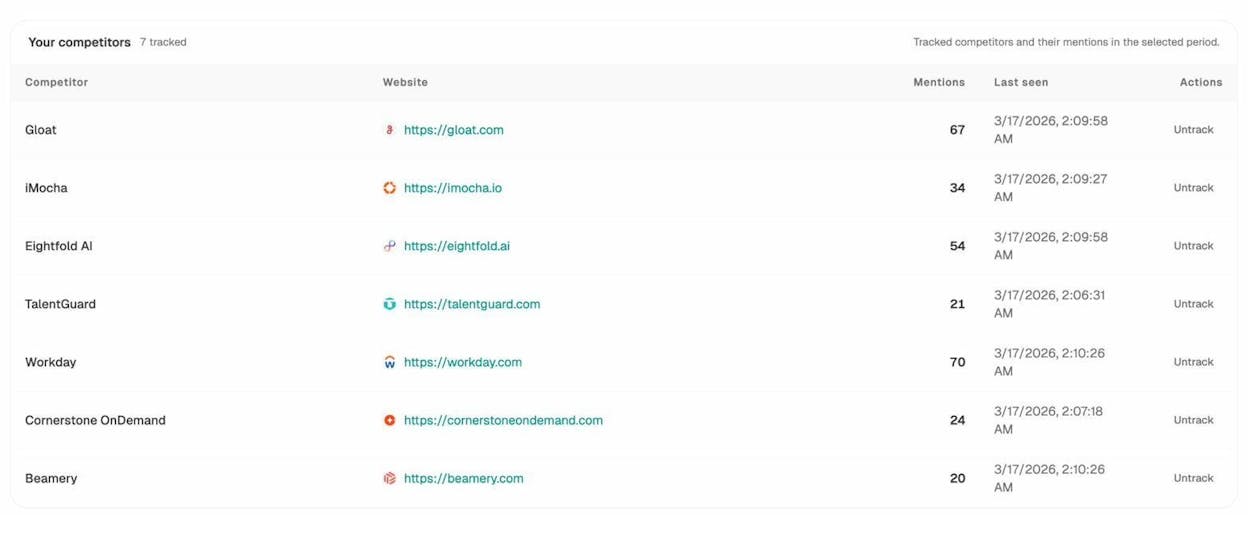
Your tracked competitors shows the brands you're already monitoring, with the number of AI mentions they've received across all tracked prompts.
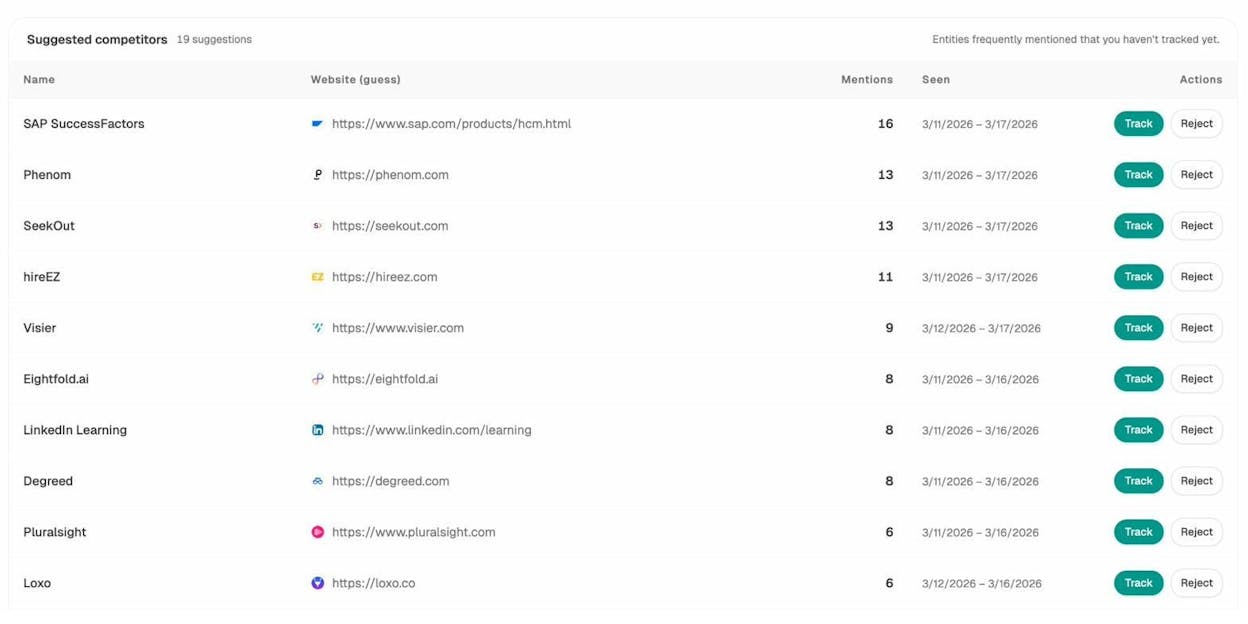
Suggested competitors surfaces brands that keep appearing in AI-generated answers alongside yours — even if you haven't added them yet. These are entities frequently mentioned that you haven't tracked, and they represent your emerging AI search competitors.
This matters for content gap analysis because the brands AI engines cite for your industry's prompts are the ones shaping the narrative. If a competitor is being mentioned 70 times across your tracked prompts and you're at 20, that visibility gap is a content gap you need to close.
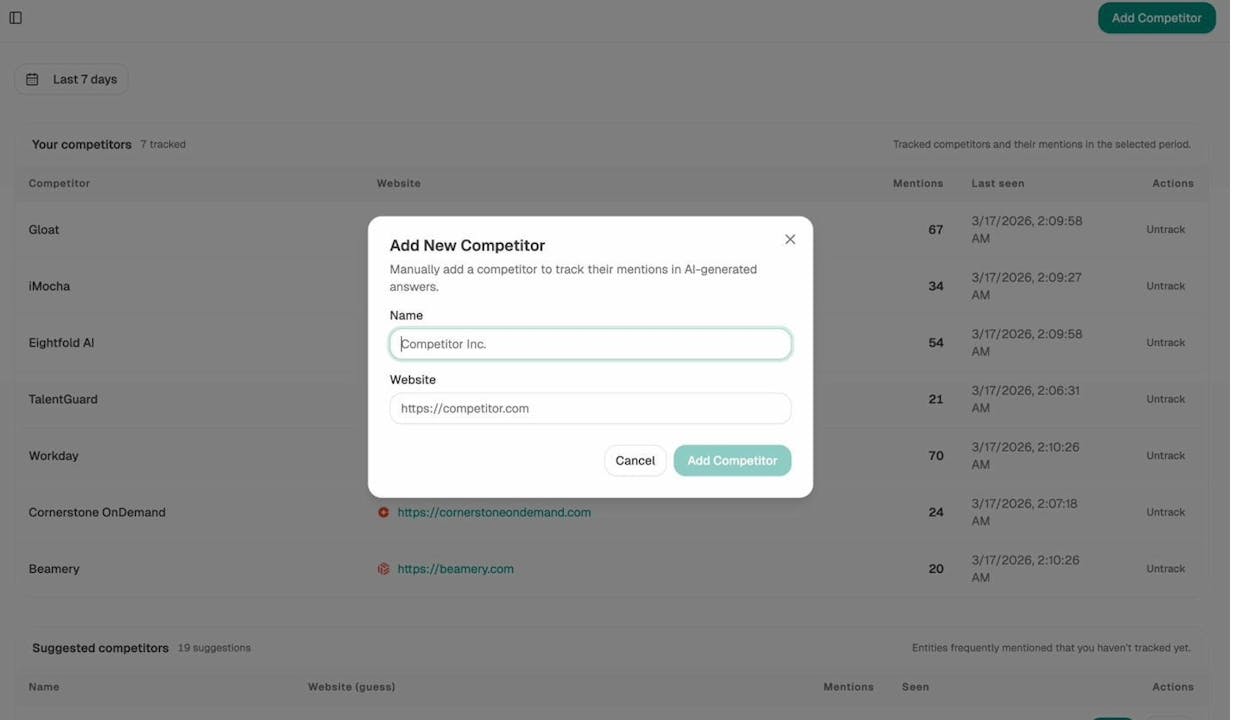
To add a new competitor to your tracking list, click Add Competitor, enter their name and website URL, and Analyze AI will start monitoring their mentions across all AI engines.
Step 2: Find Keyword Gaps
Now that you know who to compare against, it's time to pull the data.
Open a competitive analysis tool (most major SEO platforms have one) and set it to compare keywords. Enter your domain in the first field and add your 1–3 competitors below.
![[Screenshot: Competitive analysis tool with your domain and competitor domains entered, set to "keywords" mode]](https://www.datocms-assets.com/164164/1774863232-blobid5.png?auto=format,compress&w=1248&fit=max)
Click to show keyword opportunities. The tool will return all keywords that your competitors rank for, but you don't rank for at all (or rank very poorly for).
![[Screenshot: Content gap report showing thousands of keyword opportunities with columns for keyword, volume, KD, and competitor positions]](https://www.datocms-assets.com/164164/1774863235-blobid6.png?auto=format,compress&w=1248&fit=max)
Before you move on, toggle the "main positions only" filter if your tool offers one. This removes rankings in image packs, sitelinks, and other SERP features that inflate the numbers without reflecting real organic positions.
Step 3: Refine and Clean Your Data
A raw content gap export is messy. It includes branded competitor terms, irrelevant topics, zero-volume keywords, and duplicates. Before you can analyze opportunities, you need to filter the noise.
Here's the cleaning process, in order:
Filter out competitor brand names. Your competitors rank for their own brand terms — you don't need those in your gap report. Add each competitor's brand name (including common misspellings and variations) to the keyword exclusion filter. Use "partial match" to catch as many variations as possible.
![[Screenshot: Keyword filter excluding competitor brand names using partial match]](https://www.datocms-assets.com/164164/1774863238-blobid7.png?auto=format,compress&w=1248&fit=max)
Remove irrelevant topics. Depending on your competitors, the gap report will include keywords related to products, services, or content areas that aren't relevant to your business.
Set a minimum search volume. Keywords with fewer than 10–20 monthly searches are rarely worth dedicating an entire page to (unless they're high-intent bottom-of-funnel terms). Set a minimum volume filter to keep the list focused.
Require multiple competitors to rank. If you're analyzing more than two competitors, filter the results to show only keywords where at least two of them rank in the top 10. If multiple competitors rank for the same term, it's a stronger signal that the topic is relevant and achievable.
Optionally, filter by Keyword Difficulty. If your site has lower domain authority, set a maximum KD of 30–40 to surface low-hanging fruit. You can use Analyze AI's free keyword difficulty checker to quickly validate difficulty scores.
Once your filters are applied, export the data to CSV. You'll import this into a spreadsheet template in the next step.
How many keywords should you end up with? Aim for fewer than 100,000. If your list is larger, tighten your filters — especially the search volume minimum and competitor position requirements.
Step 4: Organize Your Opportunities
With your cleaned CSV export ready, it's time to organize the data so you can actually work with it.
Option 1: Use a template. Copy a content gap analysis template. Import your exported CSV into the "Data" tab by going to File > Import > Upload, selecting your file, and choosing "Append to current sheet."
![[Screenshot: Google Sheets import dialog with CSV being uploaded to the Data tab]](https://www.datocms-assets.com/164164/1774863240-blobid8.png?auto=format,compress&w=1248&fit=max)
Once imported, navigate to the "Results" tab. The template should automatically create a pivot table that groups keywords by the competitor's ranking URL. This view is critical — instead of looking at individual keywords, you're now looking at pages your competitors have that drive traffic from keyword clusters.
![[Screenshot: Results tab showing pivot table with competitor URLs, number of gap keywords, and estimated traffic]](https://www.datocms-assets.com/164164/1774863244-blobid9.png?auto=format,compress&w=1248&fit=max)
Group keywords into topic clusters. Multiple keywords often point to the same content opportunity. For example, "content gap analysis," "content gap analysis template," "how to do content gap analysis," and "what is a content gap analysis" all belong to the same cluster and can be served by a single comprehensive page. You can use the keyword clustering approach to group related keywords together.
This grouping step is important because it prevents you from creating five separate thin pages when one thorough guide would rank for all five keyword variations.
Step 5: Analyze and Prioritize Each Opportunity
This is the step that separates useful content gap analysis from busywork. Most people export keywords, skim the list, and start writing about whatever catches their eye. That approach wastes time on low-value topics.
Instead, work through the pivot table page by page. For each competitor URL (or keyword cluster), follow this decision process:
Is this topic relevant to your business?
Not every keyword your competitor ranks for is worth pursuing. If you sell HR software and your competitor has a page ranking for "how to file taxes as a freelancer," that's not a gap you need to close — even if it drives significant traffic.
Ask yourself: would someone reading this content be a potential customer? If the answer is no, skip it and move to the next opportunity.
Do you already have a page about this topic?
Run a quick site:yourdomain.com [topic] search in Google.
![[Screenshot: Google site: search checking if a page about a specific topic already exists]](https://www.datocms-assets.com/164164/1774863247-blobid10.png?auto=format,compress&w=1248&fit=max)
If you don't have a page → This is a domain-level gap. You'll need to create new content.
If you do have a page → This is a page-level gap. Look at which keywords your competitor ranks for that you don't. These missing keywords usually point to subtopics, definitions, or related questions that your page doesn't address.
How do you prioritize which gaps to close first?
Not all content gaps are equal. Prioritize based on a combination of factors:
|
URL |
Priority |
|
example.com/1 |
High |
|
example.com/2 |
Low |
|
example.com/3 |
Medium |
|
example.com/4 |
Low |
|
example.com/5 |
High |
Create a simple priority score (High / Medium / Low) for each opportunity and tackle the High-priority ones first.
Step 6: Find Content Gaps in AI Search
Here's where most content gap analysis guides stop. They cover traditional SEO gaps and move on. But there's a growing visibility layer that operates by completely different rules: AI search.
When someone asks ChatGPT "what's the best CRM for small businesses?" or asks Perplexity "how do I improve employee retention?", those AI engines generate answers that cite specific brands and content. If your competitor is consistently mentioned and you're not, that's a content gap — even if you outrank them in Google.
The tricky part? Traditional SEO tools can't show you this. Google Search Console doesn't track ChatGPT mentions. Your rank tracker doesn't know what Perplexity cites. You need a different approach.
How to find AI search gaps with Analyze AI
Start with the Opportunities view. In Analyze AI, navigate to Prompts and look at the Opportunities tab. This shows you prompts where your competitors get cited but your brand doesn't. Each row tells you the prompt, how many AI engines didn't mention you, and which competitors appeared instead.
This is the AI search equivalent of a content gap report. Each row represents a question your audience asks AI engines — and your competitors are winning the answer.
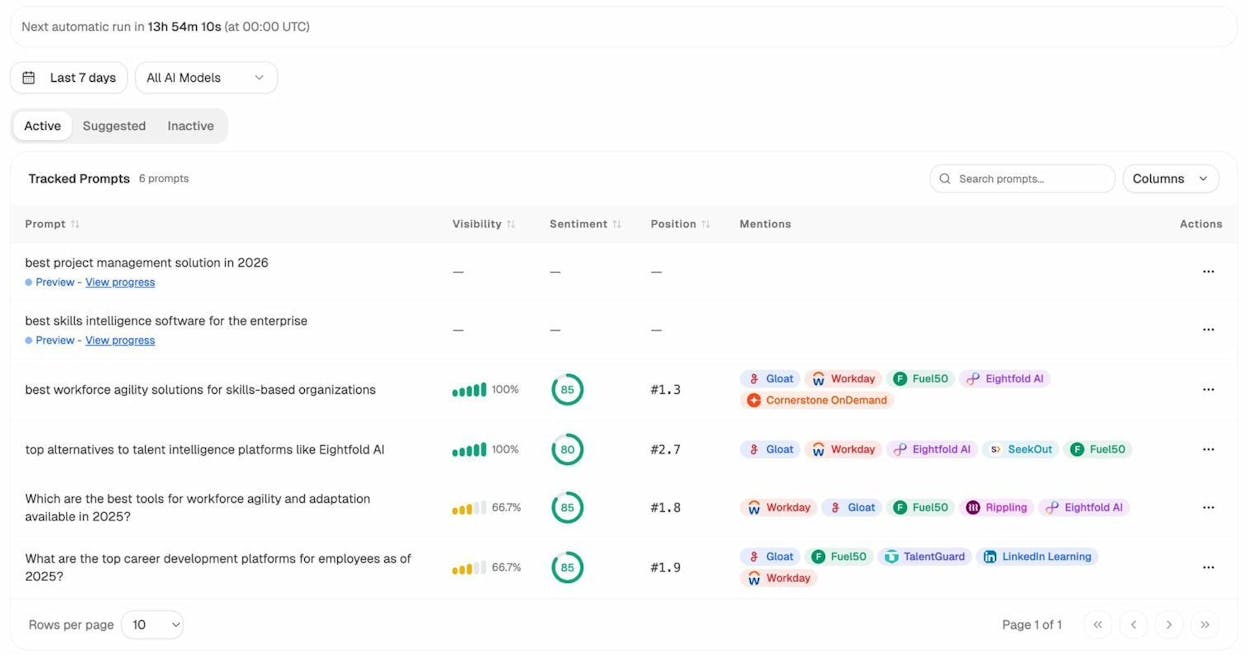
Check your tracked prompts for visibility gaps. In the Active prompts tab, review your visibility and position scores. A prompt where your competitor shows at position #1 with 100% visibility while you're at 66% visibility and position #2 tells you exactly where you need to strengthen your content.
Use suggested prompts to expand coverage. Click the Suggested tab to see AI-generated prompt recommendations based on your industry cluster. These are prompts you're not tracking yet but probably should be. Hit "Track" to start monitoring any that feel relevant.
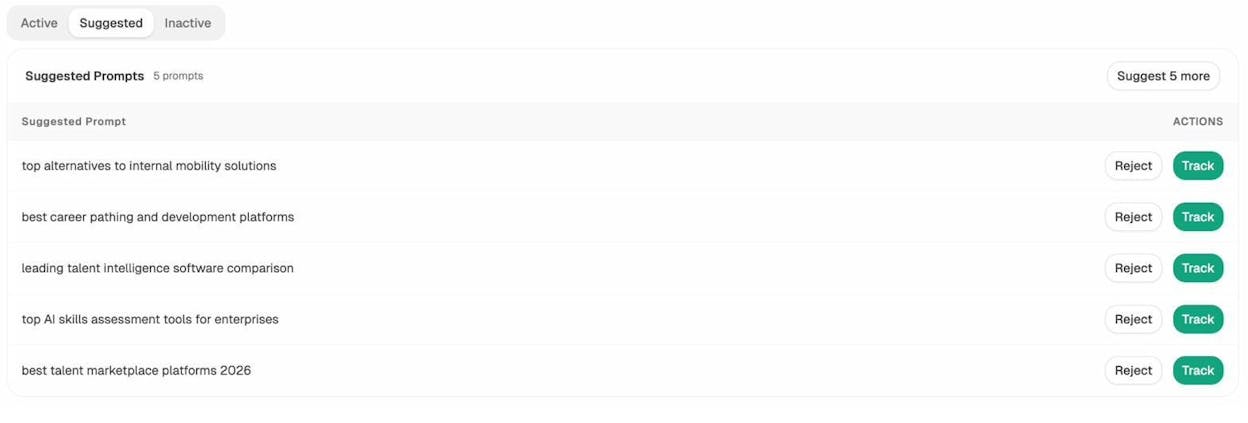
This is similar to expanding your keyword research — except instead of finding search queries, you're finding the conversational prompts that AI engines answer about your category.
Audit the sources AI engines rely on
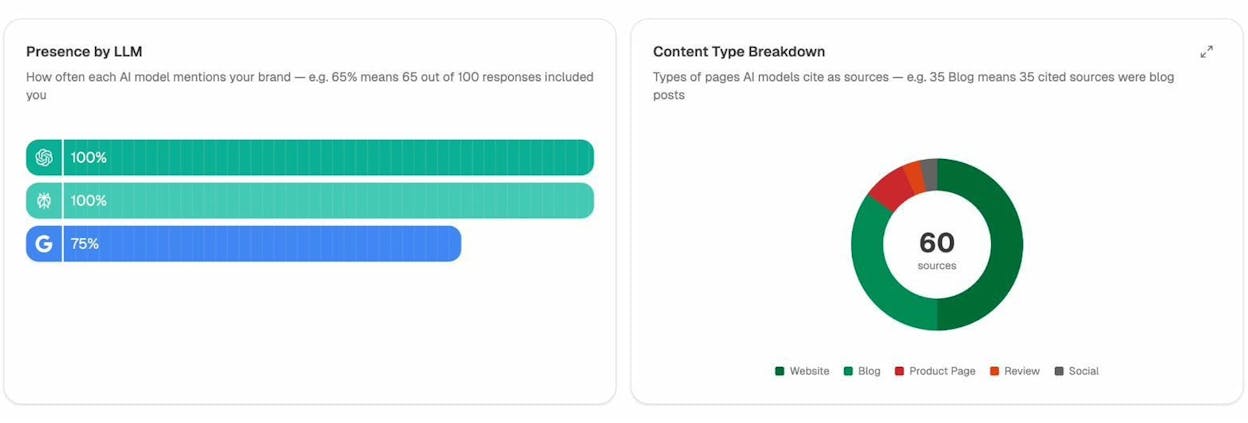
Content gaps in AI search aren't just about whether you're mentioned. They're about which sources AI engines cite when they answer questions in your space.
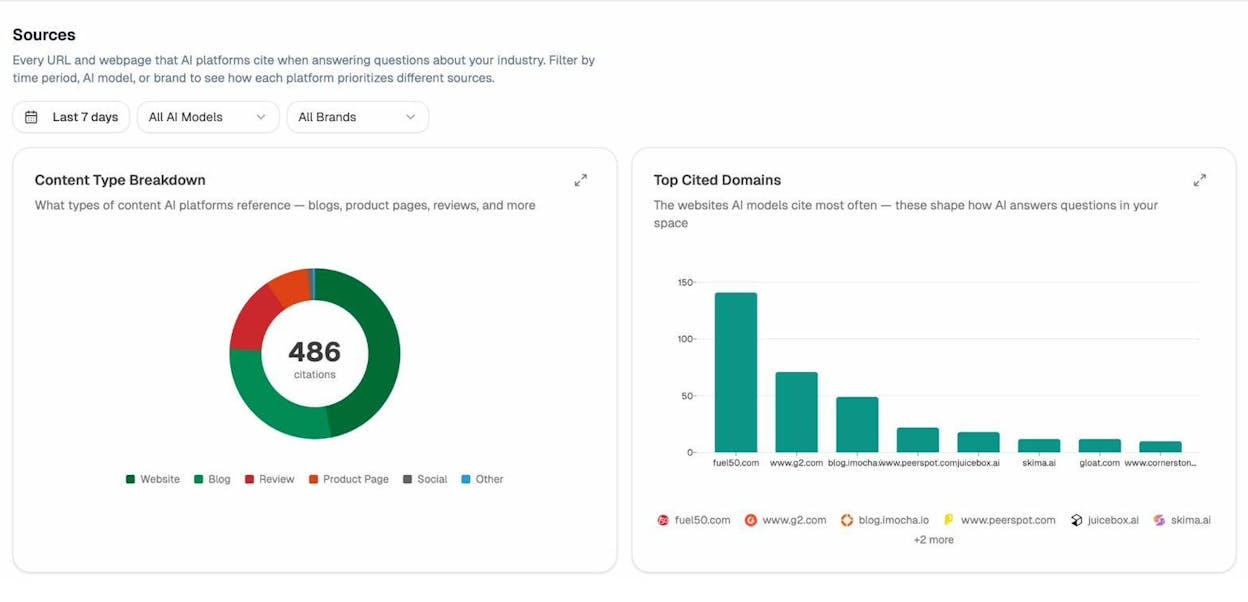
Open the Sources section in Analyze AI to see two critical reports:
Content Type Breakdown shows what types of pages AI models reference — websites, blogs, reviews, product pages, or social content. If AI engines in your industry primarily cite blog posts and you don't have blog content, that's a structural content gap.
Top Cited Domains shows which websites AI models cite most often. If a competitor's domain has 140 citations and yours has 12, you know where the gap is.
Use AI traffic data to validate what works
One of the most underused content gap signals is your own AI referral traffic. In Analyze AI's AI Traffic Analytics, you can see exactly which pages on your site receive visitors from AI engines — and which AI engines send them.
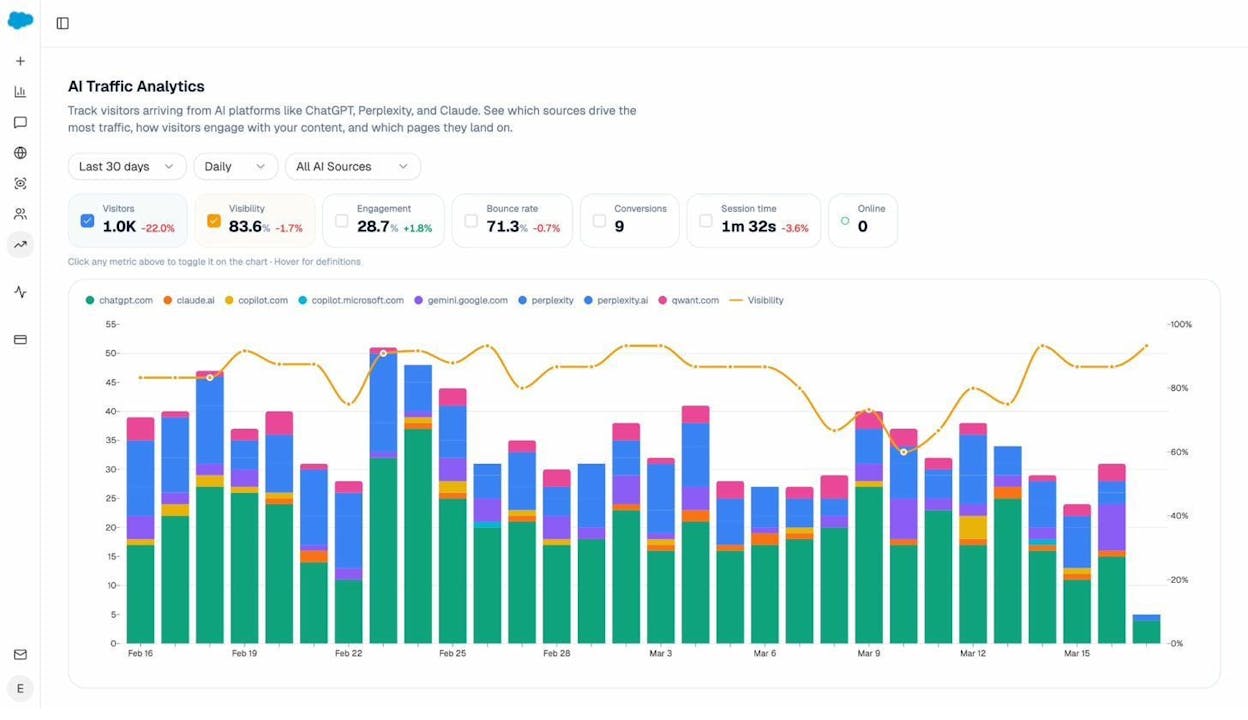
The Landing Pages report takes this further. It shows which specific pages receive AI-referred traffic, the referral source (ChatGPT, Perplexity, Claude, Gemini, Copilot), session count, bounce rate, and engagement metrics.
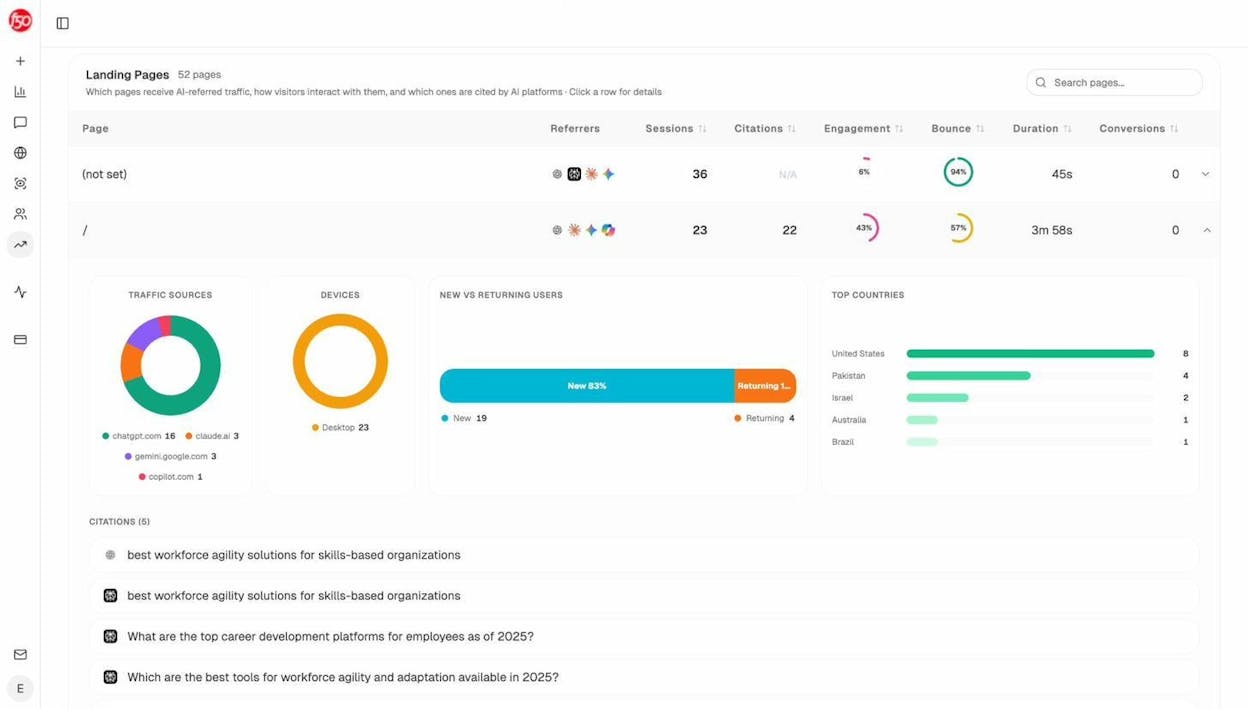
Why does this matter for content gap analysis? Because the pages that already attract AI traffic reveal a pattern. Look at what they have in common: structure, depth, format, topic type. Then compare that against your content that gets zero AI traffic. The difference between those two groups is your internal content gap for AI search.
Monitor your competitors' AI visibility over time
Finally, use the Overview dashboard to see your AI visibility trend compared to competitors. This stacked view shows each brand's visibility share over time, across all AI models.
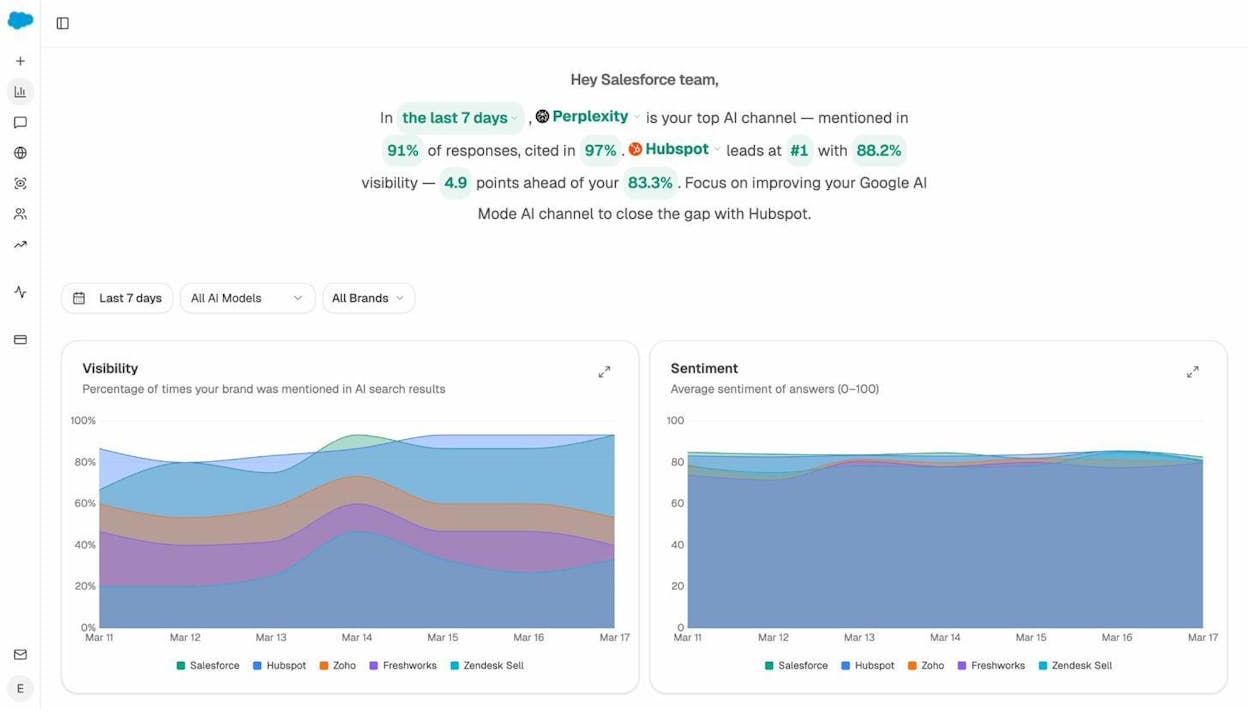
If a competitor's visibility is trending upward while yours is flat, they're producing content that AI engines increasingly trust and cite. That's a content gap signal you won't find in any keyword tool.
Step 7: Match Search Intent Before You Write
You've identified your content gaps and prioritized them. Before you start writing, there's one more critical step: verify that you're creating the right type of content for each gap.
Search intent tells you what format and depth Google (and AI engines) expect for a given query. Getting this wrong means your content won't rank — regardless of how well it's written.
Here's how to check intent for each gap on your list:
1. Google the primary keyword. Look at the top 5–10 results. What type of content dominates? Mostly blog posts → write a blog post. Mostly product pages → consider a product page. Mostly comparison pages → write a comparison roundup.
2. Check the SERP features. If the keyword triggers featured snippets, AI Overviews, or People Also Ask boxes, note what questions appear. These are subtopics your content needs to answer. Use the SERP checker to do this quickly.
3. Examine content depth. Open the top 3 ranking pages. How long are they? What sections do they include? What do they cover that others don't? This tells you the minimum bar for your content.
4. Identify the angle. Are top results written for beginners or experts? Do they focus on strategy or tactics? Match the sophistication level to what's already winning.
A common mistake is creating a 500-word overview when the top results are all 3,000-word step-by-step guides. Always let the SERP guide your content format.
For AI search intent, the logic is slightly different. AI engines tend to cite content that is structured, specific, and directly answers questions. The content that gets cited tends to have clear comparison tables, specific recommendations with reasoning, and structured data that AI models can easily extract.
Step 8: Create Content Briefs That Close Gaps
With your opportunities prioritized and intent verified, create a content brief for each piece before you write. A brief keeps your writing focused and ensures you actually close the gap instead of producing another generic article.
Here's a brief template that works:
Target keyword: The primary keyword you're targeting.
Secondary keywords: Related keywords from the gap analysis that this page should also rank for. These are the secondary keywords that signal depth to search engines.
Search intent: The format and angle the SERP demands.
Content gaps to close: The specific subtopics, questions, or angles that competitors cover and you don't. This is the most important section.
Your angle or information gain: What will make your content different from what already exists? This could be original data, a unique framework, personal experience, or proprietary tool integration.
Suggested outline: The H2 and H3 headings that cover all the gaps while maintaining a logical flow.
Internal links to include: Pages on your site that should link to this content, and pages this content should link to. Use your internal linking strategy to strengthen topical authority.
AI search angle: If relevant, note the AI prompts this content should help you win. Consider structuring sections with clear, direct answers that AI models can easily cite.
A good brief takes 20–30 minutes to create. That time investment pays for itself ten times over because it prevents your writer from producing a vague, unfocused article that doesn't close any gap.
Step 9: Implement, Track, and Iterate
Content gap analysis is not a one-time exercise. It's a recurring process that should happen at least quarterly.
For new pages (domain-level gaps):
1. Assign each brief to a writer with a deadline.
2. Set up the page with proper on-page optimization — target keyword in the title, URL, H1, and early in the body. Make sure your meta description is compelling.
3. Publish and submit the URL for indexing.
4. Build internal links to the new page from relevant existing content.
5. Track rankings weekly for the first 2–3 months.
For existing pages (page-level gaps):
1. Add the missing sections or subtopics identified in your brief.
2. Update the publication date to signal freshness.
3. Strengthen internal linking to and from the updated page.
4. Monitor the ranking changes for the new keywords you targeted.
For AI search gaps:
1. Restructure your content to directly answer the prompts where competitors win. Use clear headings, bullet points, comparison tables, and structured data that AI models can extract.
2. Track your AI visibility using Analyze AI to see if your mention rate and citation count increase over time.
3. Monitor your AI referral traffic in the AI Traffic Analytics dashboard to measure real sessions, not just visibility scores.
4. Check your competitor monitoring tools to see if competitors are also closing gaps — and stay ahead.
Set up a tracking dashboard
Create a simple spreadsheet to track each content gap.
Column definitions for the table:
-
Keyword / Topic — The keyword cluster or topic your competitor ranks for that you don't (or underperform on).
-
Gap Type — Domain-level (you have no page) or Page-level (your page exists but misses subtopics).
-
Competitor URL — The specific competitor page ranking for this topic.
-
Search Volume — Monthly search volume for the primary keyword.
-
KD — Keyword Difficulty score (0–100).
-
Traffic Potential — Estimated total traffic the top-ranking page gets from all keyword variations.
-
Action — What you need to do: create a new page, add sections to an existing page, or merge/redirect.
-
Priority — High, Medium, or Low based on business relevance and difficulty.
-
Status — Not started, In progress, Published, or Monitoring.
-
Notes — Suggested subtopics, internal links to add, or content brief details.
Review this tracker monthly. Content that isn't moving after 3 months may need additional optimization, stronger internal links, or backlinks.
Re-run the analysis quarterly
The competitive landscape shifts constantly. Your competitors publish new content. New competitors emerge. AI engines update their citation preferences. Re-running your content gap analysis every quarter ensures you catch new opportunities before your competitors fill them first.
Content Gap Analysis Template
We've referenced templates throughout this guide. Here's how to set up your own:
Tab 1 — Raw Data. This is where you import your keyword gap export. Columns should include: Keyword, Search Volume, Keyword Difficulty, Traffic Potential, CPC, Your Position, Competitor 1 Position, Competitor 2 Position, Competitor 1 URL, Competitor 2 URL.
Tab 2 — Pivot Analysis. Create a pivot table that groups keywords by competitor URL. For each URL, show: number of gap keywords, total search volume, average KD, and the competitor's estimated traffic from those keywords.
Tab 3 — Action Plan. For each opportunity you've evaluated, record: the topic, gap type, priority, assigned writer, deadline, target URL, action item, and status.
Tab 4 — AI Search Gaps. If you're using Analyze AI, add a tab for AI search opportunities. Record: the prompt, which competitors are mentioned, which AI engines cite them, your current visibility score, and the content action needed.
Common Content Gap Analysis Mistakes
After working through dozens of content gap projects, here are the mistakes that waste the most time:
Picking the wrong competitors. Adding a massive media site or aggregator as a "competitor" will flood your gap report with thousands of irrelevant keywords. Stick to direct business competitors with comparable domain authority.
Treating every keyword as a separate opportunity. A single content gap might involve 50 related keywords that all point to the same topic. If you create a separate page for each keyword, you'll cannibalize your own rankings. Cluster keywords by topic and create one thorough page per cluster. Read our guide on keyword clustering for a detailed walkthrough.
Ignoring search intent. Just because a competitor ranks for a keyword doesn't mean you should create the same type of page. Always check the SERP before committing to a content format.
Skipping the prioritization step. A gap report with 10,000 keywords is useless if you don't prioritize. Be ruthless about filtering for business relevance, traffic potential, and achievable difficulty.
Only looking at keyword gaps. Traditional keyword-based gap analysis misses the AI search layer entirely. Competitors earning mentions in ChatGPT and Perplexity are building brand awareness that keyword tools can't measure. Extend your analysis to include AI search visibility.
Never re-running the analysis. Content gap analysis decays quickly. New competitors emerge, ranking algorithms change, and your own content ages. Treat this as a quarterly process, not a one-time project.
Creating copycat content. Identifying a gap doesn't mean you should create a clone of your competitor's page. The point is to create something better — with original data, unique angles, actionable frameworks, or deeper coverage. As we've covered in our SEO content strategy guide, information gain is what separates content that ranks from content that sits at page three.
Wrapping Up
Content gap analysis is one of the most reliable ways to build a content strategy grounded in data rather than guesswork. The process is straightforward: identify your competitors, find the keywords they rank for that you don't, prioritize based on business value, and create content that fills those gaps.
What's changed is the landscape. Search is no longer just ten blue links. AI engines are answering more of your audience's questions every day, and the brands they cite are building a new kind of visibility. A complete content gap analysis now needs to cover both channels — traditional search and AI search — to give you a full picture of where your competitors are winning and where you can take market share.
Start with the highest-priority gaps, track your progress monthly, and re-run the full analysis every quarter. The compounding effect of systematically closing content gaps — across both Google and AI engines — is one of the strongest growth levers in modern marketing.
Related resources:
• 6-Step SEO Competitor Analysis (+ Track AI Search Rivals)
• How to Rank on ChatGPT (Based on 65,000 Citation Data)
• What Is Answer Engine Optimization? 8 AEO Strategies
• 9 Keyword Research Tools to Try (Free & Paid)
• How to Use Keywords in SEO: 14 Practical Tips
• 16 Best Competitor Monitoring Tools & How to Use Them
Free tools to support your content gap analysis:

Ernest

Ibrahim


