



Summarize this blog post with:


In this article, you’ll learn what SEO data is, the seven types that matter most, where to get each one for free or with a paid tool, and how to use that data to grow traffic from both Google and AI search engines like ChatGPT, Perplexity, and Gemini.
Table of Contents
1. Organic traffic data
Organic traffic data tells you how many visitors come to your site from unpaid search results, which pages they land on, and how engaged they are once they arrive.
Key data points
-
Clicks. How many times users clicked your site from a search result.
-
Impressions. How often your site appeared in search results.
-
Click-through rate (CTR). The percentage of impressions that turned into clicks.
-
Traffic by page and country.
-
Estimated traffic for sites you don’t own. Useful for benchmarking competitors.
How to get it for traditional SEO
The free starting point is Google Search Console. Connect your site, verify ownership, and open the Performance report.
![[Screenshot: Google Search Console > Performance > Search results tab showing Total clicks, Total impressions, Average CTR, and Average position with a 28-day date range applied]](https://www.datocms-assets.com/164164/1777675066-blobid1.png?auto=format,compress&w=1248&fit=max)
For traffic on sites you don’t own, you need a third-party tool. Ahrefs Site Explorer, Semrush Domain Overview, and Moz Domain Analysis all give you organic traffic estimates, top pages, and top organic keywords for any URL.
![[Screenshot: Ahrefs Site Explorer > Overview report for any URL showing Domain Rating, Organic traffic, Organic keywords, and Backlinks metric cards]](https://www.datocms-assets.com/164164/1777675072-blobid2.png?auto=format,compress&w=1248&fit=max)
For a quick traffic estimate without paying for a subscription, our free Website Traffic Checker gives you traffic volume, top sources, and traffic by country in one click.
How to get it for AI search
AI search visits don’t show up in Google Search Console. They come from ChatGPT, Perplexity, Gemini, Copilot, and Claude. Standard analytics tools often log them as direct traffic or attribute them to the wrong source.
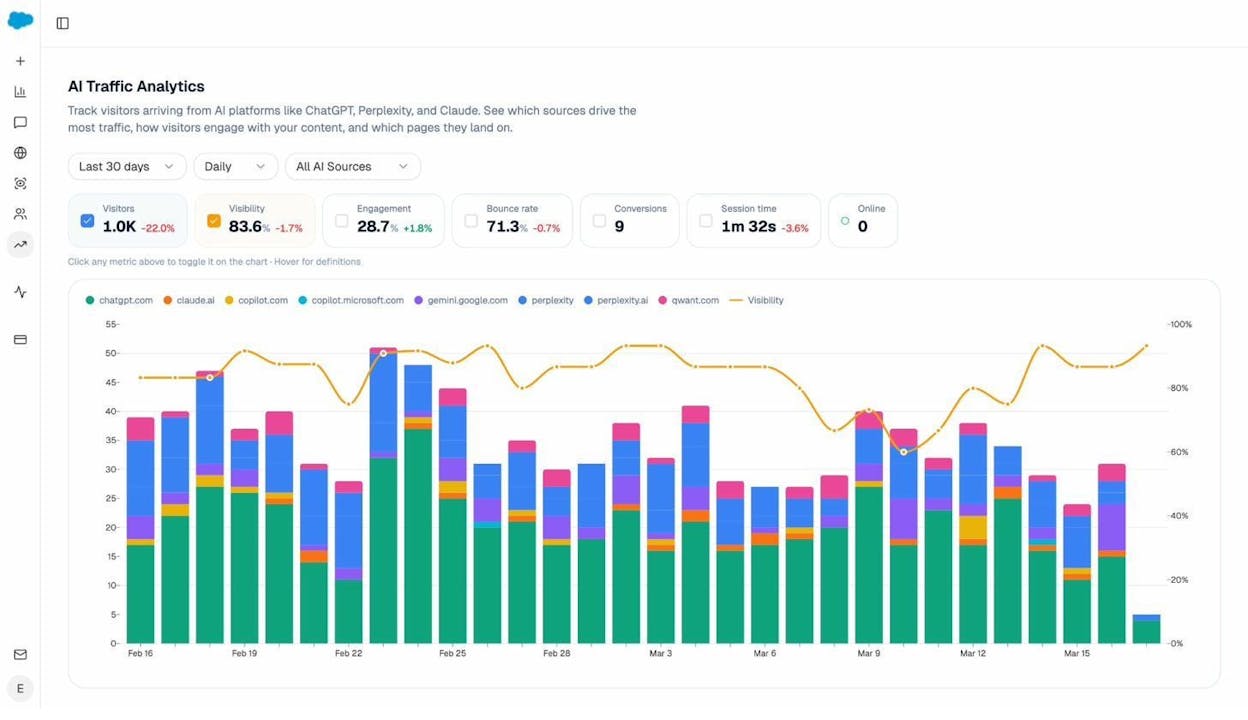
To track AI traffic properly, install Analyze AI’s tracking pixel. The AI Traffic Analytics dashboard breaks down visitors by AI source, shows which pages they land on, and tracks engagement, bounce rate, and conversions.
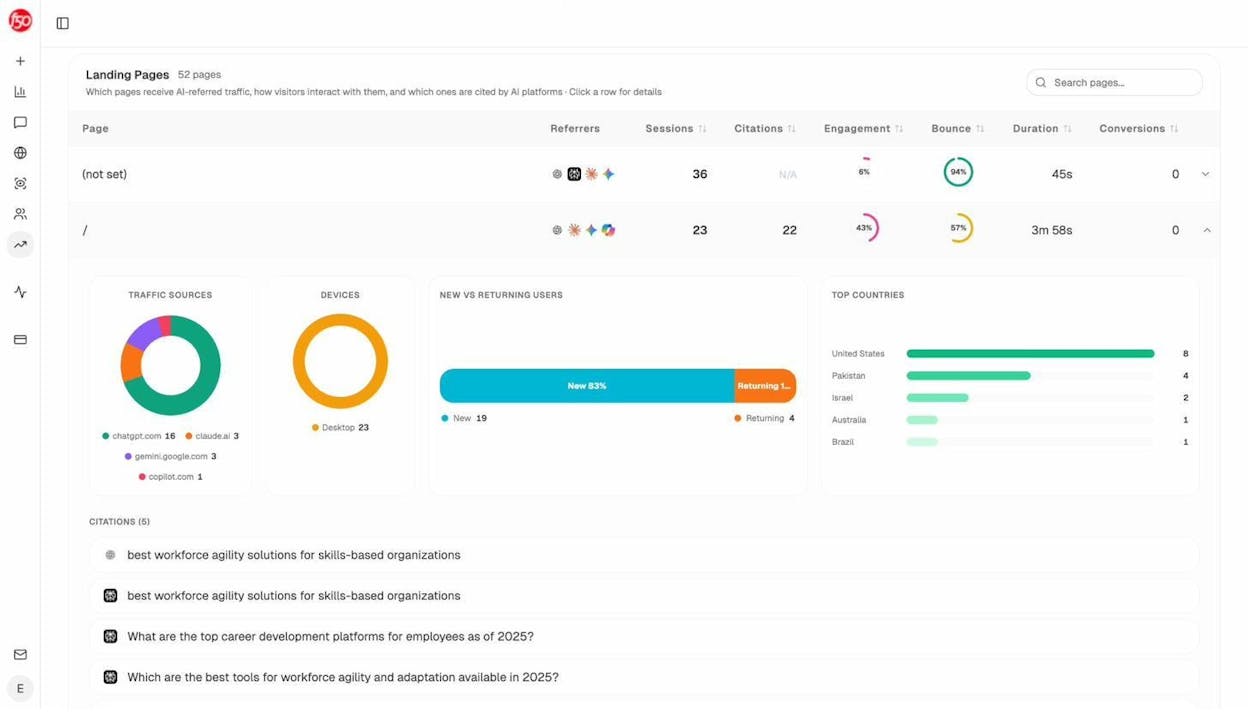
Drill into any landing page and you’ll see which AI engines sent traffic, what conversations triggered the visit, what countries the visitors came from, and how those visitors behaved on your page.
Key use cases
-
Spot pages with diminishing traffic and refresh them before rankings drop further.
-
Find pages AI engines send traffic to and create more content like them.
-
Compare your traffic patterns to competitors and identify their winning pages.
2. Keyword data
Keyword data helps you decide what to target, how hard each topic is to rank for, and how much traffic you can realistically capture.
Key data points
-
Search volume. How often a keyword is searched per month.
-
Keyword difficulty. A 0 to 100 score that estimates how hard it is to rank.
-
Cost per click (CPC). What advertisers pay for that keyword. A useful proxy for commercial intent.
-
Search intent. Whether the searcher wants information, a transaction, or a comparison.
-
Traffic potential. How much traffic the top-ranking page actually gets, often higher than raw volume.
How to get it for traditional SEO
Ahrefs Keywords Explorer, Semrush Keyword Magic Tool, and Moz Keyword Explorer are the three main paid options. Each has a slightly different keyword index, so the same query can return different numbers depending on the tool. Cross-reference at least two before committing budget to a content cluster.
![[Screenshot: Ahrefs Keywords Explorer with a seed keyword like “running shoes” entered, showing the Overview tab with Search volume, Keyword difficulty, Traffic potential, and the SERP overview at the bottom]](https://www.datocms-assets.com/164164/1777675081-blobid5.png?auto=format,compress&w=1248&fit=max)
If you don’t have a paid subscription, you can do real keyword research with free tools. Our Keyword Generator returns hundreds of ideas with search volume, and our Keyword Difficulty Checker scores any term on a 0 to 100 scale.
You should also pay attention to channel-specific tools. The Amazon Keyword Tool surfaces what shoppers search for. The YouTube Keyword Tool shows YouTube-specific demand. The Bing Keyword Tool gives you Bing-specific volume. For more, see our roundup of 9 keyword research tools.
How to get it for AI search
Keyword research breaks down in AI search because users don’t type keywords. They type prompts. A two-word search like “best CRM” becomes “Which CRM is best for a 12-person sales team that needs HubSpot integration and custom pipelines?”
To find prompts that matter to your business, open Analyze AI’s Prompts tab and look at Suggested Prompts. The system mines AI conversations in your industry and surfaces high-frequency prompts you could be tracking.
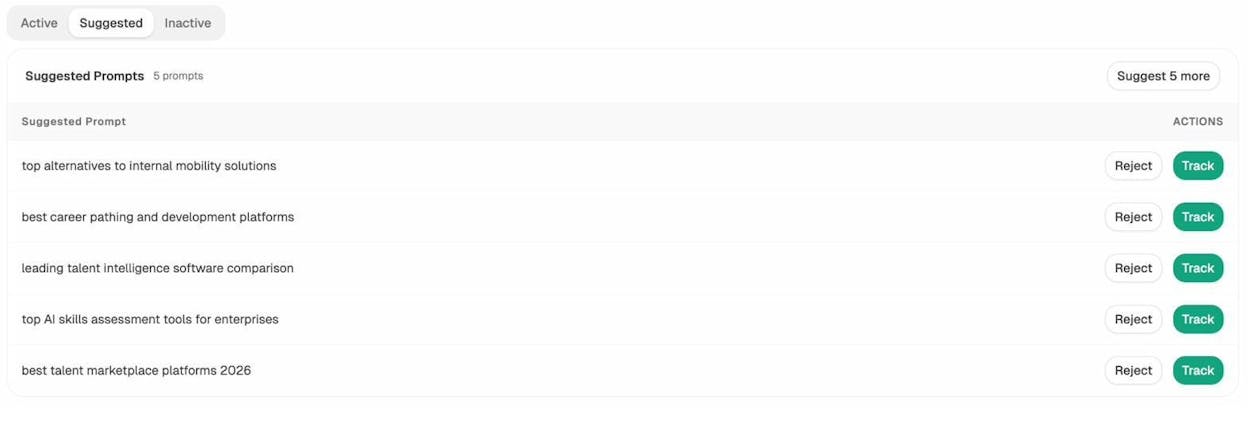
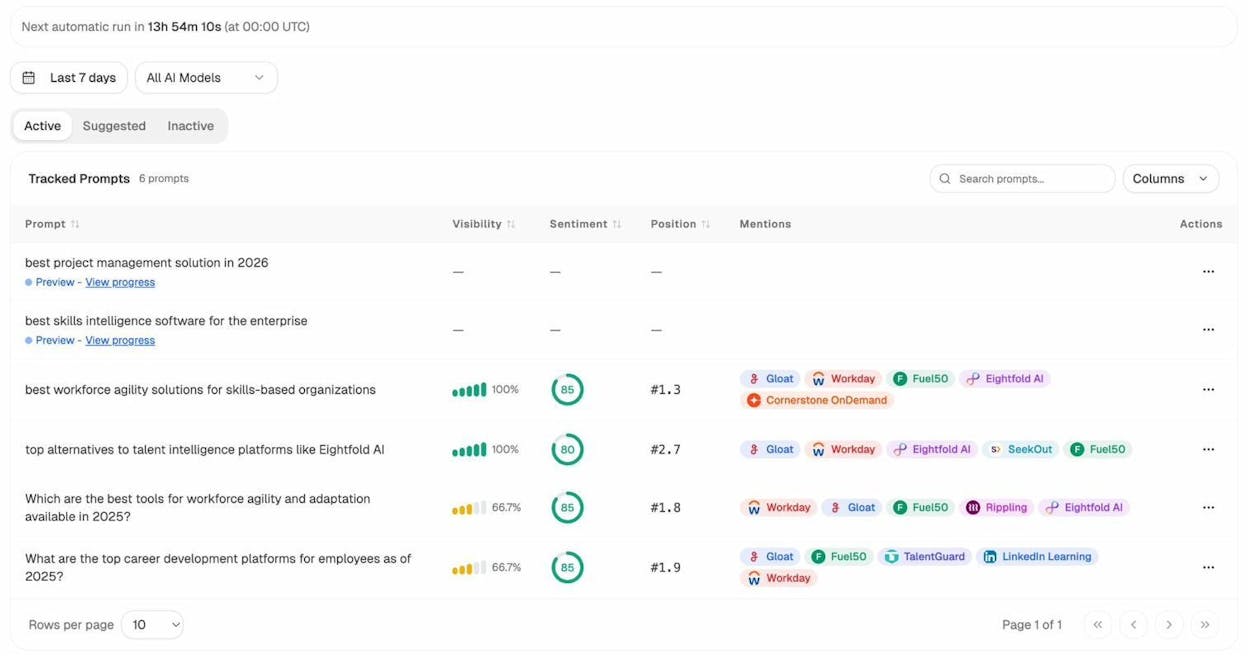
Each prompt is one click away from active tracking. From there you’ll see your visibility, sentiment, and average position across every major AI engine.
To test a single prompt without setting up tracking, the Ad Hoc Searches tool runs a one-off check across ChatGPT, Google AI Mode, and Perplexity, and shows who’s mentioned and what URLs are cited.
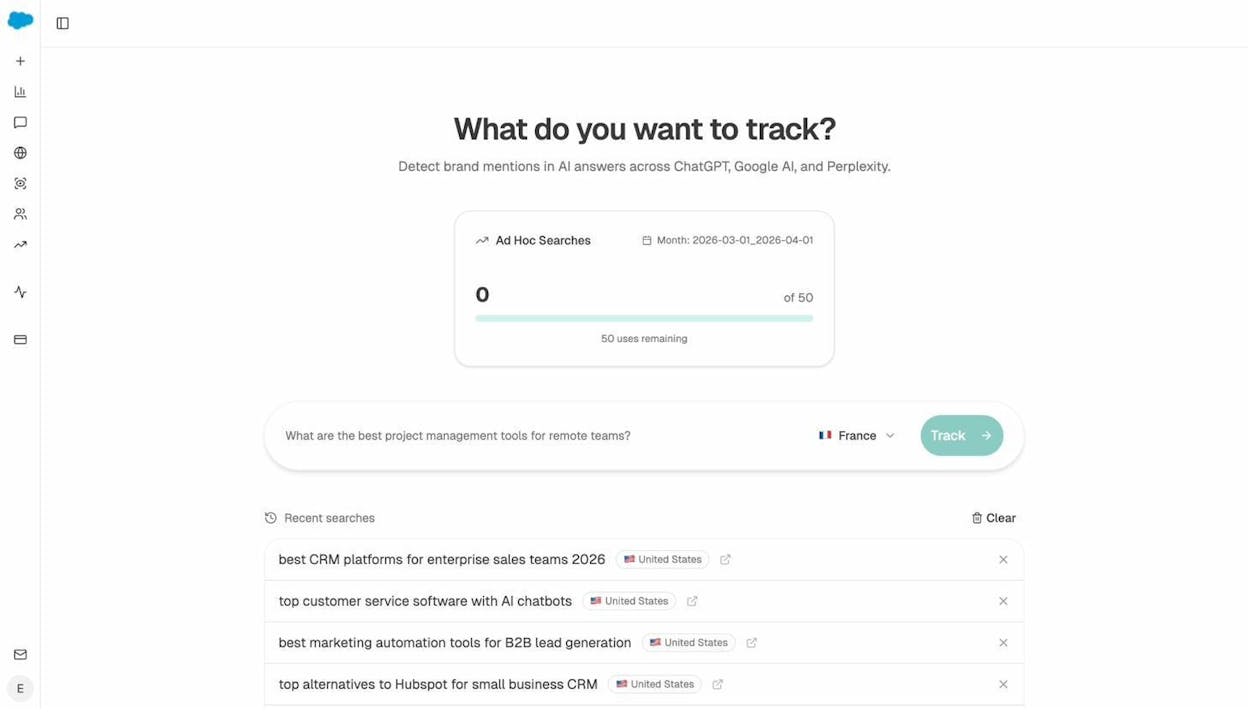
For more, see our guide on AI keyword research using free chatbot tools and 22 keyword types worth knowing.
Key use cases
-
Build a keyword strategy that mixes high-volume targets with achievable ones.
-
Find which keywords your site already ranks for and double down on them.
-
Track which prompts mention your brand in AI engines and build content for the ones that don’t.
3. SERP data
SERP data shows the actual layout of the search results page for any keyword, including who ranks where and what features show up (featured snippets, video carousels, AI Overviews, image packs).
Key data points
-
Top 10 ranking URLs and their positions.
-
Rich result types triggered (AI Overview, featured snippet, People Also Ask, image pack, video pack).
-
Position changes over time.
-
Domain diversity. How many different sites rank in the top 10.
How to get it for traditional SEO
Most paid SEO platforms include SERP data. In Ahrefs, click any keyword and you’ll see a SERP overview with positions, traffic estimates, and rich result triggers.
![[Screenshot: Ahrefs SERP overview for any keyword showing the top 10 results with traffic, keywords ranking, Domain Rating, and number of backlinks columns]](https://www.datocms-assets.com/164164/1777675092-blobid9.png?auto=format,compress&w=1248&fit=max)
For free SERP data, use our SERP Checker. Enter any keyword and you’ll see the full top 10 results for the country of your choice.
For tracking your own positions over time, use a rank tracker. Our free Keyword Rank Checker gives you a live position check, and paid platforms like Ahrefs Rank Tracker, Semrush Position Tracking, or Moz Rank Tracker store historical data and alert you when positions move. See our roundup of the 11 best keyword tracking tools for more.
How to get it for AI search
The “SERP” in AI search is the AI response itself. Each prompt has a different ranking dynamic. ChatGPT might mention your brand first while Perplexity skips you entirely, even for the same query.
Analyze AI tracks position across every major AI engine, day by day, prompt by prompt. Open the Position Trend chart and click into any day to see exactly where your brand and your competitors landed across each engine.
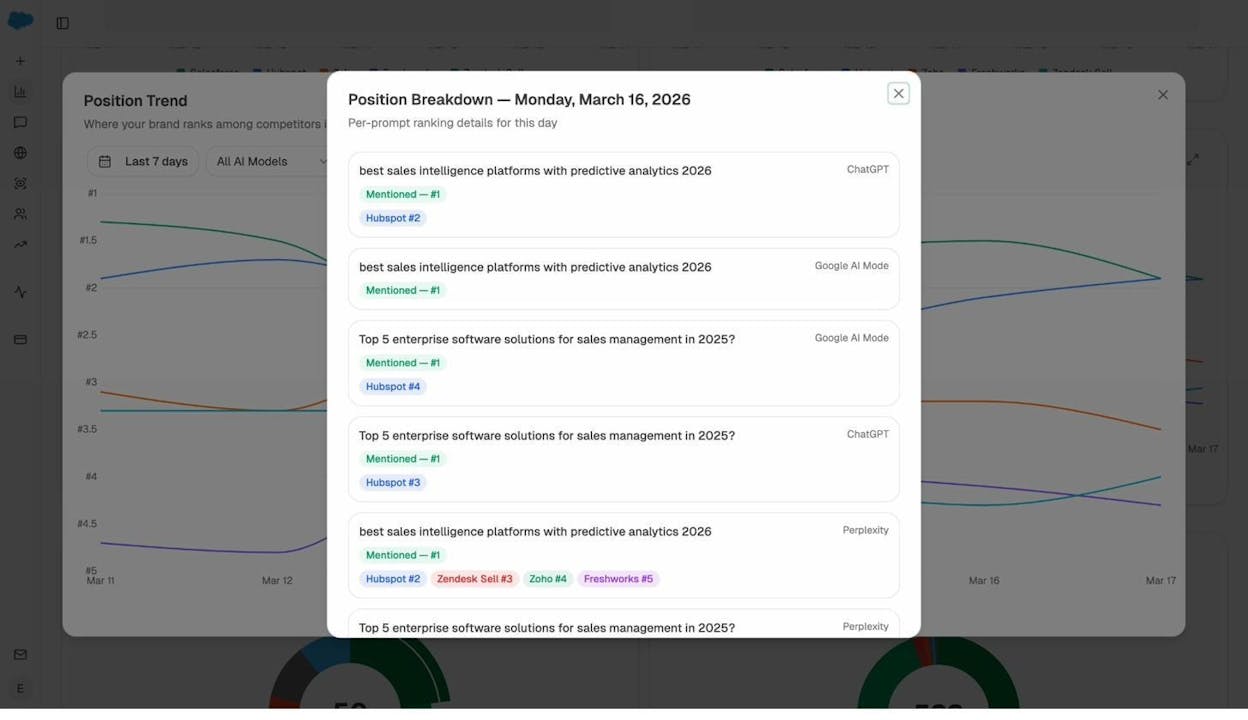
This is closer to a multi-engine rank tracker than a traditional Google SERP tracker. Position can vary widely between engines for the same prompt, which is data you can’t get from any traditional SEO tool.
Key use cases
-
Monitor competitor movements on your priority keywords and prompts.
-
Find keywords where you rank in positions 4 to 10 and need a small push to reach the top 3.
-
Track AI search position alongside Google rankings to spot gaps and overlaps.
4. Backlink data
Backlink data tells you which websites link to which pages, with what anchor text, and how authoritative those linking domains are.
Key data points
-
Total backlinks. Every link from every page to your site.
-
Referring domains. The count of unique websites linking to you.
-
Link type. Dofollow vs nofollow.
-
Anchor text distribution.
-
Domain authority of linking sites (DR in Ahrefs, DA in Moz, AS in Semrush).
-
Lost vs new links over time.
How to get it for traditional SEO
Backlink data is one area where index size matters a lot. Ahrefs runs one of the largest crawled link indexes, with billions of pages crawled and updated every 15 to 30 minutes. Semrush and Moz publish similar numbers. The bigger the index, the less likely you are to miss link opportunities or hidden penalty signals.
![[Screenshot: Ahrefs Site Explorer > Backlinks report showing referring page, anchor text, link type, DR of referring domain, and first/last seen date columns]](https://www.datocms-assets.com/164164/1777675098-blobid11.png?auto=format,compress&w=1248&fit=max)
For a quick free check, use our Website Authority Checker. Enter a URL and you’ll see total backlinks, referring domains, and an authority score. If you’re auditing your site for broken links to fix or reclaim, use our Broken Link Checker. For more options, see our roundup of the 9 best backlink building tools.
How to get it for AI search
Backlinks still matter for AI search because AI engines pull from web search results. Ahrefs found a positive correlation between SERP rank and AI Overview citation rate, meaning higher-ranking pages are more likely to get cited by AI.
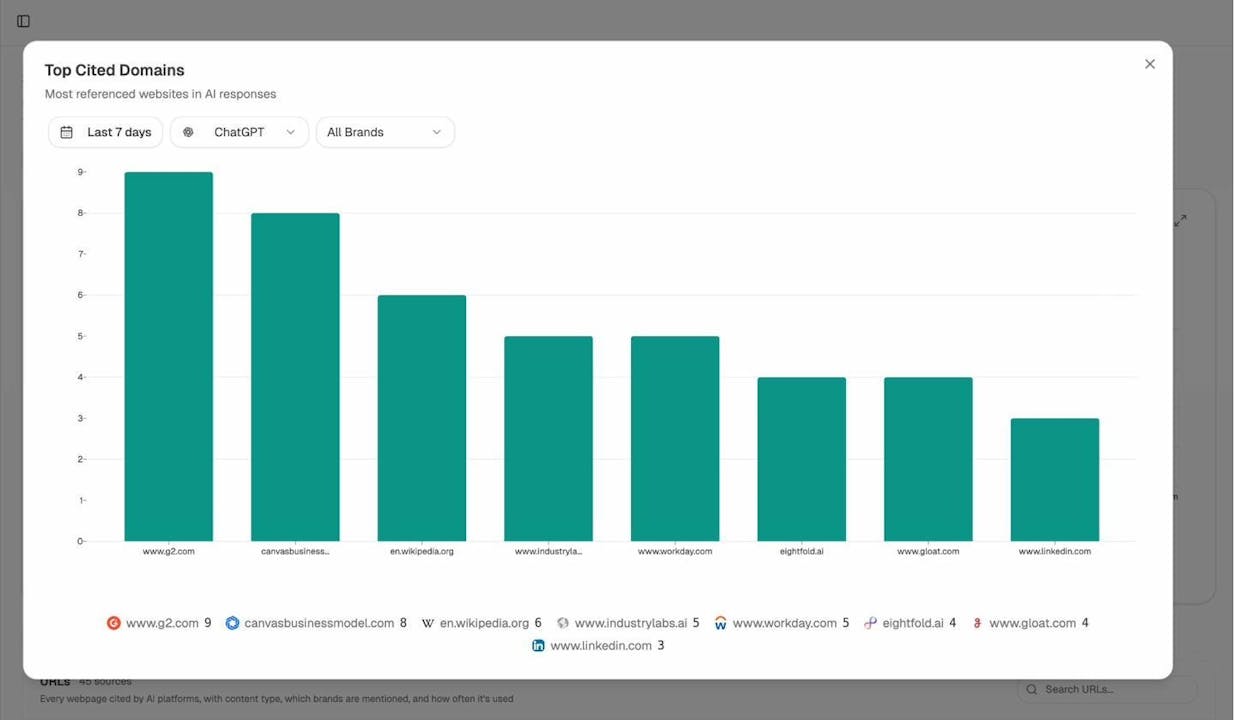
There’s also a second layer of “linking” in AI search. When ChatGPT or Perplexity answers a question, it cites specific URLs as sources. These citations are the new backlinks of AI search. They don’t pass PageRank, but they do drive referral traffic and brand impressions.
Analyze AI’s Sources report shows every URL cited by AI engines for prompts in your industry, what content type each one is, and which AI models cite it most.
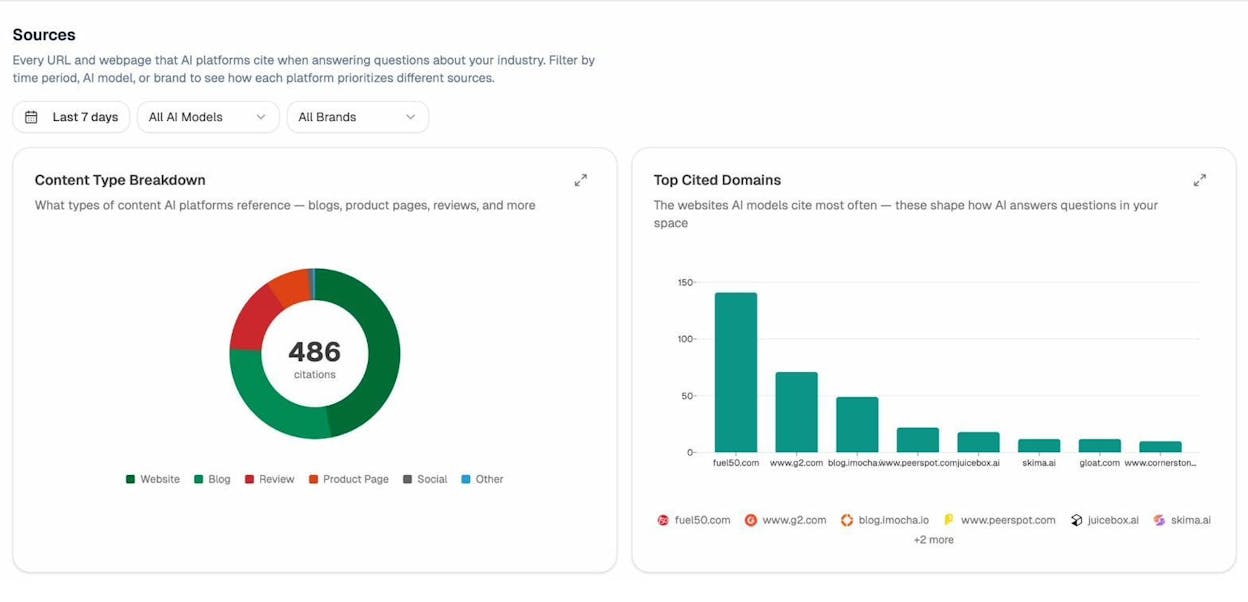
Click into any cited URL to see which prompts triggered the citation and which AI engines used it. This is the closest thing to a backlink report for the AI search world.
Key use cases
-
Track your backlink growth and identify your best-performing link prospects.
-
Spot domains that link to competitors but not to you (link gap analysis).
-
Find URLs that AI engines cite in your industry and create competing content for those topics.
5. Content data
Content data is the information about how individual pieces of content perform, who shares them, and which formats earn the most engagement.
Key data points
-
Word count and content depth.
-
Number of social shares per channel.
-
Number of backlinks per article.
-
Estimated traffic per article.
-
Publication and last-update date.
-
Content format (listicle, how-to, comparison, original research).
How to get it for traditional SEO
In Ahrefs, the Content Explorer search lets you find top-performing articles on any topic. Type a keyword, switch to “In title” mode, and filter by traffic, referring domains, word count, and language.
![[Screenshot: Ahrefs Content Explorer with a topic query in “In title” mode, showing results sorted by referring domains with filters for DR, traffic, language, and date]](https://www.datocms-assets.com/164164/1777675106-blobid14.jpg?auto=format,compress&w=1248&fit=max)
Semrush has a similar feature called Topic Research, and Moz includes Content Explorer in its Pro plan.
How to get it for AI search
In AI search, content data shifts from “what gets shared” to “what gets cited.” The Sources report breaks down every cited URL by content type, so you can see whether AI engines in your industry favor blog posts, product pages, third-party reviews, or social content.
The Chats view shows the full conversation history for prompts in your industry, which competitors got mentioned, and which sources got cited together.
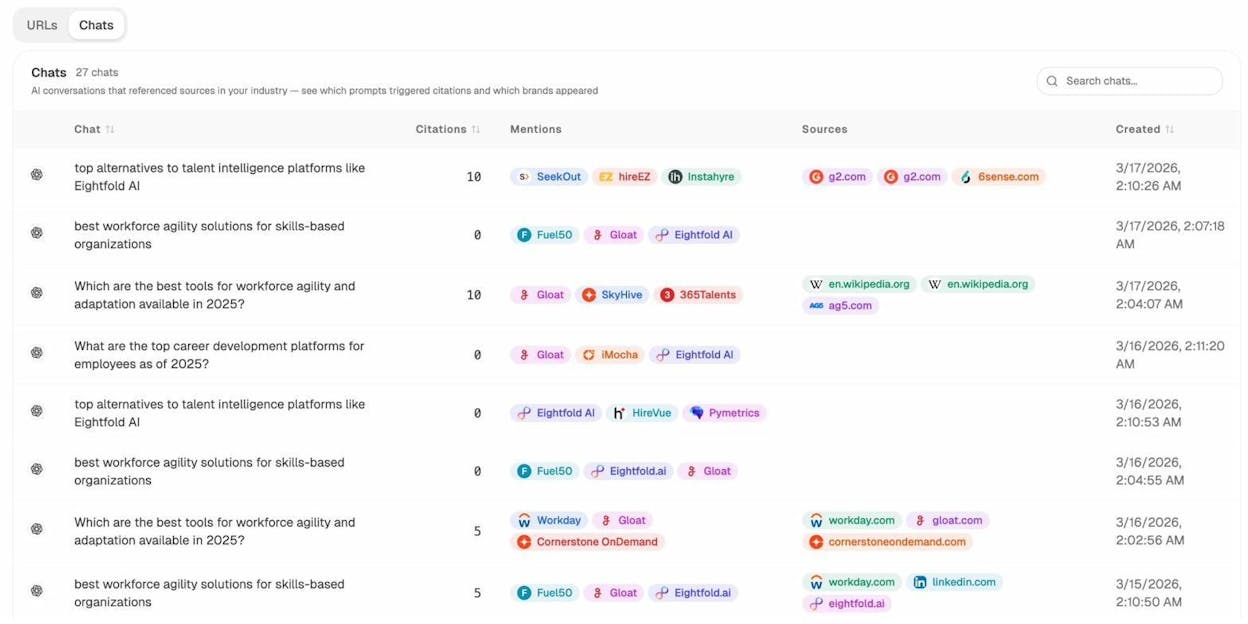
This pattern tells you what format wins in AI search for your niche. If reviews dominate, invest in G2 or Capterra. If blog posts dominate, double down on editorial. If product pages dominate, your own site needs sharper copy.
Key use cases
-
Find proven content angles in your niche that already attract links.
-
Identify content gaps where competitors rank but you don’t.
-
See which content formats AI engines cite most for your topics.
6. Technical SEO data
Technical SEO data covers the health of your site’s infrastructure. How fast it loads, how well search engines can crawl it, and whether anything is blocking your rankings.
Key data points
-
Crawlability and indexability.
-
Core Web Vitals (load speed, interactivity, visual stability).
-
Broken pages and broken links.
-
Internal link structure.
-
Schema markup.
-
Mobile-friendliness and HTTPS.
How to get it for traditional SEO
For free, the basics live in Google Search Console under the Pages and Core Web Vitals reports. They surface indexing issues and performance problems on your verified site.
![[Screenshot: Google Search Console > Pages report showing the breakdown of indexed vs not indexed pages, with reasons for non-indexing listed underneath]](https://www.datocms-assets.com/164164/1777675111-blobid16.png?auto=format,compress&w=1248&fit=max)
For deeper audits, use a paid crawler. Ahrefs Site Audit, Semrush Site Audit, and Moz Pro Site Crawl all run scheduled scans that catch hundreds of issue types. Specialized crawlers like Screaming Frog are popular for one-off deep audits.
![[Screenshot: Ahrefs Site Audit overview dashboard showing Health Score, total errors, warnings, and notices alongside the top issues list]](https://www.datocms-assets.com/164164/1777675114-blobid17.png?auto=format,compress&w=1248&fit=max)
For ongoing maintenance, our Broken Link Checker is a free option you can run monthly to catch dead links before they cost you traffic.
How to get it for AI search
Technical SEO for AI search is a younger discipline, but a few things already matter. AI engines need to crawl and parse your content. Anything that blocks Googlebot will likely block GPTBot, PerplexityBot, ClaudeBot, and Google-Extended too. Check your robots.txt and make sure none of those user agents are accidentally blocked.
You should also publish an llms.txt file. This is an emerging standard that tells AI crawlers which content on your site is most important. Generate one in seconds with the LLMs.txt Generator.
Key use cases
-
Catch and fix broken pages before they cost you traffic.
-
Reclaim link equity by redirecting old URLs that still earn backlinks.
-
Ensure AI crawlers have a clean path to your priority content.
7. AI search data
AI search data is the visibility, sentiment, citation, and traffic information for the AI search ecosystem. It’s the seventh pillar that didn’t exist three years ago, and it now sits alongside the other six.
It matters because AI search is not replacing Google. It’s adding a new organic channel on top of it. Ahrefs found a positive correlation between SERP rankings and AI Overview citations. Grow and Convert reported their clients were mentioned in 67% of ChatGPT responses and 77% of Perplexity responses for high-intent keywords where they ranked on page one. The two channels reinforce each other. For more, see our breakdown of GEO vs SEO.
Key data points
-
AI visibility. Percentage of AI responses that mention your brand for tracked prompts.
-
AI sentiment. How positively or negatively AI engines describe your brand.
-
Position. Where you rank among brands mentioned for each prompt.
-
Citations. Which of your URLs AI engines cite as sources.
-
Engine breakdown. Visibility per engine (ChatGPT, Perplexity, Gemini, Copilot, Claude).
-
AI-driven traffic and competitor mentions.
How to get it
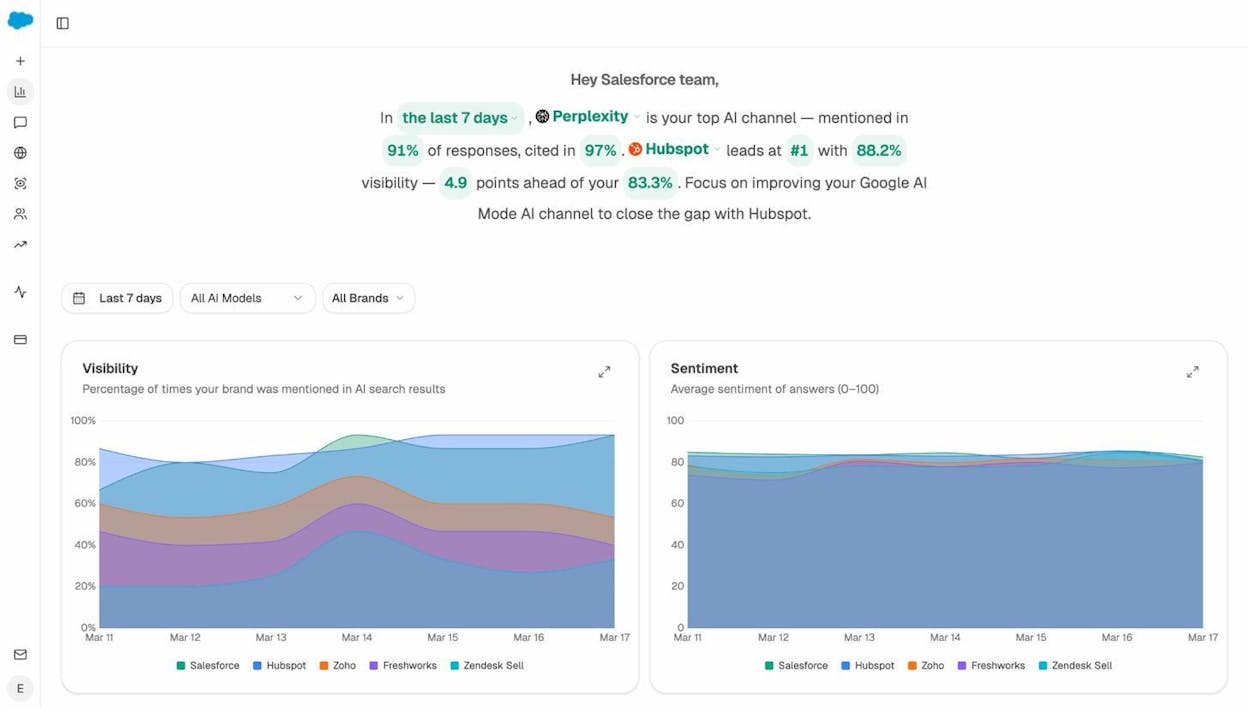
The full set of AI search data lives in Analyze AI. The Overview dashboard gives you a one-screen view of visibility and sentiment across all your tracked prompts and competitors, with a natural-language summary of what changed in the last seven days.
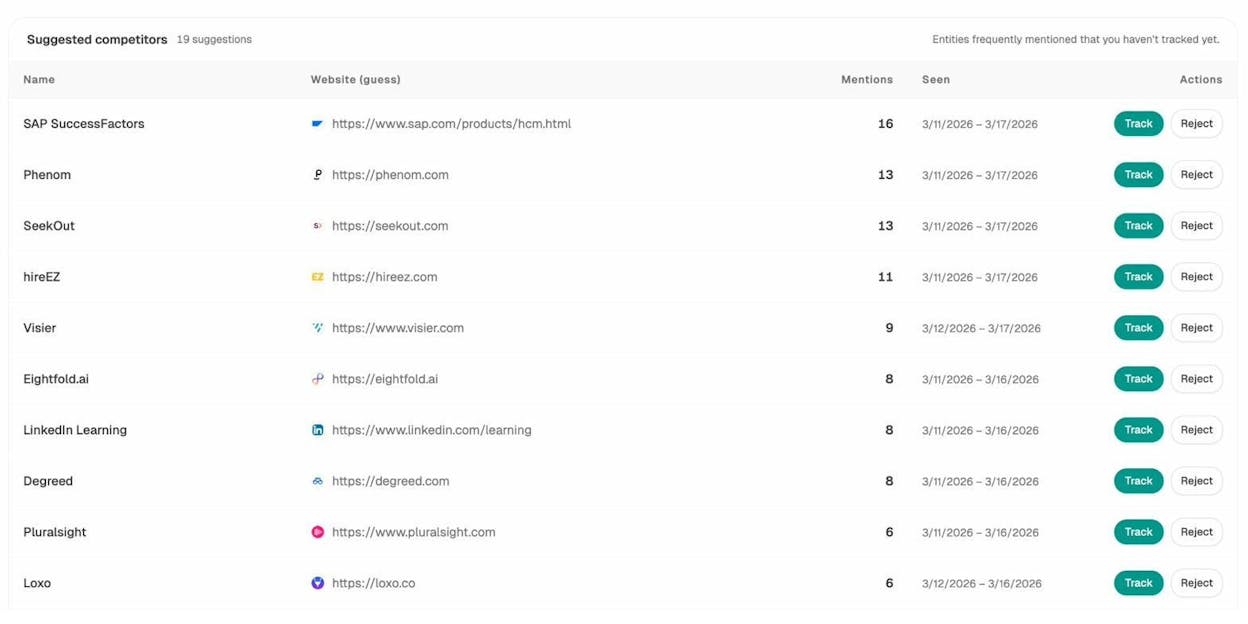
The Competitors tab pulls in suggested competitors that get mentioned in your space but that you don’t track yet. One click moves them into active tracking.
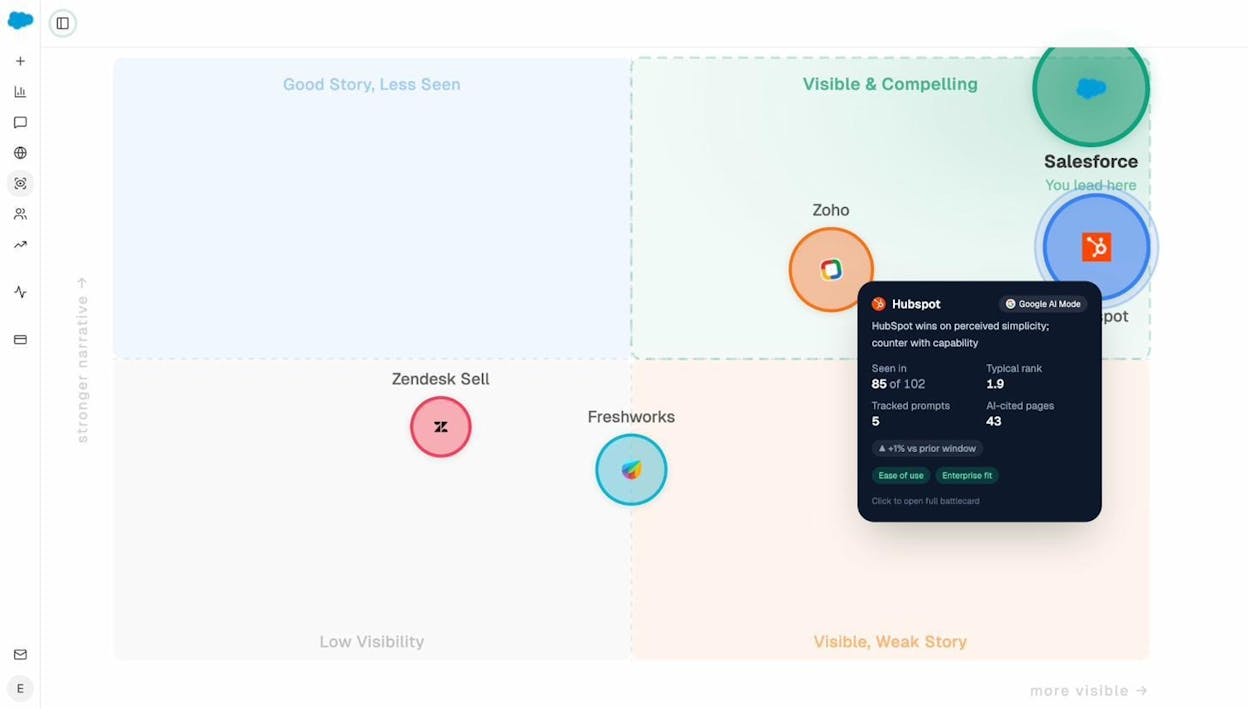
For brand positioning, the Perception Map plots every brand on two axes. Visibility (how often they’re seen) and narrative strength (how compellingly they’re described). Brands in the top-right quadrant are winning. Brands in the bottom-left have work to do.
For weekly executive updates, the Weekly Email Digest delivers a one-page summary with the biggest wins, losses, and opportunities of the past seven days.
Key use cases
-
Understand your share of voice in AI answers vs competitors.
-
Catch negative sentiment in AI responses early and respond with content updates.
-
Identify under-served prompts where competitors are missing and build content for them.
-
Tie AI search visibility to actual traffic and conversions.
For more, see generative engine optimization statistics and how LLMs cite sources based on 83,670 citation data points.
SEO data tools at a glance
Here’s where each type of data lives across the most common tools.
|
Data type |
Free tools |
Ahrefs |
Semrush |
Moz |
Analyze AI |
|---|---|---|---|---|---|
|
Organic traffic |
Google Search Console, Website Traffic Checker |
Site Explorer |
Domain Overview |
Domain Analysis |
AI Traffic Analytics |
|
Keyword data |
Keywords Explorer |
Keyword Magic Tool |
Keyword Explorer |
Prompt Tracking and Discovery |
|
|
SERP data |
SERP Overview, Rank Tracker |
Position Tracking |
Rank Tracker |
Position Trend across AI engines |
|
|
Backlink data |
Backlinks report |
Backlink Analytics |
Link Explorer |
Citation Analytics |
|
|
Content data |
None |
Content Explorer |
Topic Research |
Content Explorer |
Sources, Chats |
|
Technical SEO |
Google Search Console, LLMs.txt Generator |
Site Audit |
Site Audit |
Site Crawl |
None |
|
AI search data |
Ad Hoc Searches |
Limited (Brand Radar) |
Limited (AI Toolkit) |
None |
Full platform |
No single tool covers everything. Most serious SEO operations run a Google Search Console plus paid SEO suite plus AI search platform stack. Free tools cover the gaps when you’re starting out or running one-off checks.
What to look for in any SEO data source
Before you commit to a tool, run it through these four filters.
Index size. A bigger crawl index means fewer missed keyword and backlink opportunities. Ask vendors how many keywords are in their database, how many pages they’ve crawled, and how often they refresh.
Update frequency. SEO data goes stale fast. Search volumes shift, backlinks appear and disappear, and AI engines update their retrieval often. Look for tools that refresh at least daily for high-priority data.
Granularity. Two tools can both show “backlinks” but one might give you 5 data points per link while the other gives you 60. Granularity is the difference between knowing a link exists and being able to evaluate whether it’s worth replicating.
Accuracy. All SEO tools estimate. None of them have access to Google’s actual data. Look for independent benchmarks before you commit budget.
Final thoughts
SEO data isn’t a single number. It’s a stack of seven signals, and most of them now have an AI search counterpart that’s just as important.
You don’t need to track everything from day one. Start with organic traffic, keyword data, and AI visibility. Layer on backlink and SERP data once you have a content engine running. Add technical and content data as your site grows.
To see what the AI search half of this stack looks like for your brand, start free with Analyze AI.

Ernest

Ibrahim


