



Summarize this blog post with:


In this article, you’ll get 75 SEO resources I actually use across keyword research, technical audits, link analysis, content production, and the newer work of staying visible inside ChatGPT, Perplexity, Google AI Mode, Gemini, and Copilot. None of these are theoretical recommendations. I open most of them every week, and a few of them every day.
Table of Contents
Free SEO tools
The free tier is where most SEO careers start, and where a surprising amount of senior work still happens. These are the free tools I keep pinned.
-
Google Search Console. The foundation. GSC tells you which queries Google associates with your pages, where you rank, and which URLs Google has trouble crawling or indexing. Set this up before anything else, and check it weekly.
-
Google Analytics 4. Use GA4 to see what visitors actually do after they land. The interface still divides opinion, but the data on engagement, conversions, and traffic source is non-negotiable.
-
Bing Webmaster Tools. Underrated. Bing now powers ChatGPT search and Copilot, so its index influences which pages get pulled into AI answers. Submit your sitemap, enable IndexNow, and add it to the weekly check.
-
Google Trends. A directional check on whether a topic is rising, falling, or seasonal. I run it before committing to any new content cluster.
-
Google Keyword Planner. Built for advertisers, but the search volume ranges are useful for sanity-checking the numbers in paid SEO tools.
-
Screaming Frog SEO Spider. The standard for technical audits. Free up to 500 URLs, which covers most small site checks. The paid version is worth it once you cross that line.
-
PageSpeed Insights. Run any URL through it for Core Web Vitals scores and field data from real Chrome users. Use it to prioritize which page templates to fix first.
-
Chrome DevTools. Already in your browser. The Network, Performance, and Lighthouse panels handle most one-off technical checks.
-
Looker Studio. Free dashboarding for SEO reporting. Connect GSC, GA4, and a spreadsheet, and you have a stakeholder-ready report. Our roundup of SEO reporting tools has templates worth copying.
-
WebPageTest. Goes deeper than PageSpeed Insights. Lets you compare load behavior across devices, locations, and connection speeds with side-by-side filmstrips.
-
Schema Markup Validator. Validates JSON-LD before you push it live. Saves the embarrassment of a broken FAQ block surfacing in production.
-
Rich Results Test. Google’s own preview of how marked-up pages can render in the SERP.
-
Lighthouse in Chrome. Google retired the standalone Mobile-Friendly Test, but Lighthouse covers the same ground inside Chrome.
-
Robots.txt Tester. Check exactly which URLs Googlebot can and cannot reach. Pair with Screaming Frog’s robots simulator for a full picture.
-
SimilarWeb (free tier). Useful for a quick gut check on a competitor’s traffic shape. Treat the numbers as directional, not absolute.
AI search tools
This is the category that did not exist three years ago. If you only adopt one new habit this year, make it tracking how AI engines describe your brand and your category. These are the tools I rely on for that work.
-
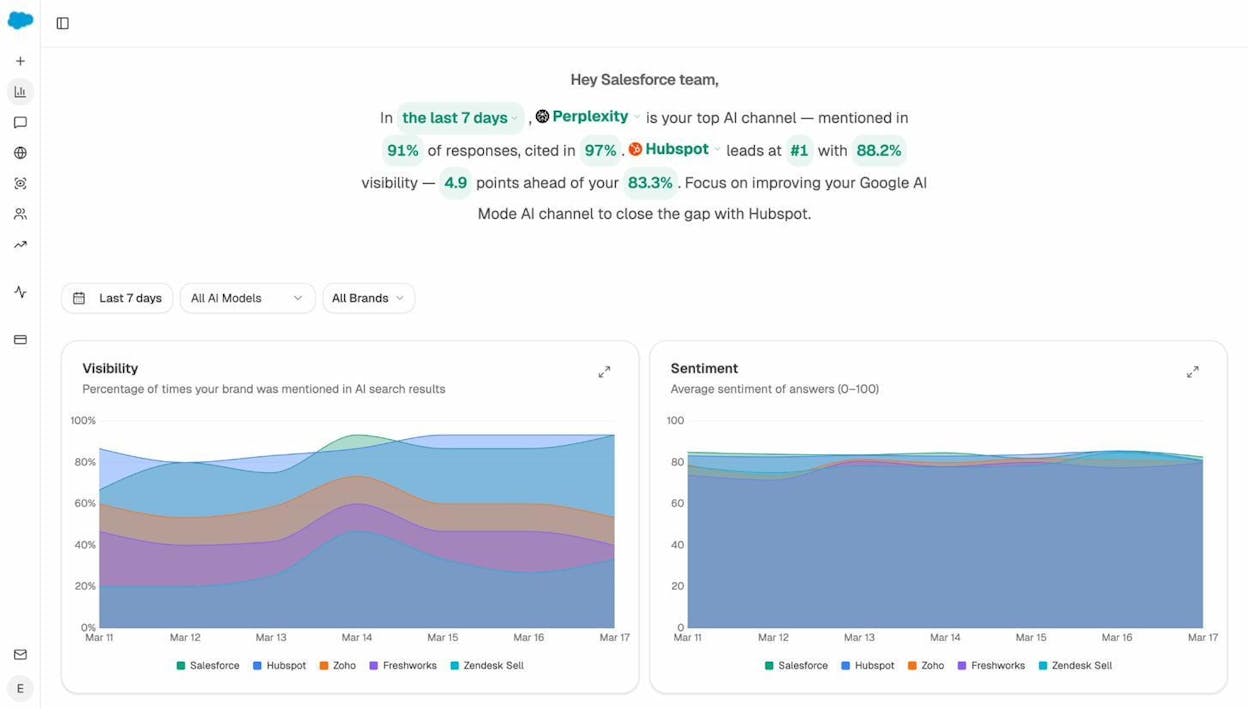
Analyze AI. Our platform tracks how often you appear across ChatGPT, Perplexity, Google AI Mode, Gemini, and Copilot. You see which prompts you show up for, who your AI search competitors actually are, and which of your pages are getting cited. Think of it as Search Console for AI search.
-
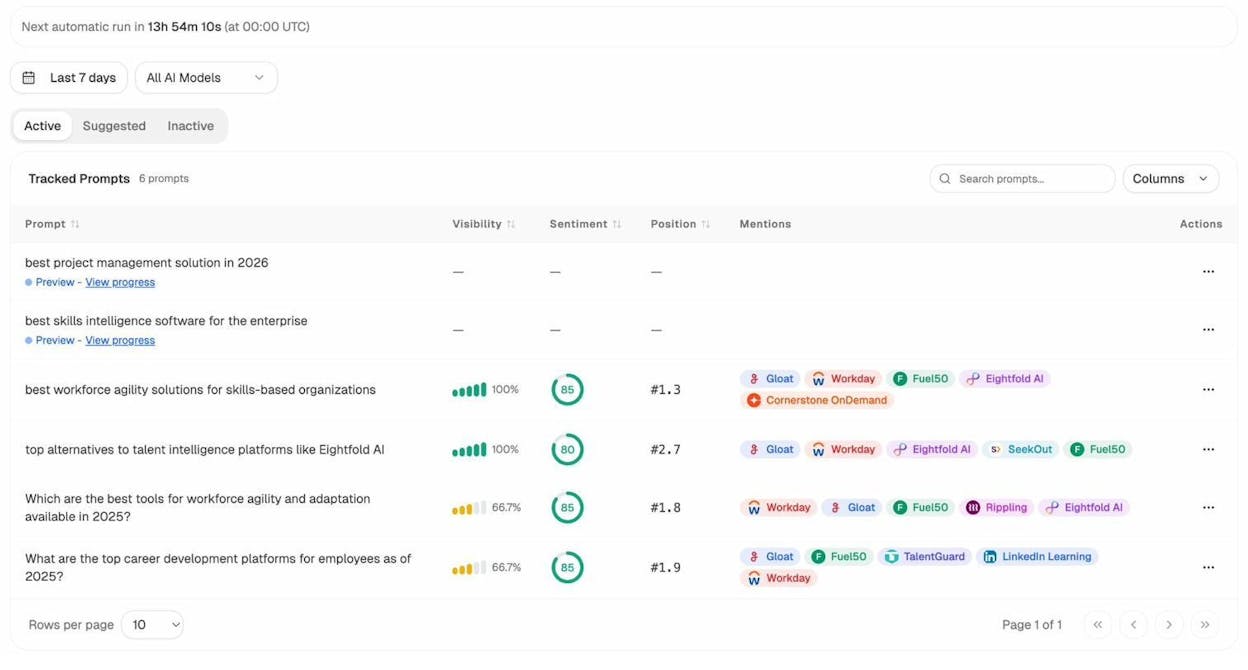
Analyze AI Prompt Tracking. Add the prompts your buyers actually use, and Analyze AI runs them daily across every major engine. You get visibility, position, sentiment, and the competitors named alongside you. This is the work that surfaces opportunity.
-
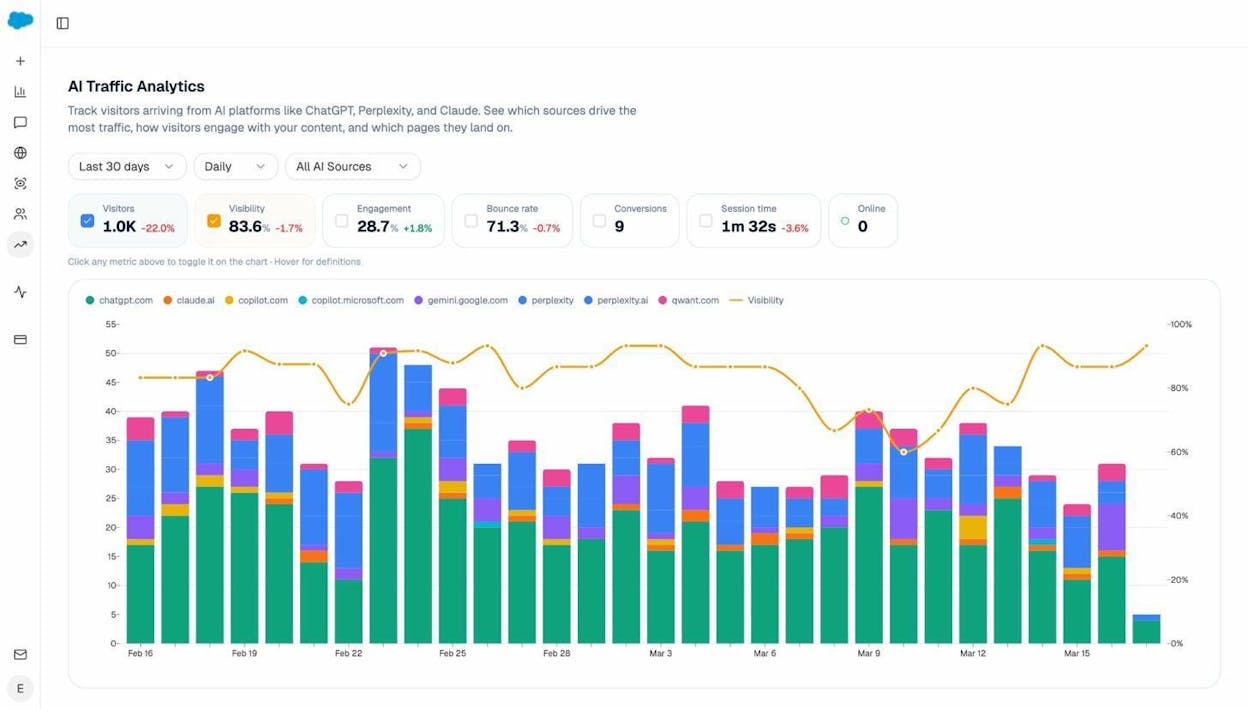
Analyze AI AI Traffic Analytics. Shows the actual sessions AI engines send to your site, which landing pages they hit, and what they convert. This is where AI visibility stops being a vanity metric and starts being attributable revenue.
-
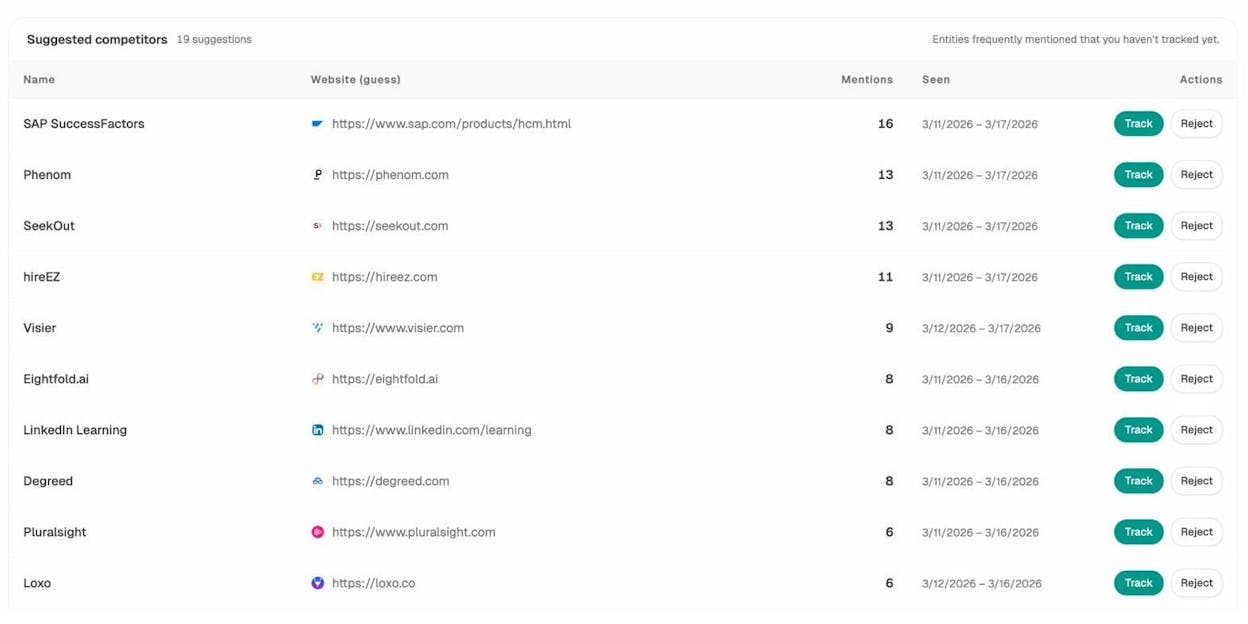
Analyze AI Competitor Intelligence. Surfaces the prompts where competitors are winning and you are not. Each gap arrives with a strategic move, an angle, and the key points to include if you want to displace them.
-
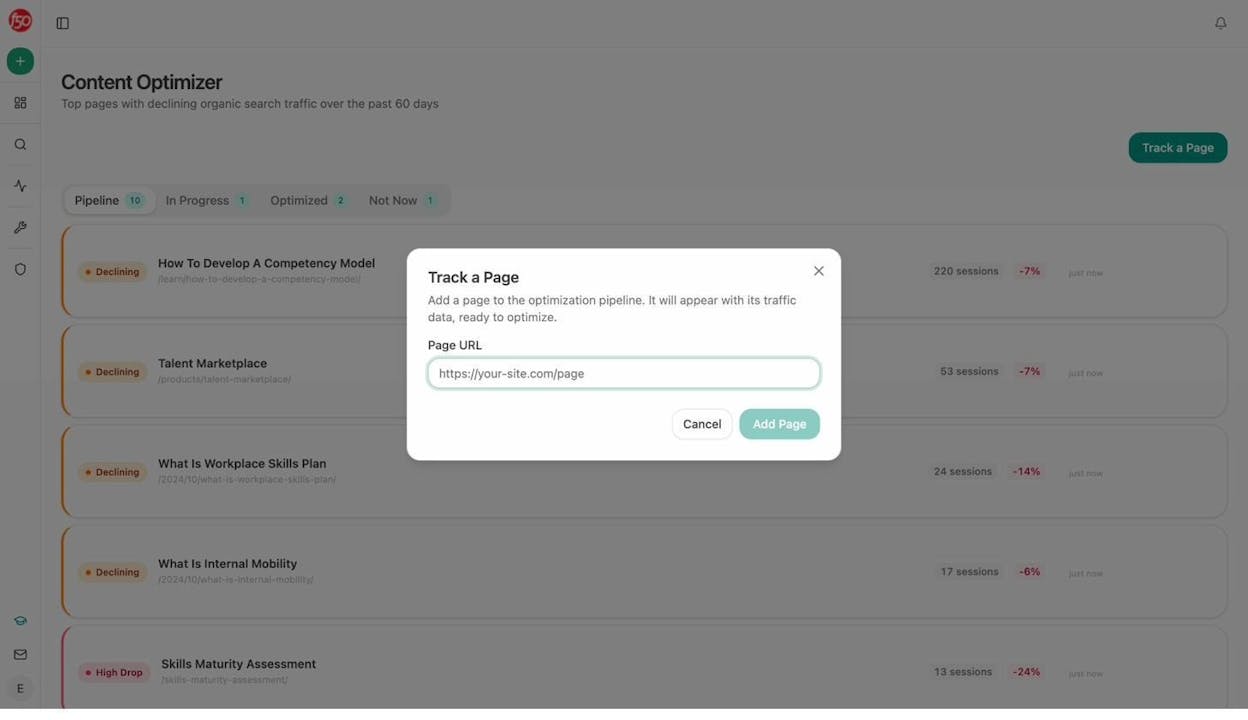
Analyze AI Content Optimizer. Paste a URL, get a quality score for AI search visibility, and ship the rewrites that close the gap. I use this to refresh existing posts that should rank in AI answers but do not.
-
Analyze AI Free Bing Keyword Tool. Bing keyword data matters more than it used to, because Bing’s index feeds ChatGPT search. Run a quick check before committing to a new topic cluster.
-
Analyze AI Free Keyword Difficulty Checker. A fast difficulty score for any keyword without paying for a subscription. Pair it with the keyword generator tool for fresh ideas.
-
Analyze AI Free SERP Checker. See the live top 10 for any keyword in any country. Useful for confirming search intent before you brief a writer.
-
Analyze AI Free Website Authority Checker. Quick authority score for any domain. I use it to qualify guest post prospects without leaving the browser.
-
Analyze AI Free Broken Link Checker. Crawl any URL for broken outbound and internal links. Fixes your own site, and finds linkable assets on competitors’ sites.
-
Analyze AI Free Website Traffic Checker. Estimated traffic for any domain, no signup. Good for a pitch or a quick competitive snapshot.
-
Analyze AI Free Keyword Rank Checker. Spot-check where you rank for a single keyword in any country.
-
Analyze AI Free YouTube Keyword Tool and Amazon Keyword Tool. Channel-specific keyword research. Useful when you build content for platforms beyond Google.
-
Perplexity Labs. A simple way to test how Perplexity describes your brand and your competitors. Pair it with our deep dive on how to rank on Perplexity.
-
ChatGPT Search. Same idea, different engine. Run your brand prompts manually before scaling tracking with a tool. The broader playbook lives in our guide on how to rank on ChatGPT.
WordPress plugins
Most of the sites I work on still run on WordPress, so the plugin shortlist matters.
-
Yoast SEO. Handles titles, meta descriptions, schema, breadcrumbs, and XML sitemaps without code. The default starting point for most teams.
-
Rank Math. Yoast’s main competitor. Lighter footprint, more features in the free tier, and a cleaner interface.
-
WP Rocket. Caching plus image lazy-loading plus database cleanup. Often the single biggest Core Web Vitals lift for a WordPress site.
-
Redirection. Manages 301s and 404 monitoring inside WordPress. Critical when you migrate URLs or restructure a category tree.
Browser extensions
I keep a handful of extensions pinned to my Chrome toolbar. Each one saves multiple clicks per audit.
-
Detailed SEO Extension. Built by Glen Allsopp. One click reveals indexability, headers, schema, and meta data of any page. A fast on-page audit lives inside this extension.
-
Wappalyzer. Identifies the CMS, frameworks, analytics, and ad tech behind any site. Use it to confirm what you are auditing before you run a crawl.
-
SEO Meta in 1 Click. Pulls every meta tag, header, and structured data block from the current page into one panel.
-
Linkclump. Drag a box around multiple links and copy them all at once. Saves time when you scrape a SERP for competitor analysis.
-
Robots Exclusion Checker. Tells you in real time whether the URL you are on is blocked by robots.txt, meta robots, or X-Robots-Tag headers.
-
Keywords Everywhere. Inline keyword volume, CPC, and trend data on Google, YouTube, Amazon, and Bing. Paid credits are inexpensive and worth it.
-
Web Scraper.io. Free Chrome extension for structured scraping. Useful for pulling competitor pricing pages, FAQ sections, or article catalogs.
-
SEO Pro Extension. Created by Kristina Azarenko. Combines several other extensions into a single panel.
-
Hreflang Tag Checker. Validates hreflang tags on any page in seconds. Required if you work on international sites.
-
NoFollow Extension. Highlights nofollow, sponsored, and UGC links on the page in colored outlines. Good for link prospecting.
YouTube channels
Most of what I learned about SEO in the last decade came from YouTube. These are the channels I still subscribe to.
-
Google Search Central. Direct from Google. The office-hours videos and updates explain how the index actually works.
-
Aleyda Solis on Crawling Mondays. Covers technical and international SEO at a level you rarely find elsewhere on YouTube.
-
Income School. Geared toward niche site owners, but the search-intent and content-decay frameworks apply to any site.
-
Matt Diggity. Aggressive, test-driven SEO. Useful even if you choose not to apply his methods, because his hypothesis testing is good.
-
Kyle Roof at HOBO Web. Granular, almost academic, on-page testing. Goes deep on entities and topical maps.
Newsletters
SEO breaks every quarter. A few good newsletters keep me from missing the things that matter.
-
SEOFOMO. Aleyda Solis’s curated weekly. The single piece of inbox I never archive without reading.
-
Marketing Brew. Wider marketing context, three times a week. Pulls me out of the SEO bubble.
-
Detailed.com. Tracks the rising and falling sites in any niche. The “who is growing” data alone is worth the subscription.
-
Kevin Indig’s Growth Memo. Long-form essays from a former Shopify and G2 SEO lead. Strategy-heavy, light on tactics.
-
SparkToro. Rand Fishkin’s audience research newsletter. Strong on the parts of marketing that are not search.
-
Lily Ray’s newsletter. Focused on E-E-A-T, core updates, and quality signals. The voice that decoded the Helpful Content Update for most of us.
Podcasts
I save podcasts for travel and the gym. These are the ones I never skip.
-
Search Off the Record. Google’s own search relations team explaining what they actually meant in their public docs. Required listening.
-
Search With Candour. Weekly news show with thoughtful interviews. Hosted by Mark Williams-Cook and Jack Chambers-Ward.
-
The SEO Rant Podcast. Mordy Oberstein interviewing senior practitioners with pointed questions. Less marketing speak than most.
-
SERPs Up. Mordy Oberstein and Crystal Carter, broader and warmer than The Rant. Useful for newer SEOs.
-
The Authority Hacker Podcast. Aimed at affiliates and niche site operators, but the tactical depth applies anywhere.
SEO blogs
When I have a specific question, this is the order I check.
-
Search Engine Land. News-first, reliable on algorithm coverage.
-
Search Engine Journal. Slightly broader scope. Good for “how do I do X” tutorials.
-
Search Engine Roundtable. Barry Schwartz’s daily index of every SEO discussion happening in public. Nothing else covers SERP volatility this fast.
-
Brodie Clark’s blog. A dependable public source on SERP feature changes and ecommerce SEO patterns.
-
JC Chouinard’s blog. Python for SEO done well. Copy-paste scripts that actually run.
-
Aleyda Solis. Technical and international SEO. Her free playbooks rival many paid courses.
-
iPullRank blog. Mike King’s team writes rigorous coverage of how AI search and LLMs work under the hood.
-
Lily Ray on Amsive. E-E-A-T, core updates, and YMYL. Read this before you publish anything in health, finance, or law.
-
Animalz blog. Less SEO-tactical, more content-strategic. The clearest writing in B2B content marketing.
-
Analyze AI blog. Yes, ours. We publish original research on AI citation patterns, including our analysis of 65,000 AI citations and a regular AI visibility index. Worth bookmarking if you take AI search seriously.
Beginner’s guides
If you are just starting, you do not need 75 resources. You need two.
-
Google Search Essentials. The official Google documentation. Start here, because half the bad SEO advice on the internet contradicts this page.
-
Moz Beginners Guide to SEO. The classic primer. Slightly dated in places, but still a friendly on-ramp.
Books
A few books are still worth your weekend.
-
Product-Led SEO by Eli Schwartz. How to think about SEO as a product growth lever, not a content marketing tactic. The book that reshapes how operators talk to engineering.
-
The Art of SEO by Stephan Spencer, Eric Enge, and Jessie Stricchiola. The textbook. Heavy, occasionally outdated, and still a thorough overview of the discipline.
-
Lost and Founder by Rand Fishkin. Not an SEO book on its surface, but the chapters on Moz’s growth, mistakes, and metrics will reshape how you think about long-term content strategy.
How to actually use a list like this
A resource list is only useful if you turn it into a routine. Here is the loop I run every week.
I open Google Search Console first thing on Monday. I scan for click and impression deltas, indexing errors, and any new pages slipping into the index without a strategy behind them. I then open Analyze AI and check the same week-over-week change for AI search visibility. The two together tell me whether I am winning, losing, or holding ground in both organic channels.
Mid-week, I use Analyze AI Competitor Intelligence to find one prompt where a rival is being cited and we are not. I brief that as a content optimization or a new page, then ship it. By Friday, I check AI Traffic Analytics to see whether the engines are picking it up.
Once a month, I use Screaming Frog and the Detailed SEO Extension for a focused technical sweep, and Looker Studio to package the results for stakeholders.
You do not need every tool on this list. You need a small, opinionated stack that covers all four jobs of modern SEO. Discovery, optimization, monitoring, and AI visibility. Pick one or two from each category, build a weekly rhythm around them, and you will outperform teams using twice as many tools without a system.
If you are starting that stack from scratch, here is the five-tool foundation I would build before adding anything else.
|
Job |
Tool |
Why it earns the slot |
|---|---|---|
|
Google performance |
Google Search Console |
The only first-party data on how Google sees you |
|
AI search performance |
First-party tracking of citations, sentiment, and AI traffic |
|
|
Technical audits |
Screaming Frog |
Standard for crawling and finding on-site issues |
|
On-page spot checks |
Detailed SEO Extension |
One-click audit of any URL during browsing |
|
Industry awareness |
SEOFOMO |
Single weekly email that covers what changed |
Everything else on this list is leverage on top of that foundation.
If you want to go deeper on any specific area covered above, our breakdowns of free SEO tools, the best AI SEO tools, and the 4 pillars of an effective SEO strategy for AI search cover the next layer of detail.

Ernest

Ibrahim


