



Summarize this blog post with:


In this article, you’ll learn what Google’s Disavow Links Tool is, why Google created it, and how its importance has shifted through major algorithm updates. You’ll also get a clear framework for deciding when you should (and shouldn’t) disavow links, a step-by-step process for auditing your backlink profile, and a practical walkthrough of how to format and submit a disavow file. Finally, you’ll see how link quality now affects your visibility in AI search engines — and how to monitor both channels from one place.
Table of Contents
What Is Google’s Disavow Links Tool?
Google’s Disavow Links Tool lets you tell Google to ignore specific backlinks when evaluating your site for ranking purposes.
Think of it as a way to distance your site from links you didn’t ask for and don’t want. You upload a plain text file through Google Search Console listing the pages or domains you want Google to disregard, and Google treats that file as a strong suggestion rather than a hard directive. (If you’re not already using GSC to its full potential, our guide to free Google SEO tools covers what you might be missing.)
![[Screenshot: Google Search Console Disavow Links upload interface]](https://www.datocms-assets.com/164164/1774442439-blobid0.png?auto=format,compress&w=1248&fit=max)
The technical process takes about five minutes. The hard part is deciding which links belong in the file — or whether you need one at all.
To make that decision well, you need to understand two things: why Google built this tool and how algorithm changes have redefined its role.
Why Did Google Create the Disavow Links Tool?
Google has been fighting spammy link-building tactics for over two decades. The timeline matters because each major update changed the calculus around disavowing.
2005: The “nofollow” attribute. Google introduced rel=“nofollow” to combat comment spam — those automated links stuffed into blog comment sections. It helped, but it didn’t solve the larger problem of manipulative link schemes.
![[Screenshot: Example of comment spam with spammy anchor text links]](https://www.datocms-assets.com/164164/1774442439-blobid1.png?auto=format,compress&w=1248&fit=max)
April 2012: The first Penguin algorithm. Penguin was Google’s first large-scale offensive against link schemes. It operated as an external filter layered on top of search results. That technical detail had a painful consequence: even after a site owner cleaned up their links, an algorithmic penalty could linger for months until the next Penguin refresh.
Google also rolled out Manual Actions, which it sent to webmasters when it detected patterns of artificial or deceptive inbound links. An entire site could lose visibility even when the problematic links targeted a single page.
October 2012: The Disavow Links Tool launches. Google gave webmasters a way to flag the links they couldn’t get removed manually. But even at launch, Google made it clear the tool was meant for a narrow audience. Google’s own announcement said that if you hadn’t received a manual spam action notification, the tool “generally isn’t something you need to worry about.”
It wasn’t meant as a preventive measure. It was a recovery mechanism — a last resort after you’d already tried to get bad links removed by contacting webmasters directly.
September 2016: Penguin 4.0 changes everything. Google folded Penguin into its core algorithm and made it real-time. Two changes mattered most for the disavow question. First, penalties became page-specific instead of site-wide. Second, Google shifted from demoting sites with spammy links to simply devaluing those links — from algorithmic punishment to algorithmic indifference.
Google’s Gary Illyes confirmed this shift publicly, stating that Penguin 4.0 would devalue spam rather than demote sites for it.
That single change sparked a debate that continues today: if Google can now ignore bad links on its own, is the disavow tool still necessary?
2022–present: The Link Spam Updates. Google released multiple link spam updates using its SpamBrain AI system to identify and neutralize link spam at scale. These updates reinforced Google’s stated approach — devalue rather than penalize. But manual actions for unnatural links still exist, and sites with egregious link profiles still experience ranking problems.
Here’s how the disavow tool’s role has changed across these eras:
|
Era |
Algorithm Behavior |
Disavow Importance |
|---|---|---|
|
Pre-Penguin (before 2012) |
No targeted link penalty system |
Tool didn’t exist |
|
Penguin 1.0–3.0 (2012–2014) |
External filter; site-wide demotions; slow refresh |
Critical for recovery |
|
Penguin 4.0 (2016) |
Real-time; page-specific; devalues instead of demotes |
Less critical, still useful |
|
SpamBrain era (2022+) |
AI-driven spam detection at scale |
Targeted use for manual actions and edge cases |
When Should (or Shouldn’t) You Disavow?
Before you can decide whether to disavow, you need to understand what makes a link “bad” in Google’s eyes.
Google’s guidelines define a low-quality link as one intended to manipulate PageRank or rankings. That includes any behavior that artificially inflates the links pointing to your site or going out from it.
A simpler test: does the link exist for a reason other than SEO? Would a real person click it and find value? If the answer to both questions is “no,” it probably doesn’t belong in your backlink profile.
Links that are editorially earned — placed by another site because your content was useful to their audience — are the kind Google rewards. The same principle applies to internal links: strategic linking within your own site reinforces the authority of your most important pages. Everything else on the external side falls on a spectrum from harmless to harmful.
Here’s where the six most common types of bad links fall on that spectrum:
1. Paid Links
Google targets non-editorial, dofollow links that are clearly designed to pass PageRank. Red flags include dofollow site-wide links with exact-match anchor text, dofollow links from completely unrelated sites or content, and dofollow links from pages with footprints like “Sponsored Post” or “Advertorial” without a nofollow or sponsored attribute.
Not every paid link is detectable, but the obvious ones are the ones that put your site at risk.
2. Private Blog Networks (PBNs)
Google began actively de-indexing PBNs in 2014 and has continued to crack down on them since. PBNs are networks of low-quality websites built solely to generate backlinks. They’re easy to identify once you know what to look for: thin content, no real audience, domains with expired registration histories, and patterns of cross-linking.
If you inherit a client’s site and discover PBN links, those should be the first candidates for your disavow file. (For legitimate alternatives, see our roundup of the best backlink building tools.)
3. Low-Quality Directories
The test here is simple: would you expect actual referral traffic from the directory listing? If the directory exists only to sell links or aggregate submissions, it’s low quality.
Most low-quality directories have moved to nofollow links, which makes disavowing unnecessary. But older directory links from a previous SEO provider may still be dofollow and worth flagging. You can spot-check a directory’s authority quickly using a free Website Authority Checker — if the domain has near-zero authority and no real content, it’s not helping you.
4. Comment and Forum Spam
Commenting on relevant, authoritative sites with a link to related content on your site is fine. Google has said so explicitly. The problem is when that process is automated or scaled. Hundreds of identical comments across unrelated blogs with exact-match anchor text will trigger Google’s spam filters.
Most modern comment systems use nofollow by default, so the risk here is low for newer links. Legacy comment spam from older campaigns is a different story.
5. Links From Hacked Sites
There’s no gray area here. Links injected into hacked sites are a clear penalty risk. If you see backlinks from pages that are clearly compromised — pharma content on an educational site, casino links on a local business page — disavow immediately at the domain level. It’s also worth running your own site through a free broken link checker to make sure none of your outbound links point to compromised or dead pages, which can erode trust signals.
6. Negative SEO
Negative SEO is when someone intentionally points thousands of low-quality links at your site to trigger a penalty. If you log into a backlink monitoring tool and see a sudden, unexplained spike in referring domains — hundreds or thousands of new links from unrelated, spammy sites in a short window — it’s likely an attack.
![[Screenshot: Referring domains graph showing a sudden spike indicating a negative SEO attack]](https://www.datocms-assets.com/164164/1774442445-blobid2.jpg?auto=format,compress&w=1248&fit=max)
The following table summarizes these six bad link types, how to identify them, and the recommended disavow approach:
|
Bad Link Type |
How to Identify |
Disavow Level |
|---|---|---|
|
Paid links |
Exact-match anchors, unrelated sites, “sponsored post” footprints |
Domain or URL level |
|
PBN links |
Thin content sites, expired domains, cross-linking patterns |
Domain level |
|
Low-quality directories |
No real traffic, exist only for link placement |
Domain level |
|
Comment/forum spam |
Automated or scaled comments, exact-match anchors |
Domain level |
|
Hacked site links |
Injected content (pharma, casino) on legitimate domains |
Domain level |
|
Negative SEO |
Sudden spike in referring domains from unrelated sites |
Domain level |
What Are the Risks of Disavowing?
Even when you’re confident a link is bad, disavowing carries risk. A link that looks spammy might actually be helping your rankings. Google has continued to warn users about the tool, stating that it’s an advanced feature and that using it incorrectly can harm your site’s performance.
The fear of penalties has historically led many SEOs to disavow too aggressively. Years ago, a comment from former Google spam chief Matt Cutts about using “a machete, not a scalpel” was widely misinterpreted as encouragement to disavow broadly. The actual context was about preferring domain-level disavowal over URL-level — not about casting a wide net.
There’s also a cost to reversing your decision. Re-including a previously disavowed link (sometimes called “reavowing”) takes time to process and may not restore the full link equity that was there before.
The bottom line: disavowing is not a routine maintenance task. It’s a targeted intervention for specific problems.
So When Should You Disavow?
Three situations clearly warrant a disavow:
1. You have a Manual Action. This is the one absolute “yes.” If Google has sent you a manual action notification for unnatural links, you need to disavow as part of your reconsideration request. No debate.
![[Screenshot: Google Search Console Manual Actions page showing an unnatural links notification]](https://www.datocms-assets.com/164164/1774442445-blobid3.jpg?auto=format,compress&w=1248&fit=max)
2. A spike in low-quality links correlates with a drop in rankings. Correlation isn’t causation, but a stable site that suddenly loses visibility after an influx of spammy backlinks is a strong candidate. Even without a ranking drop, a proactive disavow can provide insurance against future problems. You can track this using a keyword rank checker to compare your positions before and after the spike.
3. You’ve confirmed a history of paid or manipulative link building. If a client or predecessor agency paid for links, or if a previous SEO built PBN links, disavowing those links is the right move. It stops the problem rather than just monitoring it.
Outside these three scenarios, the answer gets murkier. The SEO community remains divided. Google’s own representatives have given conflicting guidance over the years. John Mueller has said the disavow tool remains valuable for peace of mind. Gary Illyes has stated that without a manual action, you probably don’t need one. Both positions are defensible.
The practical takeaway: if you’re unsure, run a link audit first. The audit will tell you whether the risk justifies the effort.
How to Identify and Disavow Bad Links
Important: Google’s first recommendation is always to remove low-quality links from the web by contacting webmasters directly. While this rarely works, you may need to document these attempts if you’re filing a reconsideration request for a manual action.
If you know what a bad link looks like, the rest of the process is applying that knowledge systematically across your entire backlink profile.
Step 1. Run a High-Level Link Audit
Before you spend hours reviewing individual links, run a quick health check to determine whether a deeper investigation is needed. You can start with Analyze AI’s free AI Website Audit Tool to get an initial read on your site’s health, then move into backlink-specific analysis. (For a breakdown of audit tools worth using, see our guide to the best SEO audit tools.)
Three reports give you a fast, relative assessment — and they take the same amount of time regardless of how large your backlink profile is.
Check your referring domains trend. Open your preferred backlink analysis tool and look at the referring domains graph over the past 12 months. You’re looking for unusual spikes — sudden jumps in new referring domains that you can’t explain with a content launch, press mention, or marketing campaign.
![[Screenshot: Referring domains graph in a backlink analysis tool showing steady growth — no red flags]](https://www.datocms-assets.com/164164/1774442450-blobid4.png?auto=format,compress&w=1248&fit=max)
A gradual upward trend is healthy. A sharp, unexplained spike warrants investigation.
Review your anchor text distribution. The anchor text cloud (or report) shows which text other sites use to link to you. A healthy profile is dominated by brand terms — your company name, your URL, or variations of both.
![[Screenshot: Anchor text report showing brand-heavy anchor text distribution — healthy profile]](https://www.datocms-assets.com/164164/1774442450-blobid5.png?auto=format,compress&w=1248&fit=max)
If you see exact-match commercial keywords (“best CRM software,” “cheap running shoes”) dominating your anchor text, that’s a red flag. It suggests someone built links with manipulative intent.
Compare a healthy profile to a suspicious one:
|
Signal |
Healthy Profile |
Suspicious Profile |
|---|---|---|
|
Dominant anchors |
Brand name, URL, “click here” |
Exact-match keywords |
|
Anchor diversity |
High variety |
Repetitive, keyword-stuffed |
|
Brand ratio |
60–80% brand terms |
<30% brand terms |
![[Screenshot: Anchor text report showing suspicious exact-match keyword anchors]](https://www.datocms-assets.com/164164/1774442456-blobid6.png?auto=format,compress&w=1248&fit=max)
Check your country-code TLD distribution. If your site targets U.S. customers but most of your referring domains come from .ru, .cn, or .co TLDs, that’s worth investigating. It doesn’t automatically mean the links are bad, but a geographic mismatch between your audience and your link sources is a common sign of spam.
![[Screenshot: CTLD distribution map showing backlinks primarily from expected countries — healthy signal]](https://www.datocms-assets.com/164164/1774442456-blobid7.png?auto=format,compress&w=1248&fit=max)
If all three reports look clean, you can probably move on to higher-priority SEO tasks. If any of them raise concerns, it’s time for a full audit.
Step 2. Perform a Full Link Audit (If Necessary)
A full link audit means reviewing every referring domain in your backlink profile and flagging the ones that need attention. Here’s how to do it efficiently.
Pull your referring domains. Open your backlink analysis tool (need help choosing one? See our best SEO software guide) and navigate to your referring domains report. Filter for dofollow links only (nofollow links don’t pass PageRank and don’t need to be disavowed). Sort by Domain Rating (or Domain Authority) from low to high. If you need a quick authority check on any domain in your profile, Analyze AI’s free Website Authority Checker gives you a snapshot without needing a paid subscription.
![[Screenshot: Referring domains report filtered for dofollow links, sorted by DR low to high]](https://www.datocms-assets.com/164164/1774442461-blobid8.png?auto=format,compress&w=1248&fit=max)
Export the data. Download the referring domains list as a CSV or Excel file so you can work through it systematically. This is especially useful for large profiles with hundreds or thousands of referring domains.
![[Screenshot: Export button in the referring domains report — downloading to CSV]](https://www.datocms-assets.com/164164/1774442461-blobid9.png?auto=format,compress&w=1248&fit=max)
Evaluate each domain. Work through the list, starting with the lowest-rated domains. Two initial markers help you prioritize: low domain authority and unusual TLDs. Neither guarantees a link is bad, but together they’re efficient sorting criteria.
For each suspicious domain, ask yourself:
-
Does the linking page have real content, or is it thin or auto-generated?
-
Is the linking site relevant to your industry or audience?
-
Does the anchor text look natural or manipulative?
-
Is the link editorial (someone chose to link to you) or manufactured?
![[Screenshot: Example of a low-DR referring domain with spammy content and exact-match anchor text]](https://www.datocms-assets.com/164164/1774442469-blobid10.png?auto=format,compress&w=1248&fit=max)
Flag your decisions. Create three categories in your spreadsheet: Disavow, Keep, and Questionable. After reviewing the full list, revisit the “Questionable” column. Patterns often become clearer once you’ve seen the full picture — a handful of borderline links from the same country, TLD, or anchor text pattern may tip the scale.
Disavow at the domain level. For clearly spammy sites, disavow the entire root domain rather than individual URLs. This catches any future links from the same source. The exception: if the spammy link comes from an otherwise trustworthy domain (for example, a single spam comment on a major news site), disavow at the URL level to avoid blocking legitimate links from that domain.
Tip: Gary Illyes has publicly warned against disavowing links from major domains like CNN or the BBC because of a single odd link. If the domain is well-known and authoritative, a stray link is almost certainly not hurting you.
Step 3. Format and Upload Your Disavow File
Google’s disavow tool accepts a plain text (.txt) file with a specific format. Before you create a new file, download any existing disavow file from Google Search Console. A disavow list is cumulative — a previous webmaster or agency may have already submitted one, and uploading a new file replaces the old one entirely.
If you didn’t create the existing file, review it carefully. A previous disavow effort may have flagged links that are actually helping your site.
Format the file. Each line should contain either a URL or a domain-level directive:
# Disavow file updated [DATE]
# Reason: [brief description of why you're disavowing these links]
# Spammy link from specific URL
https://spamsite.example.com/page-with-link
# Disavow entire domain
domain:spamdomain.example.com
domain:anotherspamsite.example.com
Lines starting with # are comments. Google ignores them, but they’re useful for documenting your reasoning for future reference. Include the date of each update and a brief note about why you’re adding each batch.
Common formatting mistakes to avoid:
-
Don’t include the protocol (https://) in domain-level disavows — use domain:example.com, not domain:https://example.com
-
Don’t include subdomains in the domain directive unless you only want to disavow a specific subdomain — domain:example.com covers all subdomains automatically
-
Google Search Console will flag formatting errors when you upload, so you can catch mistakes before they take effect
Upload the file. Go to Google’s Disavow Links Tool, select your property, and upload your text file.
A few things worth knowing about the upload:
-
Uploading a new file completely replaces the previous one. Always start by downloading the current file and adding to it.
-
Google has said that submitting a disavow file will not make them more likely to scrutinize your site. You’re not raising a flag by using the tool.
-
The file size limit is 2MB, which is more than enough for virtually any disavow list.
Step 4. Log Your Changes and Monitor Progress
Disavow results aren’t instant. Google needs to recrawl the disavowed links before adjusting its evaluation of your site. This can take weeks, sometimes longer.
Annotate the date. In Google Analytics (or whatever analytics platform you use), create an annotation marking the day you submitted or updated your disavow file. This makes it easier to correlate any ranking or traffic changes with the disavow action. You can also use Analyze AI’s free website traffic checker to benchmark your site’s traffic levels before and after the disavow, and a keyword rank checker to track movement on your most important terms.
![[Screenshot: Google Analytics annotation marking a disavow file submission date]](https://www.datocms-assets.com/164164/1774442470-blobid11.png?auto=format,compress&w=1248&fit=max)
Set up ongoing monitoring. Schedule a quarterly check of your referring domains graph and anchor text distribution. You’re looking for two things: signs that your disavow effort improved rankings (or at least stopped a decline) and any new spammy link patterns that require an updated disavow file. If you need help choosing the right reporting setup, see our list of free SEO reporting tools.
Keep a changelog. Maintain a document that logs every disavow action you take, including the date, the number of domains or URLs added, and the reason. This is essential if you work with clients, manage multiple sites, or hand off projects to other team members.
|
Date |
Action |
Domains/URLs Added |
Reason |
|---|---|---|---|
|
2026-01-15 |
Initial disavow |
47 domains |
PBN links from prior agency |
|
2026-04-10 |
Update |
12 domains |
Negative SEO attack |
|
2026-07-01 |
Review & update |
8 domains removed, 5 added |
Reavowed legitimate sites |
How Link Quality Affects AI Search Visibility
Everything we’ve covered so far applies to traditional Google search. But links now influence more than just your position on a SERP.
AI search engines like ChatGPT, Claude, Perplexity, and Google’s AI Overviews pull information from the web to generate answers. When these systems decide which sources to cite, they evaluate authority signals — and backlinks are one of those signals. Our analysis of 83,670 AI citations found that domains with strong authority profiles consistently earn more citations across all major AI engines. A site weighed down by spam is less likely to make the cut.
This doesn’t mean SEO is dead — far from it. At Analyze AI, we believe GEO isn’t a replacement for SEO — it’s the next transformation of it. Quality still governs visibility. Authority still comes from depth, originality, structure, and usefulness. What’s changed is where that quality must be legible — to crawlers, to models, and to the people asking better questions. (For a broader view of how different types of SEO intersect with AI search, that guide covers the full landscape.)
The same link hygiene practices that protect your Google rankings also protect your visibility in AI-generated answers. A spammy backlink profile doesn’t just risk a Google penalty — it can reduce the likelihood that AI systems treat your site as a trustworthy source.
Here’s how to monitor and act on that connection using Analyze AI.
Monitor Your AI Search Citations
While Google Search Console shows you how your site performs in traditional search, it doesn’t tell you whether AI search engines are citing your content. Analyze AI’s Citation Analytics dashboard closes that gap.
You can see exactly which of your URLs are being cited by AI engines, how often, and which competitors appear in the same responses. The Sources view breaks this down further — showing both the content types AI models reference (blogs, product pages, reviews) and the specific domains they cite most often in your space.
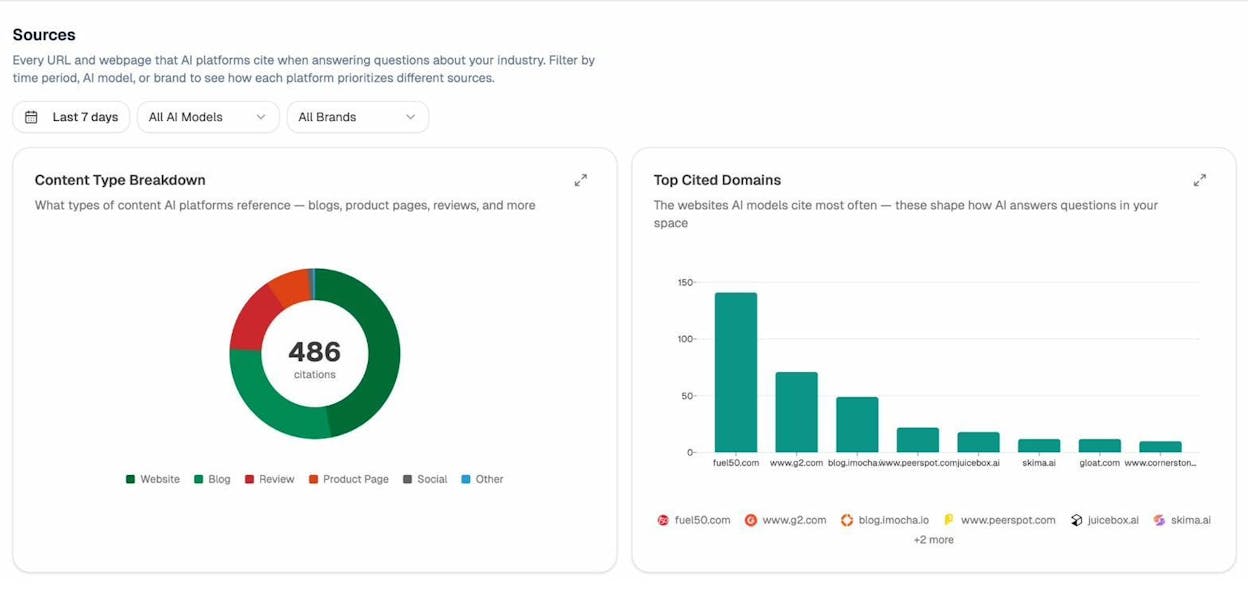
This data tells you two things. First, which pages on your site AI models consider authoritative enough to cite. Second, which competitor domains are earning citations alongside (or instead of) your content.
If you notice that a page with strong traditional SEO metrics is getting zero AI citations, the problem may not be content quality — it could be that a cluttered link profile is undermining the page’s perceived authority in AI evaluation models.
Track Which Sources Influence AI Answers About Your Brand
Analyze AI’s Sources report also shows you the specific URLs that AI engines cite when answering prompts related to your industry. You can filter by time period, AI model, and brand to see how each platform prioritizes different sources.
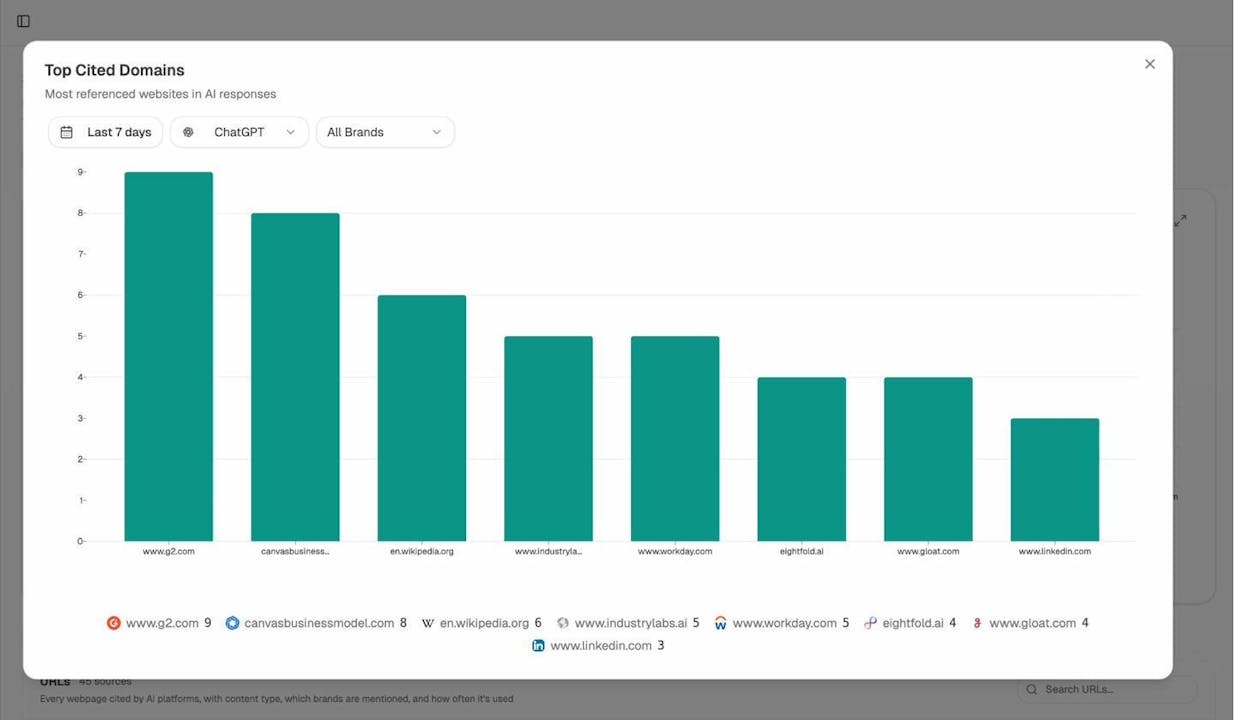
Why this matters for link quality: if a domain that AI engines trust heavily happens to link to your site, that link is likely doing double duty — helping both your traditional rankings and your AI visibility. Conversely, if your backlink profile is full of domains that AI models never cite, those links are at best irrelevant to your AI search presence.
Identify Opportunities Where Competitors Win in AI Search
Analyze AI’s Opportunities feature shows you prompts where competitors are mentioned by AI engines but your brand is absent. This is the AI search equivalent of a keyword gap analysis in traditional SEO.
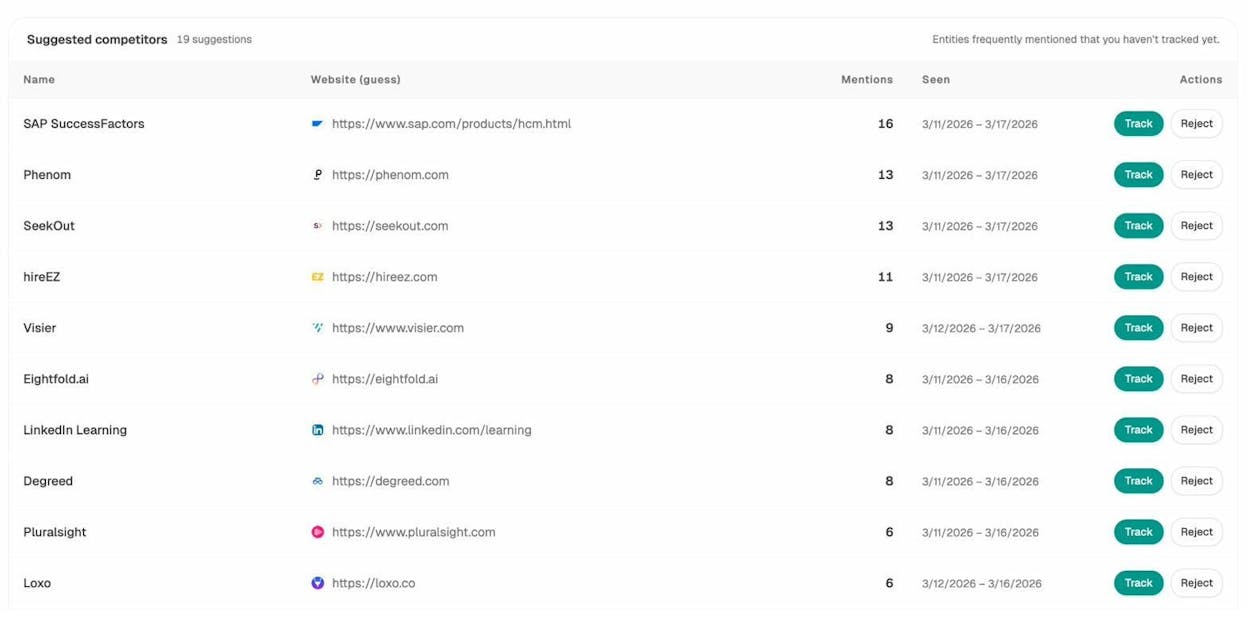
After you’ve cleaned up your backlink profile with a disavow, this report helps you prioritize where to focus your content efforts next. A clean link profile gives you a stronger foundation, but you still need to create the kind of content that AI models want to cite. (Our guide on how to get mentioned in AI search breaks down what works, based on 65,000+ citation data points.) From there, use Analyze AI’s free keyword generator to expand on the topics AI models are surfacing, and run those terms through a keyword difficulty checker to find angles where you can compete.
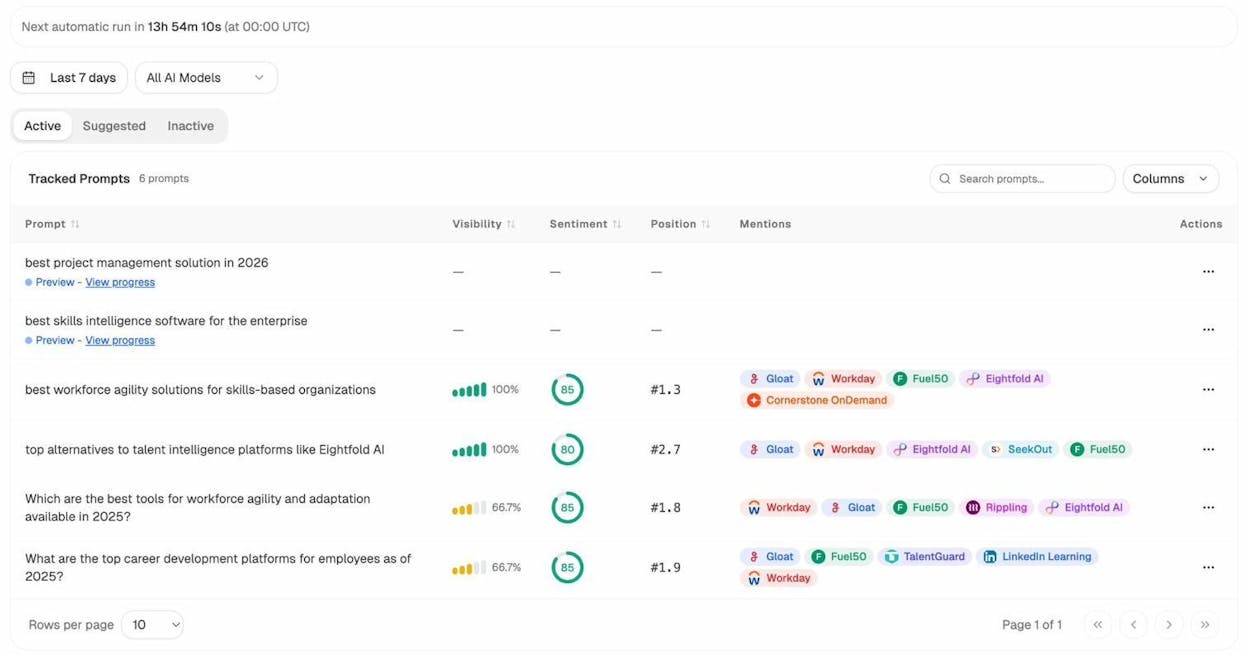
You can also track the exact prompts that matter to your business. Analyze AI’s prompt tracking dashboard lets you monitor visibility, sentiment, and position for each tracked prompt — showing you which competitors appear alongside your brand and how those mentions change over time.
Measure AI Referral Traffic to Your Site
Disavowing bad links can improve both your traditional rankings and your AI search visibility. But you need a way to measure the AI side. Analyze AI connects to your Google Analytics (GA4) data and shows you exactly how much traffic is coming from AI search engines, which pages receive that traffic, and which AI engines are sending it.
The AI Traffic Analytics dashboard breaks down visitors by source — ChatGPT, Claude, Copilot, Gemini, Perplexity, and others — so you can see which engines are driving real sessions, not just mentions.
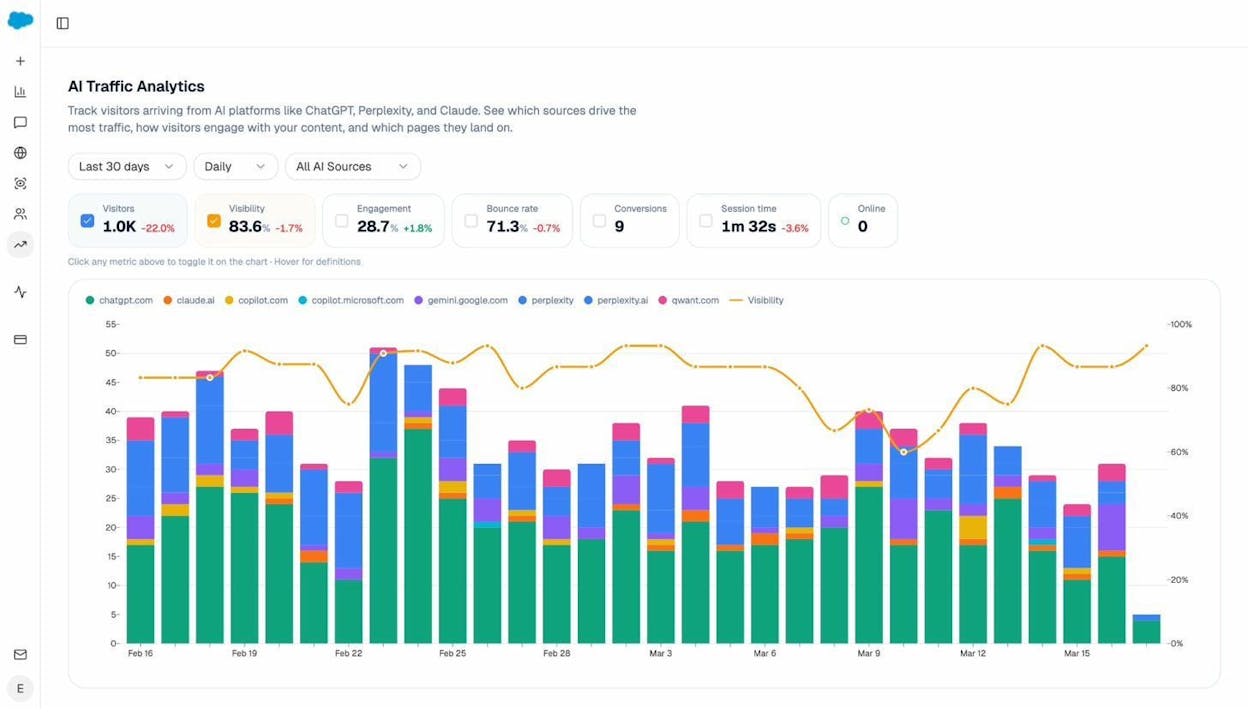
You can drill down further to see exactly which landing pages are attracting AI-driven visits, how visitors engage with those pages, and whether they convert. This is the page-level detail that ties link quality improvements to measurable outcomes.
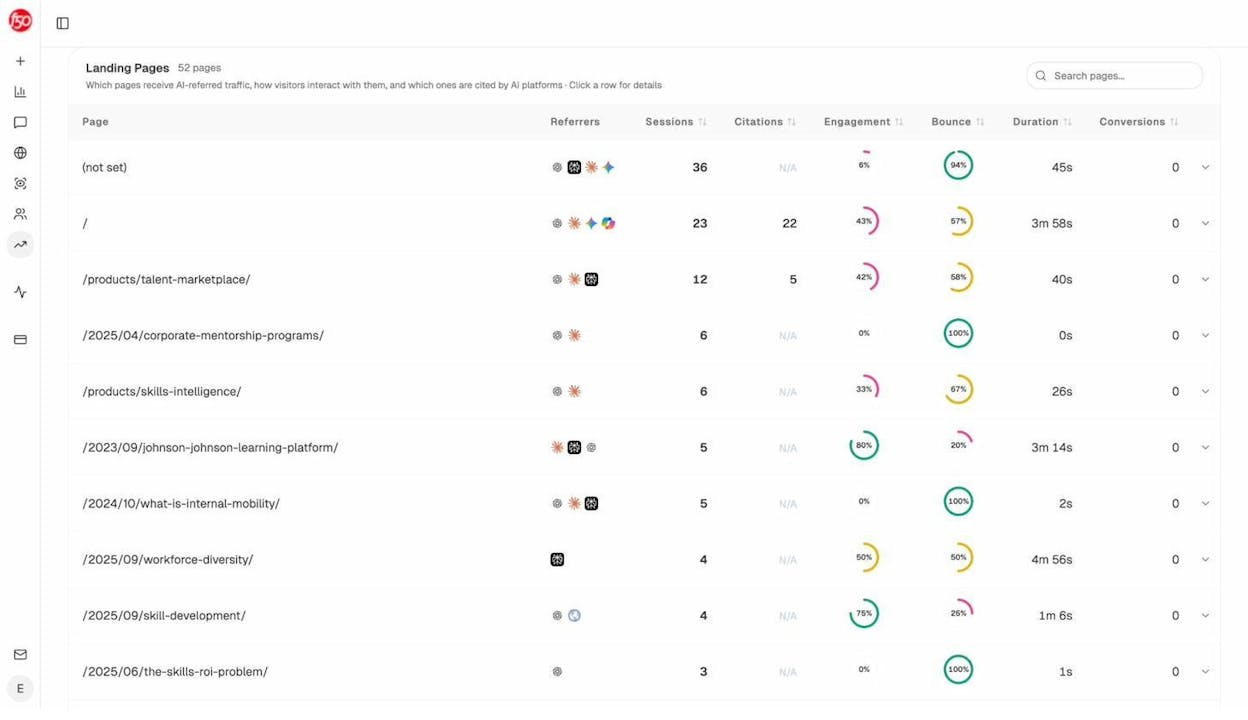
This is the data you need to connect link quality improvements to AI search performance. If you disavow a batch of spammy links and see your AI referral traffic increase over the following weeks, you have evidence that the cleanup helped. For a deeper dive into how to earn those citations, see our guides on how to rank on ChatGPT and how to rank on Perplexity.
Keeping Your Link Profile Healthy: A Maintenance Framework
Disavowing links is not a one-time project. New links appear constantly, and old ones change. Here’s a practical maintenance schedule that covers both traditional search and AI search:
Monthly (5 minutes): Check your referring domains graph for unexplained spikes. If everything looks normal, move on.
Quarterly (30–60 minutes): Review your anchor text distribution and CTLD map for new anomalies. Spot-check any new referring domains with low authority scores. Run your target keywords through a free SERP checker to see whether your rankings have shifted since your last review. Update your disavow file if needed.
Annually (2–4 hours): Run a full link audit. Review your entire disavow file and remove any domains you may have disavowed unnecessarily. Cross-reference your backlink profile with your AI citation data in Analyze AI to make sure your highest-value pages maintain clean link profiles across both traditional and AI search.
After every major algorithm update: Check Google Search Console for manual actions and review your rankings for any sudden changes that correlate with your link profile.
This framework keeps link monitoring proportional to its value. Most of the time, it’s a five-minute monthly check. The deeper work only happens when there’s a reason for it.
Key Takeaways
The Disavow Links Tool exists for a specific purpose: to help webmasters distance their sites from backlinks they can’t get removed any other way. It was never meant for routine use, and Google’s shift from demoting to devaluing spam means the tool is less critical than it was in the early Penguin years.
But “less critical” doesn’t mean irrelevant. Manual actions still happen. Negative SEO attacks still occur. And inherited link profiles from past agencies still contain toxic links that need attention.
The process is straightforward: audit your backlink profile, identify links that meet clear “bad link” criteria, format your disavow file properly, upload it, and monitor the results.
What’s changed is the broader context. Links now influence not just where you rank on Google, but whether AI search engines cite your content. A clean link profile supports visibility across every channel where search is evolving — from traditional SERPs to answer engines — and tools like Analyze AI help you track that visibility in places Google Search Console can’t reach.
And remember, Google isn’t the only search surface that matters. If your brand is visible on Bing, YouTube, or Amazon, a healthy link profile strengthens your authority signal across all of them.
Clean links, strong content, and consistent monitoring. That’s the formula — whether the search engine is traditional or AI-powered.

Ibrahim

Ernest


