



Summarize this blog post with:


In this article, you’ll learn which SERP tracking tools are worth your time and budget, what features actually matter when you’re managing real campaigns, and how to extend your tracking beyond Google into AI search engines like ChatGPT, Perplexity, and Gemini.
Table of Contents
What to Look for in a SERP Tracking Tool
Before comparing tools, it helps to know what separates a useful SERP tracker from a mediocre one. These are the criteria we used to evaluate each tool in this list.
Accuracy and update frequency. Daily updates are table stakes. Some tools offer on-demand or bi-hourly refreshes, which matter when you are monitoring a site migration or a Google algorithm update in real time.
Location and device granularity. If you track rankings for “best CRM software” in New York on mobile, you need different data than the same query in London on desktop. The tool should let you filter by city, device, and search engine.
SERP feature tracking. Rankings alone do not tell the full story. The tool should show whether your pages appear in featured snippets, People Also Ask boxes, AI Overviews, local packs, or other SERP features.
Competitor comparison. You need side-by-side visibility data. A tool that only shows your own rankings forces you to guess why positions shifted.
Reporting and integrations. Agencies need white-label reports. In-house teams need Looker Studio or GA4 integrations. The tool should fit your existing reporting workflow, not replace it.
AI search visibility. Google is no longer the only place people search. AI engines now send measurable traffic to websites. The best SERP tracking setup in 2026 covers both traditional and AI-driven search results.
Quick Comparison
|
Tool |
Best for |
Starting price |
AI search tracking |
|---|---|---|---|
|
Google Search Console |
Free baseline performance data |
Free |
No |
|
AccuRanker |
Enterprise teams needing real-time data |
From $224/mo (2,000 keywords) |
Partial (LLM tracking add-on) |
|
SE Ranking |
Multi-engine tracking across locations |
From $52/mo (500 keywords) |
AI Overview monitoring |
|
Keyword.com |
Budget-friendly tracking with AI visibility |
From $3/mo (50 keywords) |
Yes (ChatGPT, Perplexity, Gemini) |
|
Mangools SERPWatcher |
Quick health checks for small teams |
From $29.90/mo (200 keywords) |
No |
|
Advanced Web Ranking |
Tracking across 4,000+ search engines |
From $99/mo (7,000 keywords) |
No |
|
Wincher |
Global tracking across 180 countries |
From $49/mo (500 keywords) |
No |
|
SpySERP |
Budget SERP comparison across devices |
Free plan (5 keywords) |
No |
1. Google Search Console
Best for: Free, first-party search performance data
Google Search Console remains the starting point for any SERP tracking setup. It shows clicks, impressions, click-through rate, and average position for every query and page on your site, pulled directly from Google’s own index.
You can filter by device, country, page, and date range. You can compare two time periods side by side to spot ranking shifts after a content update or algorithm change.
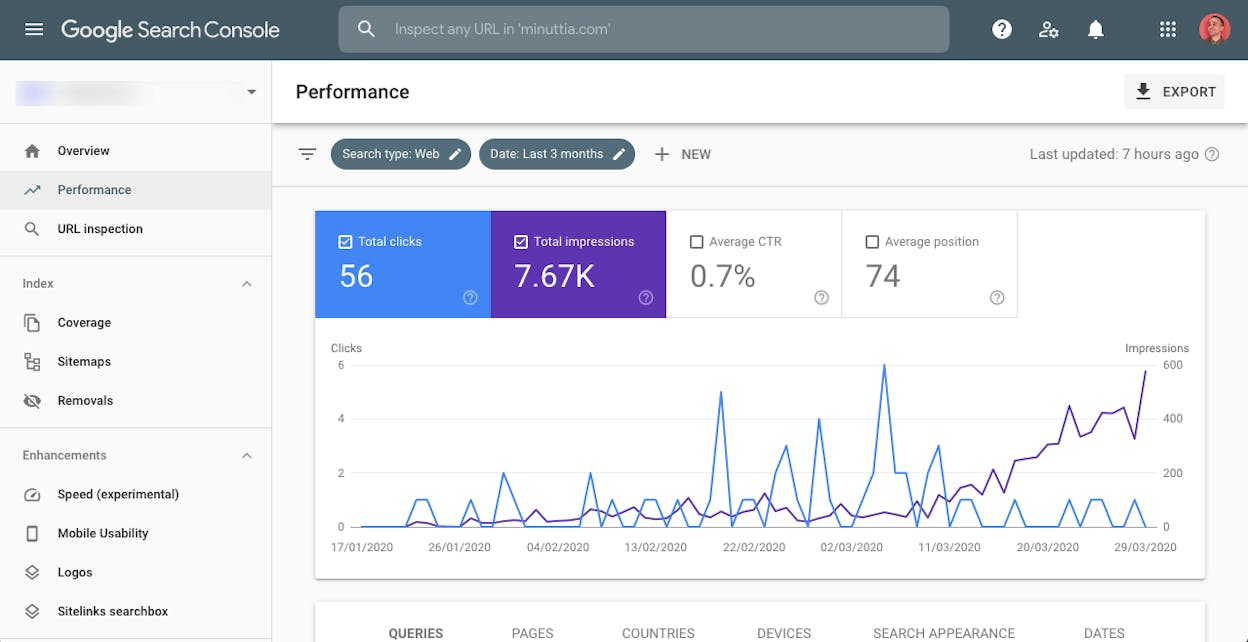
Where it works well. GSC gives you the most trustworthy view of how Google treats your site. When a ranking drops, the data tells you whether impressions dropped too (a visibility problem) or just clicks (a CTR problem). That distinction changes your response entirely.
Where it falls short. GSC does not show competitor data. You cannot see who took your position or how your share of voice compares to rivals. The interface caps exports at 1,000 rows, and data retention stops at 16 months. You also get no AI search visibility data.
Pricing: Free.
2. AccuRanker
Best for: Enterprise teams that need on-demand rank updates
AccuRanker is a dedicated rank tracker built for speed and scale. It refreshes keyword data on demand (not just daily), which is useful during site migrations, algorithm updates, or product launches when you need to see the impact of changes within hours.
You can track rankings on desktop, mobile, and tablet across any location down to the city level. All plans include unlimited users and unlimited domains, which keeps costs predictable for agencies managing many client accounts.
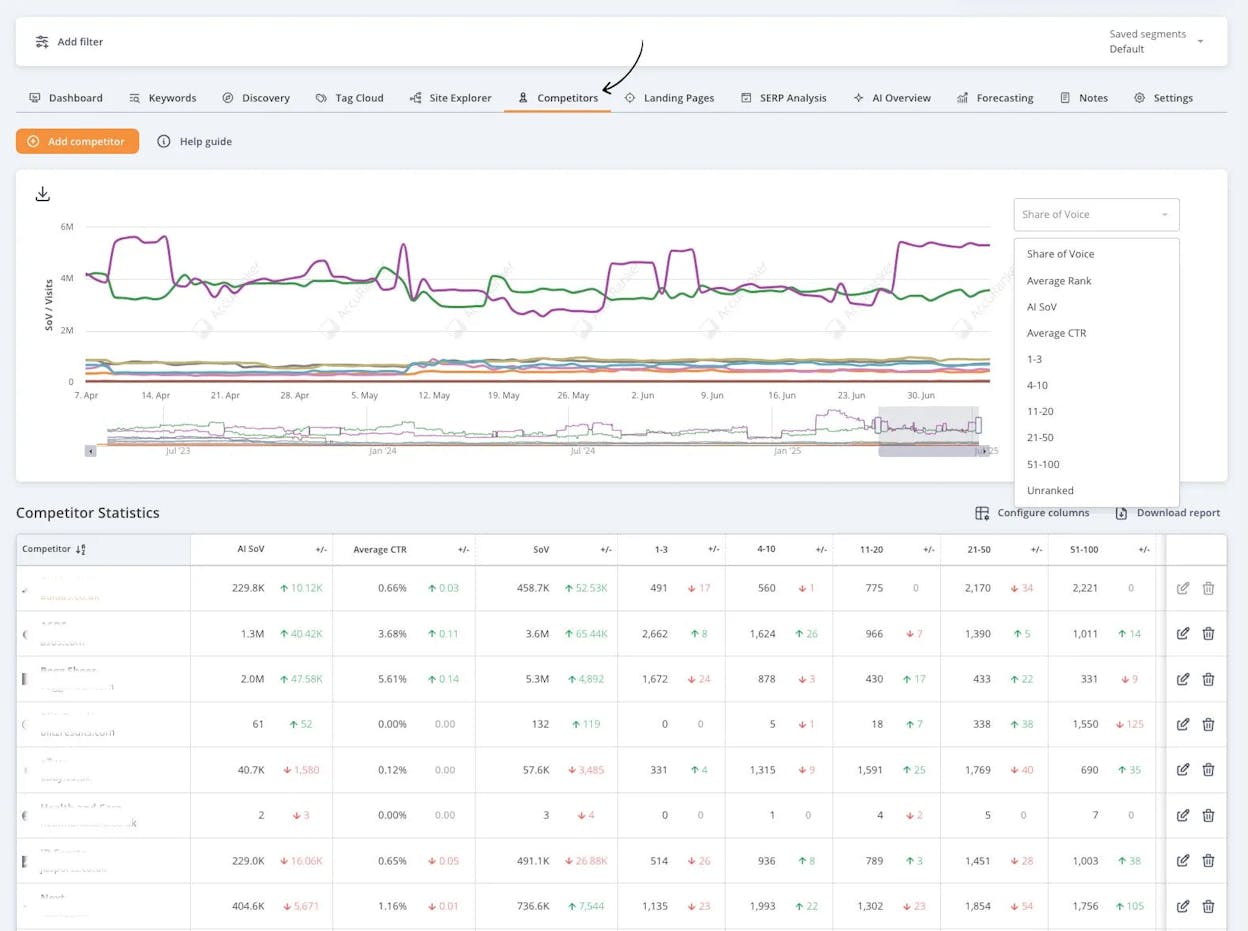
Where it works well. The Share of Voice metric combines your keyword rankings with search volume to show overall visibility in one number. This makes executive reporting much simpler because you can show a graph instead of a spreadsheet full of individual keyword positions.
AccuRanker also includes pixel-level tracking, so you can see whether your result appears above or below the fold. That explains why some page-one rankings still get low traffic.
Where it falls short. The starting price of $224/month (for 2,000 keywords) is steep for small teams or freelancers tracking fewer than 500 keywords. AccuRanker focuses exclusively on rank tracking, so you still need separate tools for technical audits, backlink analysis, and content optimization. Its LLM tracking feature exists but is not as deep as tools built specifically for AI search visibility.
Pricing: From $224/month for 2,000 keywords. Annual billing saves 10%.
3. SE Ranking
Best for: Multi-engine tracking across search engines and locations
SE Ranking tracks keyword rankings across Google, Bing, Yahoo, and YouTube. You can filter by location (down to the zip code), device, and language, and monitor up to 20 competitors per project.
The platform also tracks 37 SERP features, including AI Overviews, and supports up to 100 locations per project.
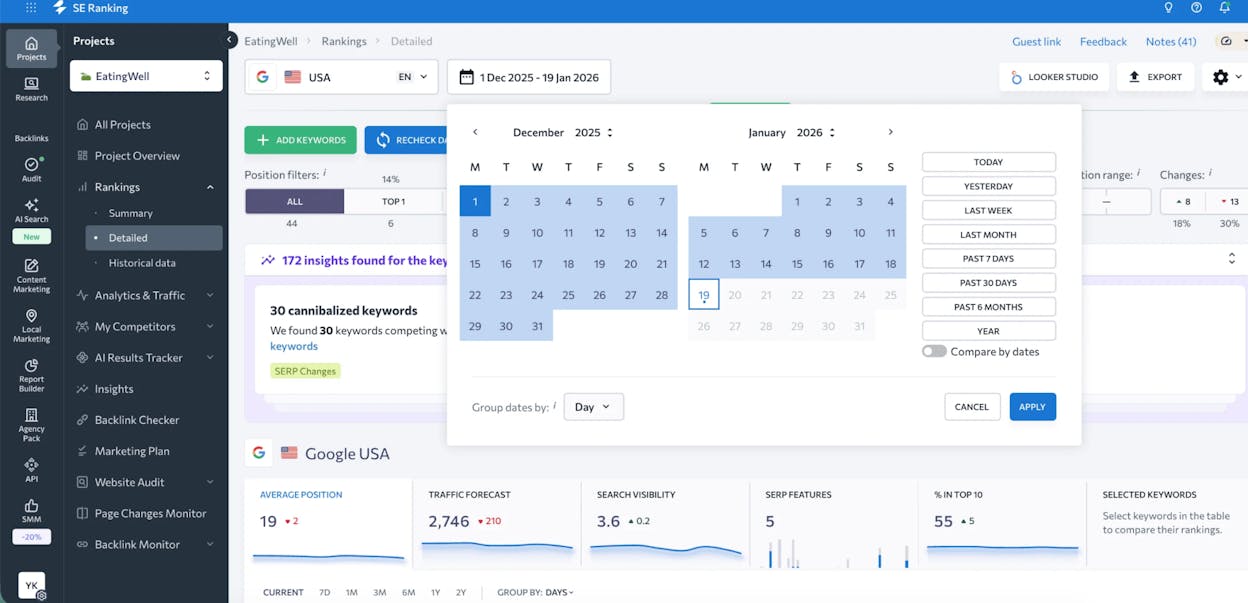
Where it works well. SE Ranking automatically detects keyword cannibalization, flagging when multiple pages on your site compete for the same query. That saves hours of manual checking and prevents internal overlap that weakens rankings.
For agencies, SE Ranking supports branded reports, client access control, and unlimited projects on higher-tier plans.
Where it falls short. The interface packs a lot of features, which makes the learning curve steeper than lighter tools like Mangools. AI Overview tracking is available but basic compared to dedicated AI search tools.
Pricing: From $52/month for 500 keywords. Pro costs $95.20/month (2,000 keywords).
4. Keyword.com
Best for: Budget-friendly SERP tracking with AI visibility features
Keyword.com tracks Google keyword rankings with updates as frequent as bi-hourly on paid plans. You can filter results by location (down to zip code), generate white-label reports, and set up instant alerts for ranking changes.
What makes Keyword.com stand out in this list is its AI Rank Tracker. It shows where your brand appears in AI-generated responses from ChatGPT, Perplexity, Gemini, and Google AI Overviews, along with which pages are cited and how often your brand is mentioned.
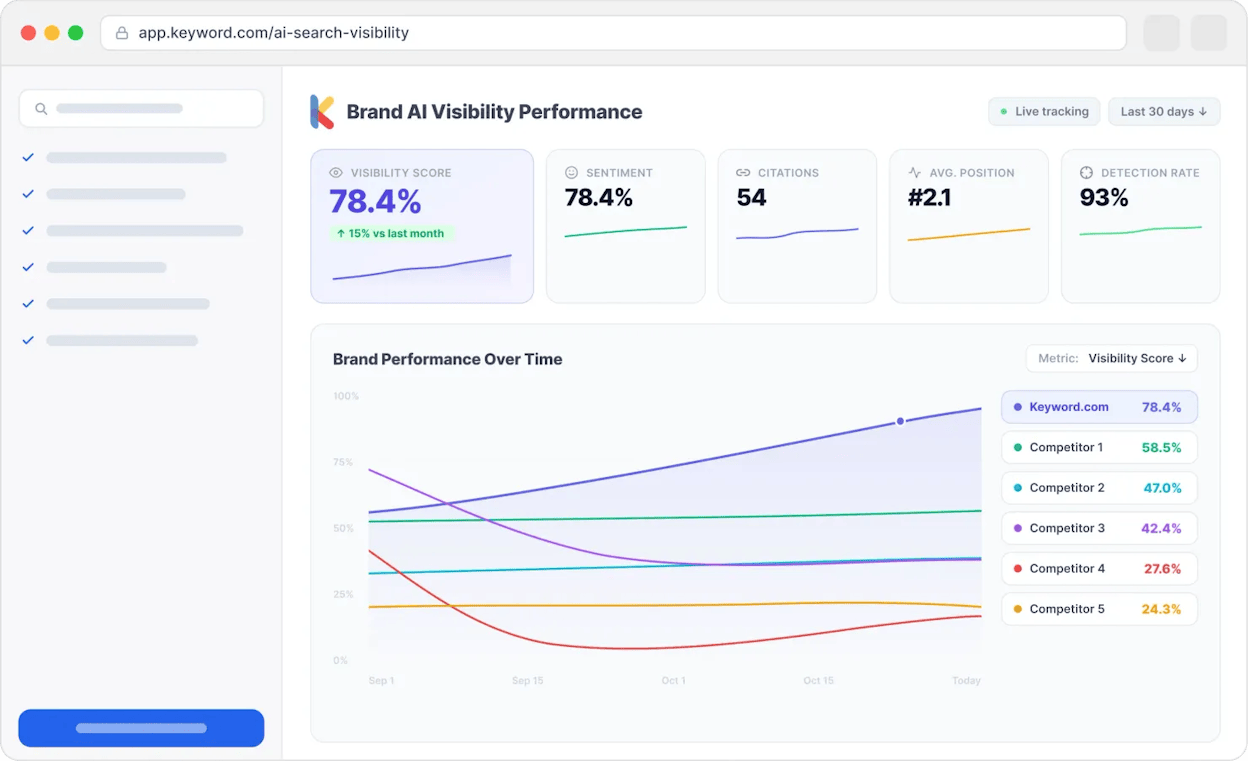
Where it works well. The entry price of $3/month for 50 keywords makes it the most accessible paid option on this list. The AI visibility features give you a starting view of how your brand performs beyond Google, which most tools at this price point cannot do.
Where it falls short. The free plan only updates weekly, and the AI visibility features are priced separately from core SERP tracking. The tool is less robust for large-scale enterprise tracking compared to AccuRanker or SE Ranking.
Pricing: From $3/month (50 keywords). AI Visibility plan starts at $24.50/month.
5. Mangools SERPWatcher
Best for: Quick SEO health checks for small teams
Mangools SERPWatcher is a lightweight rank tracker that avoids data overload. You track rankings on desktop and mobile, target specific countries or cities, and connect Google Business Profile to monitor local pack visibility.
The Performance Index score combines keyword rankings and search volume into a single number that shows whether your overall visibility is trending up or down.
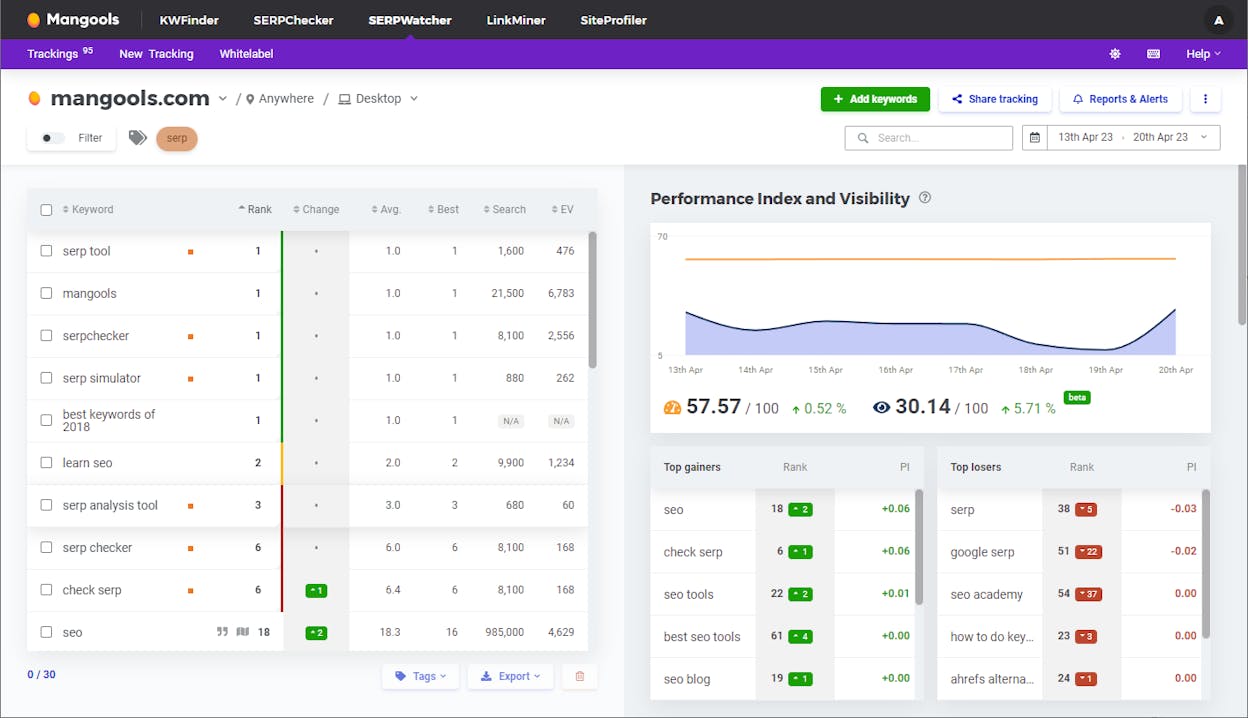
Where it works well. SERPWatcher tracks Google map pack rankings directly. When you manage multiple locations, you can quickly see where visibility drops and where it improves, then take action on the specific locations that need attention.
Custom alerts notify you when rankings change beyond a threshold you set, so you do not need to check the dashboard every day.
Where it falls short. No AI search tracking. The keyword limits are modest (200 on the base plan), and the tool lacks the depth needed for enterprise workflows or complex multi-site reporting.
Pricing: From $29.90/month for 200 keywords. Agency plans start at $89.90/month (1,500 keywords).
6. Advanced Web Ranking
Best for: Tracking rankings across 4,000+ search engines
Advanced Web Ranking goes beyond Google by tracking keyword positions on over 4,000 search engines, including YouTube and Amazon. It supports granular tracking by location, device, and language.
A notable feature is pixel tracking, which shows whether your page appears above or below the fold. This helps explain why a page-one ranking still gets low clicks if it sits beneath multiple SERP features and paid ads.
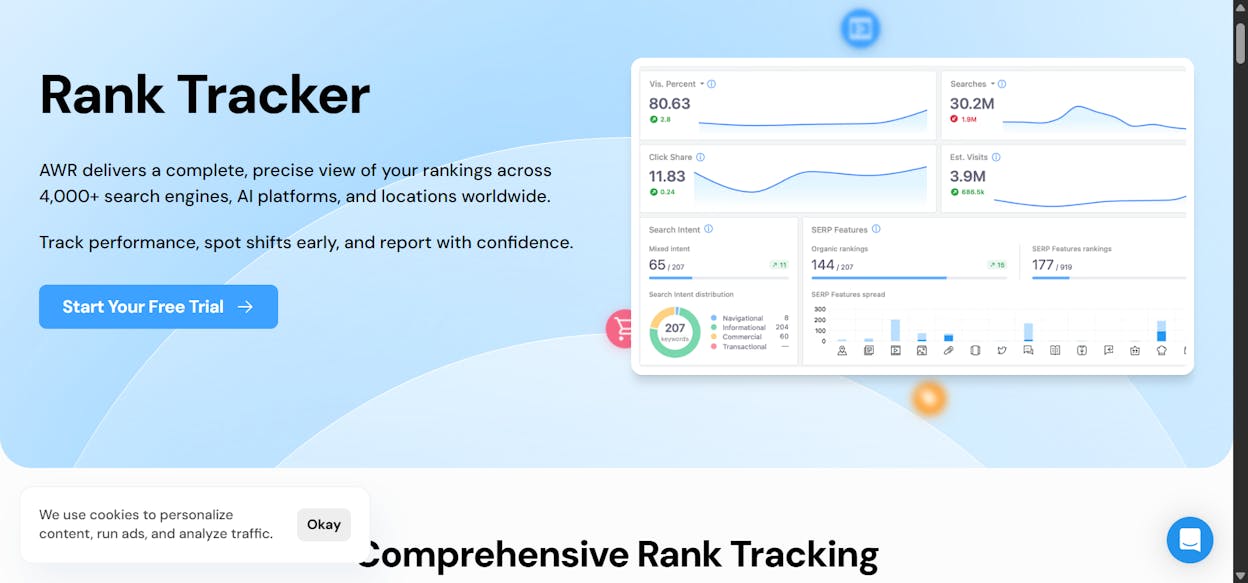
Where it works well. The forecasting module connects rankings to estimated traffic and revenue projections. When you need to justify an SEO investment or prioritize a keyword set, these projections make the value clear in terms that non-SEO stakeholders understand.
Built-in report templates simplify client delivery for agencies.
Where it falls short. No AI search tracking. The interface feels dated compared to newer tools. At $99/month for 7,000 keywords, it is cost-effective for high-volume tracking but less useful for teams that need fewer keywords and more analytical depth.
Pricing: From $99/month for 7,000 keywords. Enterprise plans start at $449/month.
7. Wincher
Best for: Global keyword tracking across 180 countries
Wincher tracks keyword rankings for desktop and mobile across 180 countries. You can monitor your own site, track competitor domains, and receive instant alerts when rankings shift.
The platform integrates with Google Looker Studio, WordPress, and Wix, which makes syncing your SEO reports into existing dashboards straightforward.
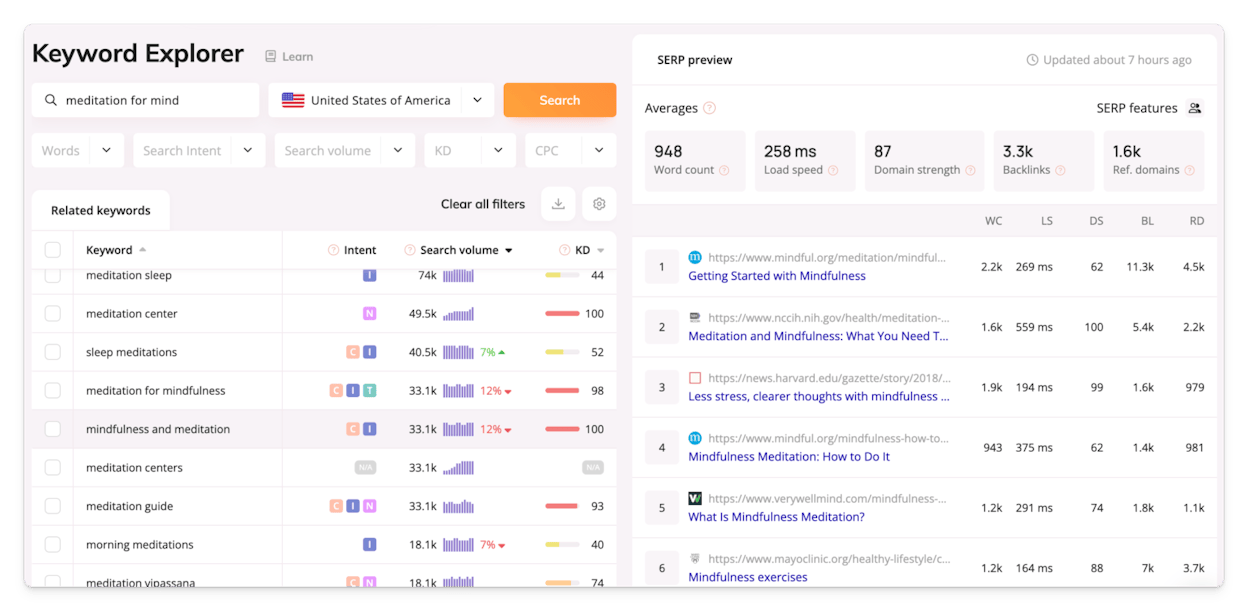
Where it works well. The SERP analysis feature lets you compare your page against the top 10 results for a keyword across factors like word count, page speed, and backlinks. This helps you build a concrete optimization plan instead of guessing what the page needs.
Where it falls short. No AI search tracking. The starting plan at $49/month for 500 keywords is mid-range, but scaling up gets expensive. Limited competitor tracking depth compared to SE Ranking or AccuRanker.
Pricing: From $49/month for 500 keywords. Professional plans cost $266/month (5,000 keywords).
8. SpySERP
Best for: Comparing SERPs across devices and locations on a budget
SpySERP monitors keyword rankings for your site and up to 100 competitor domains. It includes automatic keyword grouping for large campaigns and cannibalization detection to prevent multiple pages from fighting over the same query.
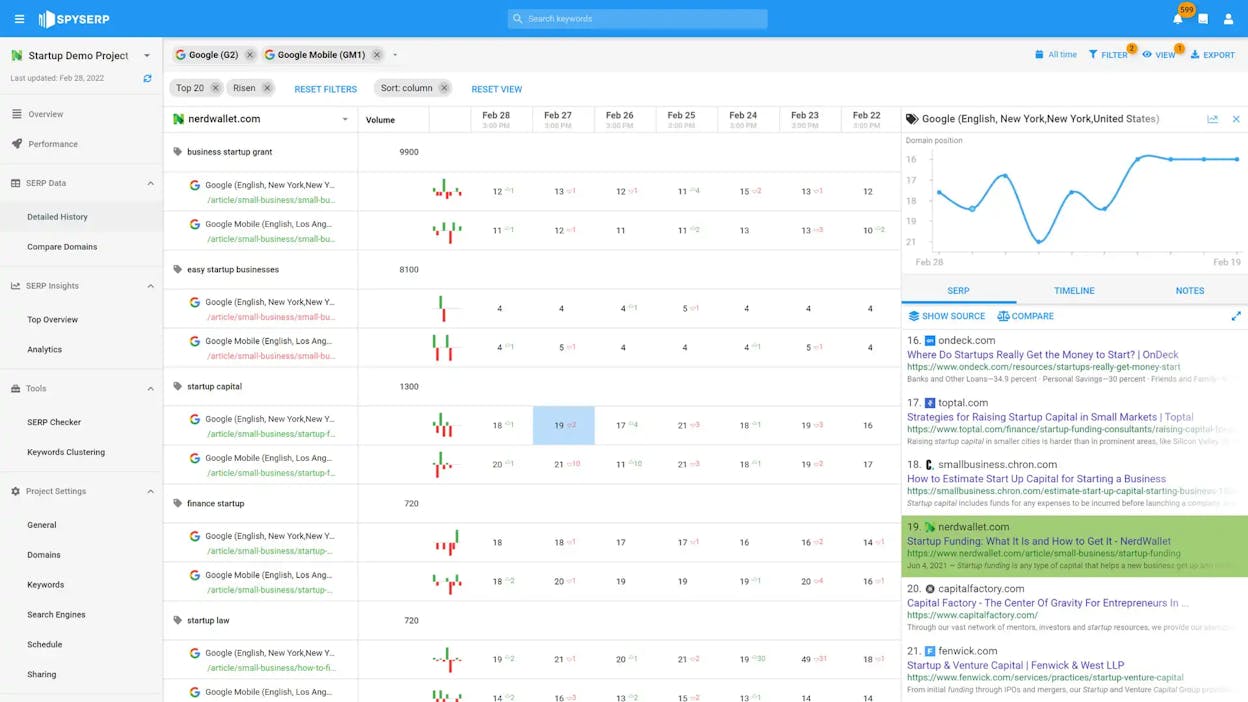
Where it works well. SpySERP makes side-by-side SERP comparisons quick. For high-value keywords, you can instantly spot ranking differences between desktop and mobile or between different geographic locations.
The free plan (5 keywords) lets you test the platform before committing, and paid plans start at just $7.20/month.
Where it falls short. No AI search tracking. The interface is utilitarian rather than polished. Reporting features are basic compared to agency-focused tools like SE Ranking or Advanced Web Ranking.
Pricing: Free plan (5 keywords). Paid plans from $7.20/month.
The Blind Spot in Every Traditional SERP Tracker
Every tool above tracks where your pages rank on Google, Bing, or YouTube. None of them can tell you what happens when someone asks ChatGPT, Perplexity, or Gemini about your product category.
That is a problem because AI search traffic is real and growing. When a buyer asks an AI engine “best CRM for mid-sized companies” or “top project management tools,” the engine generates an answer that either includes your brand or leaves it out. If you are not tracking those responses, you are blind to an entire channel.
Traditional SERP trackers were not built for this. AI engines do not return a list of 10 blue links. They produce narrative answers with citations, and the factors that determine whether your brand appears are different from traditional ranking factors.
This is where Analyze AI fits into your stack. It is not a replacement for your SERP tracker. It is the layer that covers the part your SERP tracker cannot see.
Track Which AI Engines Send You Traffic
Analyze AI attributes every session from AI answer engines to its specific source. You see how many visits come from ChatGPT versus Perplexity versus Gemini, which landing pages receive that traffic, and what conversion events those visits trigger.
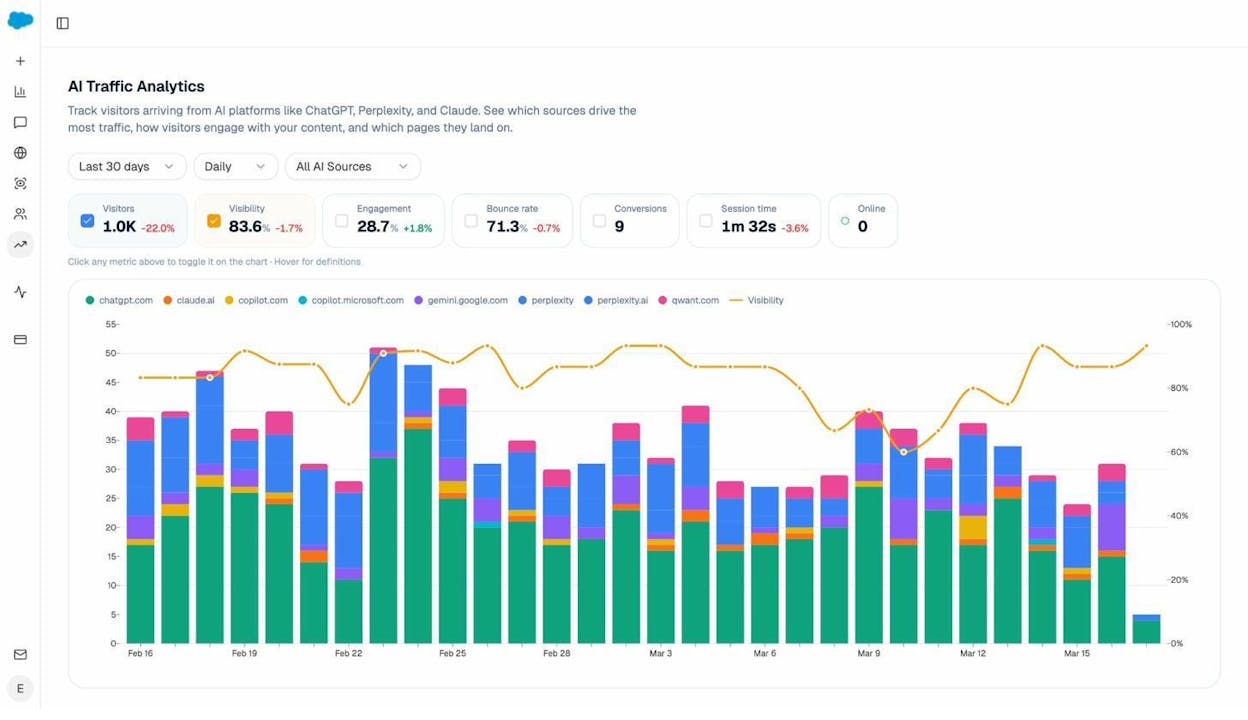
This moves the conversation from “are AI engines important?” to “ChatGPT sent 248 sessions last month with a 4.2% conversion rate, and here are the pages that drove those conversions.”
Monitor the Exact Prompts Buyers Use
Analyze AI tracks specific prompts across all major LLMs and shows your brand’s visibility percentage, position relative to competitors, and sentiment score for each prompt.
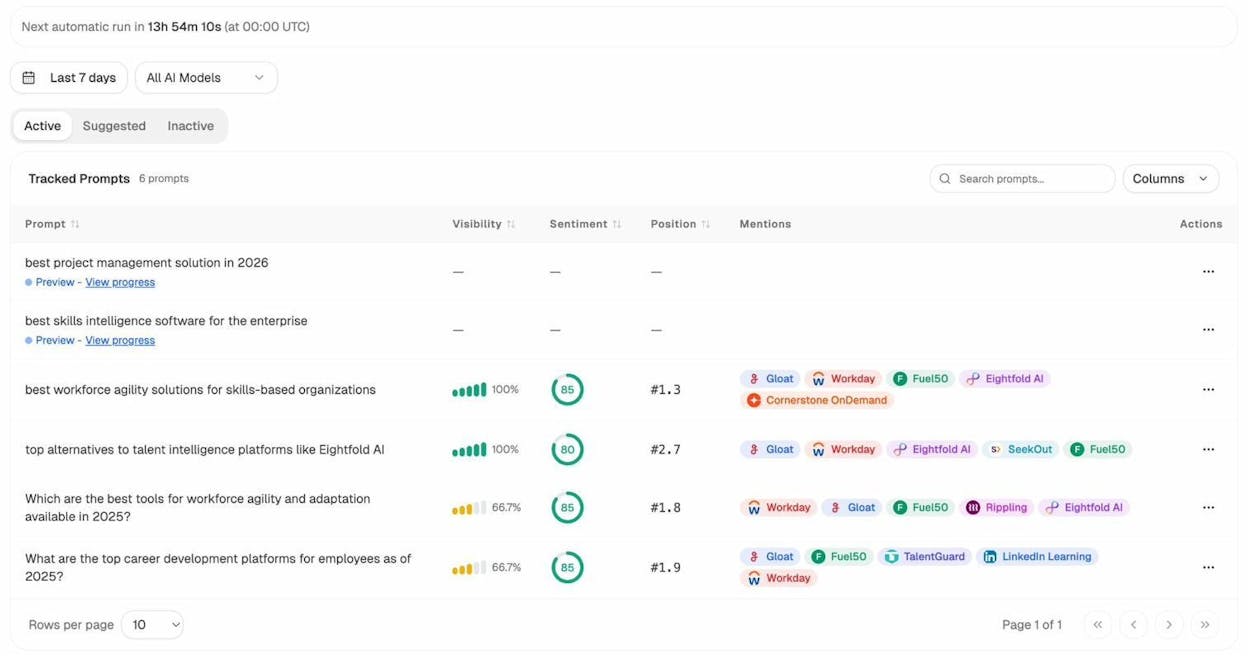
You can see which competitors appear alongside you, how your position changes daily, and whether sentiment is improving or declining. If you do not know which prompts to track, the Prompt Discovery feature suggests bottom-of-funnel prompts relevant to your brand.
See Which Sources AI Engines Trust
Analyze AI reveals the domains and URLs that AI models cite when answering questions in your category. You can see citation counts per source, which models reference each domain, and where gaps exist in your own coverage.
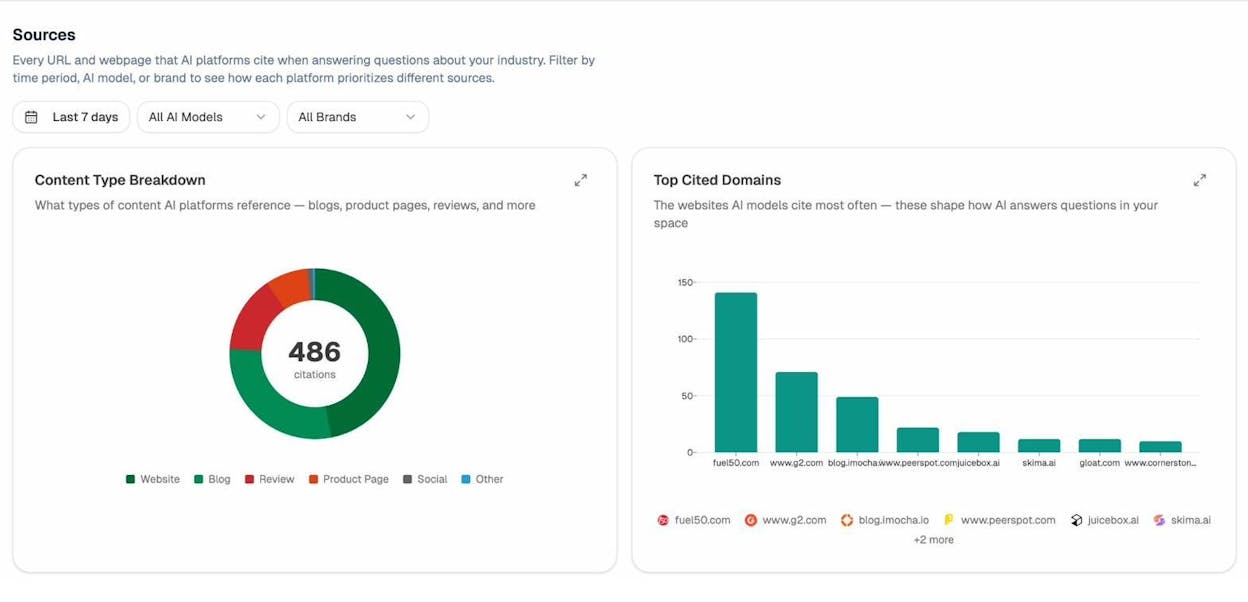
This data changes your link building and PR strategy. Instead of generic outreach, you target the specific sources that shape AI answers in your space and earn citations from the domains that models already trust. You can learn more about this in our guide to AI search competitor analysis.
Automate the Entire Tracking Workflow
What sets Analyze AI apart from other AI visibility tools is the Agent Builder. With 180+ nodes and integrations for GA4, Google Search Console, DataForSEO, HubSpot, and more, you can build agents that run on a schedule or fire on a webhook.
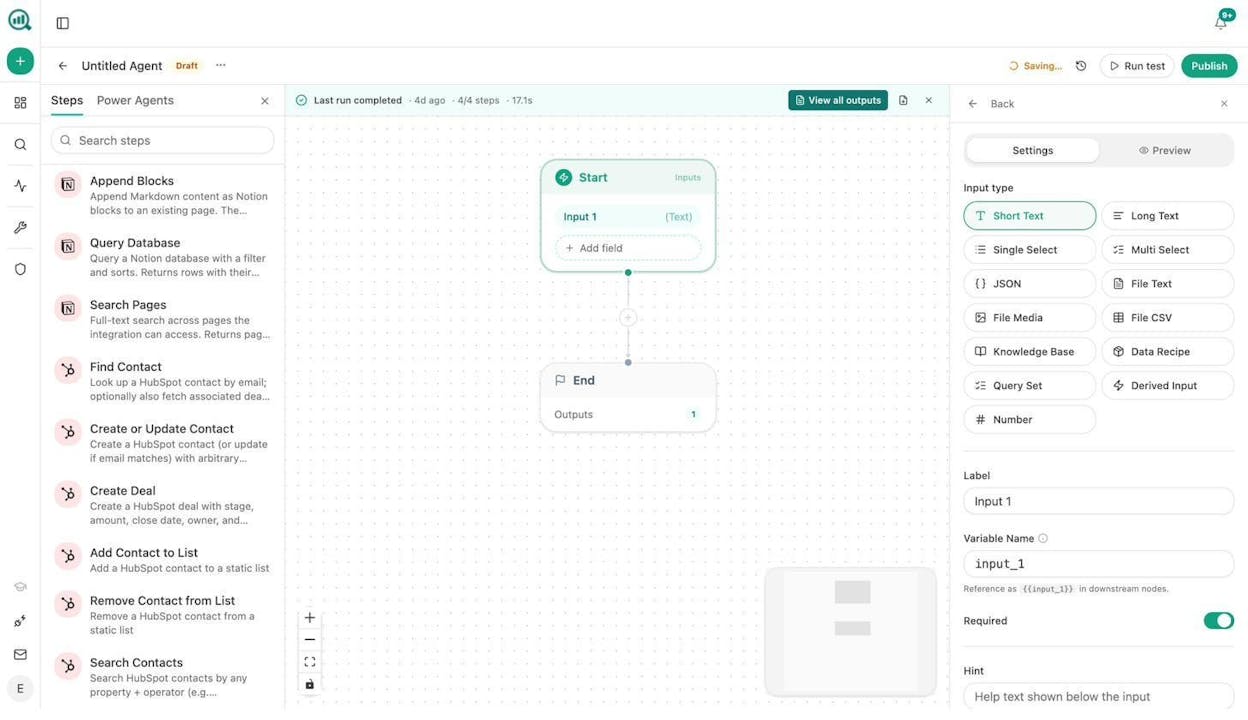
For example, you can set up a scheduled agent that runs every Monday morning, pulls your AI visibility data alongside your GSC rankings, compares both against competitors, and delivers a complete report to Slack or email before your team’s standup. Agencies can build one agent that loops over every client account and generates individual reports automatically. The Monday reporting ritual that used to take four hours now takes zero.
You can also trigger agents from external events. A HubSpot deal closing can automatically generate a case study draft. A negative brand mention can trigger a response brief in your PR team’s Slack channel. The agent substrate turns Analyze AI from a monitoring dashboard into an always-on operations layer for your marketing org.
How to Choose the Right SERP Tracking Tool
Start with your actual needs, not feature lists.
If you are a solo marketer or freelancer tracking fewer than 200 keywords, start with Google Search Console and add Mangools or SpySERP for deeper rank visibility without a large budget.
If you run an agency managing multiple client accounts, SE Ranking or AccuRanker give you the competitor data, white-label reporting, and scale you need. Keyword.com is a solid budget alternative if your clients also care about AI visibility.
If you are an in-house SEO team at a mid-size or enterprise company, AccuRanker delivers the speed and share-of-voice metrics that make executive reporting simpler. Advanced Web Ranking works well if you track rankings across multiple search engines.
If you want to track AI search visibility alongside traditional SERP data, add Analyze AI to your stack. It connects AI visibility to sessions, conversions, and revenue, so you are not just tracking mentions but proving business impact.
No single tool covers everything. The strongest reporting setup combines a traditional SERP tracker for Google visibility with an AI search layer for the channels that traditional tools cannot reach. That combination gives you the full picture of where your brand shows up in search in 2026, and where it does not.

Ernest

Ibrahim


