



Summarize this blog post with:


Google search operators are special commands and characters you type into the search bar to filter and refine results. Instead of scrolling through ten pages of generic results, a single operator can narrow your search to a specific site, file type, date range, or even a particular word in a page’s title.
For example, the site: operator restricts results to a single domain:
site:nytimes.com climate change
![[Screenshot: Google search results showing site: operator filtering only nytimes.com results for “climate change”]](https://www.datocms-assets.com/164164/1774472852-blobid0.png?auto=format,compress&w=1248&fit=max)
That one command eliminates every result that isn’t from the New York Times. And when you start combining operators — stacking two, three, or four together — you can extract insights that would take hours to find manually.
In this article, you’ll learn every Google search operator that still works in 2026, which ones are unreliable, and which Google has officially killed. More importantly, you’ll get 15 practical ways to combine these operators for SEO, competitive research, content auditing, and — because search is evolving, not dying — how to apply the same investigative mindset to track and improve your brand’s visibility in AI search engines like ChatGPT, Perplexity, and Claude.
Table of Contents
Google search operators: the complete list
Every operator falls into one of three categories:
-
Working — Behaves as intended and returns consistent results.
-
Unreliable — Not officially deprecated, but results are inconsistent.
-
Not working — Officially deprecated by Google.
Working operators
|
Operator |
What it does |
Example |
|---|---|---|
|
" " |
Forces exact-match results for a word or phrase. |
|
|
OR |
Returns results related to either term. |
|
|
\| |
Same as OR. |
|
|
AND |
Returns results that must include both terms. |
|
|
- |
Excludes results that mention a specific word or phrase. |
|
|
* |
Acts as a wildcard, matching any word or phrase. |
|
|
( ) |
Groups multiple operators or terms together. |
|
|
define: |
Returns the dictionary definition of a word. |
|
|
cache: |
Shows the most recent cached version of a page. |
|
|
filetype: |
Restricts results to a specific file type. |
|
|
ext: |
Same as filetype:. |
|
|
site: |
Restricts results to a specific website or subdomain. |
|
|
related: |
Finds websites that Google considers similar to a given domain. |
|
|
intitle: |
Finds pages with a specific word in their title tag. |
|
|
allintitle: |
Finds pages with multiple specific words in their title tag. |
|
|
inurl: |
Finds pages with a specific word in their URL. |
|
|
allinurl: |
Finds pages with multiple specific words in their URL. |
|
|
intext: |
Finds pages with a specific word in their body content. |
|
|
allintext: |
Finds pages with multiple specific words in their body content. |
|
|
weather: |
Returns the weather forecast for a location. |
|
|
stocks: |
Returns stock price and information for a ticker symbol. |
|
|
map: |
Forces Google to display map results. |
|
|
movie: |
Returns information about a specific movie. |
|
|
in |
Converts one unit to another. |
|
|
source: |
Restricts Google News results to a specific publication. |
|
|
before: |
Returns results published before a specific date. |
|
|
after: |
Returns results published after a specific date. |
Tip: The _ character works as a wildcard specifically in Google Autocomplete. Type a partial query with _ in the search bar (before pressing Enter) to see autocomplete suggestions fill in the blank.
Unreliable operators
These still work sometimes, but Google hasn’t confirmed ongoing support and results can be inconsistent.
|
Operator |
What it does |
Example |
|---|---|---|
|
#..# |
Searches within a number range. |
|
|
inanchor: |
Finds pages with a specific word in their inbound anchor text. |
|
|
allinanchor: |
Finds pages with multiple words in their inbound anchor text. |
|
|
AROUND(X) |
Finds pages where two terms appear within X words of each other. |
|
|
loc: |
Biases results toward a specific geographic area. |
|
|
location: |
Filters Google News to a specific location. |
|
|
daterange: |
Filters by a Julian date range (rarely practical). |
Not working (deprecated by Google)
Google has officially removed these operators. Using them returns either normal results or nothing useful.
|
Operator |
What it did |
When deprecated |
|---|---|---|
|
~ |
Included synonyms in results. |
|
|
"+" |
Forced exact-match for a specific word. |
|
|
inpostauthor: |
Searched by author in Google Blog Search. |
Deprecated with Blog Search |
|
allinpostauthor: |
Same as inpostauthor: without quotes. |
Deprecated with Blog Search |
|
inposttitle: |
Searched post titles in Google Blog Search. |
Deprecated with Blog Search |
|
link: |
Found pages linking to a specific domain. |
|
|
info: |
Displayed information about a specific URL. |
|
|
id: |
Same as info:. |
2017 |
|
phonebook: |
Looked up phone numbers. |
|
|
# |
Searched hashtags on Google+. |
2019 (Google+ shut down) |
15 ways to use Google search operators for SEO and AI search
The operators above become powerful when you combine them. Below are 15 practical use cases — each with step-by-step instructions, real examples, and notes on how to extend the same thinking into AI search visibility.
1. Find indexing problems on your site
The fastest way to spot indexing issues is a site: search for your own domain.
Start broad: site:yourdomain.com
Google reports an estimated count of indexed pages at the top of the results. If that number is significantly higher or lower than what you expect, something is off.
![[Screenshot: Google search results for site:yourdomain.com showing estimated page count]](https://www.datocms-assets.com/164164/1774472852-blobid1.png?auto=format,compress&w=1248&fit=max)
Now get specific. Combine site: with filetype: to check whether file types you don’t want indexed — like PDFs, DOCX files, or XML sitemaps — are showing up.
site:yourdomain.com filetype:pdf
![[Screenshot: Google results showing indexed PDFs from a site using site: and filetype: operators]](https://www.datocms-assets.com/164164/1774472860-blobid2.png?auto=format,compress&w=1248&fit=max)
If you run gated content (white papers behind lead forms, for example), any indexed PDF means users can bypass the form entirely. Fix this by adding an X-Robots-Tag: noindex HTTP header to those files, or by blocking them in your robots.txt.
You can also look for duplicate or thin content by searching for common internal patterns:
site:yourdomain.com inurl:?page=
site:yourdomain.com inurl:/tag/
These searches reveal paginated archive pages and tag pages that might be wasting crawl budget without adding value.
Check your Google Search Console too. Operators give you a quick snapshot, but GSC’s “Pages” report under “Indexing” gives you exact counts and reasons why specific URLs are or aren’t indexed. For a deeper dive, use a dedicated SEO audit tool that crawls your entire site and catches issues operators can’t — like orphaned pages, slow load times, and missing canonical tags.
![[Screenshot: Google Search Console Indexing > Pages report showing indexed vs. excluded pages]](https://www.datocms-assets.com/164164/1774472863-blobid3.png?auto=format,compress&w=1248&fit=max)
Looking for broken links while you’re at it? Run your site through Analyze AI’s free broken link checker to spot 404 errors that could be hurting your crawl efficiency and user experience.
2. Audit your title tags at scale
Poor title tags hurt click-through rates. You can use site: combined with intitle: to quickly find pages with missing, duplicate, or poorly written title tags.
To find pages that mention a keyword in their title:
site:yourdomain.com intitle:"keyword"
![[Screenshot: Google results showing title tag matches for a specific keyword across a site]](https://www.datocms-assets.com/164164/1774472865-blobid4.png?auto=format,compress&w=1248&fit=max)
To find pages that are missing a keyword from their titles, you can reverse this. Search site:yourdomain.com "keyword" and compare it against site:yourdomain.com intitle:"keyword". The gap between those two result counts tells you how many pages mention the keyword in the body but not the title — a missed on-page SEO opportunity.
To check for duplicate title tags, search for the exact title:
site:yourdomain.com intitle:"Your Exact Title Tag Here"
If more than one page returns, you have a duplication problem. Google may pick the wrong page to rank, or split signals between both.
![[Screenshot: Google showing two pages from the same site with identical title tags]](https://www.datocms-assets.com/164164/1774472870-blobid5.png?auto=format,compress&w=1248&fit=max)
Pro tip: Tools like Ahrefs Site Audit or Screaming Frog will catch duplicate and missing titles across your entire site in one crawl. Use operators for spot-checks; use crawl tools for comprehensive audits. If you want to understand which SEO keywords should appear in your titles in the first place, start with proper keyword research before auditing.
3. Find and analyze competitors
The related: operator reveals domains Google considers similar to yours.
related:yourdomain.com
![[Screenshot: Google search showing related: operator results with similar competitor websites]](https://www.datocms-assets.com/164164/1774472871-blobid6.png?auto=format,compress&w=1248&fit=max)
This is a quick way to identify competitors you might not have considered. Google bases these results on linking patterns and content overlap, so the results often surface competitors who share your audience — not just your product category.
Once you have a competitor list, dig into their content strategy with site::
site:competitor.com/blog
![[Screenshot: Google results showing competitor blog content with site: operator restricted to /blog/ subfolder]](https://www.datocms-assets.com/164164/1774472875-blobid7.png?auto=format,compress&w=1248&fit=max)
This shows you every blog post Google has indexed. Pay attention to the titles — they reveal the topics your competitor is targeting and how they structure their content.
Take it further. Want to know how many “what is” definition pages a competitor has published?
site:competitor.com intitle:("what is" | "what are")
![[Screenshot: Google results showing count of “what is/what are” posts from a competitor]](https://www.datocms-assets.com/164164/1774472876-blobid8.png?auto=format,compress&w=1248&fit=max)
This tells you whether they’re investing heavily in top-of-funnel educational content — a signal of their SEO content strategy.
However, search operators alone can’t tell you which of those pages actually get traffic. For a quick check, use Analyze AI’s free website traffic checker to see estimated traffic for any competitor page. For a full-scale SEO competitor analysis, you’ll want a comprehensive tool that compares keyword portfolios across domains.
How to extend this to AI search: Traditional search operators show what competitors publish on the web. But those same competitors might also appear — or dominate — in AI-generated answers.
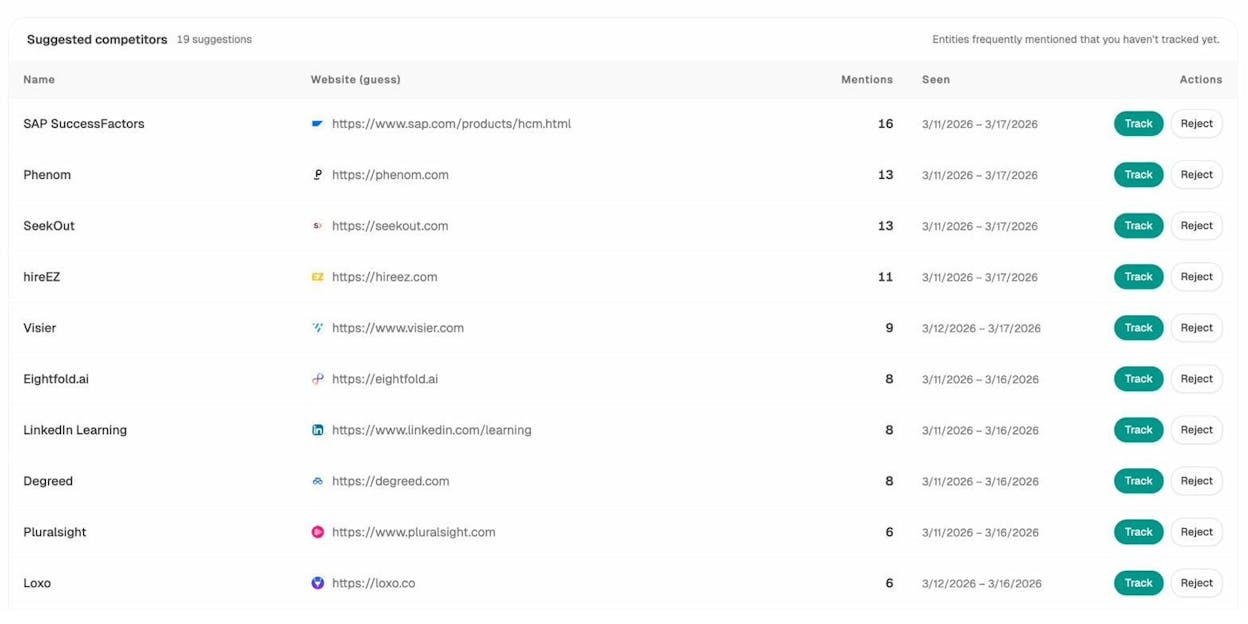
With Analyze AI, you can track which competitors appear alongside your brand across ChatGPT, Perplexity, Claude, Gemini, and Copilot. The Competitor Overview dashboard shows each competitor’s mention count, and you can track or reject suggested competitors that the platform discovers automatically.
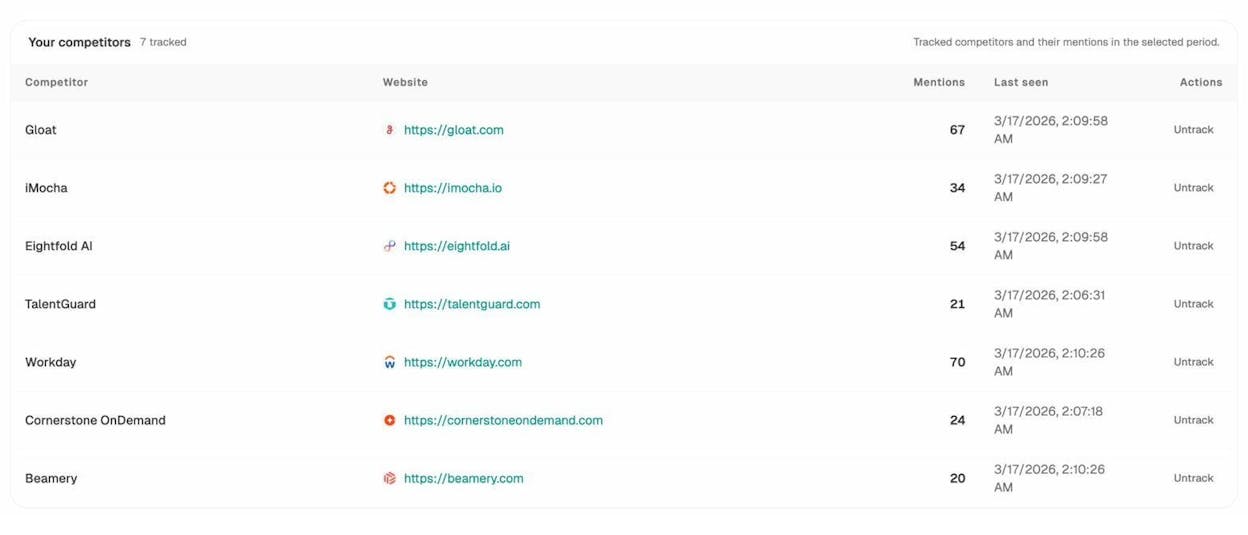
Once you start tracking competitors, you get a rolling view of how many times each one is mentioned across AI engines, when they were last seen, and how they compare to your brand.
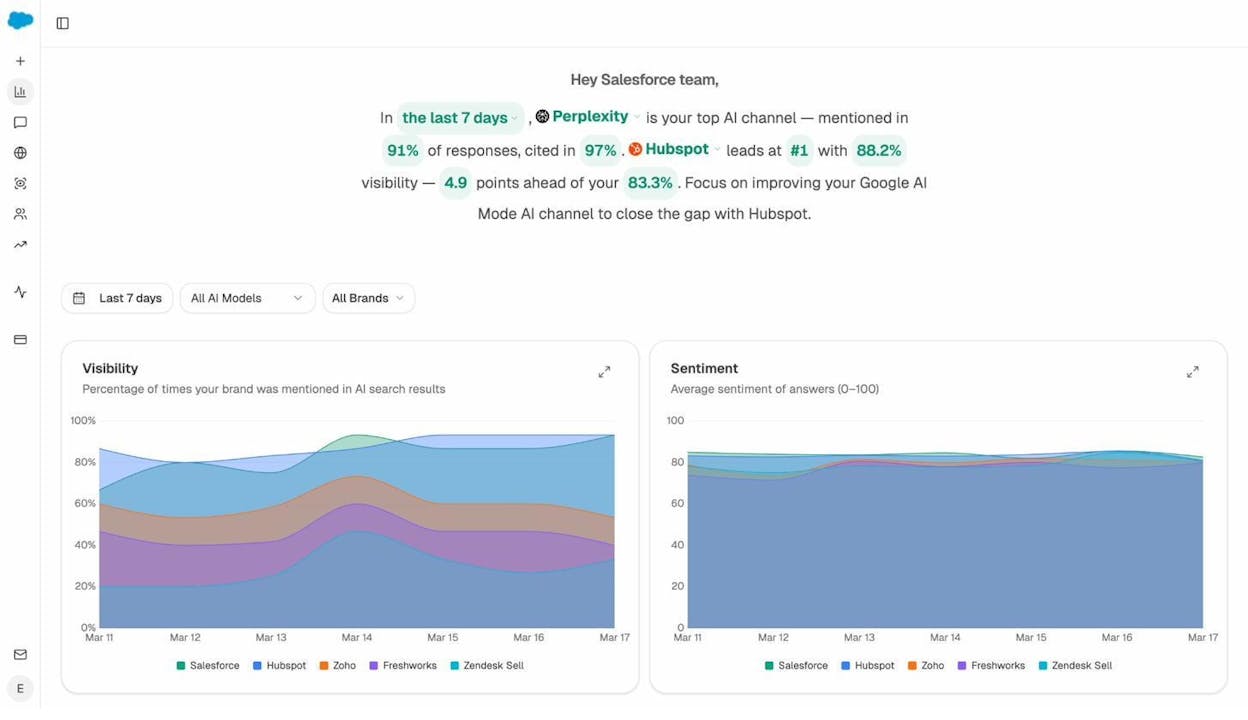
For the big picture, the Overview dashboard shows your brand’s visibility percentage and sentiment score over time — plotted against every tracked competitor. This is the AI search equivalent of the related: and site: analysis: instead of just seeing who competes on Google, you see who competes in AI answers.
If a competitor is consistently cited in AI responses where you’re absent, you’ve found a gap to close.
4. Find guest post and link building opportunities
Guest posting remains one of the most reliable off-page SEO strategies for earning backlinks. Most people find opportunities by searching for “write for us” pages:
coffee intitle:"write for us" inurl:write-for-us
![[Screenshot: Google search results showing “write for us” pages in the coffee niche]](https://www.datocms-assets.com/164164/1774472888-blobid12.png?auto=format,compress&w=1248&fit=max)
This works, but the problem is that every other link builder is using the same search. You end up pitching the same sites as everyone else.
A better approach: find a prolific guest writer in your niche and see where they’ve contributed.
"marketing" inurl:author/firstname-lastname
![[Screenshot: Google results showing guest posts by a specific author using inurl:author/]](https://www.datocms-assets.com/164164/1774472895-blobid13.png?auto=format,compress&w=1248&fit=max)
This surfaces the websites that accepted their guest post — and many of those sites will accept yours too.
You can also use intext: to find less obvious guest post footprints:
site:targetdomain.com intext:"is a guest contributor"
site:targetdomain.com intext:"this is a guest post by"
These catch guest posts on sites that don’t have a dedicated “write for us” page.
Finding resource page opportunities is another strong link building tactic. Resource pages curate links to the best content on a topic, making them natural link prospects.
"keyword" intitle:resources inurl:resources
![[Screenshot: Google results showing resource page opportunities found using intitle: and inurl: operators]](https://www.datocms-assets.com/164164/1774472897-blobid14.png?auto=format,compress&w=1248&fit=max)
Sift through the results to eliminate pages that only link to their own content. The ones linking externally to multiple sources are your best targets. Before you pitch, check the target site’s authority using Analyze AI’s free website authority checker — you want to spend your outreach time on domains that actually move the needle.
For more link building tools and strategies, we put together a dedicated guide.
5. Find files you don’t want in Google’s index
This builds on the indexing audit from section 1 but deserves its own focus because the stakes are high. Accidentally indexed files can leak sensitive information.
Check for indexed documents across all risky file types:
site:yourdomain.com (filetype:pdf OR filetype:doc OR filetype:xls OR filetype:ppt)
![[Screenshot: Google results revealing indexed documents of various file types on a site]](https://www.datocms-assets.com/164164/1774472901-blobid15.png?auto=format,compress&w=1248&fit=max)
Pay special attention to:
-
PDFs behind lead magnets. If someone can Google the PDF directly, your lead gen form is worthless.
-
Internal presentations. An indexed slide deck with internal revenue numbers or strategy plans is a data leak.
-
Spreadsheets. Pricing sheets, customer lists, or internal reports have no business in Google’s index.
Fix indexed files with an X-Robots-Tag: noindex header. If the files are in a specific directory, you can also block that directory in robots.txt — though robots.txt prevents crawling, not indexing. If Google already has the URL (from a link, for example), it might index the page even without crawling it. The noindex header is the reliable fix.
6. Find contact information for outreach
Outreach works better when you find the right person’s email. People frequently share contact details publicly — on social media profiles, personal websites, and conference pages.
Use site: to search specific platforms:
site:twitter.com "john smith" "email" "@gmail.com"
site:linkedin.com/in "john smith" "marketing director"
![[Screenshot: Google results showing a person’s contact info found via site: on social platforms]](https://www.datocms-assets.com/164164/1774472903-blobid16.png?auto=format,compress&w=1248&fit=max)
You can also search someone’s personal website:
site:johnsmith.com (email OR contact)
And for finding the right person at a company:
site:company.com "head of content" OR "content manager" OR "editor"
![[Screenshot: Google results showing team page results from a company’s site]](https://www.datocms-assets.com/164164/1774472907-blobid17.png?auto=format,compress&w=1248&fit=max)
Pro tip: If the person has a personal blog, try site:theirblog.com intext:"@" to catch any email address mentioned in their content or comments.
Dedicated email-finding tools like Hunter.io or Snov.io can supplement search operators here, especially for verified addresses.
7. Find internal linking opportunities
Internal links help distribute page authority across your site and guide users to related content. Search operators are a fast way to find pages that mention a topic but don’t link to your target page.
Say you want to build internal links to your article on keyword research tools. Search for other pages on your site that mention the phrase:
site:yourdomain.com "keyword research"
![[Screenshot: Google results showing pages on your site that mention “keyword research”]](https://www.datocms-assets.com/164164/1774472913-blobid18.png?auto=format,compress&w=1248&fit=max)
Every result is a candidate for an internal link — as long as the mention isn’t already linked. Open each page and check whether the phrase is linked or just plain text.
You can refine this further by excluding the target page:
site:yourdomain.com "keyword research" -inurl:keyword-research-tools
This removes your target page from the results, leaving only the pages that could link to it.
The limitation: Search operators can’t distinguish between linked and unlinked mentions. You have to check each page manually. For a faster method, tools like Ahrefs’ Site Audit or Screaming Frog automatically identify unlinked keyword mentions across your entire site — no manual checking required.
![[Screenshot: An SEO tool showing internal link opportunity suggestions with source page, keyword context, and target page]](https://www.datocms-assets.com/164164/1774472914-blobid19.png?auto=format,compress&w=1248&fit=max)
8. Find “best” listicles that don’t mention your brand
If you sell a product, you want to appear on every “best X tools” list that ranks on the first page of Google. Search operators make it easy to find the lists that are missing your brand.
"best email marketing tools" -yourbrand
![[Screenshot: Google results for “best email marketing tools” with the minus operator excluding a specific brand name]](https://www.datocms-assets.com/164164/1774472923-blobid20.png?auto=format,compress&w=1248&fit=max)
Every result is a list of top tools that doesn’t mention you. Reach out to the author, explain why your tool deserves inclusion, and offer to provide a demo account, screenshots, or a unique angle they can use.
You can narrow this to high-authority pages by combining with site::
"best email marketing tools" -yourbrand site:*.edu OR site:*.org
Or focus on recently published lists to pitch active writers:
"best email marketing tools" -yourbrand after:2025-06-01
![[Screenshot: Google results for recent listicles not mentioning a brand, using after: operator]](https://www.datocms-assets.com/164164/1774472923-blobid21.png?auto=format,compress&w=1248&fit=max)
How to extend this to AI search: The same problem exists in AI answers. When someone asks ChatGPT or Perplexity “What are the best email marketing tools?”, your brand might be completely absent from the response.
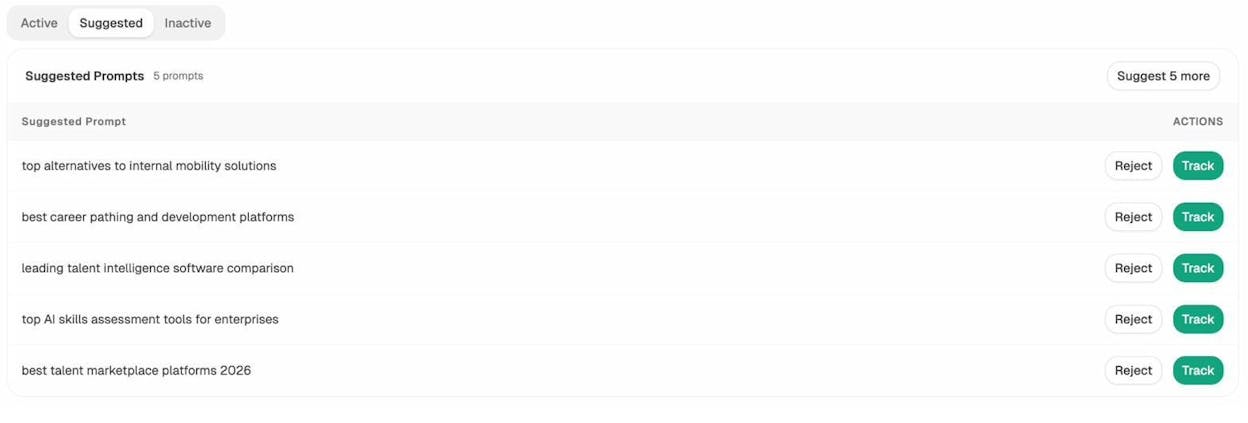
Analyze AI surfaces these gaps automatically. The platform suggests prompts relevant to your industry that you aren’t tracking yet — prompts like “top alternatives to internal mobility solutions” or “best career pathing and development platforms.” One click on “Track,” and Analyze AI starts monitoring those prompts daily across every AI engine. Think of it as the AI version of the -yourbrand operator, but automated and running on autopilot.
But finding the gap is only half the problem. You also need to understand why AI engines skip your brand — and that usually comes down to the sources they cite. Analyze AI’s Sources dashboard shows the content types AI models reference (blogs, product pages, reviews) and which domains get cited most often in your space.
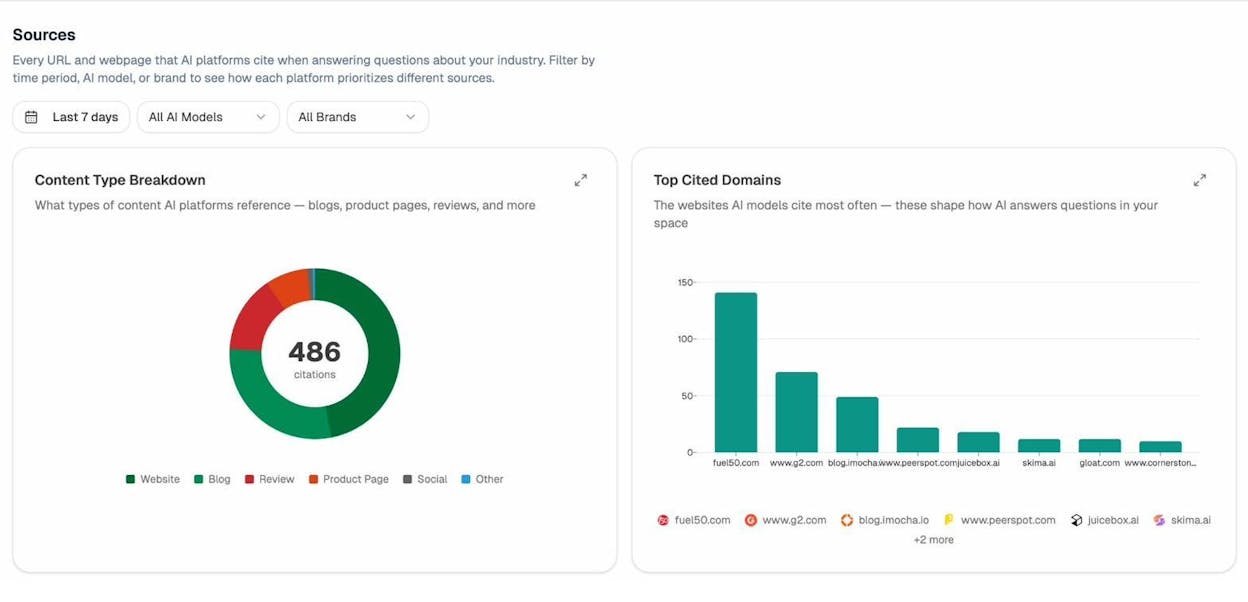
If a competitor’s blog dominates the citation graph, you know exactly what kind of content to create. This is the answer engine optimization playbook: strengthen the sources AI models rely on, and your brand starts appearing in the answers.
9. Find websites that have reviewed competitors
If a website has reviewed a competitor’s product, there’s a good chance they’ll review yours too.
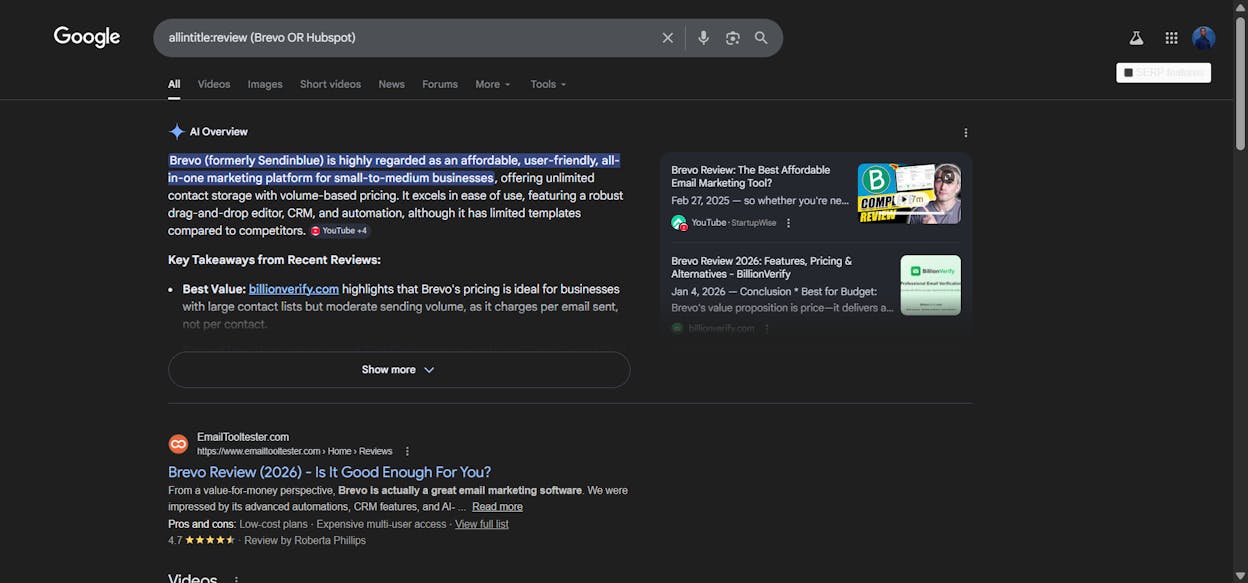
Add the after: operator to find recently published reviews. This way, you know the site is still active and the writer is still covering your niche:
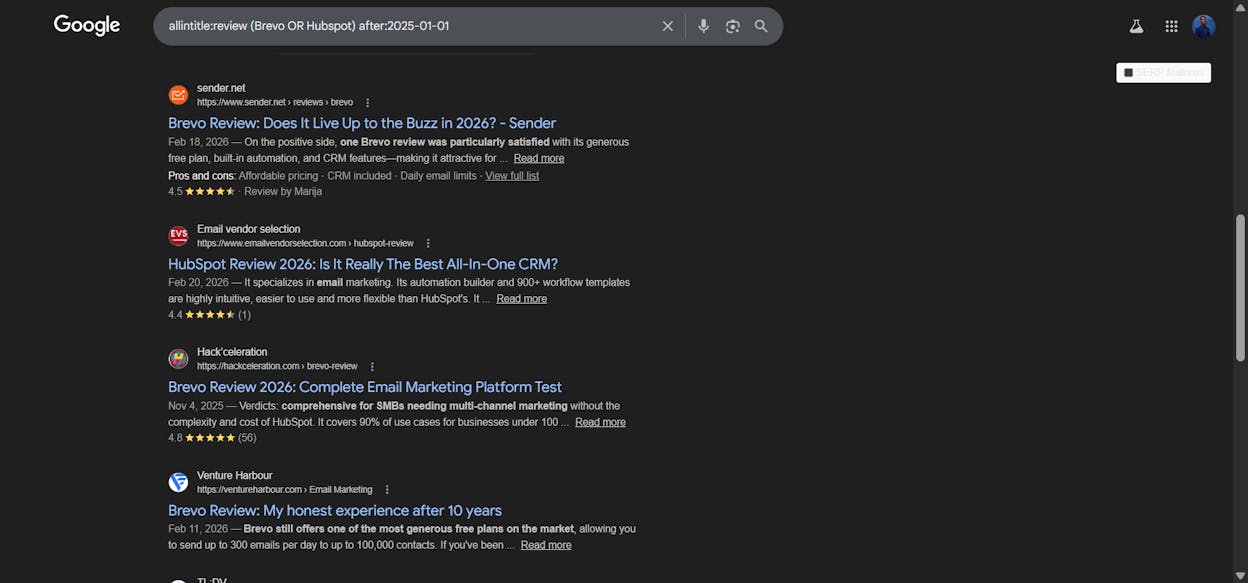
You can also look for comparison articles, which often convert even better than standalone reviews:
allintitle:(competitor1 vs competitor2)
"competitor1 alternative" OR "competitor2 alternative"
![[Screenshot: Google results showing competitor comparison and alternative articles]](https://www.datocms-assets.com/164164/1774472941-blobid26.png?auto=format,compress&w=1248&fit=max)
When you find these pages, check whether your product is already mentioned. If not, that’s your outreach target. Before reaching out, check each site’s authority with our free website authority checker to prioritize high-value targets.
10. Audit a competitor’s content publishing pace
Understanding how fast a competitor publishes can inform your own SEO content strategy. Are they publishing five blog posts a week or one per month?
Combine site: with after: and before: to count posts from a specific time window:
site:competitor.com/blog after:2025-01-01 before:2025-07-01
![[Screenshot: Google results showing the number of posts from a competitor’s blog within a six-month window]](https://www.datocms-assets.com/164164/1774472942-blobid27.png?auto=format,compress&w=1248&fit=max)
The estimated result count gives you a rough publication frequency.
A word of caution: Google’s date filtering isn’t perfectly reliable. It can include updated pages in addition to new ones. If a competitor republished or refreshed an old post with a new date, it shows up in your search even though it wasn’t originally published during your window.
For more accurate data, use a tool that tracks original publication dates separately from update dates.
You can also monitor competitors over time by setting up Google Alerts for their domain:
site:competitor.com/blog
Set the frequency to daily or weekly, and Google will email you whenever new content is indexed. For a deeper look at competitor monitoring tools and strategies, check our full guide.
11. Find relevant forum questions to answer
Answering questions on forums like Reddit and Quora builds brand awareness and can drive referral traffic — especially if your answer ranks in Google or gets surfaced in AI search results.
Search for relevant questions on Quora:
site:quora.com inurl:(keyword1 | keyword2)
![[Screenshot: Google results showing relevant Quora threads found with site: and inurl: operators]](https://www.datocms-assets.com/164164/1774472947-blobid28.png?auto=format,compress&w=1248&fit=max)
For Reddit:
site:reddit.com "keyword" intitle:"best" OR intitle:"recommendation"
![[Screenshot: Google results showing Reddit threads asking for recommendations in a specific niche]](https://www.datocms-assets.com/164164/1774472948-blobid29.png?auto=format,compress&w=1248&fit=max)
Prioritize threads that already rank in Google. If a Quora answer or Reddit thread gets organic traffic, your contribution there gets ongoing eyeballs.
You can estimate a forum page’s traffic using Analyze AI’s free website traffic checker or check where the page ranks for its main keyword with our free keyword rank checker.
How this connects to AI search: AI models like ChatGPT and Perplexity pull heavily from forum discussions, especially Reddit, when generating answers. A well-written Reddit comment that cites your product or links to your content can influence AI responses.
This isn’t speculation. Research from Analyze AI’s study of 65,000+ citations shows that AI engines frequently cite Reddit, Quora, and other community sources alongside brand websites. If you’re actively answering relevant questions with genuine expertise and citing your own helpful resources, those answers can become part of the AI knowledge graph.
12. Find pages with specific anchor text pointing to them
If you want to understand how other websites link to your competitors — or to your own content — the inanchor: operator can help, even though it’s unreliable.
inanchor:"keyword research"
![[Screenshot: Google results for inanchor: operator showing pages that receive links with specific anchor text]](https://www.datocms-assets.com/164164/1774472952-blobid30.png?auto=format,compress&w=1248&fit=max)
This returns pages that have inbound links with “keyword research” as the anchor text. It’s a rough way to gauge which pages are attracting keyword-rich backlinks.
Because inanchor: is unreliable, don’t rely on it for precise analysis. Use it for quick directional research, then validate with a dedicated backlink tool for exact anchor text data.
Pro tip: Understanding anchor text patterns matters for both SEO and AI visibility. The anchor text other sites use to link to your content sends strong relevance signals to Google — and those same linked pages are often the ones AI engines cite. For a broader look at how different keyword types influence your link profile, read our full breakdown.
13. Find content gaps by comparing competing sites
Search operators let you quickly compare what two sites cover — and spot topics one covers that the other doesn’t.
First, see what topics Competitor A covers:
site:competitorA.com intitle:"keyword research"
Then check Competitor B:
site:competitorB.com intitle:"keyword research"
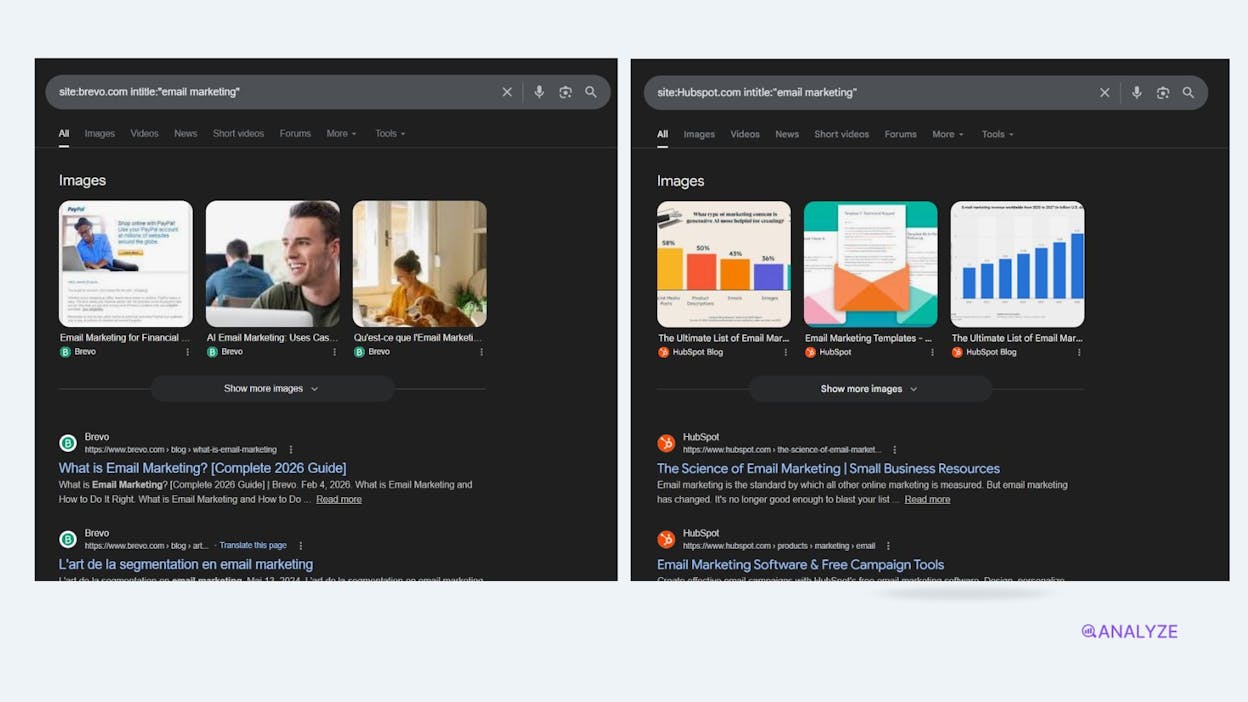
If Competitor A has five articles on keyword research and Competitor B has zero, that’s a content gap for Competitor B — and potentially for you too.
You can also reverse-engineer this for your own site. Search for a topic you cover and compare your indexed pages to a competitor’s:
site:yourdomain.com intitle:"link building" — 3 results
site:competitor.com intitle:"link building" — 12 results
That gap tells you where you’re underinvesting.
For systematic content gap analysis, use a dedicated competitor analysis tool that compares keyword portfolios across domains. To find initial keyword ideas to compare, try Analyze AI’s free keyword generator — it surfaces long-tail variations you might miss.
The AI search dimension: Content gaps don’t just exist in Google. They exist in AI answers too. Analyze AI’s Prompt Level Analytics shows you exactly which prompts your competitors dominate and where your brand is absent — broken down by visibility percentage, sentiment, position, and which competitors appear.
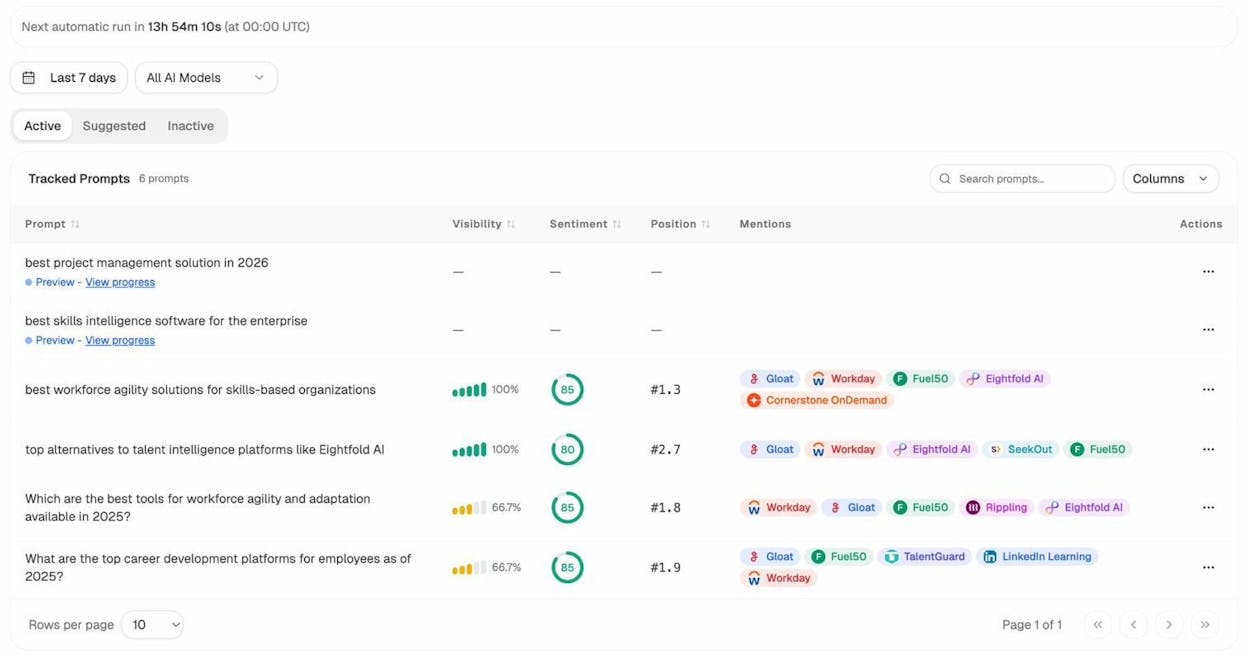
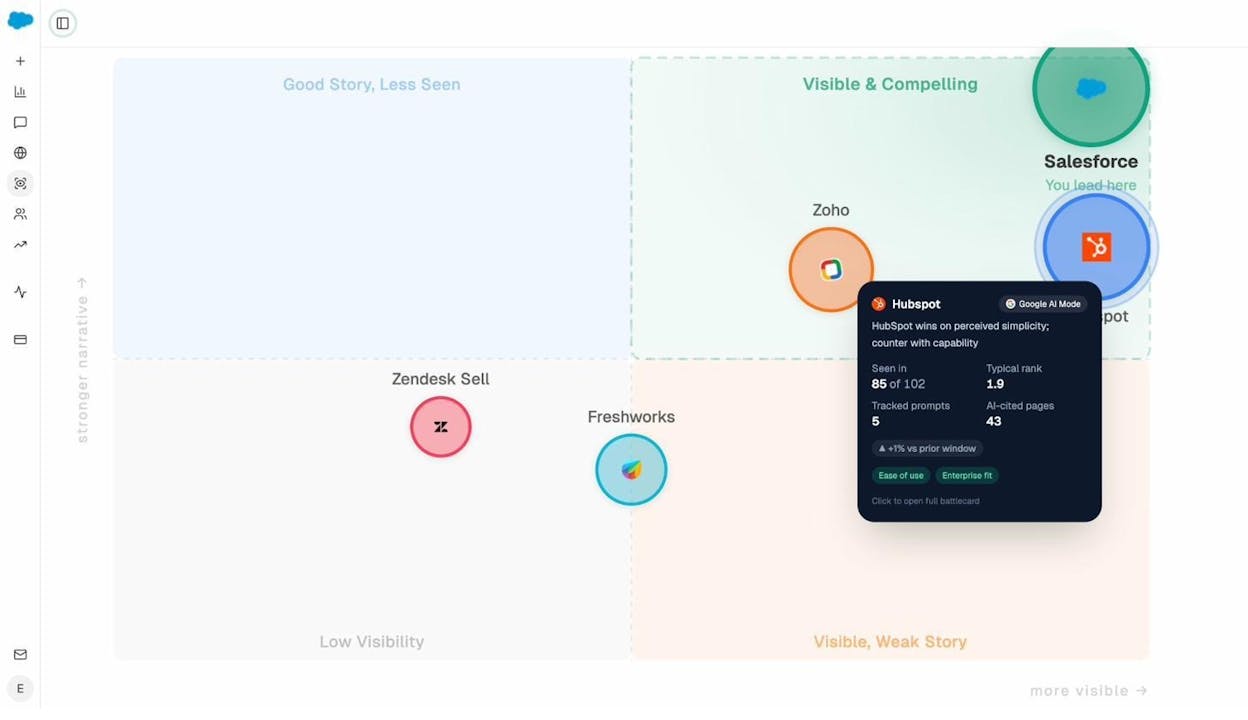
If you find that a competitor appears in 100% of AI responses for a prompt cluster while your brand shows up in only 33%, that’s a content gap worth closing. The Perception map makes this even clearer — it plots every competitor on a grid of visibility vs. narrative strength, so you can see who’s “Visible & Compelling” versus “Visible, Weak Story.”
14. Find outdated content on your site that needs refreshing
Content decay is real. Posts that ranked well two years ago can lose traffic if the information becomes outdated, competitors publish better content, or Google’s algorithm shifts.
To find your own content published before a specific date:
site:yourdomain.com/blog before:2024-01-01
![[Screenshot: Google results showing older blog posts from a specific site using before: operator]](https://www.datocms-assets.com/164164/1774472964-blobid34.png?auto=format,compress&w=1248&fit=max)
This surfaces every indexed post from before 2024. Now scan the results: are there posts with dates in the title that are clearly outdated (like “Best SEO Tools for 2023”)? Are there guides referencing deprecated features or dead links?
You can also look for specific outdated signals:
site:yourdomain.com intitle:2023
site:yourdomain.com intitle:2024
These find posts with year-specific title tags that may need refreshing for the current year.
Once you have a list of outdated content, prioritize refreshing the pages that already have traffic or backlinks. Updating a page that has 50 backlinks is far more valuable than updating one with zero — you preserve existing link equity while boosting relevance. Check any page’s current ranking position with Analyze AI’s free keyword rank checker to decide whether a refresh is worth the effort.
How to extend this to AI search: Outdated content doesn’t just hurt your Google rankings. It can also cause AI engines to surface incorrect information about your brand or products, or to skip citing you entirely in favor of fresher competitors.
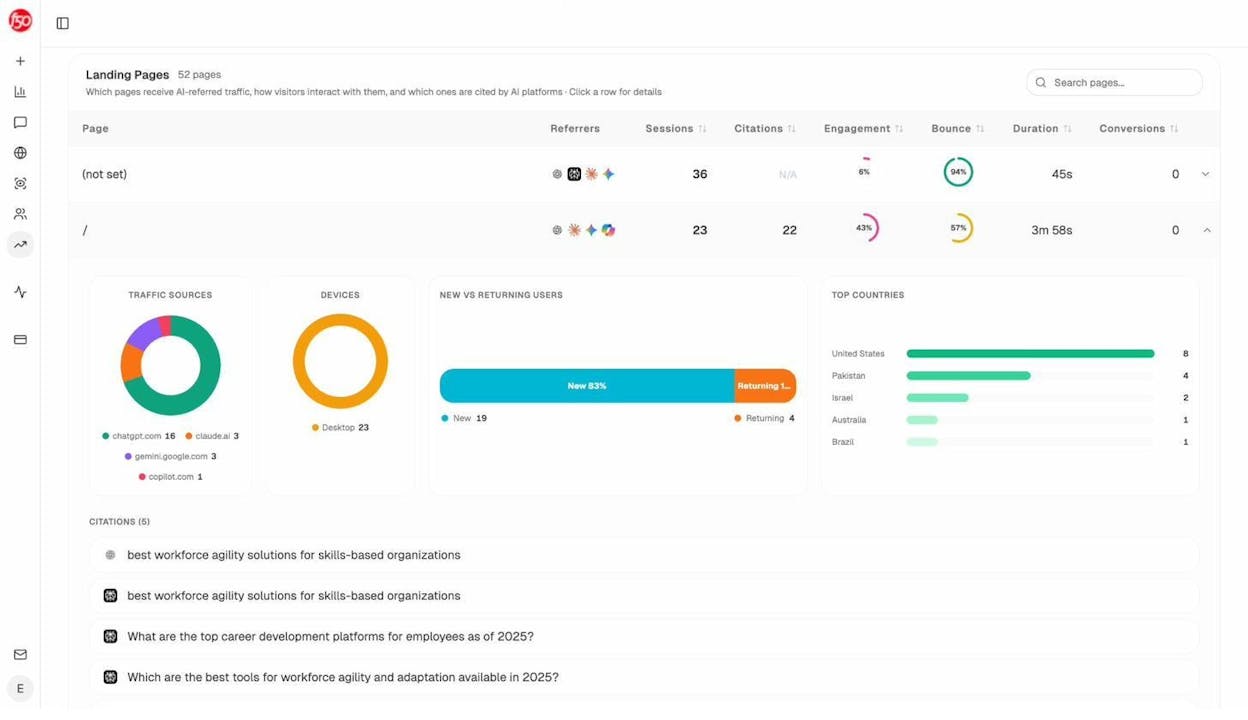
Analyze AI’s Landing Pages report in AI Traffic Analytics shows which of your pages currently receive traffic from AI engines — broken down by the specific AI source (ChatGPT, Claude, Gemini, Copilot, Perplexity), the number of sessions, engagement rate, bounce rate, and conversions. If an outdated page is getting AI referral traffic, refreshing it becomes doubly urgent — you’re protecting both your organic and AI search channels simultaneously.
15. Monitor brand mentions and sentiment across the web
Use intext: to find pages that mention your brand, product, or key personnel:
intext:"your brand name" -site:yourdomain.com
![[Screenshot: Google results showing external brand mentions found with intext: and minus site: operators]](https://www.datocms-assets.com/164164/1774472970-blobid36.png?auto=format,compress&w=1248&fit=max)
The -site:yourdomain.com exclusion removes your own pages, leaving only external mentions. These results can include press coverage, blog mentions, reviews, forum discussions, and social media posts.
To find negative mentions specifically, add sentiment-related keywords:
"your brand name" (terrible OR horrible OR worst OR scam OR overpriced) -site:yourdomain.com
To find positive mentions or testimonials:
"your brand name" (love OR amazing OR best OR recommend) -site:yourdomain.com
Set up Google Alerts for your brand name and key product names to get email notifications when new mentions are indexed. This gives you an early warning system for both PR opportunities and reputation issues. For dedicated brand tracking software, explore our guide to the best options.
How to extend this to AI search: Google search operators show you what websites say about your brand. But today, millions of people ask AI engines about brands, products, and services — and you need to know what those AI engines are saying in response.
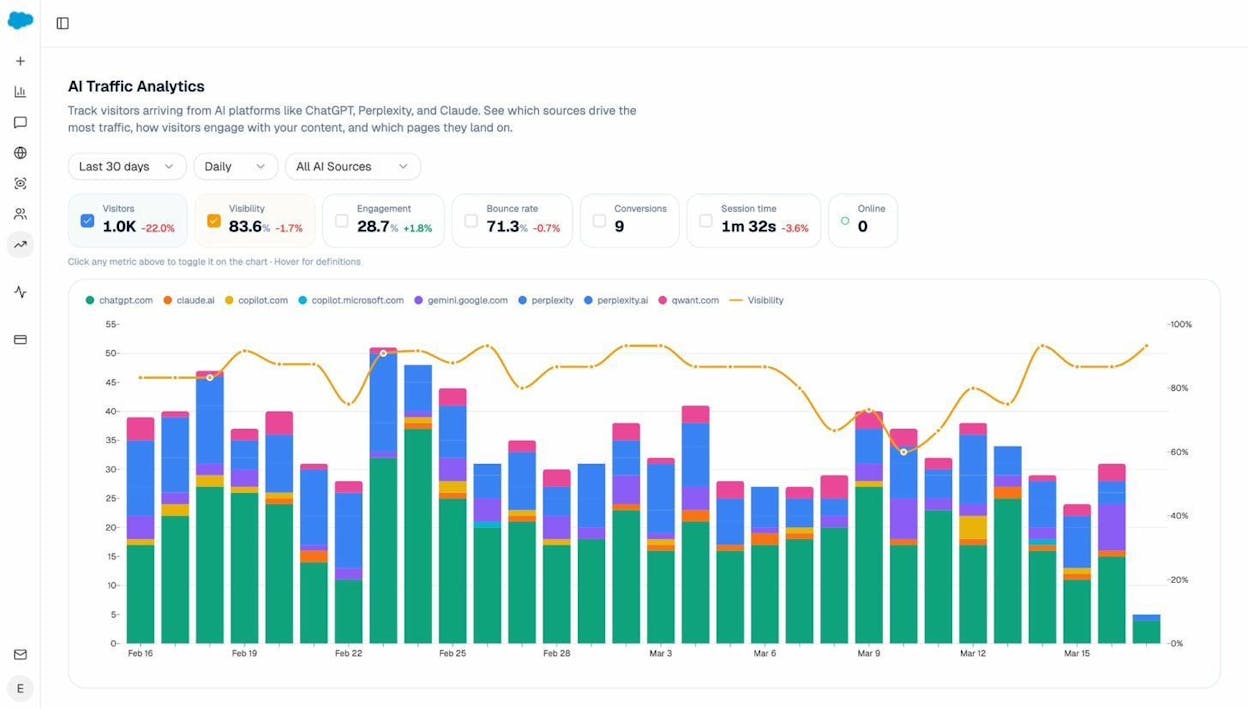
Analyze AI’s AI Traffic Analytics dashboard gives you a single view of how many visitors arrive from AI platforms, your brand’s visibility score, engagement rate, bounce rate, conversions, and session time — all trended over time and broken down by engine (ChatGPT, Claude, Copilot, Gemini, Perplexity, and others).
And when you need to check how AI engines handle a specific query about your brand in real time, use the Ad Hoc Searches feature. Type any prompt — like “What are the best project management tools for remote teams?” — pick a country, and hit Track. Analyze AI queries ChatGPT, Google AI, and Perplexity and shows you exactly which brands appear, in which position, and with what sentiment.
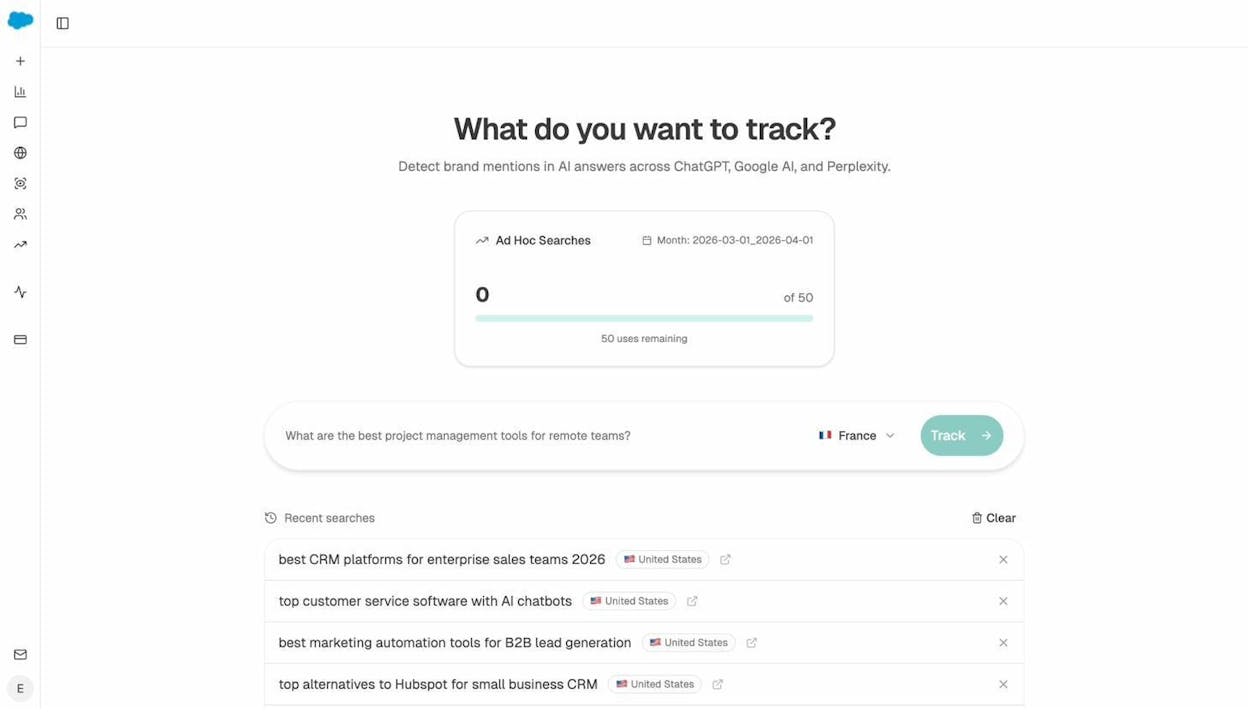
This matters because AI responses increasingly influence buying decisions. If Perplexity tells a user your product is “overpriced compared to alternatives” or ChatGPT omits you entirely from a recommendation, that’s lost revenue — and you won’t find it in Google Search Console. You’ll find it in your AI search analytics.
10 advanced operator combinations worth memorizing
The operators above are most powerful when combined. Here are ten combinations that solve real problems:
|
Combination |
What it finds |
|---|---|
|
site:yourdomain.com -inurl:blog -inurl:help |
Indexed pages outside your blog and help center (catches rogue pages). |
|
site:yourdomain.com filetype:pdf -inurl:assets |
PDFs indexed outside your assets folder (possible leaks). |
|
"your brand" -site:yourdomain.com after:2025-01-01 |
Recent external brand mentions. |
|
intitle:"best * tools" -site:yourdomain.com inurl:blog |
“Best tools” listicles on competitor blogs (link targets). |
|
site:competitor.com intitle:("how to" OR "guide" OR "tutorial") |
Competitor’s instructional content (reveals their SEO strategy). |
|
site:competitor.com inurl:author |
All author pages on a competitor’s site (reveals team size and contributors). |
|
"keyword" intitle:statistics OR intitle:data OR intitle:study |
Data-driven content on a topic (good for research and citation). |
|
site:yourdomain.com intext:"keyword" -intitle:"keyword" |
Pages mentioning a keyword in body but not in the title (on-page fix). |
|
site:reddit.com "your brand" after:2025-01-01 |
Recent Reddit discussions mentioning your brand. |
|
"keyword" filetype:pdf site:*.edu OR site:*.gov |
Academic and government PDFs on a topic (high-authority citation sources). |
Useful free tools to pair with search operators
Search operators surface the data. These free tools help you act on it. Here’s a quick reference for the situations where operators alone aren’t enough:
|
What you need |
Free tool |
|---|---|
|
Check if a competitor page gets traffic |
|
|
See where a page ranks for its target keyword |
|
|
Check the authority of a site you want a link from |
|
|
Evaluate keyword difficulty before targeting a term |
|
|
Generate new keyword ideas from a seed term |
|
|
Check what currently ranks for a keyword |
|
|
Find broken links on your site or a competitor’s |
|
|
Research keywords for Bing specifically |
|
|
Research keywords for YouTube content |
|
|
Research keywords for Amazon listings |
All of these are free to use — no signup required. For a more complete list, see our roundup of 29 free SEO tools.
Tracking your brand visibility beyond Google
Google search operators are essential for SEO research. They help you audit your site, analyze competitors, find link opportunities, and monitor brand mentions across the web.
But search today extends beyond Google’s ten blue links. AI search engines — ChatGPT, Perplexity, Claude, Gemini, and Microsoft Copilot — generate direct answers that cite specific brands, products, and resources. And unlike Google, these engines don’t expose their ranking logic through search operators. You can’t type site:yourbrand.com into ChatGPT to see where you appear.
That’s where AI search analytics fills the gap.
With Analyze AI, you can:
-
Track your brand’s visibility across every major AI engine from a single dashboard, seeing which prompts mention your brand, which don’t, and how competitors compare.
-
Identify AI search opportunities — the specific prompts and topics where competitors appear and your brand is absent.
-
Monitor AI referral traffic by connecting your GA4 and seeing exactly which AI engines send sessions, which landing pages receive them, and what converts.
-
Audit the sources AI cites to understand which URLs and domains influence AI answers in your category.
Google search operators and AI search analytics aren’t competing tools. They’re complementary. Operators help you master Google. AI analytics help you master the engines that are reshaping how people discover brands.
The companies that will win organic visibility in 2026 and beyond are the ones that treat both channels as part of the same SEO strategy — because search is evolving, not dying.

Ernest

Ibrahim


