



Summarize this blog post with:


In this article, you’ll get nine ready-to-use SEO standard operating procedures (SOPs) that cover every repeatable task — from content creation and gap analysis to backlink prospecting, competitor research, and traffic-drop diagnosis. Each SOP includes the exact steps, the tools involved, and the screenshots you need to follow along. You’ll also learn how to extend every process to AI search — because the same discipline that drives Google rankings now drives visibility in ChatGPT, Perplexity, Gemini, and Copilot.
Table of Contents
1. Creating Quality Content with AI Assistance
AI is not here to replace writers. It’s here to eliminate the blank-page problem, speed up research, and handle the formatting tasks that eat into your creative time. But without a clear process, AI-assisted content turns into a mess of generic paragraphs that sound like everyone else.
This SOP gives you a repeatable system for using AI as an assistant — not a replacement — so you can produce content that ranks, reads well, and actually sounds like your brand.
Step 1: Start with keyword research
Before you open any AI tool, you need a target keyword. Use a keyword research tool to find terms with a realistic balance of search volume and competition.
Check the SERP for your target keyword manually. Open the top five results and note what format they use (listicle, how-to, comparison), what subtopics they cover, and what’s missing. This gives you a content brief that no AI tool can generate on its own.
![[Screenshot: Google SERP results for a target keyword showing the top 5 organic results and their formats]](https://www.datocms-assets.com/164164/1777921450-blobid1.png?auto=format,compress&w=1248&fit=max)
You can also use Analyze AI’s Keyword Generator to expand your seed list, or the Keyword Difficulty Checker to prioritize terms you can realistically rank for.
Step 2: Build your content brief
Your brief should include the target keyword, secondary keywords, the search intent (informational, commercial, transactional), a proposed H2/H3 structure based on SERP analysis, and a list of subtopics the top results cover.
This is the document you’ll feed to your AI tool. The more specific the brief, the better the output.
Step 3: Generate a first draft with AI
Use your preferred AI writing tool to produce a draft based on your brief. The key instruction: tell the AI to follow your outline exactly and to leave placeholders for any claims that need data, screenshots, or expert quotes.
Do not let the AI write the introduction or conclusion. Those should reflect your brand voice and editorial perspective — two things AI cannot replicate well.
![[Screenshot: A ChatGPT or Claude prompt window showing a detailed content brief being fed to the model with specific instructions]](https://www.datocms-assets.com/164164/1777921459-blobid2.png?auto=format,compress&w=1248&fit=max)
Step 4: Add human touchpoints
Read the draft section by section. For each section, ask yourself three questions. Is this specific enough? Does it say something a competitor hasn’t said? Would I trust this advice if I were the reader?
Replace generic statements with specific data, real examples, or original analysis. Add internal links to your existing content. Insert screenshots where a visual would save the reader a thousand words.
Step 5: Edit for voice and accuracy
Run the final piece through your brand’s editorial checklist. Check for factual accuracy (AI hallucinates). Check for tone (AI defaults to formal). Remove any filler sentences that don’t advance the reader’s understanding.
Step 6: Publish and monitor
After publishing, track the page’s performance in Google Search Console and your rank tracking tool. Set a 30-day reminder to review rankings and update the content if needed.
Extend this to AI search
The content you create for Google also fuels AI answers. AI engines like ChatGPT and Perplexity pull from the same high-quality, well-structured pages that rank in traditional search. But there’s an extra step: once your content is live, check whether AI engines are citing it.
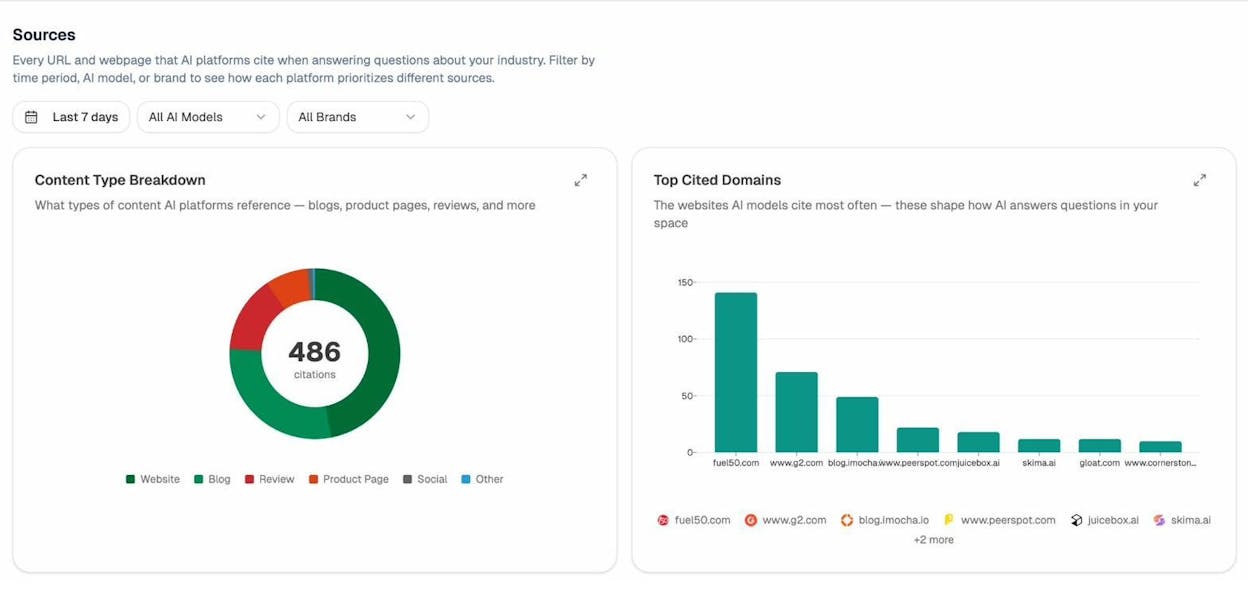
In Analyze AI, go to your Sources dashboard to see which of your URLs AI models cite, how often, and in which engines. If a page ranks well on Google but doesn’t appear in AI answers, it may need structural improvements — clearer headings, more concise answer-ready paragraphs, or better entity coverage.
2. Running a Content Gap Analysis
If your content isn’t ranking, something is missing. A content gap analysis helps you find what top-ranking competitors cover that you don’t — so you can fill those holes and move from page two to page one.
Most teams skip this because it feels tedious. This SOP makes it repeatable and fast.
Step 1: Identify your top competitors
Pick three to five websites that consistently outrank you for your target keywords. These should be direct competitors (they sell what you sell or cover what you cover), not general publishers like Wikipedia or Forbes.
If you’re not sure who your competitors are, use the SERP Checker to see who ranks for your most important keywords. Or run a few seed keywords through a competitive analysis tool and look at the competing domains report.
![[Screenshot: An SEO tool’s competing domains report showing websites that rank for overlapping keywords]](https://www.datocms-assets.com/164164/1777921464-blobid4.png?auto=format,compress&w=1248&fit=max)
Step 2: Export their top-ranking keywords
For each competitor, pull their list of organic keywords along with ranking positions and estimated traffic. Most SEO tools let you export this data as a CSV for analysis.
Step 3: Compare keyword sets
Combine the exports and filter for keywords where at least two competitors rank in the top 10 but your site doesn’t rank at all — or ranks below position 20. These are your content gaps.
Sort this list by traffic potential. The keywords with the highest estimated traffic and lowest difficulty are your quick wins.
Step 4: Group gaps into content opportunities
Cluster related keywords into topic groups. A single blog post can target a primary keyword and several closely related secondary keywords. Grouping helps you avoid writing five thin posts when one comprehensive guide would cover the topic better.
Step 5: Prioritize by business value
Not every gap is worth filling. A keyword with 10,000 monthly searches but zero relevance to your product is a vanity metric. Score each opportunity by search volume, keyword difficulty, relevance to your product or service, and the content format required (a 500-word glossary entry is faster to produce than a 4,000-word guide).
![[Screenshot: A spreadsheet with content gap opportunities scored by traffic potential, difficulty, and business relevance]](https://www.datocms-assets.com/164164/1777921465-blobid5.png?auto=format,compress&w=1248&fit=max)
Step 6: Create and assign briefs
For each prioritized gap, create a content brief (see SOP #1) and assign it to a writer with a deadline. Track progress in your project management tool.
How to find content gaps in AI search
Traditional content gap analysis compares Google rankings. But there’s a parallel gap in AI search: prompts where competitors get mentioned and you don’t.
Analyze AI has an Opportunities view that shows exactly this. It lists prompts where your competitors are cited but your brand is absent. Each entry shows which competitors appear and how many times they’re mentioned.
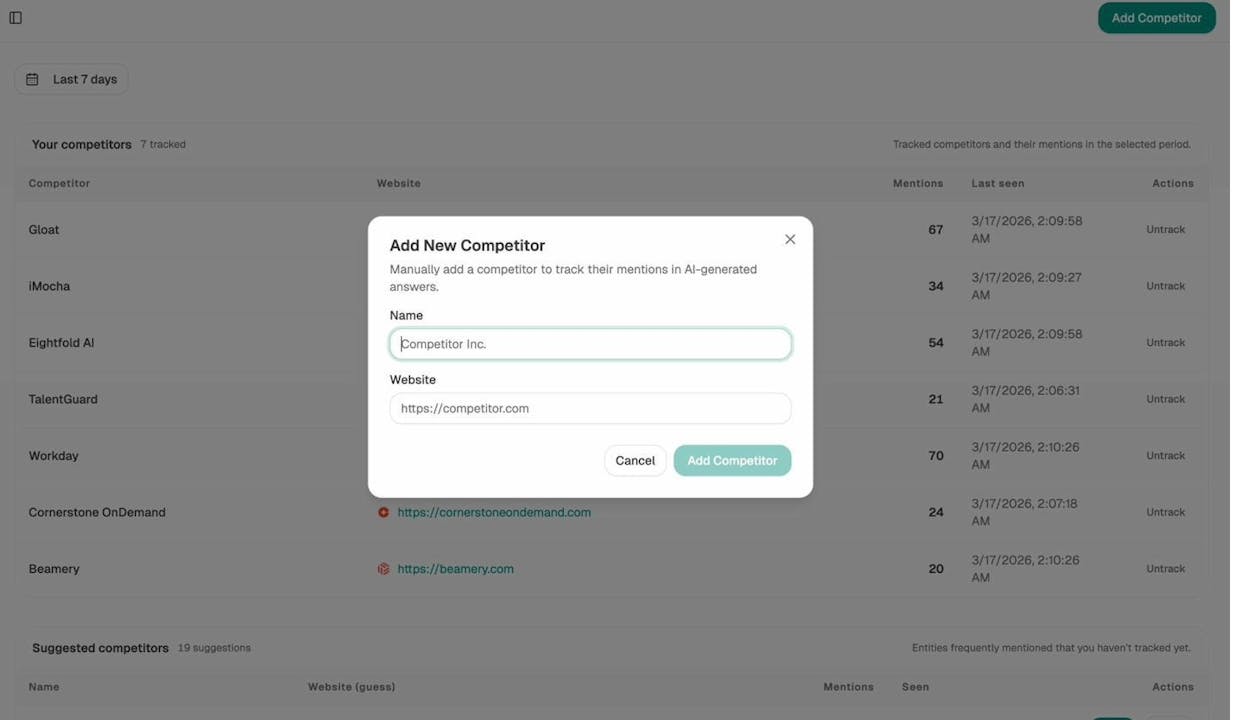
This is the AI-search equivalent of a content gap report. Use it to identify the topics and questions where AI models favor your rivals, then create content that directly addresses those prompts. Over time, this shifts AI answers in your direction — the same way filling Google content gaps shifts rankings.
3. Uncovering Backlink Gaps
Quality backlinks are still one of the strongest ranking signals. If your competitors have links from authoritative domains and you don’t, you’re starting every race a step behind.
A backlink gap analysis shows you exactly where competitors are earning links that you’re not — so you can target the same opportunities with a focused outreach plan.
Step 1: List your competitors
Use the same three to five competitors from your content gap analysis (SOP #2). Consistency matters — you want to analyze the same sites across multiple SOPs so your insights compound.
Step 2: Pull each competitor’s backlink profile
Export the referring domains for each competitor using a backlink analysis tool. You want domain-level data: the linking domain, domain authority or domain rating, and the number of backlinks from that domain.
You can start with a quick check using Analyze AI’s Website Authority Checker to gauge the strength of competitor domains, then dig deeper with a dedicated backlink tool.
![[Screenshot: A backlink tool showing a competitor’s referring domains sorted by domain authority]](https://www.datocms-assets.com/164164/1777921472-blobid7.png?auto=format,compress&w=1248&fit=max)
Step 3: Find the gaps
Filter the combined data for domains that link to two or more competitors but not to you. These are your backlink gaps — sites that are clearly willing to link to content in your space, but haven’t linked to yours yet.
Step 4: Qualify the opportunities
Not every linking domain is worth pursuing. Filter out domains with very low authority (below 20 DR/DA), spammy or irrelevant sites, directories, and link farms. Focus on domains that are topically relevant, have real traffic, and link editorially (not through paid placements).
Step 5: Categorize by link type
Sort your qualified opportunities into categories based on how the competitor earned the link: guest post, resource page mention, broken link replacement, data citation, or editorial reference. This tells you which outreach approach to use for each prospect.
Step 6: Build your outreach list
For each opportunity, record the target domain, the specific page that links to the competitor, the contact person (see SOP #4 for how to find them), and the outreach approach. Store this in a spreadsheet or CRM.
![[Screenshot: A spreadsheet template for backlink gap outreach showing columns for domain, page, contact, approach, and status]](https://www.datocms-assets.com/164164/1777921474-blobid8.png?auto=format,compress&w=1248&fit=max)
Where AI search fits in
Backlinks don’t just help you rank on Google. Many of the same authoritative sites that link to your competitors are also cited by AI engines as source material. In Analyze AI’s Sources dashboard, you can see the top cited domains in your industry — the websites AI models reference most when answering questions in your space.
If a domain appears both in your backlink gap list and in Analyze AI’s top cited domains, it’s a double-priority target. Earning a link from that site improves your Google rankings and increases the chances AI engines cite your content when they reference that source.
4. Finding and Qualifying Link Prospects
Link outreach only works if your emails reach the right person with the right message. This SOP helps you find contact details quickly and qualify whether a prospect is worth your time — before you write a single pitch.
Step 1: Start with your backlink gap list
If you’ve completed SOP #3, you already have a list of target domains. If not, build a quick prospect list by searching Google for “[your topic] + resources,” “[your topic] + recommended tools,” or “[your topic] + guest post” to find sites that link out editorially.
Step 2: Find the right contact
For each target domain, you need to find the person who controls editorial decisions — usually an editor, content manager, or the blog author. Here’s the process.
Check the “About” or “Team” page on the website. Look at the byline of the article that links to your competitor. Search LinkedIn for “[Company name] + content manager” or “editor.” Check Twitter/X bios for anyone who mentions writing for that publication.
![[Screenshot: LinkedIn search results for a content manager at a target website with the profile showing their role]](https://www.datocms-assets.com/164164/1777921477-blobid9.png?auto=format,compress&w=1248&fit=max)
Step 3: Find their email
Once you have a name, find their email using a combination of the website’s contact page, email finder tools (Hunter.io, Snov.io, or similar), LinkedIn connection requests with a brief note, and the common email format for that company ([email protected], [email protected]).
![[Screenshot: An email finder tool showing verified email results for a contact name and company domain]](https://www.datocms-assets.com/164164/1777921483-blobid10.jpg?auto=format,compress&w=1248&fit=max)
Step 4: Qualify the prospect
Before you pitch, answer three questions.
Is the site relevant? If you sell project management software and the site writes about gardening, skip it. Relevance beats authority every time.
Does the site have real traffic? Use Analyze AI’s Website Traffic Checker to estimate monthly visitors. A high-authority domain with zero traffic won’t move the needle.
Is the contact active? Check when they last published. If their last post was two years ago, they’ve likely moved on.
Step 5: Personalize your pitch
Generic outreach gets ignored. Reference a specific article on their site, explain why your content adds value to their readers, and keep the email under 150 words. One clear ask. No attachments.
Step 6: Track and follow up
Log every outreach email in your spreadsheet or CRM with the date sent, a follow-up date (7 days later), and the status (no reply, interested, linked, declined). Follow up once — then move on.
![[Screenshot: An outreach tracking spreadsheet showing email status, follow-up dates, and outcomes for each prospect]](https://www.datocms-assets.com/164164/1777921485-blobid11.png?auto=format,compress&w=1248&fit=max)
5. Building an SEO Topical Map
SEO is no longer just about individual keywords. It’s about owning topics. A well-structured topical map helps Google (and AI engines) see you as an authority by connecting related content in a meaningful hierarchy.
Without a topical map, your site feels scattered. With one, every piece of content reinforces every other piece — and the whole is greater than the sum of its parts.
Step 1: Define your core topics
Start with three to five broad topics that are central to your business. If you sell CRM software, your core topics might be sales pipeline management, customer relationship management, lead generation, sales automation, and CRM integrations.
These core topics will become your pillar pages — comprehensive guides that cover the topic broadly and link to more specific supporting content.
Step 2: Expand into subtopics
For each core topic, brainstorm subtopics by running the core term through a keyword generator, checking “People Also Ask” boxes on Google (and optimizing for them), reviewing competitor content for subtopic ideas, and browsing Reddit, Quora, and industry forums for common questions.
Aim for 8–15 subtopics per core topic. Each subtopic becomes a potential blog post or guide.
![[Screenshot: A spreadsheet showing a topical map structure with core topics in column A and subtopics in columns B through D]](https://www.datocms-assets.com/164164/1777921487-blobid12.png?auto=format,compress&w=1248&fit=max)
Step 3: Validate with search data
Not every subtopic deserves its own page. Use keyword data to verify that each subtopic has enough search volume to justify the effort. Check the keyword difficulty to make sure you can realistically rank.
Remove subtopics with negligible search volume unless they serve a clear business purpose (like a product-specific use case page).
Step 4: Map the internal linking structure
Each pillar page should link to all of its supporting pages. Each supporting page should link back to the pillar and cross-link to related supporting pages. This creates a hub-and-spoke structure that distributes link equity and helps search engines understand your site’s topical depth.
Use your CMS or a spreadsheet to document every planned internal link. Check for internal linking best practices as you build.
![[Screenshot: A visual diagram of a hub-and-spoke topical map showing a pillar page in the center connected to supporting blog posts]](https://www.datocms-assets.com/164164/1777921493-blobid13.png?auto=format,compress&w=1248&fit=max)
Step 5: Prioritize and schedule content creation
You can’t publish everything at once. Prioritize by business value (which subtopics attract buyers vs. browsers), competitive difficulty, and content format efficiency (can you repurpose research across multiple posts?).
Create a publishing calendar with deadlines and assign each piece to a writer.
Step 6: Maintain and expand the map
A topical map is a living document. Revisit it quarterly to add new subtopics, retire underperforming pages, and update internal links as your content library grows.
How topical maps power AI search visibility
Topical authority matters even more in AI search. AI models evaluate your site’s depth and breadth on a subject when deciding whether to cite you. A scattered collection of unrelated blog posts sends a weaker signal than a well-structured topical cluster.
If you’ve built a topical map and published content around it, check Analyze AI to see how your visibility trends across related prompts. The Prompts dashboard shows your visibility, sentiment, and position for every tracked prompt — so you can see whether your topical authority translates into AI mentions.
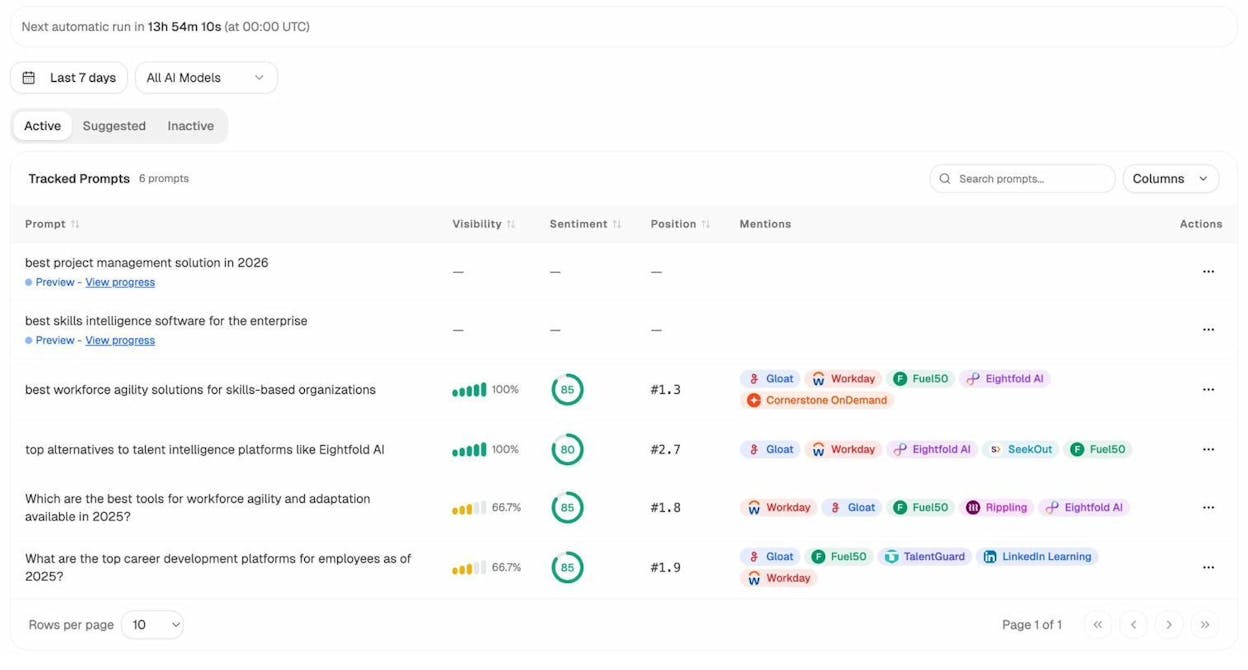
If your visibility is strong for some prompts in a cluster but weak for others, it signals exactly which subtopics need more content depth or structural improvements.
6. Analyzing Competitor SEO Strategies
A large part of SEO is figuring out what your competitors do better than you — and then doing it better yourself. Competitor analysis is not about copying. It’s about understanding their strategy so you can find the gaps and advantages they’ve missed.
Step 1: Identify your true competitors
Your SEO competitors may not be your business competitors. A SaaS company selling email marketing software competes on Google with blog publishers, comparison sites, and review platforms — not just other email tools.
Use a competitor discovery tool to find domains that rank for the same keywords you target. You can also use the SERP Checker to see who shows up for your priority terms.
![[Screenshot: A competitor analysis tool showing competing domains ranked by keyword overlap and estimated traffic]](https://www.datocms-assets.com/164164/1777921500-blobid15.png?auto=format,compress&w=1248&fit=max)
Step 2: Analyze their top-performing content
For each competitor, find their highest-traffic pages. Look at the keywords driving traffic, the content format (guide, listicle, tool, comparison), the word count and depth, and the number of backlinks to each page.
![[Screenshot: A top pages report in an SEO tool showing a competitor’s best-performing URLs sorted by estimated organic traffic]](https://www.datocms-assets.com/164164/1777921502-blobid16.png?auto=format,compress&w=1248&fit=max)
Step 3: Review their backlink strategy
Pull each competitor’s top linking domains. Look for patterns: do they earn links through guest posting, data studies, free tools, or PR? Understanding their strategy tells you what approaches are working in your niche.
Step 4: Audit their technical SEO
Use a site audit tool to check for technical issues on competitor sites. If they have poor Core Web Vitals, broken links, or thin content, those are areas where you can gain an edge. Use the Broken Link Checker to find broken pages on competitor sites — which doubles as a link-building opportunity (see SOP #3).
Step 5: Document findings and set priorities
Compile your findings into a competitor analysis report. For each competitor, note their top three content advantages, their top three weaknesses, and three specific actions you can take to close the gap or exploit an opening.
![[Screenshot: A competitor analysis report template with sections for content strengths, weaknesses, and recommended actions]](https://www.datocms-assets.com/164164/1777921506-blobid17.png?auto=format,compress&w=1248&fit=max)
Step 6: Analyze competitors in AI search
Traditional competitor analysis ends at Google. But your competitors may also appear in AI search results — and you need to know where.
Analyze AI shows you exactly which competitors appear alongside your brand in AI answers, how many times they’re mentioned, and which prompts they dominate. The Competitors dashboard lets you track specific rivals and see how their visibility compares to yours over time.
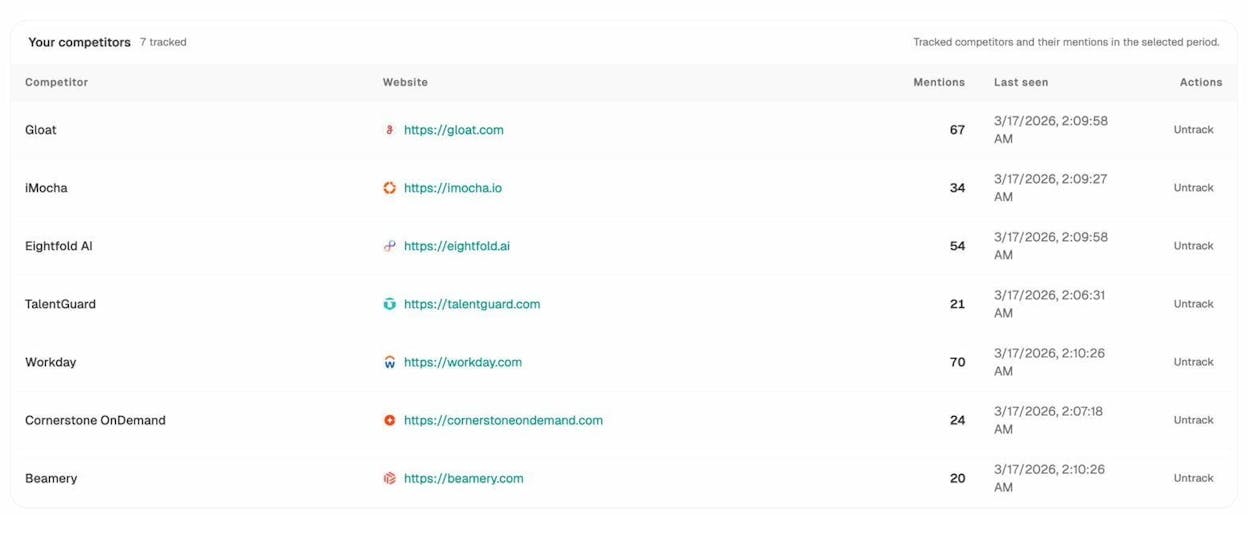
You can also discover new competitors you didn’t know about. Analyze AI surfaces suggested competitors — brands that frequently appear in AI responses within your industry, even if you hadn’t considered them rivals. These are the entities AI models associate with your space.
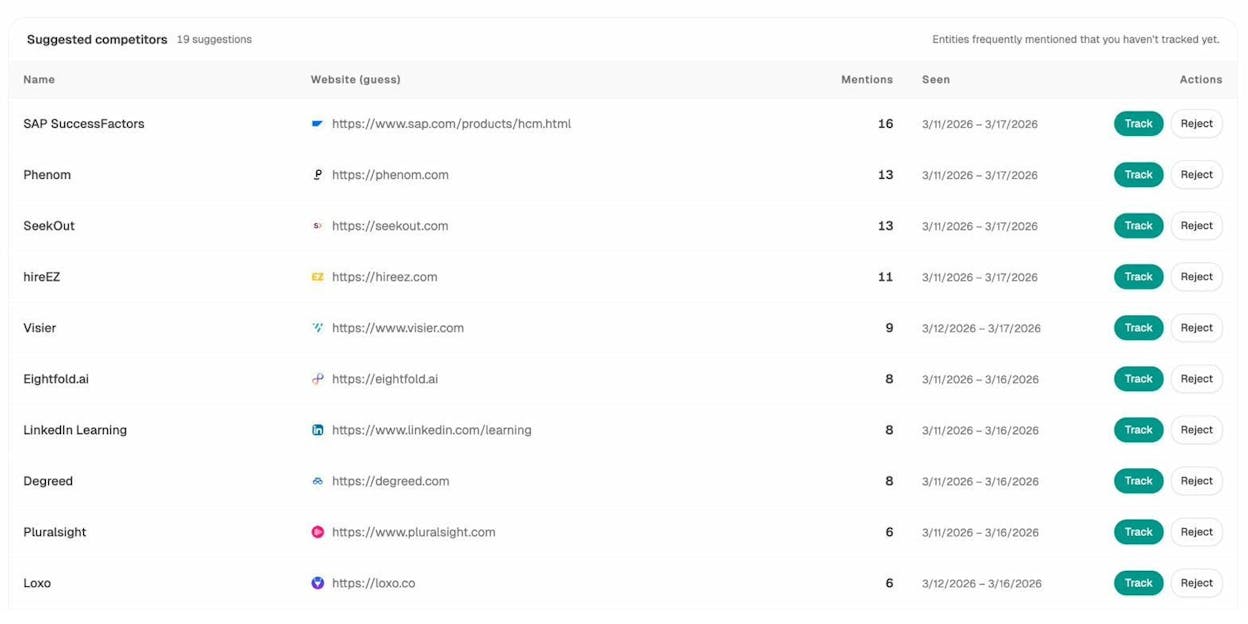
This is intelligence traditional SEO tools can’t provide. A brand might rank nowhere on Google but dominate AI mentions — and that’s a competitor you’d miss without AI search monitoring.
7. Performing a Traffic Loss Investigation
Traffic drops are stressful. But there’s always a reason — and a structured investigation process helps you diagnose the cause quickly, so you can fix it before the damage compounds.
Without this SOP, traffic investigations turn into frantic Googling and random guesses. With it, you work through a logical checklist that eliminates causes one by one until you find the culprit.
Step 1: Confirm the drop is real
Before you panic, verify the data. Check Google Analytics for filtering issues, tracking code problems, or date range mismatches. A “traffic drop” caused by a broken analytics tag isn’t a traffic drop — it’s a measurement error.
Compare data in Google Search Console to confirm. If GSC shows stable impressions and clicks, the issue is likely on the analytics side, not the search side.
![[Screenshot: Google Search Console performance report showing impressions and clicks over the past 3 months to verify a traffic decline]](https://www.datocms-assets.com/164164/1777921514-blobid20.png?auto=format,compress&w=1248&fit=max)
Step 2: Isolate the scope
Determine whether the drop affects the entire site, a specific section (like the blog), a small group of pages, or a single URL. This narrows the diagnosis. A site-wide drop suggests an algorithm update or technical issue. A page-level drop suggests a content or competition problem.
![[Screenshot: Google Analytics landing page report filtered to show organic traffic changes by page or section]](https://www.datocms-assets.com/164164/1777921519-blobid21.jpg?auto=format,compress&w=1248&fit=max)
Step 3: Check for algorithm updates
Cross-reference the drop date with known Google algorithm updates. Resources like the Semrush Sensor or Moz’s Google Algorithm Update History track these. If the timing aligns, the drop is likely algorithmic — which means the fix is content quality, not a technical patch.
Step 4: Audit technical health
If the drop isn’t algorithmic, check for technical causes. Were pages accidentally de-indexed (check robots.txt and meta robots tags)? Did the site migrate or change URLs without proper redirects? Are there new crawl errors in Search Console? Did page speed regress significantly?
![[Screenshot: Google Search Console’s Page Indexing report showing pages excluded from indexing with reasons]](https://www.datocms-assets.com/164164/1777921520-blobid22.png?auto=format,compress&w=1248&fit=max)
Step 5: Analyze SERP changes
For the affected keywords, check who now ranks above you. Did a new competitor enter the SERP? Did Google change the SERP layout (adding AI Overviews, featured snippets, or more ads that push organic results down)?
Use the SERP Checker to see the current state of the results page for your target keywords.
Step 6: Build a recovery plan
Based on your findings, create an action plan. Typical fixes include updating and expanding thin content, reclaiming lost backlinks, fixing technical issues, or improving page experience metrics. Assign each action, set deadlines, and track progress in your project management tool.
Step 7: Check your AI search traffic too
While you’re investigating a Google traffic drop, check whether your AI search traffic has also changed. Traffic from ChatGPT, Perplexity, and other AI engines is a growing channel — and a dip in Google traffic might be partially offset by AI referrals you didn’t know you had.
Analyze AI’s AI Traffic Analytics dashboard connects to your GA4 data and shows sessions from AI platforms over time, broken down by engine. You can see visitors, engagement rate, bounce rate, and conversions — all attributed to AI referrals.
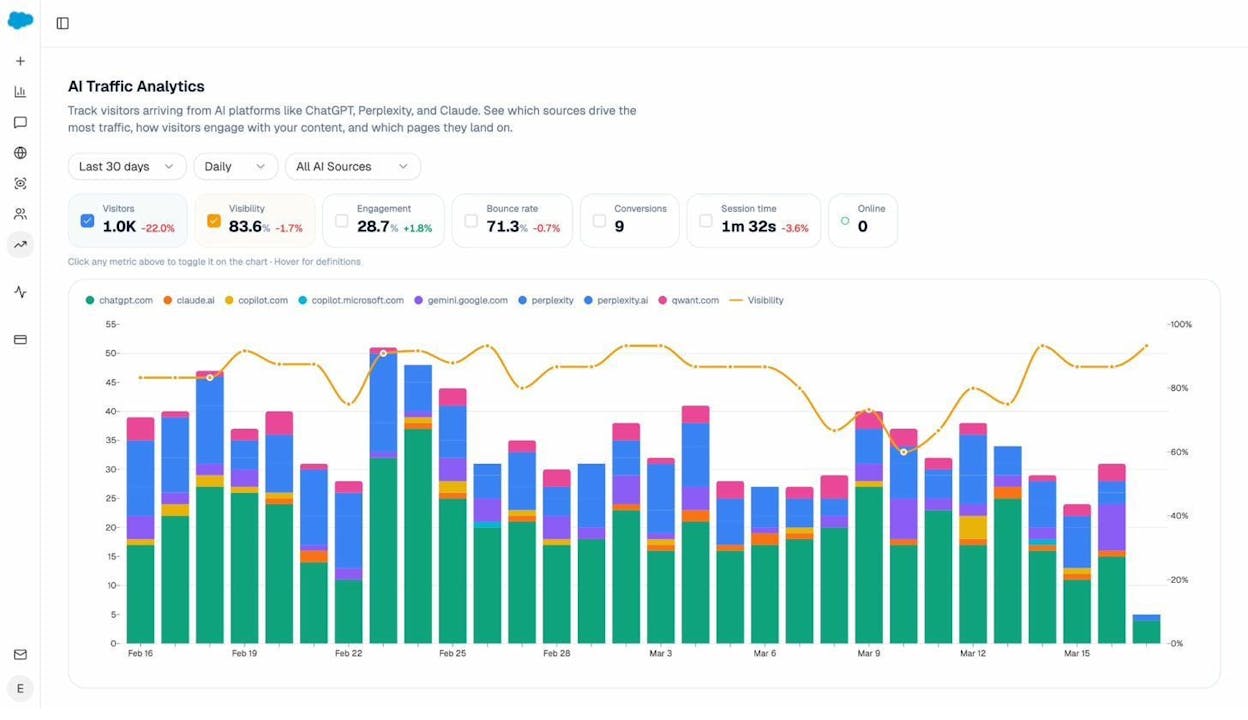
If your Google traffic dropped but your AI traffic is growing, you may be in the middle of a traffic shift, not a traffic loss. That changes the diagnosis — and the response.
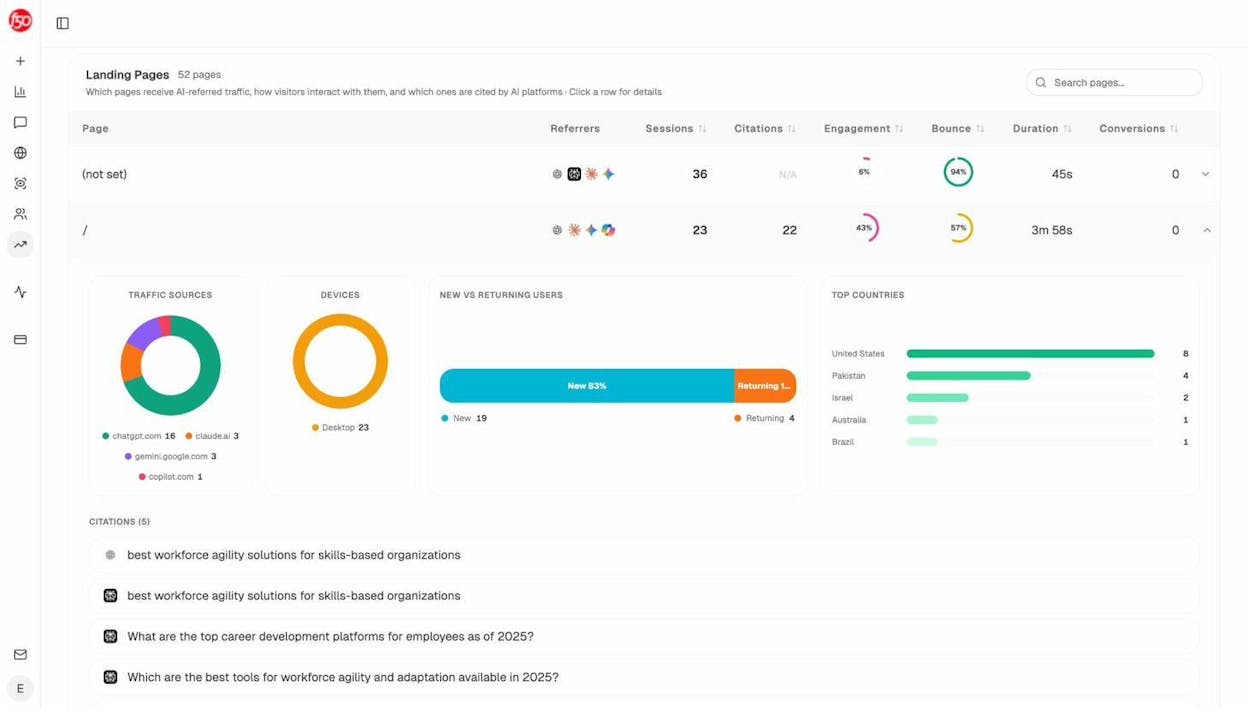
You can also drill into the Landing Pages report to see which specific pages receive AI-referred traffic, which engines send it, and how those visitors behave compared to Google visitors.
8. Monitoring Your AI Search Visibility
This SOP doesn’t exist in traditional SEO playbooks — because until recently, there was nothing to monitor. But AI search engines now drive measurable traffic and influence buying decisions. If you’re not tracking your brand’s visibility in AI answers, you’re flying blind in a channel that’s growing every month.
Step 1: Set up AI visibility tracking
Start by choosing which AI engines to monitor. The major ones are ChatGPT, Google AI Mode, Perplexity, Claude, Microsoft Copilot, and Gemini. Each engine sources and cites content differently, so you need coverage across all of them.
In Analyze AI, you connect your brand and begin tracking prompts relevant to your industry. The platform monitors your visibility, sentiment, position, and competitor mentions across all major AI engines automatically.
Step 2: Define your prompt set
Prompts are the AI-search equivalent of keywords. They’re the questions people ask AI engines about your category. Start with the prompts that match your most important keywords: “best [your category] tools,” “how to [your core use case],” “[your product] vs [competitor].”
Analyze AI suggests prompts for you based on your industry and existing prompt data. You can accept suggested prompts with one click to add them to your tracked set.
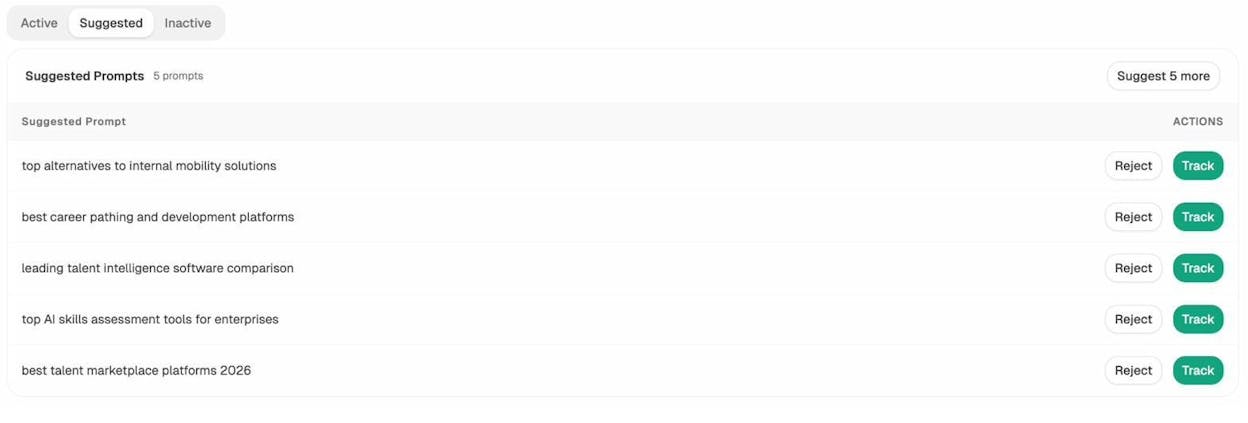
You can also run Ad Hoc Prompt Searches to test specific queries on demand and see how AI engines respond — before deciding whether to track them long-term.
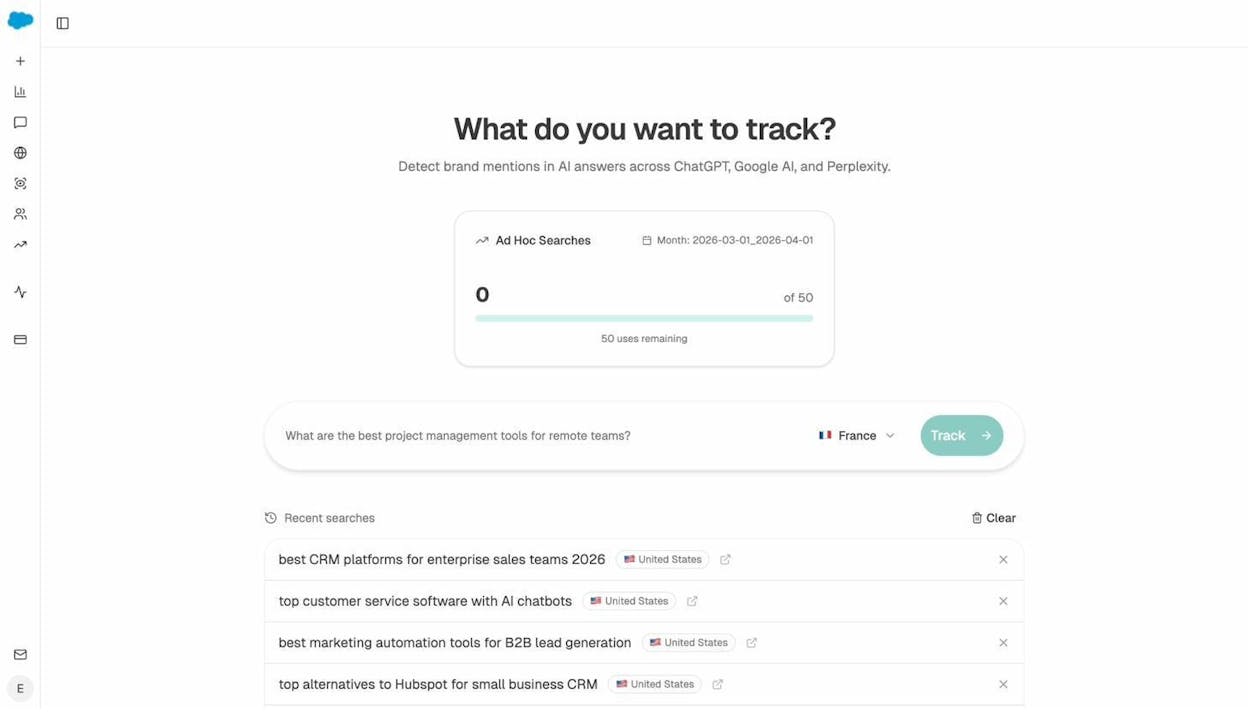
Step 3: Review your overview dashboard weekly
Make it a weekly habit to check your AI visibility overview. The dashboard gives you a snapshot of your brand’s visibility percentage, average rank, sentiment score, citation count, and AI traffic — all compared to prior periods.
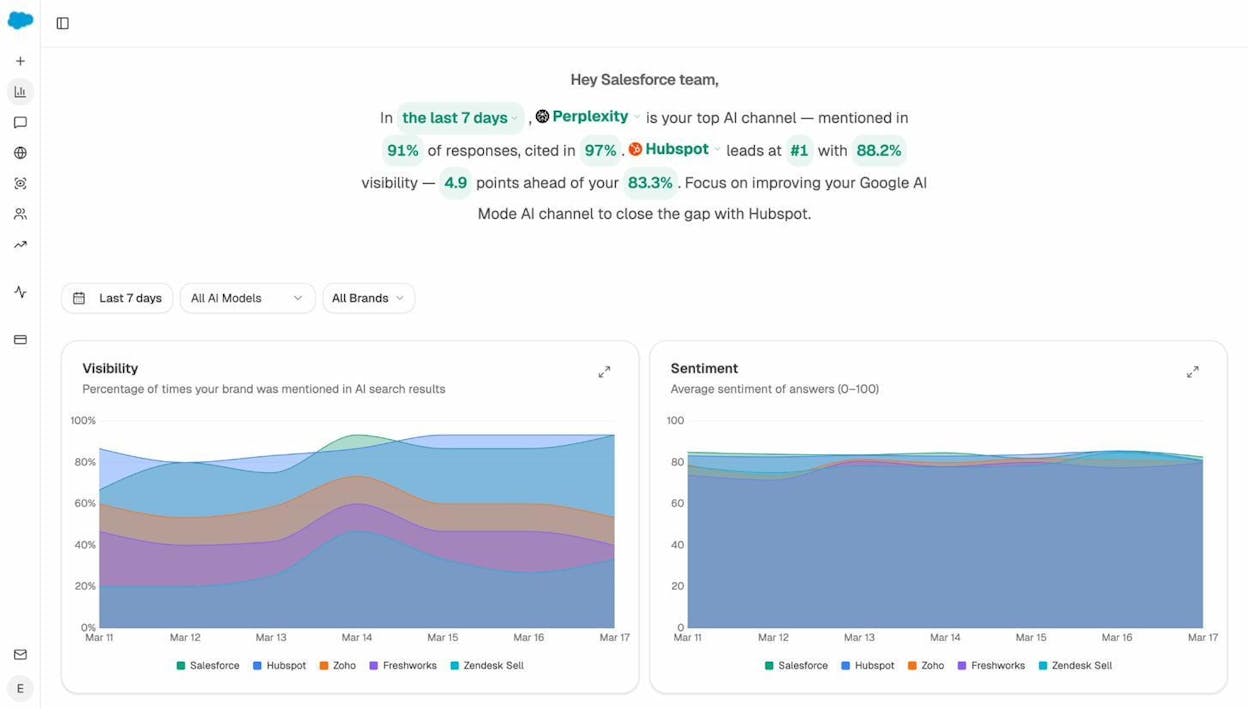
Look for trends. Is your visibility increasing or declining? How does your sentiment compare to competitors? Are your citations growing?
Step 4: Investigate prompt-level performance
When you spot a visibility change in the overview, drill into the Prompts dashboard to find which specific prompts drove the change. Sort by visibility or position to find prompts where you’re gaining or losing ground.
For prompts where your visibility is low, check which competitors appear instead. This tells you who you need to outperform — and gives you a content target.
Step 5: Monitor competitor movements
Use the Competitors section to track how rivals perform in AI search relative to your brand. Watch for new competitors entering your prompt space, existing competitors gaining citations, and competitors whose visibility is growing faster than yours.
Step 6: Act on the data
Turn monitoring insights into action items. If a competitor is winning a prompt, study their cited page and create better content. If your sentiment is dropping, investigate whether AI engines are surfacing negative reviews or outdated information about your brand. If a page is gaining AI citations, double down on that format and topic.
The weekly email from Analyze AI automates part of this. It sends you a summary of your visibility changes, pages improving, citation momentum, and competitor movements — so you don’t have to log in every day.
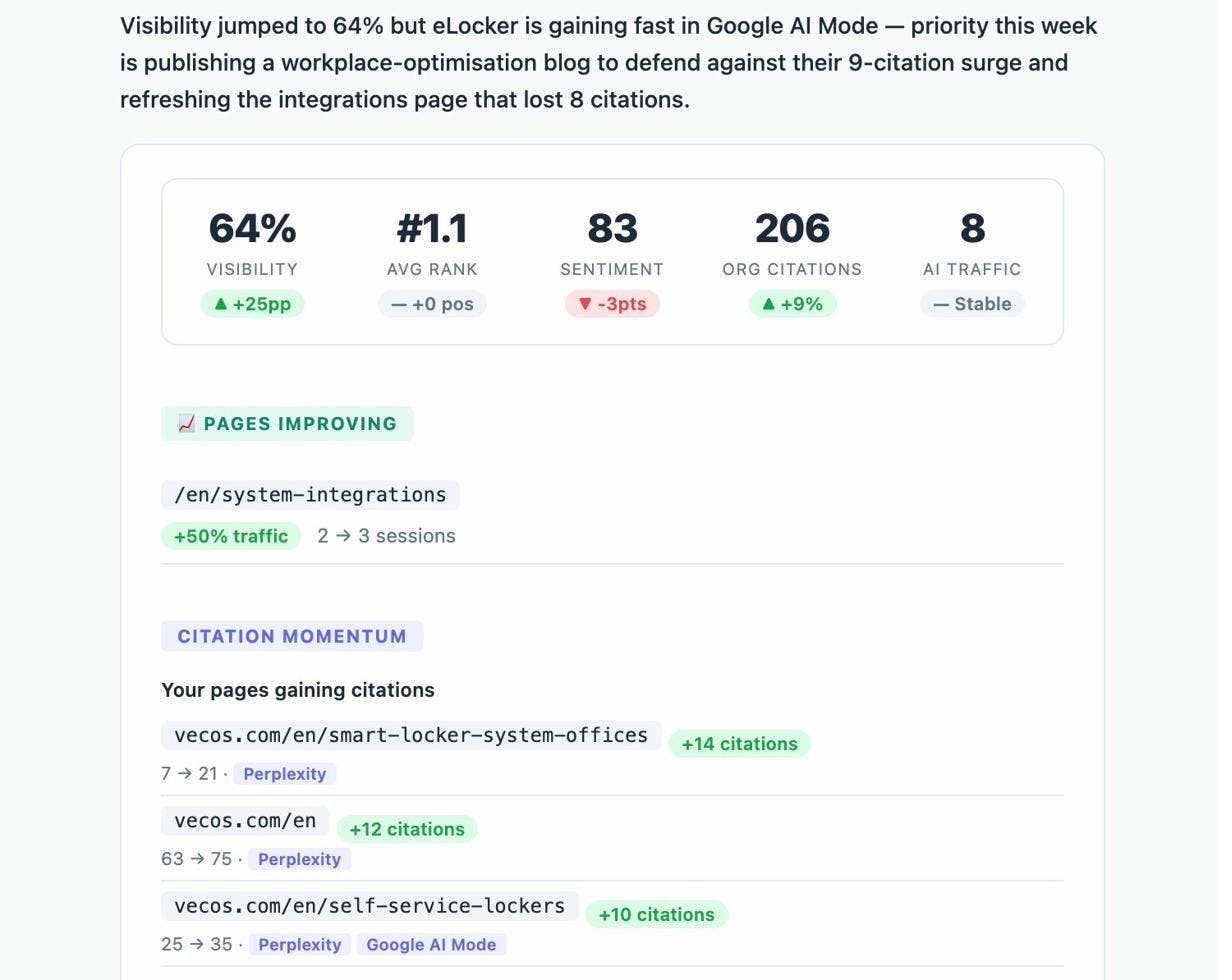
9. Tracking AI Citations and Source Influence
Citations are to AI search what backlinks are to Google. When an AI engine cites your URL in its answer, it’s a signal of trust — and it directly drives referral traffic to your site. This SOP helps you track which sources AI models rely on, identify citation gaps, and prioritize the sources you need to earn or strengthen.
Step 1: Audit your current citations
Start by understanding which of your pages AI engines currently cite. In Analyze AI, the Sources dashboard shows every URL that AI platforms cite when answering questions about your industry. You can filter by AI model, time period, and brand to see exactly which of your pages earn citations — and how often.
Step 2: Identify the top cited domains in your space
Beyond your own citations, you need to know which external domains AI models trust most in your industry. These are the sites that shape AI answers. If a domain is heavily cited by AI engines, content on that domain has outsized influence on how AI represents your category.
Look at the Top Cited Domains chart in Analyze AI. The domains at the top of this list are the ones you want to earn backlinks from (which helps Google rankings too — see SOP #3), get mentioned on (through guest posts, interviews, or product reviews), and monitor for competitive content.
Step 3: Compare citations across AI engines
Different AI engines cite different sources. Perplexity may cite your blog heavily while ChatGPT doesn’t cite it at all. Understanding these differences helps you tailor your content for each engine.
Check engine-specific citation data to spot patterns. If one engine consistently ignores your content, the issue might be structural — perhaps your pages lack the clear, answer-ready formatting that engine prefers. You can learn more about engine-specific optimization in our guides on how to rank on ChatGPT and how to rank on Perplexity.
Step 4: Map citation gaps to content opportunities
A citation gap is a prompt where AI engines cite competitor pages but not yours. This is different from a content gap (SOP #2) because you might already have relevant content — it just isn’t structured or authoritative enough for AI models to cite.
For each citation gap, decide whether you need to create a new page that directly answers the prompt, improve an existing page’s structure for AI readability, earn more backlinks and mentions to boost the page’s authority, or add entities and structured data that help AI models understand your content.
Step 5: Use the Perception Map for strategic positioning
Analyze AI’s Perception Map plots your brand and competitors on two axes: visibility (how often you’re mentioned) and narrative strength (how positively and consistently AI engines describe you). This gives you a strategic view of where you stand.
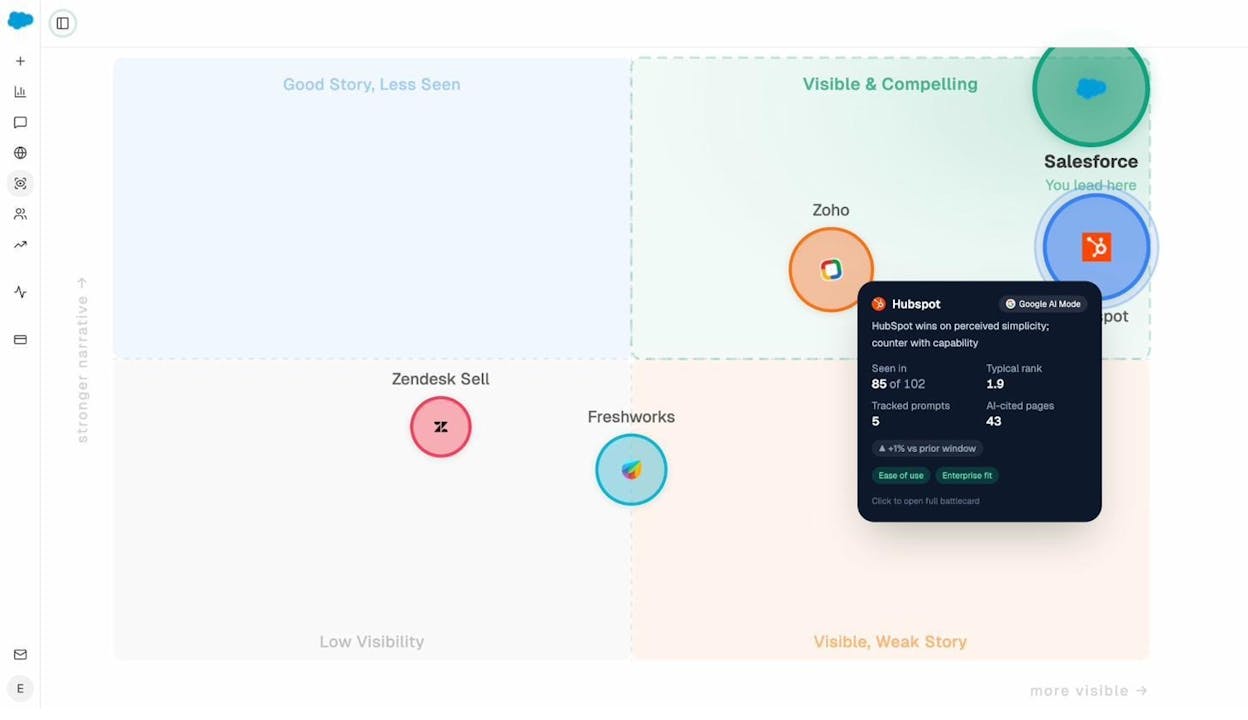
Brands in the top-right quadrant (visible and compelling) are winning. Brands in the bottom-left (low visibility, weak narrative) have the most work to do. Your goal is to move toward the top-right by systematically strengthening the content and sources that AI engines rely on.
Step 6: Build a citation improvement plan
Based on your audit, create a prioritized list of actions: which pages to optimize for AI citations, which external sources to target for mentions, and which prompts to focus your content efforts on.
Track progress monthly. Citations are a lagging indicator — it takes time for AI models to update their source preferences. But consistent effort compounds, just like backlinks do in traditional SEO.
How to Build Your Own SEO SOPs
The nine SOPs above cover the most common SEO tasks. But every team has workflows unique to their business, their tools, or their industry. Here’s how to create your own.
Document what you already do. The next time you complete an SEO task, write down every step as you do it. Don’t try to make it pretty — just capture the process.
Test it with someone else. Hand the document to a teammate who hasn’t done the task before. If they can follow it without asking questions, the SOP works. If they get stuck, add more detail.
Add screenshots. A screenshot of the exact button to click or the exact report to pull eliminates ambiguity. SOPs with visuals get followed. SOPs without visuals get skimmed and forgotten.
Set a review schedule. Tools change. Best practices evolve. Review your SOPs quarterly and update anything that’s out of date. An outdated SOP is worse than no SOP — it creates false confidence.
Store them where people look. An SOP buried in a Google Drive folder that nobody opens doesn’t exist. Put SOPs in your project management tool, your team wiki, or wherever your team already works.
Final Thoughts
SEO is easier when you have clear, repeatable processes to follow. These SOPs help you work faster, stay consistent, and get better results — without the guesswork.
But the biggest shift in SEO right now isn’t a new algorithm update or a technical best practice. It’s the fact that AI search is becoming another organic channel — one that requires the same rigor, measurement, and iteration that made your Google strategy work.
The SOPs above reflect that reality. They give you a system for traditional SEO and for the AI search layer that’s growing alongside it. Because the brands that treat AI search with the same discipline they give Google rankings are the ones that will compound visibility across both channels.
Whether you’re optimizing content, building links, or tracking AI citations, having a system in place makes all the difference.
Now go steal these SOPs and put them to work.

Ernest

Ibrahim


