



Summarize this blog post with:


In this article, you’ll learn a complete, step-by-step process for writing content that ranks on Google and gets cited by AI search engines like ChatGPT, Perplexity, and Gemini. Each step includes real examples, practical tactics, and clear guidance on what to do — so you can go from a blank page to a published, search-optimized article with confidence.
Table of Contents
1. Find a Keyword Worth Targeting
Nothing else matters if nobody is searching for what you write about. A page that ranks #1 for a term with zero search volume produces zero traffic. So the first step is always keyword research.
Here’s the process:
Start with a seed term. Think about the broad topics your audience cares about. If you sell project management software, your seed terms might be “project management,” “task tracking,” or “team collaboration.”
Expand that seed into keyword ideas. Use a keyword research tool to find related terms people actually search for. Enter your seed term and look at the suggestions.
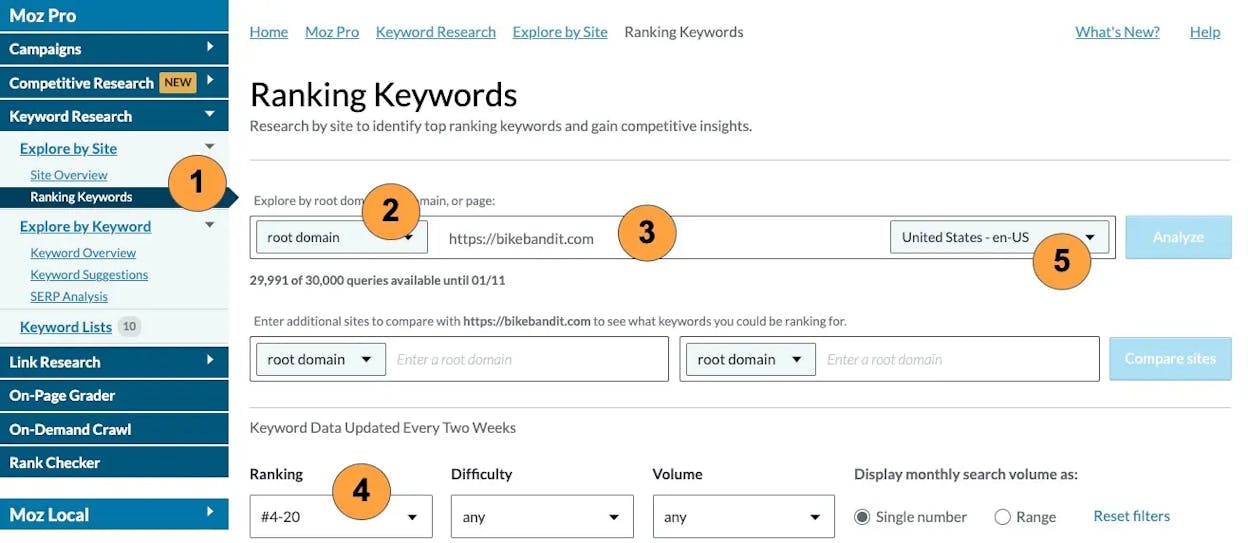
Filter for keywords that make business sense. Not every keyword is worth pursuing. The best SEO keywords sit at the intersection of three things: search volume (people actually search for it), ranking difficulty you can realistically compete on, and business relevance (you can naturally mention your product or service in the content).
For example, if you sell CRM software, “how to organize sales pipeline” is a better target than “what is a database.” Both have search volume, but only the first one puts you in front of potential buyers.
![[Screenshot: A keyword research tool showing filtered results with columns for search volume, keyword difficulty, and CPC — highlighting a keyword that has moderate difficulty and clear commercial intent]](https://www.datocms-assets.com/164164/1776978770-blobid2.png?auto=format,compress&w=1248&fit=max)
Check if you can realistically rank. Look at who currently ranks on page one. If every result is from a massive domain with hundreds of backlinks, you may need to pick a less competitive variation first. Use a keyword difficulty checker to get a quick read on how hard a keyword will be to crack.
You can also use the Analyze AI Keyword Generator to discover long-tail variations you might have missed. Long-tail keywords often have lower competition and higher intent — meaning the person searching is closer to taking action.
Don’t ignore the AI search angle. Keywords with informational or comparison intent (“best X for Y,” “how to do Z,” “X vs Y”) are the ones most likely to trigger AI-generated answers in tools like ChatGPT, Perplexity, and Google’s AI Overviews. If you can rank for these terms on Google and get cited in AI answers, you double your organic reach without doubling your effort.
To see which prompts AI engines are already answering in your space, you can use Analyze AI’s Prompts dashboard. It shows you the exact questions AI models respond to in your industry, which competitors get mentioned, and where gaps exist.
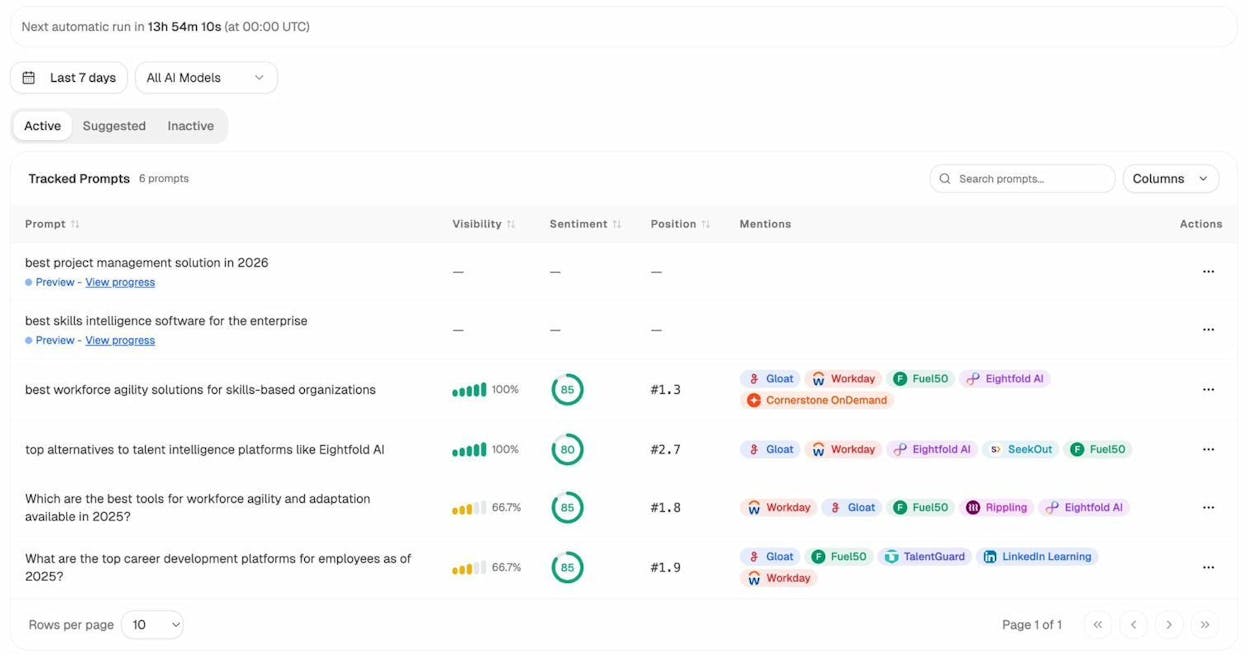
This gives you a head start: instead of guessing which topics AI cares about, you can see the data before you write a single word.
Further reading:
2. Figure Out What Searchers Actually Want
You found a keyword. Now you need to figure out what kind of content will satisfy the person typing it in.
Google’s job is to return the most relevant result. Your job is to create the most relevant result. If there’s a mismatch between what the searcher expects and what you publish, you won’t rank — no matter how good your writing is.
This is called search intent, and it has two layers.
Match the format and type
Google your target keyword and study the first page of results. Ask yourself:
-
What type of content ranks? Are the top results how-to guides? Listicles? Product pages? Definitions? The format tells you what Google already believes is the best match.
-
What angle do they take? Are they written for beginners or experts? Do they emphasize speed, cost, quality, or something else?
![[Screenshot: Google search results page for a keyword like “how to improve website speed” showing the top 5 results — highlighting that they are all step-by-step guides, not listicles or product pages]](https://www.datocms-assets.com/164164/1776978781-blobid4.png?auto=format,compress&w=1248&fit=max)
For example, if you search “how to save money” and every top result is a list of tips (not a step-by-step guide), then Google has decided that searchers want a list. Publishing a 3,000-word guide on the psychology of saving will likely miss the mark.
The safe play is to match the dominant format. If the top five results are all listicles, write a listicle. If they’re all tutorials, write a tutorial. You can differentiate on substance — but not on format.
Cover the subtopics searchers expect
Matching the format gets you in the door. Covering the right subtopics keeps you in the room.
Google’s own Helpful Content guidelines make this clear: they want content that provides a complete description of the topic. That means you can’t skip the sections that every other top-ranking page includes.
Here’s how to find those subtopics:
-
Open the top three to five ranking pages for your keyword.
-
Read each one and note the subheadings they all share.
-
Make a list of the common subtopics — these are the baseline you need to cover.
![[Screenshot: A side-by-side view of the H2 headings from three top-ranking articles for a given keyword, showing overlapping subtopics highlighted]](https://www.datocms-assets.com/164164/1776978784-blobid5.png?auto=format,compress&w=1248&fit=max)
For example, if you’re targeting “inbound marketing,” you’d likely find that every top result includes sections on: what inbound marketing is, inbound vs. outbound, inbound marketing strategies, and examples. If you skip any of these, you’re handing that subtopic (and ranking potential) to a competitor.
You can accelerate this step with a content gap analysis. Enter your target keyword into a tool that shows which related keywords the top-ranking pages also rank for. These related keywords often map directly to subtopics you should include.
![[Screenshot: A content gap or “Also rank for” report showing keywords that the top 3 ranking pages share — with potential subtopics highlighted]](https://www.datocms-assets.com/164164/1776978791-blobid6.png?auto=format,compress&w=1248&fit=max)
AI search intent is different — and worth studying separately. When someone asks ChatGPT “what is inbound marketing,” the AI doesn’t return a list of blue links. It generates a direct answer — usually a concise definition followed by examples, strategies, and sometimes tool recommendations.
This means AI search intent tends to favor content that is structured clearly (so the AI can parse it), answers the question directly (no long windups), and includes specific, factual details (names, numbers, examples).
If your content is structured well enough for Google’s featured snippets, it’s probably structured well enough for AI citation, too. But you can go further: use Analyze AI’s Ad Hoc Searches to test how AI models currently answer the exact prompt you’re targeting. Type in the question, and you’ll see which brands get mentioned, which sources get cited, and what information the AI includes.
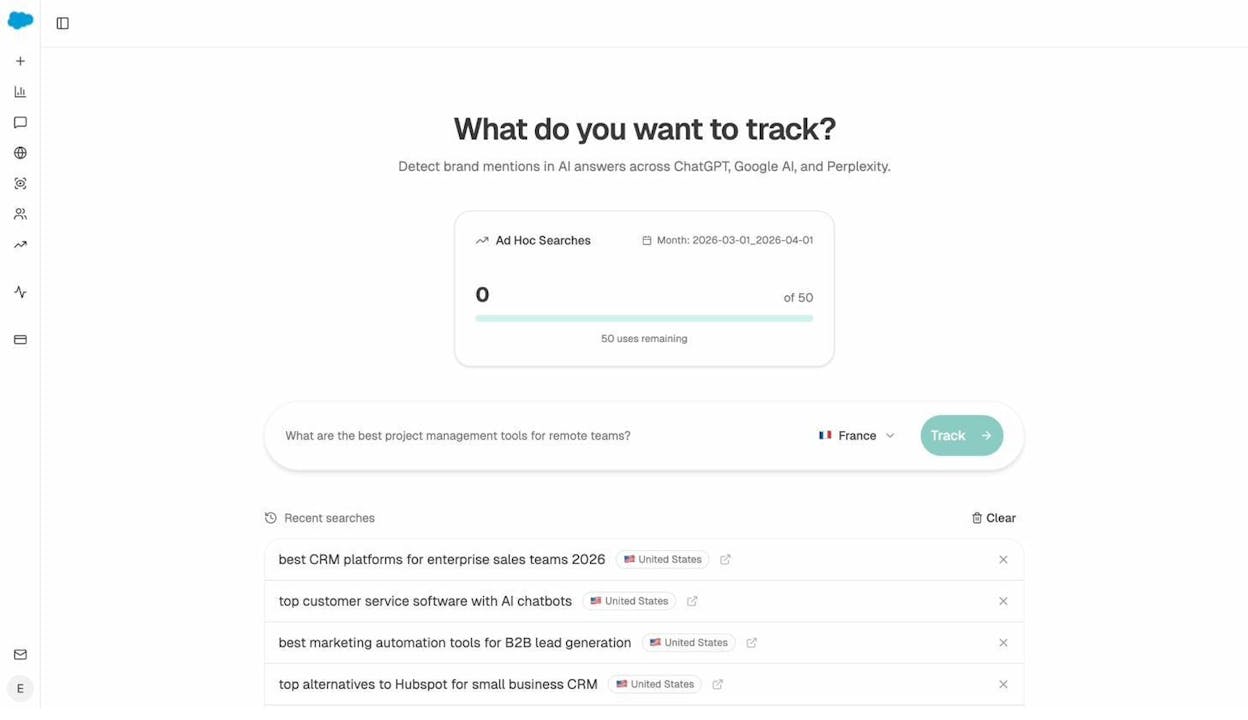
This tells you what the AI considers a complete answer. If your article covers everything the AI already says plus adds something new, you become the better source — for both Google and AI.
Further reading:
3. Make Your Content Genuinely Different
Matching search intent and covering all the subtopics gets you to parity with the competition. It doesn’t get you to page one. For that, you need to add something the existing results don’t have.
Google’s Helpful Content guidelines specifically call out that they look for original information, reporting, research, or analysis. This isn’t a nice-to-have — it’s a ranking factor.
Here are five practical ways to add originality:
1. Interview a subject matter expert. If you’re writing about email marketing strategy, don’t just summarize what other articles say. Talk to someone who actually runs email campaigns for a living. One unique quote or insight from an expert makes your article more valuable than a dozen articles that rehash the same advice.
2. Include original data. Run a survey. Pull numbers from your own product or analytics. Analyze a dataset. Unique data is one of the strongest differentiators in SEO writing because it’s impossible to copy. You can cite it, link to it, and reference it — but nobody else has it.
3. Write from real experience. If you’re reviewing a tool, actually use it. If you’re writing about a strategy, share what happened when you tried it. First-person experience adds credibility that no amount of research can replicate.
4. Go deeper than anyone else. Most SEO content stays at the surface. It defines terms, lists steps, and moves on. If you go one level deeper — explaining why a tactic works, when it fails, and what to do instead — you stand out.
5. Take a clear position. The safest content is the blandest. If you believe something that contradicts conventional wisdom, say it — and back it up. Content with a point of view earns more engagement, more links, and more AI citations than content that tries to be everything to everyone.
Here’s the thing most writers miss: if writing your article feels easy — if you can do it by opening a few browser tabs and paraphrasing what’s already out there — then your article doesn’t have enough information gain. Good SEO content requires effort. That effort is the moat.
How AI search raises the bar. AI models synthesize information from across the web. If your content says the same thing as ten other articles, the AI has no reason to cite yours specifically. But if your article contains a unique data point, a framework no one else uses, or a perspective the AI can’t find elsewhere, it becomes a preferred source.
You can see this play out in Analyze AI’s Sources dashboard. It shows you exactly which URLs and domains AI engines cite when answering questions in your space. Study the top-cited sources. What do they have in common? Usually, it’s original research, clear structure, and specific expertise.
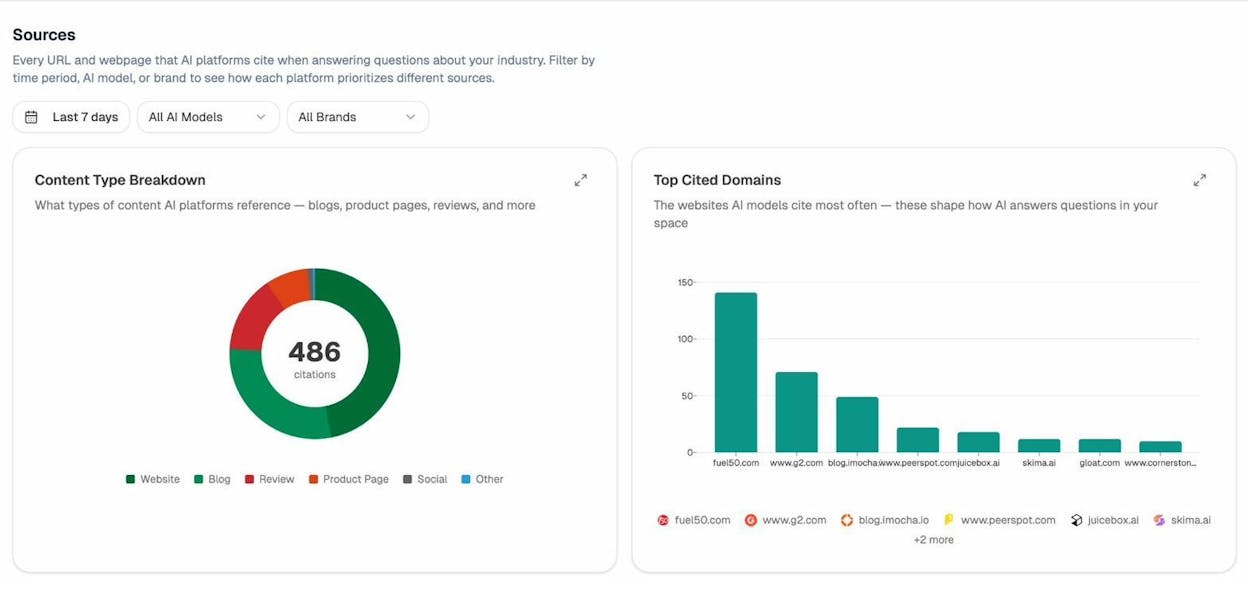
If your competitors’ domains appear here but yours doesn’t, that’s your gap. Create content with the kind of depth and originality that earns those citations.
Further reading:
4. Build a Detailed Outline Before You Write
Writing without an outline is like driving without a map. You’ll eventually get somewhere, but it won’t be where you planned.
A strong outline does three things: it forces you to organize your thinking, it prevents writer’s block (because you always know what comes next), and it makes the writing process significantly faster.
By now, you already have the raw materials for your outline: the search intent you identified (which tells you the format), the subtopics you found (which tell you the sections), and the unique angle you chose (which tells you how to differentiate).
Here’s how to turn those into an outline:
Step 1: Choose your H2 headings. Each major subtopic becomes an H2. Arrange them in a logical order. For a how-to article, this is usually chronological. For a “what is” article, it’s typically: definition → why it matters → how to do it → examples → tools.
Step 2: Add H3 subheadings under each H2. Break each section into smaller parts. If your H2 is “How to do keyword research,” your H3s might be: “Start with seed keywords,” “Expand with a keyword tool,” “Filter for business relevance.”
Step 3: Add bullet points for key arguments. Under each subheading, jot down the main points you want to make. Include any data, examples, or quotes you plan to use.
Step 4: Note where visuals will go. Mark spots where a screenshot, diagram, or table would explain something better than text. This saves time during the writing phase and ensures your final article isn’t a wall of text.
You can use ChatGPT or another AI tool to generate a first-draft outline, but don’t accept it blindly. AI outlines tend to be generic. Use them as a starting point, then restructure based on your SERP analysis and unique angle.
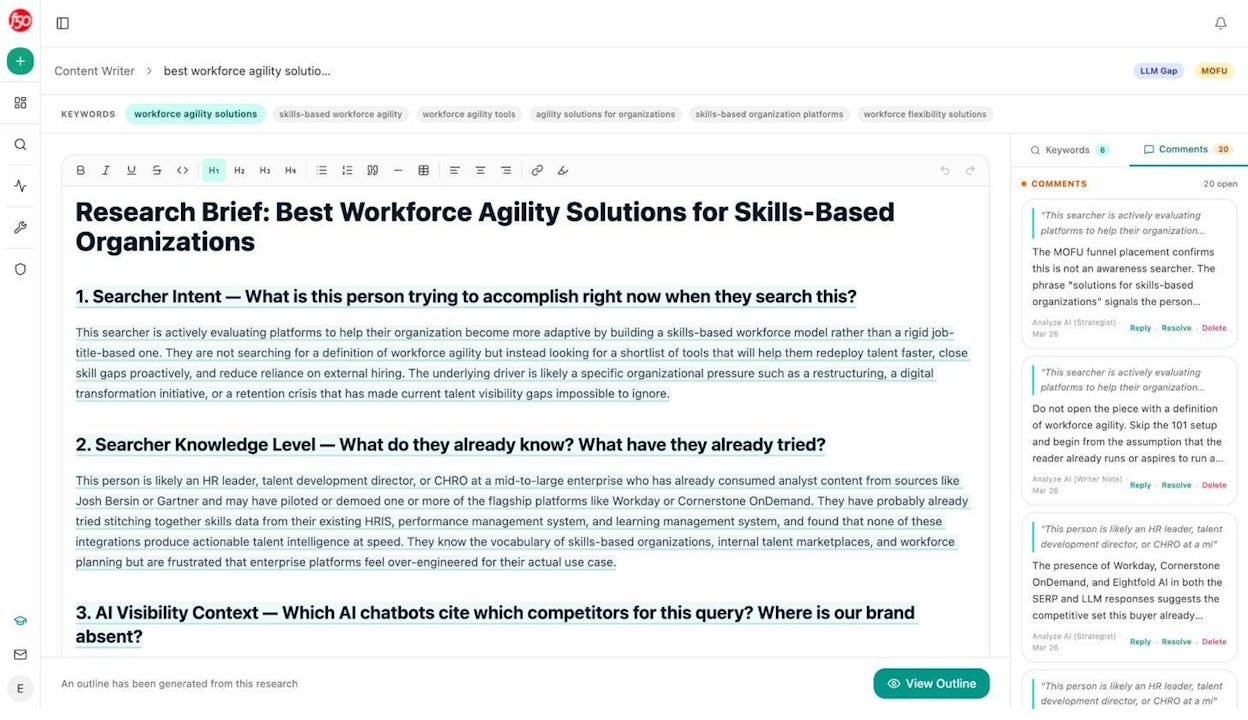
Analyze AI’s Content Writer takes this further. Instead of a generic AI outline, it generates content ideas based on AI visibility gaps, competitor keywords, and search opportunities. You can enter a keyword or even a competitor URL, and it produces a research brief with searcher intent analysis, knowledge-level assessment, and AI visibility context — complete with editorial comments from Analyze AI’s strategist.
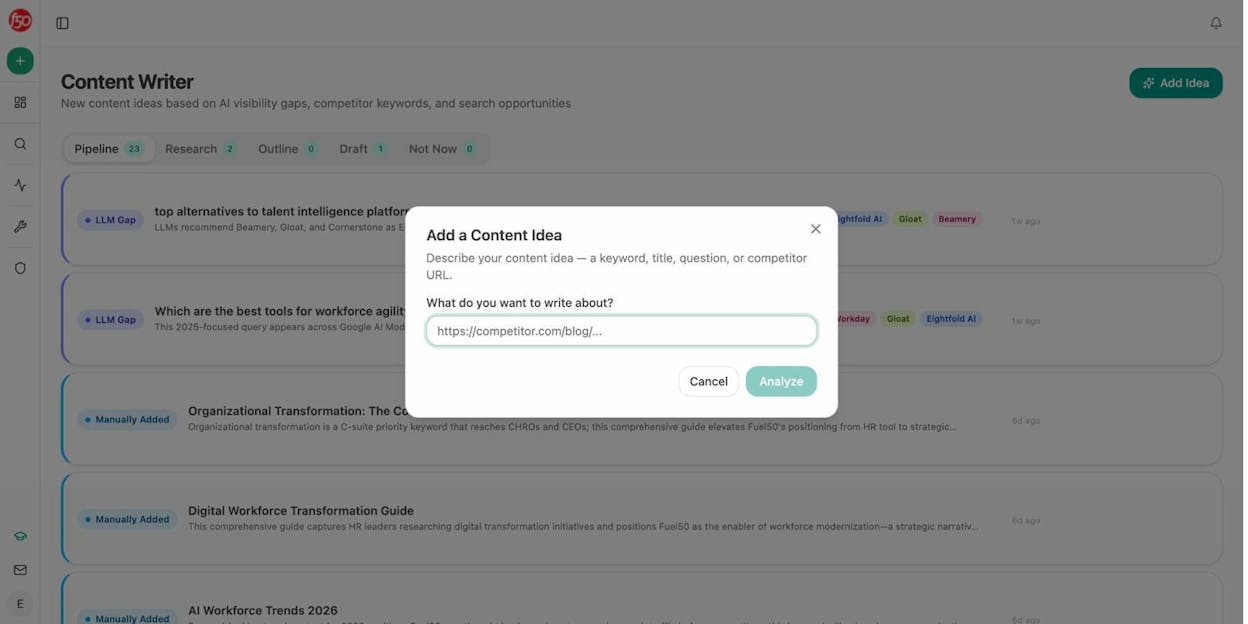
From that research, it generates a full outline with thesis, section strategy, and positioning notes — all informed by what’s already ranking on Google and what AI models are citing.
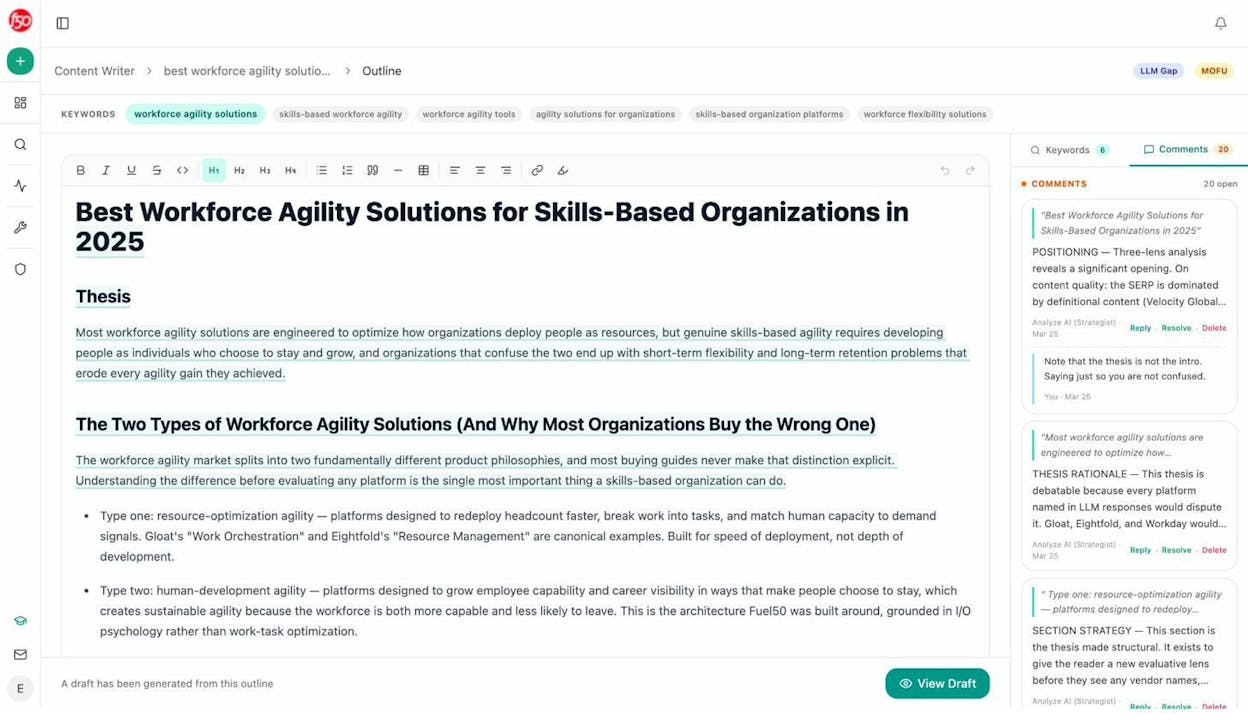
This means your outline isn’t just structurally sound — it’s built on competitive intelligence from both traditional and AI search.
5. Write a First Draft (Without Overthinking It)
The outline is your blueprint. Now you need to build the house.
The most important thing at this stage is momentum. Don’t edit as you go. Don’t agonize over word choice. Don’t switch tabs to check a fact. Just write.
Here are the principles that make SEO writing effective:
Lead with the answer. Every section should start with the main point, then explain it. Don’t make the reader wade through three paragraphs of context before you get to the substance. This isn’t an essay — it’s a resource. People came here for answers, so give them answers first.
Write at a sixth-grade reading level. This doesn’t mean dumbing things down. It means using short sentences, common words, and active voice. If a simpler word exists, use it. “Use” instead of “utilize.” “Start” instead of “commence.” “Help” instead of “facilitate.”
One idea per paragraph. Each paragraph should make one point. If you find yourself making two, split it. Short paragraphs are easier to scan, and scanning is how most people read online.
Use transitions. Every sentence should feel like the logical next step after the previous one. If a reader has to re-read a sentence to understand how it connects to what came before, your transition failed. Words like “so,” “this means,” “here’s why,” and “because” glue your ideas together.
Show, don’t just tell. Instead of writing “Keyword research is important,” write: “Without keyword research, you might spend three months writing an article that gets 12 visits a year. With it, you can identify terms that bring in 5,000 visitors per month.” Specifics are more persuasive than generalities.
Weave in your product naturally. If you’re writing for a company blog, the content needs to do two jobs: help the reader and introduce your product as a solution. The key is to integrate your product where it genuinely solves the problem you’re discussing — not to force a pitch into every section. As the team at Grow and Convert puts it, the best SEO content converts because it demonstrates the product in the context of the reader’s problem.
Don’t be afraid of length — but don’t pad. Your article should be as long as it needs to be and not a word longer. If you can cover a subtopic in 100 words, don’t stretch it to 300. If it genuinely needs 500, give it 500. Length for its own sake is fluff. Length in service of depth is value.
6. Nail the On-Page SEO Fundamentals
Good writing gets you 80% of the way to ranking. On-page SEO handles the remaining 20%. These are the technical signals that help Google understand what your page is about and how to index it.
Here’s what to get right:
Use your keyword naturally
Include your target keyword in these places:
-
Title tag (H1): Should contain the keyword, ideally near the beginning.
-
URL slug: Keep it short and descriptive. /seo-writing/ is better than /blog/2026/04/how-to-write-content-for-seo-and-rank-higher/.
-
First 100 words: Mention the keyword early so both readers and Google immediately understand the topic.
-
H2 headings: Where it fits naturally. Don’t force it into every heading — one or two is enough.
-
Image alt text: Describe what the image shows, including the keyword if it’s relevant.
Don’t stuff. If your keyword appears in every sentence, that’s a problem. Write for humans first. If the keyword fits naturally, include it. If it doesn’t, use a variation.
Use secondary keywords and related terms
Search engines understand semantics. They know that “SEO writing” is related to “search engine optimization content,” “writing for SEO,” and “SEO copywriting.” You don’t need to repeat the exact keyword — using natural variations and LSI keywords throughout your content helps Google understand your topic more deeply.
The subtopics you found in step 2 will naturally introduce these related terms. That’s one of the reasons covering subtopics comprehensively is so important — it’s not just about depth, it’s about semantic coverage.
Structure content with clear headings
Use a logical heading hierarchy:
-
H1: One per page. This is your article title.
-
H2: Major sections. Each should cover a distinct subtopic.
-
H3: Subsections within an H2. Use these to break long sections into digestible parts.
Don’t skip levels (going from H2 to H4) and don’t use headings for styling. Headings are structural elements that help both readers and search engines navigate your content.
Optimize images
Every image should have:
-
A descriptive file name: keyword-research-tool-results.png beats IMG_4392.png.
-
Alt text: Describe what the image shows. This helps with accessibility and gives Google another signal about your content.
-
Compressed file size: Large images slow your page down, and page speed is a ranking factor. Use tools like TinyPNG or Squoosh to compress without visible quality loss.
Add external links to authoritative sources
Linking out to relevant, high-quality sources (research papers, official documentation, authoritative publications) signals that your content is well-researched. It also helps readers go deeper on specific points.
Don’t hoard links. If a government study or a peer-reviewed paper supports your point, link to it. Google doesn’t penalize you for linking out — in fact, it helps establish the topical context of your page.
Make your content easy to scan
Most readers don’t read top to bottom. They scan. Help them by using:
-
Short paragraphs (three to four sentences max).
-
Bold text on key phrases so scanners catch the important bits.
-
Numbered or bulleted lists for steps and collections.
-
Tables for comparisons (side-by-side information is easier to process in a table than in prose).
This is also critical for AI citation. AI models parse structured content more easily than dense paragraphs. Clear headings, direct answers, and well-organized information make it more likely that an AI engine will pull from your content when generating a response.
Further reading:
7. Edit, Get Feedback, and Polish
First drafts are supposed to be rough. The editing phase is where good content becomes great content.
Self-edit first
Before you show your draft to anyone else, do a pass yourself. Read the entire article aloud. You’ll catch awkward phrasing, run-on sentences, and logical gaps that you’d miss reading silently.
Look for:
-
Fluff: Any sentence that doesn’t add new information or move the argument forward. Delete it.
-
Repetition: Saying the same thing twice in different words. Pick the stronger version and cut the other.
-
Vague claims: Replace “many marketers believe” with “a 2025 HubSpot survey of 1,200 marketers found.” Specifics beat generalities.
-
Passive voice: “The keyword was researched by the team” → “The team researched the keyword.” Active voice is clearer and more direct.
-
Long sentences: If a sentence has more than 25 words, consider splitting it. Short sentences are easier to read, especially on mobile.
Get a second pair of eyes
You’re too close to your own writing to catch everything. Have someone else — a colleague, an editor, a subject-matter expert — review the draft.
Good reviewers look for things the writer can’t see: logical leaps, missing context, assumptions the reader won’t share, and factual errors.
At minimum, every piece of SEO content should be reviewed by one other person before it goes live. If you’re publishing on behalf of a company, this is non-negotiable.
![[Screenshot: A Google Doc with comments from a reviewer highlighting a factual error, a suggestion for a better example, and a note about a missing subtopic]](https://www.datocms-assets.com/164164/1776978830-blobid12.jpg?auto=format,compress&w=1248&fit=max)
Polish for readability
After incorporating feedback, do a final polish:
-
Run the article through Hemingway Editor to check reading level. Aim for grade 6-8.
-
Check for grammatical errors with a tool like Grammarly.
-
Verify that all links work and all images load.
-
Read the introduction one more time. It’s the most important part of your article — if it doesn’t hook the reader, nothing else matters.
Use your content tools
If you’re already using Analyze AI, the Content Optimizer can help here. It identifies pages on your site with declining organic traffic and surfaces optimization opportunities based on content gaps. You can paste your URL and get specific suggestions — not generic advice, but data-driven recommendations based on what’s actually working in search and AI.
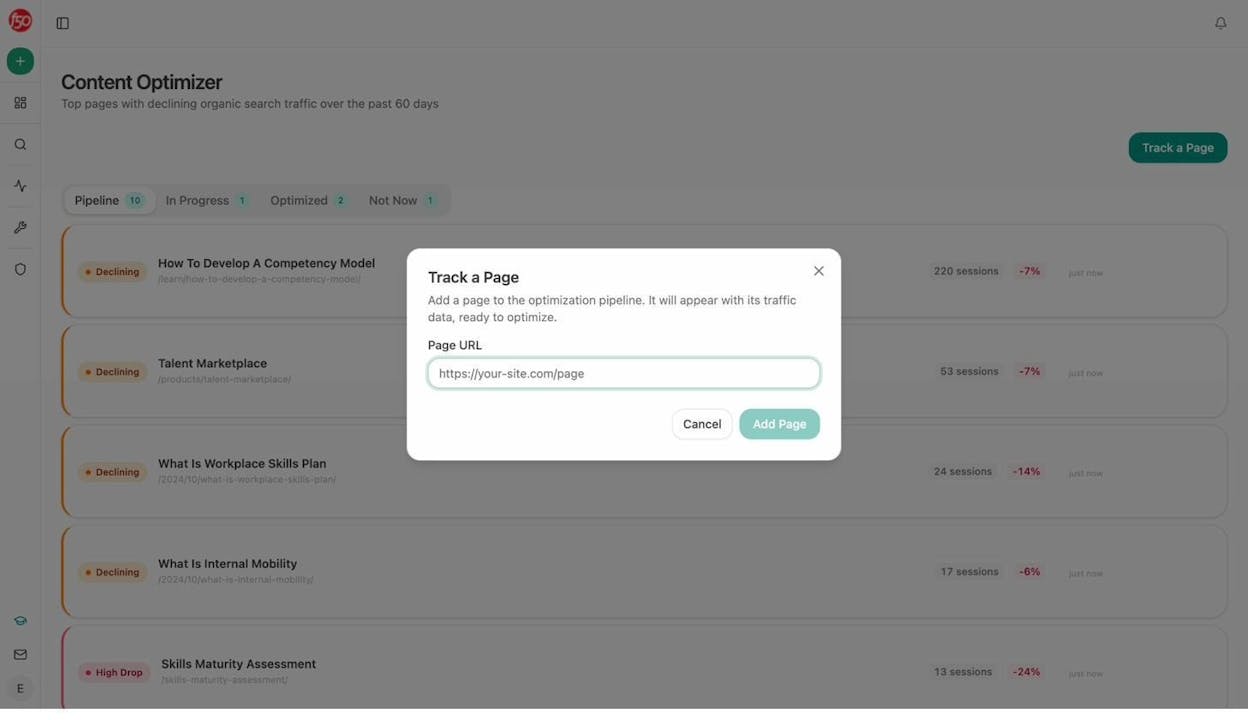
The optimizer fetches your original content, adds editorial comments identifying gaps, and generates an optimized version with specific improvements.
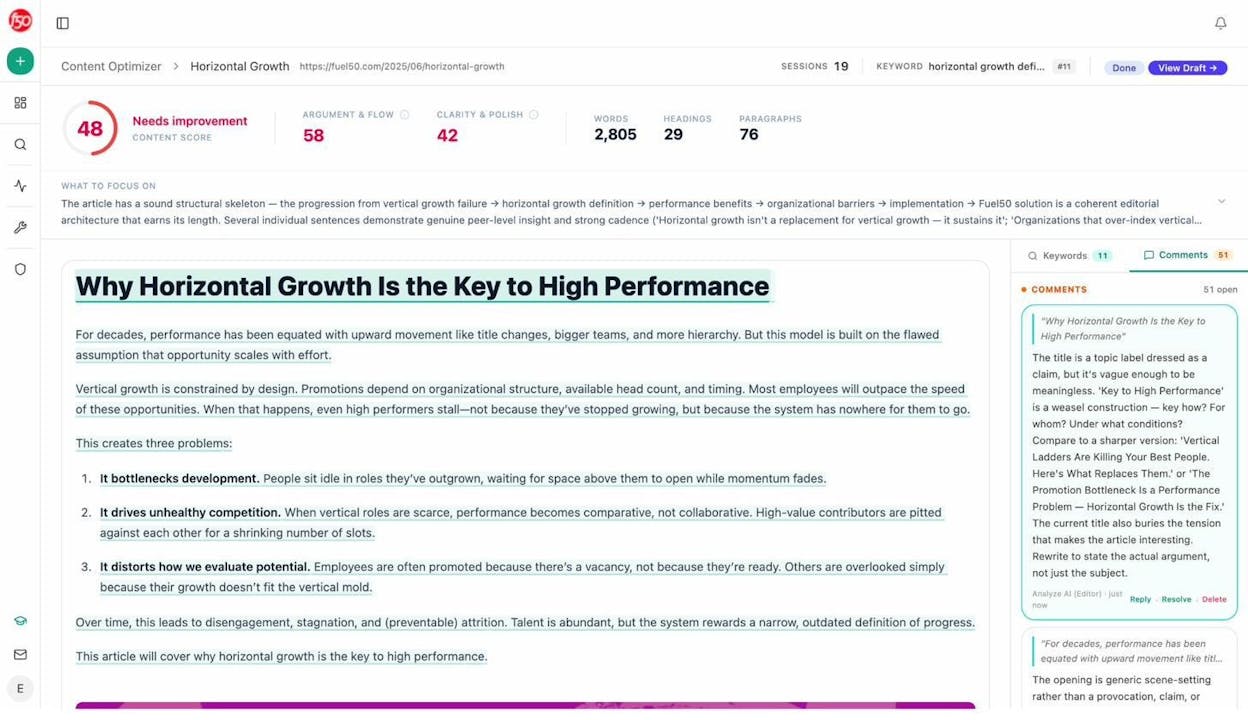
Analyze AI Content Optimizer showing the original content with editorial comments from Analyze AI’s editor
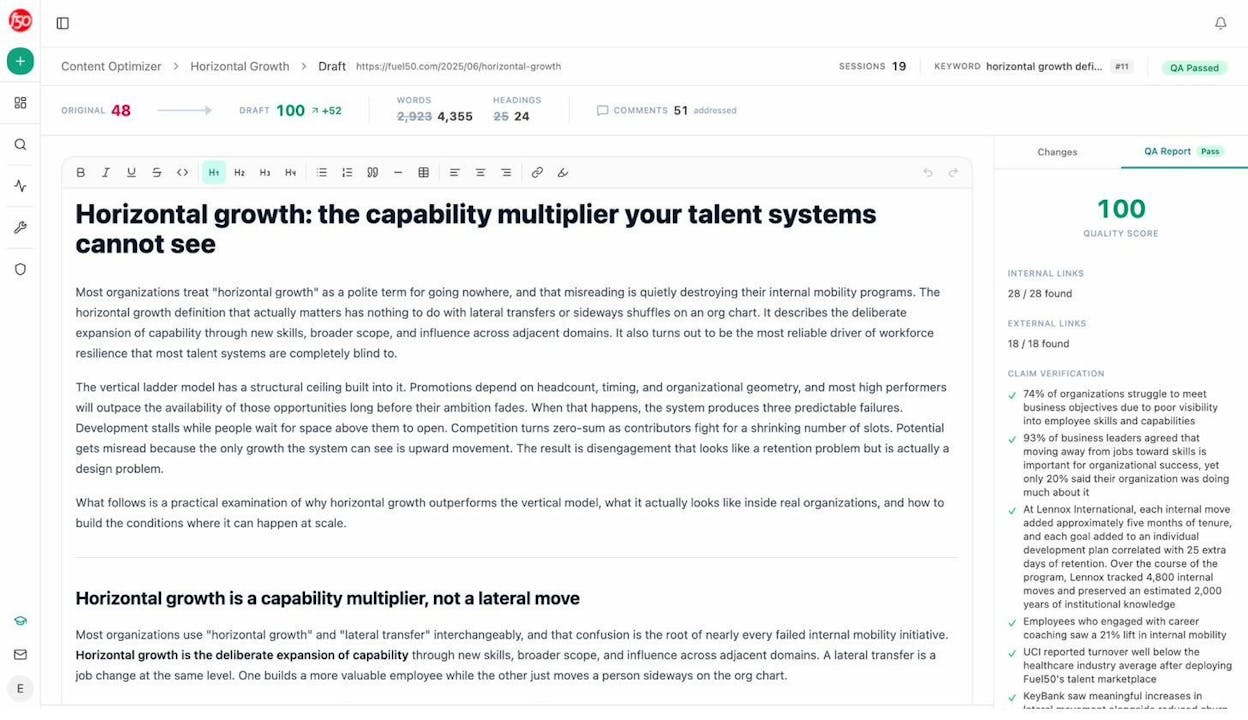
Analyze AI Content Optimizer showing the optimized version of the content
This turns editing from a subjective exercise into a data-informed process.
8. Write a Title Tag and Meta Description That Earn Clicks
Your title tag and meta description are your ad copy in search results. They’re the first thing a searcher sees after typing a query. A weak title means fewer clicks, even if you rank well.
Title tag best practices
-
Keep it under 60 characters to avoid truncation in search results.
-
Include your target keyword, ideally near the beginning.
-
Match search intent. If searchers want a how-to guide, signal that in the title (“How to…” or “X Steps to…”). If they want a list, signal that (“X Best…” or “Top X…”).
-
Be specific, not clickbaity. “SEO Writing: 10 Steps to Create Content That Ranks” is specific. “This SEO Writing Trick Will Blow Your Mind” is clickbait. Searchers can tell the difference.
-
Add a differentiator. What makes your article different? Include it. “(With Examples)” or “(Based on Data)” or “(2026 Guide)” tells the searcher they’re getting something specific.
![[Screenshot: Two search results side by side — one with a generic, truncated title tag and one with a clear, keyword-rich title tag under 60 characters — highlighting which one is more likely to get clicked]](https://www.datocms-assets.com/164164/1776978848-blobid16.png?auto=format,compress&w=1248&fit=max)
Meta description best practices
-
Keep it under 155 characters.
-
Expand on the title. Your meta description should add information the title couldn’t fit. If your title says “SEO Writing: 10 Steps,” your description could say “Learn how to find keywords, match search intent, write optimized content, and earn AI citations — with real examples and free tools.”
-
Use active voice. Address the reader directly: “You’ll learn…” or “Discover how to…”
-
Include a call to action. “Read the full guide” or “Get the step-by-step process” gives searchers a reason to click.
You can brainstorm multiple options using ChatGPT, then pick the strongest one. But always write the final version yourself — AI-generated title tags tend to be generic without manual refinement.
Further reading:
9. Add Internal Links Strategically
Once your article is published, the job isn’t done. You need to connect it to the rest of your site through internal links.
Internal links do three things:
-
Help Google discover and crawl your new page. If no other page links to it, Google may not find it — or may take longer to index it.
-
Pass authority. Pages with more internal links pointing to them tend to rank better. By linking to your new article from relevant existing pages, you give it a ranking boost.
-
Improve user experience. Readers who finish one article and want to learn more should have a clear path to related content.
How to find internal link opportunities
Step 1: Identify your site’s existing pages related to the new article’s topic. If you just published a guide on SEO writing, look for existing pages about keyword research, content strategy, on-page SEO, or content optimization.
Step 2: Search your site for keyword mentions. Use Google’s site: search operator. For example: site:yourdomain.com "keyword research". This shows every page on your site that mentions “keyword research” — each one is a potential internal link opportunity.
![[Screenshot: Google site: search showing results from a domain that mention a specific keyword — highlighting which pages could add an internal link to the new article]](https://www.datocms-assets.com/164164/1776978849-blobid17.png?auto=format,compress&w=1248&fit=max)
Step 3: Add contextual links. Don’t just drop a link at the end of a paragraph. Find the sentence where the related topic comes up naturally and link from there. The anchor text should be descriptive — “learn how to do keyword research” is better than “click here.”
Step 4: Link from the new article to existing content, too. Internal linking works both ways. Your new article should link to relevant older articles where readers might want to go deeper on a subtopic.
Use the Analyze AI Broken Link Checker to make sure none of your existing internal links are broken before you start adding new ones. Broken links waste link equity and frustrate readers.
Further reading:
10. Optimize Your Content for AI Search Visibility
This is the step most SEO writing guides skip entirely. And it’s the step that will separate the winners from the rest over the next two to three years.
Here’s the reality: SEO is not dead. Google still drives the majority of organic traffic. But AI search is growing fast. Millions of people now ask ChatGPT, Perplexity, Gemini, and Copilot questions that they used to type into Google. And when those AI models generate answers, they cite sources — just like Google’s search results, but with fewer slots and higher stakes.
The brands that get cited in AI answers earn a new stream of organic traffic. The brands that don’t become invisible to a growing segment of searchers. At Analyze AI, we believe AI search is an additional organic channel to optimize alongside Google — not a replacement for SEO.
Here’s how to optimize for it.
Write content that AI models can parse and cite
AI models favor content that is:
-
Clearly structured with descriptive headings (H2s and H3s that tell the AI what each section covers).
-
Factually specific — numbers, dates, names, and concrete examples get cited more often than vague claims.
-
Direct in answering questions — if someone asks “what is SEO writing,” your article should answer that question in the first two sentences, not the fifth paragraph.
-
Comprehensive but concise — cover the topic fully, but don’t pad. AI models are trained to extract the most useful information, and bloated content gets skipped.
Track your AI search visibility
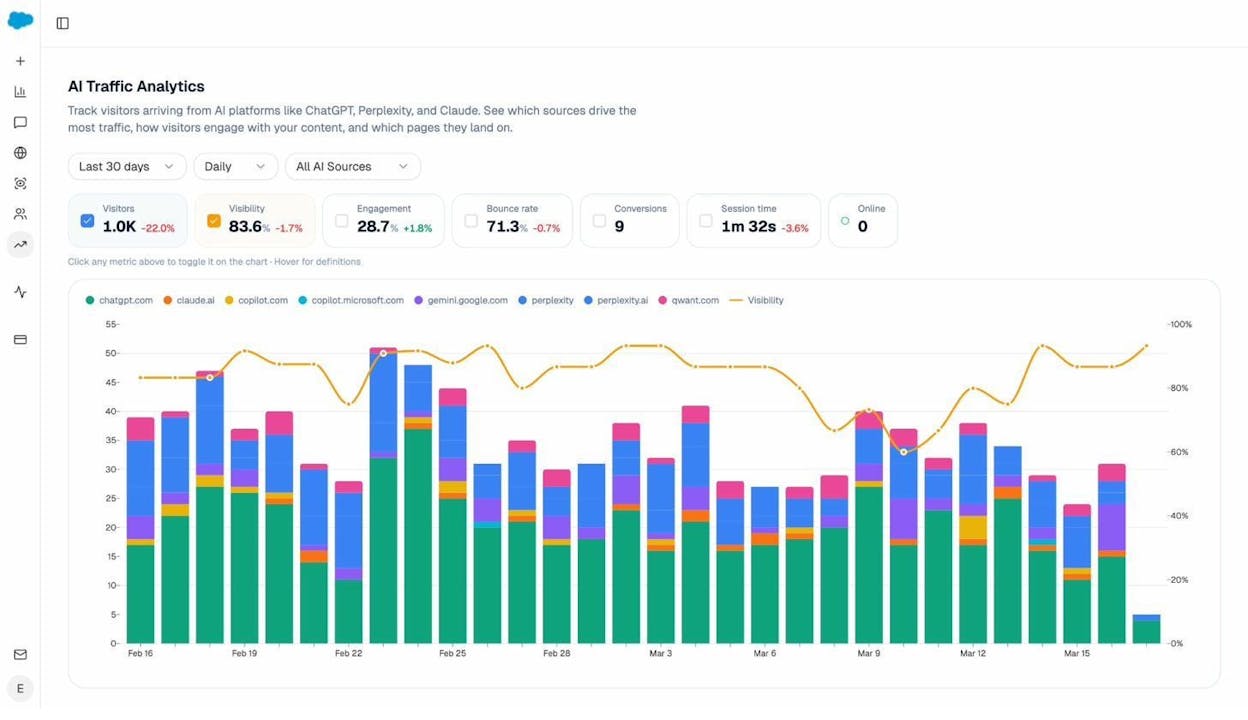
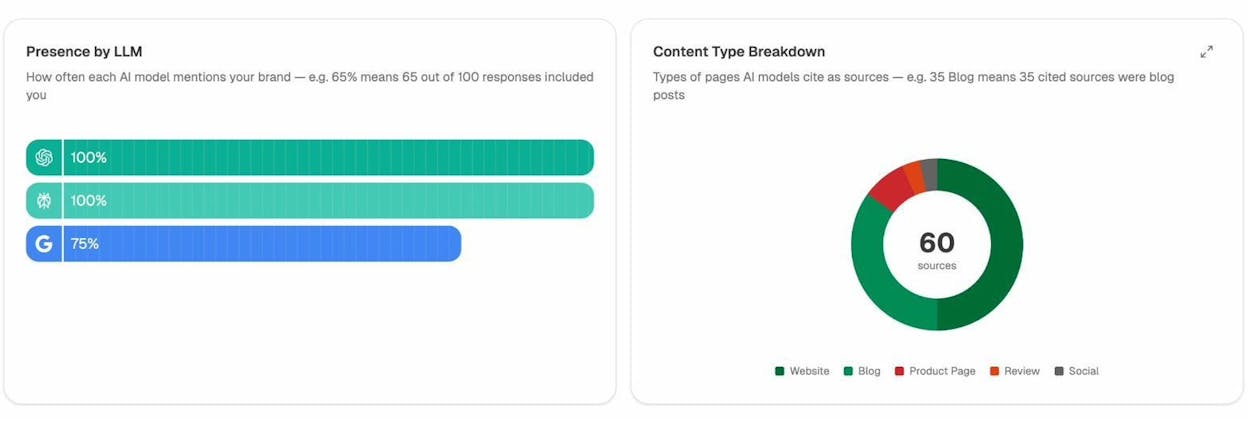
You can’t improve what you don’t measure. Use Analyze AI’s AI Traffic Analytics to see how many visitors come from AI platforms like ChatGPT, Perplexity, and Gemini — and which pages they land on.
The Landing Pages report breaks this down further. For each page that receives AI-referred traffic, you can see which AI platform sent the visitor, what prompt triggered the citation, and how visitors engage with the page.
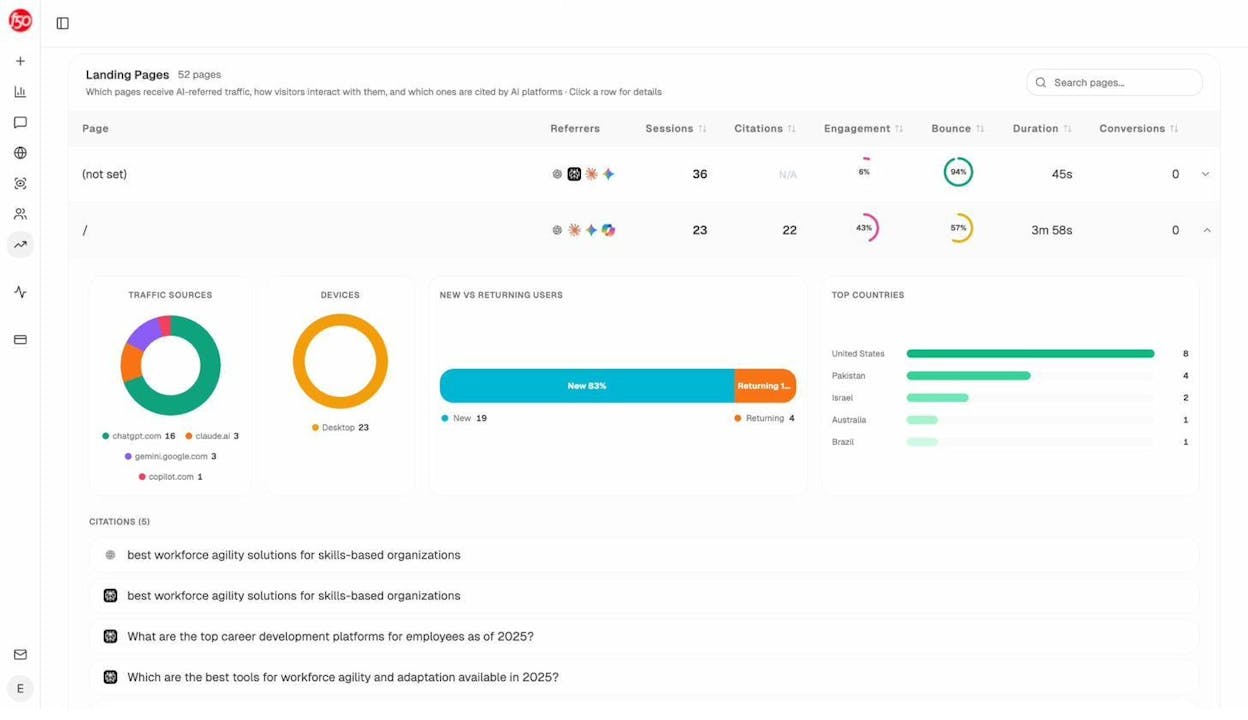
This data reveals patterns. If certain types of content consistently earn AI traffic — say, comparison articles or detailed how-to guides — you can double down on what works.
Monitor how AI engines describe your brand
AI doesn’t just link to your content. It describes your brand. And sometimes, those descriptions are inaccurate, outdated, or unfavorable.
Analyze AI’s Perception Map shows you how each AI engine positions your brand relative to competitors — along two axes: visibility and narrative strength.
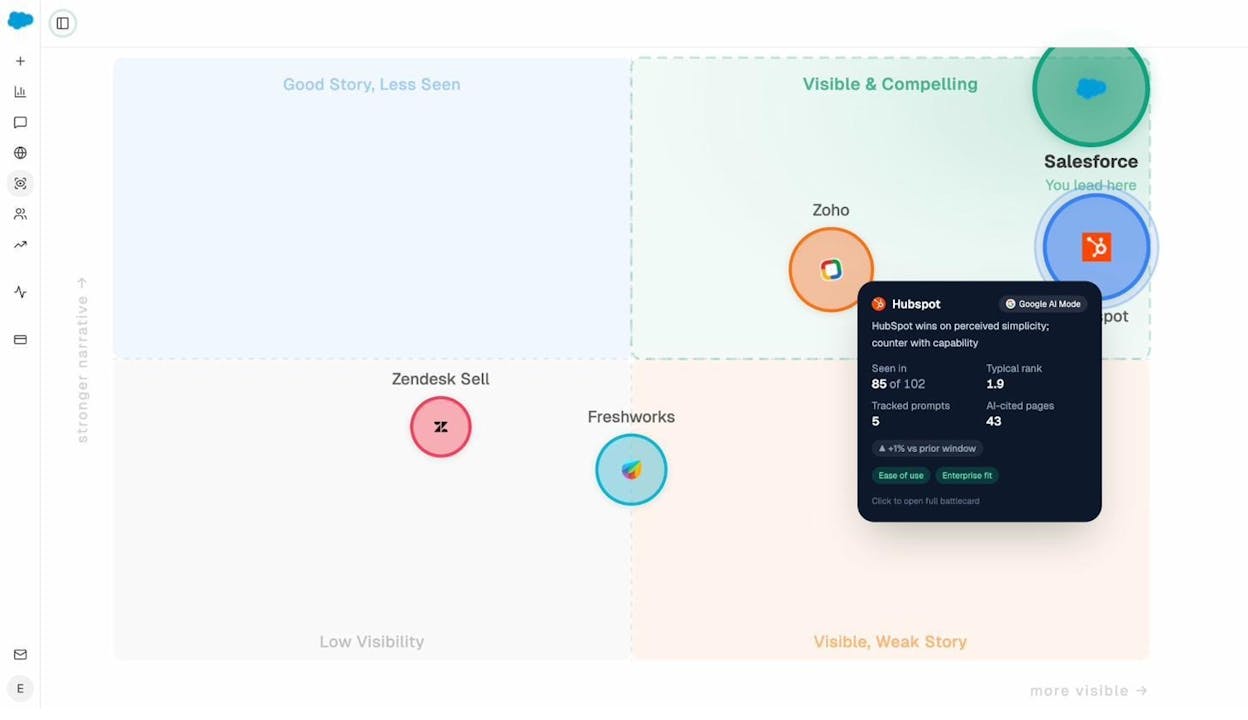
If your brand sits in the “Visible, Weak Story” quadrant, it means AI models mention you but don’t describe you compellingly. If you’re in “Good Story, Less Seen,” your content is strong but not getting picked up. Each quadrant tells you a different thing to fix.
Find where competitors win and you don’t
The Competitors dashboard in Analyze AI shows entities that AI models mention frequently in your space — including ones you might not have considered as competitors.
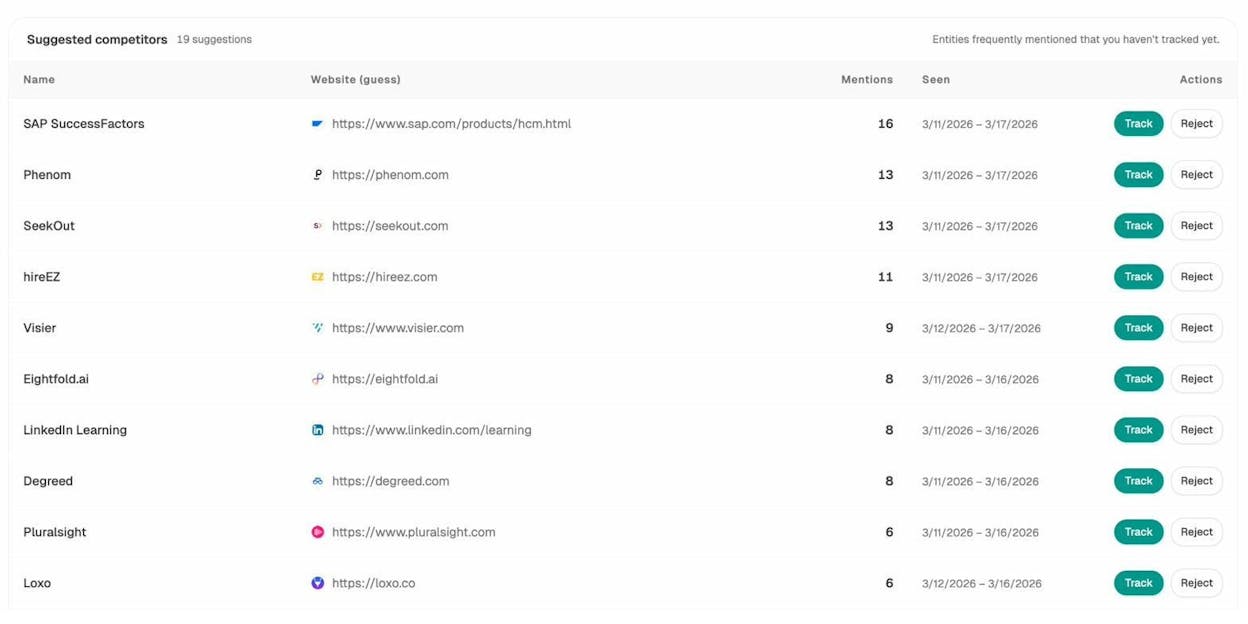
If a competitor gets mentioned in AI answers for prompts that matter to your business and you don’t, that’s a gap. Your next article should target that gap directly.
Use Analyze AI’s prompt suggestions for content ideas
Analyze AI doesn’t just track prompts you add manually. It also suggests prompts based on your industry and competitors — prompts that AI models are already answering, where you might not be visible yet.
These suggested prompts are content ideas. Each one represents a question that real users are asking AI engines. If you write content that answers these questions better than what’s currently available, you increase your chances of getting cited.
Stay informed with weekly digests
AI search visibility changes constantly. New competitors appear. Citation patterns shift. Narratives evolve. Analyze AI’s Weekly Email Digests deliver a summary of what changed — citation gains and losses, competitor movements, and priority actions — directly to your inbox every Monday.
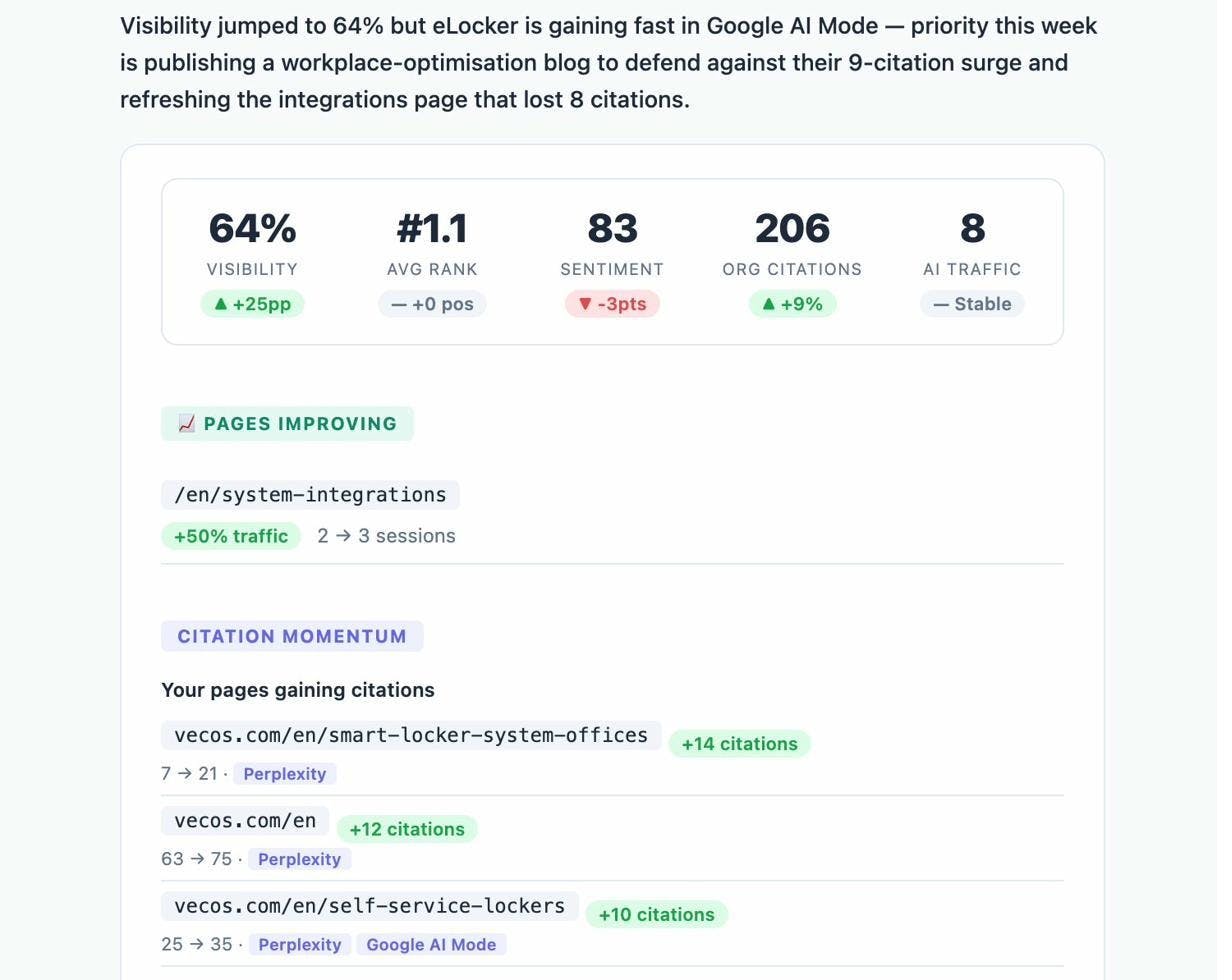
This keeps you proactive instead of reactive. You don’t need to log in every day to know if something important happened.
Further reading:
FAQs
What is SEO writing?
SEO writing is the process of creating content that is designed to rank on search engines like Google. It involves choosing the right keyword, matching what searchers want, writing comprehensive and original content, and optimizing on-page elements like title tags, headings, and internal links. In 2026, it also includes structuring content so that AI search engines like ChatGPT and Perplexity can parse and cite it.
Is SEO writing still important?
Yes. Organic search remains the largest source of website traffic for most businesses. And with AI search growing as an additional channel, the core skills of SEO writing — clarity, depth, structure, and originality — are more important than ever. Content that ranks on Google tends to get cited by AI engines too, because both reward the same qualities.
What’s the difference between SEO writing and copywriting?
SEO writing focuses on creating content that ranks in search results and answers the questions searchers are asking. Copywriting focuses on persuading a reader to take a specific action (buy, sign up, click). The best content does both — it ranks for a relevant keyword and persuades the reader that your product or service solves their problem.
How long should SEO content be?
As long as it needs to be to fully cover the topic — and not a word longer. There is no magic word count. Some keywords require 3,000 words to cover adequately. Others need 800. Let the depth of the topic and the competition on page one guide your length. Check what’s ranking and aim to be at least as thorough as the top results, but cut any content that doesn’t add value.
Can AI write SEO content for me?
AI can help with drafts, outlines, and brainstorming. But AI-generated content that isn’t edited, fact-checked, and enriched with original insight will struggle to rank. Google’s systems are designed to reward content that demonstrates experience, expertise, authoritativeness, and trust (E-E-A-T). AI can accelerate your workflow, but it can’t replace the original thinking and real-world expertise that makes content rank.
Final Thoughts
SEO writing comes down to a simple loop: find what people search for, understand what they want, create the best possible answer, and make sure search engines (and now AI engines) can find and understand it.
The steps haven’t fundamentally changed. Keyword research, search intent, originality, structure, on-page optimization, editing, and internal linking are the same principles that have driven SEO for years. What has changed is the playing field. AI search is now a real channel — and the teams that treat it as one will compound their organic visibility faster than those that ignore it.
You don’t need to choose between SEO and AI search. You need to do both. And the process for doing both starts with the same thing: writing content that genuinely helps the people who find it.
Tools mentioned in this article:
-
Keyword Generator — discover keyword ideas
-
Keyword Difficulty Checker — assess competition
-
SERP Checker — analyze search results
-
Keyword Rank Checker — track your rankings
-
Website Authority Checker — evaluate domain strength
-
Website Traffic Checker — estimate site traffic
-
Broken Link Checker — find and fix broken links
-
Analyze AI — track AI search visibility, citations, and traffic

Ernest

Ibrahim


