
Agents
Building an agent
From blank canvas to published agent — inputs, steps, prompts with variables, testing, and publishing.
The build loop
Define the inputs
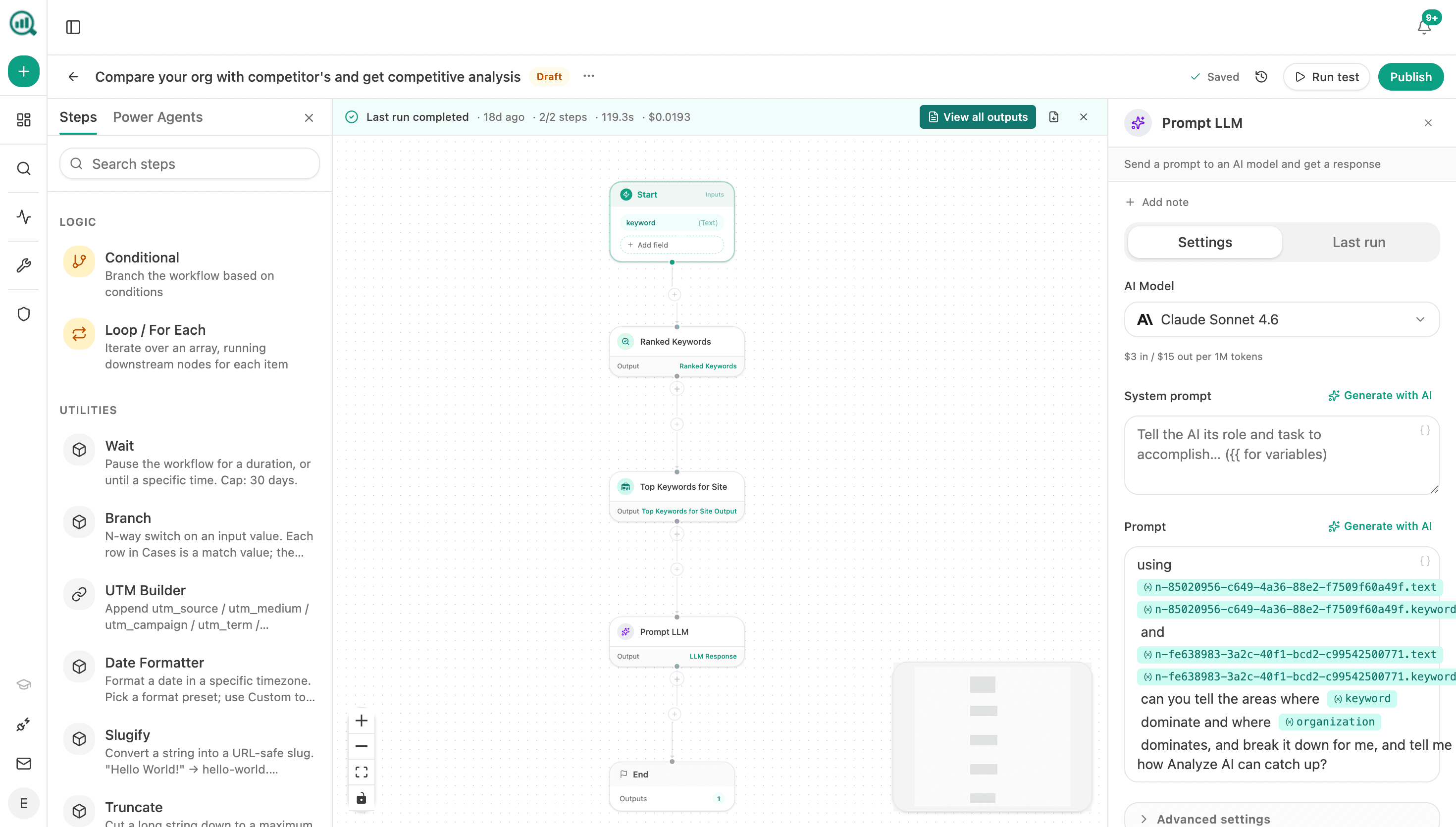
The Start node declares what the agent needs each run. Inputs are typed — short/long text, selects, JSON, files, numbers — plus the Analyze AI-specific ones: data recipe (a live query over your workspace data), knowledge base, and query set. Each input gets a variable name you reference downstream.
Add steps from the library
Search the step library and drop steps onto the canvas: data recipes, LLM prompts, logic (conditional, branch, loop), utilities, integrations, code, PDF export, email. Each step's output becomes a named variable for everything after it.
Configure the AI steps
The Prompt LLM step is where most agents think: pick a model (with its per-token cost shown), write a system prompt and a prompt, and interpolate any upstream variable into the text. "Generate with AI" drafts either prompt for you.
Test, then publish
Run test executes the whole flow and shows every step's output, timing, and cost. Publish when it behaves; unpublish or edit any time. Version history keeps the safety net.
Habits that make agents reliable
- Let recipes do the data work. Fetch with data recipes and reserve LLM steps for judgment — it's cheaper, faster, and less hallucination-prone than asking a model to "know" your numbers.
- Name variables for readability. Six months later,
competitor_gapsbeatsinput_3in a prompt template. - Test with awkward inputs. An empty recipe result or an unusually long keyword list tells you more than the happy path does.
- Watch cost per run. The run banner shows duration and dollars; a scheduled agent's cost is that number times its calendar.
Prompts can reference multiple recipe outputs at once — the strongest agents usually combine two or three (say, brand-vs-competitor plus message-shift) and ask the model for a synthesis a single recipe can't provide.