
Agents
Agent examples
Working patterns to copy — a competitive analysis agent, a content research pipeline, and a report-by-email flow.
Competitive analysis on demand
Flow: keyword input → Ranked Keywords recipe → Top Keywords for Site recipe → Prompt LLM → output.
The LLM step receives both recipe outputs and answers a pointed question: where does the keyword dominate, where does the competitor dominate, and how can we catch up? Run it whenever a stakeholder asks "how do we stack up on X?" — the answer is grounded in your live data, not the model's memory.
Content research pipeline
Flow: Brand vs Competitor + Competitor Message Shift recipes → Prompt LLM → Research and plan a blog → output.
This is the published agent from the overview: competitive positioning data feeds an LLM synthesis, which feeds a research-and-plan step — producing a data-backed blog plan for roughly two cents a run. Pair it with the Content Writer to take the plan to a draft.
Report by email
Flow: input → Call API → Code → Export to PDF → Send Email.
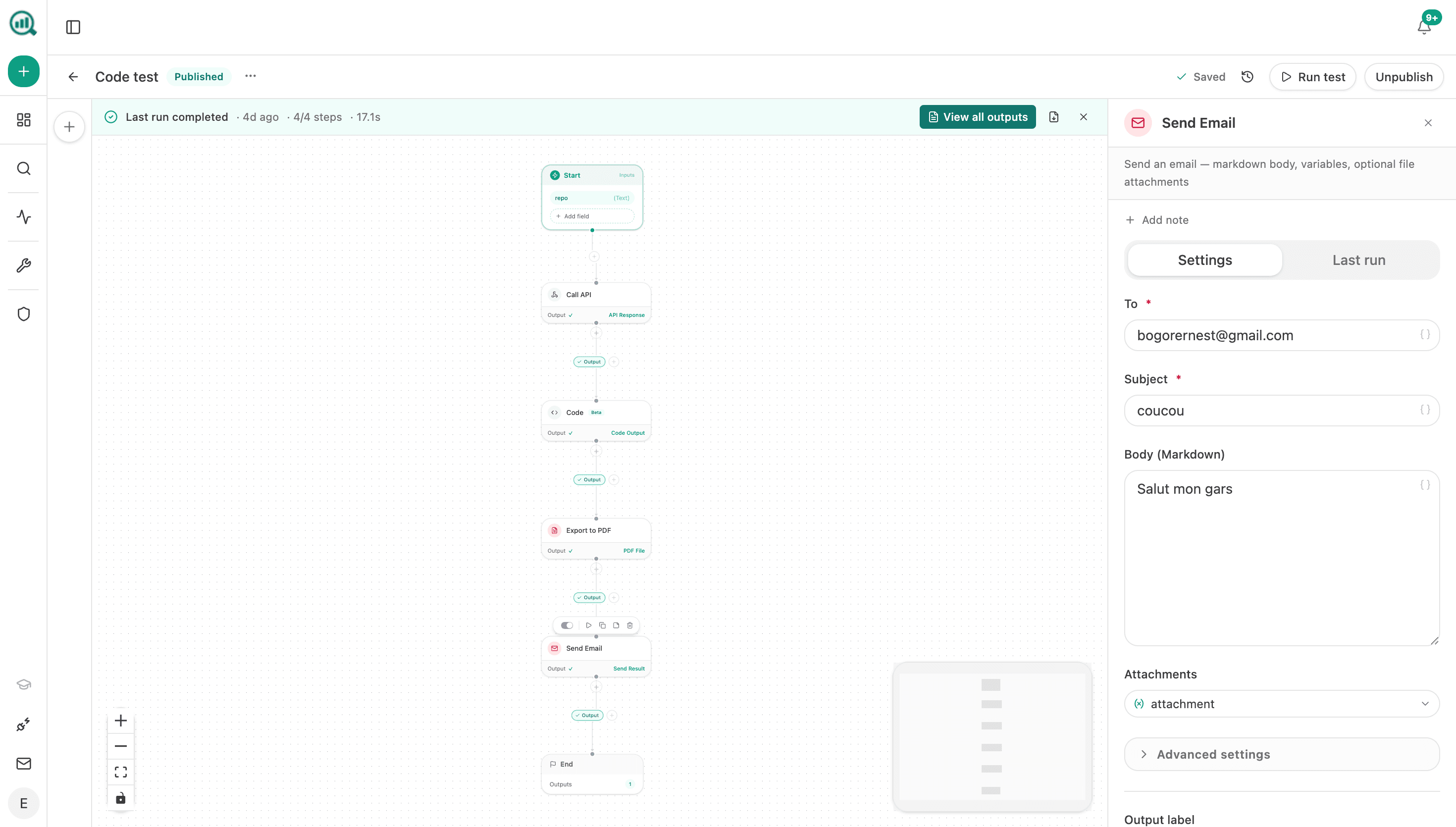
The last mile matters: Export to PDF turns a step's output into a file, and Send Email delivers it with a markdown body and the PDF attached. Swap the front of the chain for any recipes you like — the delivery pattern stays the same.
Patterns worth stealing
- Recipe → LLM → destination is the workhorse shape: data, judgment, delivery.
- Conditional in the middle turns any report into an alert: only send when the numbers moved.
- Loop over a list (competitors, keywords, pages) applies one analysis to many targets in a single run.
- Code step for glue — when an API response needs reshaping before the next step, a small code step beats fighting the prompt.
Build the one-shot version first and run it by hand a few times. Automate on a schedule only after you trust the output — a bad report delivered weekly is just automated noise.